Disclosure: Some links in this post are affiliate links. As an Amazon Associate I earn from qualifying purchases, at no extra cost to you. Learn more
Specs are compiled from manufacturer listings and verified buyer reviews and can change over time — please confirm the key details on the product page before buying.
You can keep recording live TV without a cable bill by pairing a network tuner (a box that pulls free over-the-air channels into your Wi-Fi) with a DVR. For most people, the Fire TV Cube is the smoothest all-in-one place to start. Every pick below does one job: it records shows on a schedule and plays them back on the TV you actually watch, without a monthly subscription eating your budget. You will see tuner counts (how many channels can record at once), onboard storage sizes, and which streaming apps each box runs, in plain terms, so you can match a box to your antenna and your household.
This guide is built by comparing the manufacturers’ published specifications and the patterns across verified customer reviews, so you get each pick’s real strengths and trade-offs instead of marketing spin.
Some of these boxes record free over-the-air channels with no monthly fee, while others need a service plan to open up the DVR. The picks ahead split cleanly along that line, so you can choose a dvr for streaming that fits how you already watch.
Top Picks



How To Choose The Best DVR for Streaming
Start with the recording source. A security DVR records cameras, an over-the-air DVR records antenna channels, and a streaming box with cloud DVR records whatever your paid service pushes to it. Mixing those up is the single most common way people buy the wrong box. Decide first whether you are recording free broadcast TV or a subscription service, then everything else falls into place.
Tuner Count: How Many Shows at Once
A tuner is the part that locks onto one broadcast channel at a time, so a 2-tuner box records two shows at once and a 4-tuner box records four. If two of your favorite shows air in the same hour, a single tuner makes you pick. Households with several TVs watching live while something records should lean toward four tuners.
Storage: Onboard vs. USB Drives
Some boxes ship with a drive inside, like the 500GB in the Fuers security recorder or the 128GB in the Tablo. Others expect you to add your own USB hard drive, which means buying and formatting a drive before recording works. A box with built-in storage is simpler on day one; a USB-based box lets you scale storage later.
Subscriptions and Guide Data
Free over-the-air recording still needs a TV guide to schedule shows by name. Some boxes bundle the guide, and some charge a yearly fee for advanced auto-record features. Read that line carefully — a cheap box with a recurring guide fee can cost more over time than one that includes it.
Which Streaming Players Support the App
Your DVR is only useful if its app runs on the device plugged into your TV. Roku, Apple TV, Fire TV, Android TV, and LG or Samsung smart TVs all appear across these picks, but not every app supports every platform equally. Check the app store for your specific player before you commit.
Side-by-Side Comparison
| Model | Best For | Recording Source | Tuners / Channels | Built-In Storage | Amazon |
|---|---|---|---|---|---|
| Amazon Fire TV Cube★ Best Overall | All-in-one streaming hub with cable box passthrough | Streaming apps, cable box via HDMI-in | — | — | Amazon |
| NVIDIA Shield Android TV ProPlex Powerhouse | Plex server and heavy 4K file playback | Apps, Plex, USB storage | — | 16 GB | Amazon |
| Fuers 8 Channel Security DVRCamera Recorder | Camera surveillance recording | Analog and IP security cameras | 8 channels | 500 GB | Amazon |
| Roku Ultra | Fast everyday streaming with Bluetooth headphones | Streaming apps | — | — | Amazon |
| Tablo TV 4th Gen 4-Tuner | Free OTA recording across the whole house | TV antenna (OTA) | 4 tuners | 128 GB | Amazon |
| SiliconDust HDHomeRun Flex Duo | Plex and Jellyfin users on a wired network | TV antenna (OTA) | 2 tuners | — (USB drive) | Amazon |
| AirTV Anywhere | Sling subscribers who want OTA in one app | TV antenna (OTA) | — | Built-in DVR | Amazon |
| SiliconDust HDHomeRun Flex Quatro | Recording four shows at once with no subscription | TV antenna (OTA) | 4 tuners | — (USB drive) | Amazon |
| DIRECTV Gemini Air | Cable-style channel numbers with cloud DVR | DIRECTV Stream subscription | — | Cloud DVR | Amazon |
Detailed Reviews
1. Amazon Fire TV Cube
Our pick — 4.0+★ from 16,000+ verified ratings; the strongest balance of quality and price.
One box that finally puts your cable box, game console, and streaming apps on the same screen.
The Fire TV Cube earns the top spot by solving the mess most people actually have: too many boxes and not enough HDMI ports. Its defining feature is an HDMI input on the back, so your cable box plugs into the Cube and the Cube plugs into the TV. You flip between streaming apps and live cable from one menu, with one remote. That single port is why this sits above every pure streamer here.
The engine underneath is an octa-core processor (eight processing cores working together), and Amazon rates it 2X as powerful as the Fire TV Stick 4K Max. In practice that means apps open without the spinning wheel that makes a streaming stick feel broken. Picture quality runs to 4K Ultra HD with Dolby Vision and HDR support, alongside Dolby Atmos audio, so a decent TV and soundbar get the most out of it. It is also the first streaming player here with Wi-Fi 6E, a newer wireless standard that uses a less crowded band to keep 4K streams steady.
Hands-free Alexa is the feature that changes the daily routine. Built-in microphones and speakers let you say a show name from across the room and have the Cube turn on the TV, switch the soundbar over, and start playing — no remote hunting. An off button electronically disconnects the microphones when you want privacy. What wins people over is the speed: this is the crowd favorite at 4.0+ stars across 16,000+ ratings, and the recurring theme in the reviews is how much snappier it feels than the stick it replaced. Buyers report the upgrade is dramatic — as they put it, it is “soooo much better than other devices such as fire stick 4k.”
What makes it the top pick
- HDMI-in port lets a cable box and streaming apps share one input and one remote
- Octa-core processor rated 2X as powerful as the Fire TV Stick 4K Max
- Wi-Fi 6E support for steadier 4K streaming on a less congested band
- Hands-free Alexa with a physical off switch that disconnects the mics
Where it asks patience
- Setup can run around 30 minutes and needs an ARC-capable HDMI port on the TV
- The home screen carries ads, and audio settings sometimes need manual tweaking
- No HDMI cable in the box
Top of the heap if: you want one box that folds cable and streaming together and responds to your voice from the couch.
Think twice if: you expect plug-and-play audio — some owners had to switch Dolby passthrough to PCM to get clean sound.
2. NVIDIA Shield Android TV Pro
A streaming box that doubles as a real Plex server, if you have the library to feed it.
Here is the box for the person with a NAS drive full of 4K files and a surround system to match. The NVIDIA Shield Pro carries 3GB of RAM and 16GB of internal storage, plus two USB 3.0 ports for expanding that storage or plugging in a keyboard, a camera, or a controller. A Plex Media Server is built in, so the Shield itself can serve your movie library to other rooms. For raw playback muscle, it handles poorly encoded and very large 4K files that make lesser players stutter.
The chip is NVIDIA’s Tegra X1+ processor, which uses AI upscaling to sharpen lower-resolution video toward 4K on the fly. Picture support covers Dolby Vision HDR and Dolby Atmos audio, and the box connects over Gigabit Ethernet — a wired network port — for the steady throughput a Plex server needs. Performance is what carries this pick: it is the most-discussed strength in owner feedback, and the machine stays quick even with a big library behind it.
The honest catch is age. This is an established platform without an AV1 codec (a newer, more efficient video format), and the stock Android TV interface arrives with ads cluttering the home screen. The fixed remote locks up on some units, and the recovery trick — pull the battery, hold home and center, reinsert until it beeps — is worth knowing before you panic. The remote itself draws mixed reviews, and the stock interface needs a third-party launcher to feel clean. It also does not record over-the-air TV on its own.
The Plex angle: If your library lives on a network drive, the Shield Pro is the rare streamer that serves it without a second computer running. That is its whole reason to exist, and it does that job better than anything else in this list.
Fair warning: Buy it for the hardware and the Plex server, not the remote or the out-of-the-box menus — both need tweaking before they feel right.
The fit: large-screen owners with a surround setup and a personal media library who want one box to play and serve it.
The mismatch: someone who only streams Netflix and wants an ad-free menu on day one.
3. Fuers 8 Channel Security DVR
Not a movie recorder — this one keeps an eye on the driveway, not the season finale.
Be clear about what this is before you buy: it records security cameras, not streaming shows. The Fuers box is an 8-channel hybrid DVR, meaning it accepts up to 8 cameras across TVI, AHD, XVR, and IP types, so you can mix older analog cameras with newer network ones on the same recorder. A 500GB hard drive comes installed, so recording starts without a separate drive purchase.
Recording keeps running without internet, because the drive sits inside the box and captures footage locally. You only need a connection when you want remote viewing or playback through the free XMEye or lcsee app on a phone, tablet, or PC. The H.265+ codec (a video compression method) trims the file size of each recording versus older H.264 systems, which stretches how long the 500GB drive holds footage before it overwrites the oldest clips. Output goes to a monitor over VGA or to a TV over HDMI, both at once.
Picture quality is the part that lands well, and the setup earns credit too — for a straightforward home or shop camera system, it comes together quickly once you connect the cameras and a monitor. The 4.0+ stars across 100+ ratings reflect a product that satisfies buyers who get it working. Two things trip people up: your cameras must support ONVIF and PAL formats to pair properly, and remote phone viewing can require switching off 5G so the phone stays on your home Wi-Fi. A doa unit or a rough-shipping crack is possible, so test it the day it lands.
What earns a spot in the rack
- 500GB hard drive included, so no extra storage purchase on day one
- 8 channels accept analog and IP cameras together
- Records locally with no internet connection required
- H.265+ compression stretches recording time on the fixed drive
What to have ready first
- Cameras must support ONVIF and PAL or they will not pair
- Phone remote viewing can need 5G turned off to stay on home Wi-Fi
- Documentation is thin, so expect some trial and error
Right call for: a home or small store with 8 or fewer cameras that wants local-only recording and no cloud fees.
Wrong tool for: anyone hoping to record broadcast or streaming shows — this box records cameras only.
4. Roku Ultra

The quickest way to a clean menu, with Bluetooth headphones for late-night watching.
Roku Ultra exists for people who are tired of waiting on a slow smart TV. Roku rates it 30% faster than any other Roku player, and the difference shows up as apps that launch in a snap and a home screen that responds on the first press. Picture support runs to 4K with HDR10+ and Dolby Vision, backed by Dolby Atmos audio for a room with a soundbar or a full surround rig.
The remote is the quiet hero. It is rechargeable via USB-C, so you are not hunting AA batteries every few weeks, and the buttons are backlit for the dark. A lost-remote finder pings it when it slides under the couch, and hands-free voice lets you say “Hey Roku” from across the room with messy hands. Speed and easy setup are the two things people bring up most in their feedback, and both hold up: it goes from box to streaming in minutes.
Bluetooth headphone mode is the feature worth calling out for night owls — pair headphones straight to the player and watch loud without waking the house. The trade-off shows up in the menus: Roku’s home screen carries ads, and some owners find them hard to fully clear. YouTube has had audio quirks at faster playback speeds, and the setup guide is thinner than it should be for a first-timer. At 4.0+ stars, the crowd leans heavily positive, and this is the box for someone who wants a familiar, uncomplicated interface over the Android ecosystem.
The everyday win: Backlit rechargeable remote plus a lost-remote finder means you stop fighting the couch cushions, and 4K HDR10+ output keeps a nice TV fed.
The honest niggle: The ad-supported home rows and occasional YouTube audio delay are real, but neither stops you from watching what you came for.
Pick it if: you want the fastest, simplest menu and a remote you will not lose, and you watch in a room where headphones help at night.
Pass it if: you need ad-free home screens or demand flawless YouTube at 1.25x speed.
5. Tablo TV 4th Gen 4‑Tuner OTA DVR

Four tuners and 128GB inside, with no monthly fee attached to the recording.
For cord-cutters who want to record broadcast TV and never see a subscription line on the bill, this is the closest thing to a set-and-forget box. Four tuners let you record four channels at once, or watch one while three record in the background. Storage is 128GB onboard — enough for 50+ hours of shows — and you can add up to 8TB of external USB storage for a whole season of everything. It pairs with any TV antenna, and it is one of the few OTA DVRs with Wi-Fi, so you can put the antenna where reception is best and stream the recordings through the house.
Setup is the part that keeps people happy. You connect the antenna with the included 6-foot coaxial cable, join your network over Wi-Fi or the included Ethernet cable, and scan the QR code to follow the guide. Channel selection is the most-praised trait — a strong antenna pulls in a huge spread of local and free streaming channels. The bad news is heat. This unit and its siblings have earned a reputation for running hot, and some owners added a small USB cooling fan underneath to keep it alive. This is the Renewed version, so it arrived as a refurbished unit, and a few have come dead on arrival — test it the moment it lands and use the return window.
The app runs on Apple TV, Roku, Fire TV, Android TV, and several smart TV platforms, though the experience differs by device — the Apple TV app is frequently called the smoother one. If broadcast sports and local news are your thing, this records them without a dime of recurring cost.
Why it earns a place: Four tuners, 128GB, and no subscription is a combination the paid boxes cannot match for local channels, and the antenna-first design lets you place reception where it works.
Plan for the heat: Give it airflow or a small cooling fan, and buy from a seller with a solid return policy since this is a renewed unit.
Built for: antenna households that want to record network shows and college sports with zero recurring fees.
Hold off if: you will not tolerate a refurbished unit or cannot give it breathing room for airflow.
6. SiliconDust HDHomeRun Flex Duo 2 x ATSC Tuners – HDFX-2US

A tiny network tuner that feeds live TV to every screen over your wired home network.
This is the box for the person who already runs Plex or Jellyfin and wants antenna channels to appear inside it. The Flex Duo holds two ATSC tuners (ATSC is the broadcast standard for free over-the-air TV in North America), so two people can watch different channels at once, or one can watch while the other records. Add a USB hard drive and you have a whole-home DVR without a subscription — the paid TV guide is optional and only open up advanced auto-record by name.
It connects over Ethernet, meaning a wired network cable rather than Wi-Fi, so plan for a cable run near your router or a switch. In return you get rock-solid streaming to Android, Fire TV, Apple TV, Roku, Xbox, iPhone, iPad, Windows, and Mac. Reliability is the trait that earns the most trust here: the tuner tends to just keep working, and it pulls weak channels that a TV’s own tuner drops. The review pages sum it up with a routine that revives a locked remote: pull the battery, hold home and center, reinsert until the beep.
The big practical catch is the guide. Some owners found the app leans on internet access for its TV guide, and a few struggled to use it purely as a LAN-only tuner when the internet went down. That is a genuine limitation if your connection is flaky. There is no ATSC 3.0 support and no encrypted cable, and the app behaves a little differently on every platform. Get past that, though, and this is a compact, quiet tuner that fits behind a TV and does its one job well.
The tuner’s strong suit
- Two tuners stream to multiple devices at once across the house
- Works inside Plex, Jellyfin, and the native HDHomeRun apps
- Small footprint that tucks behind a TV
- Optional paid guide rather than a mandatory subscription
The fine print to read
- Wired Ethernet only, so no Wi-Fi placement
- Needs a USB drive for DVR, and some owners use the paid guide for scheduling
- No ATSC 3.0 and no encrypted cable support
Good match for: a Plex or Jellyfin household with a wired network that wants two clean tuners on every screen.
Look elsewhere if: Wi-Fi placement is essential or you need ATSC 3.0 recording.
7. AirTV Anywhere Whole-Home OTA DVR

Made for one specific household: the one already paying for Sling.
AirTV Anywhere exists to fold free antenna TV into the Sling app. If Sling is already your live-TV home, this box lets you watch local ABC, NBC, CBS, and FOX on up to four TVs and record them into a built-in DVR, all from the same app you already open. That built-in storage is the convenience play — no separate drive to buy or format. Pair it with an antenna, and the box streams local channels over Wi-Fi to compatible devices in the home and on the go.
The catch is that the Sling app is required, and the DVR reliability is where feedback splits. Some owners love the flexibility — “it is wonderful, and is functioning exactly the way it should,” as one described it, with OTA recording quality they rate highly. Others hit trouble: the DVR function can fail after a month or two, and the built-in storage means you cannot unplug the drive to salvage it. Recordings that repeat daily or weekly have a habit of failing after a day or two and need deleting and restarting.
Expect it to run warm, likely because of a spinning drive inside, so give it airflow by elevating it. There is a real upside for cutting the cord: bundled with Sling’s DVR features, it can trim a monthly TV bill dramatically compared to the big live-streaming packages. Just go in knowing this is a device for confirmed Sling users, not a universal recorder.
The tight fit: If Sling already runs your TV life, this is the cleanest way to add local channels and recording without juggling a second app.
Before you commit: The recurring-recording failures and internal-only drive are the real risks — keep your receipt and test it thoroughly in the first weeks.
Made for: current Sling subscribers who want local broadcast channels and OTA recording inside one app on four TVs.
Not the one if: you use another live-TV service or want to store recordings on a swappable drive.
8. SiliconDust HDHomeRun Flex Quatro 4 x ATSC Tuners – HDFX-4US

Four tuners in the same tiny footprint, built to record a busy sports weekend in one box.
Take the Flex Duo’s formula and double the tuners: the Flex Quatro holds four ATSC tuners, so four channels can record at once or feed four different screens in the house. It is the pick for the household that lives on live sports and local news, where three or four things overlap on Saturday afternoon. Add a USB hard drive for the DVR, with the paid TV guide optional if you want auto-record by name. It carries a two-year warranty and a two-tuner sibling’s reputation for reliability.
Compatibility is broad — Android, Fire TV, Apple TV, Roku, Xbox, iPhone, iPad, and Windows — and the wired Ethernet connection keeps four simultaneous streams steady. It plays nicely with the Channels DVR software some owners prefer, and it handles an OTA antenna with strong reception well. Performance is the most-trusted trait overall; the box tends to run without drama for long stretches, which is what you want from something parked behind the TV.
The interface is the weak spot. The menus are plain and functional rather than polished, fast-forward and rewind can lag, and the app has glitched on Apple TV. A few owners found the whole system depended on the internet being up — during an outage, even locally recorded shows on the drive were unreachable. And formatting the USB drive trips people up; it needs to be done carefully before recording works. At 4.0+ stars, most owners accept the plain software in exchange for four reliable tuners.
Why it clears the bar
- Four tuners record four channels at once
- Works across the major streaming players and computers
- Two-year warranty
- Plays well with Plex, Jellyfin, and Channels DVR
What to brace for
- Plain, sometimes laggy interface
- An internet outage can block even local playback for some setups
- The USB drive format step takes patience
The one to grab if: your recording calendar is crowded and you want four tuners without a mandatory subscription.
The one to skip if: you insist on a polished on-screen interface and cannot tolerate the plain menus.
9. DIRECTV Gemini Air Streaming Box
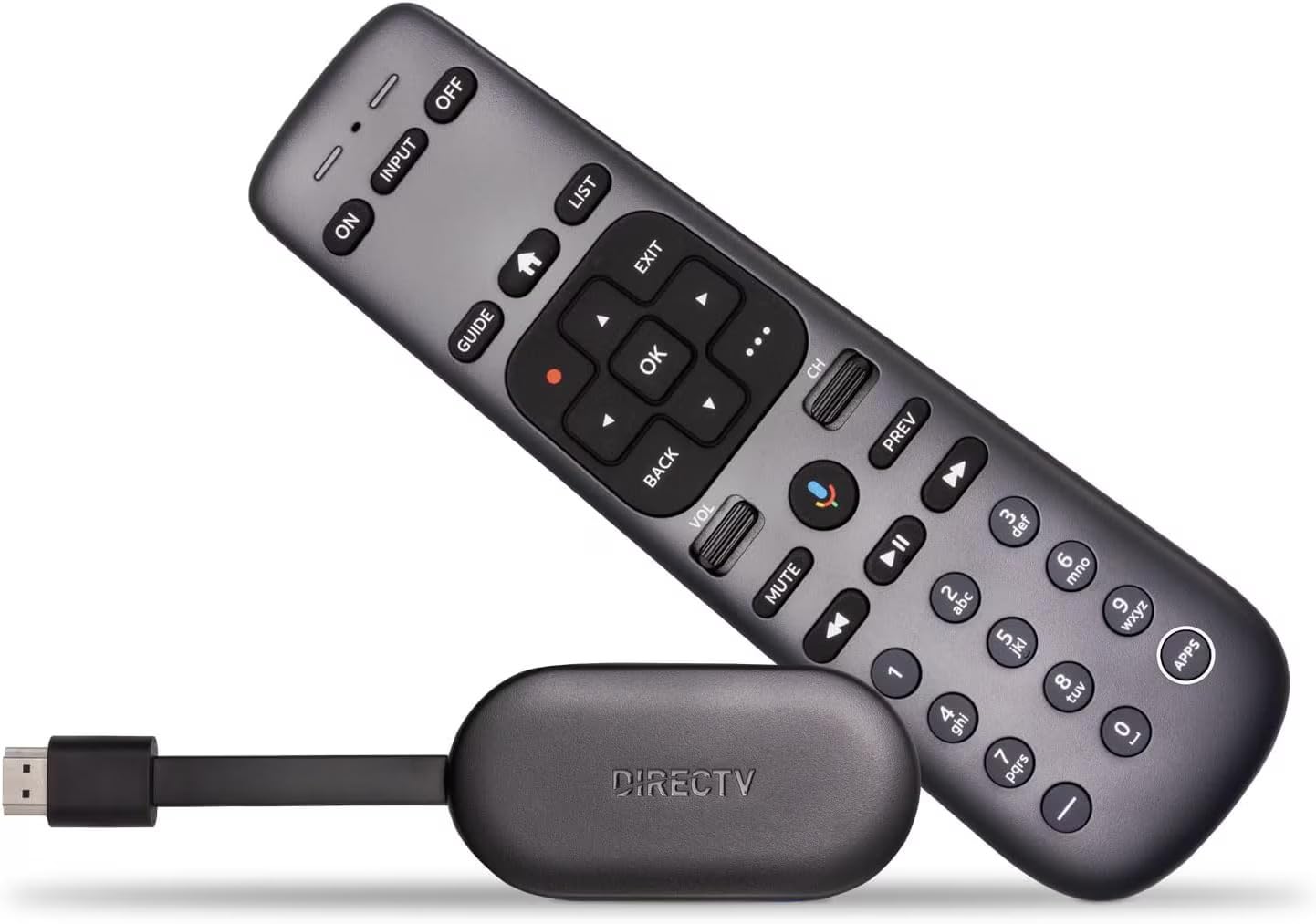
The streaming dongle that feels most like cable, complete with a numbered remote.
For someone who misses the old cable experience — channel numbers, a real guide, a remote with digits — the Gemini Air is the closest thing to it on a streaming box. It runs on Android TV 11, plugs straight into an HDMI port, and connects over Wi-Fi with no technician visit. Live DIRECTV channels, on-demand titles, and apps like Netflix, Prime Video, and Max all live in one place. It records to a cloud DVR with a 72-hour lookback, so you can rewind live TV you just passed.
The remote is the standout detail. It is backlit for dark rooms and, unlike most streamers, it has number keys for typing a channel directly. The cross-app search is what owners rave about — you search a title once and it finds it across every service you have, so you stop hopping between apps to remember where a show lives. Streaming quality is the most-praised trait; it beats what most smart TVs load on their own.
Two hard facts to weigh. First, it requires a DIRECTV Stream subscription — this is not a box that records free antenna TV on its own. Second, setup can be fussy: one owner spent over three hours getting it going and had to factory reset before the mute, volume, and voice buttons worked. The price is the other honest point — it is the priciest pick here, and the economy comes from the subscription it sits inside. If you already pay for DIRECTV Stream, though, this makes the service feel like cable never left.
The real reason to buy: Direct channel-number entry and cross-app search cut the time between thinking of a show and watching it — a small thing that adds up daily.
Know before you buy: A paid subscription and a sometimes slow setup are baked in — this is a service accessory, not a standalone recorder.
Buy it if: you want a cable-remote feel with a numbered keypad and cross-app search, and you already pay for DIRECTV Stream.
Don’t buy it if: you want free over-the-air recording or refuse another subscription.
Know the Specs
Tuners and Why the Count Matters
A tuner is the piece of hardware that locks onto one broadcast channel at a time. Two tuners mean two shows at once; four tuners mean four shows at once. If three of your programs air in the same evening slot, a two-tuner box forces a choice while a four-tuner box just records them all. Households where several TVs watch live while something else records should plan for four tuners, not two.
ATSC 1.0 vs. ATSC 3.0
ATSC is the broadcast standard for free over-the-air TV in North America. The tuners here are ATSC 1.0, which every antenna channel still broadcasts reliably. ATSC 3.0 is a newer standard that sometimes carries DRM restrictions that block recording. For recording that just works, ATSC 1.0 tuners are the safe, dependable choice, and a few of these boxes deliberately stick with it for that reason.
Onboard Storage vs. USB Drives
Built-in storage means less setup: the Tablo holds 128GB inside, and the Fuers box ships with 500GB, so you can record on day one without buying a drive. A USB-based box lets you add whatever drive size you want later, but you must format that drive before recording works, and a few of these require a specific drive format. So pick zero setup on day one, or room to grow.
Guide Data and Subscriptions
A TV guide lets you schedule recordings by show name so you are not typing channel numbers by hand. Some boxes include the guide; others charge a yearly fee for advanced auto-record. Read that line before you buy — a lower sticker price with a recurring guide fee can add up over a couple of years.
Wi-Fi vs. Wired Ethernet
A Wi-Fi DVR like the Tablo lets you place the antenna where reception is best and stream wirelessly. A wired tuner like the HDHomeRun needs a network cable, but keeps multiple simultaneous streams steadier. If you live in a busy Wi-Fi area with lots of interference, wired tends to be the more stable path for heavy recording.
Heat and Placement
Any box with a spinning hard drive runs warm, and several OTA DVRs in this class have earned a reputation for getting hot under prolonged use. Give them airflow, improve them off a shelf, or add a small cooling fan underneath. Placement on an open shelf, rather than in a closed cabinet, can meaningfully extend the life of a drive-based recorder.
Common Questions
Will an OTA DVR box record shows without an internet connection?
How many channels can I record at the same time?
Do I need a subscription to use an OTA DVR?
What kind of antenna do I need to pair with these tuners?
Can I use a DVR to record streaming services like Netflix?
Do these DVR apps work on Roku and Apple TV?
What is ATSC 1.0 and should I worry about ATSC 3.0?
How much storage do I need for recording shows?
Why does my OTA DVR run hot and should I worry?
The bottom line
The Tablo connects over Wi-Fi, so you can place the antenna near a window for better reception and stream recordings to other TVs in the house. The HDHomeRun boxes connect only by wired Ethernet, so they need a cable run to your router. If a cable run to your antenna spot is easy, the wired HDHomeRun is steadier; if antenna placement matters more, the Wi-Fi Tablo is the friendlier pick.
Do I need a subscription to record over-the-air TV?
Not always. The Tablo records with no subscription or hidden fees, and the HDHomeRun boxes record without one if you run your own software like Plex. On the HDHomeRun, the paid TV guide is optional and only needed for advanced auto-record by show name.
What kind of antenna do these DVRs need?
Any TV antenna that receives your local broadcast channels; on most of these boxes the antenna is sold separately. The Tablo includes a 6-foot coaxial cable for the antenna. Reception depends on distance from the towers and obstructions, so a window or attic spot usually beats a shelf in the middle of the room.
Can I record streaming services like Netflix with these boxes?
No. An over-the-air DVR records broadcast channels from an antenna, not content inside apps like Netflix. The one cloud-DVR exception is the DIRECTV Gemini Air, which records to DIRECTV’s cloud DVR and needs a DIRECTV Stream subscription to work.
Do these DVR apps work on Roku and Apple TV?
Most of them do, but support varies by box. Tablo lists Roku, Fire TV, Android TV, Chromecast with Google TV, Apple TV, and smart TVs running Tizen or LG’s platform, though owners often find the Apple TV app smoother than the Roku one. HDHomeRun lists Android, Fire TV, Apple TV, Roku, Xbox, iPhone, iPad, Windows, and Mac. Check the app store for your own player before buying.
What is ATSC 1.0 and should I worry about ATSC 3.0?
ATSC is the broadcast standard for free over-the-air TV in North America. All the tuners here use ATSC 1.0, which every local channel still broadcasts. ATSC 3.0 is newer and sometimes carries DRM that blocks recording, which is why these boxes stick with ATSC 1.0 for dependable recording.
How much storage do I need for recording shows?
It depends on how much you keep. The Tablo holds 128GB inside for 50+ hours and accepts up to 8TB of external USB storage. The Fuers security recorder includes a 500GB drive. The HDHomeRun tuners need you to add your own USB drive, so size it for how much you plan to save.
Why does my OTA DVR run hot and should I worry?
A box with an internal spinning drive naturally runs warm. Tablo owners added a small cooling fan underneath, and AirTV Anywhere owners suggest elevating the unit for airflow. Give any drive-based recorder an open shelf rather than a closed cabinet and it tends to stay happier.
Can several TVs in my house use one DVR at the same time?
Yes, that is what a whole-home DVR is built for. The Tablo and HDHomeRun boxes stream to multiple compatible devices at once, and the tuner count limits how many live channels can run simultaneously. A two-tuner box serves two live channels; a four-tuner box serves four, so match that count to how many screens watch at once.
Do I need a subscription to record over-the-air TV?
What kind of antenna do these DVRs need?
Can I record streaming services like Netflix with these boxes?
Do these DVR apps work on Roku and Apple TV?
What is ATSC 1.0 and should I worry about ATSC 3.0?
How much storage do I need for recording shows?
Why does my OTA DVR run hot and should I worry?
Can several TVs in my house use one DVR at the same time?
How we choose
We do not accept paid placement. Every pick is matched to a real buyer and a real use-case; we do not hands-on test units.
Sources
Specifications: manufacturer listings and product documentation. Review insights: verified customer reviews, as of October 2026. Pricing: not shown on this page (it changes often); check the current price via the retailer link.
As an Amazon Associate, Aappliancez earns from qualifying purchases. This does not affect which products we feature.