Disclosure: Some links in this post are affiliate links. As an Amazon Associate I earn from qualifying purchases, at no extra cost to you. Learn more
Specs are compiled from manufacturer listings and verified buyer reviews and can change over time — please confirm the key details on the product page before buying.
The short answer: for a front door where you want to walk up with full hands and still get in, the Lockly Visage Zeno is the one to buy. It opens on your face in about a second, keeps two spare-heavy batteries in the box, and works with Apple Home Key. For a business with several doors and dozens of key fobs, the MENGQI-CONTROL systems do the job at a fraction of what a security company quotes. Pick the wrong family — a single-door deadbolt for a four-door building, or a wired panel for one front door — and you pay for it twice.
This guide is built by comparing the manufacturers’ published specifications and the patterns across verified customer reviews, so you get each pick’s real strengths and trade-offs instead of marketing spin.
You will see two very different families here: smart deadbolts that replace the lock on one door, and hard-wired control panels that run many doors from one software dashboard. The picks below split along that line, so start by counting your doors and you will land on the right shortlist of door access control systems.
Top Picks

How To Choose The Best Door Access Control Systems
Start with one question: how many doors need to open without a key? One door means a smart deadbolt you can install yourself in an afternoon. Two doors or more, shared with staff or members, means a wired panel system with a power cabinet and a software list. That single fork decides your whole shopping list.
Match the lock hardware to the door you actually have
A magnetic lock (a magnet that grabs a steel plate to hold the door shut) is listed by holding force — the MENGQI-CONTROL kits run 600lbs. An electric strike (a notched metal piece that releases the existing latch when powered) installs inside the door frame, so it needs a frame you can cut into. Check whether your door has a knob or handle before choosing a strike kit, because strike hardware is built for knob locks and mechanical locks, not for push bars. Also measure the lock body — the ANSI strike used by MENGQI-CONTROL is 4.84 in long, and it has to fit your frame.
Work out capacity before you buy
User capacity is how many cards, fobs, or PINs the board will remember. The MENGQI-CONTROL panels hold up to 20,000 users and up to 100,000 logs, which is far more than most small businesses ever touch but matters if you run a gym with rotating memberships. The smart deadbolts take a smaller, simpler list: the Lockly Visage stores up to 99 fingerprints and hands out temporary app codes for guests. Count your people, then leave headroom.
Decide how you want to open up
Fob and card entry is the classic business answer — swipe and go, no key to copy. PIN keypads add a second factor, and the PIN Genie pad on Lockly locks scrambles the digits after each press so a shoulder-surfer cannot read your code. Face and palm recognition remove even the swipe, which is why they shine for hands-full entries and for older relatives who struggle with small keys.
Side-by-Side Comparison
| Model | Best For | Doors Controlled | open up Methods | Lock Hardware | Amazon |
|---|---|---|---|---|---|
| Lockly Visage Zeno★ Best Overall | Keyless front door entry | 1 | Face, fingerprint, PIN, key, app, voice | Deadbolt | Amazon |
| MENGQI-CONTROL 1 Door KitSingle-Door Kit | Single-door small business | 1 | Card, fob, app | 600lbs magnetic lock | Amazon |
| Lockly Secure ProBest Fingerprint Deadbolt | Fingerprint deadbolt, no hub | 1 | Fingerprint, PIN, key, app, voice | Deadbolt | Amazon |
| MENGQI-CONTROL 2 Door Kit | Two-door site on a budget | 2 | Card, fob, app | 600lbs magnetic lock | Amazon |
| MENGQI-CONTROL 2 Door ANSI | Two doors with existing handles | 2 | Card, fob, app | ANSI electric strike | Amazon |
| eufy FamiLock S3 Max | Video doorbell plus lock | 1 | Palm vein, PIN, key, app | Video deadbolt | Amazon |
| MENGQI-CONTROL 4 Door Keypad | Four doors with PIN codes | 4 | Card, PIN, card + PIN | ANSI electric strike | Amazon |
| MENGQI-CONTROL 4 Door ANSI | Heavy-duty four-door building | 4 | Card, PIN, app | ANSI electric strike | Amazon |
| MENGQI-CONTROL 4 Door Kit | Four-door high-capacity site | 4 | Card, fob, app | 600lbs magnetic lock | Amazon |
Detailed Reviews
1. Lockly Visage Zeno Series Smart Lock
Our pick — 4.5+★ from 400+ verified ratings; the strongest balance of quality and price.
Walk up with your arms full of groceries and the door opens itself.
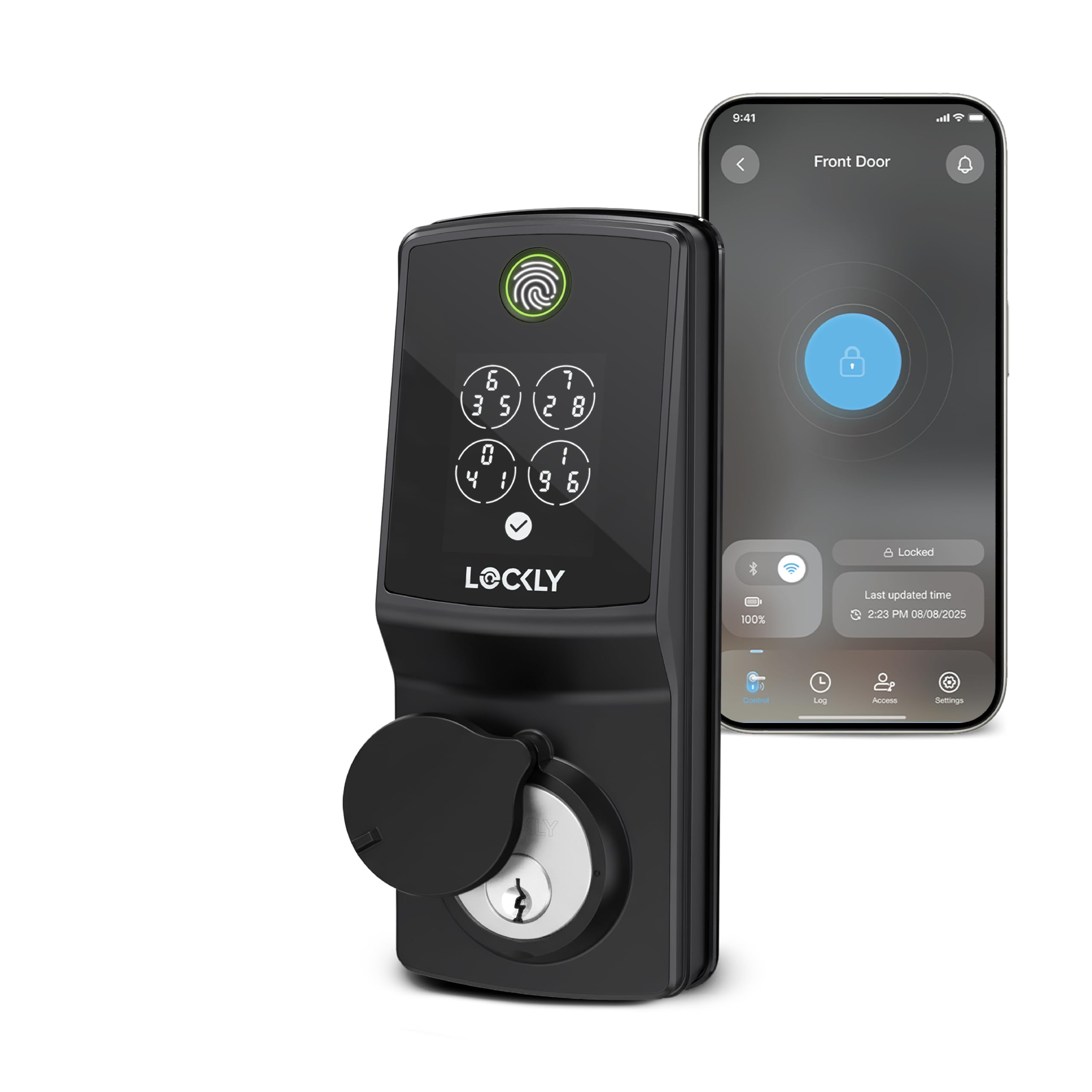
The number that decides this pick is 0.2 seconds — the claimed recognition time of the 3D biometric fingerprint sensor, which learns your print over time. That speed is the difference between holding a sleeping toddler on the stairs and fumbling for a key. Facial recognition is the headline act, though: dual infrared sensors handle low light and darkness, and the face data is encrypted and stored on the lock itself, not in the cloud.
You get six ways in — face, fingerprint, keypad, physical key, Apple Home Key tap, or voice through Alexa and Google. Built-in Wi-Fi means remote open up with no bridge box, and the kit ships with 2 x 10,000mAh lithium batteries that the maker rates at up to 6 months of normal use. In practice that spare-battery design is the clever part: you swap a dead pack for a charged one instead of waiting on a charging cable, and buyers report running the first battery past nine months at 28% before touching the spare. Owners keep coming back to the same point: the key stays in the drawer. As buyers put it, the scan open up every time and hands-full entry in the rain is where it proves itself.
Fitting is friendlier than most: it suits left or right swing doors from 1 3/8” to 2” thick and the maker claims a 15-minute install. Take that with a pinch — the honest read from the review pages is a couple of hours for a first-timer on an old door, and some doors need the deadbolt hole opened up to 2.125”. The real fit note is the door sensor magnet, which has to sit within 3/4 inch or auto-lock will not fire. A handful of owners also see Wi-Fi dropouts, so if your router sits far from the door, expect to babysit that once. The price sits well up the scale, and some buyers weigh the value hard — but the ones who park it on a door they use fifty times a day tend to stop counting.
What earns its keep
- Face open up plus a 0.2-second fingerprint sensor means keyless entry even with full hands
- 2 x 10,000mAh rechargeable batteries, so a dead lock is a swap not a wait
- Apple Home Key works even when your iPhone is out of power
- PIN Genie keypad scrambles the digits every use, so the code cannot be spied
- IP65 rating (dust-tight and protected against water jets) for a front door in weather
Where it asks patience
- Door sensor magnet must sit within 3/4 inch or auto-lock fails
- Wi-Fi dropouts show up for some owners
- The 15-minute install claim is optimistic on old doors
- Premium-tier pricing draws mixed value verdicts
Reach for this if: your main door gets constant traffic and you want face entry with a fingerprint backup and no cloud dependency.
Think it over if: you want a lock that installs in a quarter hour flat — plan an evening instead.
2. MENGQI-CONTROL Door Access Control System
A whole keyless door system in one cabinet, ready to own outright instead of renting.
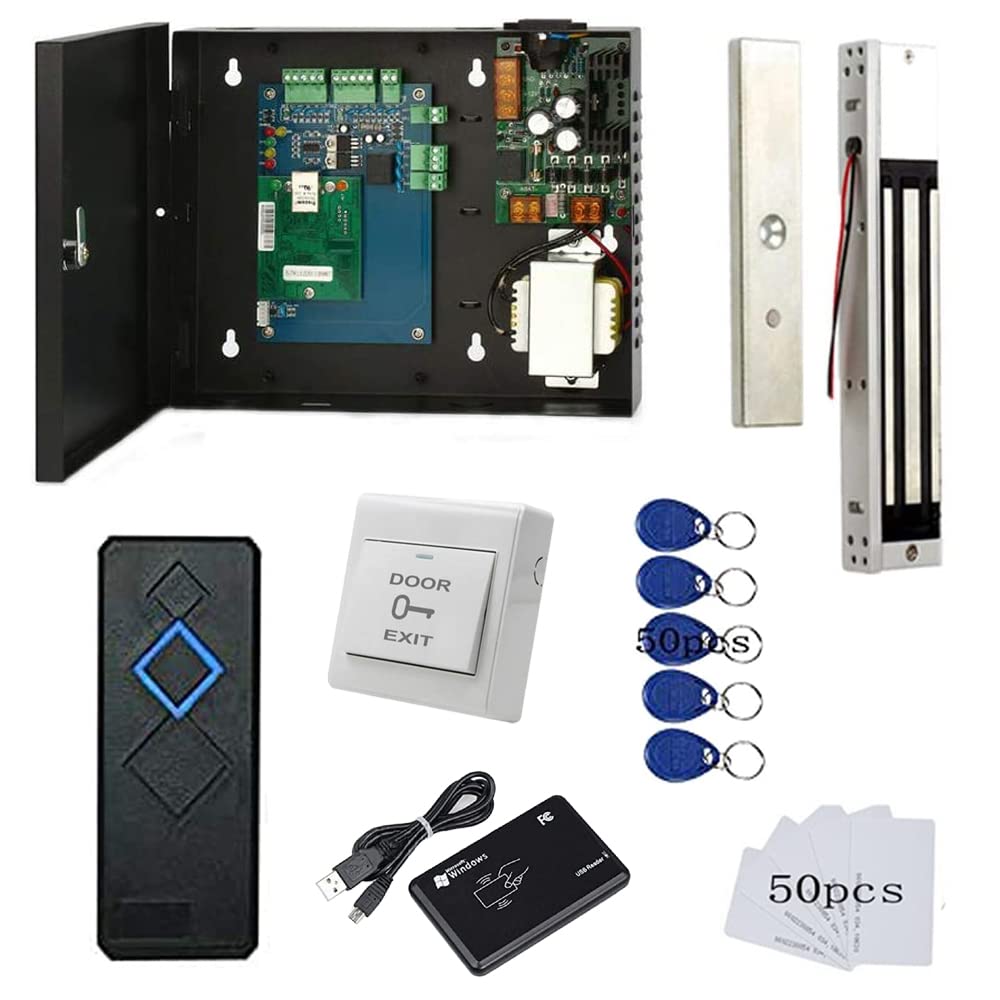
This is the entry point to the wiring world, and it covers one door properly. A 600lbs magnetic lock holds the door (that figure is the pull force it resists), a waterproof RFID reader with a 5-10cm read range takes the card, and a push-to-exit button gets people out from inside. The board remembers up to 20,000 users and up to 100,000 logs, so a small gym or studio never runs short of slots.
What lifts it above a bare swipe box is the software and the setup path. You wire over TCP/IP, register users by reading a card number through the included desktop USB reader, and then set who can enter which door at which time. Auto open and close runs on any schedule you pick, and the phone app opens the door remotely for deliveries or late staff. There is a video guide and wire diagram, and the DIP-style screws mean you can genuinely do this yourself.
The catch is that this is a project, not a plug-in. The cabinet measures 11.81 x 9.85 x 7.87 inches — noticeably bulkier than the 8 x 8.8 x 5.3 inches of the Lockly deadbolt, so it wants a wall corner, not a slim hallway. Directions matter here, and the review pages are built around that: this system’s fans are people who got on the phone with support. Expect to spend an afternoon with a drill and a multimeter.
Why the cabinet wins: everything for one door ships together — lock, reader, exit button, power supply, software — so there is no hunting for a missing piece.
The honest trade: wired installation means a cable run to the door and wall space for the box.
Pick it when: one door needs fob access and you want to own the system outright with schedule control.
Skip it when: you cannot drill or run cable — the sticker-only smart locks above are the easier path.
3. Lockly Secure Pro Wi-Fi Deadbolt Smart Lock
Fingerprint entry with a scrambled PIN pad, and no bridge box on the shelf.
This is the smart deadbolt to reach for if you want biometric entry but do not need a camera. The 3D fingerprint sensor is rated at about 0.2 seconds and learns as family members use it, including kids and older adults. The interior body has also shrunk to roughly 25% smaller than the original Secure Pro, so the inside of your door looks less like a machine.
The PIN Genie pad is the sleeper feature: the digits shuffle after every press, so someone watching over your shoulder cannot learn the code. Built-in Wi-Fi skips the extra hub entirely — connect straight to your home network and lock, open up, or check the log from the Lockly Home app. Battery life has its fans across the review pages, with a six-month run noted regularly, and offline access codes let a cleaner or contractor in even when the lock itself is temporarily off the network.
Two things to check before you buy. It is designed for left or right swing doors 1⅜”–2” thick and is not compatible with storm doors or round latch holes, so measure first. The craft on show is the heavier, more solid feel of the zinc body against the lighter plastic of some other deadbolts on this list, and installation runs around 30 minutes on most standard US doors. Wi-Fi connectivity draws a mixed verdict — the strong signal is reported often, but some owners see it waver.
Buy it for: fingerprint-first entry with a keypad that cannot be shoulder-surfed, plus real remote control without a hub.
The catch: the inside thumb-turn is counter-intuitive — horizontal turns it open, vertical locks it.
Made for: a home front door where you want biometrics and remote access, no camera, no extra box.
Not the one if: your door is a storm door or has a round latch hole — this lock will not fit.
4. MENGQI-CONTROL 2 Door Access Control System

Two doors, one cabinet, and a support line that answers fast.
Same hardware family as the single-door kit above, doubled. You get two waterproof RFID readers and two 600lbs magnetic locks, each reader with a 5-10cm read range, wired to one power cabinet. The board holds up to 20,000 users and 100,000 logs and supports time-based rules — who can enter which door at which time — plus auto open/close on a daily schedule.
The reviews keep landing on the same point: this kit ends the passing around of keys. A store or workshop that stops passing keys around and hands out fobs instead is what this buyer wanted. The software runs on Windows 7 through 11, 32- or 64-bit, so an old office PC works fine, and the desktop USB reader makes registration a tap-and-go step. Phone app and PC setup both work, and the review pages note that this all comes together quickly.
The trade-off is weight and wiring. This cabinet ships heavier and the install moves the lock, reader, and exit button onto each door frame — a job for someone comfortable with cable and screwdrivers, not a renter. A full rating from a small pool of owners marks this as a niche kit, not a mass-market one.
Choose this if: two doors need fob entry and you want the magazine-of-the-industry version of wired access.
Look elsewhere if: you can only change locks you can unscrew — the deadbolts above need no cable run.
5. MENGQI-CONTROL 2 Door Access Control Board System

The kit that keeps your existing handle and turns the lock electric.
If your doors have a knob or a mechanical handle and you would rather not add a magnetic lock plate, this is the two-door system to study. It uses an ANSI electric strike — a North American-standard release that sits in the door frame — rated at 1000kg of holding force. Default behaviour is Fail Secure, meaning it stays locked when the power drops, and you can switch it to Fail Safe instead.
The lock body is 4.84 in long, and that length is the one number to check against your frame before ordering. It is also not built for push bars, so a fire-code door with a push bar is the wrong fit. Cards are EM-ID type, with a response speed under 0.2 seconds and a 5-10cm read range, and the 110-240V power supply box means it will run on either mains style. You program from a Windows PC over TCP/IP, then the system stands alone with no network and no computer attached.
What comes up most in the review pages is the help behind the box — problems get walked through by video call after remote access is set up, and members are removed from the system without changing a single lock. For a gym owner still finding ex-members inside, removing a fob from the software beats rekeying a lock. The work is in the frame cut and the wiring.
Where it fits best: existing knob or handle doors that need electric release without a surface-mounted magnet.
Before ordering: measure your frame against that 4.84 in lock body and confirm you do not have a push bar.
Suits: offices, gyms, and studios with standard handle doors where the frame can be cut.
Does not suit: push-bar egress doors or frames you cannot modify.
6. eufy Security Video Smart Lock FamiLock S3 Max
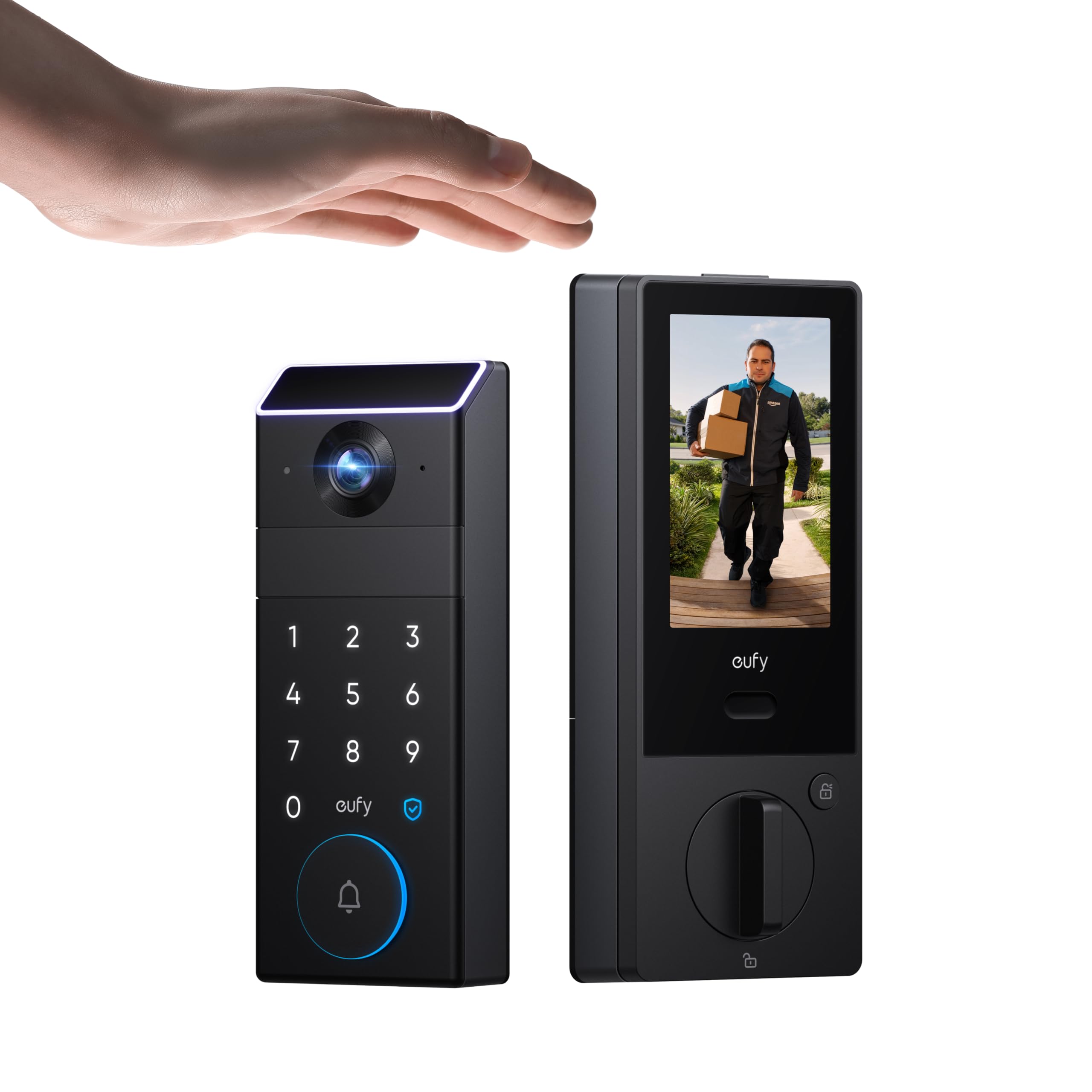
One device does lock, camera, and doorbell, with a screen inside the door.
Palm vein recognition is the hook here, and it is a genuinely different way to open up. It scans the vein pattern under your skin, which is harder to copy than a fingerprint, and the claimed recognition time is 0.6 seconds. All that biometric data is stored locally on the lock, so nothing is shipped to a cloud server. The idea behind it is forgery resistance plus speed, and it works without a phone.
The second half is the video. A 2K camera with an f/1.8 lens (a wider aperture that lets more light in, so night footage stays sharp) pairs with a 150° head-to-toe view — wide enough to see a parcel on the step and the visitor standing over it. The rear lock screen means anyone inside can see the door without finding their phone, and that is aimed squarely at kids and older relatives. Power runs from a rechargeable battery rated up to 4 months of full function, with a set of 4 AAA batteries as backup for roughly another month of essentials.
The honest caveat is integration. It supports Matter and Apple Home, and it works with eufy’s HomeBase 3, but camera streams are not carried over Matter — you need the eufy app for the full picture. It also will not pair with HomeBase 2. Palm recognition and Wi-Fi reliability draw mixed verdicts, with some owners finding the palm reader hit-or-miss. If you want one app for lock and camera and no monthly fee, this is the cleanest fit.
Why it earns the space
- 2K camera with f/1.8 lens and 150° head-to-toe view
- Rear screen shows the door to anyone inside, no phone needed
- Palm vein data stored locally on the lock
- Dual power: rechargeable battery plus 4 AAA backup
- No monthly subscription for core use
Where it stumbles
- Camera streams do not come through Matter — app only
- No HomeBase 2 support
- Palm reader accuracy varies between owners
- Lock motor is slow to throw
Worth it if: you want a doorbell, camera, and palm-open up lock under one app with no subscription.
Not your match if: you need Apple Home to show the camera feed — Matter only carries the lock here.
7. MENGQI-CONTROL RFID Keypad Access Control System

Four doors, keypad entry, and two-factor access if you want it.
This is the keypad path to multi-door control. It runs four doors and lets you open each with a card, a PIN, or a card plus PIN — that last combination is the two-factor mode a small business wants when a code alone feels too thin. The board holds 20,000 users and 100,000 logs, and schedules auto open and close for any day you set.
The strike lock here is Fail Secure, which is the default for a business door: lose power and it stays locked. It gets programmed over TCP/IP from a Windows PC, and the included desktop USB reader means registering a fob is a read-and-click step. One loopback note from the review pages: a 200-person shop runs happily on fobs and cards with the numeric keypad as the backup, and the whole kit ships without wiring — you supply the Cat5 yourself.
The thing to weigh honestly is the power supply. Most owners have no trouble, but one repeat buyer has seen intermittent e-lock failures on a newer unit and swapped in their own supply to fix it. Size that as an outlier for now — this kit is built for small-to-medium businesses that would rather own the hardware than rent a subscription.
What you are buying: four-door control with card, PIN, or both, plus a full access log you can pull into a report.
The thing to source: Cat5 cabling for the runs, since the kit does not include it.
Best for: shops and offices that want PIN codes and fobs on four doors with scheduled lock and open up.
Less ideal if: you want everything wireless — this one is wired end to end.
8. MENGQI-CONTROL ANSI Standard Electric Strike Lock

Four-door control built on heavy-duty strikes and a shared software database.
This is the step up for a real building. It ships with four Wiegand access controllers — one per door — and heavy-duty ANSI electric strikes rated at 1000kg of holding force, with Fail Secure as the default and the option to set Fail Safe. Cards are EM-ID type, response is under 0.2 seconds, and the board tracks up to 20,000 users and 100,000 log entries. One extra: swiping four times in a row holds the door open, which is a small thing that matters on moving day or during a busy shift change.
The big win is that multiple controllers can share a single database across a wide area network, so a manager can see and change every door from one place. A volunteer ambulance squad running three packages across ten doors reports the multi-controller config coming out clean, with clear wiring diagrams in the box. Support staff answer quickly with video and written instructions when a reader gets miswired.
Fitting it well is the job. These work best with a technician who knows which two-part connector is removable and can map zones and PIN/fob/card entry before the crew arrives — the software is not intuitive on the first pass and takes a teach. Also watch the horizontal connectors if the panel sits flush on a wall, since they can be awkward to reach with a screwdriver once mounted. Reach the connectors and you have four-door control that matches the big security brands on strikes and database.
Solid on: four Wiegand controllers, 1000kg strikes, and one database covering every door over WAN.
Size the setup: programming is the hard part — plan a working session, not a quick plug-in.
Built for: buildings that want four-door control with heavy strikes and one central record.
Hands off if: no one on site can sit with the setup software — the code and wiring take real time.
9. MENGQI-CONTROL 4 Door Access Control System

The four-door magnetic kit that laundromats, churches, and gyms buy again.
This is the biggest of the magnetic-lock systems, and it is built for the kind of site that has fobs in a hundred pockets. Four doors, each with a 600lbs magnetic lock, waterproof readers with a 5-10cm read range, and push-to-exit buttons inside. Memory goes to 20,000 users and 100,000 logs, with time rules for who gets into which door when. It powers from a 110V box and manages over TCP/IP from Windows 7 through 11.
The reviews paint a picture of repeat buyers — a church that saved compared to local quotes, a laundromat owner who deactivates a lost fob from across town, a pool committee that had a part fail and got a free replacement. The remote fob deactivation and day-and-time restrictions are the features people come back to. Setup notes run to a motion sensor on the egress side for fire code, and a battery backup worth adding if your power is unreliable.
The one honest friction point: the app has been incompatible with newer Android versions, so if that phone is your daily driver, keep a Windows PC in the loop for programming. Keep a Windows PC for programming and the Android app gap costs you nothing.
What makes it stick
- Four doors on 600lbs magnetic locks with waterproof readers
- 20,000-user and 100,000-log memory for busy sites
- Remote fob deactivation and day-and-time access rules
- Windows 7 through 11 setup with video and wire diagrams
Worth knowing going in
- App reported incompatible with Android 14
- Nothing ships without a cable run to each door
- Exit buttons require planning for fire-code egress
The one for: a facility with four doors and a rotating crowd of fob holders who need the list changed remotely.
The reason to hesitate: the phone app can be the weak link — keep a Windows PC nearby for the setup side.
Know the Specs
Holding Force and Lock Type
Holding force is the pull a lock resists before the door gives — stated in pounds for magnetic locks (600lbs on the MENGQI-CONTROL kits) and in kilograms for ANSI strikes (1000kg). Higher force is a sturdier door, but the bigger choice is lock type. A magnetic lock puts a plate on top of the door and grabs it with power. An electric strike notches into the door frame and releases the latch you already own. Pick the strike for existing handled doors, the magnet for doors you can fit a plate to.
User Capacity and Log Count
User capacity is how many fobs, cards, PINs, or fingerprints the system remembers; log count is how many entry records it keeps before it overwrites. The wired MENGQI-CONTROL panels run up to 20,000 users and 100,000 logs, which is far more than a small office needs but plenty of headroom for a gym with churn. A smart deadbolt measures this differently — the Lockly Visage stores up to 99 prints. Count the people who need in, then leave room.
Fail Secure vs Fail Safe
Fail Secure means the door stays locked if power dies, the default on the MENGQI-CONTROL strike kits. Fail Safe throws it open when power dies, which matters for a fire exit but not for a storeroom. Most MENGQI-CONTROL systems let you switch between the two, so decide per door and match your local egress rules before the electrician arrives.
Wired TCP/IP vs a Wireless Deadbolt
TCP/IP is just network cable to each controller; it lets one computer manage every door over a shared database, and after programming the system runs standalone. A wireless deadbolt like the Lockly or eufy skips the cable and installs in an afternoon, but each lock stands alone with its own app. Wired for many doors, wireless for one — that is the split to hold in your head.
Common Questions
Can I install a MENGQI-CONTROL system myself or do I need an electrician?
Will a MENGQI-CONTROL strike kit work on my push-bar door?
What does Fail Secure mean if the power cuts out?
How many doors can one MENGQI-CONTROL panel control?
Will the Lockly Visage fit my front door?
Do the smart deadbolts need a monthly subscription?
What is the difference between a magnetic lock and an electric strike?
How long does a smart lock battery really last?
Can I open a MENGQI-CONTROL system from my phone?
Will the eufy FamiLock S3 Max work with Apple Home and Google Home?
The Bottom Line
For most homes, the door access control systems winner is the Lockly Visage Zeno, because face and 0.2-second fingerprint entry paired with two 10,000mAh batteries means you never fumble for a key and never wait on a charge. If you run a business with handled doors and want to keep them, grab the MENGQI-CONTROL 2 Door ANSI kit and its 1000kg strike. And for a four-door building that needs one shared database and heavy-duty strikes, the MENGQI-CONTROL 4 Door ANSI system is the one to reach for. Count your doors first: one door points to a deadbolt, two or more points to a wired panel.
How we choose
We do not accept paid placement. Every pick is matched to a real buyer and a real use-case; we do not hands-on test units.
Sources
Specifications: manufacturer listings and product documentation. Review insights: verified customer reviews, as of October 2026. Pricing: not shown on this page (it changes often); check the current price via the retailer link.
As an Amazon Associate, Aappliancez earns from qualifying purchases. This does not affect which products we feature.