Disclosure: Some links in this post are affiliate links. As an Amazon Associate I earn from qualifying purchases, at no extra cost to you. Learn more
Specs are compiled from manufacturer listings and verified buyer reviews and can change over time — please confirm the key details on the product page before buying.
You have a working TV with no HDMI socket, or a spare coax line running to a back room, and a streaming stick that has nowhere to plug in. A digital RF modulator is the small box that takes an HDMI or RCA signal and pushes it out as a channel your old tuner can find — no rewiring the house, no new television. Check direction first: these boxes take HDMI or RCA in and push coax out, never the reverse.
This guide is built by comparing the manufacturers’ published specifications and the patterns across verified customer reviews, so you get each pick’s real strengths and trade-offs instead of marketing spin.
Some models here put out an old analog NTSC channel on CH3 or CH4, while others broadcast a real digital ATSC or QAM channel that a modern tuner locks onto like a broadcast station. That split decides almost everything, which is why every pick below is sorted by what it actually feeds. Here is the honest shortlist of the best digital rf modulators for reviving an old screen or feeding a second one.
Top Picks
How To Choose The Best Digital RF Modulators
Two boxes that look identical can feed two completely different televisions, so start with your screen, not the spec sheet. Ask what your TV’s tuner can actually receive, then work backward to the modulator that produces it.
Match the output to the tuner you own
An older CRT or a set with only a coax screw terminal usually wants an analog NTSC signal on channel 3 or channel 4 — the classic 61.25MHz and 67.25MHz frequencies. A newer flat panel with a digital tuner can instead pick up a real ATSC or QAM channel, which the TV treats like a broadcast station over the air. Pick the wrong one and you get static no matter how good the box is.
Decide if you need HDMI, RCA, or both
HDMI-in covers streaming sticks, game consoles and Blu-ray players. Composite RCA-in covers VCRs, camcorders, older game systems and security cameras. A unit that accepts both is the flexible choice for a mixed shelf of gear, but plenty of buyers only ever need one path.
Check the output strength and the channel switch
RF output is measured in dBµV, and a modest figure can leave a distant TV grainy once the signal runs down a long coax line. A channel selector matters too, because flipping between CH3 and CH4 is the standard fix when a local station interferes. Some pickups also let you nudge video brightness and audio volume at the box.
Side-by-Side Comparison
| Model | Best For | Input | RF Output | Channels | Amazon |
|---|---|---|---|---|---|
| HDMI to RF Modulator (kurtmark)★ Best Overall | Streaming sticks and consoles on an old coax TV | HDMI | NTSC analog, CH3/CH4 | 3 | Amazon |
| VQP HDM61 HDMI to RF ModulatorTop Performer | PCs, laptops and retro-resolution gaming | HDMI | NTSC analog, CH3/CH4 | — | Amazon |
| SatelliteSale RF Modulator | VCRs, DVD players and retro consoles over RCA | Composite RCA | NTSC analog | 1 | Amazon |
| Weytoll Compact RF Modulator | Broad frequency coverage with antenna in/out | Audio/video | RF, 47–868 MHz | — | Amazon |
| FOSA HDM61 HDMI to RF Modulator | Simple one-cable HDMI-to-coax jobs | HDMI | NTSC analog, CH3/CH4 | 1 | Amazon |
| ADRFClub HDMI/RCA to RF Modulator | Mixed HDMI and RCA gear, full-band channel picking | HDMI + RCA | NTSC & PAL, VHF/UHF | — | Amazon |
| SatLink ST-7000 | 1080p over long coax runs to many TVs | HDMI + RCA | Digital ATSC or QAM (J.83B) | 1 | Amazon |
Detailed Reviews
1. HDMI to RF Modulator for TV
Our pick — 4.0+★ from 250+ verified ratings; the strongest balance of quality and price.
The box that hands a modern stick somewhere to plug into an ancient screen
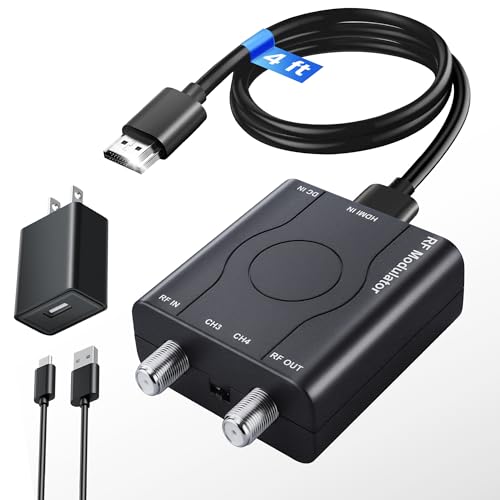
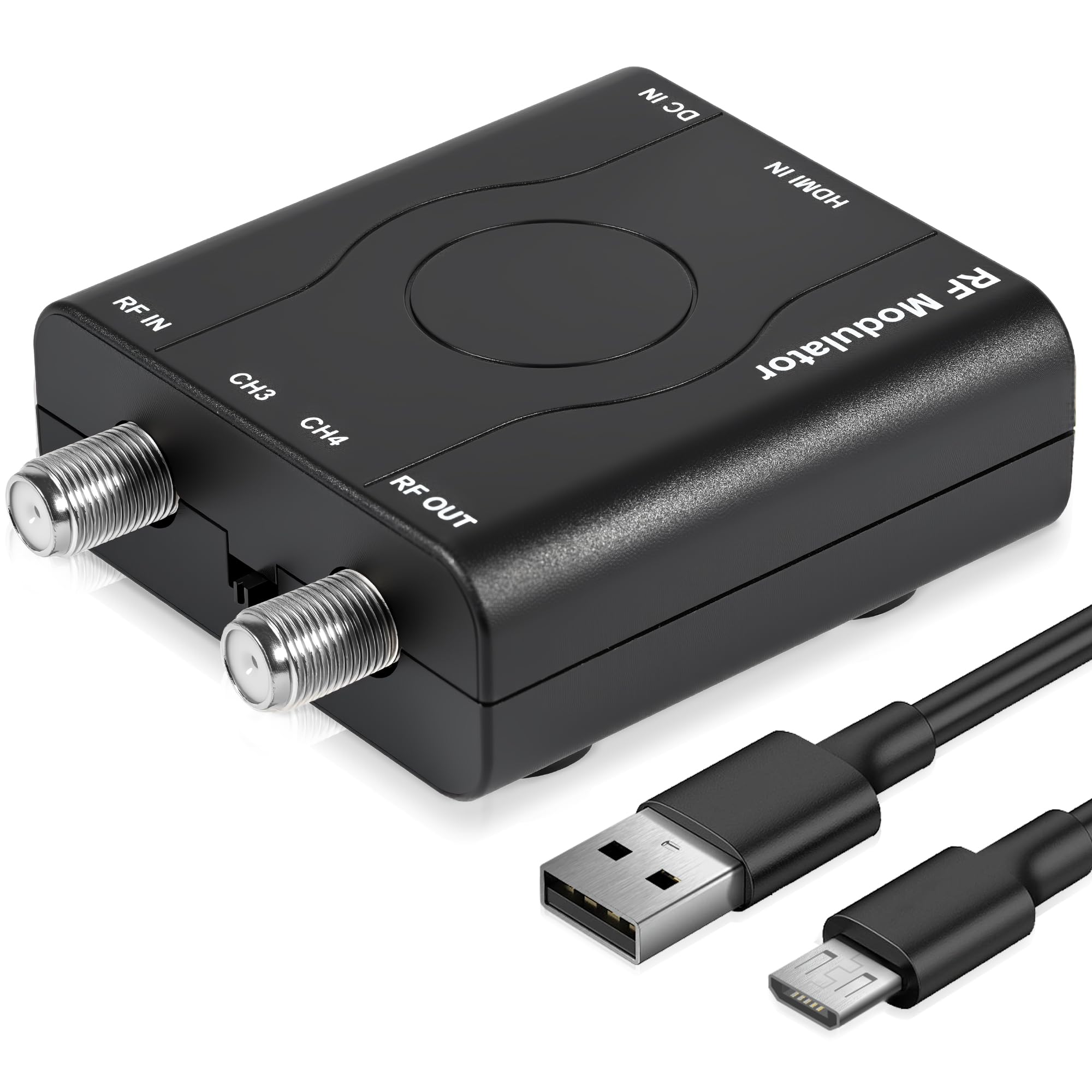
The whole point here is what comes in the package: the modulator, a 1.2M HDMI cable, a power supply adapter, a power supply cable and a user manual. Nothing else to hunt down before you can watch. It accepts HDMI from a Fire TV Stick, Roku, PS5, PS4, Xbox One, Nintendo Switch, Switch 2, Apple TV or a Sony Blu-ray player, and outputs analog NTSC on channel 3 or channel 4. Its CH3/CH4 selector gives it three channel options, the most of any pick here.
You can be watching in about five minutes. Plug the HDMI source into the box, run coax to the TV, and switch the set to TV mode — a 1989 Sharp CRT with VHF-only input (a tuner that only picks up channels 2–13) came alive this way once the input was set correctly on the back of the TV. Picture through the RF path (the coax channel your TV tunes to) is clearer than a buyer expects from a coax channel, and the CH3/CH4 selector is the escape hatch when a local station bleeds in. Signal output stays steady thanks to internal PLL control (a circuit that holds the VHF frequency steady instead of letting it drift), rated at 80 ± 5 dBµV (a measure of signal strength at the coax output).
Two limits matter before you buy. First, this converts HDMI to RF only — it will not take a coax signal and put it back out as HDMI. Second, buyers report: “Works but every week or two it stops working until I unplug the power for a minute.” A switched outlet on a receiver, so the box powers down with the rest of the gear, is the workaround that buyer settled on. It will not work with a Mac Mini or a laptop either.
What earns it the top spot
- Everything needed is in the box — a 1.2M HDMI cable and the power adapter both included
- 3 channels of support, the widest count here
- PLL-controlled output holds a steady 80 ± 5 dBµV VHF signal
- Accepts 1080P, 1080i, 720P, 576P and 480P HDMI input
What to plan around
- HDMI in, RF out only — never the reverse direction
- An occasional power-cycle reset keeps it honest
- No Mac Mini or laptop support
- You still need your own coax cable to reach the TV
Buy it if: you have a streaming stick or console and an older TV with nothing but a coax input.
Look elsewhere if: your source is a Mac Mini or laptop, or you need signal flowing the other way from coax into HDMI.
2. HDM61 HDMI to RF Modulator
Built for the tinkerer who wants a desktop or handheld on a CRT
The VQP HDM61 handles the widest spread of input resolutions in this group: 1080P, 1080i, 720P, 576P, 576i and 480p. That range is exactly why it turns up in retro setups, where a Steam Deck or an older console is pushing something far below 1080p and a fussier box would simply refuse the signal. Output is NTSC on CH3 at 61.25MHz or CH4 at 67.25MHz.
The feature that separates it from the budget boxes is HDCP 1.4 support alongside HDMI 1.4. HDCP is the copy-protection handshake a streaming stick or Blu-ray player insists on before it will send a picture, so a modulator without it can leave you staring at a black screen. It also carries a 0.5 A current rating on a 5 V input and measures 5 x 4 x 1.1 inches, which is small enough to tuck behind a set.
What wins people over is that it simply functions — that is the single most-praised thing about it by a wide margin. It is also compatible with your local CATV system. The honest caveat is the picture and sound: both land in mixed territory, so treat the image as retro-faithful rather than pristine, and expect to spend a little time dialing it in. It needs no driver installation and is ready the moment it leaves the box.
The niche it owns: low-resolution and computer sources that other modulators reject outright, backed by HDCP 1.4 compliance that streaming hardware demands.
The trade-off to expect: mixed image and sound quality means this is a working tool for period-correct gaming, not the sharpest picture in the article.
Right call for: retro gaming on a CRT, or pushing a PC or laptop screen onto an older coax-only television.
Wrong call for: anyone expecting modern-grade image or audio fidelity out of a 480p-era signal path.
3. SatelliteSale RF Modulator RCA Composite to RF Coaxial Converter

The RCA path for VCRs, camcorders and a shelf full of vintage consoles
Where the HDMI modulators above take a digital signal, this one takes analog composite RCA from a DVD player, VCR, retro gaming console, TV tuner, satellite or cable box, Blu-ray player or camcorder. It can also feed security camera and CCTV footage to an older coax monitor. Output is standard North American NTSC, and it comes with both the coaxial cable and the composite cable — the complete kit that one owner was glad not to have to shop for separately.
The casing is high-quality PVC molding with molded strain relief (a reinforced collar where the cable meets the plug, so it does not fray at the joint), and the metal connectors resist corrosion while carrying the signal. Audio output is mono. It sits freestanding and weighs 11.2 ounces, so it is happy on a shelf or behind a TV stand.
The recurring gripe is build quality, and it is worth naming honestly: the finish lands in mixed territory, so treat this as a straightforward adapter rather than a piece of furniture. Owners mention: “Works perfectly, exactly what I needed for my CRT with no AV ports!” One installation story worth remembering — faint diagonal rolling lines on screen cleared up by flipping the channel from 4 to 3 and re-tightening the coax connectors. Setup requires no drivers (no software to install), and SatelliteSale backs this modulator with a lifetime warranty.
Where it fits: the fastest route from a composite-only device to a coax-only TV, with the AV cable and power supply already in the box.
Set your expectations: finish quality is the honest weak point, and a mono audio path is all you get — fine for a talking-head VHS, not for stereo movie night.
Reach for this if: your source is a VCR, DVD player, camcorder or a PS1-era console with composite outputs.
Pass on it if: you need stereo sound or a metal-bodied build, since this one is molded PVC and mono.
4. Weytoll Compact RF Modulator
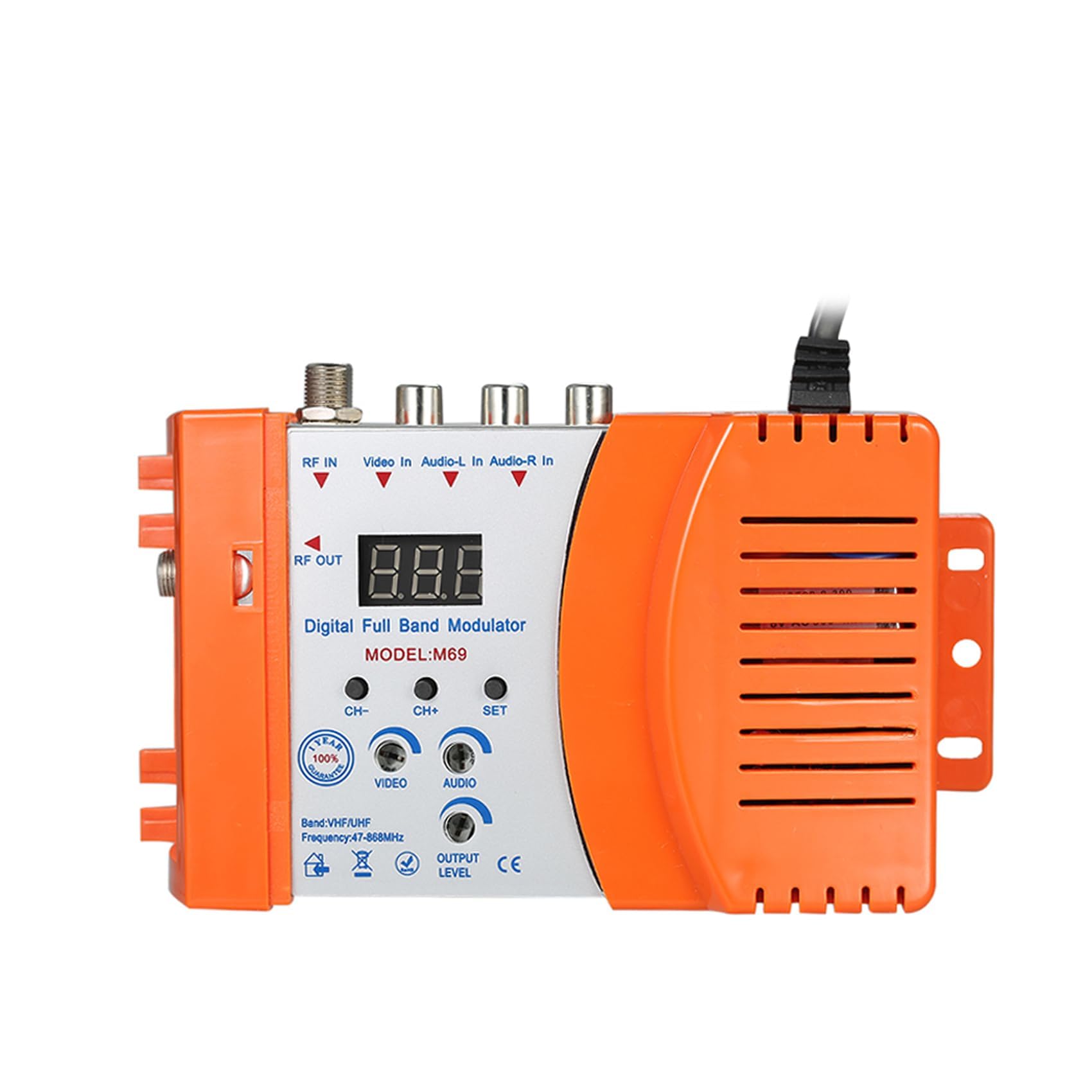
An audio and video converter that spreads across 47 to 868 MHz of spectrum
Frequency coverage is the headline: this one runs from 47 to 868 MHz, which is the widest span in this roundup. That breadth is what lets it slot into all sorts of local transmission systems without a fight, and it plays nicely with local CATV systems as well. If you have ever had a modulator that only worked on one narrow band and clashed with something else on the line, this is the answer to that problem.
Inputs are audio and video, with outputs selectable across a range of channels, and there is antenna in and out along with a channel switch built in. The audio and video conversion is meant to slot extra devices into an existing setup without compatibility headaches. It runs on AC120V and weighs 12.7 ounces.
The catch is the paper trail. This is a compact, no-frills box with a straightforward interface, and it is the least-documented pick in the group — there is very little owner feedback to lean on, so you are buying on the published spec sheet rather than on a long history of verified use. Where the kurtmark and VQP modulators above come with 1080P HDMI input ratings (Full HD, 1920×1080) and clear directional rules, this one asks you to read its manual closely and confirm your own source will talk to it before you commit.
The case for it: genuinely broad 47–868 MHz coverage and CATV compatibility make it the most adaptable piece of hardware in this article for awkward frequency environments.
The honest limit: limited owner feedback means you should verify your exact audio/video source against the manual before buying, not after.
Suits you if: you need wide frequency coverage, an antenna connection point, and a channel switch in one compact unit.
Think twice if: you want a long track record of owner experiences backing the purchase — this is the thinnest on that front here.
5. FOSA HDMI to RF Modulator HDM61

A no-drama one-cable job from HDMI straight into a coax socket
On the spec sheet this FOSA unit reads a lot like the VQP HDM61 above — NTSC output (the old analog TV standard) on CH3 at 61.25MHz or CH4 at 67.25MHz, 1080P PLL control (Full HD with a circuit that locks the channel frequency) on a VHF working frequency, HDMI 1.4 with HDCP 1.4 (copy protection that lets protected video play), and ABS construction (a hard plastic shell). It plugs in with no driver installation and works with certain Blu-ray players, gaming consoles and personal computers. If you want a simple HDMI-to-coax conversion and nothing more, it does the job.
Where it differs is in how it behaves once the coax line gets complicated. A buyer who tried to run the signal through a splitter alongside an HDMI connection ended up with a buzzing sound on the coax and no working picture — it only behaved with the coax connected directly. A second buyer reported a unit that put out no video signal at all, which points to a defective sample rather than a design fault. The lesson is the same either way: keep the coax path direct, and test the box the day it arrives.
The good news is that direct-connection setups tend to go well, and this is a low-commitment way to find out whether HDMI-to-RF conversion solves your problem before spending more. It is the plainest tool in this article — no antenna connector, no RCA path, no channel display to configure. Check the HDMI cable before you blame the box, since that was one buyer’s first troubleshooting step.
Where it shines: unfussy plug-and-play HDMI-to-coax conversion with the PLL control and HDCP 1.4 handshake that keeps modern sources happy.
Where it stumbles: it does not tolerate a split coax feed, and a defective unit is possible, so direct wiring and an early test are the two habits that matter.
Pick this if: you want one dedicated HDMI source on one TV over a straight coax run, with nothing else to configure.
skip it if: you plan to split the signal to several televisions or need RCA inputs as well.
6. HDMI/RCA to RF Modulator Coaxial UHF Converter Adapter

One box that speaks HDMI and RCA, then broadcasts up to 136 channels
This is the only pick under the SatLink that takes both HDMI and composite RCA (the yellow/white/red plugs) on the way in, and it goes furthest on the way out: NTSC and PAL formats (the two analog TV standards), VHF and UHF bands (the full range of TV channels), and up to 136 channels across the full band. There is even a channel digital display with a selectable switch, so you can see exactly which channel you are broadcasting on instead of guessing. HDMI 1.4 compatibility means Fire Stick, Roku and similar streaming hardware will connect.
The flexibility extends past the obvious sources. It handles PS2, PS3, PS4, PS5, Xbox 360 and Xbox One, Nintendo Switch, camcorders, VCRs and laptop PCs. It also carries an F-type female coax input (the screw-on TV aerial connector) for an HD TV tuner or a cable box, plus a separate coax output you can run to a TV or splitter, with adjustable audio volume and video brightness at the box. That adjustability is the fix when the signal clashes with a router sitting nearby — switching channel clears the interference.
The honest trade-offs are instructions and longevity. The manual is the single weakest point by owner feedback, with settings that only make sense after trial and error — one buyer got there by persistence rather than by the paperwork. And there is a durability question: one owner’s unit worked for a month or two and then stopped entirely. Most units keep working, and the counted positives here are still functionality first. Size up the manual-work up front, and this becomes a very versatile tool.
What makes it stand out: dual HDMI and RCA inputs, both NTSC and PAL output, and up to 136 channels with a visible digital channel display.
What calls for patience: the manual is the weakest link here, so expect to solve the setup by trial and error, and treat any single unit’s lifespan as the open question.
Ideal for: households mixing a streaming stick, a laptop and an older console, all wanting to reach coax-only televisions.
Not ideal for: someone who wants a clearly written manual to walk them through it on the first attempt.
7. SatLink ST-7000 HDMI to RF Digital Modulator/Encoder

The one pick that sends out a real digital TV channel, not an analog one
Every other modulator in this article produces an analog NTSC channel. The SatLink ST-7000 instead encodes 1080p HDMI or RCA video and broadcasts it as an HD ATSC or QAM (J.83B) channel over your existing coax network. Your modern television’s digital tuner picks it up exactly like an over-the-air station. That single difference is what makes it the right tool for whole-house distribution rather than a single retro TV.
You can dial the output power from 70 to 100 dBµV (signal strength at the coax), and the balance for one long-term owner was 75 — running it at 100 drowned out the other channels on the same line. Setup is handled over IP configuration (network settings), and a distant TV with a grainy signal can be cleaned up with an amplifier downstream. It weighs 1.47 kg, so it is a real piece of network hardware rather than a pocket adapter. It takes HDMI or RCA in, and television is the listed compatible device.
What it does exceptionally well is feed many screens. Security camera feeds can be distributed to every TV in a house over basic coax, and monitors accept the channel like any digital broadcast. The caveat is compatibility with individual sets: one Samsung display developed periodic audio drops and a garbled image over time, a channel change would fix the picture but not the sound, and the same unit worked on five other displays. There is also no overscan handling (the setting that stops the picture edges being cut off), so the image edges get trimmed, and it wants to see 1080p — 4K is not on the table.
The headline: true 1080p digital ATSC/QAM output to an unlimited number of tuner-equipped TVs over ordinary coax, with adjustable output you can fine-tune between 70 and 100 dBµV.
The reality check: not every television plays nicely with it, overscan trims the frame edges, and it caps at 1080p — so test it on your main display first.
Consult this if: you are distributing one HDMI or camera source to multiple digital televisions across a large building or home.
Don’t lead with it if: you only need one old CRT revived, or you own a display that has choked on this class of signal before.
Know the Specs
NTSC analog versus ATSC or QAM digital output
An analog NTSC modulator takes your source and broadcasts it as channel 3 or channel 4 — the 61.25MHz and 67.25MHz frequencies most older televisions already know how to find. The set tunes in like any local station, and it works on a CRT with nothing more than a coax screw terminal. A digital ATSC or QAM modulator, by contrast, encodes the video as a genuine digital channel that a modern flat panel’s tuner locks onto. That opens the door to feeding many screens at once, but it also means the receiving TV has to be a digital model with a working tuner.
Input resolution and PLL control
Input resolution tells you what source the box will accept — HDMI models here run from 480p up to 1080P, with some adding 1080i, 720P, 576P and 576i. Remember that the 1080P figure describes what goes in, not what comes out over the coax. PLL control is the circuit that keeps the output frequency steady, so the picture does not drift once it is tuned. That steady frequency is what keeps the channel locked instead of drifting out of tune.
RF output strength and channel selection
Output strength is measured in dBµV, and it decides how clean the picture stays once the signal travels down a long run of coax. The SatLink ST-7000 lets you adjust between 70 and 100 dBµV directly, which is handy when a big number starts bleeding into neighboring channels. On any modulator, a channel switch — moving from CH3 to CH4, or picking a specific channel on a full-band unit — is the standard cure for interference from a nearby station or a router.
Input types and included accessories
HDMI inputs matter for streaming sticks, modern consoles and Blu-ray players; composite RCA inputs matter for VCRs, camcorders and older game systems. A few models accept both, which is the flexible choice for a mixed shelf of equipment. Check what ships in the box too: some modulators include the HDMI or AV cable and the power supply, while others expect you to supply the coax run yourself. Direction matters here: every box in this guide feeds a signal into the coax, not out of it.
Common Questions
Will a digital RF modulator work with my old CRT television?
What is the difference between an HDMI to RF modulator and an RCA to RF modulator?
Do these modulator boxes work in both directions?
Why is my picture fuzzy or grainy on a TV far from the modulator?
Can I run the coax output through a splitter to feed several TVs?
Which channel should I select, channel 3 or channel 4?
Will a modulator pass HDCP-protected content from a streaming stick?
Do I need to install drivers or software to set one up?
What cables come in the box and what do I still need to buy?
The Bottom Line
For most people, the digital rf modulators winner is the kurtmark HDMI to RF Modulator because it ships complete with its own HDMI cable and power adapter, runs three channels, and holds a steady 80 ± 5 dBµV signal — the crowd favorite at 4.0+ stars across 250+ ratings. The VQP HDM61 is the sharper call if your source runs at lower resolutions that other boxes reject, since it accepts everything down to 480p (standard-definition video). If your gear is all composite RCA — a VCR, a camcorder, a vintage console — the SatelliteSale RF Modulator is the one to reach for. And when the job is distributing a single 1080p source to every digital TV in the house, the SatLink ST-7000 is the only pick here that sends a true ATSC or QAM channel (the digital broadcast formats modern TVs tune) instead of an analog one, which is what you need the moment more than one screen is involved.
How we choose
We do not accept paid placement. Every pick is matched to a real buyer and a real use-case; we do not hands-on test units.
Sources
Specifications: manufacturer listings and product documentation. Review insights: verified customer reviews, as of October 2026. Pricing: not shown on this page (it changes often); check the current price via the retailer link.
As an Amazon Associate, Aappliancez earns from qualifying purchases. This does not affect which products we feature.