Disclosure: Some links in this post are affiliate links. As an Amazon Associate I earn from qualifying purchases, at no extra cost to you. Learn more
Specs are compiled from manufacturer listings and verified buyer reviews and can change over time — please confirm the key details on the product page before buying.
Here is the short answer: DDR5 6000MHz CL30 RAM is the balance for AMD Ryzen builds because it pairs a fast transfer rate with a tight column address strobe latency, and your goal is a kit that hits those numbers without you fighting the BIOS. The picks below range from low-profile kits that slide under big air coolers to premium modules with addressable lighting, so you can match your motherboard and case clearance before you buy.
This guide is built by comparing the manufacturers’ published specifications and the patterns across verified customer reviews, so you get each pick’s real strengths and trade-offs instead of marketing spin.
Most buyers get stuck on speed alone and forget that profile support, heat spreader height, and your CPU’s memory controller decide whether the rated timings actually stick. The real question is which kit boots clean and stays stable with the profile you can enable, and this guide walks you through the best DDR5 6000MHz CL30 RAM so you can pick with confidence.
Top Picks


How To Choose The Best DDR5 6000MHz CL30 RAM
Two numbers do most of the work here, and they are the two in the name. The first is 6000MHz, the transfer rate — roughly how fast data shuttles between your CPU and memory. The second is CL30, the column address strobe latency, a count of clock cycles the memory waits before it delivers requested data. Tighter is better, so CL30 beats CL36 at the same speed. Get the pair right and your games, editing exports, and multitasking stop stuttering.
Match the profile to your platform first
Before you look at anything else, confirm whether you are building on AMD or Intel. AMD Ryzen boards read EXPO profiles, while Intel boards read XMP 3.0. Many kits in this category carry both. If the profile you need is missing, the kit still works — it just falls back to the JEDEC default speed, which is far slower than the number on the box. That single mismatch is the most common reason a buyer thinks they got a slow kit.
Give your cooler room to breathe
Tall heat spreaders with big RGB light bars can collide with large tower air coolers. Low-profile modules sit closer to a bare stick, so they slip under coolers without you raising a fan or swapping to liquid cooling. If your build already has a beefy air cooler, measure the clearance before you fall for the tallest, brightest sticks on the shelf.
Side-by-Side Comparison
| Model | Best For | Speed | CL Timing | Profile | Amazon |
|---|---|---|---|---|---|
| G.SKILL Flare X5 Series DDR5 RAM (AMD EXPO) 32GB (2x16GB) Up to 6000MT/s* CL30-38-38-96 1.35V Desktop Computer Memory U-DIMM – Matte Black (F5-6000J3038F16GX2-FX5)★ Best Overall | Ryzen builds needing cooler clearance | 6000 MT/s | CL30-38-38-96 | AMD EXPO | Amazon |
| Lexar ARES Gen2 RGB DDR5 RAM 32GB Kit (2x16GB) 6000MHz CL30Best with RGB | RGB-first builders wanting EXPO plus XMP | 6000 MHz | CL30-38-38-76 | Intel XMP 3.0 / AMD EXPO | Amazon |
| Kingston FURY Beast RGB 32GB (2x16GB) 6000MT/s DDR5 CL30 Desktop Memory | AMD EXPO | Kit of 2 | KF560C30BBEAK2-32Top Performer | Soft, diffused RGB without hotspots | 6000 MT/s | CL30 | Intel XMP 3.0 / AMD EXPO | Amazon |
| CORSAIR Dominator Titanium RGB DDR5 RAM 32GB (2x16GB) 6000MHz CL30-36-36-76 1.40V – White (CMP32GX5M2B6000Z30W) | Four-DIMM builds and iCUE lighting | 6000 MHz | CL36 | AMD EXPO / Intel XMP | Amazon |
| Patriot Viper Venom DDR5 RAM | Budget-friendly gaming builds | 6000 MHz | CL30-40-40-76 | Intel XMP 3.0 / AMD EXPO | Amazon |
| TEAMGROUP T-Create Expert DDR5 | ITX builds and tight-clearance cases | 6000 MHz | CL30 | Intel XMP 3.0 / AMD EXPO | Amazon |
| TEAMGROUP T-Force Vulcan DDR5 | Value-first AM5 builds with big air coolers | 6000 MHz | CL30-38-38-96 | Intel XMP 3.0 / AMD EXPO | Amazon |
| G.SKILL Trident Z5 Neo RGB Series DDR5 RAM (AMD EXPO) 32GB (2x16GB) Up to 6000MT/s* CL30-36-36-96 1.35V – Matte White (F5-6000J3036F16GX2-TZ5NRW) | White-themed showcase builds | 6000 MT/s | CL30-36-36-96 | AMD EXPO | Amazon |
| Kingston FURY Beast 32GB (2x16GB) 6000MT/s DDR5 CL30 Desktop Memory | AMD EXPO | Kit of 2 | KF560C30BBEK2-32 | Reliability-first no-RGB builds | 6000 MT/s | CL30 | Intel XMP 3.0 / AMD EXPO | Amazon |
Detailed Reviews
1. G.SKILL Flare X5 Series DDR5 RAM
Our pick — 4.5+★ from 800+ verified ratings; the strongest balance of quality and price.
The low-profile kit that slides under a big air cooler and just works on Ryzen
If you are building on an AMD X870, X670, B850, B840, B650, or A620 board and want a kit that boots clean without clearance headaches, this is the one to start with. It is a 32GB (2x16GB) DDR5 U-DIMM kit rated at 6000MT/s with CL30-38-38-96 timings and 1.35V, and it carries both a JEDEC default profile and an AMD EXPO overclock profile. The 1.35V figure matters: that is on the lower side for this category, so it runs cooler and puts less stress on your memory controller than a higher-voltage kit would. Owners consistently describe it as plug-and-play once you flip the EXPO profile in BIOS — no firmware flashing, no manual timing entry.
What has made this kit a crowd favorite is simple functionality. Buyers report zero stutters and no performance dips under load, and the memory runs at stock speeds stably with no hiccups. The low-profile height earns plenty of praise — it clears a Thermalright Phantom Spirit 120 SE air cooler without a fight. That is the real divider in this category, because a tall RGB module in the same slot may force you to lift a fan and compromise your cooling. If your case packs a large tower cooler, this is the practical pick.
The catch is compatibility, and it is worth reading before you buy. This kit is validated for AMD platforms, so if you are on an Intel board you should not expect the EXPO profile to be its native path. One recurring note across the review pages is that mixing this kit with a different memory kit causes stability problems — G.SKILL builds matched kits that are meant to run together as a set, so buy one kit sized to your slot count rather than adding sticks later. An experienced AM5 builder put it plainly, saying the platform detected it as EXPO and ran at 6000 from the start with no fuss.
What buyers rave about
- Low-profile heat spreader clears large air coolers like the Thermalright Phantom Spirit 120 SE
- 1.35V operating voltage keeps thermals and controller load down versus higher-voltage kits
- EXPO profile boots to rated 6000MT/s CL30 with no firmware or manual timing work
The honest caveats
- Validated for AMD X870, X670, B850, B840, B650, and A620 boards — Intel builders should look elsewhere for a native profile
- Mixing this kit with a separate memory kit causes stability issues, so buy the size you need in one matched set
Reach for this if: your AM5 build runs a large tower air cooler and you want EXPO speeds without a clearance fight.
Look elsewhere if: you plan to top up your RAM later with a second kit, because mixing matched sets causes instability here.
2. Lexar ARES Gen2 RGB DDR5 RAM
A dual-profile RGB kit that lights the case and sidesteps the memory-error blues
Start with the spec that separates this kit from the low-profile pick above: Lexar gives you both Intel XMP 3.0 and AMD EXPO in one module, so it does not care whether your board is red or blue. The rated 6000MHz CL30-38-38-76 timings at 1.4V are the core numbers, and the heat spreader is a 1.88mm premium aluminum plate designed to pull heat away under sustained gaming. The onboard on-die ECC (an error-checking feature built into the memory chip) is the detail that tends to matter most for stability over long sessions.
The RGB performance is the visible draw. Lexar RGB Sync lets you coordinate the lighting across your build. The trade-off of that height is real, and it shows up in the memory’s size, not its speed — owners mention the modules are tall enough that a Peerless Assassin 120 air cooler fan had to be raised for clearance, which can slightly reduce cooling efficiency. If you run a liquid cooler or a low-profile cooler, that concern simply disappears and you get the visual without the fit problem.
Where this kit lands depends heavily on your budget timing, and the review pages are honest about it. Customers note the value proposition shifts fast when memory prices move, with one long-term owner giving it a top score specifically because of what they paid for it, and noting they would not recommend a kit that had climbed into the highest price tiers. If you can get it at a fair tier, the dual-profile flexibility, the on-die ECC, and the RGB Synch make it a genuinely well-rounded 32GB choice for a mid-range gaming build.
Why it earns its place: dual XMP 3.0 and EXPO support, on-die ECC for stability, and a 1.88mm aluminum heat spreader that handles sustained gaming loads. The 6000MHz CL30-38-38-76 spec at 1.4V is competently matched to a 9800X3D-class CPU.
The call: a strong pick for a mid-range gaming rig with a liquid or low-profile cooler that wants sync light without sacrificing a stable profile.
The trade-off: its height pushes a tower air cooler’s fan up, so confirm your cooler clearance before committing.
3. Kingston FURY Beast RGB 32GB (2x16GB) 6000MT/s DDR5 CL30 Desktop Memory | AMD EXPO | Kit of 2
The RGB that stays soft and even, with none of the harsh LED hotspots
There is one spec here that puts this kit ahead of brighter rivals on looks: Kingston’s patented FURY Infrared Sync Technology, paired with a revised heat spreader that spreads the color smoothly across the bar. The effect is a soft, diffused glow rather than individual dots punching through, and that difference is exactly what makes a lit build look deliberate. Under the hood, the numbers are a matched 6000MT/s at CL30 across a 32GB (2x16GB) dual-channel set, with both Intel XMP 3.0 and AMD EXPO support. Stability is tuned specifically for overclocking headroom.
On the bench it holds up, and the behavior on a couple of specific boards is note because it is not a fire-and-forget as on every platform. On an ASUS TUF Z790 Plus WiFi with an i7 14700K, reviewers point out it boots cleanly, XMP enables without drama, and the RGB syncs cleanly. On an OMEN 35L with a Ryzen 7 8700G and B650 board, the BIOS EXPO profile proved unstable from the start, and the owner had to enable the profile via AMD’s Ryzen Master utility to reach a stable 6000 CL30. The point is not that the kit is unreliable — it is that a few specific board-and-BIOS combos want the profile pushed through the utility rather than the BIOS menu.
The memory that pairs with this kit is a good match for gaming, and the capacity is right for a modern build. It passed a full MemTest86 sweep with zero errors at the out-of-box EXPO settings — a clean-bill-of-health result that matters the moment you push 32GB of DDR5 to its rated speed. Where this kit earns its keep is the lighting, which stays evenly lit where some modules show visible hotspots. If you want the glow to actually look premium rather than cheap, that diffused bar is the deciding difference.
Straight read: the FURY Infrared Sync bar produces evenly diffused RGB with no visible hotspots — the same reason a few builders rank it above rival RGB at the same speed tier.
Worth repeating: the kit is a matched 32GB (2x16GB) dual-channel set at 6000MT/s CL30, so it is sized for a single-pair build with no need to juggle four sticks.
For you if: you want a smoothly diffused RGB bar and a 6000MT/s CL30 kit that runs clean on both Intel and AMD boards.
Consider carefully if: you run an OMEN 35L, since that specific B650/8700G combo needs the profile enabled through Ryzen Master rather than the BIOS directly.
4. CORSAIR Dominator Titanium RGB DDR5 RAM
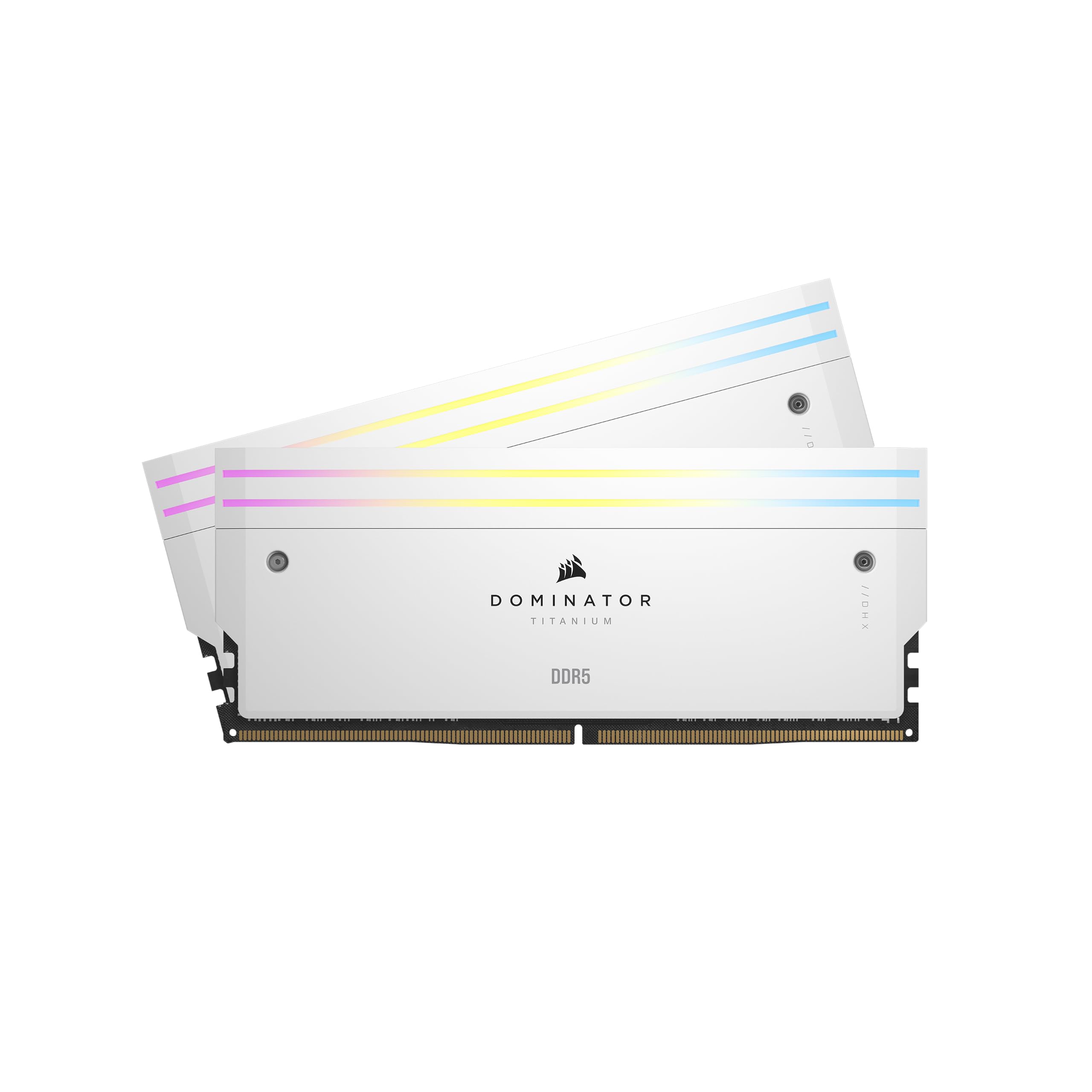
Four filled slots at rated speed, wrapped in eleven individually addressable LEDs per stick
This is the kit for the builder who wants every DIMM slot populated, not just two. The eye-catching spec is 11 vibrant addressable RGB LEDs per module, each controllable individually so you can build a gradient or a pattern rather than a single uniform glow. Corsair’s patented DHX Cooling pulls heat from both the ICs and the ground plane of the PCB itself via a dedicated heatspreader, which is a step beyond the simple bar-style coolers you see at this tier. It carries both AMD EXPO and Intel XMP profiles and is built for AMD 600 Series boards.
On the timing front, this is the one spec to read carefully: the Corsair lists CL36, which is a looser column address strobe latency than the CL30 kit sitting above it on this list. That is the honest trade-off — the Dominator buys you premium build, DHX cooling, and more addressable lighting, and in return its rated latency is a touch higher than the tightest kits here. For buyers chasing the absolute tightest timings, a lower-CL kit wins; for buyers who want the premium platform and can live with CL36, this is the module for the showcase build.
The real strength shows up in the toughest workload: four DIMMs on AMD. Shoppers say achieving a stable 6000MHz with all four slots filled, which is the scenario most builds struggle with due to the extra load on the memory controller. One owner running an MSI MAG X870E Tomahawk WiFi noted it worked plug-and-play, detected instantly by Corsair iCUE for the lighting. That pairing of DHX cooling and iCUE control is what makes the Titanium feel like a finished system rather than a set of sticks, though its higher CL is genuinely a step behind the CL30 kits for buyers who weigh latency over appearance.
Why four-slot builders choose it
- Achieves a stable 6000MHz even with all four DIMM slots filled — the workload that trips up most AMD setups
- 11 individually addressable RGB LEDs per stick for genuinely granular lighting control via Corsair iCUE
- Patented DHX Cooling pushes heat from both the ICs and the ground plane of the PCB through a dedicated heatspreader
The fine print
- CL36 is a looser latency than the CL30 kits in this guide, so it is a step behind if your priority is the tightest timings
- Tall, chunky heat spreaders with big RGB bars, so lower clearance air coolers may not fit without adjustment
Best matched to: a full four-slot build where you want a stable 6000MHz and DHX cooling behind premium iCUE lighting.
Consider skipping if: you are chasing the tightest latency and would rather trade figure and finish for CL30.
5. Patriot Viper Venom DDR5 RAM

The value pick that hits 6000 and CL30 without asking for RGB money
This is the kit to reach for if you want the speed and the tight timings but do not want to pay a premium for lighting. It runs 6000MHz at CL30-40-40-76 with a 1.35V operating voltage and 32GB (2x16GB) capacity, and the profile covers both XMP 3.0 and EXPO, so it plays well on either platform. The subtext is simple: you get the low-latency speed tier and the 32GB capacity, and the trade is a set of heat spreaders without RGB. For a build where you would rather spend on a GPU than on glow, that is the right call.
What wins people over in this kit is the value, and the reviews bear it out. Owners praise the memory quality most — well-made sticks that run fast and stable, with XMP working from the start for one buyer and a MemTest86 pass for another. Compatibility drew a broadly positive read too, with buyers reporting the modules fit motherboards without issue, and one owner running them on a Gigabyte B850 Aorus Elite WIFI7 even though the kit was not on that board’s tested list. That is the practical reality of modern DDR5: a stable 6000 CL30 kit often simply works even where the vendor list has not caught up.
The honest downsides are two, and both are manageable. The kit is not officially validated on every board, and at least one buyer hit a compatibility wall specifically with an Asus motherboard and had to return it — a reminder to check your board’s behavior before committing, though most buyers report a clean fit. The second is the packaging: a buyer noted the sticks shipped without bubble wrap or cushioning, though they arrived undamaged. Neither is a defect, but both are worth knowing before you click buy.
Bottom line: 6000MHz CL30-40-40-76 at 1.35V with 32GB (2x16GB), both XMP 3.0 and EXPO, and a limited lifetime warranty — the spec sheet that matters, without the RGB tax.
Choose this if: you want the 6000 CL30 speed tier at a budget-friendly price and do not need addressable lighting.
Best to verify first if: your board is an unusual fit, since a buyer on an Asus board had to return the kit for compatibility reasons.
6. TEAMGROUP T-Create Expert DDR5

A low-profile, non-RGB kit built for the clearance-strapped ITX builder
For a compact case, every millimeter counts, and this is the kit that respects that. It is a 32GB (2x16GB) U-DIMM set rated at 6000MHz with CL30 timings, and the design is deliberately understated — no RGB bar, a slim heatspreader, and a height that sits barely above a bare stick. That slim silhouette is why the memory is such a good match for an ITX case, where a tall module can crowd a top-mounted radiator or block a fan. The kit carries both Intel XMP 3.0 and AMD EXPO, so you get one-click speeds on either platform.
The performance story here is stronger than the modest looks suggest. Owners mention the kit runs the advertised 6000MHz stably on a broad set of motherboards — including a B650M Aorus Elite with a 7800X3D — and one experienced builder who cycled through several DDR5 kits on an AM5 platform found this one detected as EXPO and ran 6000 from the start. The same builder’s takeaway is worth repeating: 6000 is the reliable ceiling for AM5, single-rank sticks are more dependable than larger kits, and the T-Create Expert delivered all three — speed, reliability, and a sensible price. The heat spreader also stays cool under load, and the onboard temperature monitoring is a genuinely uncommon touch at this tier.
Where this kit asks patience is not in the memory itself but in the market around it. Customers note grabbing it at a friendly price in a quieter market and then watching costs climb, so the value equation shifts with timing. That is a note about the whole category, not a knock on the kit. On the build itself, it is stable, cool-running, and correctly sized, which is exactly what a compact AM5 system needs.
Strong fit for: a 32GB (2x16GB) 6000MHz CL30 build in an ITX case where a taller module would block a cooler or radiator.
Notable detail: a single builder who tested several DDDR5 kits on AM5 found this one the most stable, detecting as EXPO and running 6000 from the start.
Made for: compact and ITX builders who want 6000 CL30 speeds, heat-spreader cooling, and a silent non-RGB look.
Look past it if: you want addressable lighting, since this kit is deliberately plain by design.
7. TEAMGROUP T-Force Vulcan DDR5

The value memory that quietly outshines its own price tag
What separates this Vulcan kit from the RGB-heavy competition is a single number: a 32.7mm heat spreader height. That low-profile dimension is designed explicitly to clear large air coolers, which is the same clearance problem that trips up the taller modules elsewhere on this list. Under the low-profile shell you get a matched 32GB (2x16GB) set at 6000MHz CL30-38-38-96 with 1.35V, on-die ECC, and both Intel XMP 3.0 and AMD EXPO profiles. It is a straightforward kit that prioritizes value and fit over lighting.
Owners praise the memory quality first and performance second, reporting flawless operation and strong value for the money. Several note the speed difference in reduced load times, and the low 32.7mm height is a specific draw for builders with big air coolers. One builder running it on an AM5 B850 board with EXPO enabled reported it booted at the rated speed and timings with no issues, and stable under heavy gaming and multitasking. The sleek heat spreader also matches silver-and-black builds without the flash.
The honest trade here is identity rather than performance. The Vulcan does not have the RGB or addressable lighting that higher-visibility kits carry, and the following for it is quieter than for some brighter rivals — a fact the reviews themselves acknowledge, with owners describing it as a good rather than a flashy product. If your build’s look depends on a glowing memory bar, this kit will feel plain. If your build succeeds on specs, clearance, and value, the Vulcan quietly delivers all three.
Why the value buyers pick it
- 32.7mm low-profile heat spreader clears large air coolers without needing to raise a fan
- 6000MHz CL30-38-38-96 at 1.35V with on-die ECC for clean, stable operation
- Both XMP 3.0 and AMD EXPO support, so it works on either platform
Where it stays deliberately plain
- No RGB or addressable lighting, so it will not match a lit build’s visual theme
- Its quiet following among enthusiasts means fewer owner setups to reference versus some brighter alternatives
Perfect fit for: a value-focused AM5 or Intel build with a large air cooler that just wants clean 6000 CL30 performance.
Less ideal if: lighting is central to your build’s look, since the Vulcan keeps its RGB ambitions off the feature list.
8. G.SKILL Trident Z5 Neo RGB Series DDR5 RAM

The matte white showpiece that hits rated speed with zero tuning and matches a white build
White-themed builds live or die on matching finishes, and this is the kit that commits to it. It is a 32GB (2x16GB) DDR5 U-DIMM set rated at 6000MT/s with CL30-36-36-96 timings and 1.35V, packaged in matte white heatspreaders with bright, even RGB. The CL30-36-36-96 timing block is the tightest of the G.SKILL kits here, and it runs on a lower 1.35V rail. As with the other AMD EXPO kits in this guide, it covers the AMD X870, X670, B850, B840, B650, and A620 platform families and carries a JEDEC default profile for safe booting.
The build quality and reliability are where this kit earns its keep. Reviewers point out no instability and no need for manual voltage tweaks on AMD boards — an EXPO-and-go experience — and one owner running it with a Ryzen 9 9800X3D on an ASUS ROG Strix X870-A reported it booted to the rated 6000MT/s CL30 with zero instability. The RGB syncs without extra software on ASUS boards and via Gigabyte’s software elsewhere. It also ranked in the 99th percentile in the world per Passmark for one buyer, which is the kind of result a strong DDR5-6000 CL30 kit can produce on a well-tuned AM5 system.
The one thing to accept is that you are paying for the look and the finish. The matte white heatspreaders and the even RGB are what justify the price tier, and if those elements matter to your build, the kit delivers. If they do not, a lower-priced kit with similar timing numbers will feel functionally equivalent. For the builder who wants the interior of the case to look as deliberate as the exterior, the Trident Z5 Neo in matte white is the piece that ties it together.
Showpiece read: the matte white heatspreaders and bright, evenly spread RGB sync with ASUS Aura and Gigabyte software alike, and the CL30-36-36-96 timings at 1.35V leave headroom for tuning.
Buy it for: a white-themed AMD build where the matching matte finish and synced RGB are the whole point.
skip it if: you prioritize pure function and would rather spend elsewhere, since this kit’s premium is in the finish.
9. Kingston FURY Beast 32GB (2x16GB) 6000MT/s DDR5 CL30 Desktop Memory | AMD EXPO | Kit of 2

The plain-black kit that just never gives you a reason to think about it
This is the kit for people who want their memory to disappear into the case and stay silent forever. It is a 32GB (2x16GB) DDR5 kit rated at 6000MT/s with CL30 timings, running both Intel XMP 3.0 and AMD EXPO, and built around a low-profile heat spreader with no addressable RGB bar. That low-profile design matters for clearance in tight builds — it clears coolers that taller RGB modules would crowd out. The no-glow look is also the point: this is a kit designed to sit in a windowless case and work.
The reliability angle is where this kit has earned its reputation. Shoppers say it never fails to boot on the first attempt, and the memory quality is described as a solid improvement even against the stock memory that a prebuilt shipped with. The most-quoted praise here is reliability across long, sustained use, including several months of continuous office work, light gaming, and even small AI training runs with no issues. One owner running it in EXPO mode for three months called it rock solid after an earlier kit from a different brand failed on day one.
The honest downside is price tier rather than performance. This kit sits at the highest tier in this guide, so it is one to choose for the stability guarantee rather than bargain hunting. If your highest priority is a no-drama kit that boots clean, runs cool, and never lights up, the FURY Beast delivers that. If you want to spend less and match it toe-to-toe on paper, the lower-priced kits above will feel essentially the same in daily use.
The case for it
- Runs 6000MT/s at CL30 on both XMP 3.0 and AMD EXPO, so it works on either platform from the start
- Low-profile heat spreader clears tight cases and large air coolers without clearance drama
- Built for stable overclocking with the FURY line’s tuning emphasis and no lighting distractions
Where it asks more
- No addressable RGB lighting, so it is not the kit for a windowed showcase build
- Sits at the higher end of the price tiers here, so value-focused builders can match its numbers for less elsewhere on this list
Pick it when: your build lives in a closed case and your only demand is a 6000 CL30 kit that boots clean and stays quiet.
Think twice if: a windowed showcase or a tighter budget is your situation, since this kit trades visual and monetary value for pure stability.
Know the Specs
CL30 vs CL36 — the latency that decides feel
Column address strobe latency, shortened to CL, counts how many clock cycles your memory waits before it hands data over. At the same 6000MHz speed, a CL30 kit delivers data in fewer cycles than a CL36 kit, so your games and heavy apps load with less waiting. Think of it as the difference between a server who answers on the second knock versus the fifth. In this category, CL30 is the tight number buyers cross-shop against, and CL36 is the slightly looser trade you accept for other features like a premium heat spreader design.
EXPO vs XMP 3.0 — the profile that open up rated speed
Both are one-click overclock profiles baked into the memory that tell your motherboard to run the sticks at their advertised speed and timings. EXPO is AMD’s version, read by Ryzen boards; XMP 3.0 is Intel’s, read by Intel boards. A kit that carries both works on either platform. Without the right profile, the kit falls back to the slower JEDEC default speed. Many builders find they hit rated speed by flipping a single setting in the BIOS or, on a few stubborn board-and-BIOS pairs, by pushing the profile through a vendor utility instead.
Common Questions
Is DDR5 6000MHz CL30 the right speed for an AMD Ryzen build?
What is the difference between EXPO and XMP 3.0 on a DDR5 kit?
Will a low-profile DDR5 kit clear my large air cooler?
Do I need 32GB or is 16GB enough for gaming and everyday use?
Should I buy four 16GB sticks or two 16GB sticks?
Can I mix two different DDR5 memory kits in the same build?
Why does my 6000MHz CL30 kit only run at a slower speed?
Is a 1.4V kit safe to run long term compared with a 1.35V kit?
Does RGB lighting on RAM affect performance or cooling?
How long should DDR5 6000MHz CL30 RAM last?
Do I need to update my BIOS before installing a 6000MHz CL30 kit?
The Bottom Line
For most builders the ddr5 6000mhz cl30 ram winner is the G.SKILL Flare X5 Series DDR5 RAM, because it pairs 6000MT/s at CL30-38-38-96 and 1.35V with a low-profile heat spreader that clears a large air cooler and an AMD EXPO profile that boots clean on Ryzen boards without manual tuning — the combination that solves the two problems buyers actually hit, clearance and profile support. If soft, evenly diffused RGB matters more to your build’s look, the Kingston FURY Beast RGB delivers that diffused bar at the same 6000MT/s CL30 tier. And if you are filling every DIMM slot on an AMD board, the CORSAIR Dominator Titanium RGB reached a stable 6000MHz with all four slots occupied, which is the workload that trips up most setups. Whichever kit you choose, the deciding numbers stay the same: 6000MHz, the tightest CL your budget allows, and a profile your motherboard will actually read.
How we choose
We do not accept paid placement. Every pick is matched to a real buyer and a real use-case; we do not hands-on test units.
Sources
Specifications: manufacturer listings and product documentation. Review insights: verified customer reviews, as of October 2026. Pricing: not shown on this page (it changes often); check the current price via the retailer link.
As an Amazon Associate, Aappliancez earns from qualifying purchases. This does not affect which products we feature.