Disclosure: Some links in this post are affiliate links. As an Amazon Associate I earn from qualifying purchases, at no extra cost to you. Learn more
Specs are compiled from manufacturer listings and verified buyer reviews and can change over time — please confirm the key details on the product page before buying.
You already own DDR4 memory and a motherboard that takes it, so the cheapest upgrade is a stronger processor for that same board — not a rebuild around DDR5. For most people the AMD Ryzen 7 5700X fits that plan best: it gives you 8 cores and 16 threads, supports DDR4-3200 (memory that runs at 3200 speed), and keeps your RAM, your board, and your cooler. The nine parts below all work with DDR4, sorted by what they do for a real build.
This guide is built by comparing the manufacturers’ published specifications and the patterns across verified customer reviews, so you get each pick’s real strengths and trade-offs instead of marketing spin.
Some of these are processors, some are boards built to accept them, and one is a complete tower. Sort them by that first, then by the socket you are actually building on. The short version: the finest DDR4 CPU for a fresh AM4 build is the Ryzen 7 5700X, but Intel’s LGA 1700 chips deserve a look if you are starting from scratch.
Top Picks


How To Choose The Best DDR4 CPU
Buying a processor for a DDR4 system means one question comes before every other: what socket is your motherboard? DDR4 has been the memory standard across two completely separate processor families — AMD’s AM4 platform and Intel’s LGA 1700 — and a chip from one will not physically drop into the other. Nail that down first and the rest of the list narrows fast.
Start with the socket, not the spec sheet
AMD’s AM4 socket takes Ryzen chips with “DDR4-3200 support,” a memory standard rating that tells you the fastest official memory speed the chip is rated for. Intel’s LGA 1700 socket takes 12th, 13th and 14th Gen Core processors, and those chips support both DDR4 and DDR5 depending on which board you pair them with. Pick the wrong socket and nothing else on this page matters.
Decide whether you are upgrading or building fresh
If you already own a working AM4 board and DDR4 sticks, a processor swap costs you one part and a BIOS update. If you are building from nothing, the board is the bigger decision — a board with four memory slots leaves room to add RAM later, while a two-slot board locks your ceiling in place on day one. Both approaches show up in the picks below.
Check your core count against what you actually run
Gaming leans on a handful of fast cores, so higher boost clocks matter. Video editing, 3D rendering, and running a dozen browser tabs with a game open all lean on thread count. A 6-core chip with a high boost clock can feel quicker in games than a 16-core chip with a lower one, and the reverse is true the moment you start exporting video.
Side-by-Side Comparison
| Model | Best For | Cores / Threads | Max Boost | Socket | Amazon |
|---|---|---|---|---|---|
| AMD Ryzen 7 5700X★ Best Overall | Best all-round DDR4 upgrade | 8 / 16 | 4.6 GHz | AM4 | Amazon |
| GIGABYTE B550M KBudget Foundation | Budget AM4 board with 4 slots | — (board) | — | AM4 | Amazon |
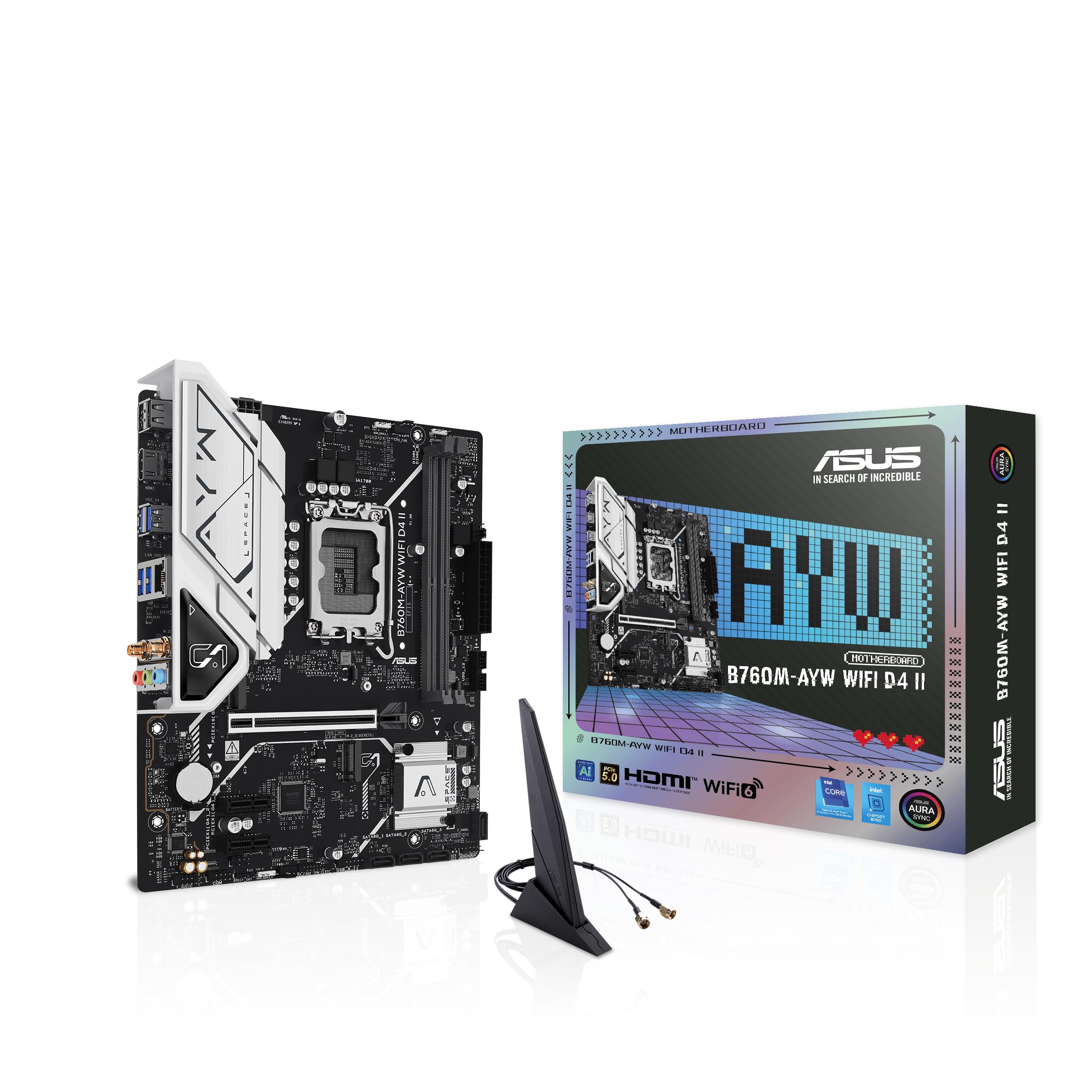
| ASUS B760M-AYW WiFi D4 IICompact Builds | Compact Intel board with Wi-Fi 6 | — (board) | — | LGA 1700 | Amazon |
| MSI PRO B760M-P DDR4 | Intel DDR4 board with four DIMMs | — (board) | — | LGA 1700 | Amazon |
| Intel Core i5-14400F | Efficient DDR4 gaming chip | 10 / 16 | 4.7 GHz | LGA 1700 | Amazon |
| Intel Core i7-12700KF | High-clock all-rounder | 12 (8P+4E) | 5.0 GHz | LGA 1700 | Amazon |
| AMD Ryzen 9 5900XT | Thread count for rendering | 16 / 32 | 4.8 GHz | AM4 | Amazon |
| Micro Center 12600KF + MSI B760-P WiFi DDR4 | One-box CPU and board bundle | 10 / 16 | 4.9 GHz | LGA 1700 | Amazon |
| HP ProDesk 600G4 Tower (Renewed) | Whole DDR4 tower, no assembly | 6 (i7-8700) | 4.6 GHz | LGA 1151 | Amazon |
Detailed Reviews
1. AMD Ryzen 7 5700X Desktop Processor
Our pick — 4.5+★ from 11,500+ verified ratings; the strongest balance of quality and price.
Eight Zen 3 cores that turn an aging AM4 board into a machine that feels new again.
Here is the number that lands hardest: 4.6 GHz max boost on 8 cores and 16 threads, with DDR4-3200 support baked in. That combination means your existing DDR4 sticks run at the speed AMD rates them for, with no fiddling and no memory mismatch to chase down. The 36 MB cache is the quiet hero — it is the on-chip scratch space the processor leans on before it has to reach out to system memory, so games and editing apps spend less time waiting around.
What wins people over is raw performance, and the upgrade path tells the story. Owners upgrading from a Ryzen 5 3600 call it a night-and-day jump, and buyers running competitive titles report 450 FPS+. Video editors report roughly 30% faster export times than their previous chip. It also runs cool for a chip this quick, with temperatures below 60°C reported often — though that depends on the cooler you bring, since none is in the box.
The catch is not the processor — it is what surrounds it. The CPU ships bare, so you need an AM4-compatible cooler, and older boards like an ASRock B450 need a BIOS update before the chip will even post. Do that first and the install is straightforward. X570 and B550 boards also open up PCIe 4.0 with this chip, which is the faster graphics-card connection standard, worth having if you plan a modern GPU upgrade later.
What earns it the top slot
- 8 cores and 16 threads at 4.6 GHz max boost, open up for overclocking.
- 36 MB cache keeps games and editing apps from stalling on memory calls.
- DDR4-3200 support means your existing memory runs at its rated speed.
- Runs cool enough that a modest air cooler keeps temperatures in check.
- open up PCIe 4.0 on X570 and B550 boards for a future graphics card.
What to plan around
- No cooler in the box — budget for one before you order.
- Older AM4 boards need a BIOS update before the chip posts.
- The open up multiplier only pays off if you actually tune it.
Reach for this if: you own an AM4 board and DDR4 memory and want the biggest single-part jump you can get.
Look elsewhere if: your board predates the 500-series chipsets and you would rather not flash a BIOS.
2. GIGABYTE B550M K AMD AM4 Micro-ATX Motherboard
Four memory slots and a Gen4 graphics lane for the price of a mid-range game.
Pair this board with the Ryzen 7 5700X and the memory math gets interesting. The GIGABYTE B550M K carries 4 DDR4 DIMM slots — twice the count on the ASUS B760M-AYW WiFi D4 II — and holds a rated 128 GB maximum against that ASUS board’s 96 GB. If you plan to grow from 16 GB today to 64 GB in a year without buying new sticks, that extra headroom is the whole point.
What buyers praise most is straight-up quality, and the layout earns it. A digital 3+3 VRM design (the power-delivery stage that feeds the CPU) uses chokes and capacitors rated to hold steady voltage, which is what keeps a 125 W chip from throttling under load. There are two M.2 slots for NVMe drives — one running PCIe 4.0, one PCIe 3.0 — plus four USB 3.2 Gen 1 ports. A 3600 chip with an RX 6650 XT and 16 GB of DDR4 makes a fair budget gaming build on this board, and the BIOS is plain enough that a first-timer can navigate it.
Know what you are buying: this is a no-frills board. There is no Wi-Fi, no RGB lighting, and the USB count runs thin if you hang a lot of peripherals off the back. One buyer found the plastic housing around a fan header snapped off with a bit of force, so treat the connectors gently. None of that changes the price-to-capability read — it is a deliberately stripped part, and the spec sheet says so.
Where the money goes: Into a 128 GB memory ceiling, two M.2 slots, PCIe 4.0 graphics and a 3+3 power stage — the parts that affect whether a build posts and stays stable.
Where it does not: Wi-Fi, RGB headers and rear USB ports are the trade. If you need wireless from the start, budget for an adapter or step up.
Best fit: a first build or a rebuild where you already own DDR4 sticks and want four slots to grow into.
Not the right call: you want Wi-Fi, addressable RGB and a full rear I/O panel without adding parts.
3. ASUS B760M-AYW WiFi D4 II Intel B760 microATX Motherboard
Two memory slots, one very fast networking stack, and a footprint that fits small cases.
The headline on this ASUS board is memory speed headroom: a rated 8000 MHz memory clock, against the GIGABYTE B550M K’s 3200 MHz. That does not mean you should buy 8000 MHz DDR4 — it means the board’s memory controller and trace layout can push a fast kit without falling over, and you get to choose your own ceiling. What you give up for it is slot count: 2 DIMM slots and a 96 GB maximum, half the slot count of the GIGABYTE.
For a compact Intel build it covers the bases well. The LGA 1700 socket takes 14th, 13th and 12th Gen Core chips, and the spec sheet confirms DDR4 memory support, which is exactly what keeps an older memory kit alive. Networking is the standout — Realtek 2.5Gb Ethernet plus Wi-Fi 6 on the board, so no dongle sits on your desk. It also carries PCIe 5.0 x16 and two M.2 slots, and the whole board measures 9.6″L x 8.3″W x 1.4″H, against the GIGABYTE’s 10.43″L x 2.12″W x 10.43″H — easy to seat in a small-form-factor case.
One buyer runs an i7-14700 and an RTX 5080 on this board for 4K gaming “without a sweat.” That is a heavy processor and a heavy graphics card on a microATX board, and it holds. The honest caveat is Linux: the wireless chipset on this board is a MediaTek variant that needs at least kernel 7.1 to work, so check your distro before you buy if that matters. Windows users have nothing to worry about there.
Build it around this if: you want Wi-Fi 6 and 2.5Gb wired networking without adding a card, and your case is small.
The limit to know: Only two memory slots, so decide your final RAM capacity up front — you cannot add a pair later without replacing.
Pick it for: a microATX Intel build where networking and a small footprint matter more than four RAM slots.
Skip it when: you run Linux on a kernel older than 7.1, or you want four DIMM slots to expand into.
4. MSI PRO B760M-P DDR4 ProSeries Motherboard

The Intel board that keeps four DDR4 slots alive when everyone else went DDR5.
Four DDR4 DIMM slots and a rated 128 GB maximum — that is the sentence that sells this board to anyone holding a pile of memory sticks. Its memory clock rating of 4800 MHz (OC) sits well above the ASUS B760M-AYW WiFi D4 II’s spec-sheet DDR4 baseline and gives a fast kit room to stretch. Dual-channel layout means you want matching pairs, which is how you get the bandwidth a B760 chipset can feed.
Setup is painless, installers report, and the board’s tuning features do real work: Core Boost manages the power delivery layout, Memory Boost cleans up signal integrity (the electrical quality of the memory signal) for stability, and the M.2 Shield Frozr heatsink stops an NVMe drive (a fast stick-shaped SSD) from overheating mid-transfer. A PCIe 4.0 x16 slot holds your graphics card, and Lightning Gen4 x4 M.2 holds your storage. Buyers keep coming back for stability under load and stable RAM overclocking.
Three things to know before you commit. The board has no VRM heatsinks (metal blocks that cool the power stages) — mounting holes are there if you want to add your own, and one long-time builder did exactly that. It also has no 2.5Gb LAN (a 2.5-gigabit wired network port), so a fast wired connection needs a PCIe card. And with an i5 chip and no discrete graphics card installed, this board shows a blank screen instead of an error — it needs a GPU to boot, so have one ready for the first start.
Why builders keep buying it
- Four DDR4 DIMM slots with a 128 GB ceiling — room to grow without buying new memory.
- Memory clock rating of 4800 MHz (OC) with stable RAM overclocking reported.
- M.2 Shield Frozr heatsink and PCIe 4.0 x16 for a modern graphics card.
- Surprisingly good onboard audio and stable MSI BIOS.
What you go without
- No VRM heatsinks from the factory — mounting holes are drilled for adding your own.
- No 2.5Gb LAN; a fast wired network needs a PCIe network card.
- Needs a discrete graphics card to boot on an i5 processor — no display without one.
Made for: an Intel build where you already own DDR4 sticks and want four slots plus a fast NVMe path.
Think twice if: you need onboard 2.5Gb networking or expect to boot without a graphics card on day one.
5. Intel Core i5-14400F Desktop Processor

Splits the work — six fast cores for games, four efficiency cores for everything else.
Ten cores, sixteen threads, up to 4.7 GHz, and 20 MB of cache. Those four numbers describe Intel’s performance hybrid design: six P-cores (performance cores, built for the heavy single-threaded work games and apps lean on) plus four E-cores (efficiency cores, built to handle background tasks at low power). The chip sits in LGA 1700 and supports both DDR4 and DDR5 memory, which makes it one of the few current-generation parts that can drop straight into a DDR4 build.
What buyers report matches the design intent. This chip runs everything — gaming, editing, browsing — with headroom to spare, and it holds 4.7 GHz when pushed. Temperatures sit around 60°C under a decent cooler and creep to about 75°C during heavy video editing. It is also an efficient part: low power draw means quieter fans and less heat in the case, and a modest aftermarket cooler handles it fine.
The one snag is in the box. The included RM1 thermal solution (Intel’s stock air cooler) is a two-piece push-pin design that takes real force to seat, and getting it on the board can eat a chunk of an evening. Do yourself a favor and set a modest air cooler aside for the build instead. One more thing: the F suffix means no integrated graphics, so a discrete graphics card is mandatory — the processor will not output a display on its own.
The value read: Ten cores and 4.7 GHz on a DDR4-compatible platform, running cool and quiet with an easy upgrade path.
The setup tax: The included stock cooler is fiddly to mount and needs a graphics card alongside it — factor both into what you buy.
Your pick if: you want a modern ten-core Intel chip on a DDR4 board with low heat and a quiet fan curve.
Pass it over if: you need integrated graphics — the F suffix rules that out entirely.
6. Intel Core i7-12700KF Desktop Processor 12 (8P+4E) Cores

Twelve cores that boost to 5.0 GHz and keep twelve browser tabs from slowing anything down.
Twelve cores split as eight P-cores and four E-cores, boosting to 5.0 GHz, with 25 MB of L3 cache and 11 MB of L2. Those two cache figures are the working scratchpads the processor uses before touching system memory — the larger they are, the less often a demanding app has to wait. The 3.60 GHz base clock gives you a floor when all eight performance cores are loaded at once, which is roughly what a heavy export session looks like.
For a mixed workload it barely breaks a sweat. One development rig ran a large Docker stack, VS Code, a pile of Chrome tabs and Baldur’s Gate 3 at once and held frame rates without stutter. In a studio setting it chewed through large client files and batch exports without waiting. Gaming and photo editing together run smoothly, and overclocking headroom is there whenever you decide to use it — the multiplier is open up.
The KF suffix is the deal detail. There is no integrated graphics on this chip, so a discrete graphics card is a hard requirement. It also runs warm under sustained load, and a strong cooler is not optional if you plan long renders or serious overclocking. If you want a fallback display output for troubleshooting, the near-identical K version carries integrated graphics for barely more — a point one buyer made plainly.
The case for twelve cores
- 5.0 GHz max boost with 8 P-cores and an open up multiplier.
- 25 MB L3 and 11 MB L2 cache keep demanding apps fed.
- Runs games, Docker stacks and browser tabs all at once without stutter.
- Supports both DDR4 and DDR5 memory depending on the board.
Brace for these
- Runs warm under heavy load — an adequate cooler is a must-have, not a nice-to-have.
- The KF has no integrated graphics, so you need a discrete card for display.
- open up multiplier only pays off if you plan to tune it.
Right for: a DDR4 build that does serious multitasking — dev work, editing and games in the same session.
Wrong for: a small case or a budget cooler; this chip needs airflow and a real heatsink.
7. AMD Ryzen 9 5900XT Desktop Processor

Sixteen cores and 72 MB of cache for the person whose exports take all night.
Rendering and 3D work get the most from this chip’s 72 MB of cache (fast on-chip memory) — more than double the Ryzen 7 5700X’s 36 MB. It also gives you sixteen cores, thirty-two threads, and 4.8 GHz max boost, plus DDR4-3200 support and PCIe 4.0 on the AM4 socket (AMD’s older CPU socket). That makes it the most cores you can put into an existing DDR4 board without swapping platforms.
Owners with heavy multithreaded workloads are the ones who feel the difference. Rendering, CAD, drone footage processing and 3D modeling all scale with thread count, and 16C/32T keeps that work parallel instead of queued. Owners mention a 64 GB DDR4-3200 kit running 1440p games at ultra settings, and 3D renders finishing noticeably faster than on an 8-core part. One comparison put the chip behind an Intel 13900K, close enough that the gap is barely noticeable in daily use.
It runs warm. No cooler comes in the box. AM4 boards with both 8-pin power connectors are recommended, and check the motherboard maker’s site for a BIOS update before you install, or you may end up chasing a no-POST.
What the thread count buys you: Multithreaded work that used to queue now runs in parallel — the difference between overnight exports and an afternoon.
What you have to feed it: A 125 W rated chip with no cooler included and a growing appetite under boost; cooling is part of the build budget.
Choose this when: you render, model or edit video on an AM4 board and want the biggest thread count that socket accepts.
Skip the upgrade if: you only game — the extra cores cost more and buy you nothing you will feel.
8. Micro Center CPU Motherboard 12600KF

A 10-core chip and a four-slot DDR4 board in one box, so the fit is decided for you.
Buying a CPU and a motherboard together removes the single biggest risk in a DDR4 build: whether the socket matches. This bundle pairs a 10-core, 16-thread LGA 1700 processor running up to 4.9 GHz with an ATX B760 board that supports four DDR4 sticks up to 128 GB. The board layers on Wi-Fi 6E, Bluetooth 5.3, Realtek 2.5G LAN, 2x M.2 PCIe 4.0 slots and 4x SATA 6Gb/s for storage. Power delivery: 12+1 Duet Rail with 8-pin + 4-pin CPU connectors and MOSFET thermal pads rated 7W/mK.
For a build starting from nothing, the bundle is a sensible shortcut. The board has a great upgrade path, and the chip handles work and gaming without complaint. The 12600KF is open up and overclockable, so there is headroom if you want to push it later. And the 20 MB cache plus 125 W base power is a known quantity in this price range.
The caveats are real but manageable. No CPU cooler is in the box, so plan for one. No screws or standoffs come with it either, and no driver disc — download the drivers from MSI instead. One reviewer noted a unit arriving with a blank white screen and no CMOS (the chip that stores basic settings), which is a defective board rather than a design flaw; that is what returns are for, so buy from a seller that stands behind it.
The convenience win: Socket compatibility is decided for you, and the bundle covers Wi-Fi 6E, 2.5G LAN, four DDR4 slots and dual M.2 in a single order.
The assembly reality: You still need a cooler, screws and standoffs, and a graphics card — those costs sit outside the bundle.
Worth it for: a first-time builder who wants the CPU and board matched before the box arrives.
Look past it if: you already own a compatible board, or you want a cooler and mounting hardware in the box.
9. HP ProDesk 600G4 Tower Desktop

The whole DDR4 machine, already put together, if you would rather not touch a screwdriver.
This is the option for the person who does not want to buy a processor at all. It is a complete Hexa-Core (six-core) i7-8700 tower with 32 GB of DDR4 RAM and a 1 TB solid-state drive, running Windows 11 and rated up to 4.6 GHz. It is a renewed unit from a Microsoft Authorized Refurbisher, not a new build. Ports are generous: six USB 3.0, four USB 2.0, one USB Type-C, two DisplayPort, audio in and out, RJ-45 Ethernet, and four internal SATA.
Speed is what buyers notice first. Programs open instantly because the SSD (solid-state drive) is the primary boot drive, and 32 GB of DDR4 lets you run photo editing, a dozen browser tabs, and a media server at once without the machine bogging down. Setup is straightforward — plug in the wireless adapters, run Windows Update, and go. As a Plex media server with an added 8 TB drive, it performed without complaint.
Here is where you need to be a little PC-savvy. The rear outputs are DisplayPort only, no HDMI, so a monitor needs an adapter. The Wi-Fi is delivered via a plug-in dongle rather than built into the board, and those dongles disconnect from time to time — a wired Ethernet connection is the steadier choice. It also does not include a Bluetooth dongle, and internal expansion room is limited. If you plan to add drives, check the SATA cable count before you buy.
What you get assembled: Six cores, 32 GB of DDR4, a 1 TB SSD and Windows 11 already installed — no build, no BIOS, no drivers to chase.
What you should know: DisplayPort output only, Wi-Fi by dongle that can drop, and limited room to add hardware inside the case.
A fit for: a home office or media server where you want DDR4 performance without assembling anything.
Not for: someone expecting HDMI out, built-in Wi-Fi, or space to add more than one drive.
Know the Specs
Socket and chipset compatibility
The socket is the physical connector the processor drops into. AM4 covers AMD’s Ryzen chips with DDR4-3200 support; LGA 1700 covers Intel’s 12th, 13th and 14th Gen Core processors and supports both DDR4 and DDR5 depending on the board. A chip from one socket will not fit the other. Check the socket on your motherboard before anything else — it is the single spec that decides whether a part is even an option.
Core count versus boost clock
Cores are the processor’s workers; threads are the task queues each can hold. More cores help when the work splits up — rendering, video export, running many apps at once. Max boost clock is the highest speed a single core can reach, and it is what makes games feel responsive. Eight fast cores and sixteen threads at 4.6 GHz is a different tool than sixteen cores at 4.8 GHz, and the right one depends on what your day looks like.
Cache size
Cache is the processor’s own scratch memory, measured in megabytes. A chip with 36 MB or 72 MB can keep more of the data it is working on close at hand, so it reaches out to system memory less often. This is why a higher-cache chip feels smoother in editing and 3D work even when clock speeds look similar — it is a working buffer, and bigger buffers mean fewer stops.
Memory slots and capacity
Memory slots are how many DDR4 sticks a board can accept, and capacity is the total memory it can address. Four slots and a 128 GB ceiling let you start with two sticks today and add two more later. Two slots and a 96 GB ceiling mean you pick your final capacity up front. Neither is wrong — the question is if you want to grow without replacing what you already bought.
Common Questions
Can I put a Ryzen 7 5700X into my existing AM4 board without buying a new motherboard?
Is DDR4 CPU performance still good compared to DDR5?
Does the Intel Core i5-14400F come with a cooler?
What does the KF suffix on the i7-12700KF mean?
Do I need a BIOS update for the Ryzen 9 5900XT on my AM4 motherboard?
How many DDR4 memory slots should my motherboard have?
Will a B760 motherboard work with my 12th Gen Intel processor?
Does the HP ProDesk 600G4 come with built-in Wi-Fi?
How much RAM can the MSI PRO B760M-P DDR4 handle?
The Bottom Line
Building on an existing AM4 board with DDR4 in it? The ddr4 cpu to reach for is the AMD Ryzen 7 5700X — 8 cores, 16 threads, 4.6 GHz boost, and 36 MB of cache that make your current memory feel new again. If your work is rendering or 3D modeling, the AMD Ryzen 9 5900XT doubles the thread count to thirty-two and doubles the cache to 72 MB on the same socket. And if you would rather skip the build entirely, the HP ProDesk 600G4 Tower arrives with 32 GB of DDR4 and a 1TB SSD already installed.
Starting fresh on Intel instead? The Intel Core i5-14400F is the honest starting point — ten cores at 4.7 GHz, DDR4 support, and a cooler in the box. Pair it with the MSI PRO B760M-P DDR4 for four memory slots and a 128 GB ceiling. Buy the processor first and the board second; that order keeps you from painting yourself into a socket.
How we choose
We do not accept paid placement. Every pick is matched to a real buyer and a real use-case; we do not hands-on test units.
Sources
Specifications: manufacturer listings and product documentation. Review insights: verified customer reviews, as of October 2026. Pricing: not shown on this page (it changes often); check the current price via the retailer link.
As an Amazon Associate, Aappliancez earns from qualifying purchases. This does not affect which products we feature.