Disclosure: Some links in this post are affiliate links. As an Amazon Associate I earn from qualifying purchases, at no extra cost to you. Learn more
Specs are compiled from manufacturer listings and verified buyer reviews and can change over time — please confirm the key details on the product page before buying.
The right case decides whether your graphics card, cooler and power supply actually fit — and whether the glass looks as good in your room as it does in the photos. Buyers of custom PC cases usually get stuck on the same two questions: will my graphics card actually fit, and will the glass look as good in the room as it does in the photos? This guide answers both, pick by pick.
This guide is built by comparing the manufacturers’ published specifications and the patterns across verified customer reviews, so you get each pick’s real strengths and trade-offs instead of marketing spin.
Below are seven custom PC cases, each checked against its published GPU clearance, radiator support and included fan count.
Top Picks


How To Choose The Best Custom PC Cases
A case does not make your PC faster, but it decides whether your graphics card, cooler and power supply physically fit. What it does is decide whether your graphics card, your cooler and your power supply physically go in — or whether you are sending parts back. That is why the numbers on the box matter far more than the logo on the front panel.
Measure your graphics card before you fall for the glass
Graphics card clearance is the length, in millimeters, your case gives a card before it hits the front or a fan. A showcase case with beautiful panels is useless if your card is longer than the listed clearance. Write your card’s length down first, then shop only among cases that beat it with room to spare.
Match your cooler to the radiator support
An all-in-one liquid cooler (a sealed loop with a pump and a radiator) needs a mounting spot the right size. Cases list that as radiator support — commonly 360mm or 420mm, where the number is the length of the radiator. If you plan to cool a hot gaming chip, buy a case that lists the radiator size you want at the top or the side, not just at the front.
Think about where the air actually goes
Glass panels trap heat unless fans push air through on purpose. Look for cases that list pre-installed fans and confirm how many fans the chassis can hold in total. A case that ships with three or more fans saves you a separate fan purchase, while a bare case means you budget for fans on top of the case itself.
Weigh the footprint against your desk
Full towers and wide dual-chamber cases eat desk space. Check the listed dimensions against the gap you actually have, especially depth. If the case lives on the floor or in a dorm room that gets packed up twice a year, a lighter mid tower will treat you better than a steel-heavy showcase box.
Side-by-Side Comparison
| Model | Best For | Form Factor | GPU Clearance | Included Fans | Amazon |
|---|---|---|---|---|---|
| MONTECH XR Panoramic★ Best Overall | Showcase builds on a budget | Mid Tower | 420 mm | 3 | Amazon |
| LIAN LI O11D EVO RGBBest For Water Cooling | Big E-ATX water builds | Mid Tower | 455.7 mm | — | Amazon |
| CORSAIR 4000D Frame | Swappable, modular cooling | Mid Tower | 360 mm | — | Amazon |
| MUSETEX Y6 | White 270° aquarium builds | Mid Tower | 400 mm | 6 | Amazon |
| Antec Flux Pro | Maximum airflow and storage | Full Tower | — | 6 | Amazon |
| Thermaltake Tower 600 | A build nobody else owns | Mid Tower | 400 mm | — | Amazon |
| NZXT H9 Flow RGB+ | Plug-in RGB from day one | Mid Tower | — | 7 | Amazon |
Detailed Reviews
1. MONTECH XR ATX Gaming PC Case
Our pick — 4.5+★ from 750+ verified ratings; the strongest balance of quality and price.
Two sheets of glass and three fans already in place — the build that shows itself off.
If you want a case that turns the side of your desk into a display window without a premium sticker, this is the one to beat. Two tempered glass panels — the front and the side — mean the graphics card, the cooler and the lighting all stay visible. A wood-grain strip around the front I/O adds a warm accent that stops the black chassis from looking like every other box.
The clearance figures are what actually earn it the top spot. It fits graphics cards up to 420 mm, CPU coolers up to 175 mm tall and power supplies up to 230 mm long. Compare that with the Thermaltake Tower 600 and the MUSETEX Y6, both capped at 400 mm of card clearance. For a card in the three-fan size class, that extra room is the difference between a snug fit and a fight.
Cooling scales with you. Three 120 mm ARGB PWM fans ship installed, and the two side fans use a reverse-blade design — the blades are flipped so the lit face points into the room instead of showing the support frame. The chassis holds up to nine fans, or a 360 mm radiator up top, so a later liquid-cooling upgrade does not require a new case. Magnetic dust filters on the top, side and bottom lift out for cleaning.
What earns it the crown
- 420 mm of graphics card clearance with 175 mm for the CPU cooler
- Three ARGB PWM fans included, room for nine total
- USB-C plus two USB 3.0 ports on the front panel
- Magnetic dust filters on three faces for quick upkeep
Where it asks for patience
- Once a full ATX board, an all-in-one cooler and a large card go in, the interior gets busy
- The side fan noise is noticeable if you chase a silent build
Reach for this if: you are building a mid- to high-end gaming rig that deserves to be seen.
Think twice if: you want absolute silence — the stock fans spin audibly in a quiet room.
2. LIAN LI O11D EVO RGB E-ATX Case
A pillarless window, two RGB strips and enough depth for radiators stacked two deep.
Take the front support pillar out and the glass becomes one uninterrupted pane — that single move is why this case has a following. Two 1.5 mm L-shaped RGB strips sit at the top and bottom of the glass panels, and they run off the case’s own lighting controls.
Now the numbers. Graphics card clearance is 455.7 mm across seven expansion slots, and this is where it beats the MONTECH XR Panoramic — 455.7 mm versus 420 mm — so a card the Montech refuses will still drop in here. Fan size steps up too, at 14 cm versus the Montech’s 12 cm, and internal bays come in at 2 against the Montech’s 3. This is E-ATX territory: extended boards fit, and the motherboard tray has two height positions so you can trade cooler height against fan placement.
Cable management is the quiet triumph. Velcro straps and dual-layered clips bundle thick and thin cables into one manageable run, and the power supply bracket protrudes 15 mm out from the chassis to give you extra room behind the board. The catch is weight. At 32.6 pounds this is roughly double the 14.5-pound MONTECH XR Panoramic, so it is a desk-and-stay case, not a LAN-party one. Buyers also report one build snag: mount a 2.5-inch drive behind the motherboard tray with the supplied rubber stoppers and the back panel’s top latches will not engage. Leave that spot empty and it closes cleanly.
The cooling headroom you pay for: support for nine fans plus a thick radiator, and the owners pushing top and side radiators at once report no thermal trouble under load.
The honest catch: it is the heaviest case here by a wide margin, and that rear drive mount trick can leave the back panel sitting proud.
Pick this one if your build centres on liquid cooling and you want the glass to disappear.
Skip the rear drive mount if you value a perfectly flush back panel.
3. CORSAIR 4000D Frame ATX PC Case

The case that lets you swap the front panel, the tray or the I/O — like a real custom build.
Most cases ask you to commit at checkout. This one is modular by design: the motherboard tray, the front I/O panel and other sections come off or swap for alternatives, so the chassis can change as your parts do. The steel front panel is perforated in a Y-pattern in three dimensions to let air through with as little resistance as possible.
Then there is the InfiniRail system. It is a steel rail you slide along the front or roof, and you mount fans wherever you stop — up to 200 mm fans up front and 140 mm in the roof. The internal side panel near the motherboard tray does double duty: leave it on as a cable cover, or take it off and mount fans to the side for extra cooling. Three mounting locations take 360 mm radiators, front, roof and side, and the chassis will hold up to twelve 120 mm fans at once.
The trade-off is real and it is the most-discussed point in its own feedback. The steel build quality splits opinion — plenty call it sturdy and easy to work in, but the recurring gripe is that some panels feel flimsy next to a heavier case like the MONTECH. There is also a fit conflict worth knowing before you buy: you cannot run 200 mm front fans and a side-mounted 280 mm all-in-one cooler together.
Where it shines: airflow through the perforated front and the freedom to keep re-configuring fans without buying a new chassis.
What to plan around: panel rigidity and that fan-versus-radiator clearance clash — decide your cooling layout before you order fans.
This suits tinkerers who change their cooling setup more than once a year.
Look elsewhere if you want a heavy, vault-solid steel shell — this one prioritises flexibility.
4. MUSETEX Y6 ATX PC Case

White glass on two sides and six lit fans already spinning — a display case, not a black box.
You get six ARGB fans (addressable RGB, meaning each fan’s lighting is controlled individually) already installed, so you skip buying them separately and skip a build evening of wiring. That means no separate fan purchase and no evening spent wiring a controller. The white finish breaks from the usual black tower. Two tempered glass panels (toughened glass side windows) give a 270° view, wider than a standard single-window case, so your hardware and any figures you display inside stay visible from two angles.
Clearance is honest for the size. Graphics cards go to 400 mm, CPU coolers to 176 mm tall, power supplies to 200 mm, and the roof takes a 360 mm liquid cooler. The front I/O runs a USB 3.2 Type-C port plus USB 3.0 and an HD audio jack, which keeps modern devices plugged in without an adapter. Magnetic dust filters sit at the top and bottom.
Two things need planning. Wiring is the most-discussed subject in the feedback — the six-pin fan connectors come with short adapter branches, so group the fans together and route cables before the motherboard goes in. Owners who built around a Micro-ATX board report a much smoother time than those using a full ATX board, where the bottom cable run gets cramped. Fan performance splits opinion as well, with the RGB lighting quality being the point that divides people. Neither is a reason to walk away — it is a reason to plan the cable run first.
Why the white build crowd likes it
- Six ARGB PWM fans included, so no separate fan purchase
- 270° dual glass view with a USB-C front port
- 400 mm graphics card room and 360 mm roof radiator support
- Magnetic filters top and bottom for easy cleaning
Where the build gets fiddly
- Short fan adapter branches reward planning your wiring order
- Bottom cable routing is tight with a full-size ATX board
Worth it for anyone chasing a white showcase rig who wants the lighting sorted on day one.
Pair it with a Micro-ATX board if you want the easiest cable run.
5. Antec Flux Pro E-ATX PC Case

A full tower dressed like furniture, with ten drive bays and six fans already mounted.
Metal, glass and walnut wood meet in one chassis here, and the result looks less like a gaming tower than a piece of living-room furniture. Venting runs in multiple directions, the top, front and power-supply shroud brackets all lift out, and the chassis can hold up to twelve fans at once. Six PWM fans come pre-installed: three Tranquil 140 up front, a pair of P12R reverse fans on the power-supply shroud, and one Tranquil 140 at the rear.
Two features set it apart from every other case on this list. The iShift mount turns your power supply 90°, which frees up room for cables. A small display on the case reads out CPU and GPU temperatures (your processor and graphics card heat), so you can watch them from across the room instead of opening a monitoring app. It also fits a 420 mm radiator and a 360 mm radiator (liquid-cooling panels) at the same time, which is a lot of cooling for one chassis. Storage is the other number most cases cannot match: ten internal bays, against the two on the LIAN LI O11D EVO RGB and the CORSAIR 4000D Frame.
The honest cost of all that is size. This is a full tower, and at 29 pounds it stays where you put it. Front panel cables run slightly short on some motherboard layouts, so check your board’s header positions before you commit. The temperature display also needs Antec’s iUnity software to work, and plenty of builders simply leave it off rather than install another program.
The case for it: furniture-grade looks, ten drive bays, six fans and dual radiator support from the start.
The trade you accept: full-tower footprint and a temperature readout that wants extra software to function.
Go here if your build includes a big radiator and a pile of drives.
Not for small desks or anyone who moves their PC around.
6. Thermaltake Tower 600 ATX Case
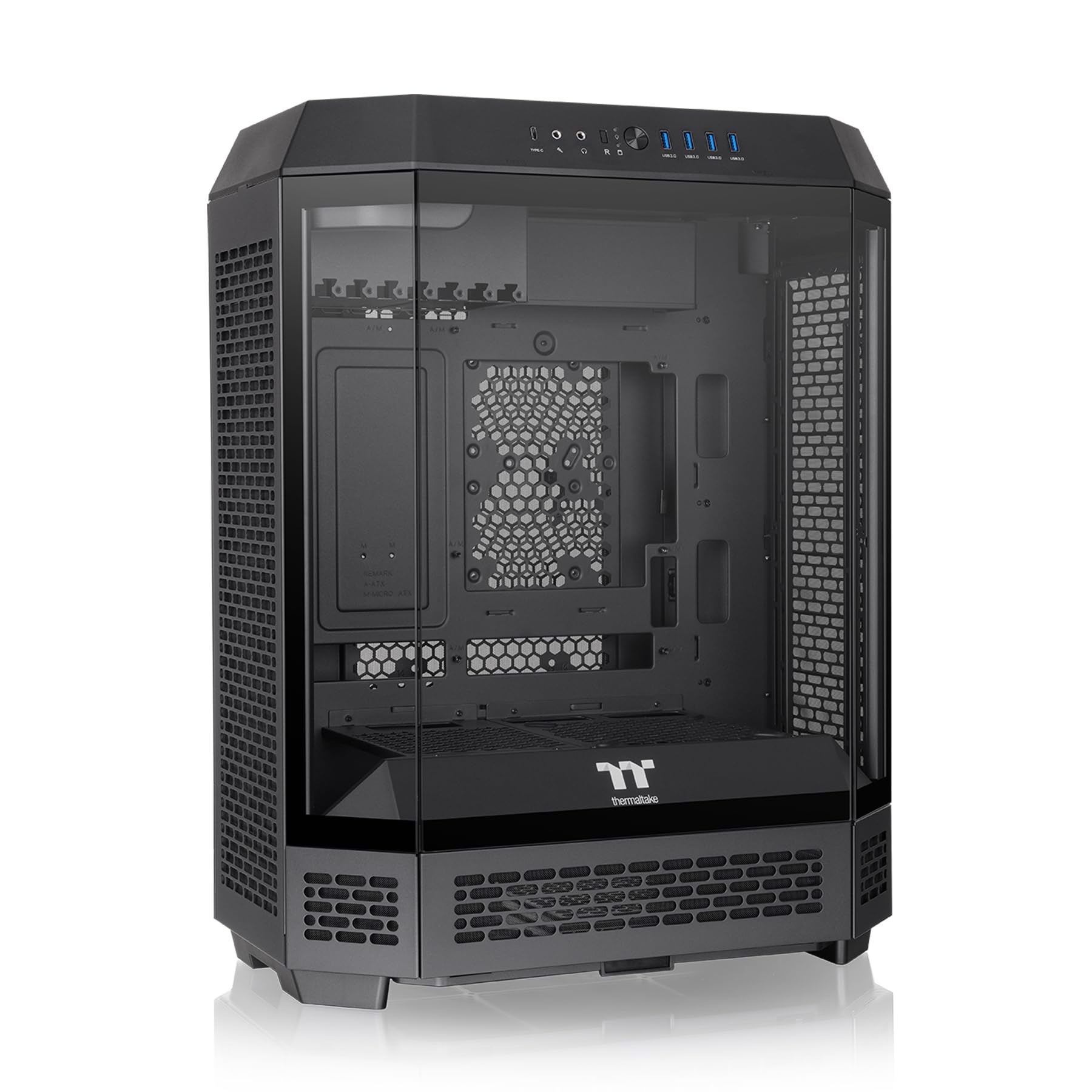
An octagon standing on its end, with the motherboard turned sideways and glass on three faces.
The octagonal body and three glass panels make it the most distinctive chassis on this list. The octagonal body carries three tempered glass panels (toughened glass windows) that pop off without tools. The motherboard sits turned 90°, which puts your ports at the top and makes the inside look completely different from a standard tower.
The rotated layout pays off in one specific way: gravity pulls down the length of the card instead of across it, which is what makes the rotational PCIe slots and floating graphics bracket useful for a heavy card. Clearance runs to 400 mm for graphics cards, 210 mm for CPU coolers, and the chassis takes up to nine fans or a 420 mm radiator. It also supports hidden-connector motherboards such as ASUS BTF, MSI Project Zero and Gigabyte Project Stealth for a near cable-free front. An optional stand lets you lay it horizontally.
Know what you are signing up for. Buyers report mixed views on build quality and cable management. The standout complaint is cramped space around the power supply and tight clearance at the rear ports, so a modular power supply (one with detachable cables) with side-facing connectors makes life far easier. Rear Wi-Fi antennas may not fit where you expect. The top fan position can block the rear I/O (the port panel) unless you remove the thumbscrew tray, and one builder had to trim the case to fit a top cooler. Plan the power supply and rear port clearance first, because both are tight.
The showpiece payoff: three glass panels, a sideways board and rotational PCIe slots make a build that looks like nothing else on the shelf.
Measure twice: rear port clearance and power supply room are the tight spots, so plan those two areas first.
Choose it if you want your PC to be the talking point of the room.
Be ready for a fussier assembly than a plain rectangular tower.
7. NZXT H9 Flow RGB+ Dual-Chamber ATX PC Case, White

Seven RGB fans, a control hub and wraparound glass — lighting solved before you open the box.
If you want synced lighting without shopping for fans or wiring a controller, this case ships with both done. Seven RGB Core fans come installed: two F420 single-frame fans up front and one F120 in the rear. An NZXT Control Hub ties them together, so fan curves and lighting sync from one place through NZXT’s CAM software. The glass wraps around in one smooth pane.
The dual-chamber layout separates your main components from the power supply and drives, which tidies the cable side and helps airflow. Perforated steel panels and angled front-right fans move air through, and the chassis fits up to nine 140 mm fans across the top, front-right and bottom plus one 120 mm at the rear. Radiators go to 420 mm at the top or the front-right. It also takes rear-connecting boards like ASUS BTF and MSI Project Zero.
Weight and footprint are the honest cost. At 13,400 grams it is a heavy, wide case, and owners regularly note how much desk it occupies. There is also a power detail worth checking before you build: the control module needs its own PCI-e cable beyond what your graphics card draws, and without it the PC will not power on. Pair it with a modular supply and a spare cable and the build goes smoothly. One more note — the included fan controller works with NZXT fans, so mixing in another brand’s fans means adding a separate controller.
What the lighting-first buyer gets
- Seven RGB fans and a control hub pre-installed
- Dual-chamber layout with extra-wide cable channels and built-in Velcro
- Up to 420 mm radiators at the top and front-right
- Back-connect motherboard ready
What you should know first
- Big desk footprint and substantial weight
- Needs a spare PCI-e cable for the control module
- The included hub is built for NZXT fans
The pick for you if you want a synced, glowing build with zero fan shopping.
Check your power supply for a spare PCI-e connector before this arrives.
Know the Specs
Three numbers on a case listing decide whether your parts fit. Learn to read them and the shopping gets simple.
GPU clearance (what it means for your card)
The longest graphics card the case will accept, measured in millimeters from the rear slot to whatever the card hits first. Measure your card and compare it against this figure before anything else. A card longer than the listed clearance simply will not seat, no matter how good the glass looks. Clearance varies widely between cases in this class, so pick a case that lists a number longer than your card with a little space left over.
Radiator support (what it means for your cooler)
An all-in-one liquid cooler mounts its radiator to the case, and the number listed — 360 mm or 420 mm — is the radiator’s length. A case that only lists a 240 mm spot will not take a larger radiator without modification. If you plan to add liquid cooling later, buy a case whose listed radiator size matches the cooler you want at the position you want it, top, front or side.
Form factor (what it means for your board)
A mid tower takes ATX, Micro-ATX and Mini-ITX boards, while a full tower adds E-ATX, which is the larger extended board size. Buy a case whose compatible list includes your board’s size. A board that is too big for the chassis will not mount at all, and a much smaller board in a huge case leaves awkward empty space that hurts the look.
Fan count and airflow direction (what it means for heat)
Pre-installed fans turn a case into a working cooler on day one, and the total fan capacity shows how far you can expand. Watch the direction as well: reverse-blade fans push air the opposite way to standard blades while showing their lit face inward, which is why so many showcase cases use them on the side. Pair intake fans with exhaust fans so air actually travels through the glass box instead of swirling inside it.
Common Questions
How do I know if my graphics card will fit in a custom PC case before I buy it?
Does a tempered glass case cool worse than a mesh-front one?
Can I put a 360mm liquid cooler in a mid tower case?
What is a reverse-blade fan and why do showcase cases use them?
Do I need a separate fan controller for the RGB fans that come with a case?
What is a dual-chamber case and does it help cable management?
Can I use a hidden-connector motherboard in these cases?
How much desk space does a full tower take compared with a mid tower?
Are magnetic dust filters worth having on a glass case?
Will a heavy graphics card sag in a normal tower layout?
The Bottom Line
For most builders, the custom pc cases winner is the MONTECH XR Panoramic, because it pairs 420 mm of graphics card clearance and three included ARGB fans with two glass panels that show the build off. If liquid cooling is your priority instead, the LIAN LI O11D EVO RGB gives you 455.7 mm of card room and nine-fan support behind a pillarless window. And for a white showcase that lights up on day one, the MUSETEX Y6 arrives with six fans already installed.
How we choose
We do not accept paid placement. Every pick is matched to a real buyer and a real use-case; we do not hands-on test units.
Sources
Specifications: manufacturer listings and product documentation. Review insights: verified customer reviews, as of October 2026. Pricing: not shown on this page (it changes often); check the current price via the retailer link.
As an Amazon Associate, Aappliancez earns from qualifying purchases. This does not affect which products we feature.