Disclosure: Some links in this post are affiliate links. As an Amazon Associate I earn from qualifying purchases, at no extra cost to you. Learn more
Specs are compiled from manufacturer listings and verified buyer reviews and can change over time — please confirm the key details on the product page before buying.
If you take card payments at a counter, a market stall, or a food truck, the machine in your hand decides how fast the line moves. The right one clears a chip card in about two seconds and keeps printing receipts when your Wi-Fi drops. The wrong one freezes mid-transaction and leaves you apologizing to a customer holding a card. This guide breaks down which countertop and handheld terminals are worth the space on a small business counter.
This guide is built by comparing the manufacturers’ published specifications and the patterns across verified customer reviews, so you get each pick’s real strengths and trade-offs instead of marketing spin.
You will see how processing contracts, battery life, and printer paper size change your daily routine before you commit. The picks below cover countertop terminals, pocket readers, and handheld units built around one clear winner among the best Credit Card Machine for Small Business.
Top Picks


How To Choose The Best Credit Card Machine for Small Business
Most first-time buyers think the machine is the purchase. In practice, you are buying two things at once: the terminal sitting on your counter, and the processing account that runs the money through it. Get the processing account wrong and a perfectly good terminal becomes a paperweight on your shelf.
Check the processing account before the hardware
Some terminals arrive locked to a specific processor. A Clover Compact, for example, requires a new merchant processing account through Powering POS, which means it cannot run on a different processor no matter how good it looks. Before you buy, confirm which processor your machine will accept and whether you already have an account that fits it. If you already have a bank or payment company, a terminal that works with that processor saves you a week of paperwork.
Match the machine to where you actually take payment
A fixed checkout lane and a food truck window are two different jobs. Countertop units plug in and stay put, so you never think about battery. Portable units carry their own battery and let you walk a table or a stall. A handheld with a built-in receipt printer suits a market trader who needs a paper slip on the spot. A pocket reader suits someone who only needs to tap a card and let the customer get a digital receipt. Decide where the money changes hands first, then pick the shape.
Think about connectivity and what happens when it drops
Wi-Fi is the first choice for most small outfits, but it is also the first thing to fail in a crowded room. Options here cover 4G cellular, Bluetooth, and dual-band Wi-Fi, and some units can store and forward transactions, meaning a sale still goes through even when the connection is down. If your location has patchy signal, a machine with its own cellular connection or an offline payment mode is worth the extra weight.
Weigh the paper before you commit
Built-in thermal printers use heat instead of ink, so you never buy cartridges. The catch is paper width. A 58mm roll is the common standard on handheld units, and it fits a standard thermal roll you can reorder cheaply. Terminals with more compact, flatter casings sometimes only accept the shorter rolls, which means more frequent changes during a busy shift. If you print a receipt for every sale, a narrow roll means changing paper mid-shift on day three, not day thirty.
Side-by-Side Comparison
| Model | Best For | Power Source | Receipt Printing | Weight | Amazon |
|---|---|---|---|---|---|
| Square Terminal★ Best Overall | Countertop all-rounder | Built-in rechargeable battery | Yes — built in | 14.7 ounces | Amazon |
| Verifone VX520 Dual CommBudget Counter Pick | Cheap counter backup | Lithium ion battery required | Yes — small rolls only | 2.5 pounds | Amazon |
| Clover Compact TerminalPlug-In Counter Station | Plug-in counter lane | Plug in — not battery | Not stated | 5 pounds | Amazon |
| MSR X6 Bluetooth Reader | Reading and writing swipe cards | USB / Bluetooth | No | — | Amazon |
| Bisofice 4G Handheld PDA | Warehouse and delivery routes | 3000mAh rechargeable battery | Yes — 58mm width | 0.57 kg | Amazon |
| SumUp Solo + Printer | Free-SIM mobile payments | Reader plus printer battery pack | Yes — printer included | 16 ounces | Amazon |
| H10 Android 14 Terminal | All-day mobile selling | 6000mAh built-in battery | Yes — 58mm thermal | 345 grams | Amazon |
| Clover Go Contactless Reader | Bluetooth tap-to-pay add-on | Reader battery | No | 4.8 ounces | Amazon |
| Square Handheld | Tableside and line-busting | Long-lasting battery | No — pocket reader | 2.11 ounces | Amazon |
Detailed Reviews
1. Square Terminal
Our pick — 4.5+★ from 4,000+ verified ratings; the strongest balance of quality and price.
The one-device checkout that rings up, takes the payment, and prints the slip without a second box.
This is the machine for a small shop or counter where one person does everything. You ring up the sale, take the card, and hand over a printed receipt from the same unit. Chip cards clear in about two seconds, so the queue moves instead of shuffling. It runs cordlessly on a built-in rechargeable battery designed to last all day, which means you can move it from the counter to a table without hunting for a socket.
What wins people over is how little setup stands between you and your first sale — buyers regularly report being up and running in under five minutes. The receipt printer earns its own praise for clean, readable output. There is no long-term contract and no hidden fees, and your money is available as soon as the next business day, which matters when you are watching cash flow week to week. Set beside the Clover Compact Terminal at 12 x 8 x 6 inches, this Square unit measures 5.6 x 3.4 x 2.5 inches, so it sits on a narrow counter where a bulkier terminal will not.
The trade-off is the shape of the business it suits. This is a Square-ecosystem device, so you are choosing Square as your processor when you plug it in. If you already have a processing account elsewhere and want to keep it, a no-account-required reader fits you better. For everyone else, one device, one rate, and next-day money is hard to argue with.
The Everyday Strengths
- Rings up, accepts payment, and prints a receipt from one unit — no extra hardware on the counter.
- Chip cards process in about two seconds, keeping the line moving.
- Runs cordlessly on a built-in battery designed to last all day.
- No long-term contracts and funds available as soon as the next business day.
Where It Asks Something Of You
- It is a Square-ecosystem terminal, so you are committing to Square for processing.
- Not the pick for a business already locked into a different processor.
Reach for this if: you want one countertop device that takes the card and hands back a printed slip on day one.
Look elsewhere if: you already have a merchant account you intend to keep and need hardware that respects it.
2. Verifone VX520
The familiar grey countertop workhorse for shops that already know their processor.
Buyers in this tier are usually trading up from an aging terminal rather than starting fresh, and that is exactly where the VX520 lands. It brings a smart card reader, an ergonomic shape, and a cable management system that keeps the counter tidy. At 2.5 pounds it sits lighter on the desk than the 5-pound Clover Compact, and it works fine over a standard internet line — the review pages mention it running happily on COX Communication service.
The one-week caution is real but small in context. One buyer’s EMV reader failed after two weeks and the seller replaced it in a day — a fair warning that the chip interface is the weakest link, not the machine’s core. The recurring gripe is the paper. The flatter casing only takes smaller rolls, which means more frequent changes on a busy day, and the default receipt prints a tip line most retail counters do not want.
This machine’s real strength is a low price of entry for a proven countertop design. But some buyers report spending two hours on the phone with their processor only to find the unit locked — so before you unwrap it, confirm with your processor that they can program it. Confirm that first, and you get a dependable countertop terminal for very little outlay.
The honest read: functionality is clearly the strongest suit here — buyers keep coming back to the fact that the thing just works once it is set up, and setup itself takes around ten minutes with no training.
Set it up right: the value proposition only holds if your processor can program the terminal and the EMV feature matches what you need this year.
Who this suits: a counter with an existing processor relationship looking for a low-cost, familiar grey terminal.
One real limitation: the compact casing only accepts smaller paper rolls, so plan on swapping rolls more often.
3. Clover Compact Payment Terminal
A workstation terminal that talks to a Clover Mini or Station across the room.
If your counter already runs Clover hardware, this is the natural second screen. The Compact syncs with a Clover Mini or Station through the Clover Dashboard and cloud network, so transactions, sales tracking, and business data stay in one view across both devices. It is a plug-in unit rather than a battery one, which suits a fixed lane where the machine never leaves the desk. The package dimensions come in at 12 x 8 x 6 inches and the unit weighs 5 pounds, so plan a permanent spot for it.
Owners mention the payment flexibility is the draw — as one review page puts it, “my clients love that they can swipe, tap, or insert card.” Onboarding service draws praise too: Clover guided one buyer through a process they described as very tech heavy made very simple. When you open the account, ask about the rate match guarantee.
Here is the catch, and it is worth reading twice: the listing says it requires a new merchant processing account through Powering POS and cannot be used with a different processor. That single sentence causes most of the frustration on this page — buyers who assumed they could plug it into an existing processor found it could not be activated. Confirm your intended account before ordering and this becomes a clean, capable countertop terminal. Ignore that line and it becomes an expensive shelf ornament.
Best fit in the range: a fixed checkout lane already inside the Clover world, where syncing with a Mini or Station actually saves you bookkeeping time.
The verdict: a tidy plug-in terminal for a Clover-based counter that wants one synced view of every sale.
The catch to respect: it demands a new processing account through Powering POS and will not run on another processor.
4. MSR X6 Bluetooth Magnetic Swipe Card Reader Writer Encoder

A pocket-sized swipe tool that reads, writes, and wipes magnetic stripe cards over Bluetooth.
This one is not a checkout terminal, and pretending otherwise will confuse you. It is a magnetic stripe reader and writer for someone who needs to encode or clear swipe cards — a gift card program, a loyalty scheme, or an ID setup. It works across Track 1, 2, and 3, handles both hi-co and lo-co cards in the 300 to 4000 oe range, and complies with ISO 7811-6 standards. It connects by Bluetooth or USB and runs on Windows, Mac, Android, and iOS.
The format is the selling point. At 5.5 inches long and 1.6 inches wide with a 1.6-inch height, it slips into a bag or a drawer, and the wireless Bluetooth interface means no dongle hanging off a laptop. Free desktop software covers Windows and Mac, and the EasyMSR app covers Android and Apple phones and tablets.
Budget one thing before you buy: the phone and tablet app is a paid download on Android and iOS, marketed at about for EasyMSR, so factor that in if you plan to drive it from a phone rather than a laptop. Buyers rate it well for what it does. If your business takes chip and tap payments at a counter, skip this entirely — it is a specialist tool, not a payment terminal.
Know what you are buying: an encoder for magnetic stripe cards, not a device that accepts customer payments at checkout.
The hidden line item: desktop software is free, while the mobile EasyMSR app on Android and iOS is a paid purchase.
Pick it up if: you run a gift card or swipe-card program and need to read, write, and erase tracks yourself.
Leave it alone if: what you actually need is a terminal to take customer card payments.
5. Bisofice 4G Handheld PDA POS

Built for warehouse aisles and delivery routes, not for a counter with a queue.
The H10S is a handheld data terminal that happens to print. It runs Android 13 on a 4-core MT processor with 2GB+16GB of memory, on a 5.5-inch HD+ screen. A 5MP rear camera with autofocus and flash reads both 1D and 2D barcodes, so stocktaking and scanning are handled in the same device you clock sales on. The paper warehouse holds 58mm thermal rolls at 203 dpi, and it ships with a roll already in the box.
Connectivity is where this one separates from a plain countertop unit: it handles 4G, 3G, and 2G, plus Wi-Fi and Bluetooth, so a route driver or yard worker is never waiting for a hotspot. Power comes from a 3000mAh built-in rechargeable lithium battery aimed at extended working hours. Against the H10 Android 14 terminal elsewhere on this list, this unit runs the older Android 13 release, which is the honest reason to weigh the two side by side before ordering.
The trade-off is the role itself. This is a scanner-first tool for inventory, logistics, and manufacturing floors — the 2GB of memory reflects that focus. If your checkout is a fixed counter and a customer standing there with a card, a dedicated payment terminal is the cleaner choice. Take this one when your business moves.
Built For The Road
- 4G, 3G, 2G, Wi-Fi, and Bluetooth all on board, so no hotspot needed in the field.
- 5MP autofocus camera reads both 1D and 2D barcodes for stocktaking.
- 58mm thermal printer included, with a roll in the box on arrival.
- 3000mAh rechargeable battery handles extended shifts away from a plug.
Worth Weighing Up
- Android 13 puts it a step behind the Android 14 H10 terminal in the same price range.
- 2GB+16GB memory is sized for scanning work, not heavy apps.
- Scanner-first design means it is not aimed at a fixed retail checkout.
Made for: warehouse, logistics, and delivery teams that scan and print on the move.
Not your machine if: your day is a static counter taking card payments from walk-in customers.
6. SumUp Solo + Printer Bundle

A reader and printer pair that carries its own SIM, for sellers who never want to hunt for Wi-Fi.
The pitch here is simple: the reader has a free SIM and unlimited mobile data built in, so it takes payments without you connecting it to anything. It pairs with the free SumUp mobile app, which is required to use it and handles setup, reporting, and refunds. You pay no monthly minimums, just a small per-transaction fee, and the touchscreen gives you transaction history, refunds, and tipping right on the device. It accepts chip, contactless, Google Pay, and Apple Pay.
The printer part is clever in a way that is easy to miss: it doubles as a battery pack for the reader. When the Solo, which is a battery-powered pocket device, starts running low, the printer feeds it power, and the pair uses double fast charging with power distribution between them. Thermal printing needs no ink and is rated at 800 receipts on a single charge, which suits a market stall or a pop-up where you hand over paper slips all day.
Be honest with yourself about the risk profile before you commit. The recurring theme in owner feedback is reliability — several customers note the bundle not working properly, and value for money comes in for criticism. That is a real caution, not a reason to write off the concept: the free-data, no-contract model works beautifully when the hardware behaves. If you want the lowest-hassle mobile setup and can accept paying a bit more attention to the hardware, this pair delivers a genuinely neat charging idea in a compact package.
Why the bundle makes sense: the printer doubles as a charger, so the two pieces look after each other and you never leave the counter short of paper.
The honest caution: this is the pick where owner experience diverges most, with reliability and value drawing the loudest criticism — buy with the return window in mind.
Best for: market traders and pop-up sellers who prize free mobile data and a printed slip over proven long-term hardware.
Think twice if: your business cannot afford a hardware wobble mid-shift — the reliability record here is the shakiest in this lineup.
7. H10, Android 14 Handheld Terminal, 58mm Thermal Printer, NFC
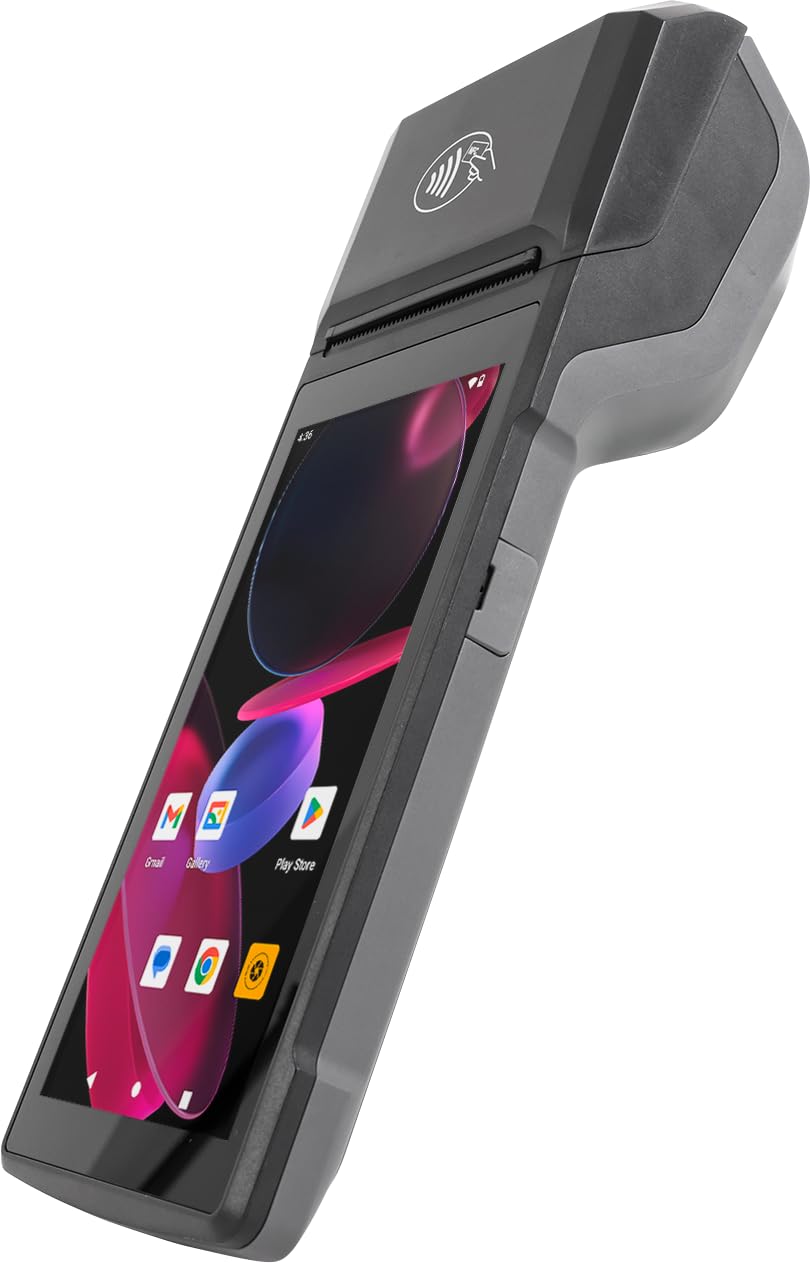
The handheld that lasts a full trading day and still has charge when you pack up.
Food trucks and mobile retail are the natural home for this one. A built-in 6000mAh battery is rated at up to 14 hours of runtime, and 10W fast charging refills it in about 2 hours with the included charger. It runs Android 14 on an octa-core processor, which means compatible business apps open without the stutter you get on cheaper handhelds. The touchscreen is a 720×1440 panel, and the NFC reader takes contactless tap-to-pay at the counter or the truck window.
The printer is built in and takes standard 58mm thermal rolls, printing in monochrome with no ink cartridges to reorder. A 5.0MP rear camera doubles as a barcode scanner for both 1D and 2D codes, so shelf counts and sales share one device. On connectivity it covers dual-band Wi-Fi, 4G LTE, Bluetooth, and USB, and at 345 grams it is light enough to hold through a service. The maker also offers an SDK for developers who want to build custom software on top.
Compare it with the Bisofice handheld above and the difference is the software base: this one runs Android 14 against that unit’s Android 13. That gap is the main reason to spend a little more here. The rest of the trade-off is simple — this is a rugged working tool rather than the daintiest device, and it lacks the big-brand support ecosystem of a Square or SumUp terminal. For a mobile seller running real apps all day, it is the better-equipped handheld.
What It Brings To A Shift
- 6000mAh battery rated at up to 14 hours, with 10W fast charging to full in about 2 hours.
- NFC tap-to-pay and a 5.0MP camera that scans 1D and 2D barcodes.
- 720×1440 touchscreen and octa-core Android 14 run compatible business apps smoothly.
- SDK available for developers building custom software.
Small Print Worth Knowing
- No big-brand support network behind it, so self-sufficiency helps.
- Held and used all day, it is a work tool rather than a pocket device.
- NFC and app support depend on your own payment software being compatible.
Built for: food trucks, market pitches, and mobile sellers who run apps all day and need the battery to outlast the queue.
Consider the alternative if: you want a familiar name behind the hardware and a support line when something goes wrong.
8. Clover Go Contactless Reader

The pocket-sized tap reader for sellers already running a Clover station.
If you have a Clover station at the counter and need to take a payment away from it, this is the add-on designed for exactly that. It pairs over Bluetooth, handles contactless and chip cards, and — unlike the Clover Compact Terminal — arrives without a merchant account requirement, so you can use it with the Clover setup you already have. At 4.8 ounces it disappears into a pocket, and owners describe a genuinely quick connection to Bluetooth.
The tool is at its best at events and offsite sales. Buyers running museum vending describe scanning barcodes, taking cash, credit, and checks, and having everything sync straight back to a Clover station, so no manual sales tracking is needed at the end of the day. Chip and contactless both work, and the overall ease of use is the clear strong point. One caveat worth sizing honestly: this version is described as limited or end of life, with orders potentially fulfilled by a newer Clover Go, so confirm what you are receiving.
Reliability is the area where feedback splits — many reviewers point out flawless operation, while some hit units that will not power on or lose their Bluetooth link after months of use. One buyer found the chip reader did not work every time even when contactless did. Set against the Square Handheld elsewhere on this list, this reader is smaller and cheaper but depends on an existing Clover station to shine. If you are already in the Clover ecosystem, it is the tidy pocket companion; if you are starting from scratch, the Square handheld is the more self-contained route.
Where it earns its place: adding tap-to-pay at a stall or event when the counter setup is already Clover, with no separate processor to sign up for.
The real-world caveat: reliability is the most-discussed topic in owner feedback and it cuts both ways — great units are flawless, a minority arrive dead or lose Bluetooth over time.
Get this if: you already run a Clover station and want a pocket-sized tap reader that slots straight in.
Skip the pairing if: you do not have a Clover setup already — this reader is designed to extend one, not replace it.
9. Square Handheld

At 2.11 ounces, the pocket POS that keeps selling when your Wi-Fi does not.
Restaurants, salons, and professional services are the intended audience, and the shape shows why. This Square unit weighs 2.11 ounces, which is a fraction of the handheld terminals above, so it rides in a palm or a pocket through a whole shift. It is built to withstand water splashes and dust, with an optional protective case for accidental drops. A built-in barcode scanner lets you ring up a tagged item without a separate gun, and the battery is designed to power through your shift.
The standout feature is offline payments. If your internet drops mid-service, you keep selling and the transactions settle later — a genuinely useful safety net for a busy dining room or a beauty salon with a card already in hand. Functionality is the trait buyers praise most, with ease of use just behind it, and portability earning its own mention from owners who keep it in a pocket. Setup draws praise too, and it accepts all major credit and debit cards under one simple rate with no hidden fees and no long-term contracts.
Two things temper the picture, and neither is disqualifying. Connectivity receives criticism from some buyers, with reports of trouble connecting over Wi-Fi — ironic for a device that shines when offline. Value for money also divides opinion. Against the bigger Square Terminal at 14.7 ounces, this one gives you true mobility at the cost of a smaller working surface. If your staff walks the floor, the trade is worth making.
Why Staff Reach For It
- 2.11 ounces — light enough to carry in a palm or pocket through a shift.
- Offline payments keep sales going when the internet drops.
- Built-in barcode scanner and splash- and dust-resistant design.
- One simple rate, no hidden fees, no long-term contracts.
Before You Commit
- Wi-Fi connectivity draws mixed feedback from some buyers.
- Smaller working surface than the countertop Square Terminal.
- Uses the Square processing ecosystem, like the other Square unit here.
Reach for this if: your staff walks payments to the customer and you want a device light enough to forget it is there.
Look elsewhere if: you need a fixed countertop setup with a bigger screen and a built-in printer.
Know the Specs
Battery Capacity and Runtime
On a portable card machine, battery capacity is measured in mAh (milliamp-hours, a measure of how much charge the battery stores). A higher number generally means longer time between charges, but the screen and printer draw power too, so a 6000mAh battery in a printer-equipped handheld will not last as long as the same capacity in a simple reader. Runtime figures matter most if you sell away from a socket — a food truck window or a market stall. Look for a stated runtime in hours where the manufacturer gives one, and a charger in the box so you are not shopping for one separately.
Chip Read Speed and Printer Width
Chip read speed is how long the terminal takes to read a chip card and approve the sale — a slow read is what makes a queue feel stuck. Thermal printing uses heat rather than ink, so there are no cartridges to rebuy; the measurement that matters is the paper width, usually stated as 58mm on handheld units. That width sets which rolls you reorder, and a machine that only accepts smaller or flatter rolls means more roll changes during a busy day. Check the width before you buy a stack of thermal paper.
Common Questions
Do I need a merchant account to use one of these card machines?
Can I keep my current processor and still buy one of these terminals?
How long does a handheld card machine battery actually last?
What is the difference between a card reader and a full payment terminal?
Do these machines print receipts if the internet goes down?
What size thermal paper rolls do handheld card machines take?
Can a card machine work without Wi-Fi?
What does dual communication mean on a countertop terminal?
Is a handheld POS better than a countertop terminal for a small shop?
The Bottom Line
For most small businesses, the credit card machine for small business that gets the job done is the Square Terminal, because it rings up, takes the card, and prints the receipt from one device — no long-term contract, funds the next business day, and the crowd favorite across thousands of owners. If you need a mobile seller’s handheld with battery to spare, the Square Handheld is the one to carry. And for a Clover-based counter that wants a tidy plug-in lane, the Clover Compact Terminal earns its spot — just confirm your processing account first.
How we choose
We do not accept paid placement. Every pick is matched to a real buyer and a real use-case; we do not hands-on test units.
Sources
Specifications: manufacturer listings and product documentation. Review insights: verified customer reviews, as of October 2026. Pricing: not shown on this page (it changes often); check the current price via the retailer link.
As an Amazon Associate, Aappliancez earns from qualifying purchases. This does not affect which products we feature.