Disclosure: Some links in this post are affiliate links. As an Amazon Associate I earn from qualifying purchases, at no extra cost to you. Learn more
Specs are compiled from manufacturer listings and verified buyer reviews and can change over time — please confirm the key details on the product page before buying.
If your controller has started dragging your aim to the left on its own, you already know the real question here: which pad still feels precise after six months of nightly sessions? The short answer is that magnetic joystick modules are the single biggest upgrade you can buy right now, because they cut the wear that causes that slow drift in the first place. This guide sorts seven popular controllers by what actually matters in your hands — stick technology, trigger feel, battery runtime, and how many programmable buttons you get before you have to pay premium money for them.
This guide is built by comparing the manufacturers’ published specifications and the patterns across verified customer reviews, so you get each pick’s real strengths and trade-offs instead of marketing spin.
You will see how a 1000Hz polling rate feels different from a standard connection, why Hall Effect and TMR sticks resist drift, and which buttons are worth mapping. Every pick below earns its place because it solves a specific problem you will hit while shopping for the best controller.
Top Picks

How To Choose The Best Controller
Pick the console or device you actually play on first, because that one answer cuts the market in half. A pad built for Sony’s PlayStation 5 will not talk to an Xbox, and a Switch-focused pad needs its own pairing routine. Once you lock the platform, four things decide the rest: the joystick mechanism (the part that reads your thumb movement), the trigger style, how many extra buttons you want under your fingers, and battery runtime.
The Joystick Question Comes First
Old-style potentiometer sticks (the carbon-film design used for decades) wear down as you play, and that wear is what shows up as stick drift — your character or crosshair creeping when you are not touching anything. Hall Effect and TMR modules replace that physical contact with magnetic sensing, so there is nothing rubbing away inside. TMR is the newer variant, and one spec worth checking is cycle rating: the EasySMX D10 lists TMR sticks rated for 5+ million cycles, which the manufacturer describes as 2.5X the 2-million-cycle benchmark of Hall sticks.
Polling Rate And Latency
Polling rate is how many times per second the controller reports its position to your device, measured in Hz. Standard wireless pads report far less often than 1000Hz, which means a 1000Hz pad updates every single millisecond. If you play shooters or fighting games where a single frame decides the round, that matters. If you mostly play story-driven titles, you will not notice the difference.
Triggers, Back Buttons, And Battery
Analog triggers (the ones that read how far you pull them) suit racing games where throttle control matters. Micro-switch trigger stops cut that travel short for faster shots in shooters, which is why dual-mode designs are popular. Programmable back buttons let you jump, crouch, or reload without moving your thumbs off the sticks. Battery capacity in mAh, plus whether a charging dock is included, decides how often you plug in.
Side-by-Side Comparison
| Model | Best For | Stick Tech | Connectivity | Battery / Power | Amazon |
|---|---|---|---|---|---|
| PlayStation DualSense Wireless Controller – Sterling Silver★ Best Overall | PS5 and PC players who want the full haptic experience | Standard analog sticks | Bluetooth and USB Type-C | Built-in rechargeable (rating: mixed) | Amazon |
| EasySMX S10 Elite Wireless Controller for Switch 2Switch 2 Specialist | Switch 2 owners who want pro features for less | TMR anti-drift magnetic modules | Bluetooth and USB-C wired | 1200mAh, up to 17 hours | Amazon |
| Wireless Controller for PS5 with RGB LED and TURBO | A budget second pad for PS5 and PC | Magnetic joysticks | Bluetooth | Built-in rechargeable (rating: mixed) | Amazon |
| EasySMX D10 Wireless Gaming Controller | Multi-platform players who want a charging dock | TMR anti-drift, 5+ million cycles | 2.4G, Bluetooth, USB-C | 1000mAh, up to 10 hours, 1000Hz polling | Amazon |
| Xbox Wireless Controller – Black | Xbox and Windows players who want the standard | Standard analog sticks | Bluetooth wireless | Batteries (rating: mixed) | Amazon |
| PlayStation DualSense Wireless Controller | Collectors and PS5 players who want a standout look | Standard analog sticks | Bluetooth and USB Type-C | Built-in rechargeable | Amazon |
| GameSir G7 Pro Wireless Controller – Wuchang Edition | Xbox and PC players who want pro-grade hardware | TMR anti-drift sticks | 2.4G, Bluetooth 5.3, wired | 1200mAh with charging station, 1000Hz polling | Amazon |
Detailed Reviews
1. PlayStation DualSense Wireless Controller – Sterling Silver
Our pick — 4.5+★ from 49,500+ verified ratings; the strongest balance of quality and price.
The one pad whose rumble you can feel in your palms before you see it on screen.
Two dual actuators sit inside this pad in place of ordinary rumble motors. That means the vibration can imitate textures and weapon recoil rather than just buzzing — the difference between feeling a gravel road and feeling a gravel road through a car chassis. It is the feature no third-party pad in this list replicates, and it is why the DualSense holds the crowd favorite spot at 4.5+ stars.
Ten buttons, a built-in microphone, and a 3.5mm jack cover the basics, and the create button records your gameplay without leaving the game. Bluetooth pairing reaches iPad, iPhone, Mac, and Apple TV, so the same pad follows you off the couch. On PC, the touch pad, motion sensor, and adaptive trigger effects work in games that support them. Weighing 100 g, it stays light enough for long sessions without feeling hollow.
What wins people over is the overall build — clear buttons that owners describe as looking like drops of water, plus a luxurious texture on the grips. The Sterling Silver finish is the most-praised colorway here. The honest catch is that this pad is the most-discussed for three things it does not solve: battery life and durability both land as mixed in long-term owner reports, and stick drift is its most-mentioned complaint. That is normal wear on standard analog sticks, and it is exactly the problem the TMR-equipped pads further down this list were built to avoid. The DualSense is simply the best-feeling pad available, not the longest-lived.
Sony haptics and adaptive triggers
- Dual actuators replace standard rumble motors for texture and recoil feedback
- Built-in microphone plus 3.5mm headset jack for chat without extra gear
- Bluetooth pairs with iPad, iPhone, Mac, and Apple TV as well as PS5 and PC
- 10 buttons with a create button for capturing and broadcasting clips
Sterling Silver finish shows wear
- Standard analog sticks, not magnetic ones, so drift is the recurring long-term gripe
- Battery life lands mixed in owner feedback — expect to plug in regularly
- Adaptive trigger and haptic effects only work in games built to support them
PS5 owners: you play on PS5 or PC and want the most convincing physical feedback any controller currently delivers.
PC-only players: your last pad died of stick drift and you want magnetic sticks that resist it — the EasySMX S10 and GameSir G7 Pro below are the ones to compare.
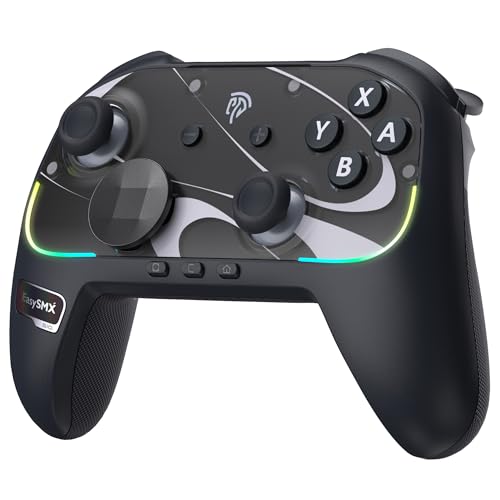
2. EasySMX S10 Elite Wireless Controller
Seventeen buttons of pro-pad hardware, built to wake your Switch 2 from sleep.
You get more controls to work with here: 17 buttons, against 10 on the DualSense above. That extra count buys you two mappable back buttons (you assign them yourself), a swappable D-pad (the directional pad you can swap out), and NFC support (near-field communication, for tap-to-pair style features), all in a shell measuring 2.56 x 3.54 x 4.33 inches. That is a far tighter footprint than the DualSense’s 7.5 x 2.75 x 7.5 inches — the difference between a pad that fits a travel case and one that does not.
The joysticks use TMR magnetic modules, the design that reduces the wear that causes drift. Motion control runs through 6-axis sensors for aiming and steering. Battery is the standout number: a 1200mAh cell rated for up to 17 hours of playtime, recharged over USB-C. That 17-hour rating is the longest in this lineup, enough for a full weekend of handheld sessions between charges.
Buyers report it is a better buy than the official Switch 2 pro pad, and the quality is what earns that praise — clicky mechanical micro-switch face buttons (each press gives a crisp click), premium-feeling sticks, and multi-platform reach across Switch 2, Switch, PC, iOS, and Android. Wake-up works, but the setup takes a few steps: a first-time pairing routine that involves removing and reattaching a Joy-Con. The recurring gripe is the triggers — they sit large and raised, which is a feel preference rather than a fault, and one reviewer flagged them as a con while still recommending the pad.
Switch 2 dock and turbo: pairing is a multi-step dance the first time — back toggle to S mode, hold HOME for three seconds, pair through the console’s Change Grip menu, then a one-time Joy-Con detach to activate wake-up. After that, a short press of HOME reconnects.
Switch 2 handhelds: you own a Switch 2 and want pro-pad features — back buttons, swappable D-pad, magnetic sticks — without paying official first-party money.
Xbox loyalists: you refuse a manual first-time pairing routine, or the large raised triggers already sound wrong for your grip.
3. Wireless Controller for PS5
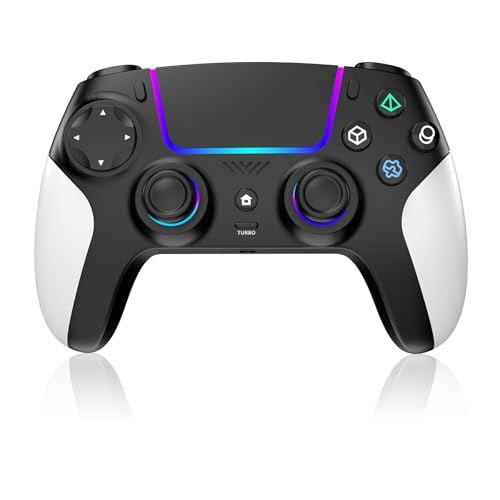
A second pad for the guest couch, with RGB lighting your kids will fight over.
Buy this as the pad you hand to a friend. It connects to PS5 over Bluetooth, pairs to PC and mobile too, and reads as a solid, responsive gamepad rather than a flimsy knock-off. The RGB lighting rings the joysticks and the base of the shell, and kids respond to it immediately — verified owners describe it as vibrant and a genuine highlight.
Behind the lights sit turbo for rapid-fire inputs and rear macro buttons that owners find useful in fighting games, plus magnetic joysticks that resist drift. The textured grip holds up through long sessions. Reliability is what earns the praise here — it pairs quickly and keeps working across different games, which is exactly what you want from a spare.
Two things to know before you buy. First, it lacks DualSense haptic feedback (the textured vibration that mimics surfaces), so vibration is standard rumble rather than the textured feel of the pad above. Second, this listing carries a manufacturer note that a recent PS5 system update may temporarily affect vibration and the controller speaker — the maker states the pad is not defective and the issue may resolve through a future update. The sensitive L2/R2 triggers have also drawn complaints for accidental taps, and battery life is the mixed point: the review pages include plain gripes about charge not holding long and docking-station incompatibility. One quote sums it up: “it doesn’t stay charged very long.”
Budget PS5 setups: a budget second controller, a house with multiple players, or anyone who wants RGB and macro buttons without premium money.
Tournament players: charge longevity is your top priority — a few hours on the cord between sessions is the realistic expectation here rather than the exception.
4. EasySMX D10 Wireless Gaming Controller

The pad that charges itself the moment you set it down.
The D10 covers more ground than any other pick here: PC, Switch 2, Switch, Android, and iOS, with your choice of 2.4G wireless for low-latency play, Bluetooth for handhelds, or USB-C wired for stable sessions. It is not compatible with Xbox, PlayStation, Luna, or GeForce Now, so check that your platform is on the list before you commit. At 11.2 ounces it is the heaviest pad in this lineup, which gives it a planted feel in the hands that some players prefer over lighter shells.
what separates it is how long the sticks last. The TMR anti-drift modules (tunnel magnetoresistance sticks, built to resist drift — the slow creep where a stick stops centering) are rated for 5+ million cycles, which the manufacturer describes as 2.5X the 2-million-cycle benchmark of Hall Effect sticks. Alongside that: ABXY and D-pad on mechanical switches, two programmable back buttons you set directly on the pad with no app, dual-mode triggers that swap between smooth Hall Effect travel for racing and fast micro-switch stops for shooters, and RGB with four vibration levels.
The 1000mAh battery is rated for up to 10 hours and recharges in about 3 hours on the included auto start-stop dock. Wired and 2.4G modes both run at 1000Hz polling, so inputs land every millisecond. The build quality is the thing owners keep returning to: solid, clicky, and comfortable like a good Xbox pad. The trade-offs are the D-pad and button shape — a circular D-pad and flat ABXY buttons make rolling motions trickier for fighting-game players, and connectivity preferences split between 2.4G and Bluetooth. One owner running six-hour daily sessions for two weeks reported no recharge needed, and no stick drift a year later.
Couch PC gaming: anyone juggling two or three platforms who wants one pad, a dock, and magnetic sticks that outlast the console generation.
Fighting game mains: fighting games are your main diet — the circular D-pad and flat ABXY buttons make quarter-circle inputs harder than a traditional cross-shaped pad.
5. Xbox Wireless Controller – Black

The plug-and-play default that every PC game already knows how to read.
If you want zero setup friction, this is the pad. Windows 10 recognizes it over Bluetooth, and it works with Xbox One, Xbox One S, and Xbox One X. It carries 21 buttons and a textured grip, and Microsoft rates its wireless range at up to twice that of previous Xbox One controllers — a real difference if you sit across the room from your screen.
Functionality is what carries this pad, and owners treat it as the safe replacement for a worn-out original. The plastic resists fingerprints, the textured back grip holds steady, and the triggers come with their own rumble for extra feedback in racing and shooter titles. A 3.5mm jack handles headsets, and latency stays low enough that nobody complains about input lag.
The catch is value, and it is a genuine split in owner sentiment rather than a verdict against the pad. Some find it a great buy, others find the asking number hard to justify next to the third-party options above that add back buttons, magnetic sticks, and docks for less. The other honest caveat is drift and durability: the review pages include a report of a right thumbstick drifting upward after three months with warranty support refused days past the coverage window. That is one report, not a pattern, but it matters if long-term reliability decides your purchase.
Native Xbox wireless pairing: it works with more games from the start — every major PC release ships with Xbox glyphs (the on-screen button labels) mapped by default, so you never remap a thing.
Xbox console owners: you play on Xbox or Windows and want the pad with the fewest surprises and the widest out-of-the-box game support.
USB-C purists: you want extra buttons or magnetic sticks — the same budget reaches the EasySMX D10 or S10, both of which include features this pad does not.
6. PlayStation DualSense Wireless Controller
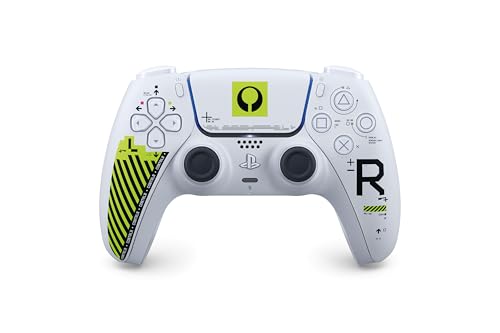
Same proven DualSense internals, wearing a lime-green tactical paint job.
Everything you get from the Sterling Silver DualSense carries over here — haptic feedback that simulates your in-game environment, adaptive triggers that add tension and resistance, and a built-in microphone for chat. It also runs the same multi-device route: USB Type-C or Bluetooth to PS5, Windows PC, Mac, Android, and iOS phones. Owners call it one of the best-feeling pads on the market, and the design is the reason this version exists.
The Marathon coating is the whole pitch. Buyers describe the shell as closer to an off-white than a pure white, with lime green accents that pop in person and understated detail work near the buttons and D-pad. The lime-green tactical artwork is the reason to buy it, not a bonus. Steam Deck players report it connects easily with every button functioning.
Be clear about what changes and what does not. The electronics are identical to the standard DualSense, so you are paying a premium for appearance rather than extra capability. That distinction matters most for collectors — this is a limited edition with the smallest review footprint in the lineup, which is expected for a special run. If you already own a DualSense and only want better sticks or longer battery, the limited-edition shell will not fix either.
DualSense collectors: collectors, PS5 owners who want their shelf to look distinct, and anyone who skipped the game this edition was painted to celebrate.
Daily grinders: you need hardware the standard DualSense lacks — this is the same pad in a different coat, so buy it for the looks or not at all.
7. GameSir G7 Pro Wireless Controller
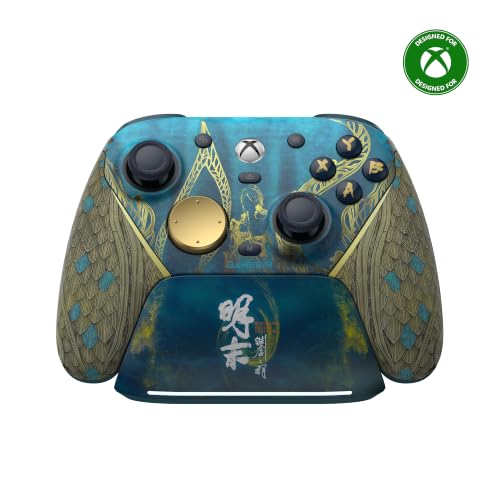
Sixteen buttons, mouse-click switches, and a station that stores your receiver.
This is GameSir’s first wireless pad for Xbox, and it is officially licensed for the console, which means no dongle-and-prayer routine. It wakes your Xbox with one press, connects over 2.4G wireless or wired USB for Xbox and PC, and switches to Bluetooth 5.3 for Android using a physical mode switch on the shell. At 272 g it has real heft, and owners describe the ergonomics as sitting perfectly in the hands.
The competitive hardware is what justifies the premium tier. TMR sticks give smooth, drift-free precision that owners confirm holds up over time. Hall Effect analog triggers deliver linear travel for racing, and clicky micro-switch trigger stops plus a Hair Trigger Mode (activated by holding M+LT/RT) shorten that pull for shooters. Rounding it out: four extra back and bumper buttons, a mute mic button, a 3.5mm audio jack, and a 1200mAh battery inside a smart auto start-stop charging station with a receiver storage bay at the base. Wired and 2.4G both run 1000Hz polling for millisecond input updates, and the Nexus app opens deeper stick tuning for players who want it.
Two honest notes before you commit. The face buttons, triggers, and D-pad click like a mouse — snappy, tactile, and quick, but not what everyone wants from a controller. And the menu buttons sit near the top of the shell, which the same buyers describe as awkward to reach mid-match. Both are design trade-offs rather than defects, and they do not stop the pad from being the most capable Xbox-focused option here.
Hall effect sticks and back paddles
- Hall Effect analog triggers with clicky micro-switch stops and a Hair Trigger Mode
- TMR anti-drift sticks backed by 1000Hz polling on wired and 2.4G
- Four extra back and bumper buttons plus a mute mic button
- Charging station stores the receiver and auto start-stops the charge
Bulky grip size
- Mouse-click face buttons and triggers are a taste call, not a universal upgrade
- Menu buttons sit near the top, where they are harder to reach during play
- Deeper stick tuning leans on the Nexus app rather than on-pad controls
Competitive Xbox play: Xbox and PC competitors who want back buttons, trigger stops, and magnetic sticks in one licensed package.
Small-handed gamers: you prefer soft, quiet membrane buttons over mouse-click feedback — this pad commits hard to the clicky side of the fence.
Know the Specs
Stick Technology: TMR, Hall Effect, And Standard Analog
Standard analog sticks rely on carbon-film contact that wears as you play, and that wear is what eventually shows up as drift — your character or crosshair creeping on its own. Hall Effect sticks replace that contact with magnetic sensing, so nothing rubs away. TMR is a newer magnetic variant with the same principle. One spec worth tracking is cycle rating: the EasySMX D10 lists TMR sticks rated for 5+ million cycles, which the maker describes as 2.5X the 2-million-cycle benchmark of Hall sticks. If drift has already killed a pad on you, buy a magnetic-stick model.
Polling Rate, Battery, And Charging Docks
Polling rate measures how often the controller tells your device where its sticks and triggers are, counted in Hz. A 1000Hz pad updates every millisecond, which is why both the EasySMX D10 and the GameSir G7 Pro advertise it for competitive play. Battery capacity is the other routine number — measured in mAh — and it decides how many nights you get between charges. A 1200mAh cell appears on the EasySMX S10 (up to 17 hours) and the GameSir G7 Pro, while the EasySMX D10 runs a 1000mAh battery rated up to 10 hours and recharging in about 3 hours. A charging dock replaces cable-chasing with a habit: drop the pad on the stand and walk away.
Common Questions
Will a third-party controller work on PS5 or is only the official DualSense supported?
Is TMR better than Hall Effect for preventing stick drift?
Do I need a 1000Hz polling rate controller for casual gaming?
How many hours does a wireless controller battery actually last?
What do programmable back buttons do and are they worth having?
Will a controller built for Switch 2 work on PC as well?
What is the difference between analog triggers and micro-switch trigger stops?
Which controller has the longest track record of reliability on Xbox?
Can I use the DualSense controller with a Steam Deck or iPhone?
Does a charging dock recharge the controller without plugging it in?
The Bottom Line
For most people hunting for the best controller, the best controller depends on your platform, not the spec sheet. If you are on PS5, the PlayStation DualSense in Sterling Silver is the pick — nothing else in this lineup reproduces weapon recoil and surface texture through its dual actuators (the motors that create the feel), and the build quality is what the crowd keeps praising. Switch 2 owners should go straight to the EasySMX S10, where 17 buttons, a swappable D-pad, and up to 17 hours from a 1200mAh cell hand you pro-pad features without first-party money. For anyone straddling multiple platforms, the EasySMX D10 covers PC, Switch 2, Switch, Android, and iOS with TMR sticks rated for 5+ million cycles and a dock that charges on contact.
Two more worth a look before you commit: the GameSir G7 Pro adds four extra buttons and 1000Hz polling (it reports your inputs 1000 times a second) for Xbox and PC players who want every competitive edge, and the Marathon Limited Edition DualSense is the one to grab if the lime-green tactical artwork is what sold you. Whichever pad you land on, the stick mechanism decides whether you are still happy a year from now — magnetic modules stop drift before it starts.
How we choose
We do not accept paid placement. Every pick is matched to a real buyer and a real use-case; we do not hands-on test units.
Sources
Specifications: manufacturer listings and product documentation. Review insights: verified customer reviews, as of October 2026. Pricing: not shown on this page (it changes often); check the current price via the retailer link.
As an Amazon Associate, Aappliancez earns from qualifying purchases. This does not affect which products we feature.