Disclosure: Some links in this post are affiliate links. As an Amazon Associate I earn from qualifying purchases, at no extra cost to you. Learn more
Specs are compiled from manufacturer listings and verified buyer reviews and can change over time — please confirm the key details on the product page before buying.
Your current controller works fine until the sticks start drifting and your aim creeps off target mid-match. That slow creep is the top reason PC players buy a replacement pad. The fix is a pad with anti-drift stick technology, and this shortlist covers seven, from a budget pick to a premium esports pad. The top pick is the PlayStation DualSense, a 4.5+ star favorite across 50,000+ ratings, because it pairs drift that stays away with haptic feedback and adaptive triggers that most PC pads simply do not have.
This guide is built by comparing the manufacturers’ published specifications and the patterns across verified customer reviews, so you get each pick’s real strengths and trade-offs instead of marketing spin.
What separates a good pad from a frustrating one is rarely the shape. It is the stick mechanism, the polling rate, and whether the triggers let you feather a throttle or snap off a shot. Below you will find the specs that matter, translated into what each one feels like in your hands during a real session. These are the seven pads worth shortlisting for PC play.
Top Picks

How To Choose The Best Computer Game Controller
Most first-time buyers shop by looks or brand logo instead of by stick type and connection. On a PC, the controller has to talk to Windows, Steam, and whatever launcher your game lives in, and that conversation is where cheap pads fall apart. Start with compatibility, then work down to the parts your thumbs actually touch.
Stick technology decides how long the pad stays accurate
Standard analog sticks use physical contact between moving parts, and that contact wears a groove over months of play. Hall Effect and TMR sticks (magnetic sensors that read position without touching) remove that wear point, which is why they show up on the anti-drift picks here. If drift has already burned you once, make stick type your first filter.
Wired, 2.4G dongle, or Bluetooth
A USB-C cable gives you the most stable signal and zero pairing fuss. A 2.4G dongle (a small USB receiver that creates its own wireless link) trades a cable for near-wired latency. Bluetooth is the easiest for switching between a laptop, phone, and handheld, but it is usually the slowest of the three for competitive timing.
Triggers: analog pull versus click
Racing and flight games want a long, smooth analog trigger pull so you can feather the throttle. Shooters and fighting games want a short click that fires the instant you press. Dual-mode trigger stops switch one pad between a long analog pull and a short click.
Back buttons and remapping
Extra paddles or buttons on the back let you jump, crouch, or reload without lifting your thumb off the right stick. On a PC pad, check whether remapping happens on the controller itself or needs an app, because that changes how portable your setup is.
Side-by-Side Comparison
| Model | Best For | Stick Type | Connection | Extra Buttons | Amazon |
|---|---|---|---|---|---|
| PlayStation DualSense★ Best Overall | Haptic feedback and adaptive triggers on PC | Standard analog | USB-C / Bluetooth | 18 total buttons | Amazon |
| abxylute C6Best Value | Budget-friendly multi-device play | Dual Hall Effect | Wired / dongle / Bluetooth | Turbo + remap | Amazon |
| Nacon Wired PS4 | Plug-and-play PS4 layout on PC | Standard analog | 3-meter USB-A | 14 total buttons | Amazon |
| Turtle Beach Rematch | Budget back paddles for Xbox and PC | Standard analog | Detachable 8ft USB-C | 2 mappable back buttons | Amazon |
| XBOX Wireless + USB-C | Wired-or-wireless simplicity on Windows | Standard analog | USB-C / Bluetooth | 19 total buttons | Amazon |
| EasySMX D10 | Charging dock and mechanical buttons | TMR anti-drift | 2.4G / Bluetooth / USB-C | 2 programmable back buttons | Amazon |
| GameSir G7 Pro 8K | Competitive latency with 8000Hz polling | Mag-Res TMR Gen-2 | Wired / 2.4G | 4 remappable macro buttons | Amazon |
Detailed Reviews
1. PlayStation DualSense® Wireless Controller – Midnight Black
Our pick — 4.5+★ from 50,000+ verified ratings; the strongest balance of quality and price.
The pad that puts tension in your trigger finger and a texture in your palms.
The DualSense earns the top spot on feel, not on drift-proofing. Haptic feedback (tiny motors that simulate texture and impact) and adaptive triggers (the trigger resists your pull with varying tension) are the two features PC players notice within the first minute of a supported blockbuster title. That is a layer of feedback no other pad on this list carries in the same form. Weighing 280 g, it sits light enough for marathon sessions without feeling hollow.
On PC it connects by USB-C cable or Bluetooth, and Windows recognizes it without extra software for most titles. The 18-button layout includes a built-in microphone, a 3.5mm headset jack, and a create button for capturing clips — so your chat and recording setup routes through the pad instead of your desk. Owners consistently single out the build and finish as its strongest trait, with the button tops drawing the kind of praise that usually goes to a phone screen.
Here is the honest catch, and it is the one that matters for anyone with drift anxiety: the standard analog sticks are not Hall Effect, so they can develop drift over a long lifespan. Plenty of buyers report years of clean play, and the phrase “Outlasted two Xbox controllers over ~2 years with zero stick drift” shows up in the review pages verbatim — but the mechanism itself is the wear-prone kind. Buy it for the feedback, not for drift immunity.
What wins people over
- Haptic feedback and adaptive triggers make supported PC titles feel physical
- Built-in mic, 3.5mm jack, and create button consolidate your chat and capture
- 280 g body with a comfortable evolved layout holds up across long sessions
- USB-C or Bluetooth connects to Windows PC and Mac without adapters
Where it asks patience
- The sticks are standard analog, so drift is a long-term possibility rather than a non-issue
- Battery life draws mixed notes compared with a wired pad that never needs charging
Worth it for: anyone who plays Sony’s big cinematic PC ports and wants the trigger feedback that comes with them.
Look past it if: drift resistance is your primary reason for buying, because the EasySMX D10 and GameSir G7 Pro solve that with magnetic sticks.
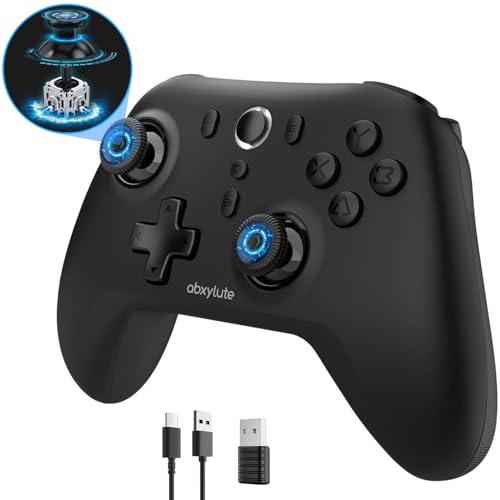
2. abxylute C6 Wireless PC Controller
Magnetic sticks and a 1000Hz signal for roughly the cost of a takeaway dinner.
If drift is what sent you looking, the C6 answers it directly with dual Hall Effect joysticks and triggers — magnetic sensors that read position with no physical contact, so there is no wear groove to form. It backs that up with a 1000Hz polling rate (the controller reports its position 1000 times a second) in wired and dongle mode, which is where the responsiveness lives. The abxylute C6 punches above its price tag with Hall Effect sticks and a 1000Hz link at entry-level money.
Compatibility is unusually broad for the money: Windows 7 through 11, Android 8.0+, iOS 13 and above, Mac, Switch and Switch 2, Steam Deck, and even Tesla Model 3 and Model Y. You get three connection routes — wired, a Bluetooth dongle, and straight Bluetooth. There is a 600mAh battery rated for up to 18 hours of play and four vibration levels from a 30% gentle buzz to 100% rumble. A gyroscope is available in Switch games for motion sensing.
The trade-offs sit in the details. The triggers have short travel, which is fine for shooters but costs you precision in racing sims. The d-pad is the weakest button on the pad. And that feather-light build takes some getting used to. The timing crowd is well served, though, with owners reporting no perceptible delay in fast games.
The case for it: anti-drift sticks, a 1000Hz link, and a battery measured in hours rather than minutes — at entry-level money, this is the feature-per-dollar leader on the list.
What to weigh: short-travel triggers and a soft d-pad mean sim racers and fighting-game purists may want the GameSir’s dual-mode trigger stops instead.
Reach for this if: you want drift resistance and a fast wireless link without spending much.
Hold off if: you need a long analog trigger pull for racing or a stiff d-pad for quarter-circle inputs.
3. Nacon Wired Controller PS4

A cable that never needs charging, built around the PlayStation 4 button map.
The pitch here is simple: no battery, no pairing, no charging port to break. The integrated 3-meter USB cable runs straight to your PC and delivers a low-latency plug-and-play connection. It carries the official PlayStation 4 layout, so the touch pad, SHARE and OPTIONS buttons, and LED player indicator are all where your thumbs already expect them. Larger face buttons and a rubber coating give it a grip that holds up through long sessions, and dual vibration motors handle the rumble.
On Windows, Steam handles the translation for PlayStation-style pads through Steam Input automatically. For non-Steam games you will want DS4Windows to remap the inputs, which is a one-time setup rather than an ongoing chore. A 3.5mm stereo port takes a headset for chat without a separate audio adapter. The cable-first design is also why some owners prefer it to the official pad — no micro-USB or charging port to snap.
Two things to know before you commit. There are no motion controls, so games that lean on six-axis tilting need remapping or simply will not use that feature. And the shell runs small in the hand, which some players love and others find cramped until they adjust. Wear on the bumpers has surfaced over long-term use, so treat the shoulders with a little care.
The obvious fit: PS4-library players on PC who want a wired pad with the correct button map and no charging routine.
Think twice if: your games rely on gyro or motion aiming, since this pad leaves that out entirely.
4. Turtle Beach Rematch Wired Gaming Controller
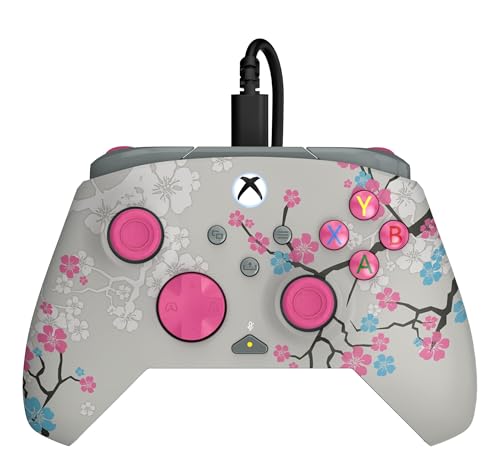
Back paddles and clicky trigger stops, with a shell that glows once the lights drop.
Turtle Beach packs a lot of competitive hardware into a wired Xbox-licensed pad. You get two mappable quick-action back buttons, 2-stop true Hall Effect hair triggers (magnetic triggers with a short pull for faster reaction), and dual rumble motors with impulse triggers. A Control Hub app handles configuration and diagnosis, so you can remap and check the pad’s health from your PC. Laser-etched texture on the thumbsticks, triggers, and grips keeps your thumbs planted.
The aesthetic is a real draw. The shell glows in the dark after exposure to UV light, and the Blossom colorway is genuinely eye-catching. A detachable 8ft / 2.5m USB-C cable gives you slack to sit back, and controls for game/chat mix, master volume, and mic mute sit on the pad itself so you never reach for a keyboard mid-match.
Build consistency is where it gets uneven. Shoulder buttons can arrive seated at slightly different heights, so one bumper may need more force than the other. The macro buttons sit where some thumbs rest, and the back-button distance is adjustable but not removable. Value and looks carry the day for most owners; just check the shoulders on arrival.
Why it earns a slot: two remappable paddles, hair-trigger stops, and on-pad audio controls are a lot of competitive kit for a wired pad.
The honest asterisk: bumper consistency varies unit to unit, and the macro buttons can crowd an active thumb.
Pick it for: Xbox-and-PC players who want paddles and trigger stops without going wireless.
Pass if: you need identical spring feel across both bumpers from the start.
5. XBOX Wireless Gaming Controller + USB-C Cable | Carbon Black
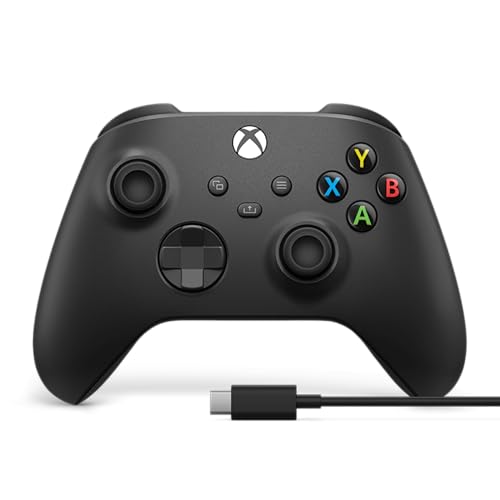
Plug the cable in, and Windows starts listening — no pairing, no adapters.
This is the path of least resistance for a Windows PC. The box includes the Carbon Black Xbox Wireless Controller and a 9′ USB-C cable, so you can plug in for zero-setup wired play or go wireless from the couch. Windows recognizes it instantly across the Xbox app, Steam, and more. No dongle, no Bluetooth dance, no extra purchase to get running.
The hardware has been refined over generations. Sculpted surfaces and textured grip on the triggers, bumpers, and back case keep your hands locked in, and the hybrid D-pad is precise and clicky. A 3.5mm jack takes a headset for chat, the Xbox Accessories app lets you remap buttons and save profiles, and pairing carries across console, PC, handhelds, and supported VR headsets. With standard AA batteries it is rated for up to 40 hours of wireless play, and you can plug in and keep going when they run low.
The follow-up question most buyers have is about batteries — and yes, this version runs on AA cells rather than an internal rechargeable pack, so factor in a set of rechargeables. Wireless connectivity also draws mixed notes on PC, with occasional dropouts reported. Functionality and build quality are what keep it a staple, and a controller that survives a few drops and still looks new says something about how it is put together.
Best suited to: PC players who want a controller that just works the moment the cable touches the port.
Worth knowing: it ships without rechargeable batteries, so budget for AAs or a rechargeable set.
6. EasySMX D10 Wireless Gaming Controller

Set it on the dock, pick it up, and you are already connected.
The D10 is the pick for anyone who wants the controller to disappear into the setup. Drop it on the included charging dock and it tops up; lift it off and it connects. The TMR anti-drift joysticks are rated for 5+ million cycles, which the maker frames as 2.5X the 2-million-cycle benchmark of Hall sticks — magnetic sensing with an even longer wear rating. A 1000mAh battery provides up to 10 hours of playtime and recharges in about 3 hours.
Full mechanical ABXY buttons and a mechanical D-pad give crisp, tactile feedback that suits FPS, fighting, and action games. Dual-mode triggers switch between smooth Hall Effect triggers for racing and fast micro-switch triggers for shooters, and you get 1000Hz polling in wired and 2.4G modes for updates every millisecond. Two programmable back buttons assign jump, crouch, or reload directly on the controller with no app needed. An 8-way precision D-pad and RGB lighting round it out. It plays on PC, Switch 2, Switch, Android, and iOS via 2.4G, Bluetooth, or USB-C.
Know what you are buying on compatibility: this pad does not work with Xbox, PlayStation, Luna, or GeForce Now. The D-pad also reads as circular in shape, which slows down fighting-game quarter-circles unless you roll along the outer edge. Build notes land on the mechanical buttons feeling slightly spongy after the click. Long-term drift resistance, though, is the headline — the sticks are built to stay honest.
The dock difference: a charging cradle, dual-mode triggers, and 1000Hz polling in one package make this the tidiest desk setup on the list.
Fit note: it skips Xbox and PlayStation consoles entirely — this one is for PC, Switch, and mobile.
Choose it if: you bounce between PC and Switch and want a dock so charging is never a thought.
Leave it if: you also game on Xbox or PlayStation and need one pad to cover everything.
7. GameSir G7 Pro 8K PC Wireless Controller, Aimlabs Edition
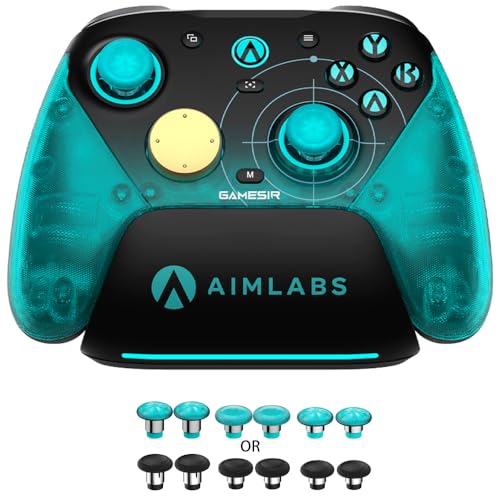
An 8000Hz signal and four macro buttons, aimed squarely at competitive PC play.
The number that defines the G7 Pro 8K is its polling rate: 8000Hz over both wired USB and 2.4G wireless, meaning the controller reports its position 8000 times a second. That is the highest rate on this list and the reason competitive players gravitate toward it. GameSir Mag-Res TMR Sticks Gen-2 use magnetic sensing with no physical contact for anti-drift reliability, and optical ABXY buttons fire on ultra-fast micro switches. A 6-axis gyroscope adds motion aiming for shooters.
Four remappable macro buttons — two lockable back buttons and two mini bumpers — each support up to 32-step macro recording so you can fire off combos with one press. Dual-mode trigger stops let you switch between linear Hall Effect analog triggers for braking and clicky micro-switch triggers for instant digital response. Dual asymmetric rumble motors with an instant start-stop circuit make the vibration hit faster and cleaner. It is built for PC only, for Windows 10 and 11, and explicitly not compatible with Xbox Series X/S or Xbox One.
The missteps are honest ones. Back-button placement feels awkward to some hands, and the stick domes run small. A handful of units show a menu-scroll glitch after a PC shutdown that clears with a replug. Whether the 8000Hz rate actually shows up for you is the one spec worth testing at home — it is the fastest link here, and it is the pick that leaves the least on the table for reaction-time play.
Why competitive players look here
- 8000Hz polling over wired and 2.4G — the top rate on this list
- Mag-Res TMR Gen-2 sticks with anti-drift magnetic sensing
- Four macro buttons with 32-step recording and dual-mode trigger stops
What to plan around
- PC-only build — no Xbox or PlayStation console support
- Back buttons and small stick domes take adapting to
Made for: FPS and fighting-game players on Windows chasing the lowest input latency available.
Not for: console gamers, since this pad is locked to PC.
Know the Specs
Polling rate (Hz)
Polling rate is how many times per second the controller reports its position to your PC. A 1000Hz rate updates every millisecond; an 8000Hz rate updates 8000 times a second. Higher rates reduce the gap between your thumb moving and the game registering it, which matters most in fast shooters and fighting games. Wired and dongle connections usually deliver the highest rate; Bluetooth is typically slower.
Hall Effect and TMR sticks
Standard analog sticks use physical contact that wears over time, which is what causes drift — the cursor creeping when your thumb is still. Hall Effect and TMR sticks use magnetic sensors that read position without touching, so there is no wear groove to form. TMR sticks are a newer magnetic design that EasySMX rates for 5+ million cycles.
Trigger travel modes
Analog triggers pull smoothly through a long range so racing and flight games can read partial input. Micro-switch triggers click at the end of a short pull so shooters register instantly. Dual-mode trigger stops let one pad do both by switching the stop point mechanically.
Connection types on PC
USB-C wired is the most stable. A 2.4G dongle creates a dedicated wireless link close to wired latency. Bluetooth is most convenient for switching between devices but usually the slowest. Many pads here offer all three; check which ones your games and setup support before choosing.
Common Questions
Will a PlayStation DualSense work with my Windows PC games?
Do I need special software to use a PS4-style controller on PC?
What is stick drift and why does everyone talk about it?
Is a 1000Hz polling rate actually noticeable?
What is the difference between Hall Effect and TMR sticks?
Can I use these controllers on a Nintendo Switch as well as a PC?
Do any of these controllers include rechargeable batteries?
Which controller is best for racing games?
What does a controller with back buttons do for me?
Will a controller work with my Samsung TV or tablet?
The Bottom Line
The winner for most PC players is the PlayStation DualSense, because its haptic feedback and adaptive triggers deliver a level of physical feedback the other pads here do not, and its 4.5+ star showing across 50,000+ ratings confirms the crowd agrees. If drift is your priority, the abxylute C6 gives you Hall Effect sticks and a 1000Hz link for entry-level money. For competitive latency above all else, the GameSir G7 Pro 8K is the one to reach for. Pick the dual-mode triggers and dock of the EasySMX D10 if you want a desk-ready setup, and the XBOX Wireless + USB-C if you just want a cable in and play. For a budget triple-threat of wireless modes, the C6 remains the value answer.
How we choose
We do not accept paid placement. Every pick is matched to a real buyer and a real use-case; we do not hands-on test units.
Sources
Specifications: manufacturer listings and product documentation. Review insights: verified customer reviews, as of October 2026. Pricing: not shown on this page (it changes often); check the current price via the retailer link.
As an Amazon Associate, Aappliancez earns from qualifying purchases. This does not affect which products we feature.