Disclosure: Some links in this post are affiliate links. As an Amazon Associate I earn from qualifying purchases, at no extra cost to you. Learn more
Specs are compiled from manufacturer listings and verified buyer reviews and can change over time — please confirm the key details on the product page before buying.
You want real keys under your fingers and a bag you can still zip shut. A compact MIDI controller is the small keyboard that turns your laptop into a studio. It gives you 25 velocity-sensitive keys (keys that respond to how hard you hit them, so soft playing stays soft), a row of knobs for shaping sound, and often drum pads for tapping out beats. The catch: most of these boards look alike on a shelf but behave very differently once they meet your software. Here are the strong ones, and the ones that fight you.
This guide is built by comparing the manufacturers’ published specifications and the patterns across verified customer reviews, so you get each pick’s real strengths and trade-offs instead of marketing spin.
Some boards are tuned for one specific program, some hand you hundreds of sounds from the start, and some are just cheap keys that never pretend otherwise. Below you get the plain-English version of each, so the choice feels obvious rather than exhausting. Here is the honest read on the best compact MIDI controller for the way you actually make music.
Top Picks


How To Choose The Best Compact MIDI Controller
A compact controller makes no sound on its own. That single fact decides everything else. It is a box of keys, pads and knobs that sends instructions to software on your laptop or tablet — the software is what actually sings. So the first question is never “how does it sound” but “does it talk cleanly to the program I already use.”
Match the controller to your DAW first
A DAW (digital audio workstation — the program where you record and arrange music) is the thing your controller serves. Boards built for Ableton Live have clip-launching pads laid out for it. Boards built around Analog Lab arrive stuffed with presets. A board with no strong house style is the safer bet if you switch programs often. Check the box or listing for your DAW by name before anything else.
Key feel beats key count
You get 25 keys here in almost every case — two octaves, plus octave buttons to reach the rest. What separates a good board from a bad one is how those keys respond. Velocity sensitivity means the harder you press, the louder and brighter the note. A stiff, springy keybed plays musically; a spongy one feels like a toy. Slim keys suit travel but will feel tight if your hands are large.
Look hard at the pitch and mod controls
Pitch bend (sliding a note up or down) and modulation (adding vibrato or movement) are how a keyboard player gets expression. Some boards use a joystick, others proper wheels. Wheels tend to feel more predictable under the fingers, so bends land where you expect. Buyers often flag this after living with a board for a month.
Decide if you want pads and knobs
Drum pads let you tap out beats with your fingers, and 8 is the usual count. Knobs handle volume, pan and effect sends. More controls means more reach but also more to learn. If you write beats, pads matter. If you mostly play chords and melodies, keys and a couple of knobs carry you fine.
Side-by-Side Comparison
| Model | Best For | Keys | Pads | Controls | Amazon |
|---|---|---|---|---|---|
| Akai Professional MPK Mini IV★ Best Overall | All-round studio and travel work | 25 mini, velocity-sensitive | 8 MPC pads | 8 knobs, encoder, color screen | Amazon |
| Novation Launchkey Mini 25 MK4Most Pads | Ableton-first beat making | 25 mini | 16 FSR pads | Scale and chord modes, arp | Amazon |
| Arturia MiniLab 3 | Software-heavy beginners | 25 mini | 8 multi-color pads | 8 knobs, mini display, fader | Amazon |
| Akai Professional APC Key 25 MK2 | Live clip launching | 25 mini | 40 RGB pads | 8 rotary knobs, arrow buttons | Amazon |
| RockJam RJMK25 | Wireless mobile jamming | 25 mini, velocity-sensitive | 8 backlit pads | 8 assignable knobs, joystick | Amazon |
| Korg nanoKONTROL2 | Mixing and slider control | — | — | Sliders, knobs, buttons, transport | Amazon |
| Arturia MicroLab Mk3 | Couch and commute sketching | 25 slim keys | — | 4 buttons, 2 touch strips | Amazon |
Detailed Reviews
1. Akai Professional MPK Mini IV
Our pick — 4.5+★ from 18,500+ verified ratings; the strongest balance of quality and price.
The board that stopped making you reach for the mouse.
The MPK Mini IV earns the top spot because it puts the settings on the hardware instead of hiding them in software. A full-color screen and a push-and-turn encoder (a knob you can also press like a button) let you dial presets, tweak values and jump between DAW functions (your recording software) while your hands stay on the board. That sounds small until you have done a full session both ways. Editing on the front panel means you save to user slots 4–14 and presets 1–4 for your DAWs without ever opening a menu on your computer.
What wins people over is how complete it feels for a board this size. You get 25 mini velocity-sensitive keys, 8 assignable 360° knobs, and 8 MPC-style pads that respond to both velocity and pressure — so a light tap and a hard stab land differently — with RGB light feedback that matches what you play. Pitch and mod wheels sit on the left instead of a joystick, which buyers cite as one of the biggest upgrades over older generations. The bundle is genuinely large: a VST/AU and standalone instrument suite (software instruments that run inside your DAW or on their own) with 1000+ drums, keys, synths, bass and FX from AIR, Akai Pro and Moog, plus Ableton Live Lite 12, a 30-day Melodics trial and 2 months of Splice.
The catch is a crowded one. There is so much software packed in that a new buyer can freeze up deciding where to start — the sensible move is to pick one goal, learn that, and ignore the rest for a month. The pads also will not audition sounds while you are editing until you save, which takes getting used to. And these are mini keys, so large hands will notice the tighter spacing. The MPK Mini IV is a 4.5+ star board across 18,000+ owners, and the front-panel screen and encoder justify the rating.
Where it pulls ahead
- Front-panel screen and encoder mean less mouse work and faster preset changes.
- 25 velocity-sensitive keys plus 8 pressure-sensitive pads with RGB feedback cover both playing and beat-making.
- Full-size MIDI Out over USB-C lets it drive older gear the way many rivals cannot.
- Bundled suite of 1000+ sounds, plus Ableton Live Lite 12 and a Native Instruments bundle choice.
What to plan around
- So much included software that a beginner needs to pick one path first.
- Pads do not play back while editing until a save, which slows early tweaking.
- Mini key spacing feels tight for larger hands.
Best for: Anyone who wants a single board that handles playing, beats and editing without constant software diving.
Heads-up: If you want to audition pad sounds live while editing, budget time for the save step first.
2. Novation Launchkey Mini 25 MK4 USB MIDI Keyboard Controller
Sixteen pads and a scale mode that keeps wrong notes out.
If your music lives in Ableton Live and you build tracks by firing off clips, this is the layout to beat. It carries 16 FSR pads — force-sensing pads that read how hard you press — where the Akai MPK Mini IV above carries 8. Those extra pads also work as a step sequencer, clip launcher and chord trigger, so the same surface does several jobs. Scale Mode keeps you in key, and a single pad can fire a full chord, which is a big help while you are still learning theory.
It plays nicely with the major DAWs by name: Ableton Live, Logic, Cubase, Reason, Reaper, FL Studio and Ardour. The keybed is described as premium, the pads respond to polyphonic aftertouch (pressure per note, so one finger can press harder than another), and it is NKS-ready for Native Instruments software. In the box you get Ableton Live Lite, Cubase LE and sounds from GForce, Klevgrand, Orchestral Tools and Native Instruments, plus free Melodics lessons. Owners with almost no production background report getting usable results fast — one describes the workflow as performing beyond expectations and feeling pro within minutes once paired with Ableton.
Two things to know before you commit. The bundled extras each want their own account and app, so sign-up takes patience and one buyer found the serial registration slow enough to be annoying. And like every board on this list, it makes no sound alone — you need a computer, and speakers or headphones, to hear anything. It is a 4.5+ star controller across 250+ owners, and the 16 FSR pads and Scale Mode are what people praise most.
Why beat-makers reach for it: 16 FSR pads, Scale Mode and instant Ableton mapping make clip launching and chord work quicker than a bare 8-pad board.
Reach for this if: Ableton Live is your home base and you want more pads to launch and sequence with.
Look elsewhere if: You dread software sign-ups — the included extras each need their own account.
3. Arturia MiniLab 3

A small display and a fader push it past its own price tag.
The MiniLab 3 is the pick when you want a controller that feels like a finished instrument the day it arrives. It adds two things most rivals at this size skip: a mini display and a fader. The display shows you what you are changing without looking up at the screen, and the fader gives you a physical volume handle. Around that sit 25 keys, 8 multi-color drum pads and 8 knobs, plus a real 5-pin DIN MIDI Out so it can talk to external gear.
What it holds over rival Arturia board MicroLab Mk3 is control count: the MiniLab 3 brings 8 knobs and 8 pads where the MicroLab carries 4 buttons and 2 touch strips. It also packs Analog Lab Intro with hundreds of presets and Ableton Live Lite, so you get sound on day one. Owners consistently find the keys and pads respond quickly and the layout intuitive, with Ableton syncing almost instantly. For beginners and experienced producers alike, the functionality lands where it should.
Honest trade-offs. Auto-mapping stops short on iPad — Logic and GarageBand users have to map knobs by hand, and one buyer felt half the board’s usefulness was lost without that manual setup. A few also find the pads heavier under the finger than expected. It is a 4.5+ star controller across 200+ owners, the highest score here, and its mini display and fader are why.
The screen-and-fader edge: Hands-on visual feedback and a physical volume fader make this feel a grade above bare 25-key boards.
iPad reality check: Desktop DAWs map cleanly, but mobile setups need manual knob assignment.
Go with it when: You want the best-feeling all-rounder with a screen, a fader and sounds already loaded.
Second-guess it if: Your whole setup is an iPad — you will be mapping controls yourself.
4. Akai Professional APC Key 25 MK2
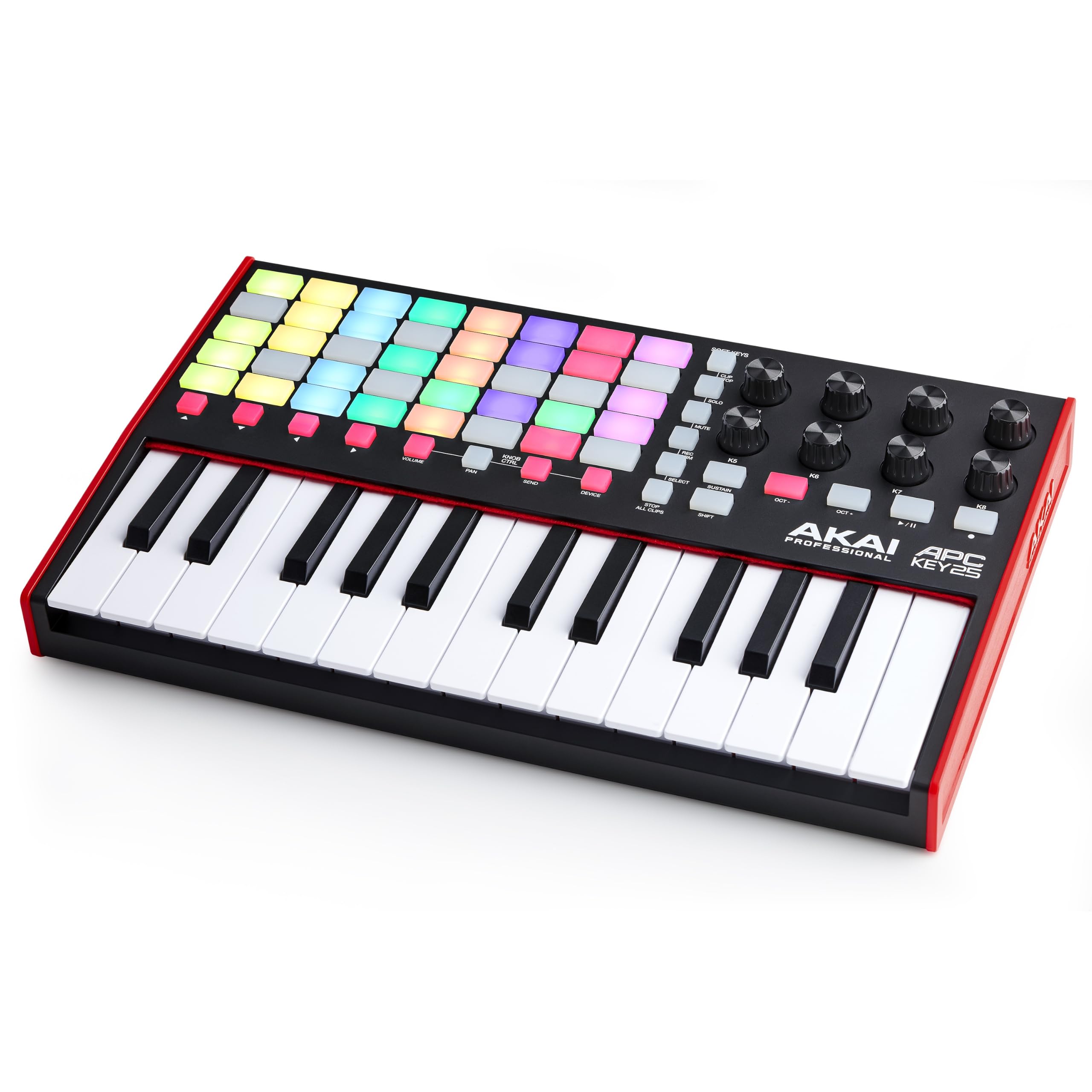
Forty glowing pads built to fire off clips in Ableton.
This is a specialist, and it does one job beautifully. The APC Key 25 MK2 carries a bright 5×8 RGB pad matrix — 40 pads in total — that launches clips in Ableton Live with color-coded feedback, so your loops, vocals and samples are all one tap away. Above the pads sit 25 velocity-sensitive mini keys with dedicated octave up and down buttons, so you can reach the full melodic range. Eight assignable rotary knobs handle volume, pan and effect sends, and four arrow buttons scroll you through tracks and scenes fast.
It is pre-mapped for 1-to-1 integration with Ableton Live 11 onwards, and the DAW comes bundled as Live Lite. Owners rate the build and keybed well and find it good for home composing, and the workflow holds up solidly on Ableton 11 with the printed manual. There is also a DAW instrument pack with Hybrid 3, Mini Grand and Velvet keyboards for piano and synth sounds.
The honest limit is the software you pair it with. On Ableton 10 you lose the plug-and-play mapping and must map controls by hand or port a script. A handful of owners also find the feature list a bit complicated to set up at first. It scores 4.5+ stars across 600+ owners, and the 40 RGB clip-launch pads are what win people over.
Strong points for Live users
- 40 RGB pads for launching clips with clear color feedback.
- Pre-mapped for 1-to-1 control with Ableton Live 11 and up.
- 8 knobs and arrow buttons keep navigation fast.
Where it needs care
- Older Ableton 10 setups need manual mapping or a script port.
- Rich feature set can feel complicated on first setup.
Pick it if: Ableton clip launching is your primary workflow and pads matter more than keys.
skip it if: You are on Ableton 10 — you will be mapping by hand.
5. RockJam RJMK25
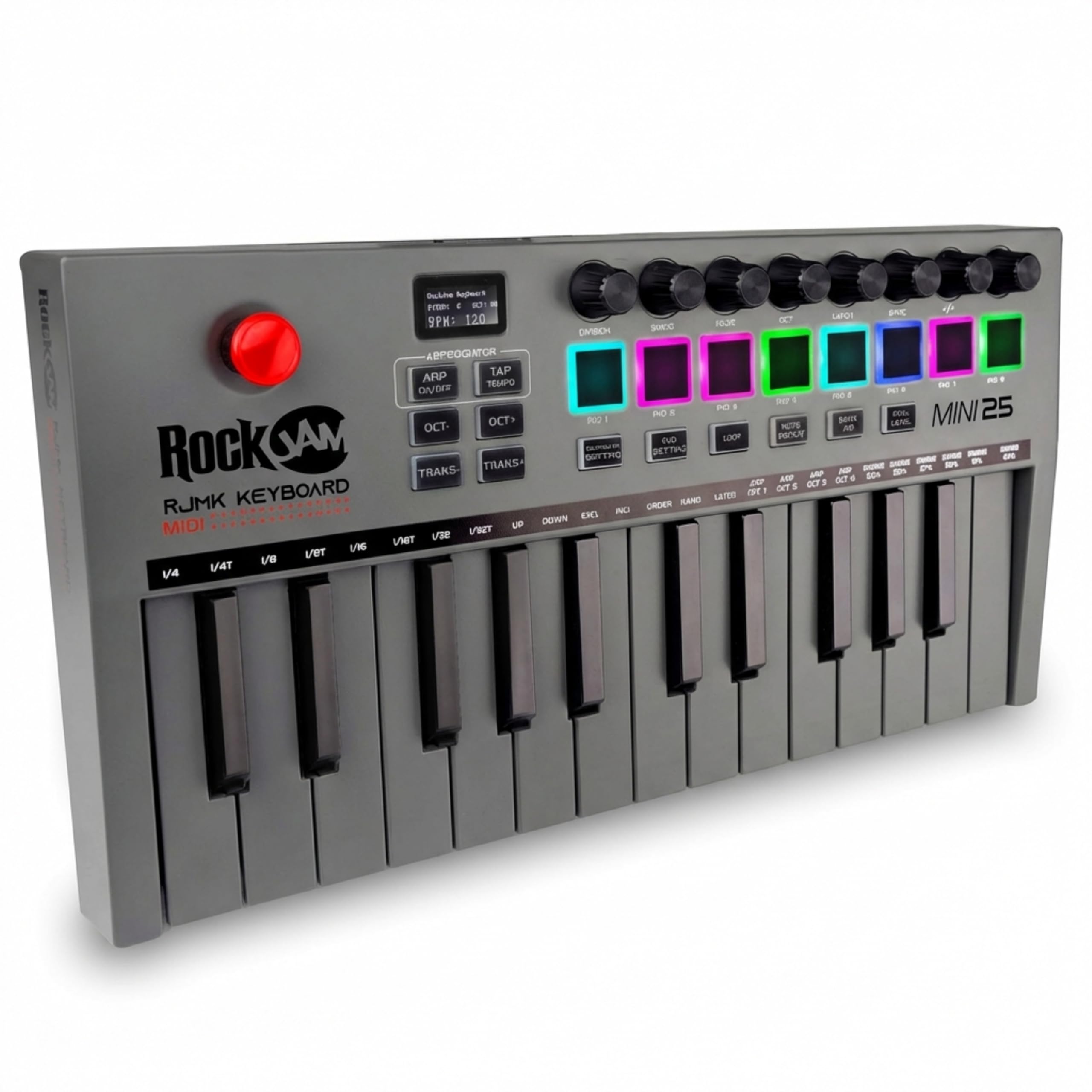
The one that cuts the cable and still fits in a backpack.
The RJMK25 is the only board here that runs on its own battery and sends notes over Bluetooth, so it earns its place on portability alone. Its compact frame measures 13.5 x 6.89 x 1.89 inches and weighs 1.8 pounds, which tucks into a bag beside a tablet. You get 25 velocity-sensitive mini keys, 8 backlit MPC-style pads with note repeat for finger drumming, 8 assignable 360° knobs for shaping your DAW sounds, and a 3.5mm headphone jack.
What buyers value most is the overall build for the money — the quality is described as good and the value as excellent for a budget board. It pairs over Bluetooth to an iPad for low-latency jamming, and the joystick self-centers. Beyond MIDI, it flashes a screen and endless encoders that give you more reach than the key count suggests.
Two real quirks to weigh. It does not produce sound on its own — one buyer points out it is not for beginners or kids learning piano, because you need software to hear anything. And Bluetooth can be fussy: some buyers report trouble connecting to Mac, GarageBand and Logic, while cabled USB works reliably. The battery is not user-replaceable and runs around 4 hours per charge. It is a 4.0+ star controller across 550+ owners.
The untethered angle: Built-in battery and Bluetooth mean you can sketch notes from the couch or a cafe without a USB cable.
Worth it for: Mobile producers who value wireless freedom and a built-in battery over polish.
Think twice if: You rely on GarageBand or Logic over Bluetooth — the cable route is the dependable one.
6. Korg, 1-Key Midi Controller (NANOKON2WH), White
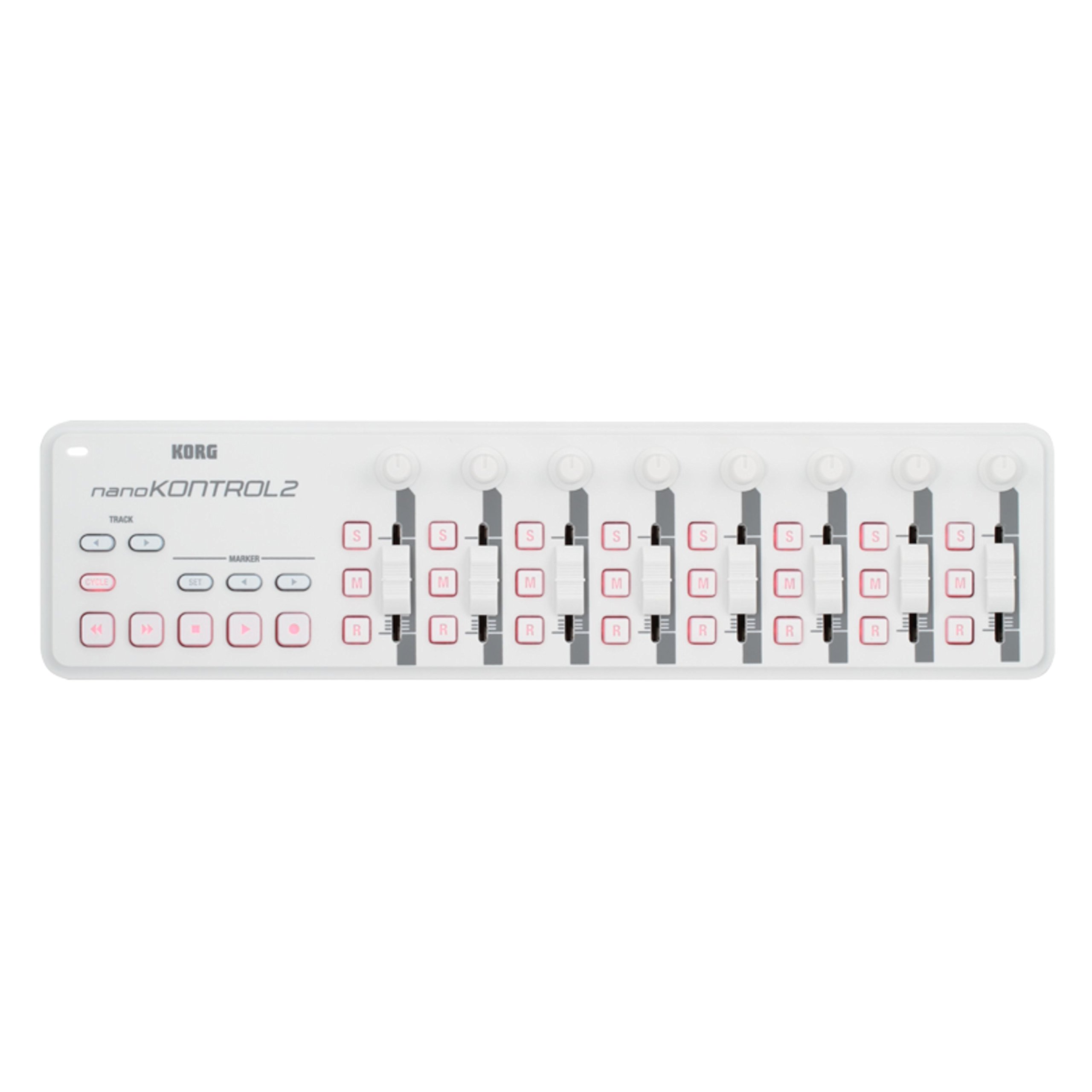
Not keys at all — a slim desk of sliders for mixing.
Read the name carefully: this is the odd one out. The nanoKONTROL2 gives you no piano keys. Instead it hands you faders, knobs and transport buttons in a low-profile, multi-function control surface that slips under a monitor. If your work is mixing and tweaking levels rather than playing melodies, this is the one to consider. It also adds new track select and marker advance parameters for moving through a song.
What buyers praise most is compatibility — it works cleanly with Logic Pro X, FL Studio, Cubase and Kontakt, and setup takes minutes. Owners also note it doubles as an OBS stream deck for scenes and alerts, and even a Serato DJ surface for FX and sample triggers. That range of uses is the reason it keeps showing up beyond pure music work.
A fair warning on the feel. The build is light plastic, and while it survives being carried in a bag, some owners find the sticky buttons and wobbly sliders toy-like against a real console. The MIDI CC control can also require replugging with buttons held, plus extra DAW tweaking. It is a 4.5+ star surface across 650+ owners, and the value and function are what keep it in the conversation.
Why the sliders matter: Tactile faders and transport make mixing faster than a mouse, though you still keep the keyboard nearby for some tasks.
Build honesty: The plastic housing is light, and the moving parts are better suited to a desk than a backpack.
Choose it when: You mix more than you play and want real sliders under your fingers.
Walk past if: You expect piano keys to play — this one does not have any.
7. Arturia MicroLab Mk3 Universal MIDI Controller, White

Real keys, barely more footprint than a notebook.
The MicroLab Mk3 is for the person who sketches melodies on a kitchen table or the end of a couch. It is small, light and USB-powered, and Arturia gave it the same upgraded keybed as its own MiniLab 3 and Keystep 37, so the slim keys feel firm with good spring-back rather than cheap. What wins people over most is simply the size — it fits a table corner or a bag with room to spare, and the white finish matches a tidy desk. A responsive, true playing feel is the point of this board.
Around the keys sit four buttons and two touch strips, plus 500 curated presets from Analog Lab Intro and Ableton Live Lite. Setup is plug-and-play over USB-C, and one owner pushed it from a first Arturia purchase into a full ecosystem, still using it as much as a larger KeyLab. The build quality reads as sturdy hard plastic that does not feel flimsy.
The honest limits are real, and they come from the features it leaves out. There is no aftertouch (extra pressure sensitivity once a key is pressed), no 5-pin MIDI DIN output and no key indicator lights. Some players also find the keys a touch stiff, and the touch strips offer only coarse control. It is a 4.5+ star controller across 100+ owners.
Why it travels so well
- Same upgraded keybed as the MiniLab 3 for a firm, musical feel.
- Genuinely small and light USB-powered frame that fits a bag.
- 500 presets and Ableton Live Lite ready on day one.
Where it cuts corners
- No aftertouch, no 5-pin MIDI DIN output and no key lights.
- Touch strips give only coarse control.
Made for: Songwriters who need real keys on the move and can live without deep control.
Leave it if: You want to drive external synth hardware — there is no 5-pin MIDI output.
Know the Specs
Velocity and Pressure Sensitivity
Velocity sensitivity means the board reads how hard you strike a key, so soft playing comes out soft and hard playing comes out bright. Pressure sensitivity goes a step further on pads, reading how hard you press after the initial hit for extra expression. On a 25-key controller these two readings are what make it feel musical instead of like a grid of on-off switches.
DAW Mapping and 5-Pin MIDI
DAW mapping is when a board is factory-set to control a specific program’s faders, transport and knobs — so you plug in and it just works. A 5-pin DIN MIDI Out is the older round socket that talks to hardware synths and drum machines. Boards with a 5-pin out can sit at the center of a hardware rig; boards with only USB need a computer in between.
Key Count and Keybed Size
Compact controllers usually carry 25 keys — two octaves — with octave buttons to reach higher and lower ranges. Mini or slim keys save space but are closer together, which suits travel and tighter hands. A firmer, springy keybed plays better than a spongy one, and it is the most-noticed quality after the first week.
Pads, Knobs and Touch Strips
Drum pads let you tap out beats, and they range from 8 to 40 depending on the board. Knobs and touch strips handle volume, pan and effect sends. FSR pads read force, so they respond to how hard you hit. More of these controls means more reach, but also a longer learning curve before everything feels natural.
Common Questions
Do compact MIDI controllers make sound on their own?
Will a 25-key controller work with Ableton Live?
What is the difference between mini keys and full-size keys?
Can I connect a compact MIDI controller to a hardware synth?
Do these controllers work with an iPad?
How many drum pads do I really need?
Can a compact controller replace a mixer for volume and pan?
Is a controller with a screen worth it over a bare board?
Do I need to install software to use the bundled sounds?
The Bottom Line
For most people, the compact midi controller worth choosing is the Akai Professional MPK Mini IV. A screen, 8 MPC pads, 25 keys and a huge bundled suite add up to the most complete small board you can buy. If you write in Ableton Live and want more pads for clip launching, the Novation Launchkey Mini 25 MK4 is the sharper tool. And if you just want real keys in the smallest possible bag, the Arturia MicroLab Mk3 slips in without a second thought.
The MPK Mini IV holds a 4.5+ star score across 18,000+ owners, and its front-panel screen and encoder are why it keeps earning that spot. Pick your board for the software you already use, and it will feel like an extension of your hands within a week.
How we choose
We do not accept paid placement. Every pick is matched to a real buyer and a real use-case; we do not hands-on test units.
Sources
Specifications: manufacturer listings and product documentation. Review insights: verified customer reviews, as of October 2026. Pricing: not shown on this page (it changes often); check the current price via the retailer link.
As an Amazon Associate, Aappliancez earns from qualifying purchases. This does not affect which products we feature.