Disclosure: Some links in this post are affiliate links. As an Amazon Associate I earn from qualifying purchases, at no extra cost to you. Learn more
Specs are compiled from manufacturer listings and verified buyer reviews and can change over time — please confirm the key details on the product page before buying.
A cheap prebuilt PC is the fastest way to get a working desktop without learning to build one. You plug in a power cable, connect a monitor, and you are running Windows the same afternoon. The catch is that the cheapest towers hide old processors behind glossy marketing, so the real question is which corners you can safely accept. This guide walks you through ten towers that real buyers actually live with, from sub- refurbs to a serious gaming rig, and tells you exactly where each one lands.
This guide is built by comparing the manufacturers’ published specifications and the patterns across verified customer reviews, so you get each pick’s real strengths and trade-offs instead of marketing spin.
Refurbished Dells with 32GB of RAM sit beside brand-new towers with dedicated graphics cards, so the listings look alike until you check the processor generation. What separates a good deal from a paperweight is whether the processor still gets Windows updates and whether the storage is a real SSD. Here is what actually matters when you shop for cheap prebuilt PCs.
Top Picks



How To Choose The Best Cheap Prebuilt PCs
The tower that looks like the best deal on the shelf is often the one that stops getting security patches first. Two numbers decide most of your experience: the generation of the processor and the type of storage inside. Get those right and almost everything else about a budget desktop is workable.
Why the processor generation outranks the core count
An “Intel i5” label tells you the family, not the age. A 6th-generation chip like the i5-6500 runs Windows 11 only through workarounds, while an 8th-generation chip like the i5-8500 is fully supported. Ask for the full model number with the hyphen and the four digits, not just the family name. That single detail predicts how long the machine stays secure and updatable.
Storage: SSD versus hard drive changes everything
A solid state drive (SSD) has no moving parts, so it boots in seconds rather than minutes. The 512GB M.2 NVMe drives in the refurbished towers here are the fast kind that plug straight into the motherboard. If a listing only says “1TB” without naming the drive type, assume it is a slow mechanical hard drive until proven otherwise.
Graphics cards: model number beats marketing
A dedicated card like the GTX 1050 Ti or RX 580 handles its own graphics work instead of borrowing from the processor. The higher the number after the letters, the newer and faster the card generally is. If you only browse and work in spreadsheets, integrated graphics are fine; if you want to play modern games, you need the dedicated card.
Side-by-Side Comparison
| Model | Best For | Processor | Memory | Storage | Amazon |
|---|---|---|---|---|---|
| Dell OptiPlex 3050★ Best Overall | Home office and study | i5-6500 3.2GHz | 32GB DDR4 | 512GB M.2 NVMe | Amazon |
| HP Windows 11 DesktopBest for Families | Families and students | Intel i5 8th Gen | 16GB DDR4 | 500GB SSD | Amazon |
| Desktop Computer PC i7Best for Dorms | Home and dorm use | Intel i7 up to 3.4GHz | 16GB DDR3 | 512GB SSD | Amazon |
| STGAubron Core I5 | Entry gaming | Intel Core i5 | 16GB | 512GB SSD | Amazon |
| STGAubron Xeon E5 | Starter gaming PC | Intel i7 Xeon E5 | 16GB | 512GB SSD | Amazon |
| abytespark Prebuilt | Gaming and streaming | Core i7-4770 | 16GB | 512GB SSD | Amazon |
| ZER-LON Gaming PC | Teen gamers | Core i7-4770 up to 3.9GHz | 16GB | 512GB SSD | Amazon |
| WIWB Ryzen 5 Prebuilt | Esports and office work | Ryzen 5 3500X | 16GB | 512GB SSD | Amazon |
| NOVATECH Phantom | 1080p gaming and school | Xeon E3 1230v6 | 16GB DDR4 | 512GB M.2 SSD | Amazon |
| CyberPowerPC Gamer Xtreme VR | Serious modern gaming | Core i5-13400F 2.5GHz | 16GB DDR5 | 1TB PCIe Gen4 SSD | Amazon |
Detailed Reviews
1. Dell OptiPlex 3050 Desktop
Double the memory of most towers near this tier, without a build-it-yourself night ahead of you.
If you have ever tried to rebuild a desktop on your own, you already know the pain: incompatible parts, a missing cable, a driver that never installs. This OptiPlex sidesteps all of that. It is a refurbished Dell tower that ships already assembled and tested, and 32GB of DDR4 memory is the headline. That is twice what the HP Windows 11 Desktop next on this list carries, a 2.0x gap that shows up as room for dozens of browser tabs, spreadsheets, and video calls running side by side without the system grinding to a halt.
The processor is an Intel Core i5-6500 running at 3.2GHz, and the storage is a new 512GB M.2 NVMe SSD — the fast kind that boots Windows in seconds and loads programs almost instantly. Dell also installed an AX200 WiFi 6 card, a wireless chip rated up to a 3000 Megabytes Per Second data transfer rate, so you are not stuck using an Ethernet cable. Dual monitor support comes through HDMI and DisplayPort, which is the fastest way to double your working screen space.
What buyers report most about this tower is the performance itself, and the setup process runs a close second. One owner summed it up simply: “Refurbished PC includes wireless keyboard/mouse, i5-6500, 32GB RAM, 512GB NVMe SSD, WiFi/BT, 1Gbps Ethernet, HDMI/DP, USB 3.0/2.0, DVD RW.” A few owners mention the 512GB drive fills up faster than they expected once photos and video files pile in, and the memory does not expand further because the board is maxed from the factory.
Where it pulls ahead
- 32GB DDR4 memory is double the HP’s 16GB, so heavy tab counts and multitasking stay smooth.
- New 512GB M.2 NVMe SSD boots in seconds and loads programs fast.
- Dual monitor support via HDMI and DisplayPort for a two-screen desk.
- Pre-built and tested, so setup is cable-in and go.
What to weigh first
- The i5-6500 is a 6th-generation chip and can block Windows 11 upgrades without a workaround.
- 512GB is a real ceiling once media files stack up.
- Refurbished condition varies unit to unit.
Matches the heavy multitasker: If you run many programs at once and want the wiring done for you, this is the one to pick first.
Look at a newer chip if: You need out-of-the-box Windows 11 support without any workaround.
2. HP Windows 11 Desktop Computer
Everything for a home desk in one box, monitor and glowing keyboard included.
Most budget towers show up as a bare box, and you then buy a screen, a keyboard, a mouse, and speakers one at a time. This HP skips that whole scavenger hunt. Alongside the tower you get a 24-inch LCD monitor, an RGB keyboard and mouse combo, speakers, and a 2K webcam, so a student can unbox it and be on a video call the same evening.
The internals are a small form factor ProDesk with an Intel Core i5 8th Gen processor, 16GB DDR4 RAM, and a 500GB SSD. That 8th-generation chip matters: it is the newest processor generation among the value-priced towers here, so Windows 11 is properly supported. The compact case also sits neatly on a narrow desk without dominating the space.
What owners like is the overall quality of the bundle, and the value for the money sits right behind it. One buyer put it plainly: “Very happy with this purchase! Came with adjustable monitor, keyboard and mouse, speakers, WiFi adapter, and webcam. Awesome value for the money. Silent operation.” The known snag is the “wifi ready” description — as customers note, some units arrived without a wireless driver or antenna installed, needing a separate adapter, and one shopper found the included monitor stand less stable than pictured. Setup times also split between quick and fiddly. The HP edges ahead of the Dell OptiPlex on processor generation but trails it on memory, 16GB against 32GB.
The bundle math: Buying a monitor, keyboard, mouse, speakers, and webcam separately adds real cost — this tower folds them into one purchase.
Worth a second look: The 500GB SSD is 12GB smaller than the 512GB drives on the Dell and Kroteaup towers, a small but real difference once Windows and updates claim their share.
Reach for this if: You need a complete desk setup for a student or family home and want the 8th-gen chip for clean Windows 11 support.
Think twice if: You already own a good monitor and would rather spend that budget on stronger internal parts.
3. Desktop Computer PC Intel i7
Three RGB fans and a classic tower shape that slides under a dorm desk without complaint.
This Kroteaup tower is aimed squarely at students and home offices. The Intel i7 chip runs up to 3.4GHz, which is a slightly higher clock ceiling than the Dell OptiPlex’s 3.2GHz, and it pairs with 16GB of DDR3 RAM plus a 512GB SSD. The 512GB is the same capacity as the Dell, so storage is a wash between these two. Windows 11 Home comes pre-installed, so there is no setup mara-thon, and the three RGB cooling fans keep airflow moving in a case small enough for a cramped desk.
The flexible part is the upgrade path. There is an open PCIe slot for a graphics card later, plus room for more storage and memory, which is rare in this price tier. If your needs grow in a year or two, you can add rather than replace.
What wins people over is performance, and the silence of those fans is a quieter bonus. Parents of younger kids report the tower landing well as a gift. The honest caveat is reliability — some units arrive with a cable half-seated inside and refuse to boot until it is reseated, and one report described a unit stuck at a glitched screen with hot glue on the internal components and detached fans. Value is also a mixed picture: it is fast and quiet for the money, but not everyone feels the internals justify the price. Ask about the DDR3 memory too, since it is older than the DDR4 in the Dell and HP.
The growth angle: The open PCIe slot and spare drive bays mean this tower can be upgraded later instead of replaced, which matters if you might want a dedicated graphics card down the road.
One thing to check: DDR3 memory is a generation behind the DDR4 used in the Dell and HP, so plan for a possible future memory swap if heavy multitasking matters to you.
Worth grabbing if: You want a quiet, upgrade-friendly tower for study and light gaming that fits a tight dorm or apartment desk.
Look elsewhere if: You need guaranteed boot-on-arrival reliability and cannot tolerate any out-of-box troubleshooting.
4. STGAubron Gaming PC Desktop Core I5

A dedicated Radeon card and lit-up internals for gamers who want the glow without the cost.
This STGAubron tower is the cheapest way into a machine with a real, separate graphics card. The Radeon RX 550 4G GDDR5 card does its own visual work, and the system runs on an Intel Core i5 up to 3.6GHz with 16GB of memory and a 512GB solid state drive. Two RGB fans light the case, and Wi-Fi 6 plus Bluetooth 5.0 mean you can connect wirelessly without extra parts.
The brand markets this rig for a long list of titles, from Fortnite to Minecraft, at 60+ FPS, and it comes with an RGB gaming mouse and keyboard plus a year of parts and labor coverage. For a first gaming setup, the appearance and ease of setup are the parts that land best, and it is often picked up as a starter machine for kids.
The trade-off is consistency over time. Performance splits hard between buyers: some say it plays very fast, while a recurring theme among unhappy owners is that the machine slows down months in and starts crashing. One owner found the RAM had arrived loose and simply reseated it to get things running, a fix that costs nothing. The RX 550’s 4GB of video memory is also modest — the STGAubron Xeon E5 and the NOVATECH Phantom both carry 8GB cards, so this tower sits a step below them on graphics headroom. If you buy it, plan to boot it immediately and check the memory is seated tight.
Why gamers shortlist it
- Dedicated Radeon RX 550 4G graphics instead of integrated visuals.
- 16GB memory and 512GB SSD handle everyday load times well.
- Wi-Fi 6 and Bluetooth 5.0 built in, no dongle hunt.
- RGB keyboard and mouse bundled, plus 1-year parts and labor coverage.
Before you click
- Some units reportedly slow down months in and crash under load.
- 4GB of video memory is less than the 8GB cards on the Xeon E5 and NOVATECH picks.
- RAM occasionally ships loose and needs reseating before first boot.
Built for: A first gaming tower where the RGB look and a dedicated card matter more than long-term headroom.
Pass on it if: You want a machine that stays snappy for years and can stretch your budget to an 8GB card.
5. STGAubron Gaming PC Desktop Intel i7 Xeon E5

A server-grade Xeon chip with triple RGB fans, built to chew through school, work, and games at once.
The Xeon E5 is a server-grade version of an Intel i7, which means it was designed to run hard for long stretches. Here it tops out at 3.0GHz and pairs with 16GB of memory and a 512GB solid state drive, and the tower carries three RGB fans instead of two. Genuine Windows 11 Home comes loaded, and the machine runs a wide range of popular titles at 60+ FPS according to the maker.
First-time PC owners tend to bond with this one. It handles games at 1080p at 60hz while running two or three other apps in the background, and it boots in minutes with the bundled keyboard and mouse. One owner described it as a solid computer for gaming, school, and everyday tasks, and another appreciated that the seller packed the interior with foam to protect parts in shipping.
Two things keep this from being a no-brainer. The Wi-Fi antenna is the weakest link — reviewers point out poor signal and often swap in a cheap third-party antenna to fix it, so budget for that small add-on. And the reliability picture splits, with a handful of owners landing dead units that never produced a display signal at all. Compared with the Core I5 STGAubron above, this Xeon model carries the stronger processor and the 500+ review track record versus 975 for the Core I5, though the Core I5 holds the higher score at 3.5+ stars. If a steady, proven unit matters most, weigh that.
The value read: A server-grade processor, 16GB of memory, a 512GB SSD, and 1-year parts and labor coverage stack up well against the price of buying those parts separately.
Ideal for: A first gaming PC where a rugged processor and roomy RGB case top the wish list, and you do not mind swapping a flimsy Wi-Fi antenna.
Better to skip if: Boot-on-arrival certainty is non-negotiable for you.
6. abytespark Prebuilt Gaming PC Desktop
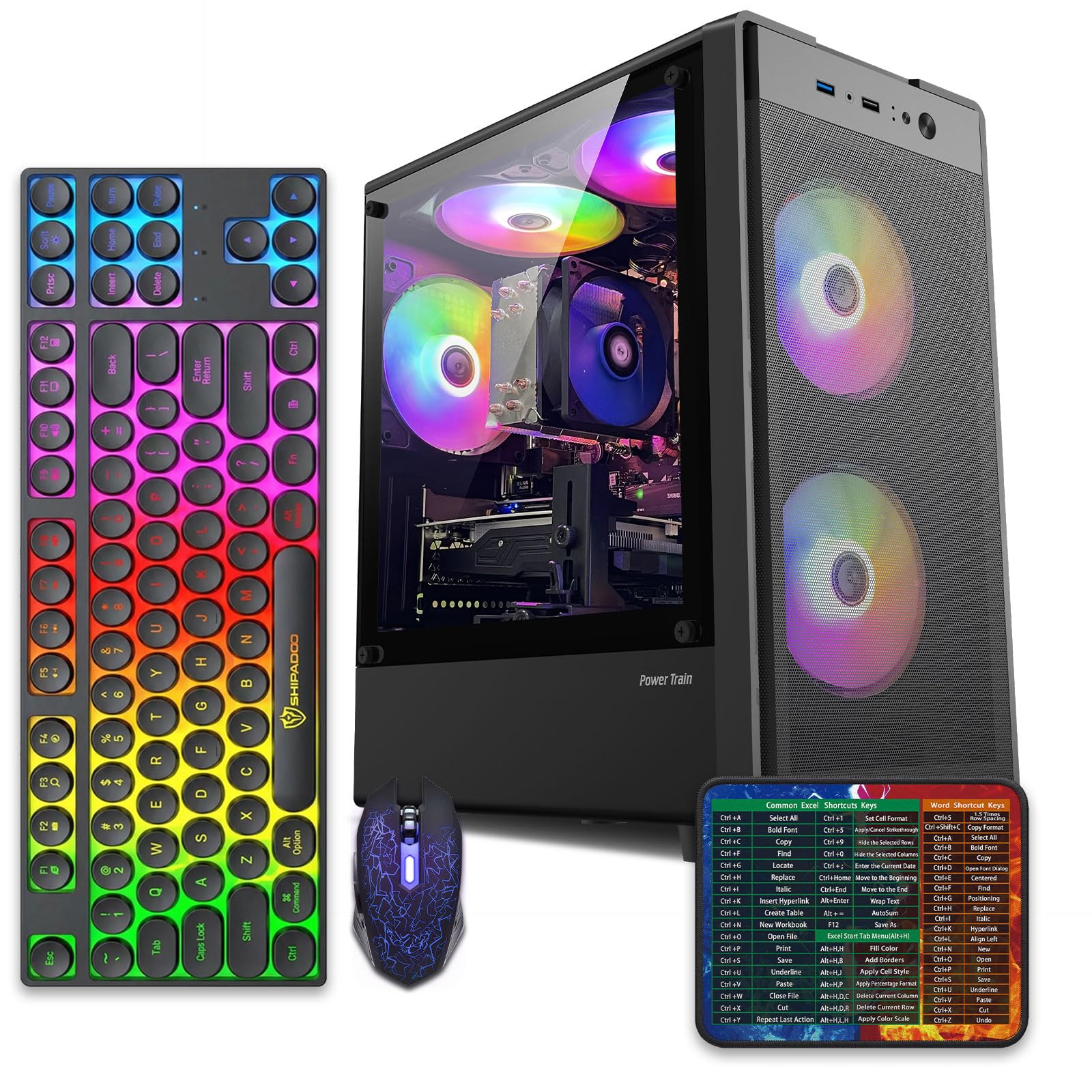
Five RGB fans and an 8GB Radeon card turn a business tower into a light show.
This abytespark tower is a dual-purpose machine: capable with office software and lit up enough for a gaming corner. At its heart is a Core i7-4770 processor running up to 3.9GHz, backed by 16GB of RAM and a 512GB SSD. The graphics card is an AMD Radeon RX 590 with 8GB of GDDR5 memory, and the case glows with five RGB fans.
Storage and connectivity hold up well for the price. There are 2 USB 3.0 and 6 USB 2.0 ports, an RJ-45 ethernet port, and HDMI, DisplayPort, and DVI outputs, so a triple-screen setup is on the table. Wi-Fi 5.0 is built in, which means no adapter to add. Performance is what owners praise most, with game development and gaming both called out as strong suits.
Reliability is the split point. The i7-4770 is a 2013-era chip, and more than one buyer flagged that Windows 11 was installed through a workaround because the board lacks TPM and Secure Boot — so future big Windows updates may not come cleanly. There is also a report of hot glue on the internal parts and a screen showing pixel artifacts from the start, which points to shipping or quality-check risk on some units. As a value play for a beginner who just wants a lit-up starter tower, it works; as a long-term, fully updatable machine, it carries more uncertainty than the newer-chip towers here.
The honest catch: The 2013 Core i7-4770 predates the official Windows 11 hardware list, so plan to verify how updates are handled before relying on it for years.
The right buyer: Someone who wants a bright, capable starter gaming and work tower and is comfortable with a few quirks.
Not for you if: You need a processor that clears the Windows 11 hardware bar without workarounds.
7. Gaming PC Desktop Computer Core I7
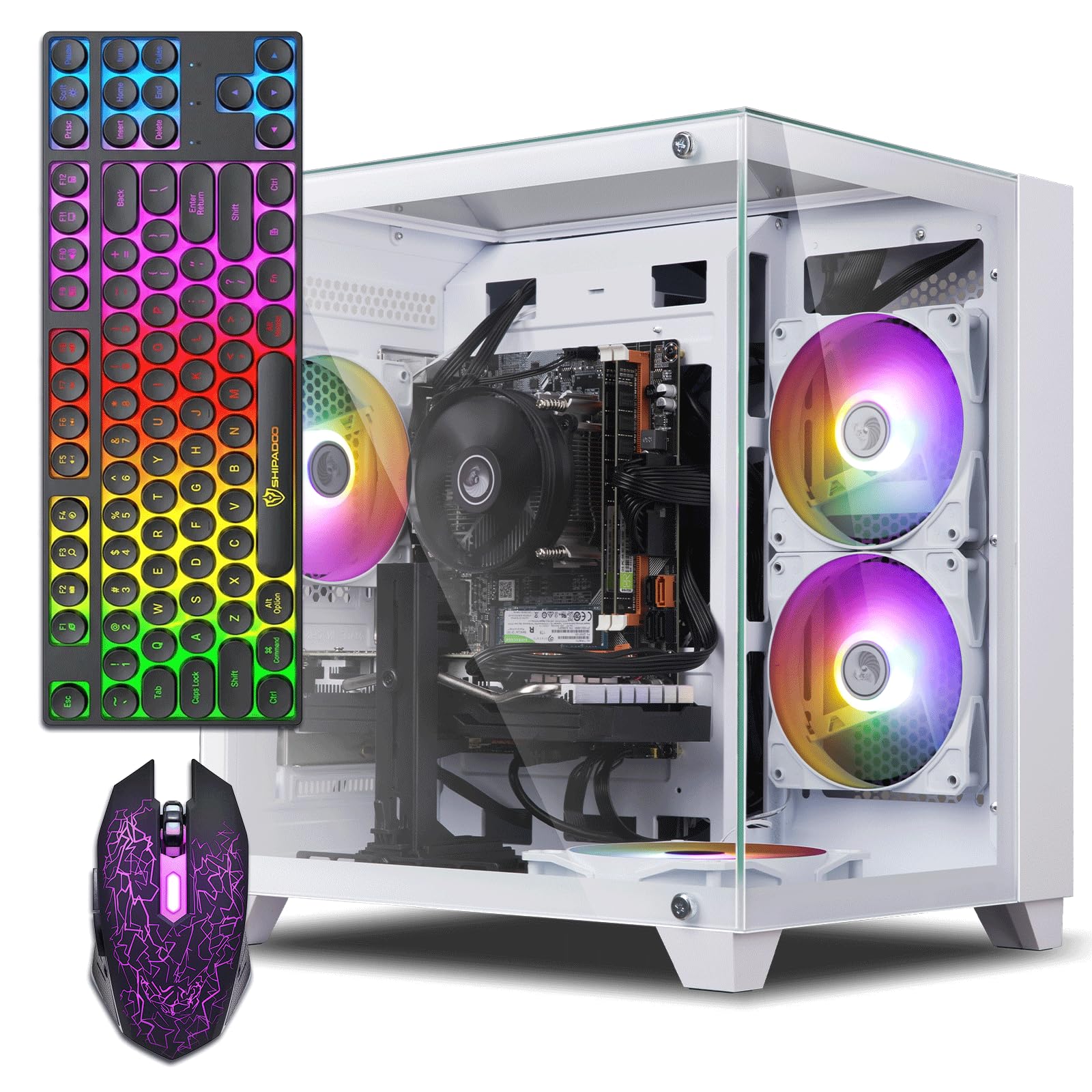
A reliable dedicated card and a full accessory bundle aimed straight at a teen’s first setup.
This ZER-LON tower centers on an NVIDIA GeForce GTX 1050 Ti with 4GB of GDDR5 memory — a well-established entry card that handles non-demanding games without drama. It runs an Intel Core i7-4770 up to 3.9GHz with 16GB of memory and a 512GB SSD. Two USB 3.0 and six USB 2.0 ports sit alongside HDMI, DisplayPort, and DVI outputs, so two monitors are easy to drive.
The bundle is a big part of the appeal: 4 RGB fans, a gaming keyboard, a gaming mouse, a mouse pad, and even a graphics card holder. For parents buying a first machine, this saves the separate accessory run. Owners with kids in the 13-year-old range report it running Fortnite, Roblox, Minecraft, and CS smoothly, and the RGB fans and glass side panel land well on a bedroom desk.
Two honest notes. The first is Bluetooth uncertainty; more than one buyer was unsure whether the system supports it, and it is worth confirming before you rely on a wireless headset. The second is the processor: like its sibling picks, the i7-4770 predates the Windows 11 hardware requirements, so updates may be a sticking point. Performance here is the strongest single draw — it is the most-praised aspect by a wide margin, and setup is a close second. If you want an easy-to-run starter rig and do not need Bluetooth or modern-chip update guarantees, it delivers on the basics.
What buyers like
- Dedicated NVIDIA GTX 1050 Ti 4GB graphics for smooth non-demanding games.
- Full bundle: 4 RGB fans, keyboard, mouse, pad, and card holder.
- Multiple outputs support two displays at once.
Where it stumbles
- Bluetooth support is unclear and worth confirming first.
- The i7-4770 is an older chip that may limit Windows 11 update support.
- Some units arrived with no display signal, requiring a return.
A strong fit for: A teen’s first gaming PC where a bundled keyboard and mouse and an easy setup matter most.
Hold off if: You need confirmed Bluetooth or a processor that fully clears Windows 11’s hardware bar.
8. Prebuilt Gaming PC Desktop Ryzen 5
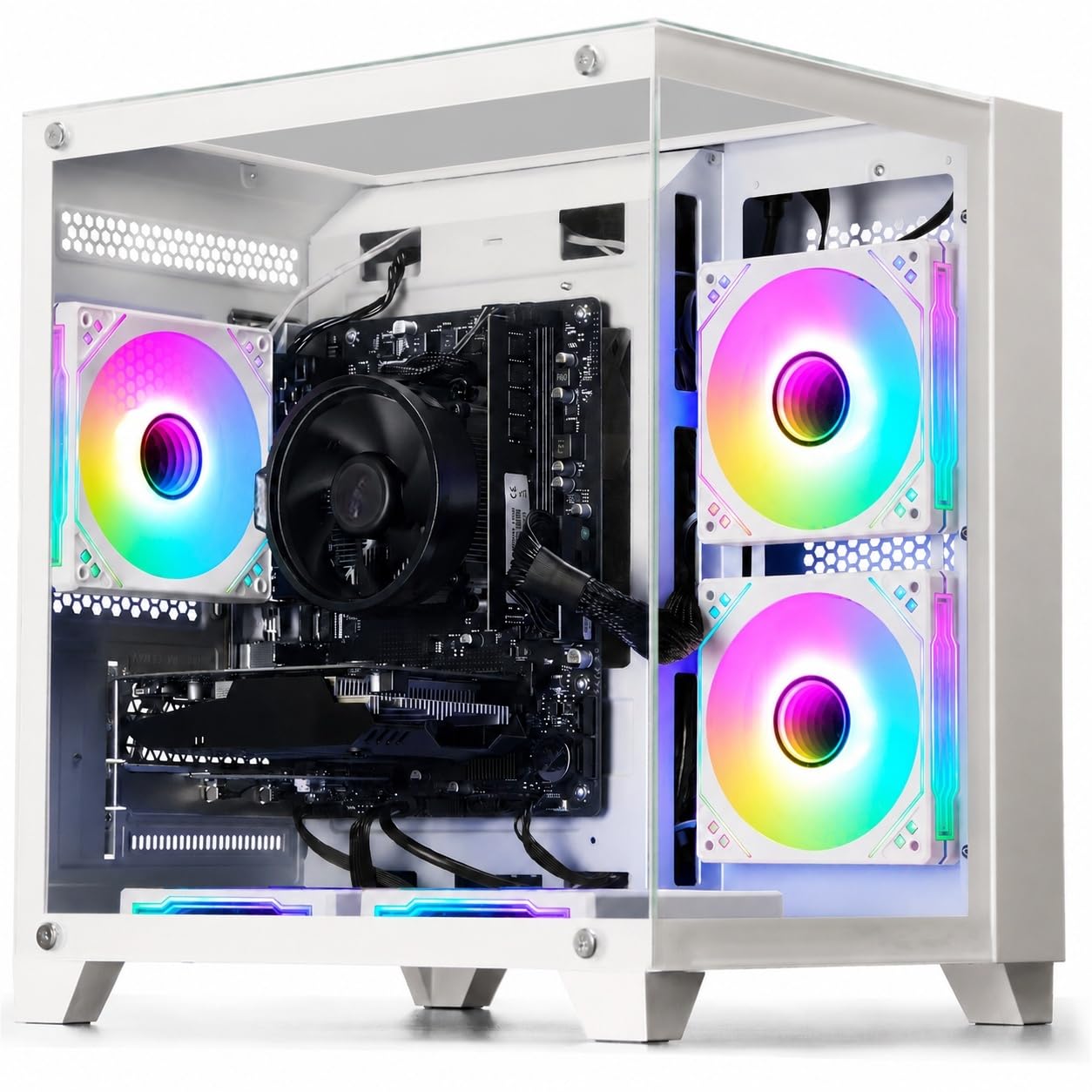
A six-core Ryzen chip with reserved upgrade slots, made for buyers who plan to grow the machine.
This WIWB tower runs an AMD Ryzen 5 3500X, a 6-core, 6-thread processor with a base frequency of 3.6GHz and a boost up to 4.1GHz. Those extra cores matter for multitasking, image editing, and programming — jobs that lean on more than raw clock speed. The graphics card is an AMD Radeon RX 560 4GB with DirectX 12 and Vulkan support, aimed at esports titles like League of Legends, CS:GO, and Overwatch. Memory is 16GB and storage is a 512GB SSD.
The standout for planners is the expansion room: the motherboard keeps an M.2 SSD interface, DDR4 memory slots, and reserved drive bays, so you can add memory, storage, or a stronger graphics card as needs change. It is also one of the few white towers here, which stands out on a desk.
What owners highlight is the build quality, with performance close behind. Buyers describe it as the best bang for the buck and say it removed the slow-gaming frustration they had before. The trade-off is reliability consistency: most units run without issue, but the occasional one develops trouble, including a reported case of a tower powering on and off repeatedly after about a month. For the price tier, it is a solid pick if you value an upgrade-friendly frame over maximum power today.
Built to grow: The reserved M.2 slot, DDR4 memory slots, and drive bays let you add parts over time instead of replacing the whole tower.
Perfect for: A buyer who wants a tidy, upgrade-ready white tower for esports gaming and light content work.
Choose differently if: You want maximum graphics power from the start and never plan to open the case.
9. NOVATECH Phantom Prebuilt Gaming PC Desktop

An 8GB Radeon RX580 and a server-grade Xeon chip make this the quiet 1080p workhorse.
The NOVATECH Phantom leads with an AMD RX580 graphics card carrying 8GB of memory — double the video memory of the ZER-LON and WIWB picks, and enough to drive 1080p games with detail turned up. Behind it sits an I7 Xeon E3 1230v6 processor, a server-grade variant built for endurance, plus 16GB of DDR4 RAM and a 512GB M.2 SSD. Windows 11 Pro is pre-installed, and the case runs three RGB fans.
Gamers who use it report smooth 1080p performance, with Fortnite and Valorant hitting frame rates above 100 in the right situations, and the M.2 SSD loading games fast. Owners also talk about the presentation: the tower arrives double-boxed with expanding foam, and the interior cabling is neat and clean. The 1-year warranty covers parts and labor, and support gets repeat praise for responding quickly.
The two caveats are the Wi-Fi and the graphics card’s age. Wireless runs through a USB dongle rather than a built-in card, and shoppers say signal dropping, so a wired Ethernet connection or a booster is the smart move. The RX580 is also an older card, so the newest, heaviest titles may need lower settings. Compared with the WIWB and ZER-LON picks, this tower carries more video memory and a stronger processor, which is where the higher tier of the budget money goes.
What earns its place: The 8GB RX580 gives it more graphics headroom than every other tower at its price tier here, and the Xeon chip is built to run long hours.
Plan around this: Buy a wired Ethernet run or a Wi-Fi booster, since the USB dongle wireless is the recurring weak point.
Pick this if: You want a quiet, warranty-backed 1080p gaming and school machine with more graphics memory than the cheaper towers.
Wait if: You need the very newest games at high settings and a rock-solid built-in Wi-Fi adapter.
10. CyberPowerPC Gamer Xtreme VR Gaming PC
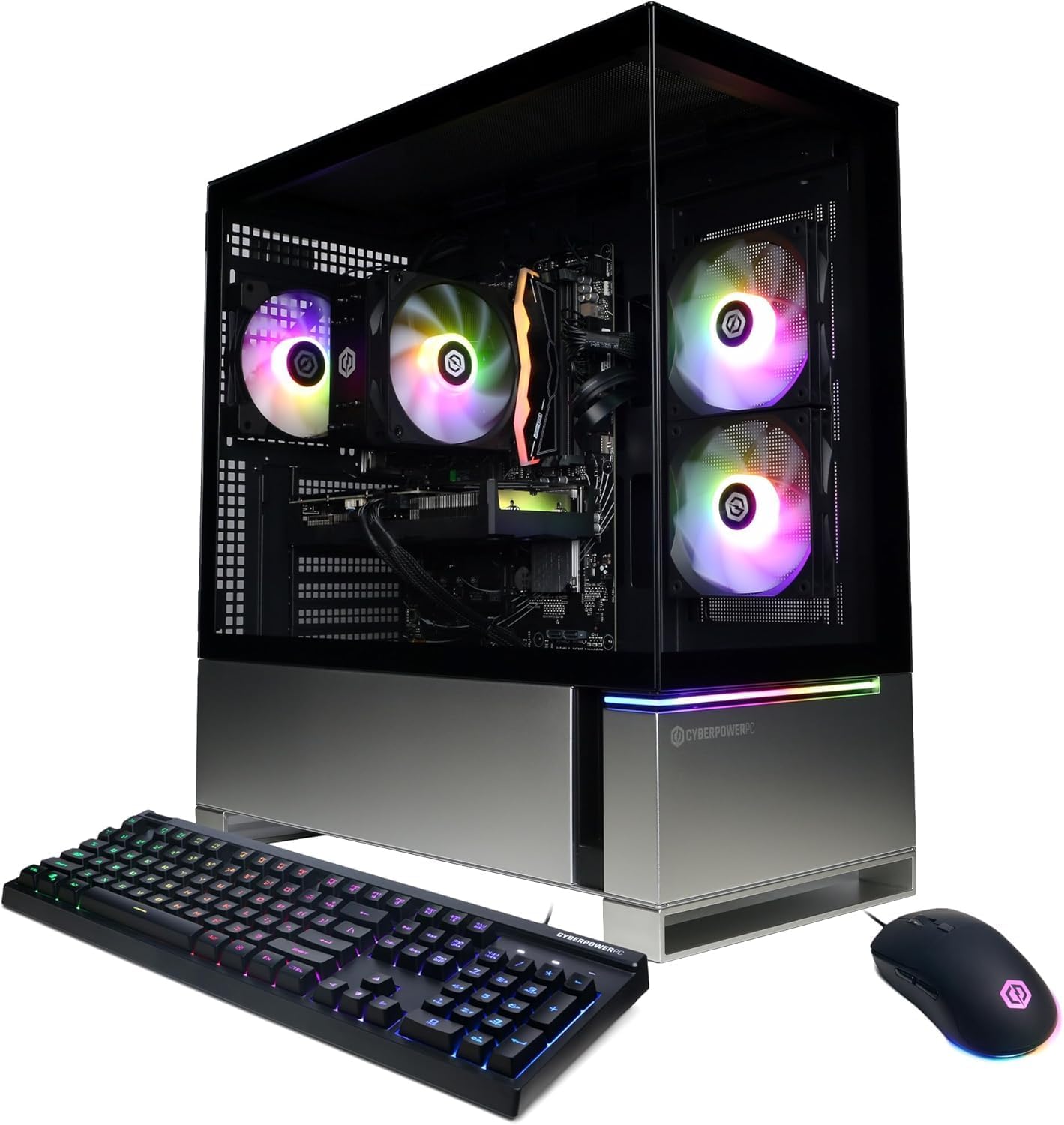
The modern tower at the top of this list, with current-generation parts and a 1TB Gen4 SSD.
Every other tower here leans on older or refurbished parts; this one does not. The CyberPowerPC Gamer Xtreme VR runs an Intel Core i5-13400F at 2.5GHz with 6+4 cores, 16GB of DDR5 memory, and a 1TB PCIe Gen4 NVMe SSD. DDR5 is a newer memory type than the DDR4 and DDR3 used elsewhere here, and the 1TB drive holds twice the storage of the 500GB and 512GB drives on the budget picks. Graphics come from an NVIDIA GeForce RTX 4060 with 8GB.
In games, buyers report it running Fortnite, Roblox, and Minecraft at high settings with steady 120 fps, and setup is quick since the system arrives pre-built with clear instructions. The tempered glass side panel and custom RGB lighting keep it looking sharp, and the machine runs quietly even under load. Connectivity includes 3 USB 3.1 and 6 USB 2.0 ports, a 1G LAN port, plus keyboard and mouse in the box.
This is the pick for a buyer who wants modern parts and does not want to think about workarounds or old-chip limitations. It carries a 1-year parts and labor warranty and free lifetime tech support, and the track record is the strongest of the group. The main thing to weigh is that some buyers will not need this much power — if you only browse and use office software, the cheaper towers above cover that for far less. Buying this one means committing to a modern platform, while the cheaper towers here still handle everyday tasks for less.
Reserve it for: A serious gamer who wants current-generation Core i5, DDR5 memory, RTX 4060 graphics, and a 1TB Gen4 SSD in one prebuilt box.
Scale down if: Your daily use is web, email, and documents — a value tower covers that without the higher outlay.
Know the Specs
Processor generation, not just the name
The “i5” or “i7” on the box is a family name, not an age. The four digits that follow it carry the real story. A chip like the i5-6500 or i7-4770 is an older generation that often cannot run Windows 11 without a workaround, which can leave you without clean security updates. Newer chips like the Core i5-13400F clear those requirements from the start. When you shop, ask for the full processor model number and check its generation against the current Windows 11 hardware list before you buy.
Video memory on the graphics card
Video memory, measured in gigabytes, is the graphics card’s own workspace. More of it lets the card store more textures and detail, which matters for higher settings and higher resolution. A card with 4GB like the RX 550 or GTX 1050 Ti handles lighter and older titles; a card with 8GB like the RX 580 or RTX 4060 has more headroom for newer games. The card’s model number tells you its generation, so a higher number generally means newer and faster.
SSD types and boot speed
A solid state drive stores your files on memory chips instead of spinning disks, which is why it boots in seconds. The fastest kind is an M.2 NVMe drive that plugs straight into the motherboard, like the ones in the Dell OptiPlex and NOVATECH Phantom. A 1TB PCIe Gen4 NVMe drive, as in the CyberPowerPC, holds twice the data of a 500GB or 512GB drive. Capacity sets how many games and photos fit, while the drive type sets how fast everything loads.
Memory type and speed
Memory, also called RAM, is the workspace your programs use while running. More of it lets you keep more tabs and apps open at once, which is why 32GB in the Dell OptiPlex feels roomier than 16GB. The type matters too: DDR5 is newer than DDR4, and DDR4 is newer than DDR3. Mixing old memory types limits future upgrades, so check what the board uses before you plan to add sticks later.
Common Questions
Will a budget prebuilt PC run the games my kid wants?
Why does a cheap prebuilt PC sometimes fail to update Windows 11?
Is a refurbished desktop a risky buy compared with a new one?
What does “wifi ready” actually mean on these listings?
How much storage do I really need on a prebuilt PC?
Can I upgrade a budget prebuilt PC later?
Which processor is better, an Intel Core i5 or a Xeon?
Do these prebuilt PCs come with a monitor and keyboard?
Is a dedicated graphics card worth it over integrated graphics?
How long should a budget prebuilt PC last?
The Bottom Line
For most buyers, the cheap prebuilt pcs winner is the Dell OptiPlex 3050 because it pairs 32GB of DDR4 memory with a fast 512GB M.2 NVMe SSD, arrives tested and ready to run, and costs less than almost everything else on this list while doing daily office and study work with room to spare. If you want a complete desk setup that arrives with a monitor, keyboard, mouse, and webcam, grab the HP Windows 11 Desktop. And for serious modern gaming with DDR5 memory, RTX 4060 graphics, and a 1TB Gen4 SSD, the CyberPowerPC Gamer Xtreme VR is the one to reach for.
If your daily routine is web, email, documents, and light gaming, the value towers here cover it without the higher outlay. The right cheap prebuilt PC is the one whose processor generation and graphics card match what you actually do.
How we choose
We do not accept paid placement. Every pick is matched to a real buyer and a real use-case; we do not hands-on test units.
Sources
Specifications: manufacturer listings and product documentation. Review insights: verified customer reviews, as of October 2026. Pricing: not shown on this page (it changes often); check the current price via the retailer link.
As an Amazon Associate, Aappliancez earns from qualifying purchases. This does not affect which products we feature.