Disclosure: Some links in this post are affiliate links. As an Amazon Associate I earn from qualifying purchases, at no extra cost to you. Learn more
Specs are compiled from manufacturer listings and verified buyer reviews and can change over time — please confirm the key details on the product page before buying.
If you want a screen that keeps showing your text, your dashboard, or your weather readout long after the power is cut, an e-ink panel is the only display that truly does it. The catch is that the cheap end of this hobby is full of boards that arrive with no wiring guide and no working sample code. This guide sorts the ones that actually boot up and talk to your Raspberry Pi, Arduino, or ESP32 board from the ones that leave you guessing.
This guide is built by comparing the manufacturers’ published specifications and the patterns across verified customer reviews, so you get each pick’s real strengths and trade-offs instead of marketing spin.
Below you will find five e-ink boards that span beginner kits and larger panels, each judged on what it takes to get a first image on screen. The crowd favorite here is the Waveshare 2.13inch Touch HAT, a board that has earned 4.5+ stars and proves you do not have to spend big to get a reliable, well-documented cheap e-ink display.
Top Picks


How To Choose The Best Cheap E-Ink Display
Buying an e-ink board is less about the screen and more about the connection. The interface header and the sample code decide whether you draw a first image in an evening or spend the weekend debugging a blank screen.
Match the display size to your project
A 2.13inch panel like the Waveshare Touch HAT is small enough to sit on top of a Raspberry Pi Zero and act as a status screen or a set of touch buttons. A 4.2 inch or 7.5 inch panel gives you room for paragraphs of text or a dashboard, but it also eats more physical space on your desk or inside your enclosure. Measure the spot where the panel will sit — a Pi Zero case, an enclosure lid, a shelf edge — and buy the size that fits it.
Check the interface before you buy
Most of these boards talk to your controller through SPI, a simple four-wire connection that works on Raspberry Pi, Arduino, STM32, and ESP32 boards alike. The other common option is GPIO, which uses the Raspberry Pi’s 40-pin header directly, so the board snaps on like a HAT and needs no jumper wires. If you are driving it from a Pico or an Arduino, check the board’s compatibility list for that exact controller before ordering.
Decide if you need partial refresh
Partial refresh updates only a small area of the screen instead of redrawing the whole panel, which is what makes an e-ink board usable as a button or a scrolling readout. Full refresh on a 7.5 inch panel takes 5s, so a board that only does full refresh will feel slow if you update it often. If your content changes every few seconds, partial refresh matters; if it changes once an hour, full refresh is fine.
Understand low power and retention
E-ink only draws power while the image is being written, then keeps showing that image with the power removed. That is what makes battery projects and shelf labels work, since the display might refresh only a handful of times a day. A static image left on the panel for weeks can leave a faint ghost behind, so schedule an occasional full refresh if the display never changes.
Side-by-Side Comparison
| Model | Best For | Display Size | Resolution | Interface | Amazon |
|---|---|---|---|---|---|
| Waveshare 2.13inch Touch E-Paper HAT★ Best Overall | Touch buttons and smart home panels | 2.13 inch | 250×122 | GPIO | Amazon |
| UeeKKoo 2PCS 2.13inch E-Ink Display HATBest Two-Pack | Two-board projects and spares | 2.13 inch | 250×122 | SPI | Amazon |
| ELECROW ESP32 E-Ink Display 4.2 Inch | Dashboard and shelf tag builds | 4.2 inch | 400×300 | SPI | Amazon |
| Waveshare 7.5inch e-Paper HAT | Weather and info panels | 7.5 inch | 800×480 | SPI | Amazon |
| Waveshare 7.5inch E-Ink Display HAT with Controller | Industrial instruments and labels | 7.5 inch | 800×480 | SPI | Amazon |
Detailed Reviews
1. Waveshare 2.13inch Touch E-Paper E-Ink Display HAT
The board that turns a plain status screen into five touch buttons you can wake with a gesture.
The reason this one earns the top slot is the thing you cannot add later: touch. It is a 2.13″ capacitive touch e-paper display with 5-point touch and 250×122 pixels, and it supports waking up through a user-defined gesture. That turns a static e-ink panel into an input device: build a smart home button set, leave the buttons on screen until someone taps, and skip the keyboard entirely.
Power is the other draw. There is no backlight, and the panel keeps displaying its last content for a long time even when the power is down, so the only real draw is the moment of refresh. It fits a Raspberry Pi Zero or Zero W through the standard 40PIN GPIO extension header, which means it stacks straight onto the Pi like a lid rather than dangling off jumper wires. A printed online manual covers the Pi Zero examples, so you are not starting from a blank page.
What wins people over is how naturally this slots into an existing Pi build — a Raspberry Pi Zero 2W in a case, screen snapped on top, running a smart home dashboard or a little drawing pad. Buyers describe the touch drawing on e-ink as a novel little trick, and the bundled ABS protection case is the part most people are quietly grateful for after a month on a workbench. The one recurring frustration is documentation: several buyers report that the manual is thin and that finding the right model page takes a search. Durability is the flip side — as owners put it, this thing takes a knock and keeps going.
What earns its keep
- 5-point capacitive touch with gesture wake turns a passive screen into a control panel
- Holds its last image with the power off, so refresh is the only real drain
- ABS protection case and 40PIN GPIO header make it a clean stack-on for the Pi Zero / Zero W
- Partial refresh support keeps small updates snappy instead of redrawing everything
Where it asks for patience
- The included documentation is the weak link — plan to hunt the online wiki for the right model page
- Fitting the Pi into the case before attaching the screen takes a bit of wriggling
- E-ink burn-in is a real risk if you leave one static image on for weeks
Reach for this if: you want a Pi Zero status screen you can actually press, with a case that survives life on a desk.
Look elsewhere if: you refuse to do a little searching for setup instructions — the manual will not hold your hand.
2. 2PCS 2.13inch E-Ink Display HAT
Two identical 2.13inch panels in one box, so a failed build never stops the project.
Where the touch HAT above gives you one screen with touch, this kit gives you two without it. That is the trade in a nutshell: you give up the capacitive layer and gain a spare panel and a spare ribbon. If you are building a Pwnagotchi or wiring a pair of status screens into a rack, having the second board on hand saves a second order and a week of waiting.
Compatibility is unusually broad here. The 40PIN GPIO extension header works with Raspberry Pi 5, 4B, 3B+, 3B, 2B, Zero W, Zero WH and Zero 2 W, and it also supports Jetson Nano. The SPI interface opens the door to Arduino and STM32 boards too, and the onboard voltage translator means it plays nicely with both 3.3V and 5V microcontrollers. Partial refresh is supported, so small changes redraw fast. Two displays, two PH2.0 cables and two screw packs come in the box.
The panel itself is the little 2.13 inch, 250×122 resolution black-and-white screen that has become the default for low-power Pi projects, and it keeps its image with no power applied. Two inches of screen does not sound like much until you see how much text fits. The honest catch is ghosting: a faint image can linger when the panel powers off, though it clears on the next refresh, and a common plugin fixes it outright for Pwnagotchi builds.
Two for the price of one build: the second panel is the real value here — the compare crowd tends to buy a single display and then wish they had bought two.
Watch the seating: the GPIO pins need a firmer push than most people expect before they drop fully home. Treat it as a security feature rather than a fault.
Built for: anyone running more than one Pi project or wanting a spare on the shelf before the first one is even wired up.
Not the pick if: you specifically need on-screen touch input — that feature lives on the top pick, not here.
3. ELECROW ESP32 E-Ink Display 4.2 Inch E-Paper HMI Display
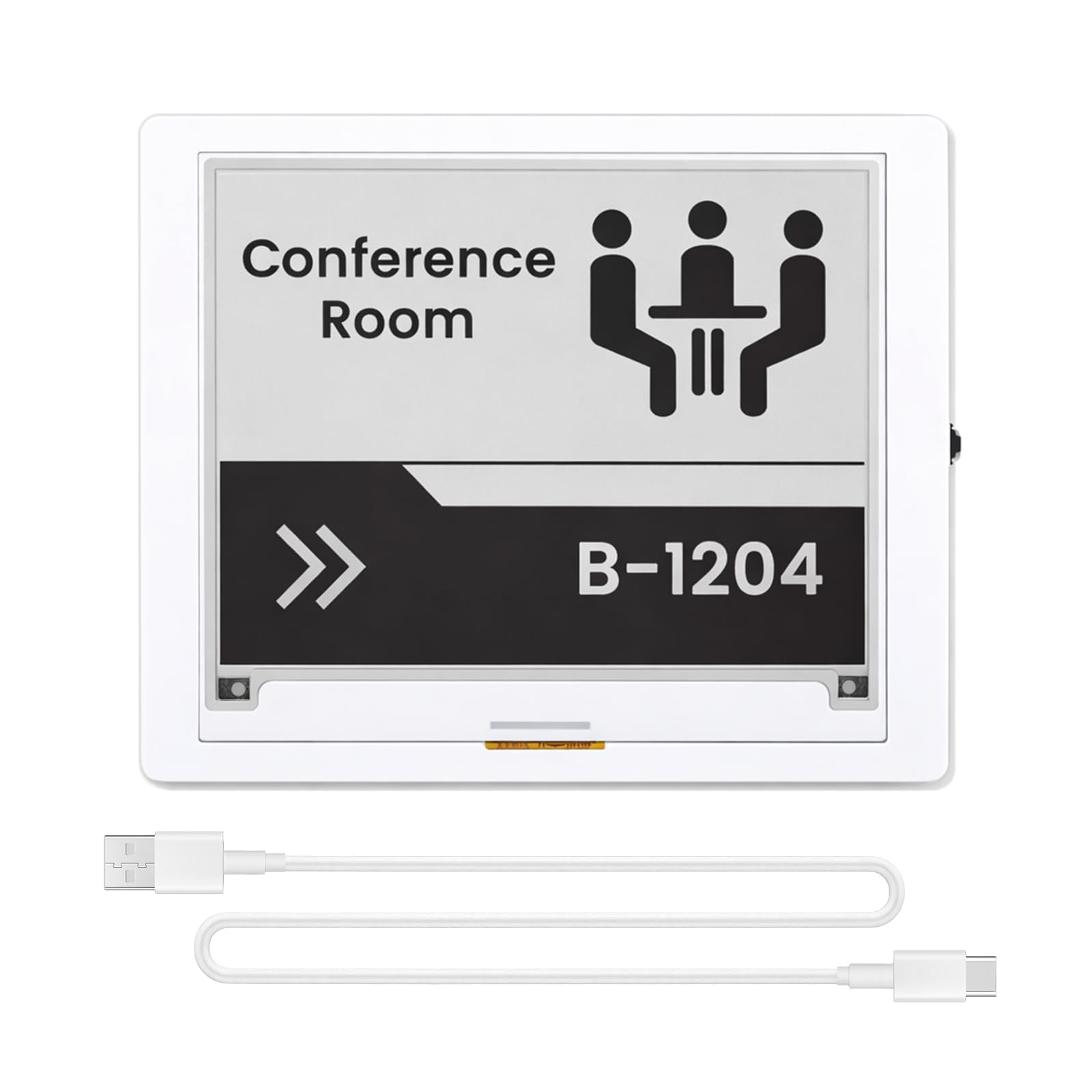
A self-contained board with the brain already mounted, aimed at makers who would rather code than solder.
This one skips a step the other boards require: you do not need a Raspberry Pi or an Arduino to drive it, because the ESP32-S3-WROOM-1-N8R8 is already soldered on as the main controller, running up to 240 MHz. That means a WiFi weather station or a smart home dashboard needs nothing but this board and a USB cable. For anyone who has ever had a project stall waiting on a Pi to arrive, that is a meaningful change.
The screen is a 4.2″ e-paper panel at 400×300 resolution, showing black and white with a wide viewing angle and a hard-coated anti-glare surface. Because it works in pure reflection mode with no backlight, it stays readable in direct sunlight, which is exactly what you want for an electronic shelf tag or a wall-mounted display. There is 8 MB of storage on board, and the interface selection is generous: a BAT interface for 2.2 V to 3.7 V, UART0, a 2×10 pin GPIO header, back/home/boot buttons, and a rotary switch.
Performance is what buyers talk about first — this board is consistently described as solid and straightforward to use, and the all-in-one design draws a lot of gratitude from people who hate loose wiring. It runs Arduino IDE and FreeRTOS, and Elecrow keeps GitHub samples for Arduino and ESP32 users, so a first sketch is within reach. The genuine quirk is refresh: a full redraw takes about 1.9 seconds, which is fine for a panel that updates every half hour but hopeless for real-time data. A rare complaint from a returned unit centered on documentation and an internal-only SPI connection, so read the online resources before you commit.
Where it wins: the ESP32-S3 onboard turns a screen into a finished device — no host board, no ribbon cable, no wiring diagram.
Where it stumbles: documentation is thin in places and the two internal controllers leave a small seam near the middle that some builders find annoying.
Pick this when: your project is a standalone panel — a weather display, a shelf tag, or a wall dashboard with WiFi built in.
Rethink it if: you need fast, real-time screen updates; this is a slow-refresh panel by design.
4. 7.5inch e-Paper HAT

A wide-format panel that reads like paper, sized for dashboards you actually want to look at from across the room.
The headline here is area. This is an 800×480 resolution 7.5 inch panel, and the comparison to the smaller boards is not a subtle one — the display measures 163.2mm × 97.92mm against the 4.2 inch ELECROW’s 4.2 inch footprint, which is the difference between a label and a poster. At a dot pitch of 0.205 × 0.204, text and numbers hold up without straining your eyes, and the viewing angle tops 170°, so the panel reads from nearly anywhere in the room.
Power is where this board really shows its hand for a wall display. Full refresh takes 5s and draws 38mW, and standby drops below 0.017mW, so a panel that updates every few minutes costs barely anything to run. There is no backlight, and the image stays visible with the power cut, which is the same retention the smaller panels offer at a much larger size. It pairs with Raspberry Pi boards, Jetson Nano, and even the Pico family through the SPI interface, with a 3.3V to 5V operating range.
Long-term clarity is the split in the reviews. Most builders use it as a simple smart-display: weather, temperature, humidity, barometric pressure, updated from Home Assistant through a Waveshare ESP32 unit. But one early panel developed visible streaks on white areas that persisted across file formats and drivers, which is a fair warning to keep your refresh schedule sensible. Support itself is well regarded — one unit arrived with a broken driver PCB and was sorted out promptly.
What makes it worth the shelf space
- Generous 800×480 panel reads comfortably at distance — ideal for dashboards
- Standby draw under 0.017mW makes it practical for battery or solar projects
- Wide 170°+ viewing angle and paper-like retention with no backlight
- Works across Raspberry Pi, Pico, and Jetson Nano boards via SPI
What to plan around
- Full refresh at 5s is slow for live data — fine for hourly info, awkward for anything frequent
- Long-running static content has shown streaking on white areas in at least one case
- The panel is physically large, so it needs real desk or wall space
Go here for: a genuinely readable wall panel for weather, calendars, or home-assistant dashboards you check a few times a day.
Step down in size if: your project is a handheld gadget or a small enclosure — the 2.13 inch boards fit where this cannot.
5. Waveshare 7.5inch E-Ink Display HAT

The long-running 7.5 inch workhorse that makers keep buying years after it first appeared.
If you have browsed e-ink projects at all, you have probably seen this board. It is a 7.5 inch, 800×480 resolution panel with an embedded controller, talking over SPI through the standard Raspberry Pi 40PIN GPIO extension header and also supporting Jetson Nano. It has been on sale since 2017, which for a hobby display board is a remarkable run and explains why so many project write-ups online reference it by name.
What makes it a favorite for fixed installations is the low power and the retention. There is no backlight, and the panel keeps displaying its last content for a long time even when the power is down, which suits shelf labels, industrial instruments, and any always-on readout. An onboard voltage translator means it works with both 3.3V and 5V microcontrollers, so the same board can drive off a Pi, an Arduino, or a Nucleo without a level shifter in the middle.
Display quality is what draws praise — the image looks impressive for a two-color panel, and the lack of a backlight means it reads evenly from any angle. The honest caveat is reliability: some owners mention it just works and some find the setup fight harder than expected, so treat the online manual as mandatory reading before you plug anything in. That spread is worth knowing about if you are new to SPI wiring, because a board this size rewards a careful first install.
The case for it: a proven 7.5 inch panel with an embedded controller and a wide board compatibility list from Pi to Jetson Nano.
The honest note: setup varies from painless to fiddly, and there is no partial refresh listed here — so build in time for a careful first session.
Best suited to: shelf labels, industrial-style readouts, and fixed panels where the image rarely changes.
Less ideal if: you want a plug-in-and-go beginner kit — the smaller boards are friendlier for a first project.
Know the Specs
Resolution and screen size
Resolution is the number of pixels on the panel — 250×122 on the 2.13 inch boards, 400×300 on the 4.2 inch ELECROW, and 800×480 on both 7.5 inch panels. More pixels plus a larger screen is what gives you room for real text and icons instead of a single line of numbers. A higher resolution on a tiny screen still gives you small text, so pick the size based on where the display will live, then check the pixel count supports what you want to show.
Refresh speed and retention
Full refresh is how long the screen takes to wipe and redraw the whole image — 5s on the 7.5 inch panels, for example. Partial refresh updates only a small area and is what makes a board usable as a button or a live readout. Retention means the image stays visible with no power applied, which is the whole point of e-ink. If your data changes often, partial refresh matters; if it changes once an hour, retention matters far more.
Common Questions
Will a 2.13inch e-ink HAT fit my Raspberry Pi Zero 2W?
What does partial refresh actually do for an e-ink display?
Do I need a Raspberry Pi to use these e-ink boards?
Why does my e-ink screen show a faint ghost image?
Which e-ink screen should I choose for a weather dashboard?
Does an e-ink display need a backlight to be readable at night?
Will these e-ink boards work with an Arduino or an ESP32?
How long does the image stay on screen after the power is cut?
What is SPI and do I need it?
Is a bigger e-ink display always a better choice?
The Bottom Line
For most builders looking for a cheap e-ink display, the Waveshare 2.13inch Touch E-Paper HAT is the one to reach for, because no other board in this group pairs touch input with a bundled case and a Pi Zero-friendly footprint. If you want a spare panel on the shelf before the first one is even wired up, the UeeKKoo 2PCS 2.13inch kit hands you two displays in a single box. And for a wall-mounted dashboard that reads from across the room, the 7.5inch e-Paper HAT gives you the largest 800×480 canvas of the group at a standby draw under 0.017mW — plenty of reason to spend a little more for a screen that stays readable all day.
How we choose
We do not accept paid placement. Every pick is matched to a real buyer and a real use-case; we do not hands-on test units.
Sources
Specifications: manufacturer listings and product documentation. Review insights: verified customer reviews, as of October 2026. Pricing: not shown on this page (it changes often); check the current price via the retailer link.
As an Amazon Associate, Aappliancez earns from qualifying purchases. This does not affect which products we feature.