Disclosure: Some links in this post are affiliate links. As an Amazon Associate I earn from qualifying purchases, at no extra cost to you. Learn more
Specs are compiled from manufacturer listings and verified buyer reviews and can change over time — please confirm the key details on the product page before buying.
You have three phones, two tablets, and a watch, and two free wall outlets to feed them all. One hub can end that fight. The short answer: the Anker Desktop Charger, 60W 6 Port USB Multiple Charging Hub is the safest all-round pick for most homes. The Ziwodiv 8-Port is the budget-friendly step up in port count. Below you get seven real options, each matched to a specific kind of buyer, plus the spec numbers that decide whether a hub keeps up or quietly slows down.
This guide is built by comparing the manufacturers’ published specifications and the patterns across verified customer reviews, so you get each pick’s real strengths and trade-offs instead of marketing spin.
A multiport hub is only as good as its wattage budget (the total power it can split across every device at once). So check those numbers first. Here is how each option handles a crowded desk, a full family, and a real travel bag: charger for multiple devices.
Top Picks


How To Choose The Best Charger for Multiple Devices
Most buyers count ports and ignore the power behind them. A hub with ten ports and a small power budget will slow to a crawl the moment three of those ports are busy. So read the total wattage first, then the per-port numbers, then the port mix.
Start with the total wattage, not the port count
Total output is the ceiling for everything plugged in at once. A 60W hub is fine for phones, tablets, and earbuds. A laptop with a big battery wants a dedicated high-wattage USB-C port, or it will charge slowly or not at all. If laptops and tablets share your desk, look for a hub whose total output comfortably covers all of them together.
Check the port mix for your actual devices
USB-C is the newer oval connector and the one that carries fast charging to modern phones, tablets, and laptops. USB-A is the older rectangular port that still fits a huge pile of accessories — earbuds, cameras, older phones. A good hub gives you a blend of both so you are not hunting for adapters. If you own a modern laptop, at least one USB-C port needs to be the high-power one.
Decide between a flat strip and an upright organizer
A flat power strip style sits low and travels well. An upright organizer with slots holds phones and tablets standing up so they charge in one tidy row — better for a family counter, worse for a backpack. Neither is wrong; pick the shape that matches where the hub will actually live. Depth matters too: an upright hub with wide center bays can swallow a tablet in a thick case, while a slim strip has no room for that.
Look for real safety protections
A hub that stays plugged in all night should list over-current, over-voltage, overcharge, and overheat protection. Those are the safeguards that cut power before a device gets stressed. Metal or flame-retardant housings help with heat, which matters most when several ports run at once.
Side-by-Side Comparison
| Model | Best For | Total Output | Ports | USB-C Count | Amazon |
|---|---|---|---|---|---|
| Anker Desktop Charger 60W 6-Port★ Best Overall | Everyday family desk | 60 W | 6 | — | Amazon |
| Ziwodiv 8-Port 60W/12ABudget Champion | Budget organizer with display | 60 W | 8 | — | Amazon |
| MEKIOJEO 380W Aluminum Station | Metal-bodied desk hub | 380 W | 12 | 8 | Amazon |
| COTOP 510W 10-Port Organizer | Upright slots with cables included | 510 W | 10 | 5 | Amazon |
| Kioson 12-in-1 200W Power Strip | AC plugs plus USB together | 200 W | 12 | 4 | Amazon |
| Zobirez 750W 10-Port Station | Multi-laptop households | 750 W | 10 | 5 | Amazon |
| UGREEN Nexode 500W GaN Station | Premium small-footprint power | 500 W | 6 | 5 | Amazon |
Detailed Reviews
1. Anker Desktop Charger, 60W 6 Port USB Multiple Charging Hub
Our pick — 4.5+★ from 27,000+ verified ratings; the strongest balance of quality and price.
A compact 6-port brick that clears a family’s charging queue off the wall outlets.
It earns this spot on 60W shared across 6 ports, which is enough headroom to feed a couple of phones, a tablet, and a few earbuds together without any of them stalling. The PowerIQ and VoltageBoost circuitry (Anker’s chip that reads what each device wants and matches it) pushes up to 2.4 amps per port, or 12 amps total. For a household that mostly charges phones and tablets, that covers the whole job.
Buyers keep coming back to it: 4.5+ stars across 26,500+ ratings, with quality and functionality leading the reviews. Owners describe a compact matte-black block, about the size of a pack of cigarettes, that hides a whole family’s charging in one spot. As one reviewer puts it: “I am able to charge 6 of them at a time and quickly with this great charger.” A classroom teacher bought it to power cordless table lamps and got all six topped up at once.
The honest catch: 60W is a phone-and-tablet budget, not a laptop budget. Every port is older USB-A, so there is no high-power USB-C PD lane for a modern laptop. You bring your own cables and a wall outlet — the box gives you a 5ft detachable cord, but the prongs do not fold away for travel. A desk of phones and watch chargers will never notice.
What people keep coming back to
- 60W across 6 ports feeds a full desk of phones, tablets, and earbuds together.
- PowerIQ reads each device’s draw and delivers up to 2.4 amps per port, or 12 amps total.
- Compact footprint means it disappears behind a monitor or sits quietly on a nightstand.
- 100 – 240V input means it works overseas with a simple plug adapter.
Where it stops short
- No USB-C PD port, so a modern laptop will charge slowly or not at all.
- No fold-away prongs on the included cord, which makes packing it for travel fiddlier.
- For a shared desk with a laptop in the mix, you will want more total wattage.
Made for: A household that mostly charges phones, tablets, and earbuds and wants a set-and-forget hub at the center of it all.
Look elsewhere: If a laptop is one of the devices you need to charge, jump to the Zobirez or UGREEN picks for high-wattage USB-C.
2. USB Charging Station, Ziwodiv 8-Port 60W/12A Charger Station
Eight ports, one little screen that tells you the power is actually flowing.
Squeezing 8 ports out of a 60W budget is the trade here, and it works well for a house full of phones, tablets, and smartwatches. The 12-amp current rating matches the Anker’s, but you get two more sockets for the same overall ceiling. The LED display is the standout: it shows current and voltage for whatever is plugged in, so you can confirm a device is genuinely charging rather than sitting at zero. Reviewers agree: “The digital display is great so I know when it is on and charging.”
It runs on 4ft of cord and carries CE, FCC, and RoHS safety certification. Inside, overcharge, overcurrent, overload, surge, and short-circuit protection all fit a chassis small enough for a backpack or a jacket pocket. Compatibility covers iPhone, iPad, Galaxy, Pixel, and Kindle, so a mixed-device household will not hit a connector wall.
The limit to know about: every port is USB-A, so a modern USB-C-only laptop will not get fast charging here. And with 8 ports sharing 60W, a single device gets a healthier share when the others are empty than when all eight are busy.
The display does real work: Seeing voltage and current per bank turns “is this thing on?” into a glance instead of a guess — a check most hubs at this tier skip.
Where it lands: The best value for a family who mostly plugs in phones and tablets and wants a visual check that charging is happening.
Reach for this if: You want the most sockets for the least outlay and the confidence of a readout on the front.
Pass it by if: You need USB-C PD for a laptop — the Zobirez station is built for exactly that.
3. 12 Ports Aluminum Alloy MEKIOJEO 380W Charging Station

Twelve ports and a metal shell that shrugs off heat while it works.
The aluminum alloy body is the maker’s claim to 40% faster heat dissipation than plastic — a real advantage when all 12 ports run through a work day. With 380W behind them, 8 USB-C and 4 USB-A ports split the load, including a dedicated 65W PD port for a laptop and multiple 30W ports for phones and tablets.
Owners talk about speed most. Fast charging comes up again and again, and the hardware backs it — a 65W PD lane means a real laptop gets real power. Several standard laptops, plus a phone and a watch, can share the station at once, with power distribution adjusting as devices are added.
Port counts are worth confirming. This 12-port station splits as 8 USB-C and 4 USB-A, so check the printed spec on the listing before you buy if the exact split matters to you. GaN tech (gallium nitride, a newer material that lets a charger run cooler and smaller) and a 5ft heavy-duty cord round it out for home office or travel use.
Built like a tool, not a toy: An aluminum body that resists scratches, a 65W laptop port, and smart power distribution make this a serious desk hub rather than a phone-only charger.
The trade-off: Port count aside, it is a desk piece first — the metal chassis is heavier than a plastic strip, so it is happiest left in place.
Suits: A home office where a laptop, tablet, phone, and accessories all need to charge from one metal block.
Think twice: If you need a lightweight travel hub, the plastic compact picks will pack easier.
4. 510W Charging Station 10 Ports

The station that stands your tablets upright instead of letting them lie in a heap.
Five USB-C and five USB-A ports share 510W here, and each lane gets its own budget: 100W USB-C for a laptop, 65W USB-C for a tablet or phone, and 30W USB-A for wearables and earbuds. In daily use a laptop, a tablet, a phone, and a watch can all be working from one station without anything going hungry. The upright slots are the real feature — they hold devices standing so the whole family’s gear lines up in one tidy row while it charges.
Reviewers point to build and organization first. The one-piece flame-retardant ABS shell feels solid, and charging a mix of gear at once is what owners appreciate most. A laptop plugged into one of the bays keeps a steady connection — no repeated disconnect-and-reconnect chime that cheaper hubs are known for.
The included cable kit is generous but worth reading closely: eight short cables covering iPhone/iPad, USB-C, and micro-USB. One owner’s frustration was minor — the slot dividers are fixed, so a very large device can crowd the row. Value is also mixed; some buyers felt the cable bundle was overkill for a USB-C-only household.
The slot setup is the pitch: Upright bays with dividers turn a charging pile into a charging shelf, which is why families gravitate to it.
Keep an eye on: Your own mix of cables — if your household runs all USB-C, the included Lightning and micro-USB cables will sit unused.
Pick this if: You want an organizer that keeps phones and tablets standing and visible while they top up.
Look elsewhere: If you only own USB-C devices and dislike extra cables, the Zobirez cable kit is a leaner fit.
5. 12-in-1 Charging Station USB C Power Strip, 200W GaN IV

A 12-in-1 strip that pairs 4 AC outlets with 8 USB ports, including a 65W PD lane for a laptop.
Twelve connections — 4 AC outlets (standard wall-style plugs) plus 8 USB ports (4 USB-C and 4 USB-A) — share 200W, so a monitor, a printer, and a laptop charger can plug in alongside the phones. The dedicated 65W USB-C port can take a MacBook Pro to 50% in about 30 minutes — fast enough to top up before you leave the house.
Owners describe it as a space-clearing piece. The flat 0.7-inch plug fits behind furniture, and a 5ft cord of 14AWG copper (the wire gauge that carries current with less resistance) gives you reach. At 5.04 by 3.02 by 1.18 inches, it sits flat under a monitor stand or on a nightstand without swallowing the space. The GaN IV chip inside runs cooler than older charging tech. Safety is solid too: a 1382°F fire-resistant PC shell plus over-current, over-charge, and over-heat protection.
The honest gap is a shared budget. With 12 ports across 200W, wattage is split when several devices draw at once, and a handful of buyers report that charging speed is not as brisk as the box suggests once multiple things are plugged in. There is only one dedicated high-wattage USB-C lane, so two laptops would have to share the fast lane or one takes the slower path.
The all-in-one angle: AC outlets plus USB in one unit means the lamps, the monitor, and the phones all come off one wall socket — the clutter problem solved in one purchase.
The caveat: A shared 200W budget says speed is generous for a few devices and tighter when every port is active.
Best matched to: A desk or nightstand that needs AC plugs and USB power from a single flat unit.
Not for you: If two laptops must fast-charge at the same time, the Zobirez’s five USB-C lanes are the cleaner setup.
6. Zobirez 750W Charging Station 10-Port
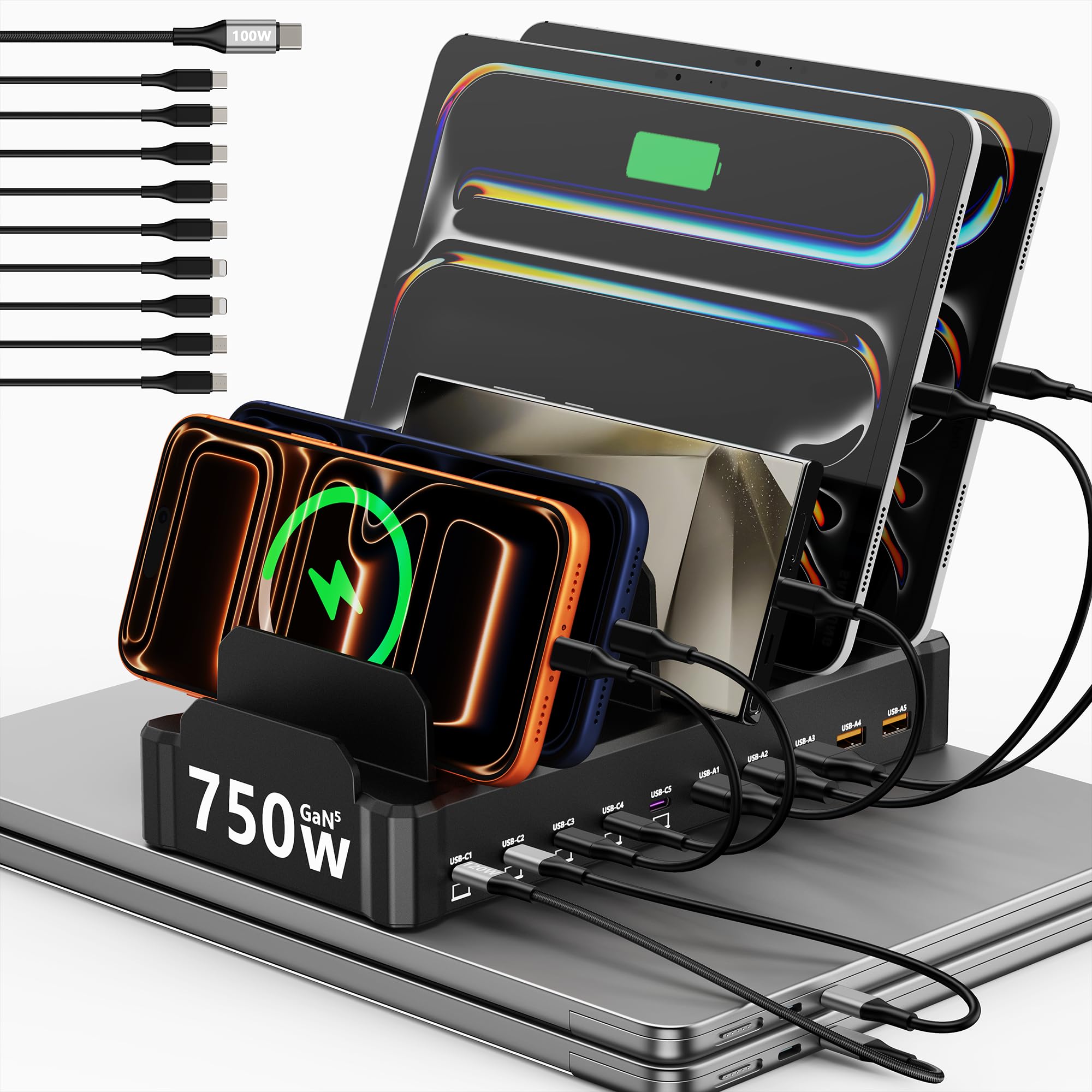
A 750W station with five 120W USB-C lanes built to charge several laptops at full speed at once.
Five USB-C ports at up to 120W each are what earns this station its spot — 750W total, with five USB-A ports at 30W each alongside. That is a machine built for laptops as much as phones. Compare it with the Ziwodiv’s 60W shared ceiling and the gap is plain: several laptops charge at full speed with the phones and tablets running alongside, without throttling to a crawl.
Owners praise the raw charging performance most, and the cable kit backs it up: ten cables in the box, including a 100W USB-C-to-C long enough to reach a laptop on a stand. The one-piece flame-retardant ABS organizer has slots instead of wobbling dividers, so the whole row stays put. Build quality comes up repeatedly, and the station runs cool even under a heavy load.
The trade is size. It takes a real footprint and asks for its own spot on the counter, so it stays home rather than riding in a bag. And expect the high per-port numbers to scale back as more devices join — the top speed is a solo or small-group figure, not what you get with all ten ports full.
Why heavy users like it
- 750W total output powers multiple laptops at once, not just phones.
- 5 USB-C lanes at up to 120W each give a real laptop charge, not a trickle.
- Ten cables in the box including a 100W USB-C-to-C, so you can set up on day one.
- One-piece slots hold devices upright without the wobble of removable dividers.
What you give up
- Substantial footprint — this is a desk fixture, not a carry-along hub.
- Per-port wattage drops as more devices share the load.
- The bundle includes several micro-USB cables, which fewer devices use now.
Chosen for: A multi-laptop home office or a shared family charging shelf where the whole house plugs in at once.
Wrong fit: If you want a hub that tucks into a bag, this one is too big — the Kioson pack is the travel-friendly choice.
7. UGREEN Nexode 500W GaN Charging Station, 6-Port 240W Max
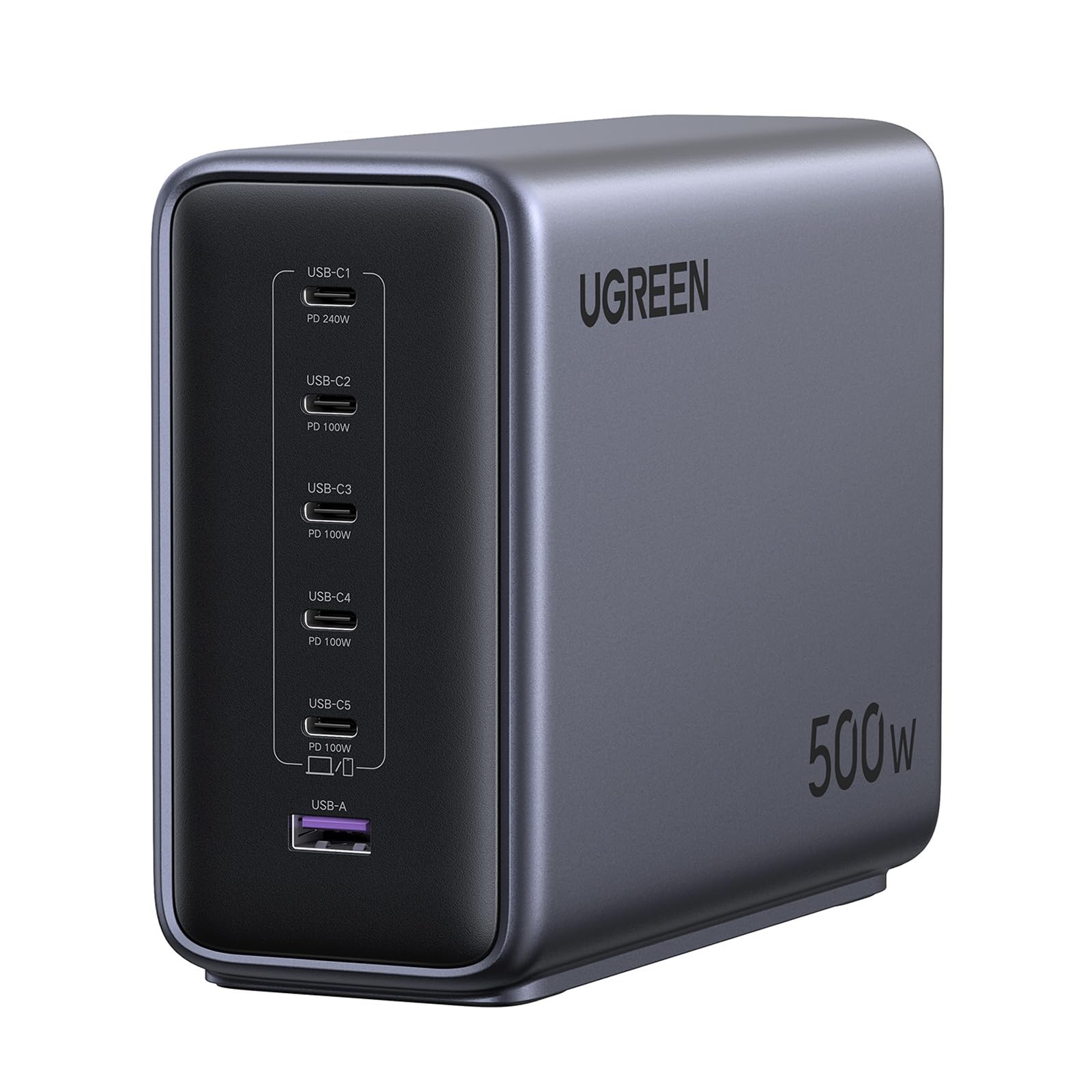
A 500W GaN station with a single 240W USB-C port in a case small enough to pack.
A single port rated up to 240W is the number that sets this apart — 500W total across 6 ports: five USB-C plus one USB-A. That is the spec sheet of a hub built for a room full of laptops, not a counter full of phones. It supports PD 3.1 and QC 3.0 (two fast-charging standards), so current phones, tablets, and laptops all get their protocol recognized. In daily use, three laptops plus phones and accessories can be working at the same time.
GaN technology is why it fits a compact, minimalist case while keeping a high output. NTC intelligent temperature control (a sensor that reads heat and adjusts in real time) monitors warmth, and the unit carries 11 levels of safety protection including over-current, over-voltage, and over-temperature. Owners mention it runs cool and delivers the wattage it advertises, and the dense case is small enough to pack for a trip despite the power it carries.
Know before you commit: reports are mixed on per-port behavior when you lean on the top USB-C port. Some owners using the 240W lane report that the other USB-C ports drop their available voltage in that setup, which matters if your whole plan rests on charging multiple laptops at maximum speed at once. A standard AC cable, vertical or horizontal standing, and a well-spaced port layout round it out.
Power density is the story: 500W and a 240W port in a case you can pack shows why GaN matters — more output, less bulk, controlled heat.
The honest asterisk: Per-port speeds shift when the big port is in play, so plan your laptop lanes with that in mind.
Built for: A power user with several high-draw laptops and a bag big enough to carry the hub between home and office.
Skip the splurge: If you mostly charge phones, the MEKIOJEO delivers the same day-to-day convenience at a mid-range ask.
Know the Specs
Total wattage vs. per-port wattage
Total wattage is the ceiling for everything plugged in at once, while per-port wattage is what a single device can actually pull. A 60W hub gives each device a much healthier charge when only two are busy — the same 60W is shared. When you see a hub at 380W or 500W, that headroom is why multiple laptops can charge at the same time without the whole thing slowing down.
USB-C PD (Power Delivery)
USB-C is the newer oval connector, and PD (Power Delivery) is the fast-charging standard it uses to negotiate power with a laptop or phone. A hub with a dedicated 65W or higher PD port is what makes laptop charging realistic. Older USB-A ports top out at lower wattages, which is why a phone-only hub and a laptop-capable hub are two different purchases.
Shared power budgets and how they split
Smart hubs split their total output across the ports that are active. The pattern owners see across every pick here is the same: a single device gets close to the per-port maximum, and speeds ease off as more devices join the party. That is normal, not a fault — plan your high-draw devices around the busy lanes.
GaN, metal builds, and heat
GaN (gallium nitride) is a newer semiconductor material that lets a charger run cooler and smaller than traditional designs. Metal housings also help by pulling heat away from the electronics. If a hub stays plugged in all day on your desk, heat dissipation, flame-retardant materials, and overheat protection are the specs to scan for.
Common Questions
Can a 60W hub charge my laptop?
How many devices can I really charge at once?
Will a USB-C hub fast-charge an iPhone or Galaxy?
Do these hubs work while I charge and use the device at the same time?
Is it safe to leave a multiport charger plugged in all night?
What is the difference between USB-A and USB-C ports on these hubs?
Can I travel with a desktop charging station?
Do I need to buy cables separately?
Will a metal-body charger get hot on my desk?
Can one hub replace all the chargers in my house?
The Bottom Line
For most households, the charger for multiple devices winner is the Anker Desktop Charger, 60W 6 Port, because its 60W shared across 6 ports quietly handles a family’s phones, tablets, and earbuds without the outlet scramble. If laptop charging is non-negotiable, the Zobirez 750W 10-Port Station is the one to grab, with five USB-C lanes at up to 120W each. And for a desk that needs AC plugs alongside USB, the Kioson 12-in-1 Power Strip is the reach-for pick. The one nudge worth making: if you are unsure how much wattage you need, the MEKIOJEO’s 380W aluminum hub is the safest middle ground — enough for a laptop, without the desk fixture bulk.
How we choose
We do not accept paid placement. Every pick is matched to a real buyer and a real use-case; we do not hands-on test units.
Sources
Specifications: manufacturer listings and product documentation. Review insights: verified customer reviews, as of October 2026. Pricing: not shown on this page (it changes often); check the current price via the retailer link.
As an Amazon Associate, Aappliancez earns from qualifying purchases. This does not affect which products we feature.