Disclosure: Some links in this post are affiliate links. As an Amazon Associate I earn from qualifying purchases, at no extra cost to you. Learn more
Specs are compiled from manufacturer listings and verified buyer reviews and can change over time — please confirm the key details on the product page before buying.
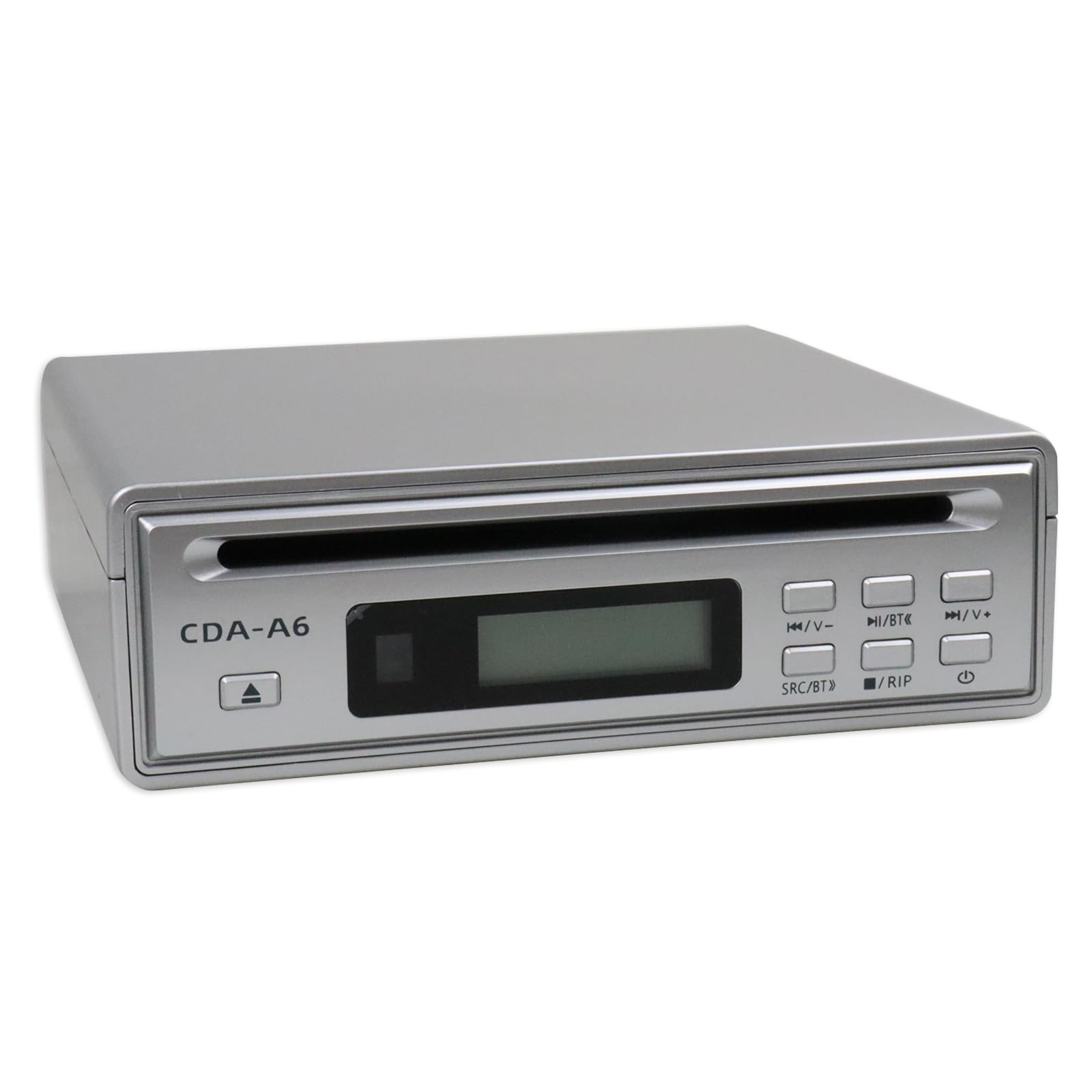
You want your CD and DVD collection off the shelf and into files — or onto fresh discs — without wrestling with a laptop that no longer has a disc tray. That is the whole job here. The picks below split into two clear camps: standalone tower duplicators that copy disc-to-disc with no computer at all, and compact external drives that plug into a USB port and rip audio to a flash drive or hard drive. If you mainly copy discs one-to-one, a tower wins. If you mainly want WAV files on a USB stick, a ripper drive wins.
This guide is built by comparing the manufacturers’ published specifications and the patterns across verified customer reviews, so you get each pick’s real strengths and trade-offs instead of marketing spin.
Copying a disc sounds simple until a tray refuses to open or a file lands in the wrong folder, so the picks below are sorted by how little friction they add to that job. Here is the honest shortlist of cd ripper hardware that actually finishes the job.
Top Picks

How To Choose The Best CD Ripper Hardware
The first decision is not a brand — it is the shape of the job. Ripping means turning a disc into files. Duplicating means copying one disc onto another. Those two jobs want different machines, and buying the wrong one is the most common way people waste time here.
Ripping versus duplicating: pick your job first
A tower duplicator takes a master disc in one slot and a blank in another and writes a copy on its own. Nothing gets saved as a file, so you cannot play the result from a phone. An external ripper drive does the opposite: it reads the disc and saves the audio or data to your computer or a USB flash drive. The ASENCH and FiiO units below save to a USB stick directly, which is the closest thing to one-button archiving.
Write speed and what it means for your afternoon
Write speed tells you how fast a burner fills a blank disc, and it is written as a multiplier of the original disc standard. PlexCopier lists up to 24x for DVDs and 52x for CD-Rs on its tower. The ASENCH drive writes 120mm CDs at up to 24X and 120mm DVDs at up to 8X. Higher numbers mean less waiting, but writing too fast to cheap blanks can produce a disc that skips later, so most burners cap speed to the media you load.
Archival blanks: what M-Disc changes
M-Disc is a recordable disc format pitched for long-term storage. The PlexCopier tower says it can record to archival grade M-Disc media, and both PlexCopier models list the same M-Disc support. If your goal is a copy that outlives a hard drive, that support is the reason to buy a dedicated tower instead of a slim USB drive.
The copy-protection wall you cannot climb
No duplicator here breaks encryption. The PlexCopier towers state plainly that they will not copy any discs locked with copy protection. That is normal and legal, not a defect. Plan around it: back up your own home videos, camcorder footage, and unprotected CDs, and expect store-bought movies to refuse.
Side-by-Side Comparison
| Model | Best For | Copy Method | Max DVD Write Speed | Rips to USB | Amazon |
|---|---|---|---|---|---|
| PlexCopier 24X 1 to 1 Duplicator Tower★ Best Overall | No-PC disc-to-disc copying | Standalone tower | 24x | No | Amazon |
| ASENCH Portable HiFi CD RipperBest for USB Archiving | Ripping CDs to a USB stick | External drive with RIP button | — | Yes, WAV files | Amazon |
| Alxum 7-in-1 External Drive | Laptop users wanting extra ports | USB external drive | 8X | No dedicated rip mode | Amazon |
| WIITHINK Radio CD Player | Kids and classrooms | Boombox player | — | No | Amazon |
| ORIGBELIE External CD DVD Drive | Digitizing a big shelf of discs | USB 3.0 external drive | 8x | Via computer software | Amazon |
| FiiO DM13 Portable CD Player | Audiophile USB ripping and playback | Portable with USB ripping | — | Yes, WAV files | Amazon |
| PlexCopier AutoDupe Tower | Fastest copy-on-insert operation | Auto-start standalone tower | 24x | No | Amazon |
Detailed Reviews
1. PlexCopier 24X 1 to 1 CD DVD M-Disc Duplicator Tower
Our pick — 4.5+★ from 600+ verified ratings; the strongest balance of quality and price.
The tower that copies a full disc straight from the tray, no computer required.
The number that makes this the pick is 24x — the DVD write speed on this tower, and the reason a full disc finishes in a single sitting instead of a coffee break. Because it runs standalone, you drop your master in one slot and a blank in the other and walk away. No PC, no software, no driver hunt. It handles CD-R writing at up to 52x as well, so audio CD copies move quickly. It also records to M-Disc archival-grade blanks, rated for 1000-year storage — the reason to pick a tower over a slim portable drive when you want a copy that outlasts a hard drive.
What wins people over is how little friction there is — buyers report the first setup and first copy coming together inside about twenty minutes of opening the box. One describes the whole experience plainly: “It took me 20 minutes after I got it from the start to set up and copy a CD.” Construction is sturdy in an 11-pound tower body that stays put on a desk rather than sliding around. A condensed review of a full DVD burn put it at seven minutes for a complete disc with no disc image to build first, which is exactly the gap this machine closes against burning through a PC.
The catch is the same one that follows all standalone towers: it will not copy any disc encrypted with copy protection, so store-bought movies are off the table. A couple of buyers also found the included instructions thin — one called the single glossy sheet unclear, and another wished a registration card had been included. Durability of the copies can hinge on the blank media and the source file format, too, so test one disc before running a whole stack. The honest math: this machine shines when you feed it a clean master.
What carries the day
- Copies disc to disc with no computer at all — 24x DVD, 52x CD-R write speeds
- Records to M-Disc archival-grade blanks rated for 1000-year storage
- Sturdy 11-pound tower that stays planted
- Quick first setup: one buyer was copying within twenty minutes of unboxing
What to weigh first
- Won’t copy encrypted or copy-protected discs
- Manual is a single glossy sheet and light on detail
- Copy results track your source format and blank media quality
Made for: Anyone backing up home videos, camcorder footage, or a stack of unprotected CDs without touching a PC.
Change your mind if: You need encrypted commercial discs copied — this tower will refuse them.
2. ASENCH Portable HiFi CD Player and Ripper
Hold one button for two seconds and a CD becomes a WAV file on your flash drive.
This is the pick for people whose real goal is files, not copies. The ASENCH has a dedicated RIP button — hold it for two seconds and it converts a CD to lossless WAV files straight onto a USB drive, plug and play. No computer, no ripping software, no folder hunting. The LED screen shows the ripping progress as a percentage plus the track number, so you can see exactly where it is instead of guessing. It reads CD-DA, CD-ROM, CD-R/RW and MP3 CD discs, and it also plays back high-resolution files (DSD64, FLAC, WAV, APE, MP3) from a USB stick, so the same drive you rip to becomes a library you can play from.
Playback flexibility is where it punches above a plain burner. Outputs run optical, 3.5mm AUX and Bluetooth, and the Bluetooth radio both receives and transmits — send audio to a Bluetooth speaker or car stereo, or feed it in from your phone. Owners mention transferring 50 to 60 CDs without a problem and describe car playback as clear and evenly balanced. That makes this the one to reach for if you want to digitize a shelf and then listen in the car without burning a single disc.
Here is the honest limit. It is an audio player, not a video machine — it will not play DVDs or video CDs, and Bluetooth pairing with car audio is hit or miss depending on the head unit. It also has no speakers of its own, so you must have headphones, a speaker, or a stereo to connect. The control buttons are tactile and easy to use by touch, and a remote is included plus AUX, optical and charging cables. Feed it a proper 5V/2A power source and it behaves; underpower it and reads get flaky.
Where it earns its slot: The RIP button plus the percentage readout is a genuinely simpler path to WAV files than any laptop-and-software workflow — a condensed review called it “very good” value with plug-and-play ease.
Know before you buy: Audio CDs only, and you will need your own output device — there are no built-in speakers here.
Reach for this if: You want one-button rips of your CD collection onto a flash drive, then car listening over Bluetooth or AUX.
Look elsewhere if: You need DVD or video CD playback — this unit handles audio only.
3. Alxum 7-in-1 External CD DVD Drive

A burner that doubles as a port hub for laptops that ditched the tray.
Most of us now own a laptop with no disc drive and no spare ports. The Alxum solves both at once: it is an external CD/DVD reader, writer and burner, and a seven-in-one expansion deck that adds three USB 2.0 ports (two type A, one type C), an M.2 NVMe slot, an SD slot and a micro SD slot. It reads both 80mm and 120mm discs, writing 120mm CDs at up to 24X and 120mm DVDs at up to 8X. It works across Windows 11/10/8/7/2000/XP/Vista, Linux and Mac OS, so it is not fussy about your machine.
What owners prize most is the build quality and the plug-and-play simplicity. It installs on a Mac mini with no drama and auto-plays a DVD on insertion. The extra functions also let you shift data between storage types — copy photos from an SD card to a disc, or move files from an M.2 drive to CD — without extra hardware. For non-technical users, that is the entire appeal: one cable, one box, done.
One detail decides whether this works for you: power. The drive wants the included power cable in a USB wall adapter, not a laptop port, because a standard USB 2.0 port only delivers 5V/0.5A and that can fall short while burning or while the card slots are busy. Connectivity gets mixed reactions — the occasional newer iMac with a hub in the middle throws errors rather than showing the drive. Expect it to shine on older PCs and Macs, and treat Blu-ray as out of scope: it reads CDs and DVDs, not Blu-ray discs.
Reasons it stands out
- Seven functions in one: CD/DVD burner plus three USB ports, M.2 NVMe, SD and micro SD
- Works across Windows, Linux and Mac OS
- 24X CD and 8X DVD writing on 120mm discs
- Simple install on a Mac mini, with auto-play DVD on insertion
Plan around this
- Needs its own USB wall power for reliable burning
- Connectivity gets mixed reaction — a USB hub in the path can break recognition
- CD and DVD only; no Blu-ray support
The buyer this fits: Laptop owners who want a burner and a port hub in one slim package at a value-friendly tier.
Skip the hub: Plug the data cable straight into your computer and give the drive its own wall adapter.
4. WIITHINK Radio CD Player with Bluetooth

The cheerful boombox that gets a first CD collection spinning without a computer.
Not every buyer wants files. Some just want a CD to play out loud — for a kid’s bedroom, a classroom, or an audiobook session. This top-loading player takes CDs, CD-R/RW, MP3 CDs and audiobook CDs, with shuffle, repeat and program functions so you control the order. It also pulls in FM radio and stores up to 30 stations (no AM), plays MP3/WMA files from a USB stick up to 128GB, and streams over Bluetooth. Five EQ modes — Rock, Pop, Flat, Classic and Jazz — let you tune the tone, and a headphone jack keeps it private when needed.
The portability is where it earns its place. It runs on four UM2-C 1.5V batteries (not included) when you take it outside, or plugs into the wall at home. For a classroom, it is loud enough to fill the room, with responsive buttons and no fussing. Kids take to it fast — a gift for an 11-year-old landed as a favorite, the color matched expectations, and setup was easy enough to do solo. It even found a fan in a teacher using it plugged in.
Sound quality is the honest trade-off. One review put it at average, describing scratchy and distant audio on any CD — fine for a first player but not for anyone chasing fidelity. It is also a player, not a ripper: it will not convert a disc to a file, so if archiving is your goal, look at the ASENCH or ORIGBELIE above. The upside is a small, well-made, brightly colored unit the size of a compact bookshelf radio.
The charm factor: A genuinely kid-friendly first CD player — portable, wall-or-battery powered, with FM, Bluetooth and USB to grow into.
The honest catch: Average sound and no ripping function — this is a playback device, not an archiving tool.
Great for: Parents and teachers wanting a cheerful, portable first CD player.
Not for: Anyone hoping to save discs as files — this one only plays them.
5. ORIGBELIE External CD DVD Drive with Ethernet Hub
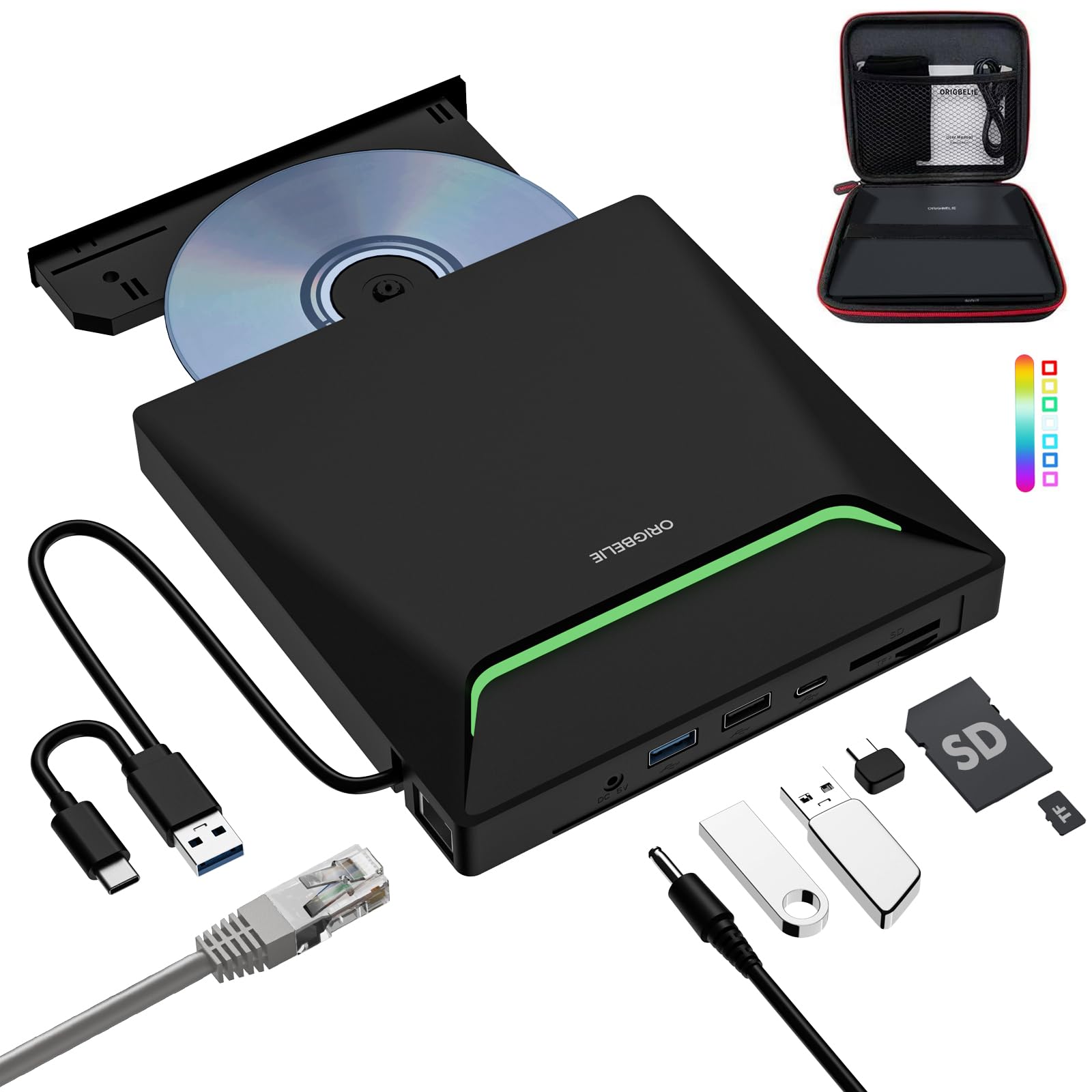
The high-volume ripper for anyone digitizing an entire shelf of discs.
When the job is hundreds of discs, throughput matters more than anything. This ORIGBELIE drive runs USB 3.0 — up to 5 Gigabits/S (625MB/S) and listed as about ten times faster than USB 2.0 — with max 8x DVD and 24x CD read/write speeds on 120mm discs. That is what makes the difference: the machine is built to grind through a pile without stopping. One reviewer noted ripping 150-plus CDs in two days, which is the kind of volume that turns a weekend chore into a done deal.
It is also a full 9-in-1 dock, not just a burner. Alongside the CD/DVD reader/writer/ripper you get a USB-A/C 3.0 network adapter (Ethernet up to 100Mbps), a USB 3.0 hub with two type A and one type C port, and an SD/TF card reader. The disc support is broad — CD±R/RW, CD-ROM, DVD±R/RW, DVD-ROM, DVD-RAM, VCD and SVCD — and it plays nice with Windows 11/10/8/7/XP/Vista, Linux and Mac OS. A storage bag and carrying case round out the package.
The trade-offs live in the details. It needs full power through a supply block rather than siphoning off the laptop, the integrated data cable is short and not replaceable, and the tray can occasionally stick, needing a repeated eject or a power cycle. It also will not touch Blu-ray, cars, TVs, tablets or game consoles. On a Mac, the eject button does not work — you eject from the desktop menu instead. None of that stops it from being the pick for a big shelf; it just sets the boundaries.
Why it moves fast
- USB 3.0 at up to 5 Gigabits/S for high-volume ripping — one buyer hit 150+ CDs in two days
- 9-in-1: Ethernet, USB hub, SD/TF reader and CD/DVD burner together
- Broad disc support from CD-ROM to DVD-RAM and SVCD
- Ships with storage bag and carrying case
The honest costs
- Wants full wall power, not just laptop current
- Short integrated cable that cannot be swapped
- Tray occasionally sticks and needs a re-eject
- No Blu-ray, console, tablet or TV support
Built for: Serious digitizers with a large CD or DVD collection and a laptop that needs more ports anyway.
Accept this limitation: The cable is fixed and short, so place the drive within easy reach of a powered USB port.
6. FiiO DM13 Portable Stereo CD Player with USB Ripping

The only portable CD player here with a 4.4mm balanced output and 660mW of drive.
This is the premium outlier. The FiiO DM13 pairs dual CS43198 DACs with dual SGM8262 amplifiers, delivering up to 660mW of balanced output power — enough to drive most earbuds and to feed active speakers or a headphone amp. Volume runs through the CS43198 chip with 99 levels of control, so each step lands smooth rather than jumping. For anyone who wants a portable CD player that sounds as good as a desktop rig, that is the reason this one exists.
Archiving is on the menu too. It is built for USB ripping and recording, saving discs to WAV format on a mobile storage device, which you can then move to a computer or phone. Outputs are the deepest in this list: 3.5mm and 4.4mm headphone jacks, 3.5mm and 4.4mm line outputs, plus optical and coaxial digital outputs for pairing with high-end decoders. Plug it into a USB adapter and flip the D.MODE switch and the unit runs off USB power without draining the battery. Owners describe playing everything from 1987 discs to fresh CD-Rs without a hitch, with excellent dynamic range, and 8 hours of use still left the battery at two of four bars.
The honest caveat is quality control. Reviews flag units arriving with a lid latch that will not hold closed, and one buyer had two in a row with the same defect. Most, however, report a solid aluminum build and impressive anti-shock. A few newer discs skipped once or twice while the player sat still. And if you skip past the basic buttons, expect the manual to be the map — some menu moves are not obvious.
The audio upside: Dual CS43198 and dual SGM8262 running 660mW into most headphones, with 3.5mm and 4.4mm outputs plus optical and coaxial digital out — desktop-grade sound you can carry.
The quality-control watch: A lid latch defect has appeared on some units, so check yours on arrival before you fill half the shelf.
Best suited to: Audiophiles who want WAV archiving and serious headphone drive in one portable box.
Consider the risk: If a firm lid latch on day one is non-negotiable, verify before relying on it.
7. PlexCopier AutoDupe 24X CD DVD Duplicator Tower

Drop a master and a blank in, and this tower starts copying without a single button press.
Some buyers want zero thinking, and this is the machine for that. AutoDupe means exactly what the name says: load a master disc and a blank, and the duplicator detects both and starts writing on its own. No programming, no menus, no PC nearby. Write speed runs up to 24x for DVDs and 52x for CD-Rs, and it records to M-Disc archival-grade blanks the same as its big sibling. At 9 pounds it is a touch lighter than the 24X PlexCopier above, so it takes up less shelf space without giving up the tower footprint.
The appeal lands hardest for home video archivists. One scene repeated across reviews: a box of old camcorder tapes and family footage, original in the top slot, blank underneath, and a copy that keeps the exact menu and format of the source. That is far less fiddly than loading a burner into a laptop and setting up software. Buyers describe it as easy from the first insert, with one saying “Autodupe is exactly what the name says,” and copies landing in minutes.
The limits are the same ones that apply to any standalone tower: encrypted discs are refused, and there is no ripping — no files, no USB stick, just a new disc. A rare unit has arrived not working, and support experience varies, so open and test yours early. It is not the machine for someone who wants phone-friendly audio files; it is for someone who wants a physical copy, quickly, with no learning curve.
The one-button win: Auto-start copying means the master-and-blank workflow is the whole process — no buttons to learn, no computer to boot.
Verify on arrival: Test that first copy in the first week; a rare unit turns up faulty and returns are easier before the discs pile up.
Pick this when: You want the least-effort physical-copy tower for family video and CD duplication.
Not the answer if: You need digital files — this tower only makes more discs.
Know the Specs
Write speed (the x number)
Write speed is written as a multiple of the base disc speed — 24x, 52x, 8X. It tells you how fast a burner fills a blank disc. Higher numbers mean a faster copy, but a burner writing too fast to mediocre blanks can produce a disc that skips, so most units cap speed to the media you insert. Match the blank to the burner and you get both speed and reliability.
Ripping versus duplicating
Ripping reads a disc and saves the content as a file — often a WAV or FLAC — onto a computer or USB stick. Duplicating writes one disc onto another with no file involved. A RIP button makes the first job one-step; a standalone tower makes the second job one-step. Neither does the other’s job, so decide which one you actually need before you buy.
M-Disc archival media
M-Disc is a recordable disc format sold for long-term storage, and the PlexCopier towers list support for it as archival-grade media. If your copies need to survive a hard-drive failure or a decade on a shelf, M-Disc support is why a dedicated tower beats a slim portable drive. The blank still has to be an M-Disc for the archival claim to apply.
Power draw and USB current
Slim external drives draw their current from USB, and a standard USB 2.0 port only supplies 5V/0.5A. That can fall short while burning or while the extra card slots are busy, which is why several drives here want their own wall adapter or a power block. Running a burner short on current is the usual cause of a disc that reads poorly or a drive that disappears mid-job.
Common Questions
Can a standalone CD duplicator tower work without a computer?
Will these drives copy store-bought movies and copy-protected discs?
What file format comes out when I rip a CD to USB?
Does a taller write speed like 52x actually matter for copying a CD?
Why does my external CD/DVD drive need its own wall power?
Can these drives read Blu-ray discs?
What is the difference between the two PlexCopier towers?
Can I rip a whole shelf of CDs without a laptop?
Is the FiiO DM13 worth it over a budget ripper?
Will a top-loading CD player like the WIITHINK rip my discs?
The Bottom Line
For most people who want disc-to-disc copies with no computer in the loop, the PlexCopier 24X 1 to 1 Duplicator Tower is the pick — standalone operation, 24x DVD and 52x CD-R write speeds, and M-Disc support for archival-grade blanks, all behind one button. If your real goal is files rather than discs, the ASENCH Portable CD Ripper turns a CD into lossless WAV on a USB stick in one held button, and it plays those files back over Bluetooth or AUX in the car. For anyone digitizing an entire shelf, the ORIGBELIE External Drive moves at USB 3.0 speed and doubles as a port hub. And if you want premium sound to go with your rips, the FiiO DM13 is the one that treats your headphones right.
Two things worth doing before you buy anything: check whether your copies need to stay on discs or live as files, and confirm your blanks are M-Disc if you expect archival life. Get those two answers right and any pick above finishes the job.
How we choose
We do not accept paid placement. Every pick is matched to a real buyer and a real use-case; we do not hands-on test units.
Sources
Specifications: manufacturer listings and product documentation. Review insights: verified customer reviews, as of October 2026. Pricing: not shown on this page (it changes often); check the current price via the retailer link.
As an Amazon Associate, Aappliancez earns from qualifying purchases. This does not affect which products we feature.