Disclosure: Some links in this post are affiliate links. As an Amazon Associate I earn from qualifying purchases, at no extra cost to you. Learn more
Specs are compiled from manufacturer listings and verified buyer reviews and can change over time — please confirm the key details on the product page before buying.
Building a Micro ATX PC is about one trade you cannot avoid: small footprint, big heat. Below you will find the cases, prebuilts, and mini desktops that actually manage that squeeze — with the real clearances and the real owner gripes spelled out.
This guide is built by comparing the manufacturers’ published specifications and the patterns across verified customer reviews, so you get each pick’s real strengths and trade-offs instead of marketing spin.
You do not need a physics degree to get this right — you just need to know which numbers matter before you buy. Clearance for your graphics card, room for your CPU cooler, and enough intake air are the three things that decide whether a small build runs cool, and the picks below separate cleanly on exactly those points when you are Building a Micro ATX PC.
Top Picks
How To Choose The Best Building a Micro ATX PC
The small-form-factor shelf punishes guesswork. Buy a case one size too tight and your graphics card simply will not seat, or your cooler pokes through the side panel. Get it right and a 400mm GPU and a 168mm cooler both fit without a fight.
Check GPU clearance before anything else
Your graphics card is usually the longest part in a compact build, so the case has to state a maximum GPU length that beats your card’s own length — for example, one of the cases here clears cards up to 400mm, which leaves headroom for the biggest current designs. If the listing does not print a maximum GPU length, do not assume your card fits.
Match your CPU cooler to the enclosure
Air coolers have a height limit and liquid coolers have a radiator limit (the width of the radiator you can mount). A case that takes a 168mm air cooler or a 360mm radiator can swallow most builds, while a true mini ITX box often forces you down to a 240mm or 280mm radiator instead.
Plan the airflow path, not just the parts list
In a tight box, a solid glass front traps heat instead of venting it. Reversed-blade intake fans and a fine mesh front pull cool air straight across the GPU, while a solid glass front simply traps it. Look at how many pre-installed fans ship with the case and whether they are PWM (fans whose speed the motherboard can vary) — that determines whether your build idles quietly or whines.
Side-by-Side Comparison
| Model | Best For | Form Factor | Cooling | Storage / Memory | Amazon |
|---|---|---|---|---|---|
| Skytech Gaming O11 Vision★ Best Overall | 1440p gaming with a liquid cooler | Mid-tower desktop | 360mm AIO liquid | 1TB Gen4 NVMe / 32GB DDR5 | Amazon |
| MONTECH Sky TwoBest for Airflow | Builders who want glass and airflow | ATX mid-tower case | 4 ARGB PWM fans | 1 internal bay / ATX-mATX-ITX | Amazon |
| GEEKOM IT13 MAXBest AI Mini PC | AI and creative work, no tower | Mini PC | IceBlast 3.0 air | 500GB SSD / 24GB LPDDR5 | Amazon |
| GEEKOM IT13 Max (1TB) | Four-display productivity | Mini PC | IceBlast 3.0 air | 1TB Gen4 SSD / 24GB LPDDR5 | Amazon |
| WIWB Ryzen 7 5700X Desktop | Entry-level 1080p gaming | ATX desktop | Air (under 30dB) | 512GB NVMe / 16GB DDR4 | Amazon |
| GMKtec K11 | Multi-screen work and eGPU play | Mini PC | Hyper Ice Chamber 2.0 air | 1TB PCIe 4.0 / 32GB DDR5 | Amazon |
| KAMRUI Hyper H2 | Monitor-mounted triple 4K | Mini PC | Centrifugal fan, dual heat pipes | 1TB NVMe / 32GB DDR4 | Amazon |
| MSI Codex Z2 | High-refresh 1440p gaming | ATX desktop | Air, 4 system fans | 2TB SSD / 32GB DDR5 | Amazon |
| Alienware Aurora | Quiet gaming with onsite service | ATX desktop | Air cooled | — / 32MB cache CPU | Amazon |
| Thermaltake LCGS View i570 | Liquid-cooled i9 gaming and streaming | ATX desktop | 240mm liquid AIO | 1TB NVMe / 32GB DDR5 | Amazon |
| Cooler Master NR2 Pro | Flagship mini ITX gaming | Mini ITX (18.25L) | 280mm AIO liquid | 2TB Gen4 M.2 / 32GB DDR5 | Amazon |
Detailed Reviews
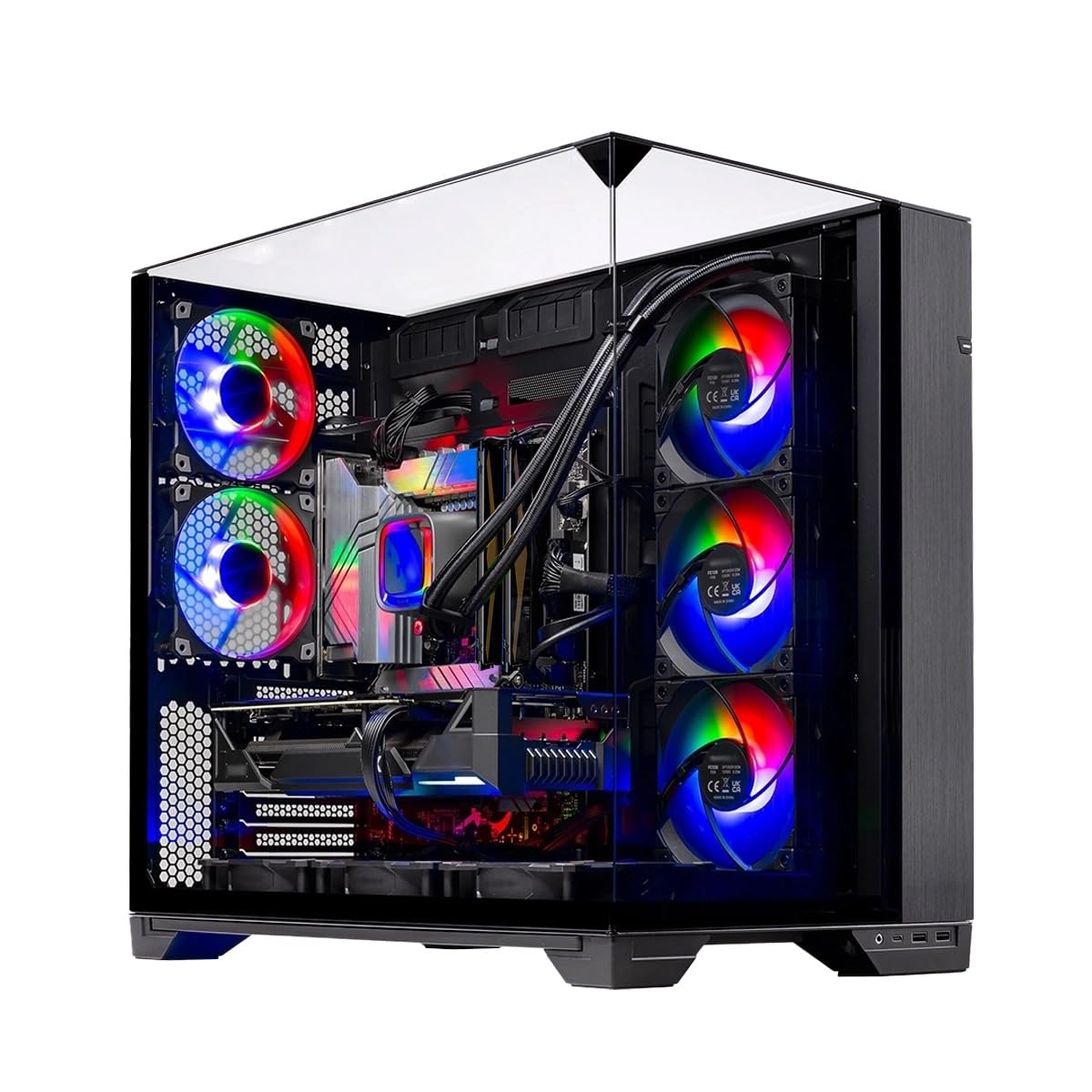
1. Skytech Gaming O11 Vision Gaming PC
Our pick — 4.5+★ from 1,500+ verified ratings; the strongest balance of quality and price.
A 360mm AIO and an RTX 5070 make this the shortest path to 1440p gaming without assembly.
If you want the shortest path from box to logged-in, this is it. The Ryzen 7 7700X runs at a 4.5GHz base clock and boosts to 5.4GHz, paired with an X670 motherboard and 32GB of DDR5 RAM at 5600 for heavy multitasking. The RTX 5070 carries 12GB of GDDR7 video memory, which is the number that decides whether modern textures load smoothly at 1440p Quad HD. Buyers report it plays demanding titles such as Cyberpunk 2077 at 60fps in 1080p and holds stable framerates in the 80-120fps range.
Liquid cooling is the headline here. A 360mm AIO (a radiator the length of three 120mm fans) with ARGB fans carries heat away from the CPU, so the chip does not slow itself down when you push it. That is the difference between holding boost clocks through a long session and throttling back. It ships with a free gaming keyboard and mouse, a 1TB Gen4 NVMe drive for fast load times, and an 850W Gold ATX 3 power supply that gives you headroom if you swap the graphics card later.
The catch is noise. The cooling works well, but reviewers split on just how loud the fans get under full load — some describe it as very quiet, others as genuinely loud, so it depends on your tolerance and how close the tower sits to your desk. The other thing to note is that the graphics card brand may vary between units, so you are buying the RTX 5070 specification rather than one specific manufacturer’s card.
What earns its place at the top
- 360mm AIO liquid cooler keeps the CPU from thermally throttling under long sessions
- RTX 5070 with 12GB GDDR7 handles 1440p Quad HD at smooth framerates
- 850W Gold ATX 3 power supply leaves upgrade headroom
- 32GB DDR5 at 5600 plus a 1TB Gen4 NVMe drive for fast boots and load times
Where it asks for patience
- Fan noise under load divides owners — some quiet, some loud
- Graphics card brand can vary between units
- Setup quirks show up in a slice of early reviews
Reach for this if: you want a ready-built 1440p machine with real liquid cooling and no assembly weekend.
Look elsewhere if: you are chasing the quietest possible rig — the noise level here is the one genuinely mixed point.
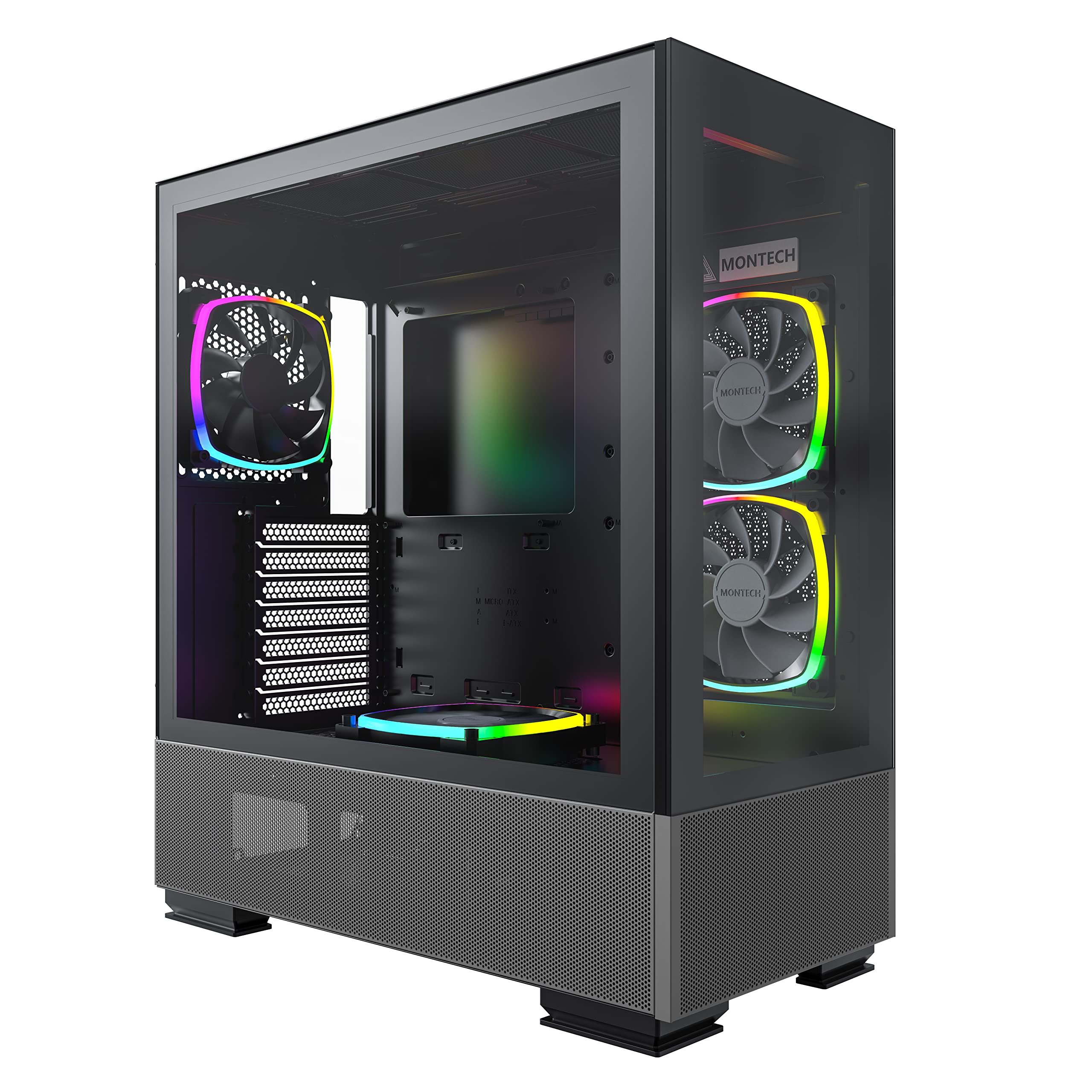
2. MONTECH Sky Two Panoramic ATX Mid-Tower PC Case
Panoramic glass on two sides, reversed-blade fans pulling air where the GPU needs it.
For a Micro ATX build, the case is the part that decides everything else. This one clears graphics cards up to 400mm and CPU coolers up to 168mm, so even an oversized card slides in with room to spare — the kind of headroom that tells you a 3070 Ti will fit without a fight. It also takes a 210mm power supply and a 360mm radiator, and it supports ATX, Micro-ATX, and Mini-ITX motherboards, so the same chassis follows you through two or three rebuilds.
What stands out is the cooling design. The side-mounted fans use reversed blades, which pull air in across the graphics card instead of just blowing it around the front. Combined with a fine mesh panel that runs down into the power supply chamber, you get cool air straight over the parts that run hottest, and the rear fan pushes the warmed air out. The case weighs 17.4 pounds and stands 19.29 inches tall, so it is a desk or floor fixture rather than a shelf piece.
Cable management gets real thought here: a dedicated channel and three Velcro straps keep the rat’s nest tucked behind the motherboard tray, and the front panel adds USB-C. As owners put it, it has “wide channels in the back for easy wire routing.” The one honest note is size. Some buyers find it marginally bigger than they pictured for a mid-tower, so if floor space is tight, measure before you commit.
The airflow trick: reversed fan blades feed the GPU directly rather than recycling case air, which is exactly the problem a small enclosure creates.
Built for: anyone assembling a mATX build who wants the glass-and-lights look with airflow that actually moves heat out.
Think twice if: you are working with a cramped desk — this mid-tower runs slightly larger than some buyers expect.
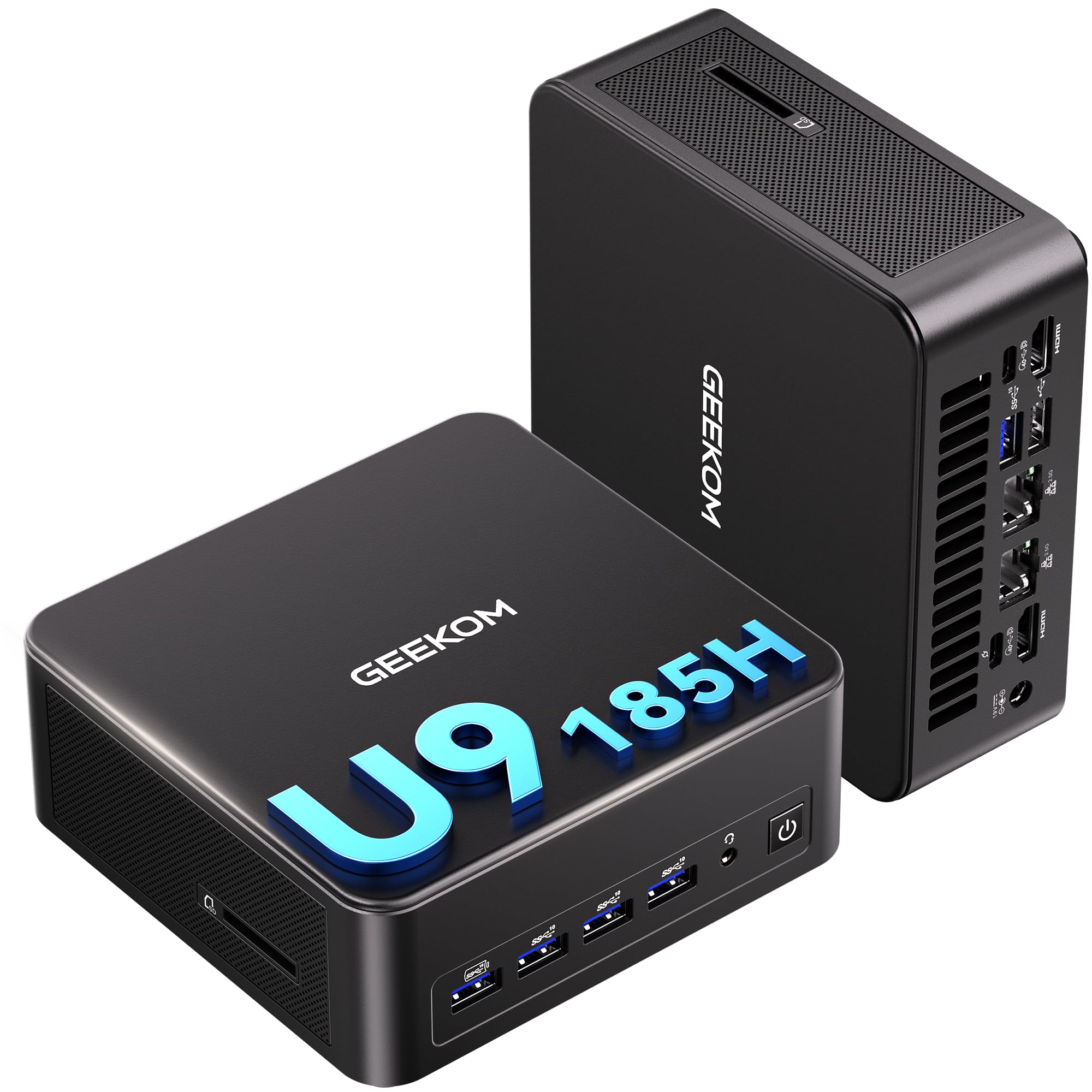
3. GEEKOM IT13 MAX AI Mini PC 500GB SSD
A tower’s worth of AI and rendering work in a box the size of a paperback.
If your build is really a productivity machine that happens to sit on a desk, start here. The Intel Core Ultra 9 185H runs up to 5.4GHz and pairs with 24GB of LPDDR5 memory clocked at 5600 MT/s plus a 500GB SSD. Memory aside, the comparison worth knowing: this mini carries 24GB while the gaming tower in this list runs 32GB — an 8GB gap. What that means in practice is that heavy local AI model training, or keeping a stack of virtual machines open, wants more memory than this mini ships with.
The connectivity is where a mini PC earns its keep. Two 2.5G Ethernet ports, Wi-Fi 7, Bluetooth 5.4, USB4, and HDMI 2.0 let you drive up to four displays at once — 8K through USB-C or 4K through HDMI. For a trader running a wall of charts or an editor stitching timelines across screens, that is the whole point. Cooling comes from GEEKOM’s IceBlast 3.0 system, which is built to hold 65W of sustained performance quietly enough for shared spaces.
The honest caveat is fan noise under load. Several owners note it stays quiet in everyday use but can spin up audibly when you push it hard — one described the fan being loud when the unit sits flat and quieter on its side. It runs Windows and mainstream Linux distributions from the start with no bloatware, so if you want a clean OS you will not fight the machine to get one.
Ports that carry it: dual 2.5G LAN plus four display outputs turn a shoebox-sized PC into a multi-monitor workstation.
The honest limit: 24GB is the ceiling here, so if your work needs 128GB for large language models, this is the wrong shelf — look at a desktop you can load with memory.
Choose it for: AI tinkering, coding, and multi-screen work where desk space is the scarce resource.
Leave it if: you need deeply expandable memory or a dedicated graphics card for AAA gaming.
4. GEEKOM IT13 Max AI Mini PC 1TB M.2 SSD
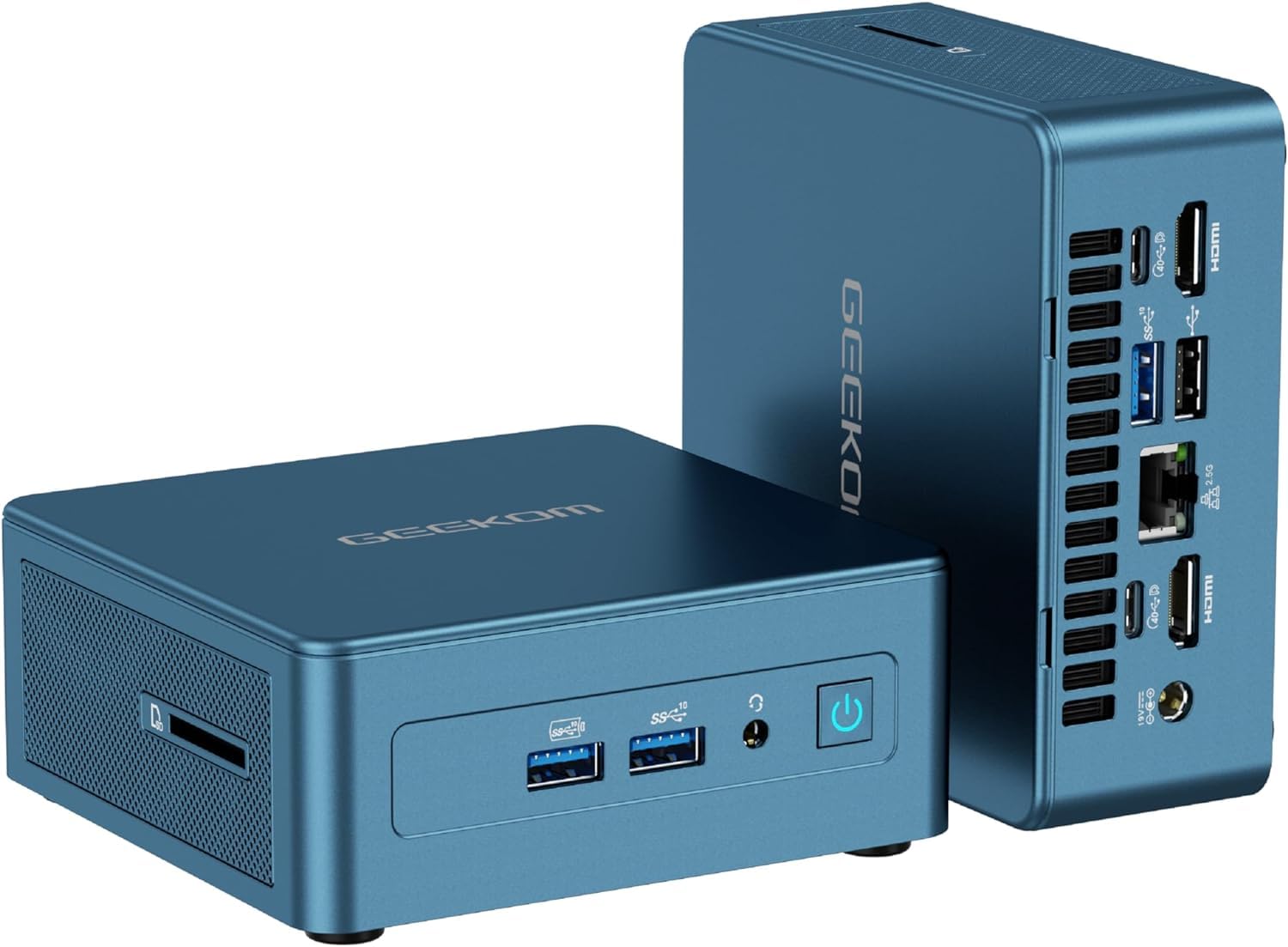
Four 4K screens, dual USB4, and storage you can grow — the mini for a serious desk setup.
This is the IT13 Max configured for people who live across multiple monitors. It keeps the Intel Core Ultra 9 185H with 16 cores and 22 threads boosting to 5.1GHz, 24GB of LPDDR5 at 5600MT/s, and doubles the storage of its 500GB sibling to a 1TB M.2 2280 PCIe Gen4 SSD. If you render video or work with big project files, that extra space and the Gen4 drive speed matter more than almost anything else on the spec sheet.
The expansion story is what separates this from a sealed mini. Memory can grow up to 96GB, the primary SSD slot accepts drives up to 4TB, and there is an empty M.2 2242 SATA slot for an optional SSD up to 1TB. Two USB4 ports push up to 40Gbps each alongside two HDMI 2.0 outputs, so you can run four 4K displays or a single 8K panel — enough real estate to keep a timeline, a preview, and your AI tools open at once.
The trade-off is thermal, not functional. Cooling is described as the one mixed point by owners: during long, heavy sessions the compact body warms up and the fans become audible, which is the price of cramming desktop-class silicon into a small case. In normal work it stays quiet, and owners describe it as fully operational in well under a minute from a cold boot.
The upgrade path: 96GB of memory support and a 4TB-capable primary SSD mean this mini grows with your projects instead of forcing a replacement.
Made for: editors and developers who want four displays, real storage, and the ability to add more later.
Know going in: sustained heavy workloads bring on warmth and fan noise — that is the compact-form-factor tax.
5. High-Performance Gaming Desktop PC Ryzen 7 5700X

Eight cores and a dedicated GPU for the price of a mid-range graphics card alone.
This is the straightforward entry point for someone stepping off a laptop. The Ryzen 7 5700X brings 8 cores and 16 threads up to 4.6GHz, backed by 16GB of DDR4 RAM, so heavy multitasking, coding, and 4K video editing all have room to breathe. The GeForce RTX 3050 with 8GB of GDDR6 handles 1080p gaming with ray tracing and DLSS support — enough for Fortnite, Call of Duty, GTA V, and Valorant at high settings above 60 FPS.
Storage and connectivity keep it practical. A 512GB NVMe M.2 SSD reads at up to 3200MB/s, so the operating system and game maps load in seconds rather than minutes, and there are extra drive bays if you want to add capacity later. Wi-Fi 6, Gigabit Ethernet, USB 3.2 Gen 1 ports, and HDMI 2.1 plus DisplayPort cover monitors, VR headsets, and peripherals without adapters. The cooling system is tuned to keep noise under 30dB, which makes it a reasonable fit for a dorm room or a shared office.
Set expectations on the graphics card. The RTX 3050 is a 1080p part, so it is happiest at Full HD rather than pushing high resolutions — a fair call for eSports and casual play, not for 4K gaming. Note also that this is a newer listing with a small pool of owner feedback so far, so treat early impressions as early.
Right for: first-time desktop buyers who want a dedicated GPU for 1080p play plus real work tasks under a quiet fan.
Skip if: you already game at 1440p or higher — the RTX 3050 is a Full HD card, not a high-resolution one.
6. GMKtec Gaming PC K11
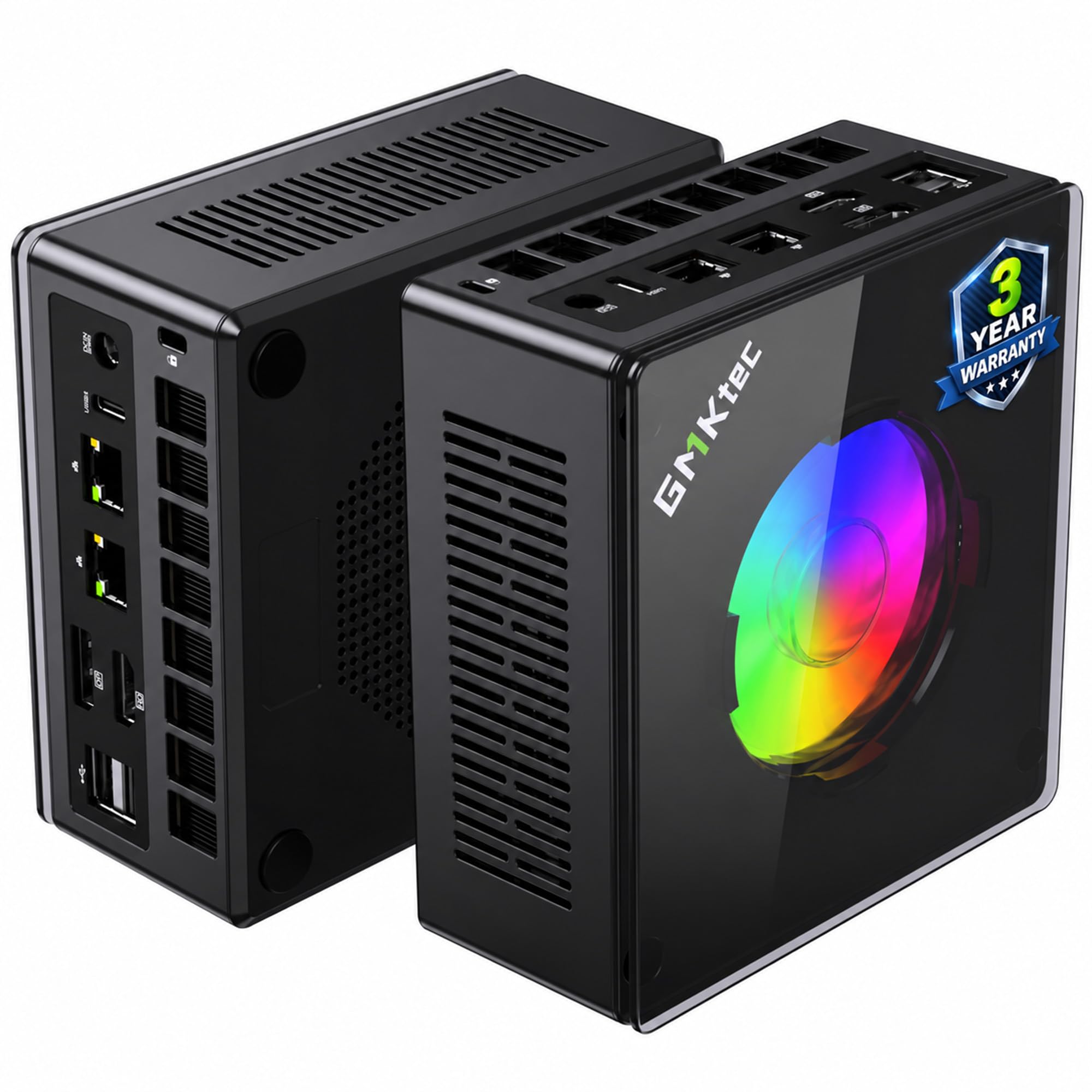
A mini that can bolt on a desktop GPU later — the compact build with an escape hatch.
The AMD Ryzen 9 8945HS here is the headline: 8 cores and 16 threads boosting up to 5.4GHz, with power management that runs at 35W and can be pushed to 70W. Paired with 32GB of dual-channel DDR5 at 5600 MT/s and a 1TB PCIe 4.0 SSD, it handles gaming, content creation, and office work without stutter. The memory can grow to 128GB and storage spans dual PCIe Gen4 x4 slots up to 8TB, so this is a mini you can keep upgrading.
What makes it genuinely different is the Oculink port. Oculink carries a PCIe connection at x4 speeds to an external graphics-card dock, so you can add desktop-class graphics later without replacing the whole machine. Combined with dual Intel i226V 2.5G LAN ports, four-screen 4K output through HDMI 2.1, DisplayPort 2.1, and dual USB4, and a metal chassis with the upgraded Hyper Ice Chamber 2.0 cooling running as low as 35dB in quiet mode, it covers a lot of ground for its size.
Owners praise the hardware and connectivity most, and the small footprint that replaces a bulky tower. The one recurring friction point is the USB controller, which has a practical device limit — if you run a keyboard, mouse, drawing tablet, audio interface, and external drives all at once, you may need a powered hub to keep everything connected. Otherwise, expect quiet, cool running even under load.
The eGPU play: the Oculink port at PCIe x4 speeds lets you add real graphics horsepower to a machine the size of a lunchbox.
Great for: tinkerers who want four displays, dual LAN, room to grow to 128GB, and the option to add a desktop GPU down the line.
Mind the port count: heavy peripheral users may need a powered USB hub to run everything at once.
7. KAMRUI Hyper H2 Mini Gaming PC
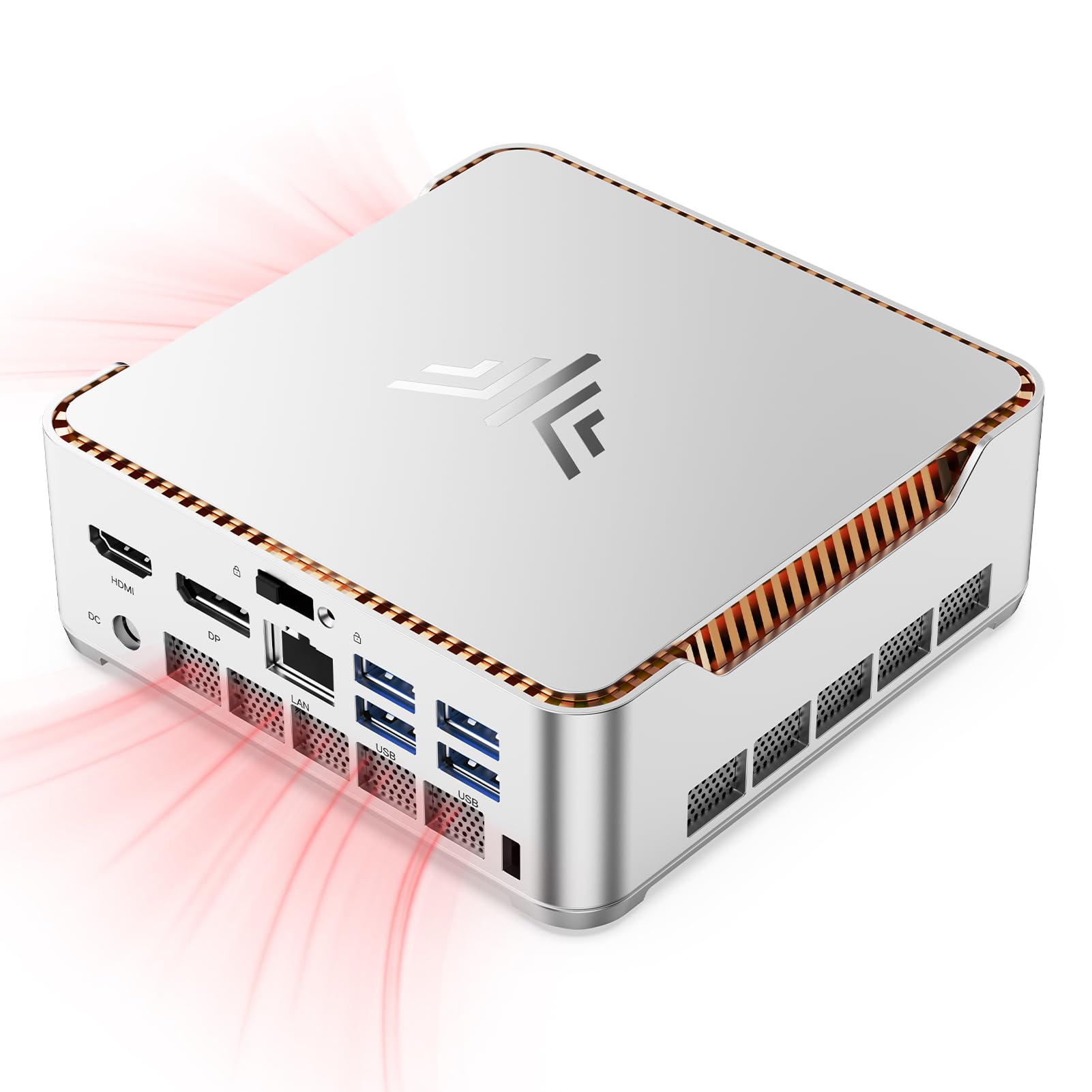
A 24-core i9 squeezed to the footprint of a coaster and mounted behind your monitor.
Core count is the whole story with the KAMRUI Hyper H2. The 14th Gen Intel Core i9-14900HX packs 24 cores and 32 threads boosting up to 5.8GHz with a 36MB cache, and it runs at a 55W thermal design power. That is a lot of parallel processing for creative work and heavy multitasking — the kind of headroom that keeps video exports and photo batches moving while you browse. Memory is 32GB of DDR4, expandable to 64GB, with a 1TB M.2 2280 PCIe 4.0 x4 SSD that can grow to 4TB across two slots.
Where it earns its keep is the display setup. An HDMI 2.0 port, a DisplayPort 1.4 port, and a USB3.2 Gen2 Type-C port support triple 4K output at 60Hz, so you can run three monitors for a serious multi-screen workspace. The included VESA mount lets you hang the whole machine behind a monitor, freeing your desk of the tower entirely — a real advantage over the ATX builds above if space is your constraint.
Cooling is handled by a silent centrifugal fan with dual copper heat pipes and a dual-fin module that the maker says raises airflow efficiency and heat dissipation, holding the CPU at 55W under full load. The honest gotcha: after power interruptions or sudden disconnections, a handful of owners mention the machine needing two or three attempts to boot back into Windows. It recovers without data loss, but it is worth knowing before you rely on it as a mission-critical workhorse.
Density on the desk: 24 cores, 32GB of memory, and triple 4K in a chassis small enough to hide behind your monitor on the bundled VESA mount.
Best for: multi-monitor professionals who want core-heavy performance and zero desk footprint.
Go carefully if: your power supply is prone to interruptions — occasional units need a couple of boot attempts after an outage.
8. msi Codex Z2 Gaming Desktop

High-refresh 1440p gaming with the storage and memory of a much pricier prebuilt.
The AMD Ryzen 7 8700F brings 8 cores and 16 threads boosting to 5.0GHz, and the RTX 5070 with 12GB of video memory handles the graphics side with the Blackwell architecture that underpins this generation of cards. For storage, a 2TB SSD means you can install a large game library without juggling space — twice the capacity of the 1TB drives on several picks here, which is a real quality-of-life win for anyone with a sprawling backlog. Owners describe it running intense shooters at up to 160Hz on high settings without stutter.
Cooling is handled by an ARGB air cooler for the CPU plus four system fans — three front intakes and one rear exhaust — which keeps temperatures in check while you game. RGB lighting can be cycled with a physical LED button on the case or fine-tuned through MSI Center software, and the system runs Windows 11 Home. Buyers consistently describe it as quiet under load, which is impressive given how much airflow it moves.
One part of the spec sheet is worth a hard look: the power supply. It is fixed at 650W, which limits how far you can upgrade the graphics card down the road — a stronger GPU would likely need a bigger PSU. Combined with a small number of owners reporting storage or driver quirks requiring support, this is a buy-for-today machine rather than a forever-upgradable one.
Storage first: the 2TB SSD is the standout versus the 1TB drives elsewhere on this list, and it means a large game library fits without a second drive.
The pick for: gamers who want high-refresh 1440p play, plenty of storage, and quiet operation from the start.
Weigh the limit: the 650W power supply caps future graphics-card upgrades more than the tower’s size ever would.
9. Alienware Aurora Gaming Desktop

A matte-black tower that stays quiet and cool, with someone else handling the repairs.
What separates the Aurora from the rest is not the silicon — it is the support. It ships with 1 Year Onsite Service, meaning Dell comes to your home or office if a covered hardware issue cannot be fixed remotely. For a first-time builder or anyone who dreads opening a case, that changes the calculus. Inside, the Intel Core Ultra 7 265F boosts up to 5.3GHz with a 66MB cache, paired with the RTX 5070 under the Blackwell architecture and 32GB of memory.
The design leans into customization. Alienware Command Center software lets you create and edit AlienFX lighting zones across the ecosystem, monitor performance modes across different power states, and build custom gaming profiles for your whole library. The stadium lighting around the chassis is the visual signature, and owners describe the appearance as one of the machine’s strengths. It also runs notably quiet and cool during gameplay, which is rare in a gaming tower.
Two honest caveats. First, this is a wireless-first machine — a few owners note a shortage of certain ports, so check you have the HDMI or display connections your monitor needs before committing. Second, expectations around setup vary: most units arrive to spec, but there are reports of a lighter-than-expected accessory bundle, so factor in a keyboard and mouse if you need them.
Support that stands out: 1 Year Onsite Service sets this apart from every other pick here — a technician comes to you if remote help cannot resolve an issue.
The compromise: port selection is thin, so map out your monitor and peripheral connections first.
Suits buyers who: want a quiet, cool RTX 5070 tower with lighting customization and the safety net of onsite support.
Reconsider if: you need a wide spread of ports or want to add components yourself.
10. Thermaltake LCGS View i570-170 Gaming Desktop

An i9 and an RTX 5070 under a 240mm radiator, built for streaming and heavy sessions.
Start with the cooling, because that is what makes this build tick. A closed-loop liquid system with a 240mm radiator pulls heat off the Intel Core i9-14900KF, and the memory runs at a fast 32GB of DDR5 at 6000 MT/s — quick enough that asset loading and high-bandwidth workloads feel snappy. An RTX 5070 handles graphics through DisplayPort or HDMI, and the B760 chipset motherboard keeps the platform current with USB 3.0, a headphone jack, and a mic input.
The liquid loop matters for a machine that runs long sessions. For streaming, rendering, or marathon gaming, keeping the CPU cool means it holds its boost clocks instead of dialing back — the same principle behind a small case needing good airflow, just handled with water instead. Customers sum up the performance bluntly: one calls it a “beast of a machine,” and across the board it gets described as quiet, fast, and issue-free.
The trade-offs are small but real. A few customers note a shortage of high-speed USB ports from the start, and the second M.2 slot is tucked in a spot that makes adding a drive fiddly. One larger consideration for buyers weighing this against a compact build is that the tower occupies full mid-tower desk space rather than the small footprint the mini picks offer. It also relies on a mid-tower case design rather than the panoramic glass of the MONTECH above.
The liquid advantage: a 240mm radiator keeps the i9-14900KF cool over long streaming sessions, so it holds performance instead of throttling.
Pick it when: you want liquid cooling, 6000 MT/s DDR5, and a quiet i9 for streaming and heavy productivity.
Look at the minis instead if: your priority is a small footprint rather than raw multi-tasking throughput.
11. Cooler Master NR2 Pro Gaming PC

A shoebox-sized gaming rig with a flagship CPU and 16GB of graphics memory inside.
This is what “small” looks like at the top end. The whole system lives in an 18.25L chassis — roughly the size of a large shoebox — yet carries an RTX 5070 Ti with 16GB of video memory and an AMD Ryzen 7 9800X3D running 8 cores and 16 threads up to 5.2GHz, on a Gigabyte B850I AORUS PRO motherboard. That 16GB of VRAM over the 12GB cards elsewhere in this list gives you more headroom for high-resolution textures, and it pushes 120+ FPS on high settings at 1440p.
Making that much power fit takes smart cooling. A 280mm AIO handles the CPU, an 850W 80+ Gold power supply feeds the whole build, and the NR200P Max case offers a choice of glass or mesh panel — the glass for looks, the mesh when you want airflow. Storage is a 2TB Gen4 M.2 SSD on a Gen 4×4 NVMe controller, with 32GB of DDR5 at 6000MHz RGB memory. Owners describe the build quality as solid and the plug-and-play setup as genuinely easy.
The notable caveat is noise, which owners describe with mixed feelings — quiet once you tune the fan curve, but not the quietest machine on this list from the start. The other real limitation of any ITX build this compact is upgrading: getting at the M.2 slot is genuinely fiddly, so plan your storage up front rather than expecting to swap it in easily later.
Desktop power, shoebox frame: an RTX 5070 Ti with 16GB and a Ryzen 9800X3D packed into 18.25L — the whole reason mini ITX appeals to builders tight on space.
Made for: gamers who want flagship mini ITX performance and are willing to tune fan curves for quiet operation.
Plan ahead if: you intend to upgrade storage later — the M.2 slot is hard to reach in a chassis this small.
Know the Specs
GPU clearance and form factor
Clearance is the maximum length of graphics card a case accepts — the MONTECH here clears 400mm, which fits the largest current cards. Form factor works the same way: an mATX board is smaller than an ATX board, and mini ITX is smaller still, so the case, board, and card have to agree with each other before you buy anything.
Cooler type and TDP
TDP is the wattage a chip is expected to pull, and the cooler has to carry that heat away. A 240mm or 280mm liquid radiator or a large air cooler handles high-wattage chips like the i9s here; a low-profile cooler will not. Match the cooler’s rated capacity to the CPU’s TDP number for stable performance.
Memory and storage speed
DDR5 runs faster than DDR4, and the MT/s figure shows how quickly data moves — 5600 is quicker than 4800. Storage speed matters for load times, with Gen4 NVMe drives moving data significantly faster than older drives, which is why big game libraries and video projects open far quicker on a Gen4 SSD.
Power supply headroom
The PSU wattage has to cover every component plus headroom for upgrades. The picks here range from 650W to 850W, and the higher figure leaves more room to slot in a stronger graphics card later. Choosing too tight a supply caps your build’s future before you even start.
Common Questions
Will a full-size graphics card fit in a Micro ATX case?
How much clearance do I need for a CPU cooler in a small case?
Is DDR5 worth it over DDR4 for a Micro ATX build?
Does a compact build run hotter than a full tower?
Can I add a dedicated graphics card to a mini PC later?
How many monitors can a small-form-factor PC drive at once?
What PSU wattage should I look for in a prebuilt gaming PC?
Is liquid cooling better than air cooling in a compact build?
Will an mATX motherboard fit in an ATX case?
How do I keep a small gaming PC quiet under load?
The Bottom Line
For most people building a compact machine, the building a micro atx pc winner is the Skytech Gaming O11 Vision — it has the liquid cooling and RTX 5070 that keep a small build cool and fast at 1440p, and reviewers point out it holds stable framerates in the 80-120fps range. If airflow and looks matter most and you are assembling your own, grab the MONTECH Sky Two. And for a tier-two-ready compact rig with 16GB of VRAM and a flagship CPU, the Cooler Master NR2 Pro is the one to reach for.
If your build is really a desk-friendly workhorse rather than a gaming tower, the GMKtec K11 earns its place with four 4K displays, dual 2.5G LAN, and an Oculink port that lets you add a graphics card later. Whatever you pick, check the card clearance and cooler height against your case first — that single step saves the most common small-build headache.
How we choose
We do not accept paid placement. Every pick is matched to a real buyer and a real use-case; we do not hands-on test units.
Sources
Specifications: manufacturer listings and product documentation. Review insights: verified customer reviews, as of October 2026. Pricing: not shown on this page (it changes often); check the current price via the retailer link.
As an Amazon Associate, Aappliancez earns from qualifying purchases. This does not affect which products we feature.