Disclosure: Some links in this post are affiliate links. As an Amazon Associate I earn from qualifying purchases, at no extra cost to you. Learn more
Specs are compiled from manufacturer listings and verified buyer reviews and can change over time — please confirm the key details on the product page before buying.
If your joystick drifts left on its own or your throttle slides back to zero mid-flight, you already know the real problem with budget flight gear: cheap sensors. A budget-friendly HOTAS setup exists that still gives you a real throttle and stick, and the trick is knowing which parts to spend on and which plastic to forgive. This guide covers the flight sticks, throttles, and desk mounts that actually hold position, so you can pick the one that matches how you play.
This guide is built by comparing the manufacturers’ published specifications and the patterns across verified customer reviews, so you get each pick’s real strengths and trade-offs instead of marketing spin.
You want a stick that centers cleanly, a throttle that stays where you put it, and enough buttons that you are not reaching for the keyboard mid-dogfight. That is what a good budget hotas delivers, and the picks below are sorted by which setup fits your desk, your platform, and your game.
Top Picks

How To Choose The Best Budget HOTAS
You need a stick that returns to center on its own, a throttle that stays put when you let go, and enough programmable buttons to keep your hands off the keyboard.
Throttle feel decides everything
A throttle that slides by itself is the fastest way to ruin a landing. Look for one with tension adjustment, so you can set the drag to your own hand. Progressive travel means the resistance changes across the throw, which gives you finer control near the idle end where precision counts.
Detents — the little notch points you feel through the travel — let you find afterburner or idle without looking down. The X52 has detents for afterburner and idle built in. Some pilots remove them for a smoother slide, though buyers report that pulling parts out like this can void your warranty.
Sensor type and centering
A hall-effect sensor reads the stick position with magnets and no contact, so nothing rubs together and nothing wears out. The Logitech G X56 uses hall-effect sensors on its aileron and elevator axis. Older contact sensors can develop drift over time — that is the slow creep where the plane turns when your hand is off the stick.
Centering matters just as much. A non-contact centering mechanism with constant spring force, like the one on the X52, keeps the stick returning to the same spot. A stick with a deadzone you have to dial in is telling you the centering has already loosened up.
Buttons, hats, and axes
Count the controls you actually use, not the ones on the box. A five-axis throttle with a bunch of buttons covers most sims. An eight-way point-of-view hat switch gives you camera and look control without leaving the stick.
More buttons help only if they sit under your fingers without a reach. Awkward reach is a real complaint on several budget setups — a button you cannot find is a button you do not use.
Side-by-Side Comparison
| Model | Best For | Controls | Connection | Platform | Amazon |
|---|---|---|---|---|---|
| Logitech G X52 Flight Control System★ Best Overall | Progressive throttle and MFD in one setup | 16 buttons, MFD + 2 dials | USB, 4.6 ft cable | PC | Amazon |
| Thrustmaster TWCS ThrottleBest for Space Sims | Space simmers pairing a throttle with a separate stick | 14 buttons + 8-way hat | USB | PC | Amazon |
| Logitech G X56 H.O.T.A.S | Dual-throttle control with RGB and four springs | 16 buttons + 189 programmable | USB, 2x USB | PC | Amazon |
| Thrustmaster T-Flight Hotas X | Cheapest full stick-and-throttle combo | 12 buttons, 5 axes | USB | PC, PlayStation 3 | Amazon |
| Hikig 2 Pack Desk Mount | Locking a stick and throttle to your desk | Dual-handed bracket pair | Clamp mount | X52/X56, VKB, Winwing | Amazon |
| Thrustmaster T-Flight Hotas One MSFS 2024 Collector Edition | Xbox and PC Microsoft Flight Simulator flying | 18 buttons, 5 axes | USB | PC, Xbox Series X/S, Xbox One | Amazon |
| Anman Foldable Racing Flight Simulator Stand | Folding cockpit stand for racing and flight | 3 gear shift panels, 3 bases | Stand, folding | PC, Xbox One | Amazon |
Detailed Reviews
1. Logitech G X52 Flight Control System – Standard Packaging
Sixteen buttons, a working LCD screen, and a throttle that holds tension where you set it.
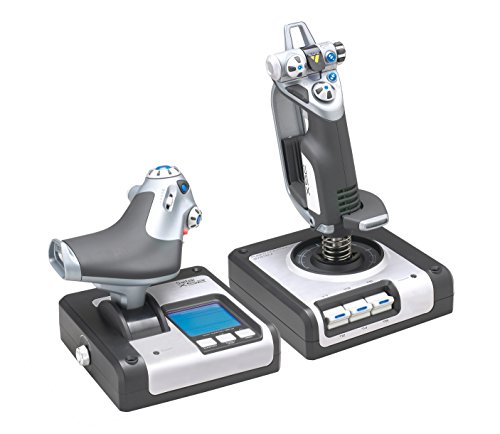
Two things set the X52 apart from every other stick on this list. The first is a multi-function display — a small LCD screen built into the throttle base that shows game readouts, driven by two dedicated MFD buttons and two rotary dials with buttons built into them. The second is a progressive throttle with tension adjustment and real detents at afterburner and idle. That combination means you can feel where your power setting is without looking down at a menu.
You get a stick that returns to the same center every time, thanks to a precision centering mechanism with non-contact technology on the X and Y axes and constant spring force. That means nothing physically rubs inside, so the feel stays consistent. The full box measures 14.33 x 10.04 x 8.98 inches, which is bigger than the Thrustmaster TWCS Throttle at 10.51 x 9.09 x 5.51 inches — so you give up more desk space for the extra hardware. The stick weighs 2.3 pounds and the throttle 1.6 pounds, both on 4.6-foot cables.
The catch is reliability as the years stack up. Some owners mention a pinky trigger that never worked, and one points to a unit that failed eight months in with flashing LEDs and an unresponsive stick. A teardown in that same account found painter’s tape instead of proper wire wrap and a metal tube with no flange, causing the wiring to chafe. Most of the buying pool still gives it 4.0+ stars across 800+ ratings, but if you plan on a decade of flying, this is the piece to watch.
X52 spring tension
- Progressive throttle with tension adjustment plus detents for afterburner and idle — you feel the power setting instead of guessing at it
- Sixteen buttons, an LCD display, and two rotary dials with in-built buttons for extra game functions
- Non-contact X and Y axis tech with constant spring force keeps centering consistent
- Windows XP through Windows 10 or newer compatibility, and Elite Dangerous has a preloaded Saitek X52 profile
Plastic stick gimbal
- The throttle slides under its own weight over time — the suction cups only stop sudden pulls, not slow creep
- Owners describe the button layout as unintuitive, and the USB cable exits the throttle on the left, which is short for a PC on your right
- The LCD sits at an awkward angle and can be hard to read while flying
- Fresh units have shipped in a bare box with no outer packaging protection
Built for sim pilots who want a readout panel: If you fly Elite Dangerous or any sim that benefits from an on-throttle display, the X52 gives you more instrument feedback than anything else in this bracket.
Long-session comfort: If you plan on five to ten years of hard flying, the wire-chafing reports on later units are worth knowing before you commit.
2. Thrustmaster TWCS Throttle (Compatible with PC)
Fourteen buttons and a thumb stick on the back that lets you strafe without moving your hand.
If you already own a decent flight stick and just need the throttle half, this is the cleanest answer on the list. The TWCS runs S.M.A.R.T. sliding rails — a system of metal tracks that guide the throttle for smooth motion instead of a hinge that binds. You get 5 (+3) axes, 14 action buttons, and one 8-way point-of-view hat switch, all mounted low so your hand rests naturally and your fingertips reach the side controls.
The back-mounted analog stick is the piece that wins space simmers. It gives you lateral and vertical movement in one thumb, which is exactly what you need in Elite Dangerous or Star Citizen to slide sideways while aiming forward. The analog paddle underneath handles quick forward and back bursts or landing thrust. Customers note the TWCS feels light but solid, with grippy control surfaces and T.A.R.G.E.T. software that makes per-game profile mapping straightforward. For large hands, the button spacing is a genuine plus.
Two honest limits. The first is the analog stick position — you cannot comfortably use both the paddles and the stick at once for full 6DOF flight, so the layout asks you to pick a hand pose. The second is sensor life. Reviewers point out the TWCS sensors failing around 1,000 hours, with the finger joystick going first and throttle drift at the zero point following. The left/right slider and the dial wheel on some units feel more like on/off switches than smooth range controls.
TWCS sliding rails: The slide-rail motion and the low hand position give you the same layout found on higher-end gear, and the T.A.R.G.E.T. software lets you build a profile per game.
No twist axis: Buyers describe the all-plastic slab feel, so expect function over finish. The 6mm pre-installed nut inserts on the base do make desk mounting easy.
Space sim throttle: Elite Dangerous and Star Citizen pilots who want a dedicated throttle beside a separate stick, especially with a VR headset where button location is memorized.
Helicopter pilots: You want a stick included — this is throttle only, so pair it with a joystick you already own or buy two pieces.
3. Logitech G X56 H.O.T.A.S Throttle and Joystick

Two throttles, four spring weights, and more buttons than you will ever map.
You get the most hardware in this bracket. Twin throttles with a friction adjuster and a lock let you fly multi-engine aircraft like a real pilot, splitting power between the two levers. Four spring options let you set how stiff the stick feels, plus adjustable stick force and a hall-effect sensor (a magnetic sensor that reads position without touching) on a 16-bit aileron and elevator axis — a digital read so fine it registers tiny movements. At 16 buttons, it edges out the TWCS Throttle’s 14, though the number of programmable controls overall tells the real story.
The stick also carries mini analog stick control surfaces so you can manage pitch, roll, yaw, and gimballed weapons separately from the main axis. There is RGB backlighting you can match to the rest of your setup via the software, and the controls are placed to be found by feel, which matters in VR.
Two notes worth weighing. The stick has a rough reputation for drift, with several buyers reporting it right from the start. Others describe a rotary judder near the throttle center and occasional clicking from the stick base, and one reports that the throttle tension is weak enough that it advances on its own from gravity. There is also a real chance you must juggle Windows 10 drivers rather than Windows 11 to get a solid connection. This listing is the renewed version, so expect to check condition carefully on arrival.
Elite Dangerous rigs: DCS World and combat sim pilots who want twin-throttle control, four spring choices, and a full button array on one stick.
Small desks: You want a cleaner out-of-box track record — the X52 has a thinner control set but fewer reported drift issues, and this X56 listing is a renewed unit.
4. Thrustmaster T-Flight Hotas X – Compatible with PS3/PC
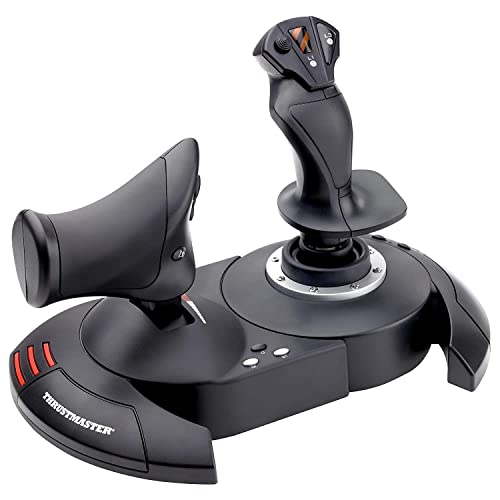
The entry point that keeps its settings even when you unplug it.
This is the cheapest complete stick-and-throttle setup on the list, and the one that gets a full flight sim into your hands for the least money. You get a wide hand rest for comfort, 12 buttons, and 5 axes that are entirely programmable. The throttle works two ways: rotate the handle, or use the progressive tilting lever. The stick runs a high-precision design with adjustable resistance, so you can dial the tension to your hand.
The standout feature lives inside: internal memory that saves all your button programming even with the joystick disconnected. That means you set up your profile once, unplug the unit, carry it to a friend’s PC, and the same mapping is still there. For a budget unit, that is more useful than an extra couple of buttons.
The honest trade-off is layout intent. The rotating handle can also serve as a rudder twist, but this is a console-era design made for PlayStation 3 and PC, so the control layout reflects that generation rather than modern sims. If you are already deep in a multi-function sim, the smaller button set will feel tight.
First HOTAS: You are buying your first HOTAS and want a full stick, throttle, and programmable memory without spending much.
Upgrade buyers: You fly modern combat sims — the 12-button set runs short next to a 16-button stick with mini analog controls.
5. Hikig 2 Pack Desk Mount for Flight Sim Hand-Controller

Turns a sliding stick-throttle set into fixed-position hardware you push against.
Not glamorous, but this is the single biggest upgrade you can make to a budget HOTAS. Bolt your stick and throttle to two clamps, and they stop sliding across the desk, stop moving when your hand pushes, and stop taking up space when you are done. The quick-clamp design holds up to 386 kg of clamping force — far more than any stick and throttle combo weighs — and fits horizontal tabletops from 0.2 to 5.3 inches thick. That range covers most desks and gaming tables.
Compatibility is the wide net. It works with Logitech’s X52, X52 Pro, X56, and X56 Rhino, Thrustmaster’s T.Flight Hotas and T.16000M, and the TCA Officer Pack Airbus Edition, plus VKB Hotas, VPC Mongoos T-50, Winwing, and a chain of shifters and handbrakes. Non-slip feet protect the desk surface, and the brackets can be set up for either left- or right-handed flyers. The unit ships as two clamps and weighs 5.27 kg overall, so plan on a sturdy surface.
The honest limits are small. Some mounts ship with cosmetic paint flakes or scratches on the platform, and the included hardware can run short — you may need extra small wing nuts and screws to land the exact fit you want. A Thrustmaster A320 quadrant screws on without an adapter and can sit with a slight tilt of 1 to 4 degrees. Functional, just not perfectly level.
Under-desk clamping: If you are mounting a VKB joystick and a throttle, the clamps hold them without any flex or sag, which is a different experience than a stick on a pad.
Thin desk limits: Check the platform condition on arrival, and budget for a couple of extra fasteners if your quadrant or stick has an unusual bolt pattern.
Cluttered setups: You already own a stick and throttle and want them locked in the right position on a desk up to 5.3 inches thick.
Glass tabletops: Your setup is a single one-piece unit like the T-Flight Hotas One — the clamps are built for separate stick and throttle bodies.
6. Thrustmaster T-Flight Hotas One MSFS 2024 Collector Edition

Plug-and-play on Xbox, with a throttle you can pop off and set beside you.
If you want to fly Microsoft Flight Simulator on a console, this is the one that works from the start. It is officially licensed for Microsoft Flight Simulator 2024 and lists fully compatible with Xbox Series X|S and PC. Shoppers say it goes straight into MSFS on Xbox with no firmware update needed, and one buyer describes it as smooth, responsive, and ideal for a beginner stepping up from a controller. The 10-bit precision on 5 axes plus 18 buttons and a multidirectional hat switch gives you more precision than a gamepad.
The detachable throttle is the layout win. You can run stick and throttle together on a desk, or split them for a relaxed lap setup. The dual rudder system lets you steer with the joystick Z-axis or the integrated lever on the throttle, and the adjustable joystick resistance lets you set the stick tension to your hand. Thrustmaster’s S.M.A.R.T. sliding rail system on the throttle keeps the motion smooth, and the ecosystem expands with TFRP rudder pedals if you add them later.
Two cautions before you buy. On PC, buyers report the plug-and-play is less smooth than on Xbox — one account describes needing to restart the console with the joystick already plugged in and navigating menus through the stick itself. And a chain of buyers reports the throttle only reaching 50% power, which is a hardware issue to watch on arrival. Buyers still praise the realism and the build feel, calling it reliable despite a plastic rather than metal finish.
Microsoft Flight Simulator: Xbox Series X|S owners flying Microsoft Flight Simulator 2024 who want a licensed, plug-and-play HOTAS with a detachable throttle.
Consider PC-first options instead if: You fly only on PC — the console setup is smoother than the PC route on this unit, and the X52 and X56 both target the PC platform directly.
7. Anman Foldable Racing Flight Simulator Stand
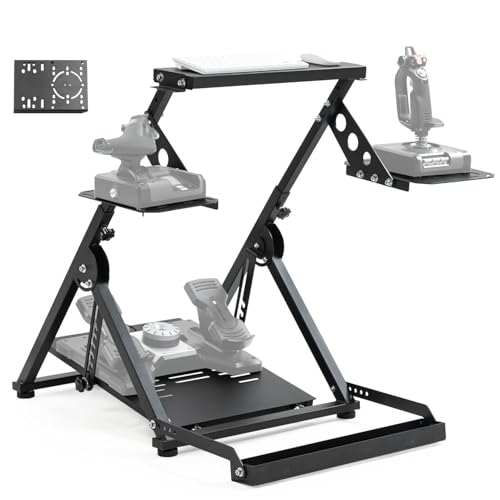
A folding cockpit that holds your stick, throttle, wheel, and pedals in one frame.
If your problem is not the stick but where to put it, this stand solves the whole rig at once. It ships with three gear shift panels and three controller bases — two large and one small — so you can mount a flight stick and a racing wheel on the same frame and swap between flight and racing games without rebuilding anything. Pre-drilled wider panels accept the Logitech G29, G920, and G923, the Thrustmaster T16000, Airbus Rocker and Throttle, A10C, and similar hardware.
The frame itself is thick steel, not sheet metal, so it resists bending and sway. An X-shape double-triangle design keeps it stable under pressure, and it supports direct-drive racing wheels under 8nm. It arrives 80% pre-installed for quick assembly, and the adjustable bottom bolt-lift pedal folds down to a compact size for storage. It also includes a chair wheel fixed slot to keep a rolling chair from sliding out from under you, and the box carries two bags of every screw, washer, and nut you could need.
The catch is weight and setup fit. Owners describe it as solid at roughly 50 pounds with a HOTAS mounted and report minimal movement during hard gaming, but it takes space while in use and the folding only helps with storage. A shorter user, arrived-damaged stories exist too — one unit shipped with a damaged rubber insert and wrong-size tools. The adjustable heights and stick positions cover most setups, but you should check that your chair height puts your arms at the right level before you commit.
Folding chair bundle
- Thick steel construction with an X-shape double triangle for stability — solid at roughly 50 pounds with a HOTAS mounted
- Three controller bases and three gear shift panels cover flight and racing gear on one frame
- Comes 80% pre-installed with two bags of every screw, washer, and nut
- Chair wheel fixed slot plus an adjustable foot lift pedal that folds down for storage
Wheel stand only
- Folds down for storage but still occupies a fair footprint during a session
- Some units have shipped with cosmetic flaws or wrong-size tools, so a condition check on arrival is worth doing
- No memory of your preferred height — you may need to re-adjust the sliding post each time you fold and unfold
- It is heavier than a desk mount, so moving it between rooms is a two-hand job
Racing and flight: Sim pilots who fly and race on the same PC and want one folding frame with interchangeable mounting plates.
Permanent cockpits: A single-stick desk setup — a pair of clamps takes less floor space and less assembly.
Know the Specs
Progressive Throttle And Detents
A progressive throttle changes the resistance across the travel — a technicial term for the throttle pull having different feel along its length — so you can make fine adjustments near idle where landings live. Detents are the notch points you feel through the throw, and they let you find afterburner or idle by touch. The X52 has both, which is why it holds altitude settings where a friction-only throttle sags.
Hall-Effect Vs Contact Sensors
A hall-effect sensor reads stick position with magnets and no physical contact, so nothing rubs and nothing wears down. Contact sensors use parts that touch, and those are the ones that develop drift — the slow creep where the plane turns with no hand on the stick. If a stick has no deadzone and centers cleanly, the sensor and centering mechanism are doing their job.
Clamp Weight Capacity And Desk Thickness
Mount clamps rate their hold in kg, and the Hikig bracket is rated to 386 kg — far above any stick and throttle load. The other number that matters is the desk thickness range: a clamp that fits 0.2 inches to 5.3 inches covers most tables, but a very thick desk or an under-desk lip can block the fit. Non-slip feet protect the surface while holding the bracket steady.
Axes, Hat Switches, And Button Counts
An axis is a direction of movement the stick reports — pitch, roll, yaw, throttle, and rudder. A five-axis unit covers a full flight sim. An eight-way hat switch, sometimes called a point-of-view hat, gives you camera and look control without leaving the stick. Button count matters only if the buttons sit under your fingers; a compact 12-button set works if the layout is right, and a 16-button stick helps only if you can find the buttons by feel.
Common Questions
Can I use a HOTAS with a console and a PC at the same time?
How many buttons do I actually need on a budget HOTAS?
Will my HOTAS work with Microsoft Flight Simulator 2024?
Is a hall-effect stick better than a standard contact sensor?
Do I need a desk mount or can I just set the stick on my desk?
How long do the sensors in a budget throttle last?
Can I split the throttle from the stick on a budget HOTAS?
What does a Z-axis rudder control replace?
Will a desk mount fit my specific stick and throttle?
Is a folding stand better than a clamp mount for flight sim?
The Bottom Line
The winner here is the Logitech G X52 Flight Control System, because it is the only budget-tier pick that pairs a progressive throttle with real detents and a working multi-function display. If you want a dedicated throttle to sit beside a stick you already own, the Thrustmaster TWCS Throttle is the one, and if you want the most hardware on your desk, the Logitech G X56 gives you twin throttles and four spring weights. For console flyers, the T-Flight Hotas One is the licensed pick, and for racing-and-flight crossover, the Anman folding stand holds both. If you want the most support for your rig, the Hikig desk mounts are the ones that hold a VKB joystick with no sag, and for a first budget-friendly HOTAS, the T-Flight Hotas X keeps your programmed profile stored inside the unit.
How we choose
We do not accept paid placement. Every pick is matched to a real buyer and a real use-case; we do not hands-on test units.
Sources
Specifications: manufacturer listings and product documentation. Review insights: verified customer reviews, as of October 2026. Pricing: not shown on this page (it changes often); check the current price via the retailer link.
As an Amazon Associate, Aappliancez earns from qualifying purchases. This does not affect which products we feature.