Disclosure: Some links in this post are affiliate links. As an Amazon Associate I earn from qualifying purchases, at no extra cost to you. Learn more
Specs are compiled from manufacturer listings and verified buyer reviews and can change over time — please confirm the key details on the product page before buying.
You want smooth, good-looking vlog footage without spending more on a camera than on your laptop — and the good news is you no longer have to. The picks below all shoot 4K, all fit in a pocket or a small bag, and several of them are purpose-built for a person talking to a lens while walking. The real decision is not “how cheap can I go” but “which of these three or four things do I care about most”: steady footage, long battery life, audio you do not have to fix in editing, or a screen you can actually see yourself in.
This guide is built by comparing the manufacturers’ published specifications and the patterns across verified customer reviews, so you get each pick’s real strengths and trade-offs instead of marketing spin.
Some of these cameras sell themselves on a built-in gimbal, others on a wide lens that fits your face and your background in the same frame. Below you will find out which one earns its place in your bag, and which compromises you can live with. Every pick here is a serious budget camera for vlogging worth shortlisting.
Top Picks


How To Choose The Best Budget Camera for Vlogging
Buying a vlogging camera is mostly about removing problems before you start filming. A camera that fights you — wobbling when you walk, dying mid-sentence, making you re-record because your face is cropped — costs you more in wasted time than the hardware saves you in cash. So judge every option on four plain questions before you look at anything else.
Will your whole face and your background fit in the frame?
When you film yourself at arm’s length, a wide lens is your best friend. A fixed 20mm lens (measured the same way as a 35mm camera, so it reads as genuinely wide) pulls your face and the room behind you into one shot without a selfie stick. A 19mm wide-angle lens does the same job. Narrower lenses force you to stretch your arm further or crop your background out entirely.
Is the stabilization mechanical or digital?
A 3-axis gimbal is a physical motorized arm inside the camera that holds the lens level while your hand moves — that is why gimbal footage looks like it was shot on rails. Digital stabilization instead crops and shifts the picture electronically, which smooths things out but can soften detail and cannot fully rescue a fast walk. For handheld talking-to-camera footage, mechanical wins.
How long does the battery really run in 4K?
Published battery figures are quoted in minutes and are measured under favorable conditions. Shooting 4K, using a bright screen, and recording continuously all pull the number down. Anything that gives you 160 minutes or more at the rated setting has real headroom for a day of short clips, and buying a spare battery is normal practice rather than a sign of a bad camera.
Do you need a microphone jack?
Built-in stereo mics are fine indoors and a few feet from your face. Outdoors, wind and traffic get in. A 3.5mm mic jack lets you plug in a lavalier later without changing cameras, and it matters most if you film outside or in noisy rooms.
Side-by-Side Comparison
| Model | Best For | Top Video Spec | Stabilization | Rated Battery | Amazon |
|---|---|---|---|---|---|
| Xtra Muse★ Best Overall | Cinematic look on a mid-range budget | 4K/120fps, 1-inch CMOS | 3-axis gimbal | 161 minutes | Amazon |
| Canon PowerShot V10Pocket Carry Pick | Pocket carry and simple one-hand filming | 4K up to 30fps | Three IS modes | 2 hours | Amazon |
| DJI Osmo NanoWearable Pick | Wearable POV and hands-free clips | 4K/60fps, 143° view | Magnetic mount, Vision Dock | 200 minutes | Amazon |
| Insta360 GO Ultra | Clipping to a cap or pendant | 4K up to 60fps, Active HDR | FlowState, 360 Horizon Lock | 180 minutes | Amazon |
| DJI Osmo 360 | Third-person and 360° storytelling | 8K/30fps 360°, 4K/120fps | Invisible selfie stick effect | Up to 190 minutes | Amazon |
| DJI Osmo Pocket 3 | All-in-one creator kit | 4K/120fps, 1-inch CMOS | 3-axis mechanical | 166 minutes | Amazon |
| Sony ZV-1F | Widest selfie framing, beginner friendly | 4K video, 20mm lens | Digital stabilization | — | Amazon |
| Sony ZV-1F Bundle | Grabbing a spare battery and card up front | 4K video, 20.1MP stills | Digital stabilization | — | Amazon |
| Canon EOS R50 | Growing into photography as well | 6K-oversampled 4K/30fps | Lens-based, no internal gimbal | — | Amazon |
| Sony ZV-E10 | Changing lenses later | 4K oversampled from 6K | Lens-based, no internal gimbal | — | Amazon |
| Sony ZV-1 | Fitting a small bag and low light | 4K HDR, 24-70mm F1.8-2.8 | Image stabilization | — | Amazon |
Detailed Reviews
1. Xtra Muse Vlogging Camera with 1” CMOS & 4K/120fps
A pocket gimbal that shoots 4K at 120fps — the exact pair of specs you would normally pay far more for.
If you want your walk-and-talk footage to look like it was shot on a rail, this is the camera that does it at a mid-range price. The Xtra Muse pairs a 1-inch CMOS sensor (a physically large image sensor, which is why it gathers more light than a phone) with a 3-axis gimbal — a motorized arm that physically holds the lens steady while your hand wobbles. Video records at 4K resolution and up to 120fps, so you get both sharp detail and the option of slow motion. Owners are clearly sold on the picture: quality is the thing that wins people over by a wide margin, followed by value for money.
That sensor does more than sharpness. It supports 10-bit X-Log color, which records up to one billion colors and gives you room to push the grade in editing — genuinely useful if you film sunrises or sunsets and want the sky to hold together. Framing happens on a 2-inch touch screen that rotates between horizontal and vertical, so a vertical Reel does not require you to re-learn the camera. Focus is automatic with face and object tracking, and there is a Master Follow mode for tripod work: set it down, jump, dance, or spin, and you stay centered.
Battery is rated at 161 minutes, which is a real working day of short clips rather than one long take. For comparison, the DJI Osmo Nano’s 200-minute rating is the longer of the two on paper. The honest catch is battery inconsistency — plenty of owners get multi-day use from a charge, while others find it drains quickly under heavy 4K work, so a spare battery is sensible. Audio is the other trade-off: there is no wireless mic connection and the camera pairs with a DJI mic instead, and the companion app is less polished than DJI’s.
Where the Muse earns its keep
- Mechanical 3-axis gimbal keeps walking shots level without software cropping
- 1-inch sensor plus 10-bit X-Log gives real color-grading headroom
- 2-inch rotating touch screen flips between horizontal and vertical shoots
- Rated at 161 minutes, and owners describe several days of light daily use per charge
What to plan around
- Battery results vary a lot between owners under continuous 4K
- No wireless mic pairing — it works with a DJI mic, not its own system
- The companion app trails DJI’s in polish, and X-Log needs a download from the XTRA site
Worth owning if: you want gimbal-smooth 4K/120fps footage and full color grading without moving into premium pricing.
Budget for instead: a second battery and an external mic, since heavy 4K and wireless audio are the two things this camera does not hand you.
2. Canon PowerShot V10 Compact Vlogging Camera
The camera that folds a stand out of its own body, so you can set it down and film yourself without a tripod.
Canon built this one around being carried. The lens is a fixed 19mm wide-angle (35mm equivalent), which pulls your face and the room behind you into the same frame at arm’s length — no selfie stick, no awkward cropping. What owners praise most is exactly that smallness; the compact size draws more comment than anything else about this camera, with video quality right behind it. It also fits in a fanny pack, which tells you the whole story about who this is for.
The stand is the clever bit. It folds in from either the front or the back, so the camera stands on a table and films you hands-free at whatever angle the room allows. A retractable front-facing screen lets you watch yourself while recording, and there is a micro-HDMI output plus an external mic auxiliary port and USB-C charging — the mic port alone puts it ahead of several pricier options for outdoor talking. Video tops out at 8-bit 4K at up to 30fps, or Full HD at up to 60fps, with 14 movie color filters for setting a mood.
Now the part you need to hear straight. The battery is rated at 2 hours, and short battery life is the most-raised complaint in owner feedback. As buyers report: “I don’t love that the battery dies so quickly and the balance with bright lighting could be better but for the price, I won’t complain.” Treat it as a camera for short, frequent sessions rather than continuous long-form shooting, and carry a spare.
What actually works: the fold-out stand and 19mm lens turn any table into a two-person interview setup, and the stereo mics plus a third center mic that cuts background noise handle indoor audio well.
Plan around this: the 2-hour battery rating and the lack of a lens cover — a scratched front element is the one failure this design invites.
Reach for this if: your vlogs are short, you film on the move, and you want a camera that props itself up.
Look elsewhere if: you need long unbroken takes — the battery rating is the weakest number on this page.
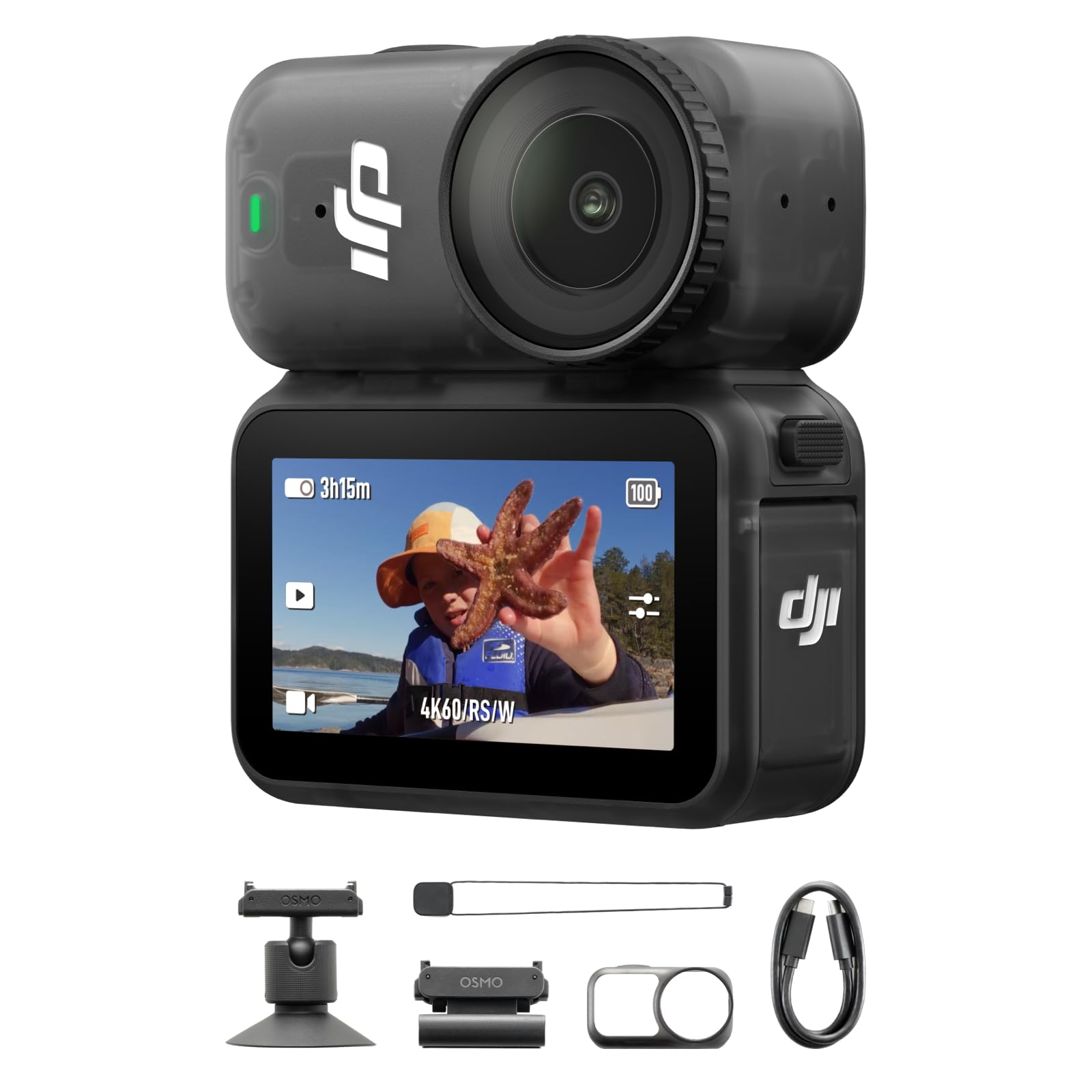
3. DJI Osmo Nano Standard Combo (128GB), 4K Wearable Camera
A thumb-sized 4K camera that clips to a hat or a lanyard and records for up to 200 minutes.
Wearable cameras live or die on two numbers, and this one wins on both. The Osmo Nano records 4K at up to 60fps through a 143° ultra-wide view — that extreme angle is what makes a chest-height or helmet-height clip feel like your own eyes rather than a camera pointed at the world. The 1/1.3″ sensor gathers more light than the tiny sensors in most body cameras, so low-light and fast-action shots hold together better than the size suggests.
Storage is the quiet luxury here. There is 128GB built into the camera, so you can start filming from the start and expand with a microSD card later. Mounting is magnetic, which means a hat clip or lanyard goes on in seconds without a rig. It waterproofs to 10m on its own, and the Vision Dock adds IPX4 splash resistance. Audio takes two microphones directly. Owners are clear about what they love most: quality first, with video quality and compact size following.
The trade-off is heat. Owners describe the body running noticeably warm even at 2.7K, and overheating is the most-discussed negative in the feedback — DJI’s own documentation notes that high-res recording heats a body this small, and built-in overheat protection stops recording to protect the hardware. Battery rating is 200 minutes, the longest here on paper, though heavy 4K sessions shorten that in practice. The small touchscreen is also hard to read in direct sun, which pushes you toward the app for framing.
The case for it: 128GB internal, a 143° view, and magnetic mounting make this the least fussy camera on the list for POV footage — clip it and forget it.
Where it bites: long continuous 4K sessions will trip the overheat protection, so plan shorter takes or enable Endurance Mode for marathons.
This is your camera if: you film while moving — motorcycle rides, workouts, pet walks — and want the footage to feel first-person.
Not your camera if: you need one unbroken hour of 4K; heat management stops that before the battery does.
4. Insta360 GO Ultra Black — 4K Hands-Free Vlogging Camera

At 53g and the size of a watch face, this is the camera you forget you are wearing.
The GO Ultra is built for the shot you cannot hold a camera for. It weighs 53g and mounts magnetically — to a cap with the Easy Clip, or under your shirt with the Magnet Pendant — so your hands stay free while you cook, cycle, run, or dive. Video records at 4K up to 60fps with 4K Active HDR, which balances bright skies and shaded faces in the same frame. A 1/1.28″ sensor and a 5nm AI chip back the PureVideo low-light mode.
Stability comes from three levels of FlowState stabilization plus 360 Horizon Lock, which stops the horizon from tilting as you lean. Waterproofing is IPX8 to 33ft (10m) on the camera alone, with a Dive Case taking it to 197ft (60m). Run time is listed at 200 minutes: 70 minutes on the standalone camera, or 3 hours in the Action Pod, with a stated 0–80% charge in 12 minutes. Editing is handled for you — the AI assembles highlights with transitions and music at a tap.
What wins people over here is the video quality and the sheer smallness; owners talk about weight and compactness almost as much as footage. The recurring caveat is battery behavior — some report the camera and dock draining while idle, which is a real concern if you leave it in a bag for weeks. Night footage is usable but limited by a sensor this small. Think of it as a brilliant second camera for action and POV, and check the sample night clips before you commit.
Why creators reach for it
- 53g and watch-sized, so it disappears on a cap or pendant
- 4K60fps with Active HDR and 360 Horizon Lock handled in-camera
- IPX8 waterproof to 33ft without any housing at all
The honest ledger
- Battery drain while idle is the most-reported frustration — store it charged and check before trips
- Small sensor means limited night performance
Pick this and stop thinking about it if: you shoot sports, travel, or hands-busy content and want the camera to vanish.
Think twice if: it will live in a drawer between trips — idle drain punishes that habit.
5. DJI Osmo 360 Essential Combo, 360 Action Camera

The camera that films everything at once, then lets you choose the angle in editing.
Shooting 360° changes how you vlog. You do not have to aim — you record the entire sphere in 8K at up to 30fps, then pick your framing afterward. That is why the Invisible Selfie Stick matters: the camera hides the pole, so you get a third-person shot of yourself carving down a slope as if a cameraman were following you. Single-lens 4K at up to 120fps is there when you just want a normal vlog. The 1-inch 360° sensor is what makes the low-light panoramas hold up.
There is 105GB of internal storage and a rated 190 minutes of nonstop recording, so the Essential Combo can shoot without a memory card at all. Four microphones capture sound from every direction, and the camera connects directly to two DJI transmitters without a receiver. The included 1.2m selfie stick and spare 1950mAh battery round out the kit. Video quality is what owners talk about most, and it earns it.
Be honest with yourself about the workflow. Editing 360° footage has a learning curve — the app’s Pano Dewarp and Pano Pro Color Grading tools help, but a first-timer will spend time there. Reliability is mixed: some report the camera locking up at random during recording, and editing and battery feedback split both ways. The selfie stick itself draws occasional criticism for rotational play that transmits vibration. This is a camera for someone willing to trade a little setup effort for angles nothing else gives you.
Best for: storytelling where the framing decision comes later — travel, skiing, group scenes, anything where you would miss the shot by aiming.
Skip if: you want a one-take, no-editing workflow; the post-production step is baked into how 360° works.
6. DJI Osmo Pocket 3 Creator Combo

The pocket gimbal that made a whole category — and the kit includes the wireless mic that normally costs extra.
DJI’s Pocket 3 is the benchmark the Xtra Muse is measured against, and the two specs line up: a 1-inch CMOS sensor recording 4K at up to 120fps, a 3-axis mechanical gimbal, and a 2-inch touch screen that rotates for vertical shots. Where this bundle pulls ahead is audio. The Creator Combo ships with a DJI Mic 2 Transmitter, a battery handle, a mini tripod, and a wide-angle lens in the box, so you are not buying a mic separately. Battery is rated at 166 minutes, versus the Xtra Muse’s 161.
ActiveTrack 6.0 handles framing while you move — put it on the tripod, walk, spin, or dance, and it keeps you centered. Color is 10-bit with D-Log M for grading, and stereo recording covers the audio when you are not using the clip-on mic. It fits in a sweater pocket, and owners describe replacing bulky mirrorless setups with this because it is ready the second you flip the screen. Quality is the runaway favorite in the feedback, with video quality and ease of use right behind it.
Two things to know before you buy. First, setup is not frictionless: the camera requires online registration before the fifth use, and the app has to be side-loaded on Android rather than pulled from Google Play. Second, the lens is delicate and the included case leaves the front exposed, so a screen protector and a gentle bag matter. Battery life is rated well but some owners still want the battery handle for long days.
Why it tops so many lists: 4K/120fps, mechanical gimbal, rotating 2-inch screen and a real wireless mic in one box is an unusually complete creator kit.
The friction nobody mentions: mandatory registration before the fifth use and an Android app you must sideload — plan for a 20-minute setup session before your first shoot.
You should buy this if: you want a complete system — camera, gimbal, screen, and wireless mic — and value your setup time.
The catch to accept: the lens is exposed when the case is on, and the app install is clumsier than it should be.
7. Sony ZV-1F Compact Digital Camera 4K Video

A 20mm lens that fits your face and the whole room in — no selfie stick, no cropping.
If you vlog at arm’s length and keep losing the top of your head, this is the fix. Sony’s 20mm ultra-wide lens (35mm equivalent) captures you and your background in one frame, and the 1-inch sensor with an F2 lens keeps low light and background blur within reach. Focus runs on Eye-AF with autofocus tracking, so your face stays sharp as you move. The screen articulates sideways for composing selfies, and a directional 3-capsule mic with a windscreen accessory handles the audio.
Owners are drawn to the picture and the ease. The 20.1MP sensor produces stills and video that beginners and younger creators take to quickly, and the compact body means it actually leaves the house. Product Showcase mode flips focus from your face to an object in front of the camera — useful for unboxings — and one-button background defocus softens the room behind you without a menu dive. It records 4K and charges over USB-C.
Know the limits. The lens is fixed, so there is no optical zoom — you move, not the camera. Low light in poor conditions can get grainy, and stabilization is digital rather than mechanical, so a fast walk will still show some bounce. There is no viewfinder, which makes framing hard in bright daylight, and no flash or working hotshoe. Battery life is the other repeated note; carry a spare and you are fine.
The wins
- 20mm wide angle solves framing at arm’s length in one move
- Eye-AF and Product Showcase mode cover both talking and demos
- Directional 3-capsule mic with windscreen reduces outdoor noise
The limits
- Fixed lens — no optical zoom at all
- No viewfinder, so bright-sun framing relies on the screen
Great fit for: beginners and anyone filming solo at arm’s length who wants a wide, flattering frame with minimal menu work.
Not for you if: you need zoom range or a viewfinder — a fixed 20mm is the whole point and the whole limitation.
8. Sony ZV-1F Camera with 20mm Lens & Photo Software Bundle
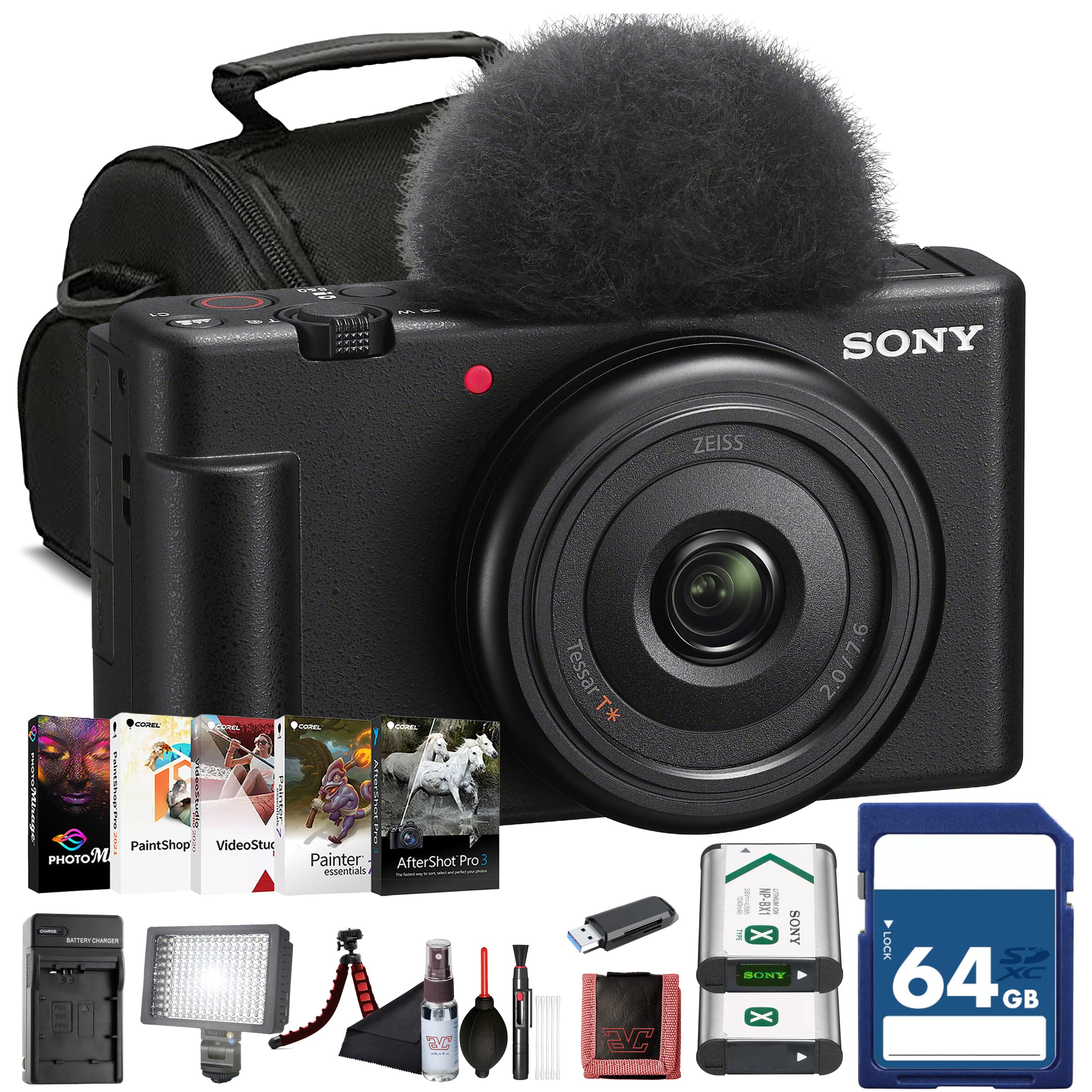
Same 20mm vlogging lens, but the box already includes the battery and card you would buy anyway.
This is the ZV-1F sold as a kit, and the accessories answer the two complaints that follow that camera everywhere. You get a replacement NP-BX1 battery — the spare you would otherwise order separately — plus a 64GB card, an LED light, and Corel photo software. The camera itself carries Sony’s 20mm fixed wide lens and a 20.1MP 1-inch Exmor RS sensor, with oversampled 4K recording and up to 120fps in Full HD for slow motion.
For vlogging the useful parts are already there: built-in background defocus, the Product Showcase setting that shifts focus to whatever you hold up, face-priority auto exposure, and skin-tone optimization so faces stay bright in tricky light. It weighs under 300 grams, connects over Wi-Fi and Bluetooth to the Imaging Edge app for fast transfer, and streams over USB-C when you need it as a webcam. The flip-out LCD handles self-framing.
The honest read is that two things decide this one. The bundle removes the immediate accessory cost, but the camera body is the same fixed-lens design, so digital stabilization only goes so far and there is no optical zoom. Negative feedback on this listing clusters around durability and value rather than features — a camera that stopped working, and a software package a few find hard to navigate. If you want the accessories bundled, this is the sensible version.
The practical draw: a spare battery and a 64GB card in the box turn a camera people love into one you can use on day one without another order.
What stays the same: the camera’s fixed 20mm lens and digital stabilization — no accessory in this kit changes how it handles a fast walk.
Choose the bundle: if you would buy the spare battery and memory card anyway and prefer one order.
Choose the plain body: if you already own compatible cards and batteries — you would be paying for duplicates.
9. Canon EOS R50 Mirrorless Camera RF-S18-45mm Lens Kit

A real interchangeable-lens camera that shoots clean 4K — and takes a better photo than any vlogging compact here.
If your channel is as much about stills as motion, this is where the money should go. The EOS R50 pairs a 24.2-megapixel APS-C sensor (a sensor larger than a 1-inch compact’s, which is why it gathers more light) with Canon’s DIGIC X processor. Video is 6K-oversampled, uncropped 4K at up to 30fps — oversampling means the camera captures more pixels than it needs and downsamples, which keeps detail crisp. Full HD runs up to 120fps for slow motion.
Autofocus is the standout. Dual Pixel CMOS AF II covers up to 100% x 100% of the frame with 651 AF zones, and it detects and tracks people, animals, and vehicles using deep learning. Continuous shooting reaches 12fps with the Electronic First Curtain shutter or 15fps with the Electronic shutter. You get a 2.36-million-dot electronic viewfinder plus a vari-angle touchscreen, Wi-Fi and Bluetooth transfer through the Canon Camera Connect app, and the RF-S 18-45mm kit lens in the box. Quality is what owners rate highest, followed by image quality and value.
Two caveats matter for video. Some owners find the body too small to grip comfortably without a cage or grip extension, and others report 4K overheating and shutting down past 30-minute record times. It is also note the kit lens draws mixed feelings — the 18-45mm is a fine starting point, but a body-only purchase plus a better lens is a legitimate route. No internal gimbal here, so handheld walking shots depend on lens stabilization and technique.
Why it earns the spot: 24.2MP stills, 651 autofocus zones, and oversampled 4K make this the one camera on the list that does not feel like a compromise the day you get serious about photography.
The video catch: long 4K takes trigger overheating, so treat it as a clip camera rather than a livestream rig.
Buy it when: you want vlogging ability without giving up real photography — the 24.2MP files and RF lens mount are the long game.
Hesitate if: your content is 40-minute sitting shots, where the overheating limit will frustrate you.
10. Sony ZV-E10 APS-C Mirrorless Camera with 16-50mm Lens

The camera you buy once and grow into, because the lens can change and the body stays.
A fixed-lens camera has a ceiling; this one does not. The ZV-E10 uses a 24.2MP APS-C Exmor CMOS sensor with Sony’s BIONZ X processor, and its 4K video is oversampled from 6K with full pixel readout and no pixel binning — the technical reason the footage looks sharper and cleaner than a crop-and-stretch trick. The Sony E mount means you can swap the included 16-50mm lens for something faster or longer whenever your budget allows.
Two creator-specific tools stand out. The Product Showcase Setting shifts focus from your face to an object held up to the lens, which is exactly what review and unboxing videos need. The Background Defocus button toggles the blurred background on and off without a menu crawl. Live streaming runs over a single USB cable with no extra hardware. Owners rate camera quality highest, with image quality and value following, and the swivel screen plus simple menu make the jump from a phone feel manageable.
Autofocus is the split verdict in the feedback — plenty find it quick and reliable, while some report it stopped working. The kit lens is a general-purpose starting point rather than a star. There is no built-in flash, so an attachment is needed indoors, and the companion app is the weakest link in an otherwise tidy package. Controls take a little learning, but you can run fully automatic while you get comfortable.
What makes it grow with you
- Interchangeable Sony E-mount lenses end the built-in obsolescence
- Oversampled 4K from a 6K readout with no pixel binning
- Product Showcase and Background Defocus buttons built for creators
What to budget for
- No built-in flash, so indoor work needs an attachment
- App experience lags behind the camera itself
Go this way if: you plan to buy lenses over time and want one body that keeps up.
Stay with a compact if: you never intend to change a lens — you would be paying for a mount you do not use.
11. Sony ZV-1 Digital Camera for Content Creators

A 24-70mm zoom with an F1.8 aperture — the widest, brightest lens in this entire lineup.
Where the ZV-1F locks you to one wide angle, this camera gives you range and light. The 24-70mm F1.8-2.8 ZEISS Vario-Sonnar T lens is a zoom that also opens wide — F1.8 lets in far more light than a typical kit lens, which is why evening shots and dim rooms stay usable. A 20.1MP stacked back-illuminated 1-inch Exmor RS sensor with DRAM backs it up. Autofocus is Fast Hybrid with Real Time Eye AF and Real-time tracking across 425 points.
Audio is unusually well handled for a compact. There is a forward-directional on-board mic and a detachable wind screen in the box, plus a 3.5mm mic jack and an MI shoe for adding more. The side flip-out 3.0″ LCD tilts up and down for self-framing, and the same Product Showcase and background bokeh switches appear here. Pro video tools include HLG and S-Log3/2 for grading, and stabilization suppresses shake while walking. Picture and video quality are what owners talk about most, with suitability for beginners close behind.
The repeated complaint is battery life — reports of under 25 minutes while filming are not unusual — and the battery/SD door sits partly behind the tripod mount, so swapping cards means removing the mount. Long streaming sessions can also overheat without a fan or cooling pad. Picture quality is where it shines hardest, but plan on extra batteries and a dummy battery if you stream.
The strongest reason to pick it: a 24-70mm F1.8-2.8 zoom is a combination no other camera here offers, and it is what makes dim-light footage look easy.
The daily annoyance: battery life is short enough that spares are not optional, and the tripod mount blocks the card door.
Reach for it when: you film indoors, at dusk, or in small rooms where light is scarce and zoom flexibility matters.
Plan for: a two-battery minimum, because short run times are the one thing almost every owner agrees on.
Know the Specs
Sensor size — why “1-inch” beats “more megapixels”
A camera sensor is the light-catching chip inside the body, and its physical size matters more than its pixel count. A 1-inch sensor is larger than what a phone uses, so each pixel collects more light and your face stays clean in a dim room instead of turning grainy. An APS-C sensor, found in the Canon EOS R50 and Sony ZV-E10, is larger still. That is the honest reason those two cost more — you are buying light-gathering area, not a bigger number on the box.
Frame rate — 30fps versus 120fps
Frame rate is how many still pictures the camera takes each second. At 30fps you get natural motion for talking-head vlogs. At 120fps you get slow motion, because you can stretch those frames across a longer timeline in editing. Several picks here record 4K at up to 120fps, and a few drop to 60fps or 30fps in 4K — check which one applies before you plan a slow-motion shot, because the resolution usually has to drop to reach the highest frame rate.
Gimbal versus digital stabilization
A 3-axis gimbal is a motorized physical mount that counter-moves against your hand, holding the lens level — that is what makes walking footage look gliding. Digital stabilization shifts the image electronically and often crops the edges to do it. Both help, but a gimbal does not soften your picture to achieve smoothness, which is why the Xtra Muse, DJI Osmo Pocket 3, and DJI Osmo Nano lean on physical or magnetic mounting instead of software alone.
Battery minutes and what they hide
Rated battery life is quoted in minutes under favorable conditions, usually at a lower resolution with the screen dim. Push into continuous 4K footage with a bright screen and the real number drops. Ratings in the 160-to-200 minute range give you genuine headroom for a day of short clips, but nobody should expect a full hour of unbroken 4K from a body this small. A spare battery is standard kit, not a red flag.
Common Questions
Can a budget vlogging camera replace my phone for YouTube videos?
How wide does a lens need to be to vlog at arm’s length?
Do I need an external microphone for outdoor vlogging?
Is a 360 camera any good for normal talking-head vlogs?
Why do so many of these cameras overheat during long recordings?
What storage do I actually need to start filming?
Do I lose image quality by using digital stabilization instead of a gimbal?
Should I buy the kit lens or the body only?
Can these cameras work as a webcam for streaming?
How much does the phone app matter in day-to-day use?
The Bottom Line
The budget camera for vlogging that makes the most sense for most people is the Xtra Muse, because it hands you the two things that decide whether a vlog looks professional — a 1-inch sensor and a real 3-axis gimbal — with 4K at 120fps and 161 minutes of rated battery, at a mid-range price instead of a premium one. If you would rather have audio sorted in the box and the most refined pocket gimbal available, the DJI Osmo Pocket 3 Creator Combo includes the DJI Mic 2 transmitter, a battery handle, and a mini tripod, and its 166-minute rating edges slightly higher.
Film while moving and want your hands free? The DJI Osmo Nano clips on magnetically, holds 128GB inside, and rates 200 minutes — the longest number here. Prefer to grow into photography and change lenses later? The Canon EOS R50 brings 24.2 megapixels and 651 autofocus zones, and the Sony ZV-E10 gives you the Sony E mount to build on.
The one nudge worth making: decide your non-negotiable before you compare anything else. If it is steady footage, buy the gimbal. If it is dim rooms, buy the F1.8 lens on the Sony ZV-1. If it is wide framing and nothing else, the Sony ZV-1F covers it for less than most of this list. Pick the one attribute you refuse to compromise on, and the right camera here becomes obvious.
How we choose
We do not accept paid placement. Every pick is matched to a real buyer and a real use-case; we do not hands-on test units.
Sources
Specifications: manufacturer listings and product documentation. Review insights: verified customer reviews, as of October 2026. Pricing: not shown on this page (it changes often); check the current price via the retailer link.
As an Amazon Associate, Aappliancez earns from qualifying purchases. This does not affect which products we feature.