Disclosure: Some links in this post are affiliate links. As an Amazon Associate I earn from qualifying purchases, at no extra cost to you. Learn more
Specs are compiled from manufacturer listings and verified buyer reviews and can change over time — please confirm the key details on the product page before buying.
You want smooth, blur-free motion without paying flagship money. The TCL 55 Inch T7 Series is the sharpest value on this list — a true 120Hz QLED panel that also runs up to 144Hz on two of its HDMI inputs. If your living room gets a lot of daylight and you want deeper blacks than an ordinary LED can manage, the Hisense E7 Mini-LED is the other smart buy. Everything below explains why, and which one fits your room, your console, and your patience for setup.
This guide is built by comparing the manufacturers’ published specifications and the patterns across verified customer reviews, so you get each pick’s real strengths and trade-offs instead of marketing spin.
Watch the refresh number and the HDR format list before anything else, because those two things decide whether fast sports and games look fluid or smeared. The picks below are the ones worth your time when you shop for a budget 120hz tv.
Top Picks


How To Choose The Best Budget 120Hz TV
Most people looking for a 120Hz set get tripped up by the same thing: the panel says 120Hz, but only some of the HDMI ports actually accept a 120Hz signal. That is the first thing to check.
Check what the refresh rate applies to
A 120Hz refresh rate (the screen redraws the picture 120 times a second) is what keeps a fast camera pan from turning into a smear. On a TV it usually shows up as smoother sports, cleaner scrolls, and less ghosting in games. Look at the fine print on the ports: some sets run 120Hz on every input, others only on designated HDMI 2.1 ports. If you own a PS5 or Xbox Series X, plug into the right one.
Understand the backlight, not just the panel
Mini-LED is a backlight that uses thousands of tiny light-emitting diodes instead of a few big ones, and paired with local dimming (zones that brighten or darken independently) it gives you deeper blacks and punchier highlights. A plain direct-LED panel still looks good, especially for the money. The trade-off usually shows up in dark scenes, where a basic LED can look slightly grey.
Match the HDR formats to your viewing
HDR (high dynamic range) is the technology that lets bright and dark parts of a scene show at the same time. Dolby Vision and HDR10+ are the two premium versions, and any set that lists both covers more of your streaming library. Filmmaker Mode, where offered, strips out motion smoothing so movies look as the director shot them.
Decide how much smart-TV software you want
Google TV, Fire TV, and Roku OS all bundle your apps into one home screen, but the experience differs. Roku keeps it simplest, Google TV feels the most app-forward, and Fire TV is the most ad-heavy on the home row. None of them should be the deciding factor — the panel is what you actually look at for the next several years.
Side-by-Side Comparison
| Model | Best For | Refresh / Panel | Backlight | HDR Formats | Amazon |
|---|---|---|---|---|---|
| Samsung 43″ QLED Q8F★ Best Overall | Bright-room small-screen upgrade | Up to 4K 144Hz VRR | QLED | Quantum HDR | Amazon |
| TCL 75″ S5 Fire TVBig-Screen Value | Big-screen movie nights | Motion Rate 240 / 120Hz VRR | High-brightness LED | Dolby Vision, HDR10+ | Amazon |
| Sony 55″ BRAVIA 2 IIEveryday Streamer | Everyday streaming, PlayStation owners | Motionflow XR (60Hz class) | Direct LED | HDR10, HLG | Amazon |
| iFFALCON 55″ U85 | Console and PC gamers on a budget | 144Hz native, VRR to 240Hz | Mini-LED, local dimming | Dolby Vision IQ, HDR10+, IMAX Enhanced | Amazon |
| TCL 55″ T7 QLED | Best all-round value | 120Hz native, 240Hz VRR | Direct LED, QLED | Dolby Vision, HDR10+ | Amazon |
| Toshiba 55″ Z670R | Film fans who want deep blacks | 144Hz native, FreeSync Premium | Mini-LED, full-array local dimming | Dolby Vision IQ, HDR10+ Adaptive | Amazon |
| Hisense 55″ E7 Cinema | Bright rooms and sports | 144Hz native | Hi-QLED Mini-LED, FALD | Dolby Vision IQ, HDR10+ Adaptive | Amazon |
| Roku 55″ Pro Series | Simplest interface, easiest setup | 120Hz, FreeSync Premium Pro | QLED Mini-LED | Dolby Vision IQ | Amazon |
| LG 42″ OLED evo C4 | Dark-room cinema and small spaces | Up to 144Hz, 0.1ms response | Self-lit OLED | Dolby Vision, Filmmaker Mode | Amazon |
| Sony 55″ BRAVIA 5 | Creator-accurate movie picture | XR Motion (120Hz class) | Mini-LED, XR Backlight Master Drive | Dolby Vision, IMAX Enhanced, DTS:X | Amazon |
| Samsung 55″ M70H | Big mini-LED picture, low fuss | Motion Xcelerator / DLG 120Hz | Mini-LED, Supreme Dimming | Mini LED HDR | Amazon |
Detailed Reviews
1. Samsung 43-Inch Class QLED Q8F 4K UHD Smart TV
The 43-inch that makes a spare room feel like a proper cinema, not a compromise.
For a secondary room — a kitchen, a bedroom, a small den — this Samsung hits the exact size balance. It runs smooth motion at up to 4K 144Hz with VRR (variable refresh rate, which syncs the screen to your console’s frame output so you don’t see torn frames). At this screen size that smoothness matters more than 4K detail; it’s the difference between a football pass looking like a pass and looking like a blur.
The colour story is where Samsung’s Quantum Dot layer earns its keep. The nano-sized particles display the full colour spectrum at any brightness level, so bright highlights don’t wash out into white. The 100% Color Volume claim sits behind that. And 2,700+ free channels through Samsung TV Plus — including 400+ premium channels — means the set is genuinely watchable on day one with no subscriptions, which is rare in this price band.
Here’s the honest catch, and it’s a small one: this is a 43-inch panel with a 16:9 aspect ratio and a wide but not infinite viewing angle. Off-axis beyond roughly 45° the colour washes out a touch — fine for a kitchen where you’re not sitting far off centre, less ideal for a wide living-room sofa arrangement. The VESA mount holes also sit high off centre, so wall-mounting takes a moment longer than expected. Buyers report: “4K in a 32 inch package which works perfectly for a kitchen TV.”
What earns it the top spot
- Up to 4K 144Hz with VRR — genuinely smooth for the size and the price band
- Quantum Dot colour holds up in bright rooms, with 2,700+ free channels built in
- Setup is quick and the smart interface is easy to navigate
- Apple AirPlay works for casting from an iPhone without extra hardware
Where it gives ground
- Narrow viewing angle — colour fades slightly past 45° off centre
- VESA holes sit high, so wall mounting needs longer screws or a bracket tweak
- Remote splits opinions: some find it minimal and slick, others find the menus fiddly
Best fit: a kitchen, bedroom, or den where the TV sits perpendicular to where you watch.
Think twice: if you need a wide seating arc across a big room — a Mini-LED set with broader viewing angles will serve you better.
2. TCL 75-Inch Class S5 UHD 4K LED Smart TV with Fire TV
A 75-inch panel that turns a living room wall into a cinema screen without asking flagship money.
If you’re chasing sheer size, this TCL delivers it at a frequency the eye can feel. Motion Rate 240 with MEMC frame insertion means the TV generates in-between frames to smooth fast motion — so a 24-frame film panned across a wide shot won’t judder as much. Game Accelerator 120 pushes up to 120Hz VRR on compatible inputs, so your PS5 or Xbox can run above 60 frames and stay tear-free. The 1.77:1 aspect ratio on a 75-inch panel is what makes the size feel genuinely big when a letterboxed film fills the frame.
The HDR list is long for the money: Dolby Vision, HDR10+, HDR10, and HLG all supported, with Dolby Atmos for the sound stage and Enhanced Dialogue Mode to lift muffled conversation in a drama. Fire TV wraps all your apps into one home screen with over a million movies and TV shows available — subscriptions apply.
Fire TV OS is the trade-off nobody warns you about. It’s the software’s quirks, not TCL’s panel, that get on people’s nerves long-term — the occasional lag on app switches, the ad-heavy home row, and the odd crash after a pause. Owners mention: “75” TV used daily for ~2 years with zero issues; excellent picture quality, reliable, easy to use.” That’s the more common experience, but it’s worth knowing the software takes patience.
Size-per-pound logic: this is the set to buy if big-screen impact is the whole point and you want Dolby Vision without crossing into premium territory. Fire TV is the weak link — fast enough on day one, but plan on a streaming stick if it slows over the years.
Worth it for: movie lovers who want a huge picture and already live inside the Amazon ecosystem.
Less ideal if: you’ll be toggling between five streaming apps hourly — a snappier OS serves that habit better.
3. Sony 55 Inch BRAVIA 2 II LED 4K HDR Smart Google TV
Sony’s picture processing in a straightforward 55-inch set — no fuss, no gimmicks.
This is the set to pick if you want a TV to just work and you’re not chasing 120Hz gaming. The 4K Processor X1 is Sony’s dedicated picture chip, and on a 55-inch screen it does the heavy lifting — upscaling your streaming shows to near-4K detail and keeping colours natural rather than overblown. In a mid-sized living room that gives you clean, believable picture without tinkering.
For PlayStation 5 owners there’s a specific hook: Auto HDR Tone Mapping and Auto Genre Picture Mode, which switch the picture to the right preset the moment a game boots. The Game Menu collects all gaming picture settings in one place, which saves you diving through submenus mid-session. Google TV gathers your apps together, Apple AirPlay 2 and Google Cast are supported, and Sony Pictures CORE adds a bundle of films to the mix.
The compromise sits in the panel tech: this is a direct LED, not Mini-LED, so dark scenes won’t reach the deep blacks a Mini-LED set manages. It’s also the class of set where 120Hz gaming isn’t the selling point — Motionflow XR smooths film and sport, but if high-frame console gaming is your priority, one of the Mini-LED picks does that job better. The Wi-Fi on some units has been a sticking point; wired Ethernet is the safer connection for a heavy streamer.
Who it clicks with: a household that streams everything, owns a PS5, and wants the picture to look right without tuning it. Sony’s processing is the reason to buy here, and the price-to-polish ratio is why it stays on the list.
Buy this if: you want a natural, well-processed picture and PS5-friendly features without paying premium money.
Pass if: deep blacks in dark scenes or high-refresh gaming are the deciding factors.
4. iFFALCON 55″ 4K MiniLED Smart TV (55U85)

Four HDMI 2.1 ports and a native 144Hz panel — a console gamer’s checklist nailed.
This is the set that puts the gaming specs where they matter. A native 144Hz panel with variable refresh rate running 4K between 48 and 144Hz, and up to 240Hz at lower resolutions, means fast camera pans stay sharp. FreeSync Premium Pro is the higher tier of AMD’s tear-free tech — the same tech your console or PC uses — so screen tearing during a fast shooter basically disappears. Four HDMI 2.1 ports let you plug in a PS5, an Xbox, a gaming PC, and a soundbar all at once, with two ports running full 4K at 144Hz.
The Mini-LED backlight is the second reason to care. It pairs local dimming with a 6,000:1 contrast ratio and up to 1000 nits of HDR brightness, and nits is simply how bright the screen can push a highlight — so a neon city in a night scene actually glows rather than looking flat. Dolby Vision IQ adjusts the picture to your room’s light automatically; Dolby Vision Gaming kicks in for consoles with no setup. The 50W audio system with a dedicated 20W woofer is a bonus you rarely get at this tier.
The honest note is on software and brand support. Google TV is well-integrated and the menus are fast, but some buyers worry the responsiveness will fade over years, and customer support traces back to a newer brand with less of a repair track record. Customers note it’s a TCL sub-brand — the specs match the big names at a lower number. If a five-year app-experience guarantee matters more than raw gaming smoothness, one of the major-brand picks is a safer bet.
Where the spec sheet shines
- Native 144Hz with VRR — and 4x HDMI 2.1 inputs for every console you own
- Mini-LED backlight with local dimming and up to 1000 nits of HDR brightness
- Dolby Vision IQ, Dolby Vision Gaming, HDR10+, and IMAX Enhanced all supported
- 50W audio (2×15W tweeters + 20W woofer) so you don’t need a soundbar on day one
What to weigh up
- Newer brand with less service history behind it
- Google TV integration is deep — users who want an offline set have to work around it
- Colour defaults lean warm; a short calibration pass makes a real difference
Top of the list for: gamers with a PS5, an Xbox, and a PC all needing a home — the four 2.1 ports are the whole argument.
Not for: buyers who want a household name for warranty and service, or who’d rather not touch picture settings.
5. TCL 55 Inch T7 Series 4K 120Hz QLED Smart Google TV
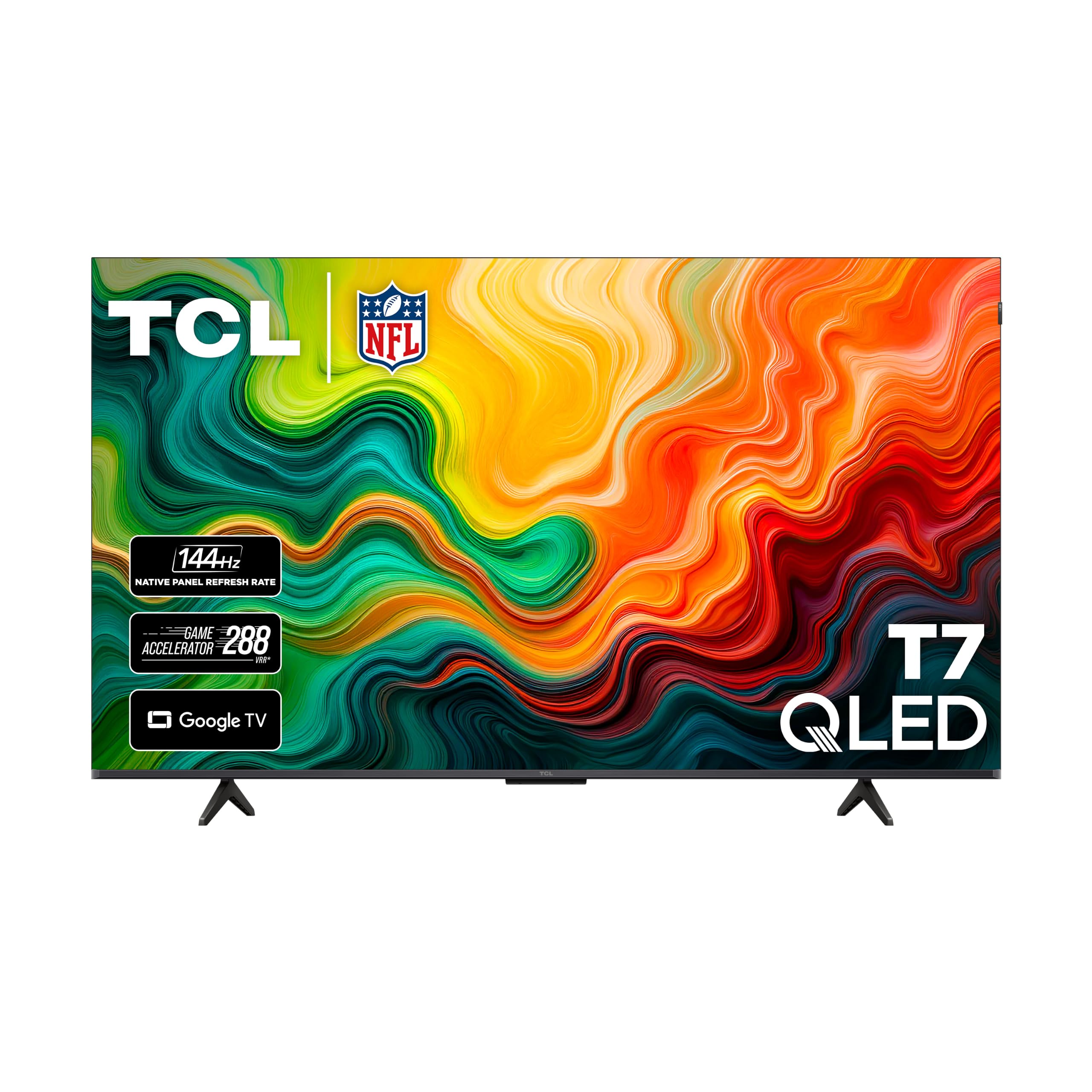
The 120Hz QLED that does nearly everything right for less than the premium brands ask.
If you’re scanning this list for the one set to buy and stop thinking about, slot this TCL near the top. A native 120Hz panel is the headline, and it’s a real 120Hz — not a software-simulated one. QLED adds quantum-dot film behind the panel to cover nearly the entire DCI-P3 colour space (the colour range used in film production), so the reds stay red and the greens don’t turn yellow. The TCL AIPQ Pro processor handles colour, contrast, and clarity together, and the result is a picture that holds up against sets priced considerably higher.
The list of HDR formats is the giveaway: Dolby Vision, HDR10+, HDR10, and HLG all supported. That means whatever streaming service you open, the set has the format it needs. Dolby Atmos audio handles the sound stage, Google TV with built-in Chromecast and Apple AirPlay 2 covers apps and casting from either phone camp, and Alexa, Google Assistant, and Apple HomeKit all work for voice control.
Reviewers point out one nuance worth knowing: the 55-inch panel is technically a 144Hz set on HDMI 1 and 2, even though the listing says 120Hz. That’s a plus for gaming — but only on the right ports. A few units have shut off at random times, which is the low percentage of small-panel hiccups rather than a pattern. Speed of setup is genuinely fast, and the interface is responsive day one.
Value read: this is the closest thing to a no-regrets pick on the list — 120Hz, QLED colour, Dolby Vision and Atmos, four HDMI ports including eARC for a soundbar. The only real caution is reliability variance in a small slice of units, which a standard return window covers.
Your set if: you want the best-balanced feature set at a mid-range number and 120Hz is non-negotiable.
Look further if: you need deep-black cinematic contrast — a Mini-LED set climbs higher there.
6. Toshiba 55″ Z670R Series Mini-LED 4K UHD Smart Fire TV
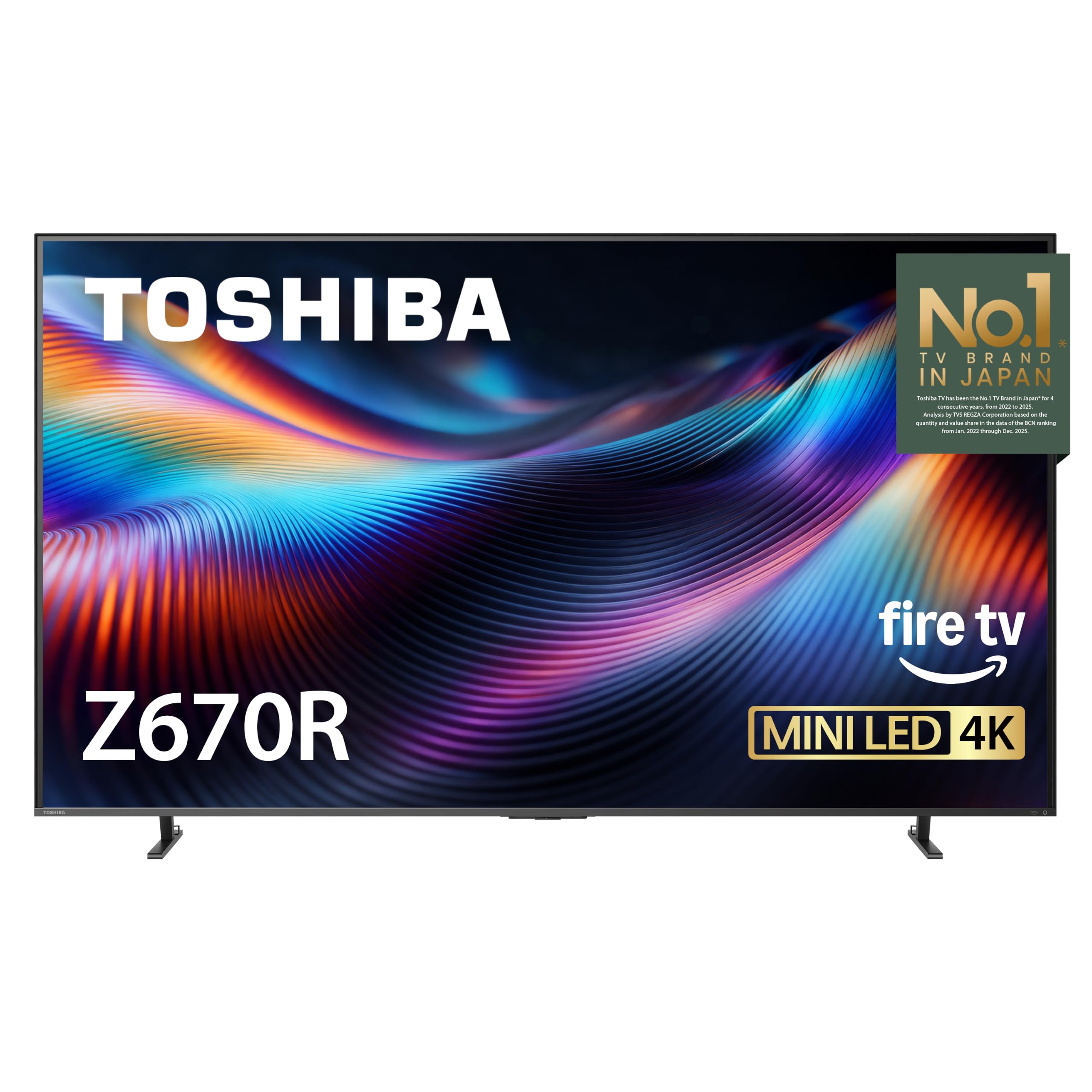
Full-array local dimming and a native 144Hz panel — the film-lover’s contrast play.
The spec that earns this Toshiba its spot is full-array local dimming on a Mini-LED backlight. That means the tiny light diodes behind the screen are grouped into zones that brighten or darken independently, so a night scene gets true black and a starfield gets true sparkle. The result is a picture with more depth than a plain LED can produce, and the QLED layer pulls over a billion colour shades through the same pipeline.
Native 144Hz is the second win. That’s the panel redrawing the picture 144 times a second, and with VRB 144Hz and ALLM (auto low-latency mode, which drops the TV into game mode the moment a console signals it) there’s very little between the controller press and the screen response. AMD FreeSync Premium keeps a PC or Xbox frame-synced. For a PS5 or PC session, this is a fast set with a genuinely smooth sports picture.
Fire TV runs the apps, which divides opinion. The home screen is ad-cluttered, and that’s the recurring gripe. Otherwise the streaming runs clean, with Dolby Vision IQ, HDR10+ Adaptive, and Dolby Atmos all supported. The REGZA Engine ZRi Gen3 is Toshiba’s AI picture processor, and the Japan-designed tweaks show in natural skin tones. Shoppers say one owner-unit arrived with a foggy picture — but it’s a warranty case, not a pattern across the line.
The whole picture: Mini-LED contrast, native 144Hz, and full Dolby Vision IQ for a mid-range number is a strong hand. What you accept is Fire TV’s home-screen advertising and a set that doesn’t quite match the very top names for black-level purity at the extreme end.
Made for: film fans who care about dark-scene depth and console gamers who want a native 144Hz panel without the premium.
Not the fit if: an ad-free home screen is a hard requirement — Google TV or Roku OS serves that better.
7. Hisense 55″ E7 Cinema Series
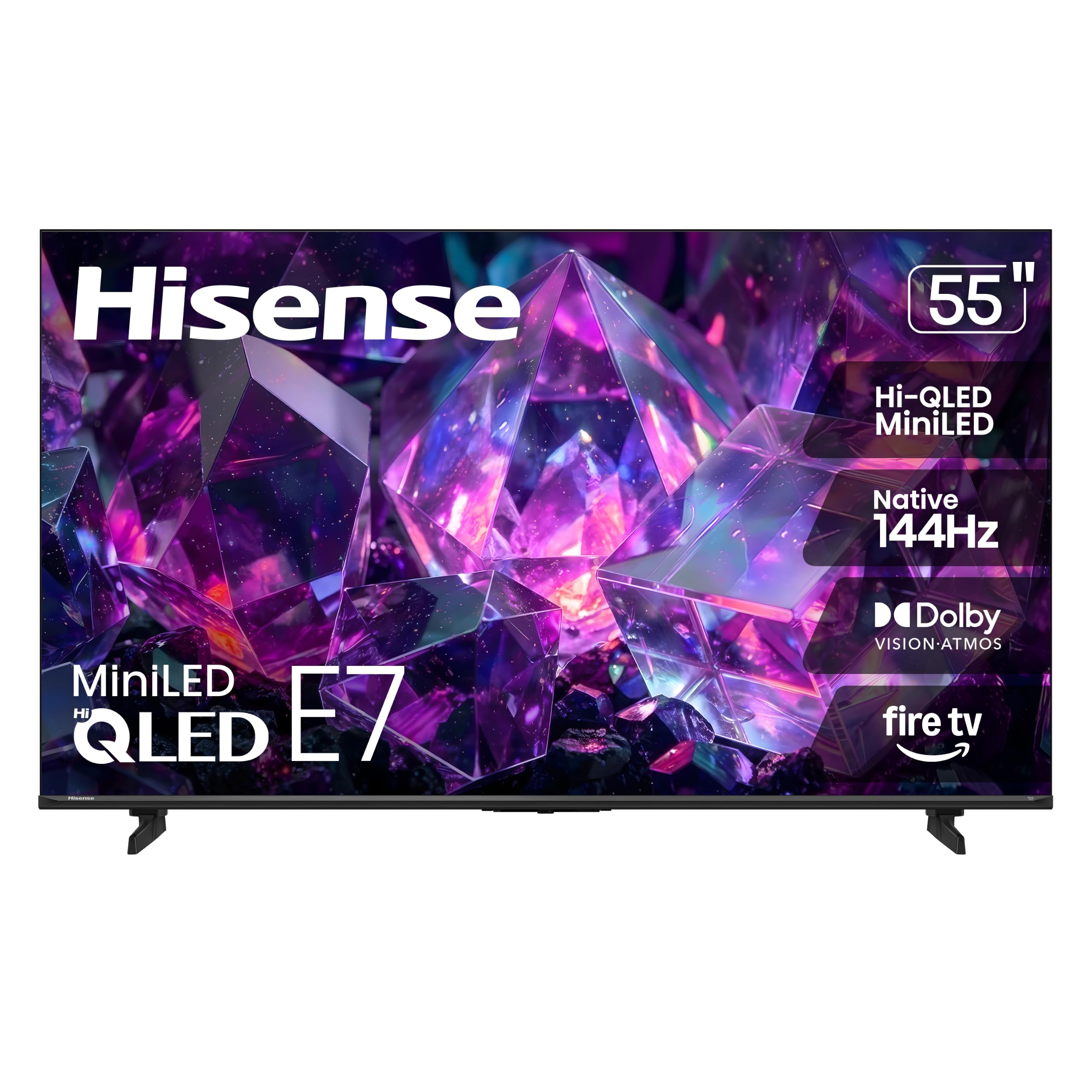
Mini-LED made for a sunlit lounge where a plain LED would wash out.
Mini-LED is the story here. The backlight uses thousands of small light zones, and the more zones you have lit independently, the better a bright room holds its picture. If your TV faces a window or you watch sport mid-afternoon, that’s the practical difference — highlights stay punchy and dark areas don’t turn grey. Dolby Vision IQ on top of it reads the room’s light and adjusts, so you’re not diving into settings every time the sun shifts.
Native 144Hz keeps fast sports and gameplay clean. AI Smooth Motion with MEMC fills in intermediate frames so a cricket ball travelling toward the boundary stays a ball, not a smudge. Filmmaker Mode is included, which strips out the smoothing and preserves the original colour and frame rate so a film looks as the director cut it. AI Sports Mode recognises live sport and boosts crowd audio and motion, and AI 4K Upscaler sharpens lower-resolution sources.
The catch that shows up in buyer reports is the software on the Fire TV side: some units have had Wi-Fi dropouts and setup hiccups that required resets. Those cases exist but they’re the minority, and the fixes are standard reset steps. Day-to-day, quality and picture performance carry the set. Buyers report: “The picture quality, sound, and connectivity all great.”
Why it punches above its tier
- Hi-QLED Mini-LED backlight with full-array local dimming for brighter highlights and deeper blacks
- Native 144Hz Game Mode — low blur for sport and console gaming
- Dolby Vision IQ, HDR10+ Adaptive, HDR10, and HLG all on board
- Filmmaker Mode for a faithful film presentation, plus AI Sports Mode for live action
What to know walking in
- Fire TV home screen carries advertising — not removable
- A minority of units had early Wi-Fi and software wobbles before settling
- Default colour leans warm; a quick adjustment brings it closer to neutral
Pick it when: your lounge is bright and sport or gaming dominates the schedule.
Reconsider if: you want the simplest possible smart interface with no ads on the home row.
8. Roku 55-Inch Pro Series Smart TV — 4K QLED Mini-LED

The set your least tech-savvy household member will figure out in five minutes.
Roku’s 120Hz refresh rate covers what most buyers need — smooth sports and low-blur gaming without the 144Hz escalation. FreeSync Premium Pro, ALLM, and VRR are the gaming layer, so a PS5 or Xbox can run tear-free. Thousands of Mini-LEDs light the QLED panel with Dolby Vision IQ, and Roku Smart Picture Max is the AI behind the picture tuning — it reads the incoming signal and refines colour and sharpness scene by scene without you touching a menu.
Where Roku genuinely wins is the interface. The home screen is uncluttered, setup is measured in minutes, and the remote does what it says. That remote is rechargeable, backlit, and has a remote-finder button on the side of the TV that leads you to it. Roku Soundstage Audio with side-firing speakers delivers the sound, Dolby Atmos handles the spatial mix, and Bluetooth Headphone Mode lets you listen without waking the house. A huge free section of live TV, news, and movies means the set is watchable from the start.
The trade-offs are specific, not broad. The panel runs 4K at 120fps on two of its HDMI ports, so keep that in mind if you game with a PC that needs 144Hz. Owners mention that the older Roku soundbar and surrounds work with it, making it a natural upgrade if you already own Roku audio.
For people who hate fiddling: the combination of a simple home screen, a rechargeable finder remote, and automatic picture tuning means you barely touch settings. The Mini-LED panel delivers the bright, high-contrast picture that matters, and the 120Hz keeps the motion clean.
Top choice for: a household where simplicity outranks every other spec — the Roku interface is the reason.
Look elsewhere if: you need 144Hz on every input for PC gaming, or want a track record across a longer service life.
9. LG 42-Inch Class OLED evo C4 Series Smart TV

Eight million self-lit pixels turn a 42-inch screen into a proper dark-room cinema.
OLED is a different breed of panel, and this LG is the reason to consider it. Instead of a backlight shining through a screen, over 8 million self-lit pixels switch on and off individually. A black part of the picture is genuinely black because the pixel is off. For dark-room viewing, that contrast is the whole game — no halo around a bright object, no grey wash where shadow should be. The 42-inch size also makes it one of the only genuinely small OLED options on this list.
The gaming specs sit at the top of the list too: 0.1ms response time, up to 144Hz refresh, NVIDIA G-Sync, AMD FreeSync Premium, and VRR all supported, plus four HDMI 2.1 inputs. The 0.1ms figure is how fast a pixel changes colour — a blur-level number that makes fast motion feel immediate. The a9 AI Processor Gen7 handles upscaling and the AI Super Upscaling sharpens everything you throw at it, whether it’s an older series or a live match. Dolby Vision and Dolby Atmos are both on board, with FILMMAKER MODE for director-intended viewing.
The honest caveat is about brightness and burn-in habits. OLED panels don’t push highlights as hard as Mini-LED, so a sun-drenched room will look less punchy than a bright Mini-LED set. That’s why this one suits a darker room. The Magic Remote also splits opinion — the wand-style pointer is fast once learned, but it’s a learning curve. And because webOS refreshes for five years through the Re:New program, the software stays current, though some users find the menus slow.
Why OLED changes the picture
- Over 8 million self-lit pixels deliver perfect blacks and no backlight halo
- Up to 144Hz with 0.1ms response, plus G-Sync and FreeSync Premium
- Four HDMI 2.1 inputs — room for every console and a PC
- Dolby Vision, Dolby Atmos, and FILMMAKER MODE for films as the director cut them
Where it asks something of you
- Peak brightness is lower than Mini-LED — a bright room flattens the picture
- Magic Remote pointer takes hands-on learning time
- webOS menus can feel slower than Roku or Google TV
Right for: a dark, dedicated room, or a small apartment where 42 inches is exactly the size that fits.
Wrong for: a glass-walled sunroom, or a household that leaves the same news channel on all day — OLED suits varied viewing better.
10. Sony 55 Inch BRAVIA 5 Mini LED 4K HDR Smart Google TV

Sony’s Mini-LED flagship-lite — the set film fans buy when the picture must be right.
XR Backlight Master Drive is the difference here. It’s Sony’s system for controlling thousands of Mini LEDs with fine precision, so a bright object on a dark background stays sharp rather than glowing into grey. XR Triluminos Pro sits behind it, delivering the billions of real-world colours the set claims, and XR Processor with AI analyses every scene in real time to adjust colour, contrast, and clarity together. For a set that has to keep up with a demanding movie, that processing is the reason to buy it.
The film and gaming credentials are strong. Dolby Vision, IMAX Enhanced, Dolby Atmos, and DTS:X are all supported, with Studio Calibrated picture modes designed for Netflix, Prime Video, and Sony Pictures CORE. PlayStation 5 owners get Auto HDR Tone Mapping and Auto Genre Picture Mode. XR Motion keeps fast pans blur-free. Google TV with Google Assistant handles the apps, and Apple AirPlay 2 and Google Cast cover casting.
The one clear limitation is the port count: only two of the four HDMI inputs are version 2.1. That’s fine for a console and an AV receiver, but if you’re planning a PC, a soundbar, and two consoles on 2.1 features, you’ll run out. Customers note the picture quality is what keeps them — “the best tv I’ve ever owned” and “insanely clear” are the tone of the reviews.
Straight read: the sharpest 4K upscaling in this group and studio-calibrated modes for Netflix and Prime Video make it the best pick for a serious film viewer. You pay for the processing, and the HDMI 2.1 input count is the trade.
Superb for: a film-first room where upscaling, colour accuracy, and creator modes matter more than the highest gaming refresh rate.
Not the tool if: you need every HDMI port on 2.1 spec to wire a whole gaming setup.
11. Samsung 55-Inch Class M70H Series Mini LED Smart TV

Samsung’s Mini-LED engineering aimed at one thing: a bright, punchy 55-inch picture.
The Mini LED Processor 4K is the engine here, and the pitch is simple — brighter highlights and deeper blacks than a standard LED, with one billion true-to-life colours pulled through the Pure Colour Spectrum layer. Supreme Mini LED Dimming controls the backlight zones for contrast, and the result is a picture with noticeable punch in a lit room. For a living room that’s busy during the day, that brightness is the practical benefit.
Sports and gaming are well-served. Motion Xcelerator with DLG 120Hz analyses the incoming content and optimises the refresh so fast motion stays sharp — a direct hit for football season. Soccer Mode is the Samsung-specific tuning for that, adjusting motion and turf colour for a stadium look. Gaming Hub collects your consoles, cloud services, and gaming apps in one place, and 2,700+ free streaming options (750+ subscription-free channels) with Samsung TV Plus means plenty to watch without a subscription.
The recurring gripe is the remote — it’s minimal, with too few buttons, so you cycle through on-screen menus to reach common options like closed captions or audio mode. Screen fragility during delivery is a known risk on any big panel: a couple of buyers received cracked unitsthat the return policy resolved. Buyers also praise the picture itself — bright, clear, and deep in the dark scenes — and setup that takes a few minutes. “The picture quality is sharp and clear, the colors look beautiful” is the common tone.
What you’re buying: a 55-inch Mini-LED Samsung with strong brightness, a sport-focused motion setting, and a free-content library that removes the need for a subscription on day one. The remote design is the thing you’ll either shrug at or grumble about.
Ideal for: a busy, well-lit lounge where sports and streaming fill the schedule, and a Samsung phone or tablet already lives in the house.
Maybe not if: you want button-rich control or a wall-mount install with no delivery risk — buy in store if you can, and check the panel before signing.
Know the Specs
Refresh rate and motion clarity
A refresh rate is how many times per second the screen redraws the picture. A 120Hz panel redraws 120 times a second. That matters most when the camera moves fast — a pan across a stadium, a racing game cornering at speed. On a 60Hz set the same shot can look smeared, because each frame lingers twice as long. A native 120Hz (or 144Hz) panel cuts that smear. Watch for the word “native” versus “Motion Rate” or “Motionflow XR” — the latter describes the processing that fills in extra frames on top of the panel’s real speed.
Mini-LED and local dimming
Mini-LED uses thousands of tiny light diodes as the backlight instead of a handful of larger ones. Local dimming means those diodes are grouped into zones that can brighten or darken independently. The practical effect: dark scenes keep their depth and bright highlights pop without washing the whole picture grey. A plain direct-LED or edge-lit panel can still look good, but it usually shows a faint halo around bright objects on dark backgrounds. If you watch a lot of night scenes or space films, Mini-LED is the upgrade that shows.
HDMI 2.1 and VRR for gaming
HDMI 2.1 is the port version that carries a 120Hz (or higher) 4K signal from a console or PC to the TV. Without a 2.1 port, a PS5 or Xbox can’t switch into high-frame mode. VRR — variable refresh rate — syncs the TV’s refresh to the console’s frame output, so when the frame rate dips, the screen dips with it instead of tearing. FreeSync Premium and G-Sync are the two big VRR technologies; a set that supports one covers the matching console or graphics card.
HDR formats and brightness
HDR stands for high dynamic range — it’s what lets bright highlights and dark shadows show at the same time. Dolby Vision and HDR10+ are the two premium versions, and each carries scene-by-scene brightness metadata so the TV knows how bright each scene should be. A set that lists both covers more of your streaming library. Brightness is measured in nits, and higher nits means punchier highlights. A set rated around 1000 nits can make a neon sign look like a neon sign; a dimmer panel makes it look like a coloured rectangle.
Common Questions
Does a 120Hz TV actually look different from a 60Hz TV?
Do I need an HDMI 2.1 cable for 120Hz gaming?
What is the difference between Mini-LED and regular LED?
Will a 120Hz TV make regular TV shows look strange?
How far should I sit from a 55-inch 4K TV?
Is Dolby Vision better than HDR10+?
Can I wall-mount these TVs with a standard bracket?
Do I need a soundbar with these TVs?
What is VRR and do I need it if I don’t game?
Is OLED or Mini-LED better for a bright room?
The Bottom Line
For most people shopping for a budget 120hz tv, the set to buy is the TCL 55 Inch T7 Series — a genuine 120Hz QLED panel with Dolby Vision, HDR10+, and Dolby Atmos all covered, and two HDMI ports that go higher than the listing claims. It’s the pick that asks the least of you and delivers the most for the price tier. If your lounge is bright and sport fills the schedule, the Hisense E7 Cinema Series brings Mini-LED brightness and 144Hz into the same conversation. And if you game on a PS5, an Xbox, and a PC at once, the iFFALCON 55U85 gives you four HDMI 2.1 ports and a native 144Hz panel — the setup a dedicated gaming room actually needs.
One last thought on the top pick: it sits among the most-reviewed sets on this list for a reason. Higher refresh rates have finally crossed into the mid-range tier, and the TCL T7 is where that shift lands best — smooth enough for sport, colourful enough for films, and simple enough that you never dig through a menu.
How we choose
We do not accept paid placement. Every pick is matched to a real buyer and a real use-case; we do not hands-on test units.
Sources
Specifications: manufacturer listings and product documentation. Review insights: verified customer reviews, as of October 2026. Pricing: not shown on this page (it changes often); check the current price via the retailer link.
As an Amazon Associate, Aappliancez earns from qualifying purchases. This does not affect which products we feature.