Disclosure: Some links in this post are affiliate links. As an Amazon Associate I earn from qualifying purchases, at no extra cost to you. Learn more
Specs are compiled from manufacturer listings and verified buyer reviews and can change over time — please confirm the key details on the product page before buying.
Buying your first desktop tower is mostly a decision about what you are willing to babysit. A beginner PC either plugs in and behaves, or it teaches you about drivers, power supplies and return windows the hard way. The nine towers below all work — the real question is which one matches your games, your patience, and the room on your desk.
This guide is built by comparing the manufacturers’ published specifications and the patterns across verified customer reviews, so you get each pick’s real strengths and trade-offs instead of marketing spin.
The short version: a starter tower lives or dies on its graphics memory, its processor cores and the quality of its assembly. This breakdown of the beginner pc field separates the ones that simply work from the ones that need a screwdriver on day one, so you can buy with your eyes open.
Top Picks


How To Choose The Best Beginner PC
The mistake most first-time buyers make is shopping the processor number and ignoring the graphics card’s memory figure. A beginner PC is a balancing act, and the 4GB graphics card sets a lower ceiling than the 8GB one. Get graphics memory, core count, RAM generation and SSD size right and the rest is detail.
Dedicated Graphics Or Built-In Graphics
A dedicated graphics card has its own memory chip, so games render on hardware built for the job. Built-in graphics live inside the processor and share system memory instead. If you play modern titles at high settings, you want a dedicated card with a real memory figure attached — 8GB is a common number in this group. If you mostly browse, stream and play lighter games, built-in graphics keep the build simpler.
Processor Cores And Clock Speed
A core is a work lane inside the processor, so more cores help when several programs run at once. Clock speed, measured in GHz, is how fast each lane works. A 4.1GHz six-core chip handles gaming plus a browser plus a chat app without stutter. A four-core chip at 3.6GHz is fine for homework and video, but it runs out of road sooner.
RAM And SSD You Can Live With
RAM is short-term memory — the desk space where open programs sit. 16GB is the sensible starting point for gaming and multitasking. The SSD is where your files live permanently, and it decides how fast the tower wakes up. A 512GB SSD fills quickly once Windows and a few games are installed; a 1TB drive leaves room to breathe.
What A Refurbished Tower Really Means
A refurbished PC has been cleaned, tested and reloaded with a fresh copy of Windows by a reseller. It usually arrives with a keyboard and mouse and a lower starting point. The catch is age: some refurbished processors predate the security chip Windows 11 prefers, so check the support notes before you commit.
Side-by-Side Comparison
| Model | Best For | Processor | Graphics Memory | RAM / SSD | Amazon |
|---|---|---|---|---|---|
| CyberPowerPC Gaming PC (Ryzen 7 8700F)★ Best Overall | Serious gaming with room to grow | AMD Ryzen 7 8700F, 4.1GHz, 8 cores | 8 GB (RTX 5060 Ti) | 16GB DDR5 / 1TB | Amazon |
| Skytech Gaming ShivaMost Upgradable | Clean first build with an upgrade path | AMD Ryzen 5 5600GT, 3.6GHz (4.6GHz Turbo) | Integrated Radeon Vega 7 | 16GB DDR4 / 500GB | Amazon |
| YAWYORE Gaming PC DesktopMost Storage | Storage-heavy everyday gaming | AMD Ryzen 5 5600GT, 3.6GHz (4.6GHz Turbo) | Integrated Radeon Vega | 16GB DDR4 / 1TB | Amazon |
| Suevery Black Prebuilt Gaming PC | Budget 1080p with a glass panel | AMD Ryzen 5, 4.1GHz | AMD Radeon RX 560, 4GB | 16GB DDR4 / 512GB | Amazon |
| Gaming PC Desktop (RX 560 4GB) | Quiet entry-level gaming | Intel Core i5, up to 3.6GHz | AMD Radeon RX 560, 4GB | 16GB DDR3 / 512GB | Amazon |
| STGAubron Gaming PC Desktop | Kids’ first gaming tower | Intel Core i5, up to 3.6GHz | Radeon RX 550, 4GB | 16GB RAM / 512GB | Amazon |
| HP RGB Gaming Desktop | Light gaming on a budget | Intel Core i5-6500, up to 3.6GHz | GeForce GT 1030, 2G | 16GB DDR4 / 512GB | Amazon |
| Dell OptiPlex 7050 (Renewed) | Cheapest route to a Windows 11 desktop | Intel Core i5 7500, 3.40GHz | Integrated Intel HD Graphics 630 | 16GB DDR4 / 1TB SSD | Amazon |
| abytespark Prebuilt i5 Tower | Office and homework duties | Intel Core i5, up to 3.2GHz | AMD Radeon RX 550, 4GB | 16GB / 512GB | Amazon |
Detailed Reviews
1. CyberPowerPC Gaming PC Ryzen 7 8700F
Our pick — 4.0+★ from 500+ verified ratings; the strongest balance of quality and price.
The tower that clears the recommended specs on new releases for years, not just the minimums on day one.
If you want the beginner build that behaves like an enthusiast rig, start here. The AMD Ryzen 7 8700F runs at 4.1GHz across 8 cores, which means a game, a browser full of tabs and a voice chat can all run at once without the machine stalling. The NVIDIA GeForce RTX 5060 Ti carries its own 8GB of dedicated memory.
That memory figure is the headline. The abytespark prebuilt in this group ships a 4GB card, and the gap between 8GB and 4GB is the difference between high textures and turning settings down. Buyers put real numbers on it: “Runs latest COD ~60fps ultra, 100+ high.” The 16GB of DDR5 memory is the newer, faster generation of RAM, and the 1TB PCIe 4.0 NVMe SSD is where Windows and your game library live — so booting and level loading both move at a clip.
The catch is maintenance and the occasional bad unit. Air cooling inside a glass case pulls in dust, and the cooler needs a clean-out roughly every four months to keep temperatures in check. A small share of towers arrive with a memory error light straight from the start, which is a shipping-and-handling problem rather than a design flaw. Check the tempered glass panel for cracks before you power on.
What this tower earns its place with
- 8GB of dedicated graphics memory — double the 4GB in the abytespark tower, so higher texture settings stay smooth
- 8-core Ryzen 7 8700F at 4.1GHz keeps a game and a full browser open together
- 1TB PCIe 4.0 NVMe SSD holds Windows plus a large game library in one place
- Wi-Fi 6 and Bluetooth 5.3 built in, plus 2 USB-C 3.2 ports
- Non-proprietary parts and an AM5 socket give you a real upgrade path
Where it asks a little of you
- Air cooler gathers dust — plan a clean-out around every four months
- An occasional unit turns up dead on arrival with a memory error light
- Heavier and larger than a compact office tower, so measure your desk first
Pick it for: a first gaming PC that will still hold its own after two or three years of new releases.
Know going in: you are buying a machine you will need to dust, not a sealed appliance.
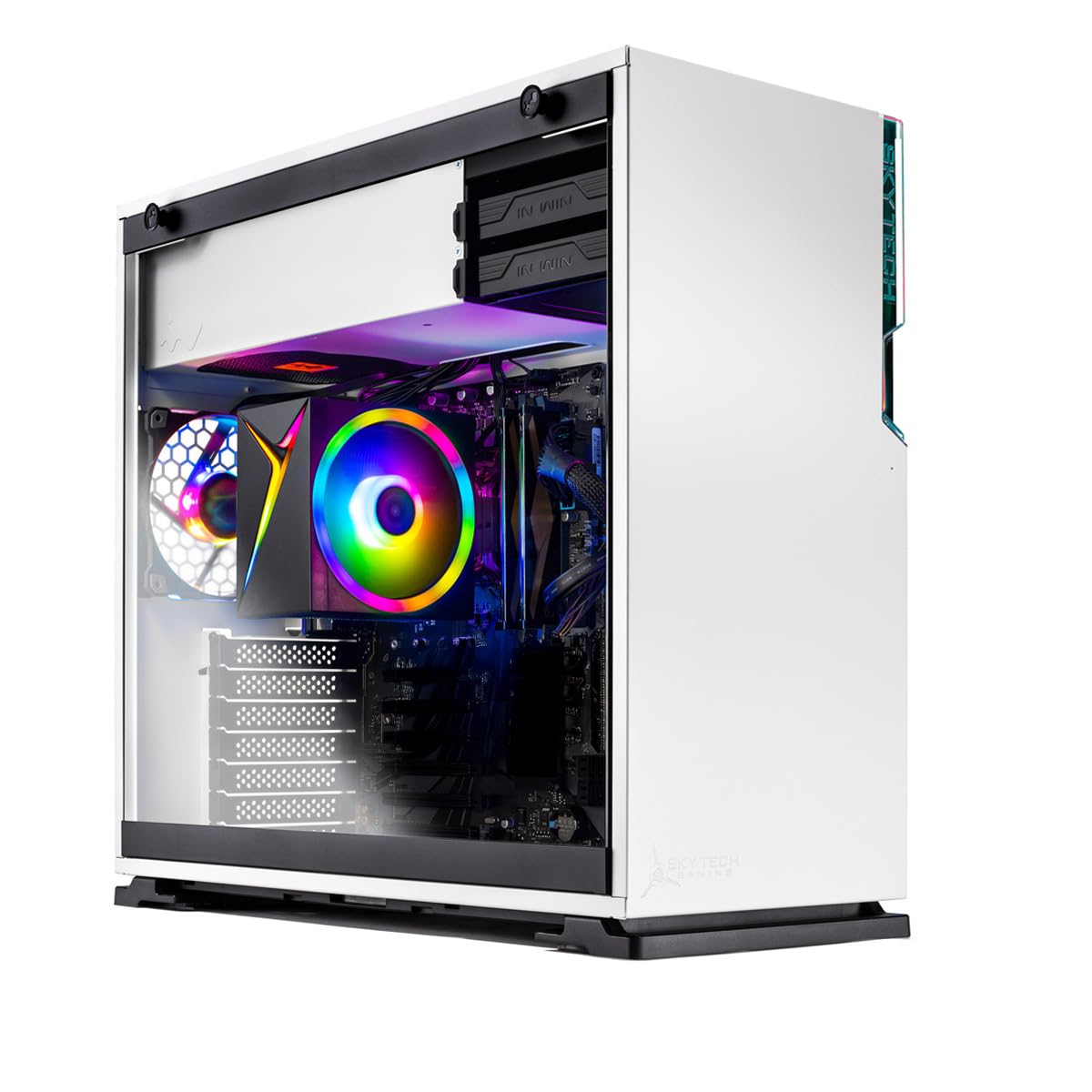
2. Skytech Gaming Shiva Gaming PC
A white glass case with room to grow — the starter that expects you to come back and upgrade it.
Where the CyberPowerPC above is a finished package, this one is a foundation. The AMD Ryzen 5 5600GT runs at 3.6GHz with a 4.6GHz Turbo Boost and pairs with AMD Radeon Vega 7 integrated graphics — a built-in chip that shares the system memory instead of carrying its own. That keeps the tower simple, with nothing extra to fail, but it also caps how far you can push modern titles.
The reason to pick it is the inside. It sits in an In Win 101 mATX mid-tower with a tempered glass side, backed by a 650W Gold power supply, a high-performance air cooler and 3 ARGB fans. Buyers describe it as far more upgradable than most low-cost builds, pointing to the ATX motherboard and expansion slots. For a beginner who wants to learn by adding a graphics card later, that is exactly the right shape.
The honest trade-off is horsepower today. The 500GB NVMe SSD is the smallest drive in this lineup, so a growing library fills it fast. Integrated graphics run simple games well but will not carry the big releases at high settings. Eight people have left their thoughts and the tower tops out with simple gaming in mind.
Why it lands: a 650W Gold power supply, an ATX motherboard and expansion slots mean the first part you swap is not the whole machine.
Cut to the chase: buy it as a first tower with a plan to add a dedicated card, not as a machine you never intend to open.
Reach for this if: you want to learn what is inside a PC by upgrading it a piece at a time.
Look elsewhere if: you expect 500GB to hold a large game collection without a second drive.
3. YAWYORE Gaming PC R5 5600GT
The same processor as the Skytech, but with double the drive space and five glowing fans.
Storage is where this tower makes its case. The 512GB drive in the Skytech above is the weakest part of that build; here you get 1TB of M.2 NVMe PCIe storage, twice the room for games, video projects and a shared family library. It also carries a 550W 80PLUS Bronze certified power supply, which is a rating for how efficiently a power unit converts wall current.
The AMD Ryzen 5 5600GT is the same 6-core, 12-thread chip at 3.6GHz with a 4.6GHz Turbo Boost, so the CPU story matches. Cooling is handled by AMD air cooling plus 5 x 12cm ARGB fans, and an MSI A520M-A PRO motherboard keeps the layout tidy inside the transparent panel. Built-in Wi-Fi and a Bluetooth antenna save you a dongle.
Two things to weigh. The graphics are AMD Radeon Vega, integrated rather than a dedicated card, so the biggest current games need settings dialled back — a fit note, not a fault. And the power supply is the component to watch over time; a tower that struggles to wake from sleep is the recurring complaint, and a few units arrive with the motherboard mounted slightly crooked, which matters the day you try to fit a graphics card.
The storage win: 1TB of NVMe against the Skytech’s 500GB means you are not deleting games to install the next one.
What to expect honestly: integrated graphics cap the heavy titles, and the power supply is the part worth watching.
Suits: a household that wants one tower for games, streaming and a growing file library.
Skip only if: you plan to run the newest big-budget titles maxed out from day one.
4. Suevery Black Prebuilt Desktop Computer
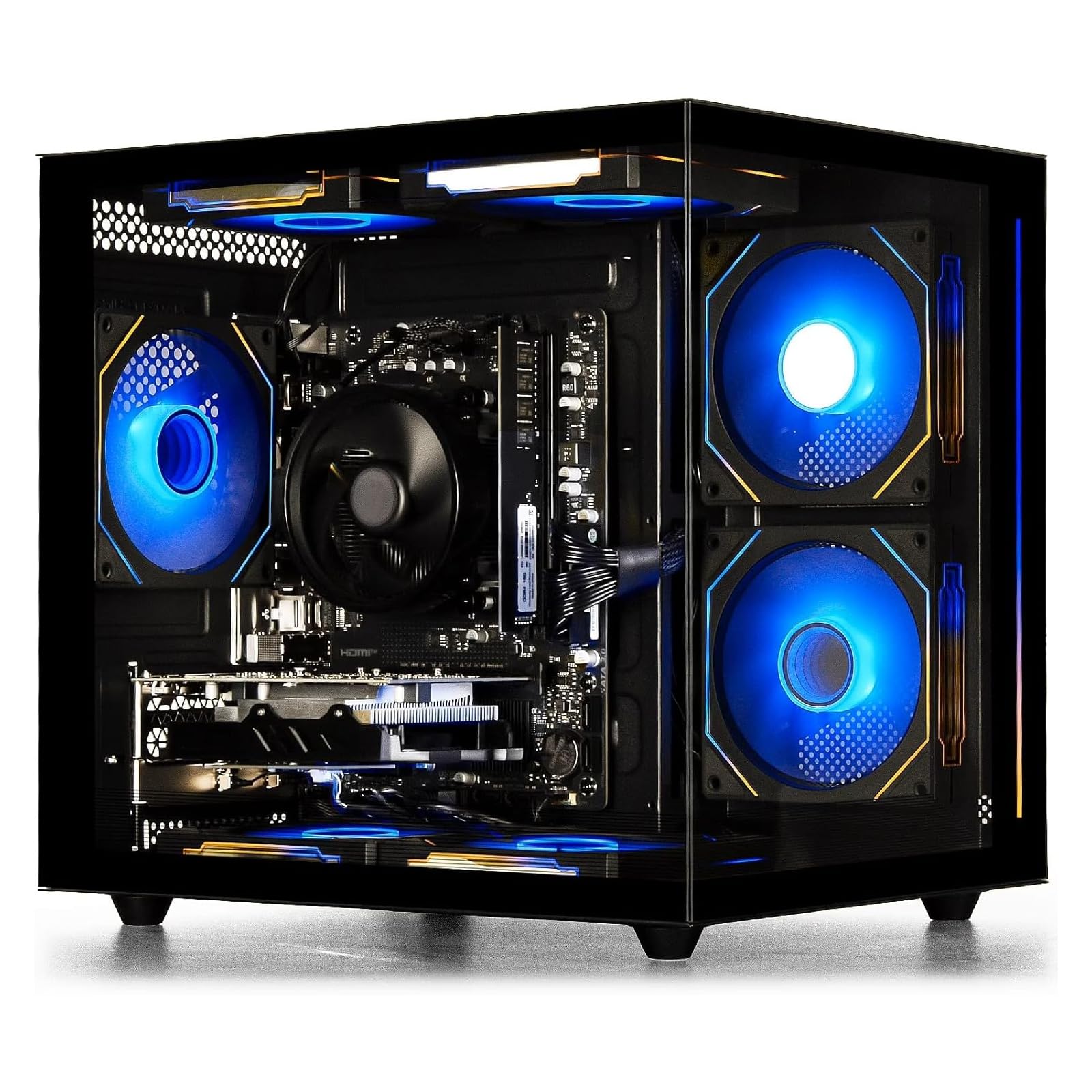
A glass-sided starter with a real graphics card and a fan bank that stays quiet under load.
This is the entry-level tower that most resembles a proper gaming build. The AMD Ryzen 5 runs 6 cores and 6 threads at a 3.6GHz base with a 4.1GHz boost, backed by an AMD Radeon RX 560 4GB dedicated card. That card carries its own memory, so it does the graphics work itself rather than borrowing system RAM — the difference between a machine that games and one that merely browses.
Inside, 16GB of DDR4 3200MHz memory and a 512GB M.2 NVMe SSD cover multitasking and fast loading. The transparent side panel lets the RGB lighting show, and you can cycle the effects with the power switch or hold it for 5 seconds to kill the lights. Built-in Wi-Fi 6 plus 2 USB 3.0 and 4 USB 2.0 ports handle the desk wiring.
The reality check is graphics headroom. 4GB on the RX 560 is modest next to the 8GB on the CyberPowerPC — two times the memory there — so heavy textures on new titles demand lower settings. On the build side, a few drivers go missing after a fresh Windows install, including the rear audio port, and that takes a quick motherboard-driver download to fix. A rare unit arrives with a boot fault and goes back.
The verdict: the best balance in this group of dedicated graphics, memory and storage for someone learning what a gaming PC actually feels like.
One limitation: the 4GB card has half the memory of the top pick, so plan on high rather than ultra settings.
5. Gaming PC Computer Desktop Intel Core I5

Five RGB fans, a dedicated 4GB card and a low hum — the tower your family shares without noticing.
Noise is the underrated spec in a first PC, and this tower addresses it directly. Cooling comes from RGB Fan x5, which spreads the heat load across more fans so each one spins slower. Owners describe it as quiet and reliable, with graphics “excellent” and the price “excellent” in the same breath. The dedicated AMD Radeon RX 560 4G handles graphics work on its own chip.
The rest of the kit is sensible for a starter: an Intel Core i5 up to 3.6GHz, 16GB of dual-channel DDR3 memory and a 512GB NVMe SSD that cuts loading times for games and software. Windows 11 is pre-installed and the hardware arrives tested, so there is no assembly step. Connectivity covers HDMI, DisplayPort, DVI, Ethernet and Wi-Fi, which means most monitors on a family desk will connect without an adapter.
Two honest notes. The DDR3 memory is an older generation than the DDR4 in the Suevery above, so it will not keep pace forever as software grows. And on arrival, a half-connected internal cable can send the tower straight to the BIOS screen instead of Windows — reseating it fixes the problem, but it is a two-minute scare for a first-time owner.
Standout detail: five fans doing the work of three keeps the noise low, which matters in a shared living room or a bedroom.
The honest trade-off: DDR3 memory is the older standard, so this tower is a comfortable starter rather than a long-haul machine.
Fits best: a bedroom or shared desk where a noisy tower would be a nightly annoyance.
Think twice if: you want a machine that stays current for years of heavier software.
6. STGAubron Gaming PC Desktop

The plug-in-and-play tower that gets a kid gaming on day one, keyboard and mouse included.
Setup effort is the thing this tower gets right. It ships with an RGB gaming keyboard and an RGB gaming mouse, so the box contains a complete desk. The Intel Core i5 runs up to 3.6GHz beside 16GB of memory and a 512GB SSD, with an AMD Radeon RX 550 4G GDDR5 card handling graphics. Windows 11 Home comes pre-installed, and ARGB lighting gives the case some personality.
Where owners land is on the starter-PC label: it is well suited to Minecraft, Roblox and Fortnite, and buyers describe it as an excellent first machine for a younger player. Wi-Fi 6 and Bluetooth 5.0 are built in, and a one-year parts and labour warranty covers the early stretch. Two RGB fans keep airflow moving through the case.
The catches are real but predictable. The RX 550 is the least powerful dedicated card in this group, so today’s demanding titles are out of reach — the games it plays, it plays well. Wi-Fi and Bluetooth run through USB dongles rather than built-in radios, so if you move the tower you may need to reseat them. Headset microphones are the other weak spot; a few buyers report distorted mic input that an adapter did not solve.
Why it earns a spot: keyboard, mouse and a fully installed Windows make this the lowest-effort gift in the group.
The realistic ceiling: a 4GB RX 550 covers lighter titles only, so treat it as a first step, not a last one.
Best for: a parent buying a first gaming tower for a child who lives in Roblox and Minecraft.
Not for: anyone hoping to play the newest big releases — the card will hold you back.
7. HP RGB Gaming Desktop Computer

A four-core tower with a 2GB card and a light-up keyboard for homework first, gaming second.
The HP is honest about what it is: a light-duty desktop with gaming accessories. The Intel Core i5-6500 runs four cores up to 3.6GHz, paired with 16GB of DDR4 memory and a 512GB SSD. The NVIDIA GeForce GT 1030 2G handles graphics on its own chip, which keeps it clear of the built-in crowd. RGB case lighting and an RGB keyboard and mouse set the mood.
Owners who treat it as a first computer are happy. One parent’s 14-year-old runs Roblox, Garry’s Mod and fast shooters with no crashes; another buyer calls it an “Excellent starter computer..good value for a loaded feature filled unit.” The 16GB/512GB combination is the part that makes it feel current for its class, and Windows loads and browsing feel smooth.
The limits show up in heavy games. The GT 1030 carries 2G, the smallest graphics memory in this lineup, so settings and titles both need trimming — one owner notes Fortnite glitches and Halo sitting out of reach. Reliability is the other watch point; a dead-on-arrival unit and a failed Wi-Fi card after the tower was moved both show up in the reviews. Ethernet is the safe fallback if Wi-Fi drops.
The appeal: a proper four-core processor with 16GB of RAM and a 512GB SSD makes schoolwork and light gaming pleasant.
What it will not do: a 2GB graphics card is a hard ceiling for modern titles, so buy it for homework and older games.
Buy it when: you need a family homework desktop that doubles as a light gaming machine.
Pass if: current big-name shooters are on the list — the 2GB card will not carry them.
8. Dell OptiPlex 7050 Desktop Computer PC

A refurbished office tower with a 1TB drive, built for spreadsheets more than frame rates.
If your idea of a beginner PC is homework, email and a browser with too many tabs, this is the value play. The Intel Core i5 7500 runs 3.4GHz with a 3.8GHz Turbo Boost, 16GB of DDR4 memory keeps multitasking smooth, and the 1TB SSD is the largest drive in this entire group. Windows 11 Pro comes preloaded, and the machine arrives with a keyboard and mouse.
Quality is what owners talk about most, and it is easy to see why: this is a business-grade tower with a metal chassis, not a plastic gaming shell. One buyer notes “Fast boot (~30s), easy Wi-Fi setup, includes keyboard/mouse, 1TB SSD, many USB ports (3 front), HDMI/DisplayPort, external USB Wi-Fi adapter works.” Ports include 2 DisplayPort 1.2, 1 HDMI 1.4, 1 USB-C 3.0, 5 USB-A 3.0 and 4 USB-A 2.0 — enough for two monitors and every peripheral on your desk.
The real limitation is graphics. It runs integrated Intel HD Graphics 630 with 4K support, which means no dedicated card and modest gaming at best. One spec worth flagging before you buy: this PC has TPM 1.2 rather than the TPM 2.0 Windows 11 recommends, so some newer security features may not be available. And there is no CD drive, which matters if you still install software from discs.
Worth it if: you want the biggest drive and the lowest entry point for a working Windows 11 desktop.
Think twice if: games are the goal — there is no dedicated graphics card here.
9. Prebuilt Gaming PC Desktop Intel Core i5

White case, five RGB fans, and an office-first spec sheet that asks you to read the fine print.
This white tower is the one to look at closely before buying. The Intel Core i5 runs up to 3.2GHz, paired with 16GB of memory and a 512GB SSD, and an AMD Radeon RX 550 4G GDDR4 card sits alongside. Ports run to 2 USB 3.0, 6 USB 2.0, a serial port and an RJ-45, with HDMI, DisplayPort and DVI out. The case ships with RGB lighting and five RGB fans.
Start with the clock speed. The 3.2GHz processor is the slowest in this group — the CyberPowerPC’s 4.1GHz chip runs 28% higher — and one buyer notes the processor is dated and flagged Windows 11 compatibility concerns. That is the single most important thing to check before ordering. Owners who stick to everyday tasks report it performs well from the start.
For general office work, streaming and light gaming it can do the job, and the RX 550 4G handles graphics on its own chip. But treat the gaming claims on the listing with caution and verify the Windows 11 support directly with the seller. If it fits your daily tasks, the price-per-part math works in its favour; if the games matter, spend elsewhere.
What works: 16GB of memory, a 512GB SSD and a dedicated RX 550 4G make everyday office work and light gaming feel fine.
What to check first: the 3.2GHz processor is the slowest here, and Windows 11 support is worth confirming before you buy.
Right for: a homework and office desk that wants a white tower with some glow.
Wrong for: current games and anyone who needs the fastest processor for the task.
Know the Specs
Dedicated vs Integrated Graphics
A dedicated card has its own memory chip — 8GB or 4GB in this group — and does the graphics work alone. Integrated graphics live inside the processor and share the system memory instead. A game running on 8GB of dedicated memory keeps textures crisp at high settings; a 4GB card needs settings trimmed on demanding titles. Check the graphics memory figure before you buy, not after.
GHz, Cores and Turbo Boost
GHz is how fast each processor core works; cores are the number of work lanes. Turbo Boost is a temporary speed bump when one task needs extra punch. A 4.1GHz eight-core chip handles a game plus a browser plus chat. A 3.2GHz quad-core chip is fine for office work but settles down sooner under load.
SSD Size and Type
An SSD stores your files and Windows. NVMe is the fast type that plugs straight into the motherboard; PCIe 4.0 is a newer, quicker connection standard. Size matters more than speed for a beginner: Windows eats space, then games. A 512GB drive fills within a dozen large games, while 1TB gives you room to add without deleting.
RAM Generation and Speed
RAM is short-term memory where open programs sit. 16GB is the practical floor for gaming and multitasking. DDR4 is the current common standard and DDR5 is newer and faster; DDR3 is older and slower. Buy 16GB of DDR4 at minimum, and treat 3200MHz as the sensible speed to look for.
Common Questions
Is a dedicated graphics card necessary in a beginner PC?
How much RAM do I actually need for gaming and schoolwork?
Will a 512GB SSD be enough or should I get 1TB?
Can I upgrade a prebuilt beginner PC later?
What does Turbo Boost mean on a processor spec?
Is a refurbished desktop like the Dell OptiPlex 7050 worth buying?
What is the difference between DDR4 and DDR5 memory?
Do these towers come with Windows and a keyboard?
Will a budget beginner PC play Fortnite and Roblox well?
What should I check on arrival before the return window closes?
The Bottom Line
For most beginners, the beginner pc worth buying is the CyberPowerPC with the Ryzen 7 8700F and RTX 5060 Ti, because its 8GB of dedicated graphics memory and 8-core 4.1GHz processor give you real headroom for years of new releases instead of a spec sheet you outgrow in a season.
If you would rather keep it simple and add power later, the Skytech Shiva pairs a 650W Gold power supply and an ATX motherboard with a tempered glass case, which makes it the easiest tower here to grow. Want the biggest drive without paying for gaming muscle? The Dell OptiPlex 7050 brings 16GB of DDR4 and a 1TB SSD to a homework desk.
And if a child is the one who will be playing, the STGAubron arrives with keyboard, mouse and Windows ready, so the first evening is spent gaming rather than setting up. Match the graphics memory to the games you actually play — 8GB for new releases, 4GB for lighter titles — and you will not regret the purchase.
How we choose
We do not accept paid placement. Every pick is matched to a real buyer and a real use-case; we do not hands-on test units.
Sources
Specifications: manufacturer listings and product documentation. Review insights: verified customer reviews, as of October 2026. Pricing: not shown on this page (it changes often); check the current price via the retailer link.
As an Amazon Associate, Aappliancez earns from qualifying purchases. This does not affect which products we feature.