Disclosure: Some links in this post are affiliate links. As an Amazon Associate I earn from qualifying purchases, at no extra cost to you. Learn more
Specs are compiled from manufacturer listings and verified buyer reviews and can change over time — please confirm the key details on the product page before buying.
Most backlit keyboards look great in the product photos and then let you down in real life — the glow fades, the keys feel mushy, or the battery dies mid-sentence. If you want one keyboard that stays lit, types well, and holds a charge, the Logitech MX Keys is the safest place to start. It pairs a metal build with spherically-dished keys (slightly cupped keycaps that match your fingertip shape) and automatic backlighting that wakes as your hands approach. Below you’ll find seven keyboards sorted by what they actually do well, so you can match one to your desk instead of guessing.
This guide is built by comparing the manufacturers’ published specifications and the patterns across verified customer reviews, so you get each pick’s real strengths and trade-offs instead of marketing spin.
You want a glow you can actually see at midnight, and you do not want to charge the thing every week. Some boards here are mechanical, some are low-profile, and a few are built for spreadsheets rather than shooters. The right one depends on if you need silent switches, a number pad, or a backlight bright enough to read at midnight. This breakdown of the backlit wireless keyboard space covers battery claims, switch types, and connectivity so you can pick once and stop shopping.
Top Picks


How To Choose The Best Backlit Wireless Keyboard
The mistake most people make is buying the brightest keyboard they can find. Brightness drains the battery fastest, and a keyboard you have to charge every few days becomes a chore. A smarter approach is to pick the backlight behavior first, then the key feel, then the layout.
Backlight behavior: auto-on versus always-on
A backlight that wakes on hand proximity and times out when you walk away is a battery saver in disguise. Logitech’s MX Keys does exactly this, and its own published figures show the difference — up to 10 days of use with backlighting on, or up to 5 months with it off. That gap tells you the light is the single biggest power draw on any backlit board. On budget sets, the lights typically cut out after about a minute of idle, which is normal and protects the charge.
Switch type decides the sound and the fatigue
Mechanical switches come in three broad flavors: clicky (audible snap), tactile (a bump you feel but quieter), and linear (smooth all the way down with no bump). Clicky blue switches give you that typewriter satisfaction but carry across an open office. Silent pre-lubed linear switches, like the ones in the AULA F99 Pro, are built for shared spaces. Low-profile switches sit closer to the deck and shorten the travel, which eases finger fatigue over a long day.
Three ways to connect, and why it matters
You get three ways to connect, so you are never stuck without a port. Tri-mode means the keyboard can talk to your computer three ways: a 2.4GHz USB receiver (a tiny dongle that behaves like a wired connection), Bluetooth (no dongle needed, works with laptops and tablets), and a USB-C cable for charging or a zero-lag wired session. If your laptop has limited USB ports, Bluetooth is the feature you will lean on most. If you game, the 2.4GHz receiver is the one you want active.
Layout: full size, 96%, or compact
A full-size board gives you every key plus a number pad. A 96% layout squeezes the number pad and arrow keys into a shorter frame, which frees desk space without losing the number row you use for spreadsheets. The trade-off is a period of adjustment — the arrow cluster and the zero key shift position, and most people take a week to stop misfiring.
Side-by-Side Comparison
| Model | Best For | Connection | Backlight | Battery / Power | Amazon |
|---|---|---|---|---|---|
| Logitech MX Keys★ Best Overall | All-day typing | Bluetooth, USB receiver | Smart auto (hand proximity) | Up to 10 days lit / 5 months unlit | Amazon |
| VEILZOR ComboBest Value | Budget desk setup | USB-A/C wireless | RGB, 9 effects | Rechargeable, weeks per charge | Amazon |
| Redragon K580 PRO | MMO and MOBA players | Bluetooth, 2.4GHz, USB-C | RGB | Rechargeable | Amazon |
| Redragon Typewriter | Retro look and sound | Bluetooth 3.0/5.0, 2.4GHz, USB-C | RGB, up to 16 presets | 4000mAh rechargeable | Amazon |
| AULA F99 Pro | Quiet office work | BT5.0, 2.4GHz, USB-C | RGB, 16 effects | 8000mAh rechargeable | Amazon |
| Keychron K4 | Mac and Windows switching | Bluetooth 5.1, USB-C | White LED | 4000mAh, up to 240 hrs unlit | Amazon |
| Lofree Flow Lite | Low-profile comfort | Bluetooth, 2.4GHz, wired | Single color, shine-through | 3000mAh, up to 100 hrs unlit | Amazon |
Detailed Reviews
1. Logitech MX Keys Advanced Wireless Illuminated Keyboard
Our pick — 4.5+★ from 950+ verified ratings; the strongest balance of quality and price.
The keyboard that lights up before your fingers even land on it.
If you type for a living, the spec that matters here is the smart illumination. Small sensors detect your hands approaching and light the keys, then dim them when you leave. That single behavior explains the published endurance figures: up to 10 days of use with the backlight running, or up to 5 months with it switched off. You get the glow when you need it and the battery relief when you walk away.
Your fingertips land in a slight cup on every key, so long typing sessions feel steadier. The keys are spherically dished — each cap has a slight cup that matches the shape of your fingertip — and the board sits on a metal top plate, which is why it weighs 1.8 pounds and stays put on the desk. A full 104 keys plus a USB-C port for charging round out the hardware. You can pair it with up to three devices and jump between them, and it speaks to Windows, macOS, Linux, iOS, and Android.
What wins people over is the typing quality itself — the low-profile caps enable faster, more accurate touch typing than tall budget switches. There is an honest catch on the lighting, though. A fair share of the feedback notes the backlight does not stay on as long as they would like, so if you want a permanently glowing deck under your hands, this is not that keyboard. The connectivity also draws some mixed remarks, mostly around occasional lag on multimedia keys rather than typing. This is the crowd favorite in the lineup at 4.5+ stars from 900+ ratings, and the highest score here, even though the VEILZOR set carries more total reviews at 1,000-plus.
Where it earns its keep
- Backlight wakes on hand proximity and times out on its own, so the glow tracks your presence instead of your battery
- Up to 10 days lit or up to 5 months with the light off
- Spherically-dished metal-topped keys that hold up to eight-hour typing days
- Pairs with three devices and works across Windows, macOS, Linux, iOS, and Android
Where it asks for patience
- The backlight timing draws mixed feedback — plenty want it to linger longer
- At 1.8 pounds with a metal deck, it is a stay-put board, not a couch companion
- Multimedia keys occasionally respond with a beat of lag
Settle here if: you want a low-profile board that types fast, looks serious on a desk, and manages its own lighting without fuss.
Look past it if: you need a permanently lit deck — the auto-dim behavior will feel like a compromise every evening.
2. VEILZOR 2.4G Rechargeable RGB Keyboard and Mouse Combo
A whole desk setup for the price of one mid-range keyboard.
This is the package for someone building out a first home office on a tight budget. You get a full-size keyboard with a phone holder and a wrist rest, plus a matching mouse, all on one 2.4GHz receiver that fits either a USB-A or USB-C port. That single dongle means one connection for both devices, and it reaches up to 10 meters, so you can type from across the room if you like.
The showpiece is the lighting: 3 modes, 7+1 colors, and three brightness steps, which is a surprising amount of control at this end of the market. The keys are built to reduce noise, and the mouse is the same story — quiet clicks so you are not the loudest desk in the room. The included tilt legs adjust the height, and the contoured mouse has a thumb rest with three sensitivity settings (800, 1200, and 1600 DPI).
Battery life is the honest caveat here. The keyboard runs for weeks between charges and the mouse needs topping up more often — as owners put it: “Keyboard charge lasts 2-3 weeks, mouse 1-2 weeks.” One heavier user found the mouse needed charging once or twice a week, though it works while plugged in. A handful of sets have had a component fail over months of use, and the seller has been responsive about replacements. For a bundle this complete at the entry tier, the value is the headline and the long-term reliability is the thing to keep an eye on.
What you actually get: a keyboard, a mouse, a wrist rest, three lighting modes, and 800/1200/1600 DPI on the mouse — all running off one receiver.
The honest read: the mouse drinks power faster than the keyboard, so plan on a spare cable nearby. Treat the set as a great first office kit rather than a decade-long investment.
Reach for this if: you want a lit desk on day one without buying pieces separately.
Think twice if: you plan to keep it for years of heavy daily use — a few sets have needed a replacement inside the first year.
3. Redragon K580 PRO Wireless RGB Gaming Keyboard

Five macro keys you can program without ever opening software.
For anyone deep in an MMO or MOBA, the G1 through G5 keys are the reason to look here. You can record an ability rotation straight on the keyboard and replay it with one press, no companion app required. A media wheel handles volume and playback rolls, and there are 104 keys with full anti-ghosting, meaning rapid multi-key combos register exactly as pressed.
Underneath, this is a hot-swap board — the sockets accept nearly any 3-pin or 5-pin switch, so you can change the feel without a soldering iron. Connectivity covers all three bases: USB-C wired, Bluetooth, and 2.4GHz wireless. The enclosure is plastic, and the board is heavier and sturdier than the price suggests. Battery reports are informative: push the RGB to maximum with short sleep and you get roughly two weeks before a charge, while dropping the lighting and extending the sleep stretches that well past a month. A full recharge takes about two hours.
Gamers will notice two things. The RGB is not as bright as some expect — the lighting lands on the dimmer side of the spectrum. And some buyers have seen Bluetooth get flaky over time, while the 2.4GHz receiver stays solid. Mechanical purists should also know the red linear switches, while quieter than some premium options, lack the deep low-end thock. The key-repeat accuracy and typing response, though, are why it lands so well with people moving off older boards.
The gamer’s case: onboard macros, a media wheel, full anti-ghosting, and swappable switches at a mid-range price.
The fine print: dim-ish RGB and a Bluetooth link that can get patchy — lean on the 2.4GHz dongle for competitive play.
Made for: the player who wants macro keys on the board itself and the freedom to swap switches later.
Not the fit if: maximum RGB brightness is the whole point of the purchase for you.
4. Redragon Wireless Typewriter Mechanical Gaming Keyboard

The board that clicks like a vintage typewriter and glows like a modern one.
Most people buy this one for the sound. The blue mechanical switches have medium resistance, an audible click, and tactile feedback, and combined with the round steampunk keycaps they turn ordinary typing into something with a little ceremony. Peer past the aesthetics and it’s a genuinely capable 104-key board with a solid metal panel that keeps it planted on the desk and 104-key anti-ghosting so fast combos stay accurate.
For lighting, you get up to 16 presets you can cycle on the board or through software, seven solid colors (red, green, blue, yellow, purple, cyan, white), and adjustable brightness and flow speed. Connectivity runs the full tri-mode set — USB-C wired, Bluetooth 3.0/5.0, and 2.4GHz — switchable with simple key combos. It carries a 4000mAh rechargeable battery, which is real capacity for a board this size, and it holds a charge for several days with the lights on.
The keys are spaced a touch wider than a typical board, and some typists find that their fingers overshoot for the first few days until muscle memory catches up. That is a fit note, not a flaw. The colors are also a genuine selling point — the animation in the color changes draws repeated praise. If you want a keyboard that turns heads on a video call and sounds satisfying to type on, this delivers on both fronts.
Why it charms
- Audible, tactile blue switches with a real typewriter click
- Up to 16 backlight presets and seven solid colors
- 4000mAh battery that lasts several days even with the lights on
- Tri-mode connection and a steady metal panel
What to expect
- Wider key spacing can cause typos while you adjust
- Clicky switches are a poor match for a quiet open office
- Round caps are harder to clean than flat ones
Buy it for: the look and the click — this is a desk centerpiece that happens to be a capable work keyboard.
Pick something quieter if: you share a room and the blue-switch snap would carry too far.
5. AULA F99 Pro Wireless Mechanical Keyboard, Silent Version
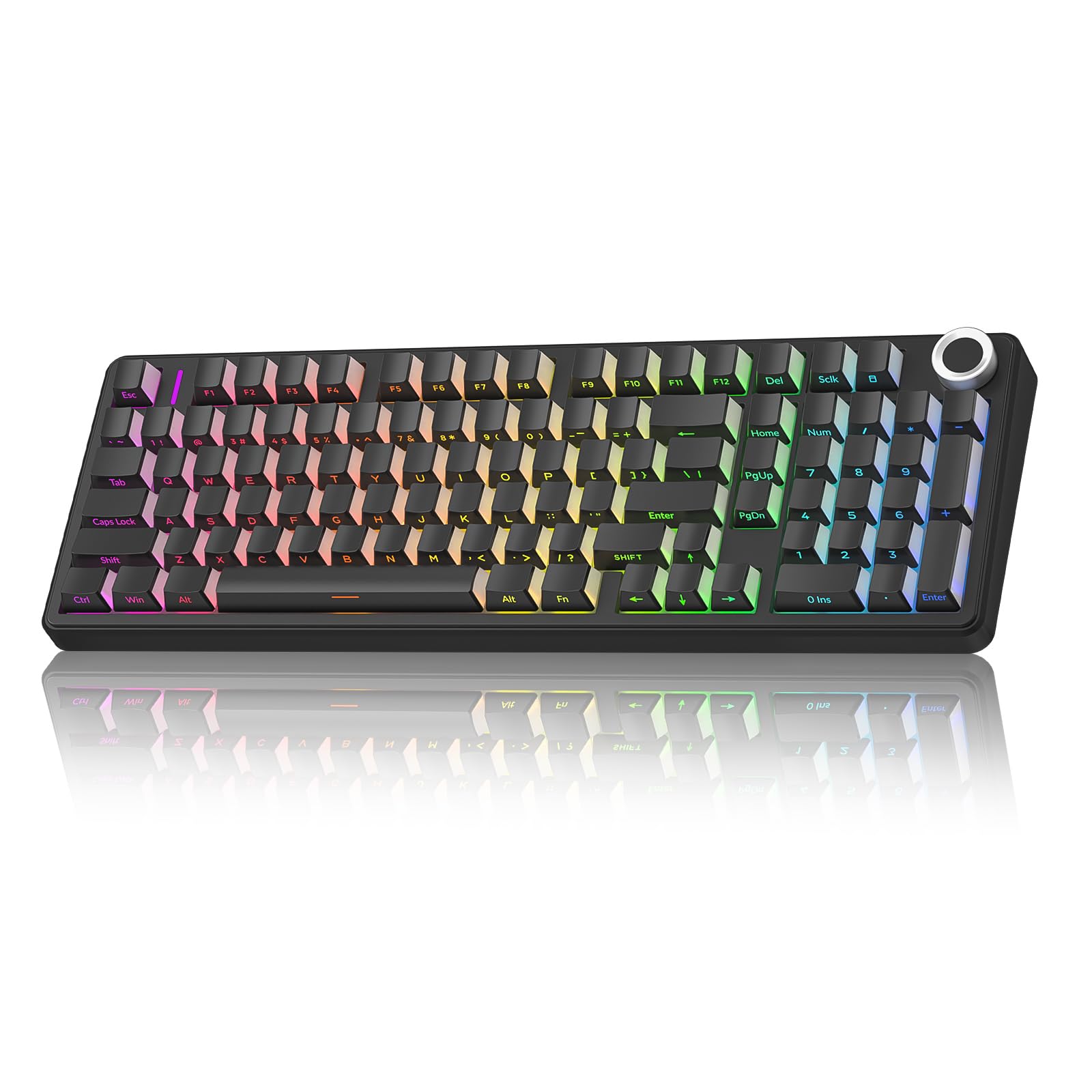
An 8000mAh battery and a gasket mount that hushes every keystroke.
Here is the number that separates this board from the rest: an 8000mAh rechargeable cell, which is a serious reserve for a keyboard. In practice that translates to needing a charge roughly once a week under heavy daily use, and a full workday of chat support across ten-hour shifts still lands around one charge a week. Pair that with a silent design and you have a board built for the person on the other end of a headset.
The quiet comes from pre-lubed linear switches and a gasket-mounted structure — a soft mounting layer that cushions each press instead of transmitting it straight into the case. Five layers of filling silencer sit between the PCB and the plate to cancel out cavity noise, so the press feels soft and the sound stays muted. The switches and caps are hot-swappable with the included puller, and there are two spare switches in the box. A side-printed PBT keycap set stays legible and resists fading.
Three connection modes (BT5.0, 2.4GHz, and USB-C) can hold up to five paired devices, and a multi-function knob switches between backlight brightness and volume with a long press. The RGB runs 16 effects across 16.8 million colors. A few things to know going in: the setup documentation is basic, the companion software is not the easiest to locate, and Bluetooth pairing can take a couple of tries the first time. Some users have reported keys failing intermittently. The silence, though, is what this keyboard is built around, and the gasket mount delivers it.
If silence is the goal: the gasket structure and lubed linears make this the softest, quietest board on this list by a wide margin.
Fair warning: onboarding takes a little patience, since the manual is thin and the pairing flow is fiddly the first time.
For you if: you take calls all day in a shared space and need a mechanical feel without the noise.
Keep looking if: you want a clicky, tactile typing sound — this board is quiet on purpose.
6. Keychron K4 96% Layout Wireless Mechanical Keyboard

A compact 100-key board that speaks Mac natively and lasts up to 240 hours.
If you switch between a Mac and a Windows machine, the K4’s native Mac layout with correct Command-key placement is the feature that will sell you. Extra keycaps for both systems are in the box, and a physical toggle flips between the two without a reboot. You get the number pad and function row in a 96% frame that saves real desk width — handy if your space is tight.
The battery is a 4000mAh cell, spec’d at up to 240 hours with the backlight off, which is among the largest on this list. Charging runs over USB-C, and infrequent top-ups are the norm. Under the hood are Keychron Apex Brown switches — a tactile brown with a solid click — and N-key rollover on wired mode or 6KRO wirelessly for accurate multi-key presses. Connectivity is Bluetooth 5.1 across up to three devices, plus a wired mode.
Two honest notes before you buy. The board is tall, so many typists want a palm rest to keep their wrists level. And there is no 2.4GHz receiver option — Bluetooth or cable only, which means competitive gamers should look elsewhere. The compact number pad also shifts the arrow and zero keys, and that adjustment takes a week for most. A daily user of three years reports no keycap or frame wear and weeks per charge.
The Mac-first angle: correct Command-key placement, system toggle, and extra caps for both operating systems from the start.
What will bug some: the tall deck wants a wrist rest, and there is no dongle option for lag-sensitive gaming.
Right for you if: you bounce between macOS and Windows and want one keyboard that switches cleanly.
skip it if: you need a 2.4GHz wireless link for competitive play — Bluetooth is the only cordless option here.
7. Lofree Flow Lite 100 Keys Low Profile Mechanical Keyboard

Low-profile keys and a 40gf touch that spare your wrists the long haul.
Wrist strain is the enemy of anyone who types all day, and this board attacks it from two directions. The front height sits lower than the standard Flow, putting your hands in a more natural position, and the Specter full-POM linear switches drop the operating force from 50gf to 40gf. Lower force means less finger-joint fatigue on long sessions. The switches are also swappable, so the feel is yours to change.
The 2.4GHz link runs at a 1000Hz polling rate — it checks for keystrokes 1000 times a second, which keeps wireless latency feeling like a cable. Three ways to connect (Bluetooth, 2.4GHz, and wired) let you hop between a PC and a laptop. The 3000mAh battery is spec’d for up to 100 hours with all lights off, and a full charge takes around 3 hours over USB-C. A built-in adjustable kickstand and an aluminum volume roller handle the desk conveniences.
This is a 96% 100-key layout, so the tiny zero key and shifted arrows take some getting used to, and the shine-through keycaps only carry a single white backlight rather than full RGB. The macro software is also on the shallow side, needing frequent updates. What it does beautifully is sound: the reviewers describe a creamy low-profile thock, and the low-profile height removes the need for a wrist rest entirely. The 40gf actuation and crisp tactile feedback are what keep enthusiasts coming back.
What people love
- Low front height and 40gf switches ease wrist and finger strain
- 1000Hz polling for near-wired wireless response
- 3000mAh battery rated to 100 hours with lights off
- Creamy, quiet low-profile keystroke sound
Where it gives ground
- Single-color backlight, no RGB
- Tiny zero key and shifted arrows need adjustment
- Macro software is glitchy and needs updates
Pick it when: your wrists ache after a long typing day and you want a slim board without a wrist rest.
Pass if: you expect a full-color RGB light show — this one keeps it to a single white glow.
Know the Specs
Backlight type: RGB versus single-color
RGB backlighting means the keys can glow in any color and often run animated effects, which is the draw for gamers and desk-aesthetic buyers. Single-color boards (like the Keychron K4’s white LED or the Lofree Flow Lite’s white glow) keep things simple and save power. Brightness matters less than behavior: a light that dims when you stop typing protects the battery, while a permanently blazing deck runs down faster. That is why the MX Keys’ up-to-10-days-lit figure versus up to 5 months unlit is the clearest illustration of what the backlight actually costs you.
Battery capacity and real-world runtime
Capacity in mAh tells you how much reserve the board holds, but runtime depends on how you use it. The AULA F99 Pro carries 8000mAh and the Lofree Flow Lite carries 3000mAh; the Keychron K4 uses a 4000mAh cell rated at up to 240 hours with the backlight off. The pattern across all of them is the same: turn the lights down and the runtime climbs. If you want to charge rarely, favor a larger cell and a board with auto-dimming or timed-out lighting.
Switch types and hot-swap sockets
Linear switches are smooth and quiet — the AULA’s pre-lubed linears are the quietest example here. Tactile switches (like the Keychron Apex Brown) give a bump you feel, and clicky switches (Redragon’s blue typewriter) add an audible snap. A hot-swap socket means you can pull a switch and drop in another without a soldering iron; the Redragon K580 Pro and Lofree Flow Lite both offer it. If you like to tinker, hot-swap saves you from buying a new board just to change the feel.
Connectivity: Bluetooth, 2.4GHz, and wired
A 2.4GHz receiver is a tiny USB dongle that behaves like a wired connection and is the most reliable wireless option for gaming. Bluetooth skips the dongle and pairs across devices, which is what you want on a laptop with few ports. A USB-C cable gives you zero-lag wired play plus charging. The more modes a board offers, the more places it fits — the Redragon K580 Pro, Redragon Typewriter, AULA F99 Pro, and Lofree Flow Lite all run all three, while the Keychron K4 sticks to Bluetooth and USB-C.
Common Questions
How long does a backlit wireless keyboard actually last on one charge?
Is a backlit keyboard worth it if I mostly type in a bright room?
Will a tri-mode keyboard work with my Mac and my Windows laptop?
What does hot-swappable mean on a keyboard?
Are clicky blue switches too loud for a shared office?
Can I keep using the keyboard while it charges?
What is a gasket mount and why do people want it?
Should I worry if my new keyboard’s backlight turns off while I’m not typing?
Do these keyboards need software installed to work?
Is a low-profile keyboard easier on my wrists?
The Bottom Line
If you want one keyboard to buy and stop thinking about, the backlit wireless keyboard winner is the Logitech MX Keys — it leads on typing quality and smart auto-backlighting, and the mixed notes on lighting and connectivity are the rare exception rather than the rule. For a lit desk on a budget, grab the VEILZOR combo, which bundles a keyboard and mouse off one receiver. And if silence is the whole point of your purchase, the AULA F99 Pro is the board to reach for. Whichever way you lean, weight the backlight behavior heavily — it is the spec that decides whether you charge weekly or rarely.
How we choose
We do not accept paid placement. Every pick is matched to a real buyer and a real use-case; we do not hands-on test units.
Sources
Specifications: manufacturer listings and product documentation. Review insights: verified customer reviews, as of October 2026. Pricing: not shown on this page (it changes often); check the current price via the retailer link.
As an Amazon Associate, Aappliancez earns from qualifying purchases. This does not affect which products we feature.