Disclosure: Some links in this post are affiliate links. As an Amazon Associate I earn from qualifying purchases, at no extra cost to you. Learn more
Specs are compiled from manufacturer listings and verified buyer reviews and can change over time — please confirm the key details on the product page before buying.
If your fans light up but you have run out of headers, a hub splits one ARGB signal across six to sixteen ports. The single most important choice is whether that hub talks to your motherboard’s software or acts as its own controller. That choice decides whether you get one mirrored colour or per-port effects.
This guide is built by comparing the manufacturers’ published specifications and the patterns across verified customer reviews, so you get each pick’s real strengths and trade-offs instead of marketing spin.
A hub mirrors one lighting zone, while a controller gives each channel its own address — a difference that decides which effects you can actually run. Below I break down the argb controllers that handle either job cleanly.
Top Picks


How To Choose The Best ARGB Controllers
The wrong assumption most first-time builders carry is that any hub gives you per-fan light control. In truth, the cheap ones are splitters: one signal in, copied to every port. Every pick below is either a splitter or a true controller, and the specs follow from which one it is.
Controller Versus Hub
A hub takes one ARGB channel and one PWM channel from your motherboard and mirrors them across all its ports — so every fan shows the same colour at the same time. A controller gives each channel its own address, so a fan on port 3 can glow cyan while port 7 pulses orange. Layered per-fan effects require the controller. More headers alone? The hub costs less and installs in minutes.
Match The Header First
ARGB runs on a 3-pin 5V header; older plain RGB uses a 4-pin 12V header. They are not cross-compatible, and plugging a 5V device into a 12V header can damage it. Confirm what your board exposes before you buy anything, and look for a hub that lists both 12V and 5V support if you are bridging older fans into a newer build.
Count Ports And LEDs Before You Buy
Add up every fan, strip, and AIO pump you plan to light. Then check the LED ceiling — some controllers cap the total LEDs per channel, which limits how long a strip you can run. A hub with six ports can feel tight the moment you add a radiator and a couple of strips; eight or sixteen leaves room. The PWM side matters too, because a fan plugged into a port that only carries PWM signal will spin at full speed if the fan itself is 3-pin.
Power And Mounting
SATA power keeps the lighting steady under full load, and dual SATA connectors give you a second feed if one rail is stretched. Magnets or Velcro decide how tidy the install ends up, because a hub with no mount becomes a loose box rattling against your glass panel.
Side-by-Side Comparison
| Model | Best For | Ports | Power Input | Mounting | Amazon |
|---|---|---|---|---|---|
| ASUS TUF Gaming ARGB PWM Fan Hub★ Best Overall | Six fans, clean cabling | 6 PWM + 6 ARGB | Dual SATA | Magnetic | Amazon |
| Thermaltake TT Sync 9 Port ControllerEcosystem Pick | Thermaltake Plus ecosystems | 9 ARGB | SATA | Velcro | Amazon |
| Cooler Master ARGB & PWM HUB 1 to 6 | Small cases, Cooler Master fans | 6 PWM + 6 ARGB | SATA | Magnetic | Amazon |
| EZDIY-FAB ARGB PWM Fan Hub | Max headers on a tight budget | 8 PWM + 8 ARGB | SATA | Velcro | Amazon |
| Airgoo 16-Port USB ARGB Controller | Per-LED effects in SignalRGB | 16 ARGB | SATA + USB | Magnetic | Amazon |
Detailed Reviews
1. ASUS TUF Gaming ARGB PWM Fan Hub
Our pick — 4.5+★ from 300+ verified ratings; the strongest balance of quality and price.
Six fans’ worth of cables collapse into one tidy box that snaps to steel.
The problem this solves is blunt: you have more fans than headers. The ASUS TUF hub gives you six PWM ports and six ARGB ports in one box, so a full case of fans can run from a single motherboard fan header and a single ARGB header. Six PWM and six ARGB ports sit paired side by side, so each fan gets its own speed and lighting slot.
This pick earns its top spot on power: two SATA connectors (the flat power plugs from your power supply) feed the hub instead of one. That second feed gives you a spare rail to lean on when six fans pull hard, so the hub is less likely to brown out under load. Buyers report: “OK first looks amazing but it’s large, to large and needs 2 separate sata power cables, Which is fine for those that need rgb.” That note cuts both ways — the dual feed is a reliability win, and the size is something you have to plan around. Measure your case first: at 6″ long and 4.1″ wide, it is a genuinely big box next to the Cooler Master hub at 1.73″ by 0.98″.
The magnetic base is what owners cite most, because it lets you stick the hub to a metal panel and skip the double-sided tape entirely. Visible power and operation indicators mean you can spot a dead fan port without tearing the loop apart. It works with any PWM ARGB fans, not just ASUS stock, and plays well with Armoury Crate for colour and speed. Measure for the 6″ by 4.1″ box and free up two SATA leads before mounting.
Where it earns its keep
- Six ARGB plus six PWM ports cover a full fan loadout from one header pair
- Dual SATA connectors give the lighting a second power rail under load
- Strong magnet holds the hub to any steel surface without tape
- Warning lights flag a dead port before you dismantle the build
- Runs third-party PWM ARGB fans, not only ASUS models
Know before you mount
- At 6″ by 4.1″ it is a large box — cramped rear cable paths get tight
- Two SATA leads mean two spare power runs on the PSU
- Fans must be PWM; 3-pin fans will not get speed control here
Best for: Anyone with a glass-panel case and six or fewer ARGB fans who wants the cabling gone in one move.
Think twice if: Your case’s rear cable channel is shallow — this hub needs breathing room.
2. Thermaltake TT Sync SATA Powered 9 Port Addressable LED Controller
Nine ARGB ports for Thermaltake builders drowning in proprietary 9-pin plugs.
If your fans say Thermaltake on the box and every one of them ends in a plug that fits nothing else, this is the adapter between you and motherboard control. It takes nine addressable devices and lets ASUS Aura Sync, GIGABYTE RGB Fusion, or MSI Mystic Light Sync drive the colours straight from your board, with no extra software layer in between.
The hardware is a slim rectangle measuring 3.54″ by 3.54″ and 0.3″ thick, weighing 3.04 ounces, and it draws power from a single SATA lead rather than USB. That last point is the one to verify before you buy — the installer’s honest note is “verify that your motherboard has a 5 V port for this. I do not.” Check your board for a 5V 3-pin ARGB header. No header, no sync, no matter how good the hub is.
The 5A SATA ceiling sets your real device budget. Run Riing Trio fans alone and you can feed up to five; mix in other Plus-series gear and that drops to four Trio fans. The one thing everyone notices: every light becomes a single zone, so all nine devices show the same colour at once. It also ships with Velcro rather than magnets, and the motherboard-end connector is on the loose side, so route the cable once and leave it be.
The zone limit is the story: nine devices, one colour. If you wanted port 2 green while port 8 glows red, this is not that product — it is a bridge that lets your board talk to Thermaltake gear, and it does that job well.
The cable is the fragile part: the 3-pin board-end connector slides off easily, so seat it once and avoid tugging it when you move the tower.
Reach for it when: Your Thermaltake fans, pump, or strips need a path into Aura Sync or Mystic Light.
Look elsewhere if: You want individual per-port colour — a true multi-channel controller is the better match.
3. Cooler Master ARGB & PWM HUB 1 to 6 Port

The pocket-sized hub that disappears behind your motherboard tray.
At 1.73″ by 0.98″ and 62 grams, it fits gaps the ASUS box cannot. At 1.73″ long, 0.98″ wide, and 0.59″ tall, and just 62 grams, the Cooler Master hub slots into gaps the bigger ASUS box cannot reach — the size gap between the two is roughly 3.5x. Six ARGB plus six PWM ports still fit inside that shell, so the small footprint does not cost you connections.
What wins people over is simple function: plug in, power from SATA, and it mirrors your motherboard’s ARGB and PWM signals across every port. There is no per-port colour or individual fan curve here, and the design says so plainly — it is a hub, not a controller. The strong magnet latches to the chassis and holds. The one recurring gripe is the ARGB slot width: some standard connectors will not seat without persuasion.
That fit issue is the whole honesty section. As owners mention, “RGB Slots Were Not Big Enough, But I Made it Work by using wire cutters to cut the plastic between the slots.” If your connectors run snug, expect to trim. The other limit is brand fit — Cooler Master’s own fans slide in cleanly, while chunky third-party plugs can be too wide. Check your fan plugs against the port before you commit to the routing.
Why it fits tight builds
- Under two inches long and 62 grams — hides in small cases
- Six ARGB and six PWM ports in a thumbnail-sized shell
- Magnet grips the chassis firmly with no drilling
- SATA feed keeps output steady at full fan load
- Mirrors both PWM and ARGB so MSI Mystic Light can steer it
The fit caveat
- ARGB slots run narrow — some standard plugs need trimming to seat
- Only Cooler Master fans fit without fuss; larger third-party plugs can be too wide
- No per-channel colour or per-fan speed curves
Made for: Mini-ITX and mid-tower builds where every millimetre behind the tray is contested.
The trade-off: You may have to trim plastic to seat certain ARGB connectors — worth knowing before the cables go in.
4. EZDIY-FAB ARGB PWM Fan Hub
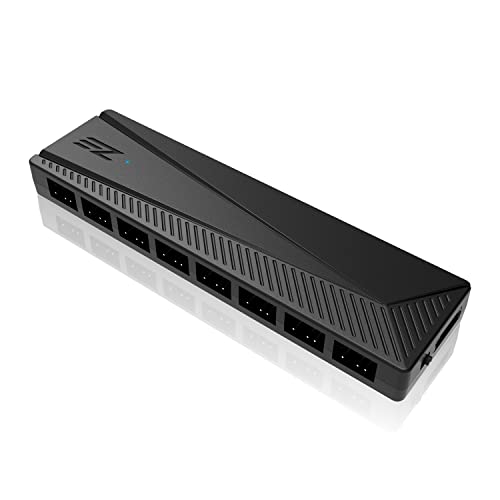
Sixteen total ports, including a 12V-to-5V switch for mixing old and new lighting.
Port count is where this hub separates itself: eight 4-pin PWM ports and eight ARGB ports, sixteen in all, which is more per device than the six-and-six hubs above. It supports up to 200 LEDs across the ARGB side, so long strips and multi-fan arrays fit without hitting a ceiling. That makes it the pick for somebody running a big radiator stack on a modest board.
The feature that earns the value label is the small toggle switch. It lets you sync either a 12V RGB system or a 5V ARGB system to your board, so an older motherboard with plain 12V RGB can drive newer 5V ARGB fans. Owners put it to work exactly that way — as customers note, “Perfect, used for 12v rgb motherboard with 5v argb fans.” Compatibility covers Aura, RGB Fusion, Mystic Light, and Polychrome through the sync cable.
Two limits to weigh. First, only Fan 1’s speed is readable by your system, and a 3-pin fan on any port runs flat out at maximum RPM because the speed control needs a 4-pin fan. Second, the male connectors are on the lighter side and can flex if inserted at an angle — they bend back, but seat them straight. Velcro holds it in place rather than magnets. No built-in colour modes either; the sync cable has to reach a motherboard header.
balance for mixed gear: A 12V/5V switch (a toggle between the older 12V RGB standard and the newer 5V addressable standard) lets an older motherboard drive modern ARGB fans directly. It does that across sixteen ports, so you skip a chain of adapters.
Watch the fan type: Plug a 3-pin fan in and it runs at full tilt — this hub reads only Fan 1 and cannot slow a 3-pin unit.
Worth grabbing if: You have more fans than headers and want to bring 12V RGB hardware into a 5V ARGB setup.
Skip when: You need per-port light control or per-fan curves — this mirrors one signal across all eight.
5. Airgoo 16-Port Magnetic-Mount USB ARGB Controller
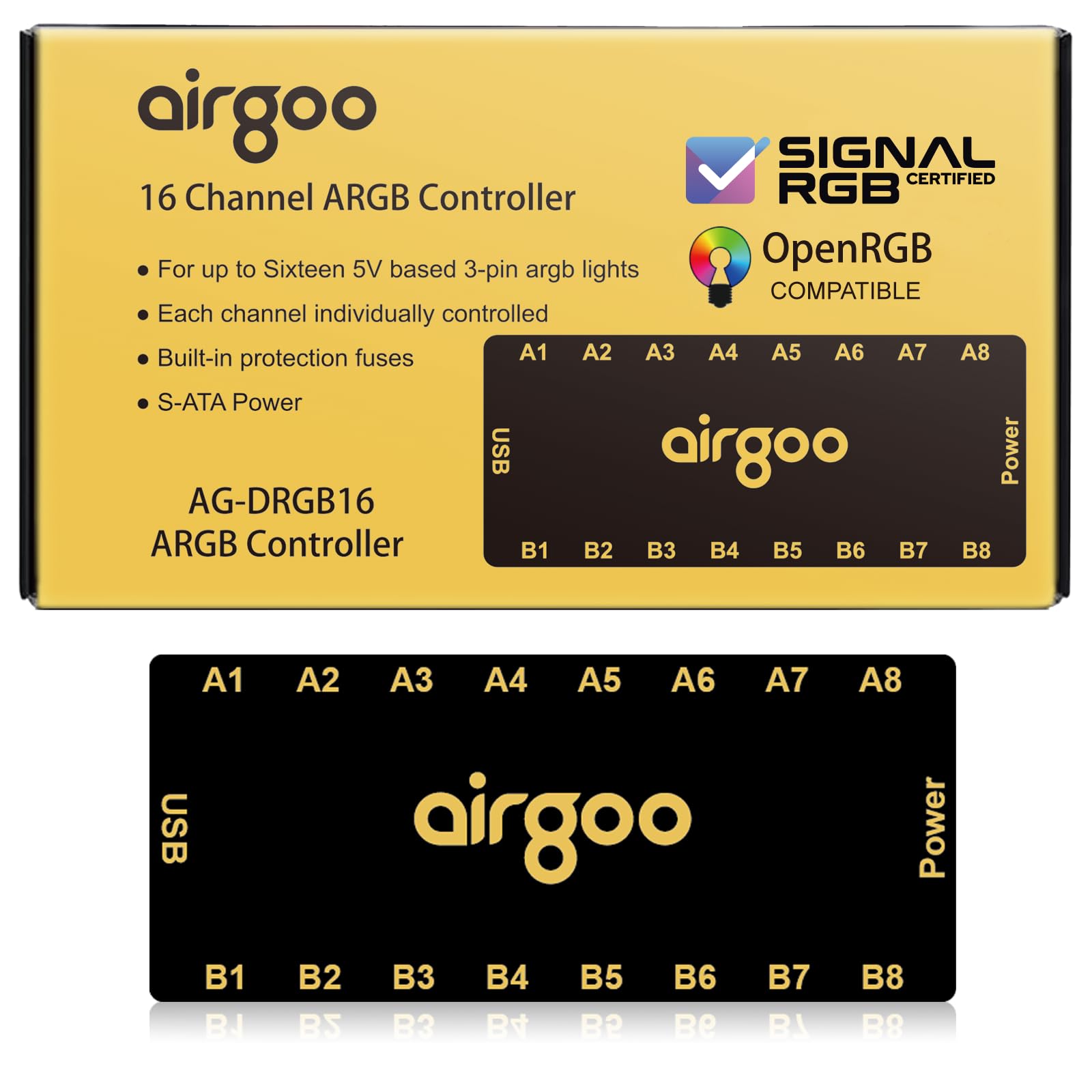
Sixteen channels that each hold 256 LEDs — real per-device control, not a splitter.
This is the one on the list that is a true controller rather than a mirror. Sixteen ports, each with its own address, and each able to carry up to 256 LEDs. That is the number that matters: you can run a fan, a strip, and an AIO pump on separate channels and give each its own effect at the same time. The older six-channel hubs simply cannot do that.
It talks to your PC over USB 2.0 (the older, slower USB plug on your board), not just a board header, which is why SignalRGB and OpenRGB both detect it and drive it. One buyer’s verdict: “True 16 separately controllable ARGB channels, not a splitter; USB powered via SATA, no motherboard ARGB port needed.” Plan the setup order: install the latest SignalRGB or OpenRGB release first, because the channels stay dark until the right software is running. On OpenRGB you must set each channel’s LED count by hand, or those strips stay dark.
The recurring gripe is the plugs. The 3-pin connectors hold loosely, and the male-male adapters can work their way out, so a little electrical tape settles it. Magnets hold the box firmly to steel, though painted surfaces defeat them — Velcro covering that gap is a common fix. A Linux setup with OpenRGB can take real troubleshooting (udev rules and permissions), so go in expecting some setup time. An auto-resetting fuse protects the lighting from overloads and shorts.
What makes it the top tier
- 16 independently addressable channels, 256 LEDs apiece
- SignalRGB and OpenRGB both detect and drive it over USB
- No motherboard ARGB header required
- Strong magnets mount it to any steel panel
- Auto-resetting fuse guards against overloads and shorts
Where it asks for patience
- 3-pin connectors hold loosely — adapters can slip out
- Software must be installed before channels light up
- OpenRGB on Linux needs manual setup time
- Painted surfaces defeat the magnets
Built for: Anyone chasing layered per-fan effects in SignalRGB or OpenRGB who wants every channel independent.
The honest catch: Budget a few minutes to tape down loose connectors and set up the software before the lights cooperate.
Know the Specs
Ports And LED Ceiling
Ports are how many devices you can plug in; the LED ceiling is how many individual lights each port can carry. A hub with six ports is fine for six fans but tight once strips and a pump join the count. Check both numbers — a controller that caps LEDs per channel can leave a long strip half-lit.
Hub Versus Controller
A hub mirrors one motherboard signal to every port, so all devices show the same colour. A controller addresses each port separately, which is what open up layered effects. If you want fans in different colours at the same moment, you need the controller.
5V ARGB Versus 12V RGB
ARGB uses a 3-pin 5V header; older RGB uses a 4-pin 12V header. They are not interchangeable, and feeding a 5V device 12V can kill it. Some hubs include a switch to bridge the two, which is why that toggle matters for mixed builds.
Power And Mounting
SATA power keeps lighting steady under full load, and a second SATA feed adds a safety rail on six-fan hubs. Magnets clip to steel instantly; Velcro works on painted or plastic surfaces where magnets have nothing to grab.
Common Questions
Will an ARGB controller work with my motherboard?
What is the difference between an ARGB hub and a controller?
Can I connect a 12V RGB fan to a 5V ARGB controller?
How many fans can I run from one controller?
Do ARGB controllers need SATA power?
Why do my ARGB connectors not fit the hub?
Can I control ARGB fans without a motherboard ARGB header?
Will a 3-pin fan get speed control from an ARGB hub?
Does SignalRGB support these controllers?
Where should I mount the hub inside my case?
The Bottom Line
If you are juggling six fans and a tangle of cables, the ASUS TUF Gaming ARGB PWM Fan Hub wins because it gives you six PWM (fan speed) and six ARGB (lighting) ports from one header pair, with dual SATA power and a grip that holds. Want per-fan effects instead of one mirrored colour? The Airgoo 16-Port controller is the one to reach for — sixteen independent channels in SignalRGB do what no hub can. And if you simply need more headers in a tight case, the Cooler Master hub slips into spaces the bigger boxes cannot.
How we choose
We do not accept paid placement. Every pick is matched to a real buyer and a real use-case; we do not hands-on test units.
Sources
Specifications: manufacturer listings and product documentation. Review insights: verified customer reviews, as of October 2026. Pricing: not shown on this page (it changes often); check the current price via the retailer link.
As an Amazon Associate, Aappliancez earns from qualifying purchases. This does not affect which products we feature.