Disclosure: Some links in this post are affiliate links. As an Amazon Associate I earn from qualifying purchases, at no extra cost to you. Learn more
Specs are compiled from manufacturer listings and verified buyer reviews and can change over time — please confirm the key details on the product page before buying.
You want to play music from your phone through the good speakers you already own — without buying a new amp, a new soundbar, or a whole wireless speaker system. That is exactly what an AirPlay 2 receiver does. It sits between your Wi-Fi network and your old stereo, and it makes that stereo show up as a speaker on your iPhone or Mac. The catch: “AirPlay 2” on a spec sheet does not always mean the same thing. The boxes that fail are the ones that quietly drop out of your speaker group or resample your music down before it ever reaches your amp.
This guide is built by comparing the manufacturers’ published specifications and the patterns across verified customer reviews, so you get each pick’s real strengths and trade-offs instead of marketing spin.
Nine boxes below plug into real stereos, sorted by what they actually do well. Each entry also flags the protocol gaps and power quirks that decide whether you keep one or send it back, so you can pick the right AirPlay 2 receiver for your setup.
Top Picks

How To Choose The Best Airplay 2 Receiver
Most people who buy one of these boxes are trying to fix one specific annoyance: the music lives on a phone, and the good speakers live on the other side of the room. So the first question to answer is not which chip is inside — it is what plugs into what. Get the output type wrong and the unit is useless no matter how good its DAC measures.
Match the output to the input you actually have
Look at the back of your amplifier or powered speaker first. If it has red and white RCA jacks, you need a streamer with RCA out. If it has a square optical port, look for SPDIF (TOSLINK) — that is the fibre-optic audio connector that carries a digital signal. Coaxial is a round RCA-style digital connection; XLR is the three-pin balanced connector found on pro and higher-end gear. Order the wrong one and you will be buying adapters the same week.
Know what “AirPlay 2” gets you over AirPlay 1
AirPlay 2 lets several speakers play the same track in sync and lets you control them all from one place. That matters in a kitchen-plus-living-room setup. AirPlay 1 only handles one room at a time. If multiroom sync is the whole reason you are buying, check the listing says AirPlay 2 and not just “AirPlay” — one pick in this list runs AirPlay 1, and that limit changes how you use it.
Decide if you need Google Cast and Alexa too
AirPlay 2 is Apple’s protocol. Google Cast is the Android equivalent, and Alexa Cast is Amazon’s. Plenty of buyers own an iPhone plus an Echo, or an Android phone plus a HomePod. A streamer that only speaks one protocol will strand the other device. Cheaper boxes tend to pick a lane; the more capable ones carry AirPlay 2, Google Cast, Spotify Connect and TIDAL Connect together.
Wi-Fi versus Bluetooth is a quality decision
A Bluetooth receiver compresses the audio before it ever reaches your stereo. A Wi-Fi streamer sends the file itself, so a hi-res track stays hi-res. Bluetooth is still fine for casual listening, and several units here support it as a backup. But if you are chasing detail in vocals or acoustic instruments, the Wi-Fi path is what you want the box to use by default.
Side-by-Side Comparison
| Model | Best For | Core Protocols | Outputs | Network | Amazon |
|---|---|---|---|---|---|
| YUYUNLOMN G58T Wireless HDMI Kit★ Best Overall | Mirroring one source to many TVs | HDMI over 2.4/5.8GHz wireless | HDMI (up to 1080p 60Hz) | 2.4/5.8GHz dual-band | Amazon |
| Arylic LP10Most Versatile | Waking up a passive old stereo | AirPlay 2, Google Cast, Spotify Connect, TIDAL, Qobuz | Optical, analog, USB, line in | Wi-Fi plus wired Ethernet | Amazon |
| WiiM MiniBudget Champion | Cheapest real entry into AirPlay 2 | AirPlay 2, Spotify Connect, TIDAL, Alexa Cast | Aux, optical, Bluetooth | Wi-Fi | Amazon |
| 1Mii DS500 | Bluetooth into a vintage receiver | Bluetooth 5.3 (LDAC, aptX HD) | RCA, optical, coaxial | Bluetooth only | Amazon |
| Arylic A30+ | Adding an amp and streaming in one box | AirPlay 1, Spotify Connect, DLNA, UPnP | Speaker terminals (built-in amp) | Wi-Fi plus Bluetooth 5.0 | Amazon |
| WiiM Pro | Whole-home streaming with wired options | AirPlay 2, Google Cast, Spotify Connect, TIDAL, Roon | Optical, coaxial, RCA in and out | Wi-Fi, Gigabit Ethernet | Amazon |
| Fosi Audio S3 | TV and stereo in one streamer | AirPlay 2, Google Cast, Spotify Connect, TIDAL, Qobuz, Roon | XLR balanced, optical, RCA, HDMI eARC, sub out | Wi-Fi 6 dual-band plus Bluetooth 5.3 | Amazon |
| Bluesound Node Nano | Long-term BluOS multiroom building | AirPlay 2, Spotify Connect, TIDAL, BluOS | RCA, optical, coaxial, USB | Dual-band Wi-Fi, Gigabit Ethernet | Amazon |
| Sonos Port | Feeding an existing Sonos household | AirPlay 2, Sonos app, line-in | RCA and digital outputs | Wi-Fi plus Ethernet | Amazon |
Detailed Reviews
1. Wireless HDMI 2 Receivers and Transmitter
Our pick — 4.5+★ from 400+ verified ratings; the strongest balance of quality and price.
One source, six screens, and 165 feet of cable you never have to run.
This is the pick for the person who has one thing to show and several rooms to show it in. The kit ships with one transmitter and two receivers, and the platform accepts up to six receivers total — you add more as needed with the RX model B0DPKSFXRV. Picture tops out at 1080p 60Hz, which is the honest ceiling here. If you were hoping to push a 4K signal across the room, this is not the box.
The range figure is 165 feet or 50 meters in open space with the dual-antenna design, and that number drops to roughly 50 feet or 15 meters once walls are in the path. The dual-band 2.4GHz/5.8GHz transmission is what keeps latency low enough for presentations and video.
The size difference against the Arylic LP10 is stark: this measures 3.93″L x 2.24″W x 0.7″H against the LP10’s 7.87″L x 6.69″W x 2.36″H, so it disappears in a laptop bag. It is also not an audio streamer in the AirPlay sense — it mirrors whatever HDMI source you feed it, and it cannot do TV-to-TV transmission. For a bar, church, classroom or conference room with multiple displays, nothing else here solves the same problem.
What earns its place
- Scales to six receivers on one transmitter, so one laptop drives a whole room of screens.
- 165ft/50m open-air range with a fall-back to 50ft/15m through walls — enough for most single-floor layouts.
- Three adapters included (USB-C to HDMI 4K, Micro HDMI, Mini HDMI), so phones, cameras and tablets all connect without extra shopping.
- Preprogrammed pairing means setup drops from about an hour to under 10 minutes.
What to plan around
- Each receiver needs its own USB-C power feed, because HDMI carries no power over this link.
- 1080p maximum, so no 4K output.
- Units warm up in use — unplug the transmitter when the room goes dark.
- Mini-HDMI monitors need a dongle for full-size HDMI.
Reach for this if: you are wiring a venue — a bar, a classroom, a courtroom — where several screens need the same feed without cables under the carpet.
Look elsewhere if: you want music streamed from your phone into a hi-fi amp; that is a different job entirely.
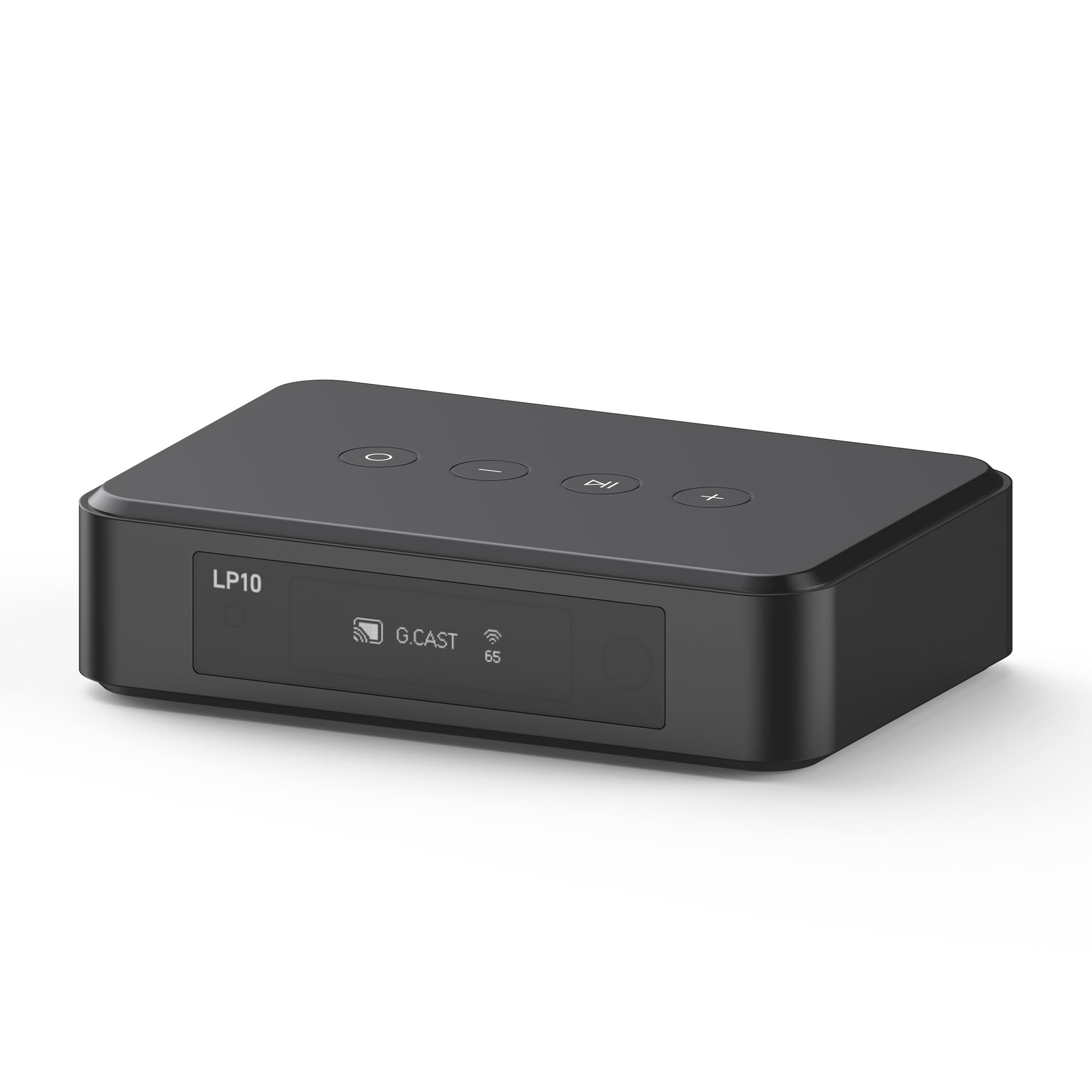
2. Arylic LP10 WiFi Music Streamer for Existing Stereo Systems
The protocol list is the longest here — AirPlay 2, Google Cast, Spotify, TIDAL and Qobuz all in one box.
On paper the LP10 covers every base a mixed-household buyer needs. AirPlay 2 for the iPhone, Google Cast for the Android tablet, Spotify Connect and TIDAL Connect for the apps themselves, plus Qobuz Connect. It connects to amplifiers, active speakers, soundbars and home audio systems through optical output, analog output, USB playback and a line input, so both modern and older gear have somewhere to land. At 0.4 kg it sits quietly on a shelf.
Read this part carefully, because streaming reliability on this one splits down the middle. Wired to the router, it behaves — owners who run Ethernet describe it as rock solid night after night. The trouble shows up in Google Home speaker groups. Owners describe frequent audio cutouts, group dropouts, and the unit going fully offline and needing reboots several times daily. One owner logged more than 30 hours of troubleshooting across firmware updates and multiple routers, and wired Ethernet still failed to stabilize it. Digital output has also drawn complaints about mangled bit-accurate lossless files.
So treat this as a single-zone streamer with a huge protocol list, not a multiroom workhorse. Compared with the WiiM Pro, which also carries AirPlay 2 and Google Cast but pairs them with Gigabit Ethernet, the LP10 is the more ambitious spec sheet with the shakier track record in grouped playback. Buy it for one room, one amp, one reliable wired connection, and it does the job it advertises.
The Ethernet question: this box rewards a cable. Run one to the router and the dropouts that dominate the negative side of its record largely fall away.
The honest limit: multiroom grouping across Google Home is where it stumbles, so plan on one zone rather than a whole-house mesh.
Who it beats for: the household split between an iPhone and an Android tablet, where both need a path into the same amplifier.
Who should pass: anyone whose plan is three or four grouped rooms — that is the exact scenario this one struggles with.
3. WiiM Mini Wi-Fi Music Streamer
Palm-sized, and it pushes unaltered audio up to 192kHz without resampling a single sample.
The WiiM Mini’s headline trick is refusing to resample. It passes audio through at up to 192kHz, 24-bit on both its digital and analog outputs — the same resolution an artist’s studio recording carries. That is a real step up from most budget streamers, which quietly convert everything to a fixed sample rate before it leaves the box. Amazon Music Ultra HD, Qobuz and your own library files can use the full rate; TIDAL Master tops out at 24-bit/96kHz here.
The crowd favourite in this list by a wide margin: buyers praise its build quality most, with reliability right behind it. A second Mini for a second zone is a common pattern, and owners run them into external DACs over optical to beat a receiver’s own conversion. Room correction via the WiiM Home app made in-wall speakers sound markedly better for at least one owner. Gapless playback keeps track transitions clean.
Two limits to know before you buy. AirPlay is receive-only — it pulls streams in but cannot push them out to other AirPlay speakers. And unlike the rest of the WiiM line, the Mini has no Google Cast support at all. Connectivity is the recurring friction point; most buyers report it holding fine, and a minority hit drops that need a reconnect. At 2.7″ x 2.7″ x 0.9″ it fits on a shelf edge next to the amp.
The value read: the highest-rated pick in this guide sits at the entry tier — 4.0+ stars across 5,000+ owners. That is why the cheaper box takes the value crown rather than the top slot.
The catch: no Google Cast and no AirPlay transmission, so an Android-only household or a multiroom group built on Cast should look at the WiiM Pro instead.
Go here first: if your stereo has an optical or aux input and you want AirPlay 2 plus hi-res playback on a tight budget.
Step up instead if: you run Google Cast or need AirPlay to travel outward to other speakers.
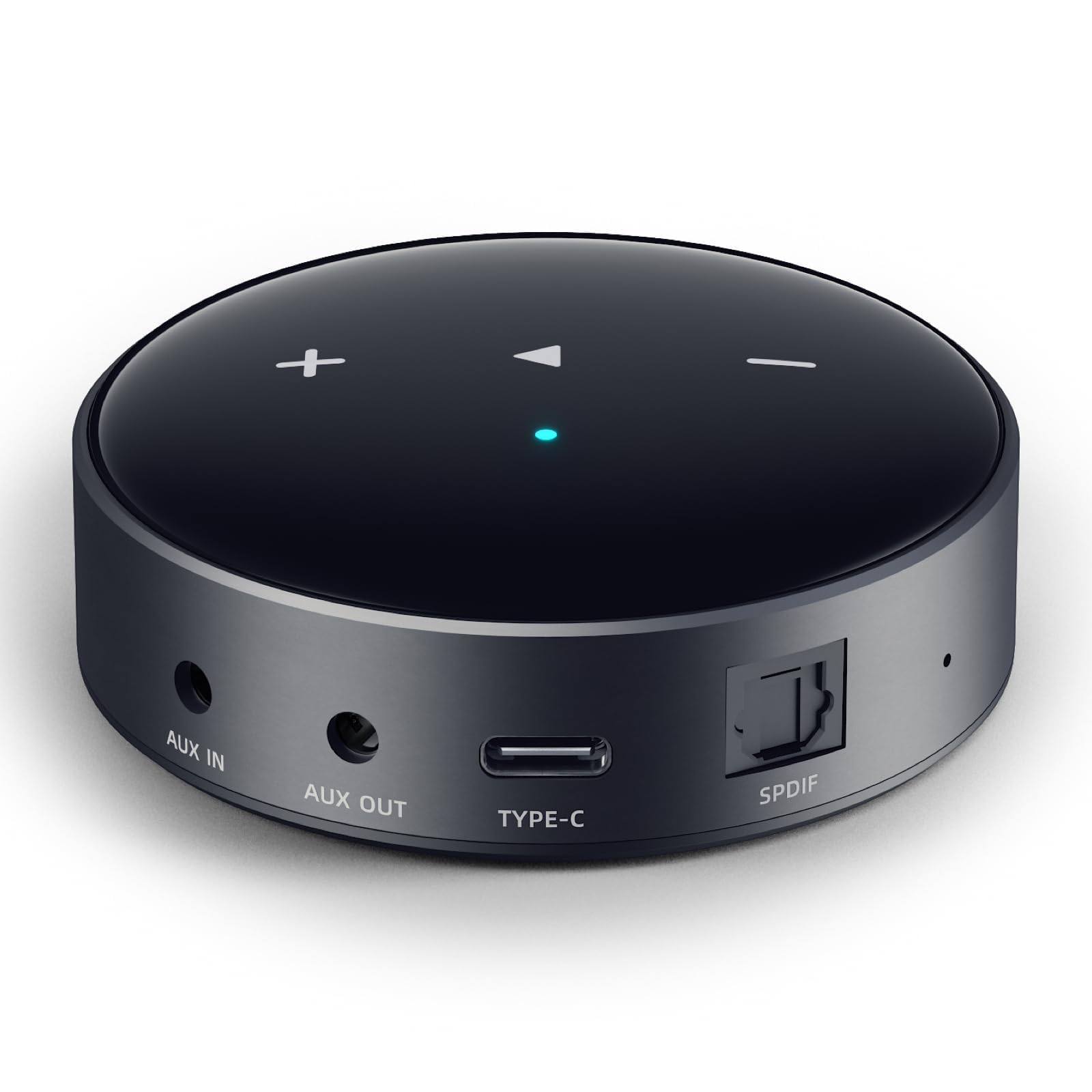
4. 1Mii DS500 Hi-Res Bluetooth 5.3 Receiver

An ESS Sabre ES9018K2M DAC and an OLED readout, aimed squarely at the amplifier you refuse to replace.
This is a Bluetooth receiver, not an AirPlay box — say that clearly up front, because it changes who should buy it. What it does is bridge a phone to an old amplifier over RCA, optical or coaxial output, and it does that with a 32-bit/384kHz ESS Sabre ES9018K2M DAC inside. LDAC runs at 990kbps, which is a high-speed Bluetooth codec rather than a Wi-Fi stream. The OLED screen tells you the live sample rate, volume and active codec so you are never guessing what the phone negotiated.
Sound quality is what buyers single out most here, repeatedly describing vocals as sounding like the singer is standing in the room. One owner hooked it to a barn Aiwa rig and another to a garage Centrex, the latter glad to lose the washing-machine whoosh and dimmer buzz that had been riding on AM reception. LDAC on a PC through a specific driver gets close to a wired DAC with a streamer, per one detailed write-up. Bluetooth 5.3 plus an external high-gain antenna hold the link up to 100ft/30m.
Fair warning on Apple hardware: iPhones and iPads fall back to AAC or SBC, so the LDAC and aptX HD benefits are Android and PC territory. If you are an all-Apple household hunting for AirPlay 2, the WiiM Mini or WiiM Pro is the correct turn. The DS500 shines where the goal is dragging a 1970s receiver into the present without touching its internals.
The conversion story: three outputs — RCA, optical and coaxial — mean it slots into almost any legacy amp or home theatre receiver without an adapter run.
The fine print: USB-C direct is the cleanest path, and the bundled cable runs shorter than some owners would like for a shelf install.
Pick this for: a vintage amplifier, a barn system, a garage rig — anywhere a Bluetooth hop into RCA is the whole point.
Not your box if: the words AirPlay 2 and multiroom sync are on your must-have list.
5. Arylic A30+ Stereo WiFi and Bluetooth 5.0 Mini Amplifier

If you own passive speakers but no amplifier, this skips a whole purchase.
Everything else in this guide assumes you already have an amp or powered speakers. The A30+ does not. It is a 2-channel Class D wireless mini amplifier (a small, efficient amp chip that runs cool) that drives bookshelf, ceiling, desktop, tower or garden speakers directly, with network streaming built in. That makes it the right answer for someone with a pair of unpowered speakers and nothing to feed them. It also plays local files — MP3, APE, FLAC, WAV — off USB drives or a NAS (a network hard drive on your home Wi-Fi).
Read the protocol line closely: this unit supports AirPlay 1, not AirPlay 2. So you get music from your iPhone, but not the synced multiroom groups that AirPlay 2 brings. It does support Spotify, Amazon Music, TIDAL, Qobuz, TuneIn and more, plus Qplay, DLNA and UPnP. Multiroom is handled through multiple connected Arylic devices on the same network rather than through Apple’s protocol. The 4stream app runs on iOS and Android and is clunky but functional, and Wi-Fi pairing takes about a minute.
Sound on a pair of cheap bookshelf speakers impressed owners enough that one replaced a far more expensive streaming receiver with it. Bluetooth 5.0 range is generous — an owner walked the whole yard with no drop or static. The honest friction points: the app does not work on some newer Android phones, a couple of buyers fought the Wi-Fi connection on first setup, and there is no clean power-off, so you mute it or reboot. It draws very little at idle, which is why plenty of people leave it on.
Why it fits a specific buyer
- Built-in amplification means no separate receiver purchase for a passive speaker pair.
- Speaker protection circuit built into the design for bookshelf, ceiling and desktop use.
- Bluetooth 5.0 held up across an entire yard walk without static.
- Lossless FLAC and WAV playback from USB or NAS, not just streaming apps.
Where it asks for patience
- AirPlay 1 only — no synced AirPlay 2 multiroom groups.
- The 4stream app is the weak link and does not work on newer Android models.
- No dedicated power switch; you mute or reboot.
The right match: you have passive speakers sitting idle and want them playing music from a phone over Wi-Fi this weekend.
The mismatch: you need Apple’s synced multiroom, which requires AirPlay 2 and lives on other picks here.
6. WiiM Pro Music Streamer
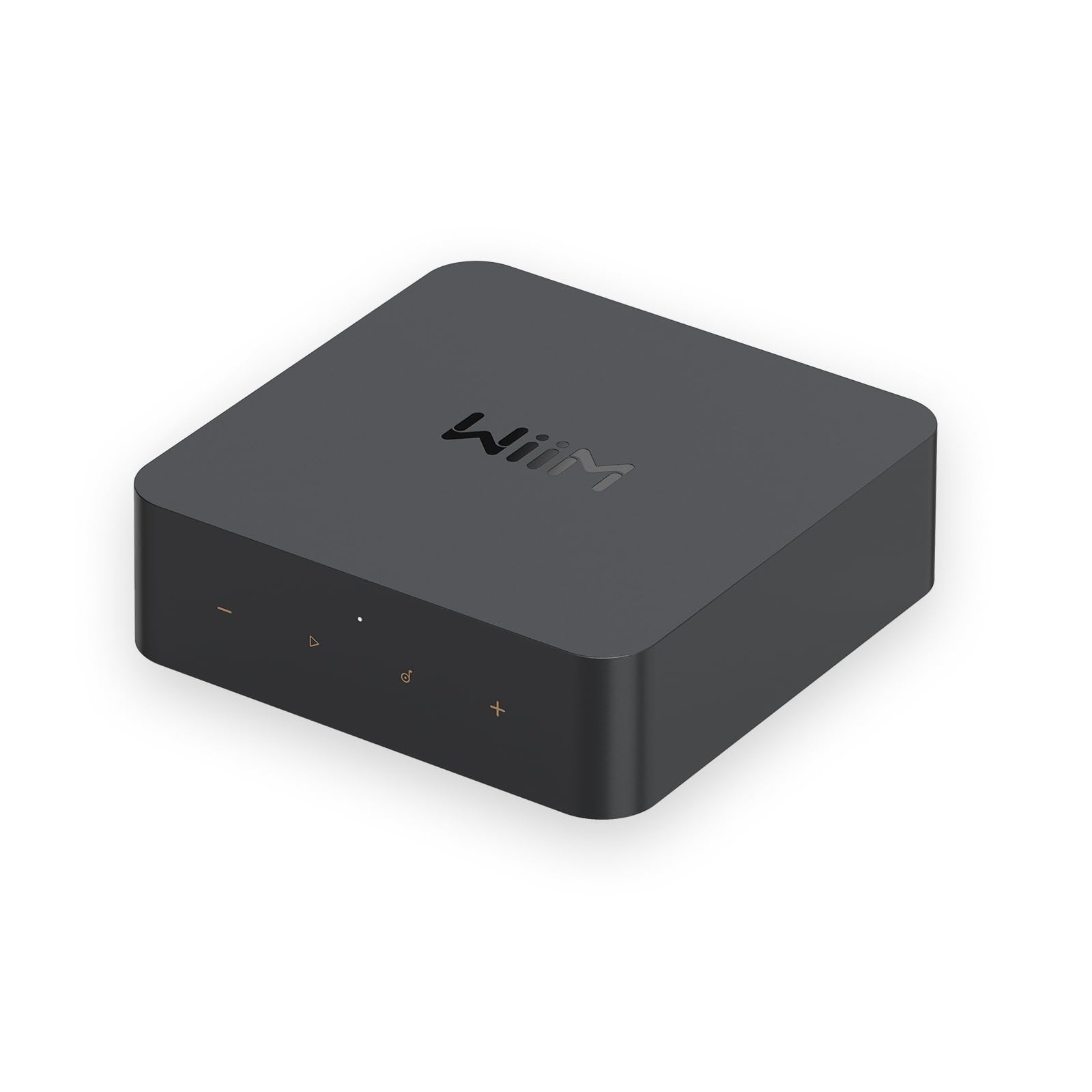
The one that turns a twenty-year-old receiver into a hi-res AirPlay 2 endpoint.
Take the WiiM Mini’s philosophy and add the ports the Mini leaves out. The Pro brings optical, coaxial and RCA in and out, so it sits as a preamp, a DAC, an ADC and a streamer in one chassis. It handles up to 24-bit/192kHz gapless with bit-perfect output over optical or coax. AirPlay 2 works both ways here, and Google Cast arrives too — the Mini has neither of those going for it in the same combination. Roon Ready is on the list, and so are Spotify Connect, TIDAL Connect and Alexa casting.
Performance is what buyers praise most on this unit, especially those who moved up from a Bluetooth receiver. Replacing a Bluetooth receiver on a 20-year-old Sony STR-DE845 with this delivered CD-quality 16/44.1 over AirPlay 2 instead of compressed AAC, with native Amazon Music HD reaching 24/96. Setup lands under five minutes for most people, and the app is the same WiiM Home interface. A free Room Correction firmware update arrived later and applied to existing units.
The Pro is not bug-free — the software is a work in progress, and SPDIF input trouble, TIDAL track-transition pops and a lost latency setting all appear in the record. Most of those resolved with firmware or a warranty swap. One power note worth knowing: the stock 2.4A charger caused hi-res playback to break up for at least one owner, and a higher-capacity supply fixed it. Adding a Powerline Ethernet adapter tightened things further. At 14.1 ounces and 5.5″ square it sits neatly beside the amp.
Where it leads: the wired options beat the WiiM Mini outright — Gigabit Ethernet, coaxial, optical and RCA in and out, all on the same box.
One thing to buy alongside: a beefier USB power supply than the bundled 2.4A unit if you plan on hi-res files.
The step-up pick: you want the WiiM ecosystem’s polish with Ethernet, Roon and full input/output flexibility.
Think twice if: the amp is in a spot with no cable path and you refuse to troubleshoot firmware quirks.
7. Fosi Audio S3 HiFi Music Streamer DAC Preamp
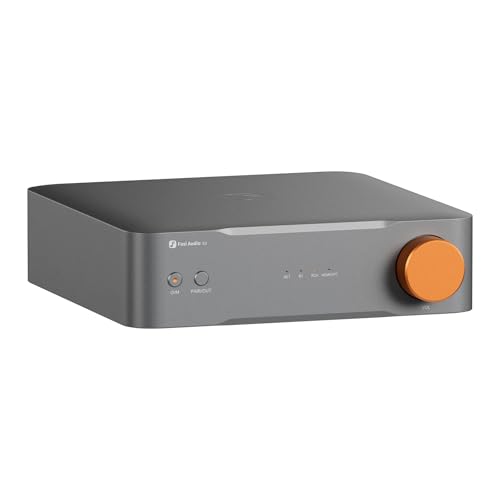
HDMI eARC, XLR balanced out and a sub output — it is the only box here built to sit under a TV.
Most streamers stop at the stereo. The S3 keeps going. HDMI eARC pulls audio off your television, a dedicated sub out hands the low end to a powered subwoofer, and XLR balanced outputs feed serious amplification with a wider soundstage than RCA. The AK4493SEQ DAC carries PCM up to 32-bit/768kHz over LAN with THD+N at or under 0.00018% and SNR at or above 120dB. Wi-Fi 6 dual-band and Bluetooth 5.3 handle the wireless side, and AirPlay 2, Google Cast, Spotify Connect, TIDAL Connect, Qobuz Connect and Roon Ready are all on board.
The 12V trigger is the detail that wins over multi-box setups — it wakes the amp when the streamer comes on. Owners chose the S3 specifically over the WiiM Ultra because the Ultra has no AirPlay, and over another competitor that lacked the 12V trigger. Buyers praise performance most, then sound quality, and repeatedly credit the balanced XLR path for opening up the sound. A recording professional swapped out a large analog rack and a power amp for powered monitors and rated it a perfect score on detail and imaging.
The caveats centre on software. The Fosi Audio App is described as simple but bare-bones, with slow source switching, and some buyers expected more from it. There is no native Amazon Music or AlexaCast support. Bass management across a 2.1 crossover (the handoff between your main speakers and a subwoofer) is not there despite the sub output — one disappointed buyer found it mostly acting as a Bluetooth DAC (a box that just converts a Bluetooth signal to analog audio) while waiting for the software to grow. Qobuz Connect needs a firmware update to appear. Given the hardware on offer, that is a fair trade for a home theatre that wants one box doing music and film.
The hardware case
- HDMI eARC plus sub out turns a stereo into a 2.1 TV system.
- XLR balanced output with dual op-amp differential amplification for a wider soundstage.
- 12V trigger sync wakes the amp automatically.
- 10-band EQ in the app for tuning to the room.
The software gap
- No native Amazon Music or AlexaCast support.
- No 2.1 bass management crossover despite the sub output.
- App is bare-bones with slow source switching.
Built for: the living room where the television and the stereo share speakers and you want XLR headroom for future upgrades.
The trade-off you accept: app polish sits behind the hardware, so expect firmware updates to fill in features.
8. Bluesound Node Nano Wireless Music Streamer

A quad-core 1.8GHz ARM processor and an ESS Sabre DAC in a box barely wider than a paperback.
The Node Nano is the entry point into BluOS, Bluesound’s multiroom platform, and that is the real purchase. The hardware is a QUAD-CORE 1.8GHz ARM Cortex A53 processor paired with an ESS ES9039Q2M Sabre DAC running up to 24-bit/192kHz with gapless playback. Outputs cover stereo RCA, optical, coaxial and USB, and there is a two-way aptX Adaptive Bluetooth radio plus Gigabit Ethernet alongside dual-band Wi-Fi. AirPlay 2, Spotify Connect, TIDAL Connect and local server mode all work, with MQA and DSD playback noted as arriving via a future update.
Buyers praise its build quality most here, with sound quality right behind it. Setup is quick for most, with an automatic software update on first boot and a startup booklet that several owners compare to Apple’s packaging. One buyer fed it into a tubed preamp and found the internal DAC impressive — a meaningful compliment given the vintage downstream gear. Two programmable quick-touch presets and a wall-mounting system round out the convenience side.
Two frictions to weigh. Bluetooth connectivity draws mixed reports, and general reliability splits the same way — the Wi-Fi drop-outs and an occasionally wonky Android app that needs a restart are the recurring notes. The included USB-C supply matters: a 2A brick caused restarts mid-playback for at least one owner. The quick-start guide is thin, with streaming logins and status-colour meanings only in the online manual. At 5.53″L x 5.6″W x 1.4″H and 1.3 pounds, it tucks onto a shelf without argument.
Why pay the premium: BluOS is the reason. Group it with other Bluesound players and the whole house stays in sync from one app, with a processor that has headroom to spare.
Use the right power brick: stick with the bundled USB-C adapter — higher-rated bricks than 2A caused playback restarts.
Choose it for: a Bluesound household in the making, or anyone who wants a mature multiroom platform under a legacy stereo.
Skip the upgrade if: you only ever play in one room — a cheaper WiiM handles that for far less.
9. Sonos Port Streaming Component

The only reason to buy this one is that a Sonos household already exists.
Connect the Port to a traditional stereo and that stereo joins your Sonos system. AirPlay 2 works alongside the Sonos app, and Siri can play Apple Music straight from an iPhone or iPad. The line-in takes a turntable, tape deck or CD player and pushes it to Sonos speakers elsewhere in the house. A 12V trigger (a small control cable that switches linked gear on and off) auto-powers connected equipment. RCA and digital outputs feed the old amplifier. At 1 pound it sits quietly on a shelf.
Its strengths are sound quality and ease of use, and once configured it behaves reliably. Owners mention hearing bass throughout the house off a stereo it had just joined. Volume passthrough with a KEF LS50W setup worked well. Outside the ecosystem, though, its record is mixed: connectivity and setup draw consistent friction, with source configuration against AV receivers noted as genuinely difficult, and the value question comes up often given the price against competitors. One buyer wanted the ability to disable DSP and EQ for an uncoloured signal and found it missing, while another described the bundled RCA cable and power brick as basic.
Be realistic about the install. It is not the plug-and-play experience some expect: the app insists on location and microphone access before it will proceed, and setup aborts if you decline. The 8-digit PIN and serial number entry trips people up. One unit vanished from the network a day after setup. So this is not the pick for someone new to streaming — it is the pick for the person with four Sonos speakers already and a turntable they want heard in the kitchen.
The real value: line-in plus AirPlay 2 plus the Sonos app means vinyl, CDs and phone audio all reach every Sonos speaker you own.
The install reality: budget time for the setup wizard, and expect the app to request permissions you may not want to hand over.
Worth it when: a Sonos system is already running and you want the old turntable and receiver folded into it.
Wrong first purchase: if you are starting from zero, the setup demands and cost sit badly against the simpler streamers here.
Know the Specs
AirPlay 2 vs Bluetooth: what the protocol decides
AirPlay 2 runs over your Wi-Fi network, so the file travels intact and several speakers can play it in sync. Bluetooth compresses the audio and sends it over a short radio hop, which is why a Bluetooth receiver like the 1Mii DS500 cannot join an AirPlay 2 group. If sync across rooms is your goal, the protocol matters more than the DAC chip inside.
What a DAC chip actually does
The DAC (digital-to-analog converter) turns the digital file into the analog signal your amplifier amplifies. A named chip like the ESS Sabre ES9039Q2M in the Bluesound Node Nano or the AK4493SEQ in the Fosi S3 tells you the manufacturer spent on this stage rather than the box. If your amplifier has a good DAC of its own, use the streamer’s digital output and let the amp do the conversion.
Sample rate and bit depth in plain terms
24-bit/192kHz means the streamer passes more information per second than a standard CD’s 16-bit/44.1kHz. Higher numbers only help if the source file actually carries them — a Spotify stream at 320kbps does not. Look for a streamer that passes the file unaltered rather than resampling it to a fixed rate.
Outputs: RCA, optical, coaxial, XLR
RCA is the red-and-white analog pair found on nearly every amplifier. Optical (TOSLINK) is the square fibre port carrying digital audio. Coaxial is a round digital connection that does the same job over copper. XLR is the three-pin balanced connection used on pro and higher-end gear, and on the Fosi S3 it feeds a wider soundstage. Match the streamer’s output to your amp’s input before anything else.
Common Questions
Will an AirPlay 2 receiver work with my old amplifier that only has RCA inputs?
Can I group an AirPlay 2 streamer with my HomePod or Apple TV?
Do I need an external DAC if the streamer already has one?
What is the difference between AirPlay 2 and Google Cast on these streamers?
Why does my streamer drop out of the speaker group?
Does 24-bit/192kHz matter if I stream from Spotify?
Can a Bluetooth receiver like the 1Mii DS500 join an AirPlay 2 multiroom group?
Do these streamers need a particular power supply?
Can I connect aturntable to one of these boxes?
Which streamer is best if my household mixes iPhones and Android phones?
The Bottom Line
If your goal is music from a phone into the amplifier you already own, the WiiM Mini is the starting point worth taking. It passes hi-res audio up to 24-bit/192kHz without resampling (it keeps the full detail of the file instead of cutting it down), and it does that on the smallest budget in this guide. Step up to the WiiM Pro the moment you want Gigabit Ethernet (a fast wired network port), coaxial and RCA in and out, or Roon Ready streaming in the same box.
For a living room where the television and the stereo share speakers, the Fosi Audio S3 earns its spot with HDMI eARC, a sub output and XLR balanced connections no other pick here offers. And if a Sonos household already exists, the Sonos Port is the only box that folds a turntable and an old receiver into that system.
One last thing before you decide: the WiiM Mini sits at the entry tier yet holds the strongest owner record of anything in this guide. So if you are unsure which protocol you actually need, it is the low-risk place to start.
How we choose
We do not accept paid placement. Every pick is matched to a real buyer and a real use-case; we do not hands-on test units.
Sources
Specifications: manufacturer listings and product documentation. Review insights: verified customer reviews, as of October 2026. Pricing: not shown on this page (it changes often); check the current price via the retailer link.
As an Amazon Associate, Aappliancez earns from qualifying purchases. This does not affect which products we feature.