Disclosure: Some links in this post are affiliate links. As an Amazon Associate I earn from qualifying purchases, at no extra cost to you. Learn more
Specs are compiled from manufacturer listings and verified buyer reviews and can change over time — please confirm the key details on the product page before buying.
You want a device that records, translates, or tracks without you thinking about it — a pin on your collar, a ring on your finger, or glasses on your face. The real question is which one you will still be wearing in week three. This guide breaks down eight picks by what they physically do, what they cost you in daily effort, and where each one genuinely falls short.
This guide is built by comparing the manufacturers’ published specifications and the patterns across verified customer reviews, so you get each pick’s real strengths and trade-offs instead of marketing spin.
The category splits cleanly into three jobs: capture (pins and pendants that record and summarize), track (rings and bands that log your body), and see (glasses that put a screen or a camera in front of your eyes). Below, the picks are sorted by what they actually solve, with the honest hardware limits named up front. Here is the straight story on the best ai wearables you can buy right now, sorted by what each one truly does well.
Top Picks
How To Choose The Best AI Wearables
Start with the job you need done, not the spec sheet. A device built to capture meetings is useless as a sleep tracker, and a ring that logs your recovery will never write your minutes. Pick the job first, then check only the numbers that job depends on.
Match the wearable to the body part it lives on
Pins and pendants clip to a collar or hang from a lanyard, so they sit close to the mouth — which is exactly where clear voice audio comes from. Rings and bands sit on the wrist or finger and read your pulse and movement. Glasses sit on your face and either show you a screen or shoot photos and video from eye level. Where it sits on your body decides what it can do before any spec does.
Read the battery number carefully
Two very different figures get published side by side. Some devices list continuous recording hours — how long the microphone runs on one charge. Others list standby days — how long the device sits idle before it needs a top-up. A pin quoting 20 hours of continuous recording is telling you something completely different from a ring quoting several days of battery life. Know which number you are reading.
Check where your recordings actually live
Onboard storage measured in gigabytes lets you record without a connection. Cloud transcription minutes decide how much of that audio gets turned into text. Some devices include a free monthly minute allowance and cap your cloud storage beyond it. If you plan to record daily, read the plan details before you commit — this is where the real ongoing cost hides.
Understand the IP rating before you sweat on it
An IP rating (Ingress Protection — a two-digit code for dust and water resistance) tells you how much moisture a device tolerates. A device rated IP54 handles splashes and light rain, not swimming. If you want to wear something in the shower or the pool, check that the number is stated for that specific product rather than assuming it.
Side-by-Side Comparison
| Model | Best For | Wear Format | Battery Figure | Storage / Memory | Amazon |
|---|---|---|---|---|---|
| Plaud NotePin S★ Best Overall | Meeting and interview capture | Pin, clip, lanyard or wristband | 20 hours recording | 64GB onboard | Amazon |
| GetD AI GlassesMost Versatile | Music, calls and translation on the move | Eyeglasses frame | 115mAh per side | 8 MB | Amazon |
| Fitbit Inspire 3Everyday Tracker | Everyday steps, sleep and heart rate | Wrist band | 10 days | — | Amazon |
| soundcore Work by Anker | Clip-on note taking for sales and calls | Collar clip, necklace or magnetic ring | 8GB onboard, 32H recording | 8GB | Amazon |
| Oura Ring 4 | Discreet sleep and recovery tracking | Titanium ring | 5 days | — | Amazon |
| Meta Ray-Ban (Gen 2) | Hands-free photos, calls and translation | Eyeglasses frame | — | — | Amazon |
| XREAL 1S | Portable big screen for games and video | AR glasses, USB-C tethered | Powered by host device | — | Amazon |
| XREAL One Pro | Wide-screen productivity and gaming | AR glasses, USB-C tethered | Powered by host device | — | Amazon |
Detailed Reviews
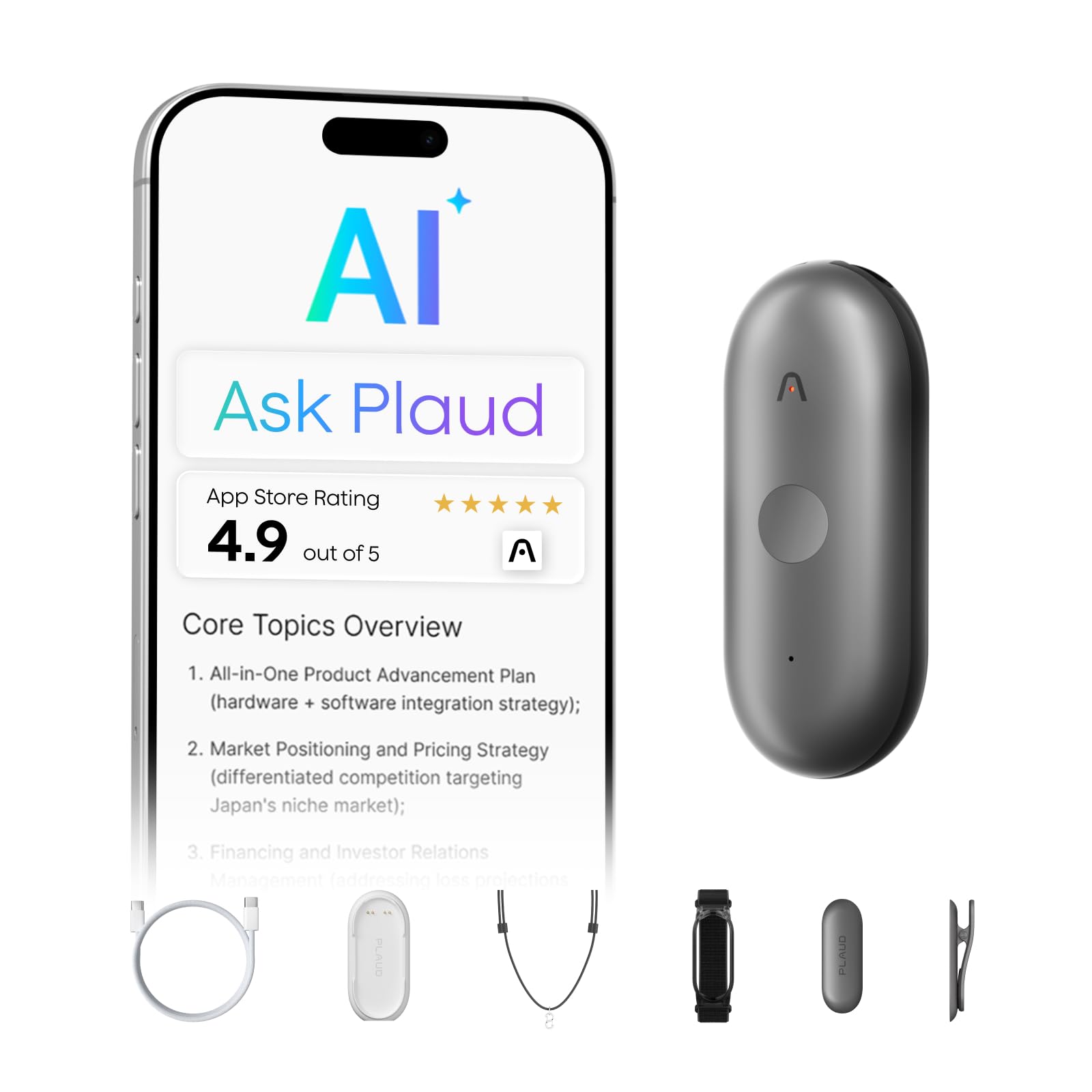
1. Plaud NotePin S Wearable AI Voice Recorder
Our pick — 4.0+★ from 1,000+ verified ratings; the strongest balance of quality and price.
A 0.61 oz collar pin that turns a two-hour meeting into a bullet-point list.
If your problem is that you cannot take notes and hold eye contact at the same time, the NotePin S was built for exactly that trade. It weighs 0.61 oz (roughly the weight of a couple of AA batteries), so clipped to a collar or hung from the included lanyard you stop noticing it by mid-morning. A dedicated physical record button gives you a real click instead of a fiddly app gesture — you press it, you move on.
The capture side is where the money goes. Plaud says the device works in 112 languages and converts raw audio into structured notes, mind maps, and to-do lists through the Plaud app, drawing on large language models. A single conversation can come back as several perspectives rather than one flat transcript. It stores up to 64GB of audio locally, so you can record an entire off-site day without a signal and let the summaries catch up later. The included Starter Plan gives you 300 transcription minutes a month, and a Pro Plan at 1,200 minutes a month sits above that if you record daily.
Where this pick earns the top spot is reliability in the field. Owners describe real workday scenarios where it quietly does the job — dictating reports hands-free, capturing client calls for later reference, and running as a running tally of things said and promised. The recurring gripe is the bill, not the hardware: transcription minutes beyond the free allowance cost extra, and that recurring fee is the thing to weigh before you commit. The pin also adds a bit of bulk if you clip it to a phone. Privacy handling is documented with ISO 27001, ISO 27701, SOC 2, HIPAA, GDPR, and EN18031 compliance, and the box covers pin, clip, lanyard, wristband, charging dock, and USB-C cable.
What owners lean on it for
- Hold a meeting without a pen in your hand — 112-language capture with AI summaries and to-do lists waiting afterwards.
- Record away from Wi-Fi with confidence — 64GB of local storage means the audio stays on the device until you sync.
- Wear it four different ways — pin, clip, lanyard, or wristband, chosen by what you are wearing that day.
- Trust the physical click — a dedicated record button beats fumbling through an app when the meeting is already starting.
The honest catch
- Transcription beyond the free monthly allowance is a recurring charge — budget for it if you record often.
- The pin adds visible bulk when attached to a phone.
- Names occasionally come back misspelled in transcripts, so proofread anything official.
Suits you if: you sit in meetings, interviews, or client calls all week and want the notes to appear themselves.
Think twice if: you record only a few times a month and would rather not manage a transcription plan.
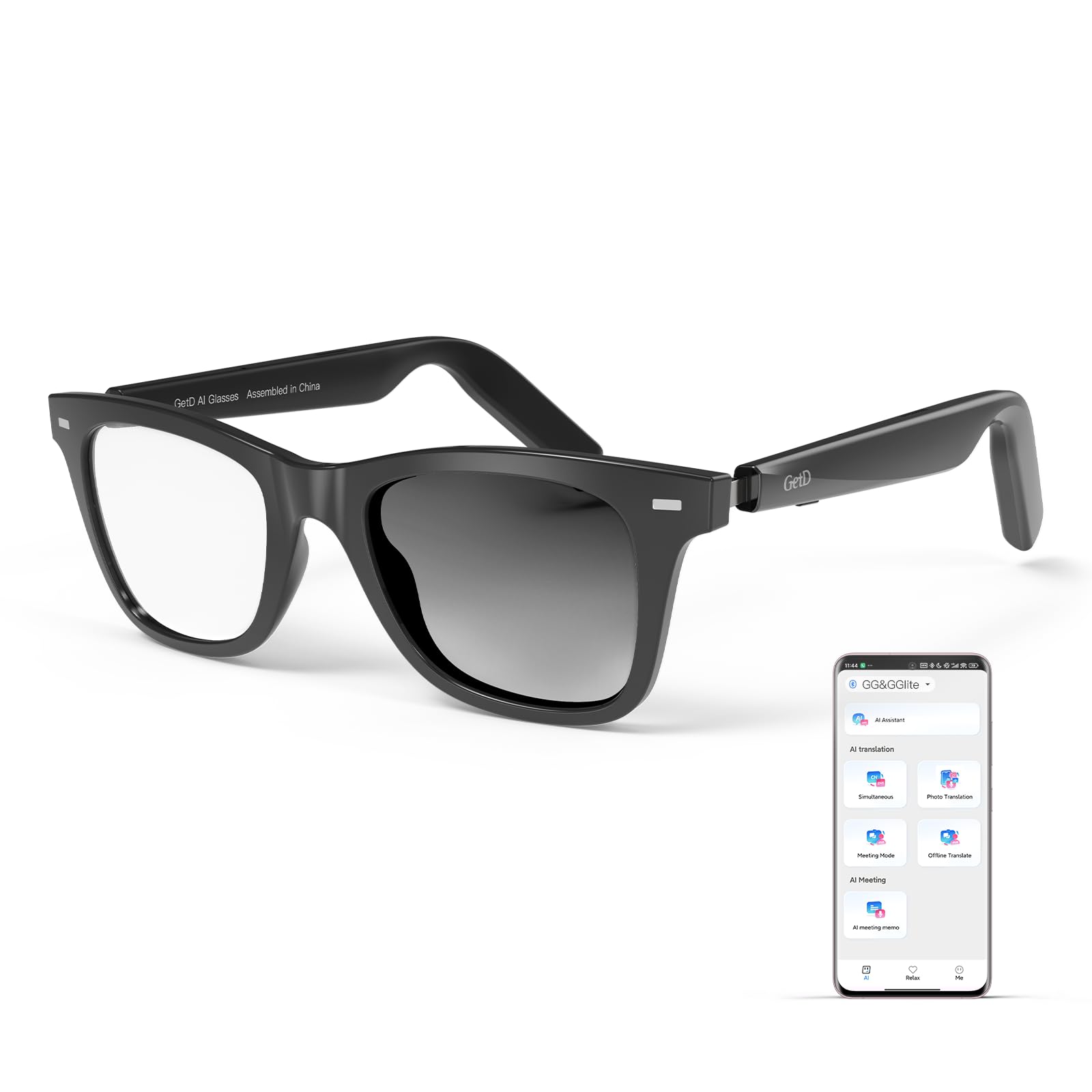
2. GetD AI Glasses, Smart Glasses Powered by ChatGPT
One pair of glasses doing three jobs: open-ear earbuds, tinted lenses, and a translation app on your face.
The GetD puts a light TR90 frame on your face and two things in your ears — directional open-ear drivers that play music and calls without plugging your ear canal. The lenses are photochromic, meaning they darken in sunlight and clear up indoors, and they are polarized with 100% UV protection per the listing. Two 115mAh batteries, one per arm, carry 11 hours of music listening or 9 hours of calling at 50% volume, with 15 days of standby. A ten-minute top-up buys an hour of use, and the frame carries an IP54 rating for splash resistance.
Translation is the headline claim. The app supports bi-directional simultaneous translation across 145 languages in over 170 countries, powered by ChatGPT and DeepSeek through the GetD app. In practice owners describe the translation as pass-the-phone style — the app does the work while the glasses carry the audio. The frame is light enough that one buyer wrote, verbatim, “the frame is super light, I barely feel them,” and prescription lenses can be added by an optician afterward.
Reliability is the honest watch-out here. One arm’s battery has been known to drop charge faster than the other after a full charge, and a couple of units went back for that reason — a fair sample risk rather than a pattern. The ChatGPT branding on the box oversells the hands-free angle; the AI lives in the companion app rather than on the frame itself. Still, for travel, jogging, and international calls, the combination of tinted lenses and ear-level audio is a genuinely useful two-in-one.
What wins people over: the sheer number of daily jobs one pair handles — sunglasses, earbuds, and translation app in a single strap over the ears.
The fair caveat: treat the AI as an app feature rather than a glasses feature, and check both arms hold charge evenly in the first week.
Buy it for: travel days, morning runs, and hands-free calls where you want tinted lenses and audio without a second device.
Pass it up if: you want a true always-listening AI assistant built into the frame itself.
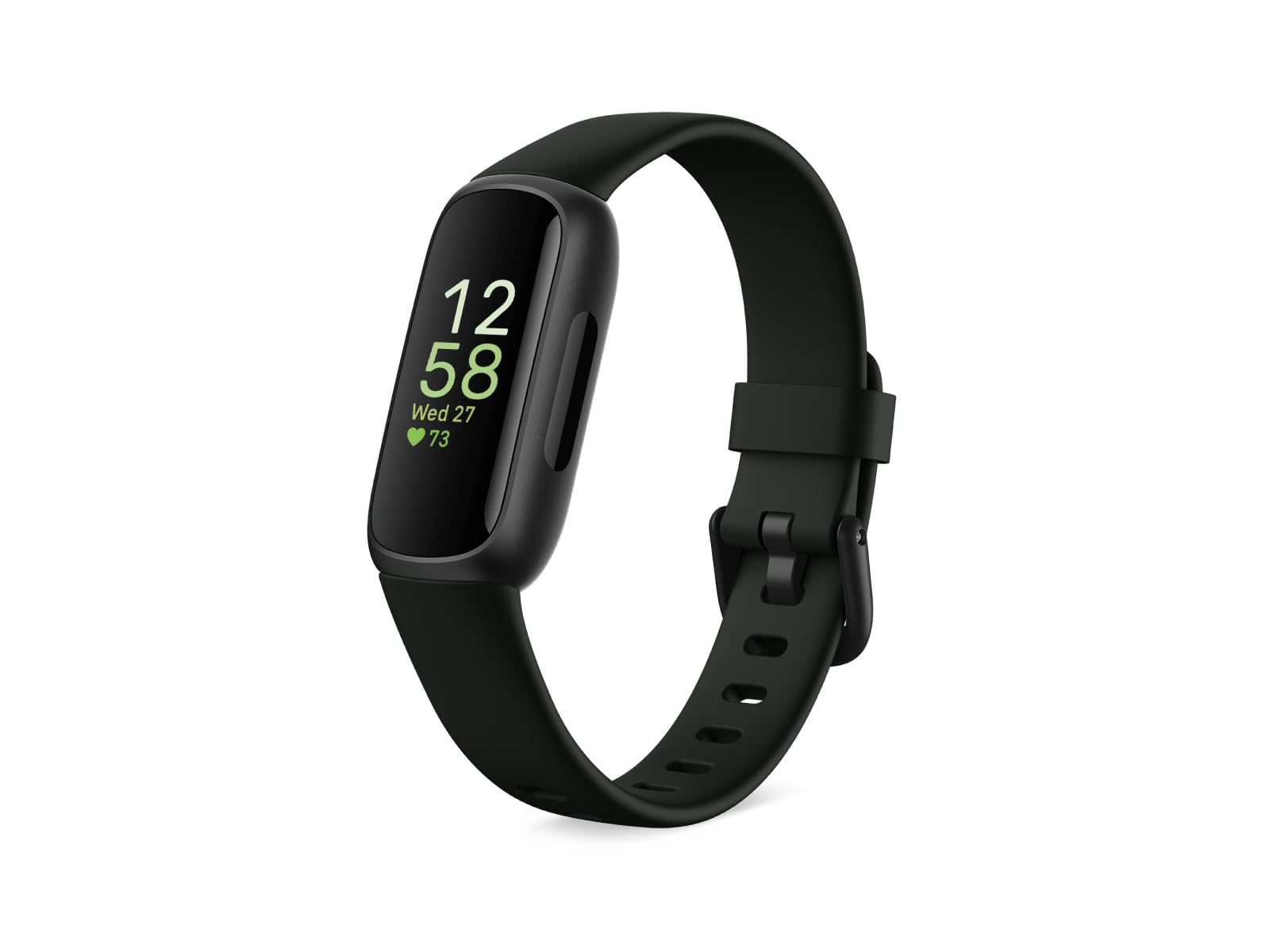
3. Google Fitbit Inspire 3
The band that scratches the “do I move enough” itch without asking you to charge it every night.
A 10-day battery is the whole argument here. The Fitbit Inspire 3 gives you continuous heart-rate tracking, a Daily Readiness Score, Active Zone Minutes, and automatic exercise tracking across 40+ exercise modes. A small touchscreen shows steps, time, and heart rate; a wrist flip wakes it up; a vibrating alarm is there if you want one. Add a daily Sleep Score, a Stress Management Score, and an SpO2 reading and you have the full wellness dashboard sitting on a silicone band.
It earns its keep in small, honest ways: it slips into a pocket and still counts steps for people whose workplace bans wrist wear, it is light enough to sleep in, and the included longer band fits wrists that normally get squeezed. Owners who run it side by side with a heavier tracker describe the data as accurate enough for the basics: steps, distance, sleep, resting heart rate. Expect to turn off always-on display if you want the battery number to reach its published ceiling.
Where it can disappoint is longevity. The strap hinge on some units has cracked well inside the first year of use, and reports of units that stop holding a charge exist alongside the ones that run for years. The Google Health app is also a step down from the old Fitbit app in some eyes. Weigh those against a very approachable price for a full-featured tracker and the value argument still holds — this is a basic tracker done well, not a premium one.
Reasons it earns the wrist space
- Get through a full week and into the next on one charge — 10 days is the published figure, and real use lands close.
- Read your recovery and not just your steps — Daily Readiness Score, Sleep Score, and Stress Management Score all live here.
- Small enough to ignore at night — the compact resin case is light enough for sleep tracking.
- A ten-minute plug-in gets you back in business — rapid top-ups are a documented strength.
The small print
- The strap hinge has been reported to crack well inside the first year on a handful of units.
- Always-on display cuts the battery figure — you will want it off to hit the published ceiling.
- The Google Health app takes more taps than the old Fitbit app did for some basic jobs.
Reach for this if: you want a comfortable, cheap, week-long tracker that logs sleep, steps, and heart rate reliably.
Look elsewhere if: you want premium-feeling straps, a big screen, or long-term durability without any replacement risk.
4. soundcore Work by Anker Coin-Sized AI Voice Recorder
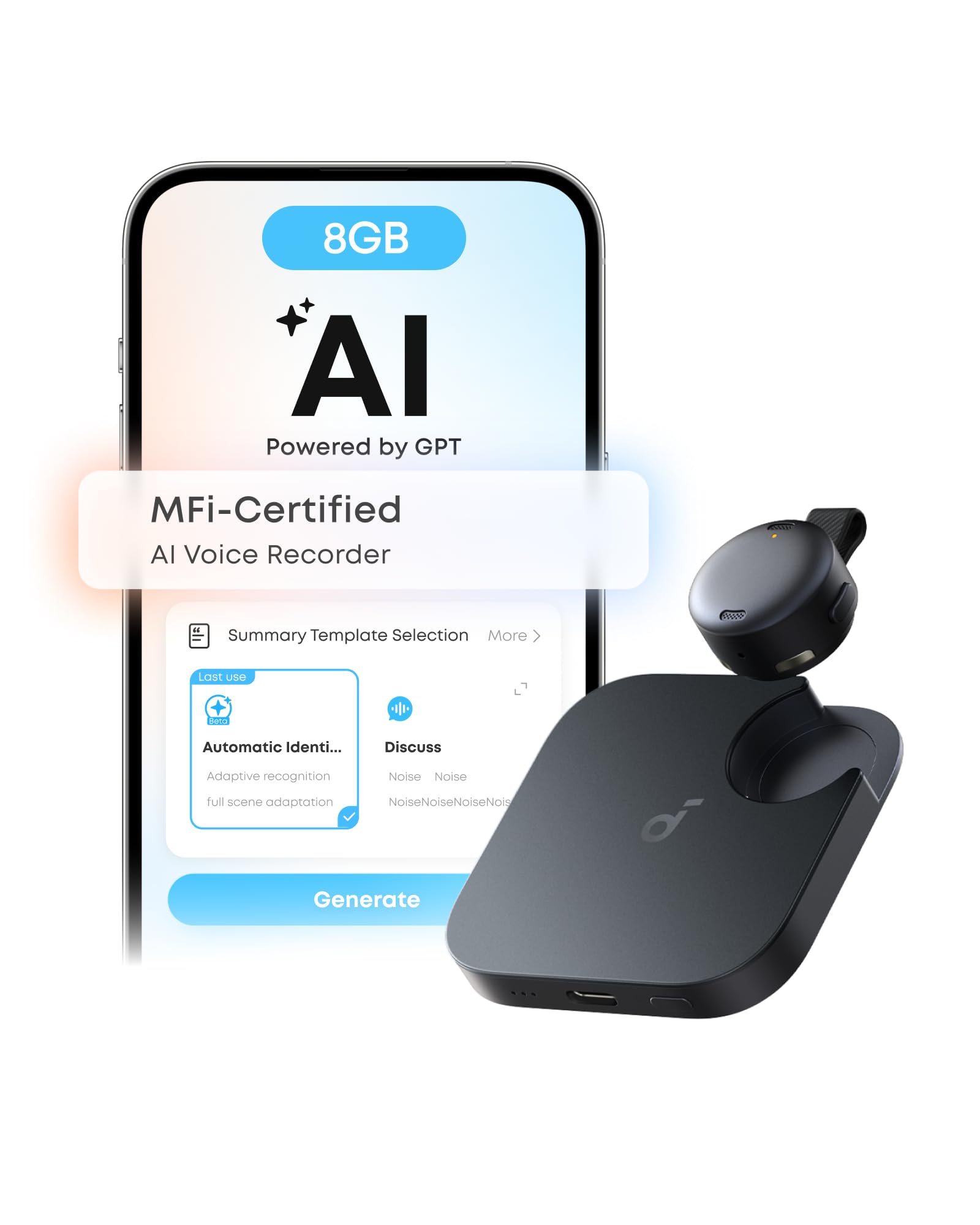
A coin-sized clip that turns a spoken meeting into structured minutes without you touching a pen.
The pitch here is size. soundcore Work is a lapel-sized recorder that clips to a collar, hangs from a necklace chain, or slots into a magnetic ring mount, so it disappears against most shirts. Press once to record, double-tap to mark a key moment, and the soundcore app assembles the meeting summary — key points, decisions, and follow-ups — from the recording. It is certified MFi (Made for iPhone) with an Apple-authorized chipset, and the listing notes Android compatibility as well, with a caveat that iPhone 7 and earlier models are not supported.
The AI side quotes 97% transcription accuracy and speaker identification across 150+ languages, which matters if you sit in mixed-language calls. The box includes 300 free transcription minutes a month, and a Pro or Unlimited plan sits above that if you need more. Anka, the in-app assistant, will answer questions and pull decisions from any recording, which is a real time-saver when you cannot remember the exact number someone quoted three weeks ago.
Data handling is where it makes its most serious pitch. Audio and transcripts are encrypted with AES-256, stored locally by default, and the cloud processing is temporary. The soundcore app holds SOC 2 Type I certification, and the listing cites alignment with NIST IR 8425 and compliance with EN 18031-1/-2. That does not make the cloud caps disappear, however. The devices hold around 10,000 minutes of cloud transcription on the base plan, and on units that hit that limit the app can stall on “waiting to sync” until you upgrade. Files also cannot be exported over USB, so your recordings live in the soundcore ecosystem. Owners who record heavily describe that as the main friction point, not the hardware.
Why it earns a spot: in a room full of people you are the only one not scrambling for a notebook, and the summary lands in the app minutes after the meeting ends.
What to plan for: the recording is easy, the export is not — pick your plan and decide where your files will live before you record a hundred meetings into it.
Fits you if: you take lots of meetings, want the notes, and care that the audio is encrypted and MFi-certified for iPhone.
Not for you if: you need your recordings in a portable file format you can move freely off the device.
5. OURA Ring 4 Smart Ring – Silver – Size 9

A titanium band with no screen that reads your sleep, your stress, and your recovery without a single buzz.
No screen. No vibration. That is the design brief and it is why the Oura Ring 4 works as an all-night wearable in a way that a smartwatch does not. It is built from titanium across the whole ring, charges on a small dock, and is rated water resistant for everyday wear. Oura quotes up to 8 days of battery, though the technical spec lists 5 days, and consistent reporting is closer to the 5-day figure in real life — plan to top up several times a week.
The data side is the argument. Oura tracks over 50 health metrics: sleep, activity, stress, heart health, and women’s health, with an app that syncs to iOS and Android and passes data to Apple Health, Google Health Connect, Natural Cycles, Flo, and Strava. Owners describe the sleep insight as the surprise feature — it does not just tell you how long you slept, it surfaces patterns and explains them in plain sentences. among the most common stories is people who could not explain their own sluggishness until the ring showed them the trend. Sizing is a genuine gotcha: Oura uses its own ring size chart, so order the sizing kit first or you will return it.
The membership is the elephant in the room. The first month is included for new members, then a monthly subscription open up the full set of scores and features — the basic data works without it, but the app makes its case on the paid tier. Battery longevity is the other fair caveat: a few buyers report degradation inside the first year, and out-of-warranty replacement is expensive. Weigh those against a device that slips on like jewelry and is forgotten entirely by lunchtime.
Where it earns its keep
- Forget you are wearing it — titanium is light, comfortable, and completely silent.
- Understand your sleep in sentences — 50+ tracked metrics distilled into patterns and explanations rather than numbers alone.
- Sync with the apps you already use — Apple Health, Google Health Connect, Natural Cycles, Flo, and Strava are listed as supported.
- HSA/FSA eligible — the ring and chargers qualify for health savings spending, per the listing.
The honest trade-offs
- A monthly membership sits on top of the ring purchase if you want the full feature set.
- A small number of owners mention the battery weakening toward the end of the first year.
- You need Oura’s own sizing kit before ordering — standard ring sizes do not translate.
A strong match if: you want sleep and recovery insight without a screen on your face all day.
A weaker match if: you want a device with no membership fee or you want to see live heart rate on a display.
6. Meta Ray-Ban (Gen 2), Skyler AI Glasses

Photograph what you are looking at without lifting a hand, then let the glasses read the menu to you.
Ray-Ban Meta glasses solve a specific problem: the moment is happening at eye level and your phone is in your pocket. A side button takes the photo or video, a long press and the “Hey Meta” voice prompt handles the rest, and the directional speakers above your ears keep the audio to yourself. The Skyler frame is the slimmer cut in the line, and owners repeatedly single out the appearance and build quality as the reason they actually wear these daily.
The full feature list includes hands-free calls and texts, live translation between languages at roughly a second or two of lag, and music playback through the frame. Prescription lenses are available through the website or local partners, and one owner had progressive lenses fitted and now wears them on dog walks in place of earbuds. The battery question is honest and worth stating clearly: some owners say the battery lasts through a long day of mixed use, others find it drains faster than expected when they lean on video capture.
The reason to slow down before buying is the durability record. A few owners have seen a speaker stop working or a screw work loose from an arm, and in those cases repair can be awkward — the frame is not something your local optician can open up. The camera is also mounted on the frame rather than on a gimbal, so if your shoot involves a lot of head movement or your hair, expect wobblier footage than a phone would give you. That said, for daily stills, quick videos, and answering a call without fishing out your phone, nothing else here feels this natural on your face.
What makes them worth the price of entry: you look like you are wearing normal glasses, and you get a camera, speakers, a microphone, and a translation tool without a single extra device in your bag.
Where they stop short: these are not action cameras — treat the footage as memory-keeping, not content creation.
Pick these if: you want eye-level photos, hands-free calls, and live translation in something you would wear anyway.
Leave them if: you need rugged video capture or you want a device that survives heavy daily handling without a repair visit.
7. XREAL 1S AR Glasses

A cinema that fits in your bag and plugs straight into your phone, handheld, or laptop.
XREAL 1S is not trying to be a headset you live inside. It is a pair of glasses with a projected OLED display in each lens, showing you a virtual screen that runs up to 500 inches according to the maker’s claim, powered by the company’s own X1 chip. A 120Hz refresh rate keeps motion smooth, and a 52° field of view puts you inside a wide picture. A native 3DoF mode (three degrees of freedom — the screen stays put when you turn your head) works without any app, as long as you have a USB-C port that outputs DisplayPort video.
Sharpness and color are routinely called excellent, and text stays legible at low sizes for people used to reading glasses. But the perceived screen size is closer to a 27-inch monitor at a meter than a true 500-inch cinema wall — impressive, just not magical. Comfort is the other honest note: it is generally fine for a movie or roughly an hour of focus, but the nose weight starts to tell on long work sessions, and the wayfarer frame shape lets side light in when you face a bright window.
It shines in travel and hands-off media. On a plane, in a hotel room, or on the sofa with a Steam Deck or ROG Ally, it turns any USB-C device into a private big screen and leaves the room dark for everyone else. The REAL 3D mode converts 2D sources into a 3D look at a button press. The catch is the rigour of setup: no built-in diopter correction means prescription inserts if your eyes need them, and the glasses are powered by the host device, so your phone battery takes the hit while you watch. Everything you need to know is in if you want a screen you wear, not a headset you mount.
Where it delivers: a genuinely portable big picture for movies, games, and handhelds, with zero fuss when you plug in a compatible USB-C device.
What to expect in return: a modest field of view, nose fatigue after an hour or so, and your host device battery paying the bill.
Suits you if: you travel or game on the move and want a private screen bigger than any tablet you can pack.
Think hard if: you want a workday-long monitor replacement or a headset with room-scale movement tracking.
8. XREAL One Pro AR Glasses

The bigger, brighter, pricier sibling of the 1S — built to replace a monitor, not just entertain you on a plane.
Where the 1S stops at 52°, the One Pro stretches to a 57° field of view — the widest in the XREAL lineup — and pulls its picture from a Sony 0.55-inch Micro-OLED panel at 120Hz. The claimed viewing result is a 171-inch screen from four meters away. Brightness reaches 700 nits, which matters on a sunny terrace or by a bright window; electrochromic dimming lets you change the tint of the lenses on the spot so you can block the world out or stay aware of it. Bose-tuned sound carries through an open-ear design, so you do not need headphones for most viewing.
Fit is the upgrade that actually matters day to day. The One Pro ships in two widths — M for 57–66mm IPD (interpupillary distance, the gap between your pupils) and L for 66–75mm — and covers over 95% of users with three nose pad sizes, three tilt levels, and adjustable arms. That is the difference between an hour of viewing and a full workday. Owners who use them for productivity report clear text at high zoom, stable 3DoF anchoring, and plug-and-play with MacBooks and iPhones through the right USB-C cable. The sound system is decent enough that a call is not a compromise.
The honest downside is heat and battery. These glasses run warm on long sessions — some customers note a visible warm-up around the arms after several hours — and everything is powered by the host device, so your phone or laptop battery drains faster while you watch. PC compatibility is narrower than the marketing suggests, since you need a USB-C port that actually outputs video. REAL 3D converts content on the fly and looks genuinely rich for games, but it adds a little softness to the picture. For travel, gaming, and long viewing sessions, the wider view and brighter panel make the One Pro the more capable of the two XREAL picks.
What puts it above the smaller model
- A noticeably wider picture — 57° field of view versus 52° on the 1S — for a more cinema-like wall of image.
- A brighter display — 700 nits keeps the picture readable in daylight where lesser panels wash out.
- Two width options plus three nose pads — over 95% of users are covered by the fit range.
- Bose-tuned open-ear audio means calls and movies without extra headphones.
The honest catches
- Runs warm on long sessions, and the heat shows up around the arms.
- Drains your host device battery — there is no internal battery in the frame.
- Needs a USB-C port with video output; plenty of laptops and phones do not qualify.
- REAL 3D adds a little softness compared to the flat 2D picture.
Best for: anyone who wants the widest, brightest virtual screen XREAL makes for gaming, streaming, and long viewing sessions.
Look elsewhere if: you need an internal battery, long-session cool running, or a compatible port you do not already have.
Know the Specs
Recording hours vs. standby days
The published battery number on a capture wearable is almost always one of two things: continuous recording time (how long the microphone runs before it needs a charge) or standby time (how long the device sits idle before a top-up). A pin that lists 20 hours of recording is telling you something very different from a ring that lists several days of battery life. Look for the word “recording” or “standby” beside the number and match it to how you plan to use the device. If you record all day, you want the recording figure. If you wear it and only occasionally record, the standby figure is the one that matters.
Onboard storage vs. cloud transcription
Onboard storage (measured in gigabytes) decides how much audio the device can capture without a connection. Cloud transcription minutes decide how much of that audio the service will convert to text. Most AI capture wearables include a free monthly minute allowance and let you buy a larger plan. Some also cap how much audio sits in the cloud before the app starts stalling on sync. Before you commit to a device, read the plan details and understand if you need to export your audio later — and whether the device lets you.
Field of view (FOV)
Field of view is the angle of the image a pair of AR glasses projects in front of your eyes, measured in degrees. A wider FOV feels more like sitting in a cinema; a narrower FOV feels more like looking through a window. The XREAL One Pro’s 57° and the XREAL 1S’s 52° sit on the wider side for consumer glasses. A wider field of view only pays off if the frame stays comfortable for an hour or a full workday.
IP ratings explained
An IP (Ingress Protection) rating is a two-digit code telling you how well a device resists dust and water. The first digit covers solids and the second covers liquids. A device rated IP54, like the GetD AI Glasses, handles splashes and light rain — not swimming, not a shower. A device rated water resistant without a specific IP number is telling you less. Match the rating to where you plan to wear the device, and be cautious about wearing anything without a stated IP rating into a wet situation.
Common Questions
Will an AI voice recorder still catch the audio if my phone is in my pocket?
Do I need a subscription to use a wearable AI recorder?
Can an AI ring track live heart rate during a workout?
What kind of phone or device do AR glasses need to work?
Are AI glasses safe to wear with a prescription?
How long should a wearable AI device last before it needs replacing?
Is the soundcore Work compatible with Android and iPhone?
How does the Oura Ring 4 battery life compare to the Fitbit Inspire 3?
Do the Ray-Ban Meta glasses work for live translation without Wi-Fi?
Is the XREAL 1S water resistant?
The Bottom Line
For most people who search for the best ai wearables, the one that actually changes how the day goes is the Plaud NotePin S. It captures what was said, turns it into structured notes, and wears four different ways so it fits whatever you have on. The 64GB of onboard storage does the real work here — you record without a signal, and the summaries catch up later. If you want a screen-free ring that explains your sleep instead of a transcript of your meetings, the Oura Ring 4 is the more quietly useful pick. And for anyone who wants a big private screen without buying a headset, the XREAL One Pro delivers the widest view of the two AR pairs here.
One reasonable nudge before you buy: the category rewards a focused purchase. If you most often need captured notes, start there. If you most often need to understand your sleep, start there. A recorder you clip on for every meeting beats a gadget you pull out once a month.
How we choose
We do not accept paid placement. Every pick is matched to a real buyer and a real use-case; we do not hands-on test units.
Sources
Specifications: manufacturer listings and product documentation. Review insights: verified customer reviews, as of October 2026. Pricing: not shown on this page (it changes often); check the current price via the retailer link.
As an Amazon Associate, Aappliancez earns from qualifying purchases. This does not affect which products we feature.