Disclosure: Some links in this post are affiliate links. As an Amazon Associate I earn from qualifying purchases, at no extra cost to you. Learn more
Specs are compiled from manufacturer listings and verified buyer reviews and can change over time — please confirm the key details on the product page before buying.
If you want smooth, detail-heavy prints with almost no visible layer lines, a resin printer is the tool — and the ANYCUBIC Photon Mono 4 is where most people should start. It pairs a 7-inch 10K mono LCD with a 17 µm pixel and enough build volume for miniatures, jewelry masters, and small functional parts. The rest of this list covers the machines that beat it on speed, print size, or enclosure, so you can match one to how you actually print.
This guide is built by comparing the manufacturers’ published specifications and the patterns across verified customer reviews, so you get each pick’s real strengths and trade-offs instead of marketing spin.
Resin printing rewards the buyer who checks pixel size, build volume, and ventilation before checkout, not the one who chases the biggest number on the box. Below, every pick is matched to a real workflow, with the honest catch spelled out so you can choose the acrylic 3d printer that fits your bench, your resin, and your patience.
Top Picks


How To Choose The Best Acrylic 3D Printer
The first decision is resin versus filament, and for acrylic-style parts — clear-looking display pieces, smooth miniatures, jewelry masters — resin usually wins because it cures into a hard, glossy surface with almost no visible layer lines. Filament printers (FDM) extrude melted plastic in visible passes. Resin printers cure liquid photopolymer against a light screen, so the surface comes out smooth.
Pixel size is the number that decides detail
Every resin printer has an XY resolution, written as a micron figure like 17 µm or 22 µm. That is the width of one pixel on the light screen, so a smaller number means finer detail. A 17 µm pixel holds tiny features like eyelashes on a miniature; a 35 µm pixel smears them. This is the single spec serious buyers check first, and it matters more than the marketing “4K” or “10K” label alone.
Build volume sets what fits in one print
Print volume is quoted in millimeters or inches, and it caps the largest single-piece model you can make. A small vat around 153 x 87 x 165 mm suits miniatures and jewelry. A larger plate like 300 x 300 x 400 mm lets you print helmets, prop parts, or a whole diorama in one go. Measure the tallest thing you actually plan to print before you commit.
Leveling and sensors cut failed prints
Manual leveling means adjusting the build plate against the screen by hand until the gap is even — a fiddly job that beginners often get wrong. Auto-leveling does that for you. A mechanical sensor watches for low resin, foreign objects, or overheating, and it pauses the job before the screen takes damage. Those features are worth having if you print unattended.
Ventilation is not optional
Resin gives off odor and VOCs (volatile organic compounds — the fumes you smell). Plan for an open window, a garage, or a vented tent, and wear gloves when handling uncured resin. Any spill that reaches the LCD screen can damage it, so keep the vat sealed and the work area clean.
Side-by-Side Comparison
| Model | Best For | XY Resolution | Build Volume | Print Tech | Amazon |
|---|---|---|---|---|---|
| ANYCUBIC Photon Mono 4★ Best Overall | Most buyers starting in resin | 17 x 17 µm | 153.4 x 87 x 165 mm | Resin (MSLA) | Amazon |
| Creality Ender 3 V3 SEBudget Filament Pick | Large filament prints on a budget | — | 220 x 220 x 250 mm | Filament (FDM) | Amazon |
| Entina Tina2CKid-Friendly Starter | Kids and total beginners | — | 3.9 x 3.9 x 3.9 in | Filament (FDM) | Amazon |
| ELEGOO Mars 5 | Sensor-protected resin printing | 35 x 35 µm | — | Resin (MSLA) | Amazon |
| Longer LK5 Pro | Big filament builds | — | 300 x 300 x 400 mm | Filament (FDM) | Amazon |
| phrozen Sonic Mini 8K S | Fine detail miniatures | 22 µm | 16.5 x 7.2 x 17 cm | Resin (MSLA) | Amazon |
| FLASHFORGE Adventurer 5M Pro | Enclosed, filtered filament work | — | 220 x 220 x 220 mm | Filament (FDM) | Amazon |
| Bambu Lab A1 Combo | Multi-color prints with minimal setup | — | — | Filament (FDM) | Amazon |
| ELEGOO Saturn 4 Ultra 16K | Big, fast, high-detail resin work | — | — | Resin (MSLA) | Amazon |
Detailed Reviews
1. ANYCUBIC Photon Mono 4
Our pick — 4.0+★ from 500+ verified ratings; the strongest balance of quality and price.
The compact resin workhorse that turns out miniature-grade detail without a big-bench commitment.
The defining number here is a 17 x 17 µm pixel on a 9024 x 5120 screen — that is the width of a single pixel on the light panel, and a smaller pixel means sharper edges on the smallest features. On a miniature’s face, that shows up as crisp eye sockets and clean armor trim instead of a soft smear. The 7-inch 10K mono LCD backs it up, and Anycubic claims a 105% increase in print precision compared with the Mono 2 — a manufacturer figure, worth weighing against the spec rather than as independent proof.
What wins people over is the fuss-free start. The 4-point leveling method means you tighten four screws once and are done — no repeat leveling before every job. The laser-engraved build plate grabs the first layer to reduce lifting and warping, and the printer resumes after a power cut so a long overnight job does not die with the lights. Owners describe the kit as easy to clean and disassemble, with resin cleanup manageable using rubber gloves. One practical warning from the field: spilled resin can severely damage the printer, so keep it out of the screen area.
Weigh it against the Ender 3 V3 SE and the size math is stark. This printer weighs 7.7 pounds versus the Creality’s 15.43 pounds, and it measures 10 x 10 x 15 inches versus 17.8 x 16.93 x 20.47 inches — a much smaller footprint for a bench or shelf. The trade-off is the vat. Some resin tanks are prone to breaking over time, and a leak can mean an LCD replacement, so budget for a spare vat and treat it gently. The build volume of roughly 153 x 87 x 165 mm also runs smaller than some first-timers expect, which limits chunky one-piece models.
Where the Mono 4 pulls ahead
- 17 x 17 µm pixel on a 7-inch 10K mono screen for fine detail
- One-and-done 4-point leveling — set the screws, stop fussing
- Power-loss resume protects long jobs
- Small, light chassis at 7.7 pounds that fits a tight bench
What to plan for
- Resin vats can crack; a leak risks the LCD screen
- Smaller build volume than the headline suggests
- No Anycubic app support on this model
Straight answer: This is the pick for a first resin printer where detail matters and bench space is tight.
Think twice if: you need to print large one-piece models, since the vat tops out around 153 x 87 x 165 mm.
2. Creality Ender 3 V3 SE
A filament starter that hits 250 mm/s and keeps the upgrade path wide open.
If your “acrylic” dream is really a large, hard plastic part rather than a glossy resin miniature, filament is the cheaper road — and the Ender 3 V3 SE runs at up to 250 mm/s with 2500 mm/s² acceleration, so big jobs finish in a reasonable window. The CR Touch handles auto leveling and a strain sensor sets the Z offset, which is the height where the nozzle meets the plate. Getting a clean first layer is the part that trips up most beginners, and this machine does most of that work for you. Assembly takes about three steps in roughly 20 minutes.
The “Sprite” direct extruder feeds PLA, PETG, and TPU, and Creality says over 500,000 units have shipped — a maturity signal rather than a quality guarantee. A dual Z-axis with a timing belt and two 8 mm steel shafts on the Y-axis holds the platform steady, and the 32-bit silent mainboard keeps the noise down. The PC spring steel plate flexes to pop prints off, and auto filament load and unload saves your fingers. The bed it has to survive is here literally bigger than the resin options above: this is a 15.43-pound, 17.8 x 16.93 x 20.47-inch machine compared with the Mono 4’s 7.7 pounds and 10 x 10 x 15 inches, so clear a real table for it.
What buyers flag most is setup precision. Roller tension and belt tension have to be right or the printer wobbles and print quality drifts, and the bed can cup in the center after a while, which a glass bed upgrade fixes. A PTFE tube coupler can let the tube back out and jam the hot end, and one buyer’s long dragon print clogged the nozzle three times over roughly 15 hours before failing at 70%. Those are tuning problems, not fatal ones, and the fix is usually a better tube and a fresh bed surface.
Bench reality: The 220 x 220 x 250 mm volume and 250 mm/s ceiling make this the value filament pick for furniture-sized parts — the trade is that you must learn bed leveling and roller tension before results settle.
The honest caveat: Expect to spend an afternoon calibrating and to budget for a glass bed if your plate cups.
Reach for this if: you want size and speed on a budget and don’t mind learning the machine.
Look elsewhere if: you want a plug-in-and-print experience with zero tuning.
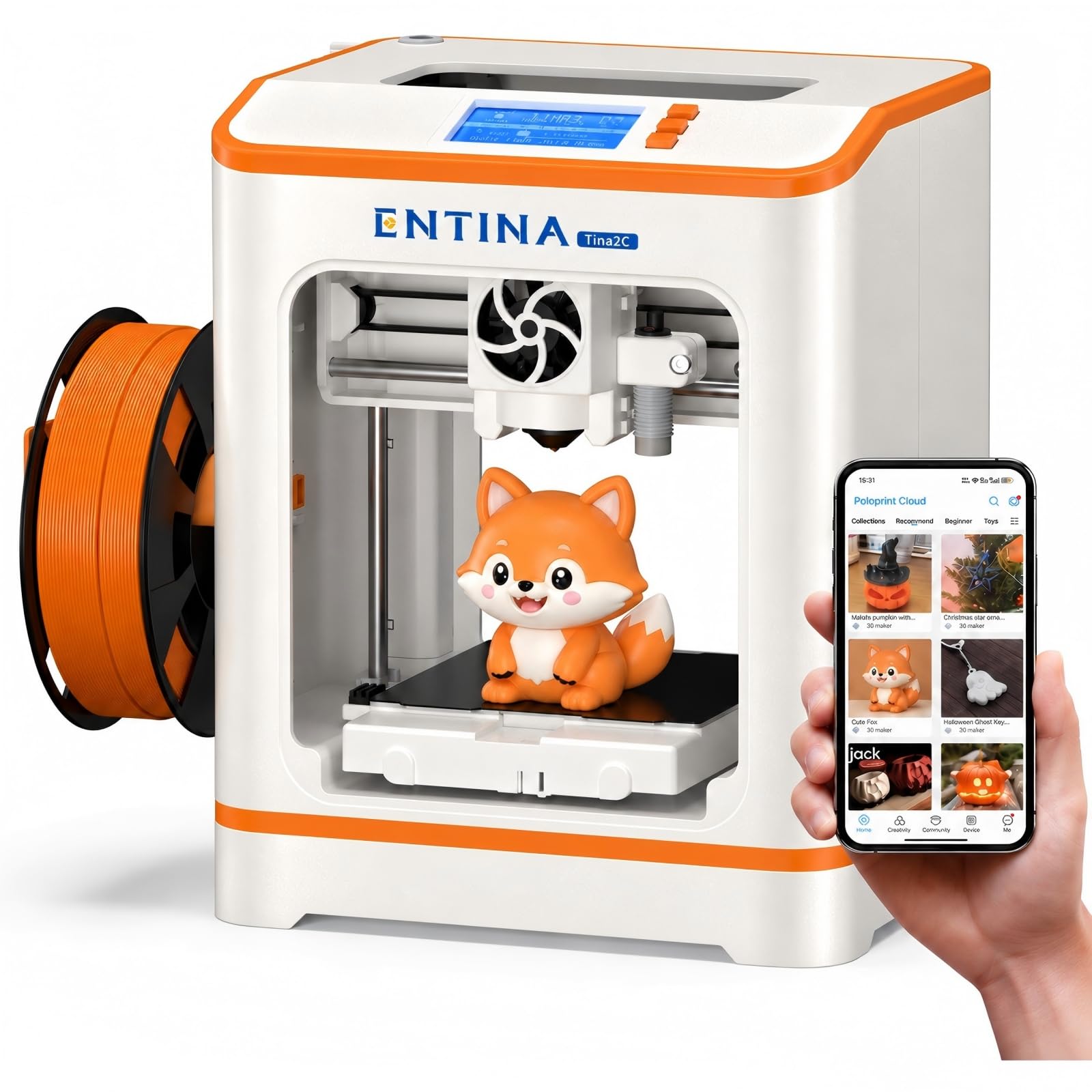
3. Entina Tina2C
The printer a ten-year-old can run solo — setup in minutes, prints small enough to finish fast.
Most filament printers arrive in pieces and want an afternoon of assembly. This one comes fully assembled and is designed so a first print lands in as fast as 8 minutes, guided step by step through the Poloprint Cloud app. The build volume is 3.9 x 3.9 x 3.9 inches, which is small on purpose — a fidget-sized print finishes in a session, so a kid sees a result before losing interest. It supports 2.4G WiFi printing and a TF card offline mode, so you can print from the app or slice elsewhere and load a card.
Auto-leveling removes the fiddliest chore for a newcomer, and power-loss recovery picks a job back up after an interruption instead of scrapping it. The flexible magnetic plate bends to release a model, the nozzle is designed to self-clean, and the quick-swap printhead means a jam does not end the printer’s life. The body has rounded edges and low-noise operation, with LED lighting so you can watch progress without a harsh glare. It works with Windows, macOS, Linux, and Chromebook, and with Cura and Simplify3D for more control.
The recurring gripe is consistency — some prints come out a little wobbly, and one frustrated buyer hit a filament break inside the machine and gave up. That fits the machine’s job: it is a teaching tool for small decorative prints, not a production unit. The Poloprint Cloud library and 25+ creative modules keep the first weeks busy, and the STEM courses give a younger user a path to follow.
Built for: a child’s first printer or a family that wants a working print on day one without tools.
Not the tool for: anything larger than a 3.9-inch cube or a job that needs tight dimensional accuracy.
4. ELEGOO Mars 5 MSLA Resin 3D Printer, Smart Mechanical Sensor

A resin printer that watches its own tank so you don’t wreck the screen.
The feature that earns this one a slot is the built-in intelligent mechanical sensor. It detects low resin, foreign objects, a release film that needs replacing, and overheating — then it flags the problem before your LCD takes damage. Resin is expensive and a screen replacement is the worst repair on a resin machine, so that sensor is real protection, not a marketing line. Auto-leveling sits on top: a built-in sensor and spring do the leveling for you, so you can unpack, power on, and start.
Detail comes from a 6.6-inch 4K monochrome LCD with 4098 x 2560 pixel resolution and 35 x 35 µm XY resolution — a larger pixel than the Photon Mono 4’s 17 µm, so this one is a step behind on pure micro-detail. It makes up ground with a COB light source at 92% light uniformity for even surface finish, and it prints at up to 70 mm/h. Cooling fans and copper tubes hold the temperature steady, and the design adds adjustable foot pads, one-touch build plate locking, a replaceable tank lock, and dual chute pouring spouts for draining resin.
The honest catch is reliability. When the printer works, the prints are strong and the setup is easy; the reported misfires are things like the screen not booting or a job that cannot resume after a USB disconnect. The included Voxeldance Tango Pro license also gives you a slicer that one careful comparison called a clear step past Chitubox. Add a wash-and-cure station and the workflow gets far less messy.
Why it’s on the list: The mechanical sensor and auto-leveling remove two of the most expensive beginner mistakes in resin printing.
Fair warning: A USB that drops out mid-print stops the job with no resume — keep the drive seated.
Pick this for: resin work where you want the printer guarding itself against spill and overheat.
Skip if: 17 µm-grade fine detail is your top priority — the Mars 5’s 35 µm pixel trails there.
5. Longer LK5 Pro
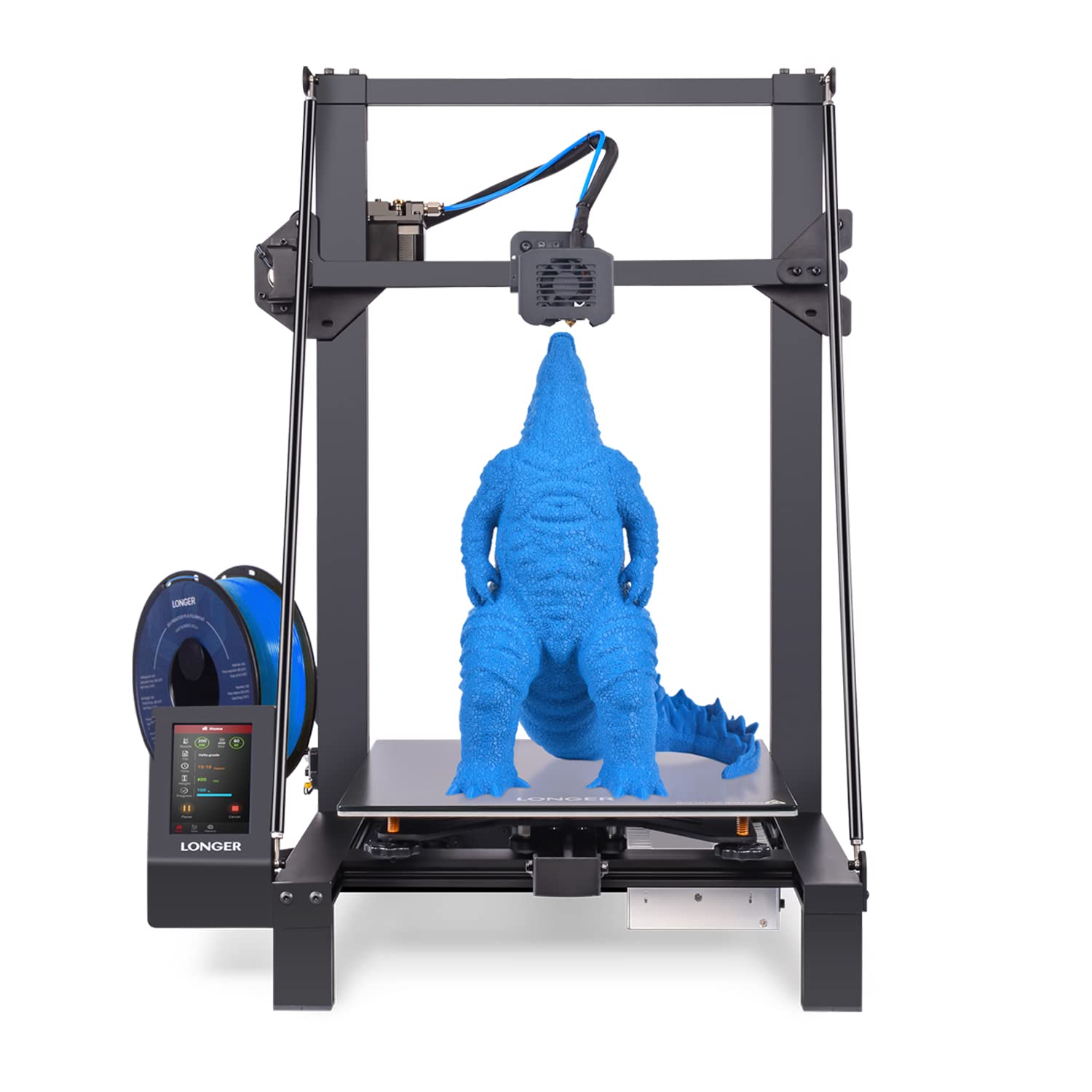
Four hundred millimeters of Z height for the parts no small printer can hold.
When the model you want is a prop helmet or a shelf-sized piece, print volume stops being a detail and becomes the whole decision. This one gives 300 x 300 x 400 mm — the tallest build here — and a diagonal-bar triangular frame that cuts vibration so a tall print stays straight. The lattice glass plate flattens the hotbed and releases models cleanly once it cools. It prints at 180 mm/s, fast for its size.
It arrives 90% pre-assembled, which is the practical reason beginners gravitate to it. Filament and power sensors pause a job when the spool runs dry or the power drops, then resume from the last position — a real save on a print that runs many hours. The TMC2209 silent driver keeps motor whine low, and open-source firmware lets you edit the G-code. Dual Z-axis support comes with the upgrade kit, which eases leveling and steadies tall jobs.
What buyers praise most is how much machine you get for the size: easy assembly, a huge print area, and a workable result straight after calibration. Set expectations on speed — experienced owners call the motion slow and the design dated, and manual leveling takes about five minutes and is awkward until you get the hang of it. The glass plate also loses its grip over time, so a glue stick or raft becomes part of the routine.
What the big deck buys you
- 300 x 300 x 400 mm — the largest build in this lineup
- Filament and power-failure resume for long jobs
- 90% pre-assembled with labeled hardware
- Touchscreen control and silent TMC2209 driver
Where it feels its age
- Slower motion than newer filament machines
- Manual leveling is fiddly and takes minutes
- Glass plate grip fades; expect glue or rafts
Best matched to: makers who need one big solid part and value build size over speed.
Pass on it if: you print small, fast, and often — the motion speed will feel dated.
6. phrozen Sonic Mini 8K S

A tabletop resin machine tuned for figures and action models where every edge counts.
Precision is the pitch. The 8K mono LCD pairs with a 22 µm XY resolution — the size of one pixel — which sits between the Photon Mono 4’s 17 µm and the Mars 5’s 35 µm, so it lands in the sweet range for detailed toys and appliance parts. The printing volume runs 16.5 x 7.2 x 17 cm, small enough to keep on a desk, with a quoted load capacity of up to 22 lbs. Open-source support means you can slice in Lychee, Chitubox, or Tango, and precise Z-axis calibration keeps layers even.
Reliability is what keeps owners loyal: it works right from the start, and the build-quality complaints are few and mostly cosmetic. One owner’s scraper arrived bent and scratched the build plate during a first removal, and Phrozen sorted it out after photos and proof of purchase. The recurring practical note is the USB-only file transfer — you must load designs on a stick, and some drives fit poorly or won’t read, so use the one bundled with the printer.
The touchscreen is the soft spot. A few units freeze and need a power cycle, and one frustrated owner saw slow cure times that never fully resolved. That’s an outlier against the broader pattern of steady, reliable service, but it’s worth knowing before you commit a paid client job to one machine on a deadline. For miniatures and jewelry prototypes with a backup plan, the detail reward is real.
Worth it for: figure painters and jewelry makers who need 22 µm clarity in a footprint that fits a desk.
Consider a second option if: you need USB-free file transfer or print under hard client deadlines.
7. FLASHFORGE Adventurer 5M Pro

A closed, filtered filament printer built for a home office where smell and noise matter.
The enclosed chamber is the reason to buy this one. A fully enclosed body with a dual filtration system keeps dust off the print and quiets the machine to under 50 dB, which matters if it lives near a desk or a classroom. The all-metal CoreXY frame hits speeds up to 600 mm/s with 20,000 mm/s² acceleration, and vibration compensation cuts ghosting and ringing so the finish stays smooth at speed. A 280°C extruder and 110°C heated bed open up engineering materials like ABS, ASA, and PETG-CF alongside PLA and PETG.
Setup is genuinely quick — around 10 to 15 minutes in most accounts — and one-click full auto-leveling gets a clean first layer without hand work. The nozzle swaps in about 3 seconds with no tools, and you can choose between 0.25, 0.4, 0.6, and 0.8 mm sizes. A built-in camera gives live monitoring and time-lapse video, and Flash Studio pushes status alerts to your phone. The 220 x 220 x 220 mm build volume is the sensible middle ground between the Tina2C’s tiny cube and the LK5 Pro’s big deck.
The catch is the software road and the mechanical risk. The setup path wants the FlashMaker app with an account plus FlashPrint 5 or Orca on desktop, and owners have hit installer trouble on newer macOS. A harder complaint is the extruder head crashing into the plate and snapping it, which is costly when it happens. Weigh those against the enclosure, the filtration, and the speed, and this is a strong pick for fume-sensitive rooms.
The core case: An enclosed, filtered, under-50 dB build that handles ABS and ASA at 600 mm/s without a separate enclosure purchase.
The trade-off: Software setup can fight you, and the auto-leveling can scrub the PEI plate on a bad run.
Fits best in: a home office or classroom where you need fume control and quiet running.
Less ideal if: you want zero software friction or print at maximum detail on a first machine.
8. Bambu Lab A1 Combo

The multi-color machine that makes four-filament prints feel like one-tap work.
Colors are the hook. The bundled AMS lite holds multiple spools and swaps between them automatically, so a model with four colors prints without you standing over it. That is the feature most filament printers still charge an upgrade for. Speed is a serious second: 10,000 mm/s² acceleration is a big jump over the Ender 3 V3 SE’s 2500 mm/s², and active flow rate compensation adjusts extrusion on the fly for smoother surfaces. Full-auto calibration handles Z offset and bed leveling with no hand tuning.
The LED Lamp Kit is a nice add-on for functional projects — print a lamp shade design and drop in the included light to make a working piece. The 1-clip quick-swap nozzle makes maintenance a one-hand job, and active motor noise canceling keeps it quiet enough to sit in a room and work. WiFi plus the phone app let you browse community models and start a print from the couch. One owner printed alongside a 7-year-old using Bambu Studio to resize and add text — the app path is what makes it approachable.
The recurring gripes are the flip side of that convenience. The AMS lite needs adapters for some spool brands, takes up real space beside the printer, and multi-color jobs run slower than single-color ones. Instructions are mixed — clear for assembly, thin on operation — and some units clog or throw feeder errors. High-precision parts also loosen with hundreds of hours of use, so a periodic bed clean, cold pull, and re-tighten is part of ownership.
Choose this when: multi-color models and near plug-and-play setup are worth the extra bench space the AMS lite takes.
Choose the Ender 3 V3 SE instead if: you want single-color prints and a wider upgrade path for less outlay.
9. ELEGOO Saturn 4 Ultra 16K Resin 3D Printer

The heated-vat, tilting-vat resin machine for big models printed fast.
Two features separate this from every other resin printer here. A smart tank heating system holds the resin at 30 °C, which keeps it fluid and helps layers bond, cutting bubbles and layer separation in a cold basement or garage. A tilt-release mechanism peels models off the film with speed, and the printer runs at up to 150 mm/h — four times the Mars 5’s quoted 70 mm/h. A 16K LCD captures fine surface texture, and auto-leveling means a click, not a screwdriver.
The AI camera adds real-time monitoring and alerts for an empty plate or a warped model, with a chamber light so you can check progress at midnight and a time-lapse feature for sharing builds. A mechanical sensor watches for resin residue to protect the LCD, and alarms fire on low resin or a leveling failure. The tilt vat also eased support placement for owners moving up from older Saturn models, letting them print small parts on light supports instead of heavy ones.
Expect to use the warranty. Print quality draws consistent praise, but build quality has let owners down — electronics failing inside two weeks, a screen self-check error, a tank that stopped being recognized, and units that quit within a couple of months. The flip side is that ELEGOO support has a strong record of sending parts and walking owners through fixes, even past a year. Plan for a vented space and a backup plan for big jobs.
The engineering wins
- Heated tank at 30 °C for steadier layers in a cold room
- Tilt release at up to 150 mm/h — the fastest resin speed here
- AI camera with chamber light and time-lapse
- Auto-leveling and a mechanical residue sensor guarding the LCD
The upkeep reality
- Build quality has a shaky record — electronics and screens can fail early
- Software can crash or stall on STL import
- Large models succeed only part of the time without careful supports
Suited to: experienced resin printers chasing big, fast, high-detail output with customer support behind them.
Risky for: a first machine on a deadline — the failure odds are real.
Know the Specs
XY Resolution (µm)
This is the size of one pixel on the light screen, measured in microns — a micron is one-thousandth of a millimeter. A smaller number means a finer line the printer can hold, so 17 µm captures eyelashes and sharp trim while 35 µm softens them. Resin printers quote this most often, and it is the quickest way to compare detail between two models.
Build Volume (mm)
Build volume is the box of space a model can occupy — width, depth, and height. A 300 x 300 x 400 mm deck prints a prop helmet in one piece; a 153 x 87 x 165 mm vat is for miniatures and jewelry. Measure your largest planned model before choosing, since no amount of resolution makes up for a part that physically will not fit.
Print Speed (mm/s or mm/h)
Filament printers quote speed in millimeters per second of head travel; resin printers quote millimeters per hour of build height. A 250 mm/s filament machine finishes big parts faster than a 180 mm/s one, and a 150 mm/h resin printer beats a 70 mm/h model on tall jobs. Higher speed almost always raises the tuning effort.
Auto Leveling and Sensors
Leveling sets the gap between plate and screen or nozzle so the first layer sticks evenly. Manual leveling is a hands-on chore; auto-leveling uses a sensor to set it for you. Mechanical sensors also detect low resin, foreign objects, and overheating — the failures that most often ruin a job or damage an LCD.
Common Questions
Can a resin printer make clear acrylic-looking parts?
Do I need gloves and ventilation for resin printing?
Is 17 µm or 22 µm resolution better for miniatures?
Can I print a large prop helmet on these machines?
How often do I need to level the bed?
What happens if the resin tank leaks onto the screen?
Does filament or resin give a smoother surface?
Can the Bambu A1 print in more than one color at once?
Is an enclosed printer better for a home office?
What should I budget for besides the printer?
The Bottom Line
The strongest choice for most buyers is the ANYCUBIC Photon Mono 4 — a 17 µm pixel on a 7-inch 10K mono screen gives the finest detail here, and the 4-point one-and-done leveling makes a first resin print painless. It holds a 4.0+ out of 5 rating, and the small vat and steady output back that up.
If you want bigger prints in filament instead, reach for the Creality Ender 3 V3 SE for large parts at 250 mm/s, or the Longer LK5 Pro when 300 x 300 x 400 mm of space is the whole point. And for multi-color filament work with minimal tuning, the Bambu Lab A1 Combo brings the AMS lite and full-auto calibration to a home bench.
My honest nudge: buy the printer whose resolution and build volume match the models you actually plan to make, not the loudest spec sheet. The Photon Mono 4 covers more first-time resin buyers than any other pick here.
How we choose
We do not accept paid placement. Every pick is matched to a real buyer and a real use-case; we do not hands-on test units.
Sources
Specifications: manufacturer listings and product documentation. Review insights: verified customer reviews, as of October 2026. Pricing: not shown on this page (it changes often); check the current price via the retailer link.
As an Amazon Associate, Aappliancez earns from qualifying purchases. This does not affect which products we feature.