Disclosure: Some links in this post are affiliate links. As an Amazon Associate I earn from qualifying purchases, at no extra cost to you. Learn more
Specs are compiled from manufacturer listings and verified buyer reviews and can change over time — please confirm the key details on the product page before buying.
A 65W USB-C charger is the one brick that can top up your laptop, your phone, and your earbuds from a single wall outlet. The trick is picking one that actually holds up under daily use — not one that gets scalding hot or quits after a few months of juggling a tablet and a phone on the same port. This guide narrows the field to four bricks that earn their place in your bag.
This guide is built by comparing the manufacturers’ published specifications and the patterns across verified customer reviews, so you get each pick’s real strengths and trade-offs instead of marketing spin.
Port count matters more than wattage bragging rights once you start charging a laptop and a phone at the same time. Here is what separates a dependable 65w usb-c charger from a drawer full of dead bricks.
Top Picks
How To Choose The Best 65W USB-C Charger
A 65W rating tells you how fast one device charges. What decides whether you keep a charger in your bag or bury it in a drawer is how it splits power when you plug in a second device, how warm it runs, and whether the cable fights you every time you reach for it.
Real wattage versus shared wattage
A “65W” label usually describes the maximum the brick can push to one lucky port. Plug in a laptop and a phone together and that power gets divided. Look for a charger that lists its split ratios up front — something like 45W to the laptop and 20W to the phone — so you know your laptop still charges fast while your phone tags along. Chargers with a single high-output port that drops to a trickle once the second port fills are the ones that frustrate people.
GaN versus old-school silicon
GaN (gallium nitride — a semiconductor material that wastes less energy as heat than traditional silicon) is why a 65W brick can now fit in a jacket pocket. Cooler running means no warm-brick-in-your-hand surprise and typically a longer working life. If a charger runs hot enough to notice after an hour, its internals are aging faster than they should.
Cables, retractable or not
A charger is only as good as the cable attached to it. A built-in retractable cord means one less thing to lose, but it caps how far you can sit from the outlet. A separate long cable gives you freedom to charge from across the room, at the cost of a tangle in your bag. Which one wins depends entirely on whether you charge at a desk or on the move.
Side-by-Side Comparison
| Model | Best For | Max Output | Ports | Cable Length | Amazon |
|---|---|---|---|---|---|
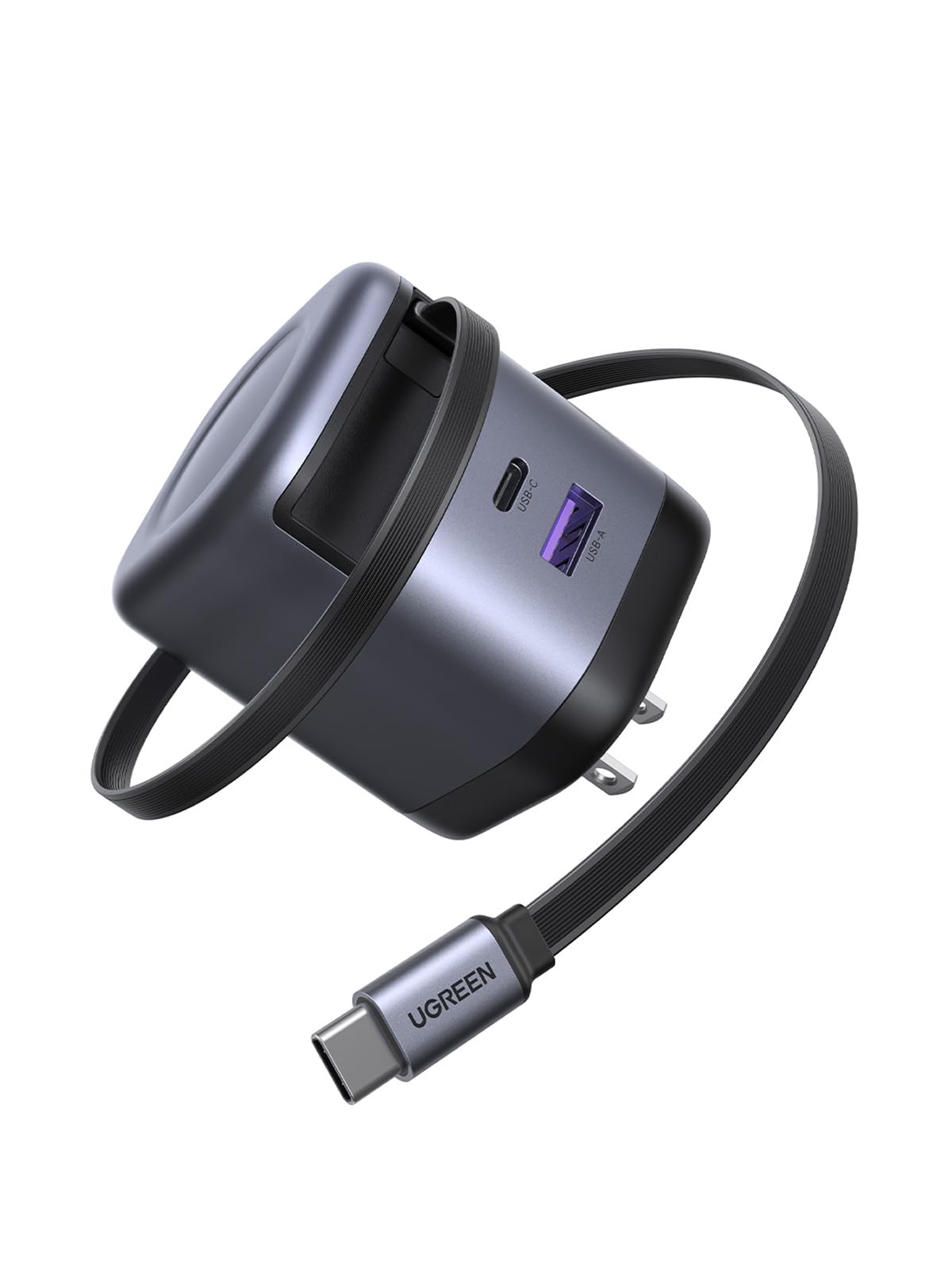
| UGREEN Nexode 65W Retractable Charger Block★ Best Overall | Desk and travel flexibility | 65W | 3 (built-in USB-C, USB-C, USB-A) | 2.3 ft built-in | Amazon |
| Lenovo USB-C 65W Wall Charger | OEM laptop replacement | 65W | 1 (USB-C) | 5.9 ft | Amazon |
| Belkin 65W Compact USB C Charger Block | Ultra-compact travel | 65W | 1 (USB-C) | — | Amazon |
| NOCO XGrid X65 65W USB-C GaN Wall Charger | Dual-device power splitting | 65W | 2 (dual USB-C) | — | Amazon |
Detailed Reviews
1. UGREEN Nexode 65W Retractable Charger Block
Our pick — 4.5+★ from 1,000+ verified ratings; the strongest balance of quality and price.
The brick that hides its own cable and still charges three things at once.
If you are tired of untangling a nest of cords every time you open your bag, the UGREEN Nexode solves that in one move. A 2.3 ft cable is built right into the block and retracts with a single push, locking at any length up to 27 inches. Nothing to lose, nothing to coil. That alone puts it ahead of the Lenovo and Belkin bricks, which both need a separate cord you have to remember to pack.
You can charge three devices at once, and the charger splits the power for you: the built-in cable carries 60W to a laptop, a USB-C port sends 20W to a phone, and a USB-A port delivers 15W to earbuds. Inside it uses GaN II (a newer semiconductor that stays cooler than older components), and the manufacturer says it charges a MacBook Air 2022 to 60% in 40 minutes or a Galaxy S24 to 50% in 18 minutes. Owners rate it 4.5+ stars across 1,000+ ratings, and the detail they praise most is build quality, followed closely by charging speed. Buyers report the retractable cord “prevents tangling/damage,” and people who own several brands put this one above competing chargers.
Where it stumbles is reach. That 2.3 ft built-in cable is noticeably shorter than Lenovo’s 5.9 ft cord, and the same owners who love the tidy design admit it forces you to sit close to the outlet or grab your own longer cable. Some also find the block itself kind of big once it is in a pocket. For a desk, a nightstand, or a bag where space is tight, none of that matters. For charging from across the room, it does.
What Works
- Built-in 2.3 ft retractable cable means nothing to lose or untangle
- Three ports charge a laptop, phone, and earbuds at once
- GaN II internals and 8-safeguard protection keep it cool and safe
- Works across iPhone, Galaxy, Pixel, Switch, and Steam Deck devices
Where It Falls Short
- 2.3 ft cable is short — grab a longer one if you need reach
- Some find the block itself bulky in a pocket
Grab this one if: you want one charger for laptop, phone, and earbuds without a separate cable ever leaving your bag.
Pass it over if: you regularly charge from across a room and need a long cord built in.
2. Lenovo USB-C 65W Wall Charger
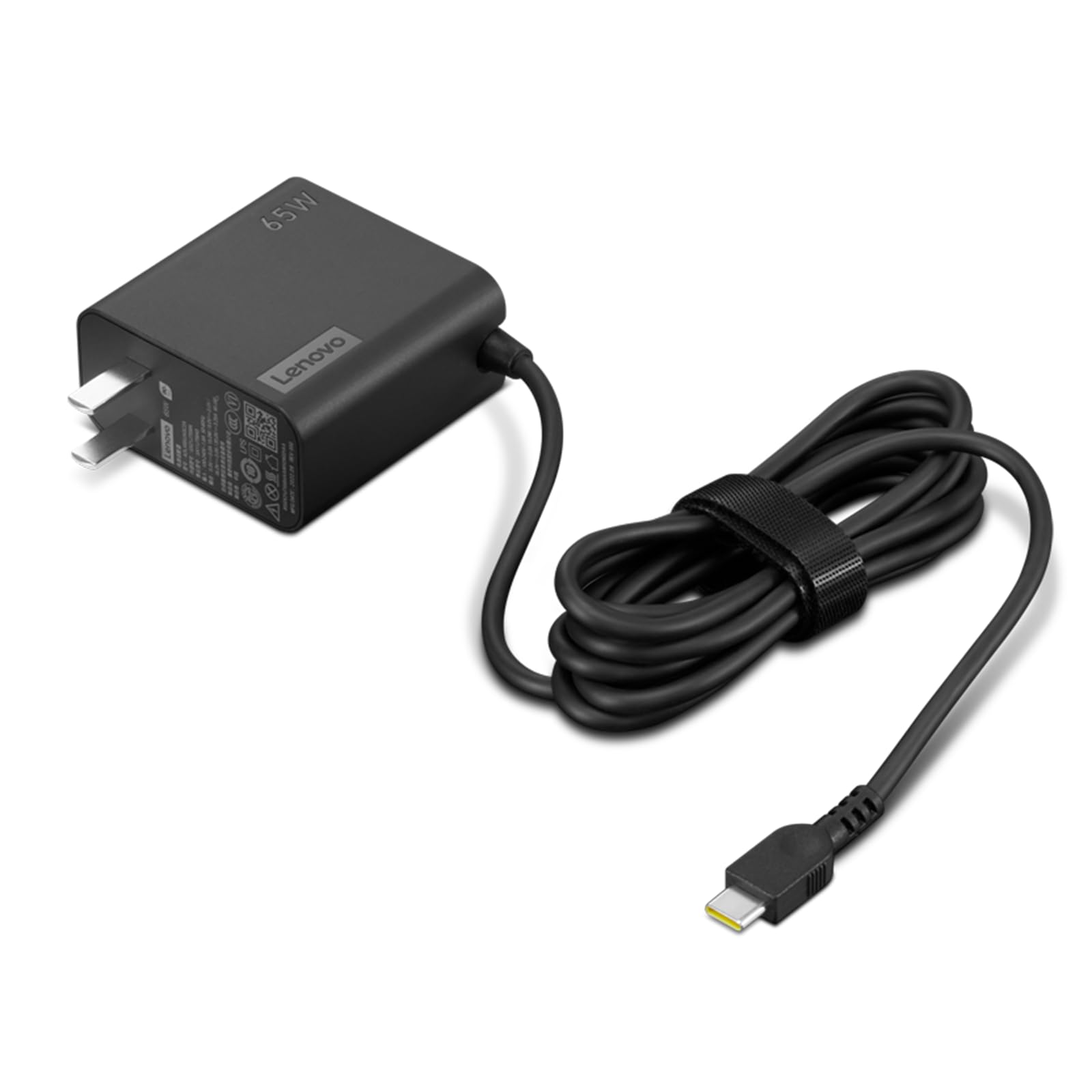
An exact-fit replacement brick with the longest cable of the four.
If your laptop charger died and you want the same one again, this is built for that job. Lenovo designed it as an OEM part, so owners replacing a lost or chewed-up original describe it as identical in specs and size. It uses PD 3.0 (Power Delivery 3.0 — a standard that lets a charger and device negotiate the fastest safe wattage), and the headline is the 65W output paired with a 5.9 ft cable. That cable runs over two and a half times the length of the UGREEN’s 2.3 ft built-in cord, so you can sit well away from the wall.
If you are replacing a pet-damaged or lost original, owners say it drops straight in and supports Samsung Super-Fast Charging alongside Lenovo laptops. The design is slim and light with a rectangular brick shape. The catch is heat: across the reviews there is a recurring note that the unit gets very warm on small laptops and tablets, and the reliability record is mixed — some units work perfectly for the long haul, while a few stop working early. That is a fair caution if you plan to leave one plugged in and running hot for hours. The 4.0+ star rating across 200+ ratings reflects mostly satisfied replacement buyers.
The replacement angle: this makes the most sense as a like-for-like swap for a Lenovo laptop, not as a general travel brick. It has one USB-C port and no smart splitting, so if you want to charge two devices at once you are looking at the other picks.
Reach for this if: you need an exact OEM replacement with real cord length and only charge one device.
Look elsewhere if: you charge multiple devices at once or want a charger that stays cool under a long session.
3. Belkin 65W Compact USB C Charger Block
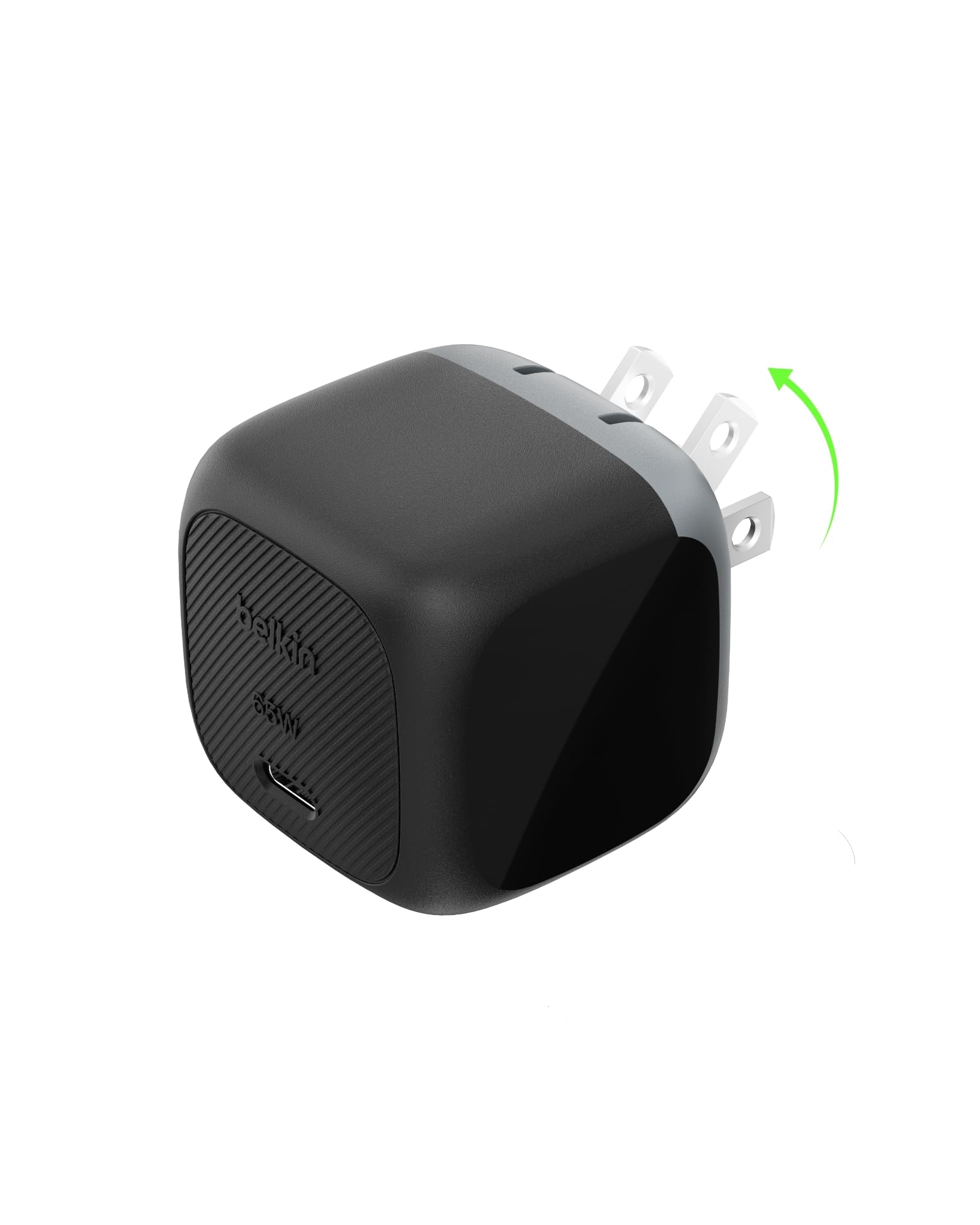
The foldable, pocket-sized brick that disappears into a backpack.
Some chargers are built to sit on a desk forever. This one is built to leave the house. The prongs fold down flat, which means no stabbing your other gear in the bag. Belkin also gave it an unusually wide input range — it accepts up to 240 volts, far above the 100 volts the UGREEN handles, so it is the pick that travels across different power systems without a fuss.
You get fast top-ups: it takes an iPhone 16 from 0 to 50% in 28 minutes or a Samsung S25 to 50% in 33 minutes, and it will charge a Chromebook ThinkPad C13 Yoga Gen 1 to 50% in 41 minutes. It runs the USB PD 3.1 chipset with PPS support (a protocol that lets certain phones draw power at exactly the rate they want while cutting heat). What wins people over here is pure reliability — Functionality is the aspect praised most, and the reviews echo that every time: works as expected, charges a laptop and a phone without complaint. The 4.5+ star score across 140+ ratings backs that up.
The honest limit is that this is a single-port charger. There is one USB-C port and no smart splitting, so a laptop and a phone means taking turns. The NOCO below solves that with dual ports. If you carry one device and value a brick that slips into any pocket, that trade is an easy one.
Best for the road: a single-device traveler who wants foldable prongs, wide voltage tolerance, and a block barely bigger than a matchbox.
Not the one if: you need to charge two things at once — there is only one port.
4. NOCO XGrid X65 65W USB-C GaN Wall Charger Block
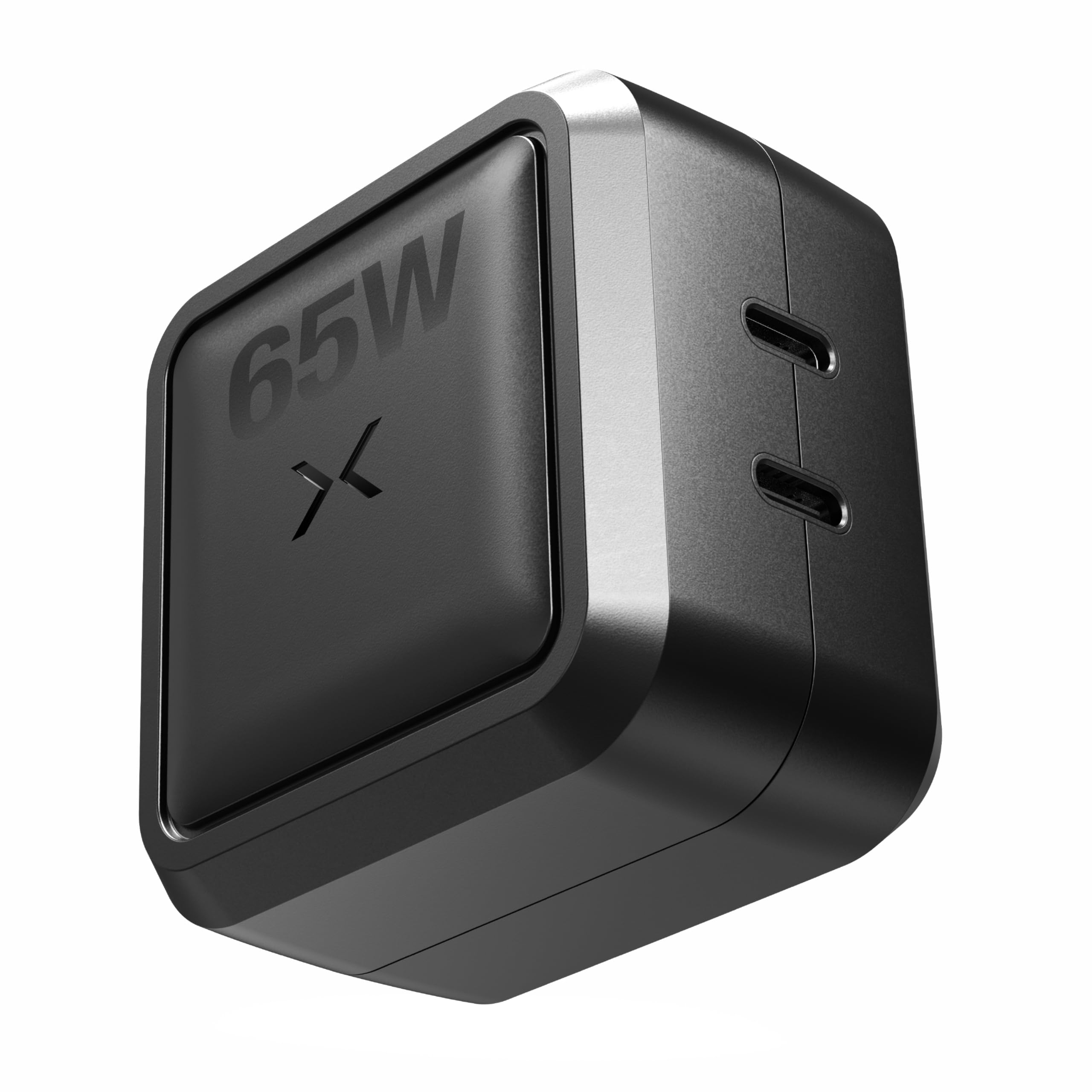
Two USB-C ports that share 65W so both devices still charge fast.
Where the Belkin gives you one port, the NOCO hands you two USB-C ports and divides the wattage around whatever you plug in. The split options are 65W/0W, 45W/20W, 30W/30W, 20W/45W, or 0W/65W — so you can push near-full power to a laptop while a second device tops up, or hand both ports an even 30W. That flexibility is the reason owners say it replaces a drawer of single-purpose chargers.
It supports PD 3.0, QC 4.0+, PPS, Apple 2.4A, and Samsung Fast Charging, and runs on GaN components so it stays cool while working. The reviews single out charging performance above everything else — the top praise is that it charges both a MacBook Air and another device at once without breaking a sweat, and that it barely warms up during operation. It is also UL-certified with real-time monitoring against overcharging and overheating, a detail that matters if you leave a charger plugged in all day. The 4.5+ star rating across 260+ ratings makes it the most-reviewed pick here.
The one trade-off owners flag is heft. It is heavier than you would guess and larger than the company’s own 30W version, though still small enough to tuck into a drone case. Nothing about the size is a dealbreaker — it is a small-brick-with-two-ports reality, not a flaw.
Why it leads on ports: the smart splitting is genuinely useful day to day — the UGREEN caps its second USB-C port at 20W, while the NOCO can send a full 45W to whichever device needs it most.
The pick for two-device households: a laptop and phone that both need speed from one outlet, with certified safety to leave plugged in.
skip it if: you prefer the lightest possible brick — this one carries a bit more weight than the rest.
Know the Specs
Wattage and Power Delivery
The 65W number is how much power the brick can push out, and it is the threshold where a charger can meaningfully top up a laptop — not just a phone. Power Delivery (PD) is the standard that lets the charger and your device agree on the fastest safe rate. PD 3.0 and PD 3.1 are the versions you will see named; the differences are minor for everyday use, but a device that supports PPS can take power at a finely tuned level, which keeps things cooler.
GaN and Heat Management
GaN (gallium nitride) is a semiconductor that loses less energy as heat than the older silicon used in bulky chargers. That means a 65W brick can be small enough for a pocket and still run cool. When a charger runs hot, its internal components age faster — so temperature is a real long-term quality signal, not just a comfort issue. The best picks here stay warm at most, never hot to the touch.
Ports and Smart Splitting
More ports is not automatically better — it depends on how power is divided. A charger with smart splitting lists its exact output per port, like 45W to one device and 20W to another. A charger without it may drop the second port to a slow trickle. If you plan to charge a laptop and a phone together, check the split figures before you buy.
Cable Length and Portability
A built-in retractable cable means one fewer thing to lose; a separate long cable means more freedom to sit where you want. The right choice turns on where you charge. For a desk or nightstand, a short built-in cord is actually the cleanest option. For couch or across-the-room use, a longer cable wins. Neither is better in the abstract — pick for your actual routine.
Common Questions
Is a 65W USB-C charger enough for a laptop?
What does GaN mean in a charger?
Can I charge a phone and a laptop from the same 65W charger?
Will a 65W charger fast charge my phone?
Is PD 3.0 better than PD 3.1?
Why does my charger get hot while charging?
Should I pick a retractable cable or a separate one?
How long should a 65W USB-C charger last?
Do I need a separate cable with these chargers?
Are these chargers safe to leave plugged in?
The Bottom Line
The strongest all-round pick is the UGREEN Nexode 65W Retractable Charger Block, because it does the thing none of the others do — a built-in retractable cord plus three ports for charging a laptop, phone, and earbuds at once. Its build quality is the trait that stands out most, which is exactly what you want from a brick that lives in your bag. If you need two ports and full-power splitting for a laptop and a phone together, the NOCO XGrid X65 delivers. And for the lightest travel brick with foldable prongs, the Belkin 65W Compact is the one to pocket. Whatever you choose, buying the retractable UGREEN means one fewer loose cable to lose — that is a genuinely useful place to spend a little extra.
How we choose
We do not accept paid placement. Every pick is matched to a real buyer and a real use-case; we do not hands-on test units.
Sources
Specifications: manufacturer listings and product documentation. Review insights: verified customer reviews, as of October 2026. Pricing: not shown on this page (it changes often); check the current price via the retailer link.
As an Amazon Associate, Aappliancez earns from qualifying purchases. This does not affect which products we feature.