Disclosure: Some links in this post are affiliate links. As an Amazon Associate I earn from qualifying purchases, at no extra cost to you. Learn more
Specs are compiled from manufacturer listings and verified buyer reviews and can change over time — please confirm the key details on the product page before buying.
If you want to watch one HDMI source on every TV in the building without running new cables, the short answer is: pick a modulator that matches your TVs’ tuner standard. The best 4K RF modulator multichannel QAM ATSC DVB-T setups do one job — they take an HDMI picture and turn it into a broadcast-style channel your existing coax can carry. Get the format wrong and your TVs will scan right past it.
This guide is built by comparing the manufacturers’ published specifications and the patterns across verified customer reviews, so you get each pick’s real strengths and trade-offs instead of marketing spin.
What follows is nine coax-network devices, from pro multiviewers to full production switchers. Whether you are feeding security cameras, satellite boxes, or a stage feed, this guide covers nine coax-network devices for your exact setup and budget.
Top Picks


How To Choose The Best 4K RF Modulator Multichannel QAM ATSC DVB-T
Two devices sit behind almost every coax-distribution project: a modulator that turns HDMI into a TV channel, or a multiviewer/matrix that routes several HDMI sources onto one or many displays. Figure out which problem you have before you buy, because the two do not overlap.
Tuner standard decides compatibility
ATSC is the over-the-air digital TV standard used in North America, and QAM (J.83B) is the cable-TV version of the same idea. If your TVs are set to “Cable” they scan QAM channels; set to “Antenna” they scan ATSC. Check which one your display expects before you commit — a QAM-only box will not show up on an ATSC scan.
What 1080p means for your distribution
Progressive scan at 1080p redraws every line each frame, which reads as smoother motion than interlaced video. Most affordable modulators top out at 1080p, so plan your expectations around that unless you step up to a true 4K multitasking switcher.
Cable and power budget
Long coax runs lose signal, so many modulators let you dial output power in dBuV (decibels per microvolt, a measure of signal strength). Lower power than the run needs means grainy patches; too much can kill channels entirely. Round shielded Ethernet cable beats flat cable for HDBaseT extenders that push picture over CAT cable.
Multiviewer or matrix versus plain modulator
A multiviewer shows several feeds at once in a grid; a matrix routes any input to any output; a plain modulator puts one source on one channel for every TV. Mixing these up is the most common buying mistake in this category.
Side-by-Side Comparison
| Model | Best For | Output Type | Port Count | Top Resolution | Amazon |
|---|---|---|---|---|---|
| Decimator DMON-Quad★ Best Overall | Studio quad-split | 3G-SDI / HDMI | 4 | 1080p60 | Amazon |
| MT-VIKI 4K HDMI Multi-Viewer 9×1Most Inputs | Security & console switching | HDMI | 10 | 4K@30Hz | Amazon |
| OREI 8K@30Hz HDMI Extender BalunBest Long-Run | Long-run 4K120 gaming | HDBaseT / HDMI | 2 | 8K@30Hz | Amazon |
| SatLink ST-7000 | HDMI-to-coax single channel | ATSC / QAM | — | 1080p | Amazon |
| OREI 4×4 HDMI Extender Matrix | Multi-room 4K matrix | HDBaseT / HDMI | 4 | 4K@60Hz | Amazon |
| Thor Broadcast HDMI to Coax Modulator | Multi-TV broadcast channel | QAM / ATSC | 5 | 1080p | Amazon |
| MINIMOD 2 Vecoax | RV & mixed coax injection | ATSC / Cable | 2 | 1080p | Amazon |
| Blackmagic Design UltraStudio 4K Mini | Capture & playback rigs | Thunderbolt 3 / HDMI 2.0 | — | 4K | Amazon |
| Blackmagic ATEM 1 M/E Constellation 4K | Large live events | 12G-SDI / HDMI | 16 | 4K | Amazon |
Detailed Reviews
1. Decimator DMON-Quad Multiviewer
Our pick — 4.5+★ from 60+ verified ratings; the strongest balance of quality and price.
A 1.8-pound aluminum quad-splitter that puts four SDI cameras on one monitor
If you run multi-camera shoots and need to see every angle on one monitor, this is the pick. Its four SDI inputs (a professional video connector that carries uncompressed picture) convert to HDMI and can be shown as a quad view or multiplexed down to a single output. It handles up to 1080p60 over SDI, and you can mix formats and aspect ratios freely — so a 720p camera can sit beside a 1080i feed without the box complaining.
The build is the thing owners rave about first. Aluminum chassis, 1.8 pounds, and it feels like it will outlast the shoot schedule. The LCD and button control system is the selling point over rival designs that lean on dip switches or a laptop to change one setting. An 8-channel audio metering overlay per window and a 16-character UMD (under-monitor display, the name label under each thumbnail) overlay round out the on-screen options, with individual enable, positioning, and size for each.
What wins people over is the sheer depth of control. Front buttons give you fullscreen, two, three, and four-screen layouts, or a single large window with two small ones, without touching a computer. Real-time response means virtually no lag between the camera and the screen. One honest trade-off: the box outputs 1080p or lower, so if your whole pipeline is 4K, this is a monitor-side companion rather than a 4K source route.
Where it earns the crown
- Four SDI inputs feed an HDMI or SDI output simultaneously for a true quad view
- Aluminum build in a 1.8-pound box built for road use
- Front-panel LCD and buttons instead of dip switches or mandatory software
- Mix formats and aspect ratios on the fly up to 1080p60
What to weigh first
- No native 4K passthrough — ceiling is 1080p60 over SDI
- Listed with no warranty from the seller page
- Tally runs through an RJ-45 connector, so you need that wiring
Reach for this if: you shoot multicam and want director-grade quad viewing without a laptop in the mix.
Know before you buy: it distributes and monitors what you feed it — it does not create a numbered TV channel for coax.
2. MT-VIKI 4K HDMI Multi-Viewer
Nine HDMI inputs on one TV, switched by front button or IR remote
You get nine HDMI inputs feeding one screen, so you can leave every source plugged in at once. It offers 10 viewing modes covering single, quad, nine-screen, and a big-plus-eight-small layout. Switching stays smooth up to 4K@30Hz (4K resolution at 30 frames per second — fine for menus and streams, not for fast competitive play), and you can change views from the front button or the included IR remote (infrared remote — the kind that needs a clear line of sight). In multiscreen modes the audio defaults to the first screen, so know that before you wire five consoles into a party setup.
The port count is where this sits in a class of its own: 10 ports against the 2 on the OREI extender above, a genuine 5.0x gap that matters the moment you run out of HDMI jacks. Comes with a 12V 2A power adapter, the remote, and a two-year MT-VIKI warranty.
Two things temper the appeal. Some buyers report warping when mixing different resolutions and refresh rates on one scan, so keep your sources to compatible specs where you can. And there is no dedicated five-HDMI mode (four small, one big) — you get quad, nine-screen, and the big-plus-eight layout instead.
What owners mention: setup is genuinely plug-and-play. One buyer summed it up as “Literally plug and play. Works just as described and is exactly what I was looking for!” Others praise the no-fuss customer service, which reportedly shipped a replacement unit within days.
Best fit: game room, security desk, or demo wall where you need many sources on one display.
skip it if: every source runs at a different refresh rate — that is the reported weak spot.
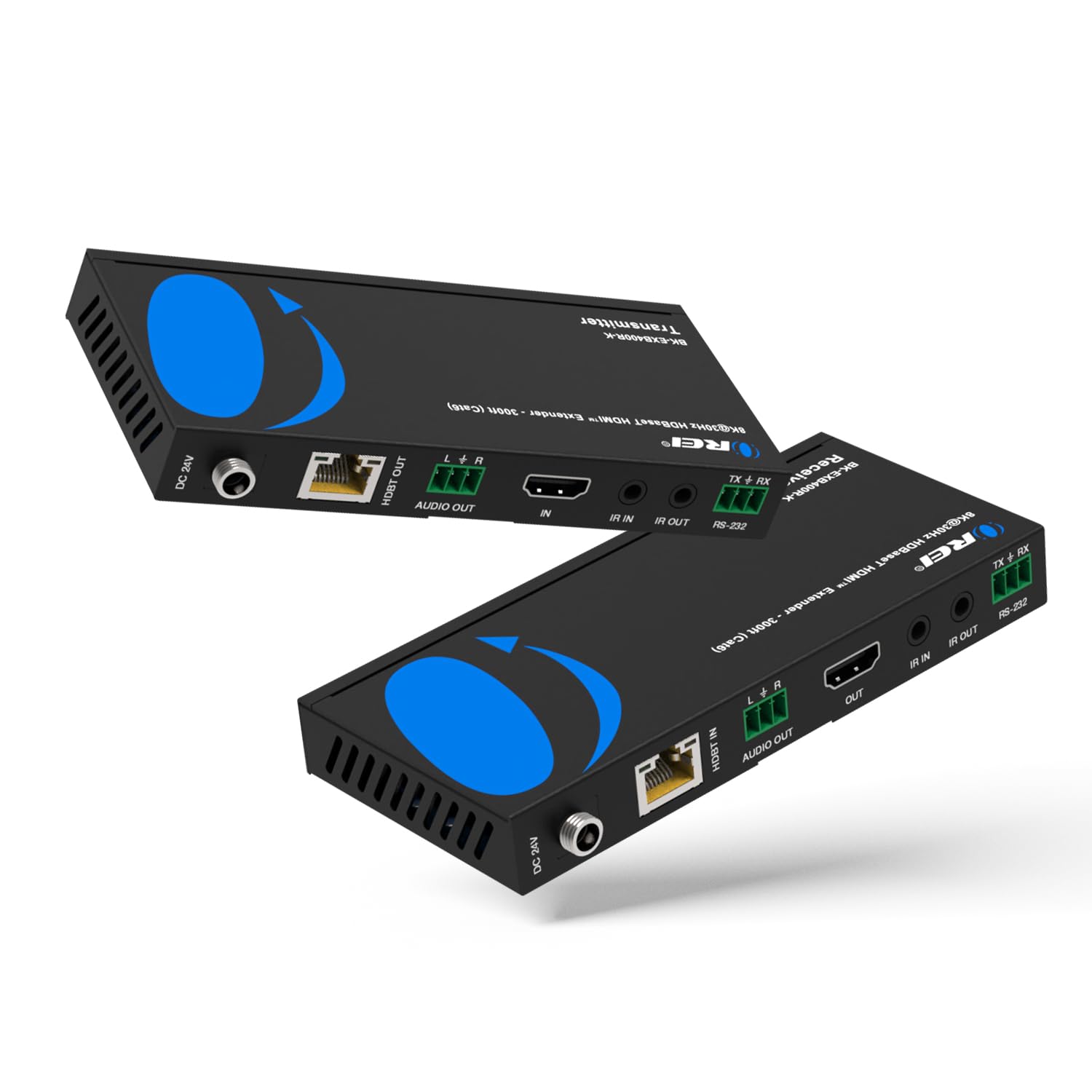
3. OREI 8K HDMI Extender Balun
Carries 4K@120Hz up to 400 feet over a single CAT cable
This is the kit for anyone who has tried to snake a long HDMI cable across a room and watched the picture black out. It uses HDBaseT (a standard that packs HDMI, audio, control, and power onto a single CAT cable) to carry uncompressed signal up to 400 feet for 4K@120Hz and 300 feet for 8K@30Hz. HDMI 2.1 support, HDCP 2.3, and full YUV 4:4:4 color keep the picture clean, and the box handles HDR, HDR10+, Dolby Vision, HLG, VRR, FVA, and ALLM for gaming displays that care about those formats. Bandwidth is listed at 40 Gbps FRL and 18 Gbps TMDS — how much data the link can push per second, which is what keeps 4K120 unpacked and lag-free.
Power over Cable is the practical winner here. You run one power adapter at either the transmitter or the receiver, not at both. Bi-directional IR pass-through lets you point a remote at either end, and an RS-232 port drops it into a control system. Multi-channel audio such as DTS-HD and Dolby TrueHD 7.1 rides along fine, though one owner notes that routing multi-channel audio requires an HDMI 2.1 passthrough receiver in the chain.
A heads-up on compatibility: OREI says these HDBaseT models pair only with their own matching transmitter and receiver — not with other OREI HDBaseT models, and not with other brands’ HDBaseT gear, because of chipset differences. Use the included pair. Customers note 4K120 over 100 feet of Cat8 with no noticeable latency, and one verified owner reported that “4K 120Hz HDR VRR over 100ft Cat8, no noticeable latency” while replacing 40ms+ streaming tools. One flaw worth knowing: at 4K120 with HDR, some scenes show color distortion that disappears at 60Hz — a fit note for content-focused viewing rather than a dealbreaker for competitive play.
Who it beats: any long HDMI cable for distance gaming or home theater across rooms.
The catch: pair it with its bundled ends only — mixed-brand HDBaseT runs are not supported.
4. SatLink ST-7000 HDMI to RF Digital Modulator / Encoder

Turns one HDMI or RCA source into a 1080p ATSC or QAM channel on your coax
This is the classic single-channel modulator: one HDMI or RCA input, broadcast as a 1080p ATSC or QAM (J.83B) channel over your existing coax network. The interface accepts both HDMI and RCA, and setup is done over IP — you point a browser at the unit and configure the channel from there. That is a big convenience versus front-panel fiddling on a closet shelf.
For pushing security-camera feeds around a building, it works cleanly. You feed a DVR’s HDMI into the modulator, inject it into the coax run, and every TV that scans the channel sees the feed like a regular over-the-air broadcast. The catch that comes up repeatedly is signal level on long runs: distant TVs show grain that an amplifier fixes, and the output power adjustment is finicky — reviewers point out that 75 dBuV (a measure of signal strength) works while 100 kills channels. One consistent nuisance is that the box cuts the very edges of the image with no overscan option (no way to shrink the picture to fit), so on-screen text near the frame can clip.
Owners praise the easy IP setup, excellent 1080p picture, and solid build, while a fair slice note audio that arrives garbled or drops on certain Samsung displays. One long-time owner found it rock-solid on five displays and only one problem set. It is not a 4K device — for security and satellite feed distribution at 1080p, that is the honest ceiling.
The verdict: a dependable workhorse for one channel of 1080p down existing coax, with the amplifier and overscan caveats noted.
Pick it if: you need one clean 1080p channel from an HDMI source over coax, and IP setup appeals.
Look past it if: you need 4K or multi-channel output — this is a single-channel box.
5. OREI 4×4 HDMI Extender Matrix

Routes any of four HDMI sources to any of four rooms over CAT5e/6/7
Four inputs, four outputs, plus four loop-out HDMI ports at the head end, all over CAT5e/6/7 cable up to 230 feet. That is the matrix model: instead of one source on every screen, you independently choose which source shows where. Full HDMI 2.0 and HDCP 2.2/1.4 support, 4K at 60Hz with 12-bit color, EDID management (the handshake that tells the source what resolution the display wants), RS-232 control, and wideband IR relay round out the spec sheet. A single power adapter runs the whole unit, and the 3-pound metal housing is built to shed heat.
Your cable choice decides whether this works at all. Shoppers say that flat shielded CAT cable (the thin, flat kind) fails at 65 feet, and that the run needs round shielded CAT6 (a thicker cable with a foil or braid shield) to work — 150 feet of round cable was tested successfully. Take that seriously, because when the cable fails it looks like a dead unit. One owner split the difference, saying it arrived as “Right about a year old and just starting to have issues” with occasional pink picture or dropped TVs — a reminder to watch heat and power in long-running installs.
Audio pass-through goes up to 7.1-channel HD formats including LPCM, Dolby TrueHD, and DTS-HD Master Audio. The learning curve is the honest gripe: remembering the button sequence to set each output’s source trips people up, though the unit itself works well once configured.
Reach for this if: you want independent source-to-room routing and are willing to run round shielded CAT6.
Think twice if: you only need one source on all screens — a plain modulator is simpler.
6. Thor Broadcast HDMI to Coax Modulator
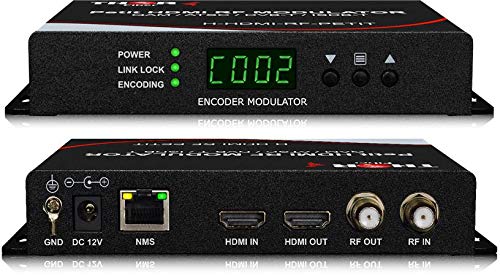
Encodes HDMI into DVB-C, DVB-T, ATSC, or ISDB-T on any channel you set
Standards coverage is the reason to pick this one. It encodes HDMI into HD MPEG2 with AC3 Dolby Audio and outputs DVB-C, DVB-T, ATSC, or ISDB-T — so the same box works across different TV regions, not just North American ATSC. Input accepts anything from a set-top box to a satellite receiver to a camera or computer, and you set the channel straight from the front panel or through Thor’s web GUI. Supported source resolutions run 720p, 1080i, and 1080p.
Picture quality is where this earns its keep. Church installations pushing four 85-inch TVs report broadcast-grade results, including a 200-foot run over RG11 and 50-foot runs over RG6 coax. Security setups feeding NVR HDMI through it see near-HDMI clarity with minimal delay. Front-panel parameter settings were called out as a plus over web-only competitors, though the web configuration does require adjusting your PC network settings — spare yourself that confusion by reading the manual up front.
Setup is generally easy once the network is sorted. The most common friction on the value side is exactly the trade-off you would expect from a pro unit: the manual is sparse and cheaper alternatives exist. But the rock-solid picture with no drops and roughly a one-second delay is the kind of reliability that matters when it is feeding a whole campus.
Who it suits: anyone distributing one strong 1080p channel to many TVs over existing coax — churches, bars, multi-room homes.
One honest limitation: it is single-channel and 1080p; it is not a 4K modulator.
The pick for you if: the job is a broadcast-quality channel across many displays and multiple standards matter.
Keep looking if: you want per-room independent routing — that is a matrix job.
7. MINIMOD 2 Vecoax HDMI to Coax Modulator

Injects a 1080p HDMI channel alongside your existing antenna or cable feed
Two ports do one job: they take an HDMI source and inject it onto your existing coax as a full-HD 1080p channel with Dolby audio (a surround-sound format). what separates it is that it combines with your antenna or cable signal, so you watch your normal channels and your new one side by side without tearing down the wiring. You set the channel number and name from a small color display on the unit, then rescan the TVs to find it.
Quality is the headline. Setup is straightforward, and once configured, the unit behaves like an appliance rather than a project — plug and play from that point on. Buyers moving from older RF modulators notice a major step up in picture, especially when replacing modulators feeding DirecTV HD receivers. The one technical caution: on an RV or mixed OTA setup, the modulator has to be injected at the same coax point as the OTA signal, and rebalancing is required when you move campgrounds. In ATSC mode scans find the channel reliably; default cable mode scans sometimes miss it.
On the honest side, the picture is not identical to a direct HDMI feed — a few owners describe light shadows and a slightly soft look on secondary TVs even with a premium HDMI cable. It is a recognizable trade-off for wired distribution to secondary displays rather than a flaw. For an RV or a home with existing coax runs, that is usually a fine deal to make.
Suits you if: you want to keep your antenna or cable TV and add one HDMI channel alongside it.
Give it a miss if: you need perfect HDMI-equivalent sharpness on every secondary display.
8. Blackmagic Design UltraStudio 4K Mini

A Thunderbolt 3 capture box for editors who need real 4K in and out of a desktop
This is the pick for the editing bay rather than the living room. It brings 12G SDI, HDMI 2.0, NTSC, and PAL into a Mac, Windows, or Linux machine over a Thunderbolt 3 port, capturing up to 40Gb/s and outputting HD through 4K. Inside Premiere and DaVinci Resolve, it becomes the bridge between a camera or deck and your timeline, with uncompressed DCI 4K capture reported by professional users.
The one setup trap to know about: the included USB-C cable is power-only, not data, so a new unit can look dead on arrival until you swap in a true USB-C Thunderbolt cable. That has burned enough buyers that it should be the first thing you check if the Mac does not detect the box. Once wired correctly, the device works reliably with OBS, Wirecast, and the major NLEs.
Rigid audio handling is the honest weak spot. Even a broadcast pro reports that signal levels are weak for critical work, with a clipping input registering -32dB, limited gain adjustment, an unadjustable mic-input buffer that causes monitoring delay, and channel handling that could be more granular. The on-device navigation also feels less polished than the capture hardware itself. It is a professional tool that asks you to work around its audio quirks rather than with them.
Why it earns a spot
- Thunderbolt 3 with up to 40Gb/s capture to a desktop
- 12G SDI and HDMI 2.0 plus NTSC and PAL support
- Uncompressed DCI 4K capture, verified by pro users
- Works with OBS, Wirecast, Premiere, and DaVinci Resolve
Do not overlook
- Ships with a power-only cable, not a data cable
- Audio levels and mic-input buffer need workarounds
- Codeless — drive it from a computer with Thunderbolt 3
The decision: buy it if your workflow lives in a computer and you want studio-grade 4K capture and playback.
Not the one if: you need a standalone box that runs without a PC attached.
9. Blackmagic Design ATEM 1 M/E Constellation 4K Switcher
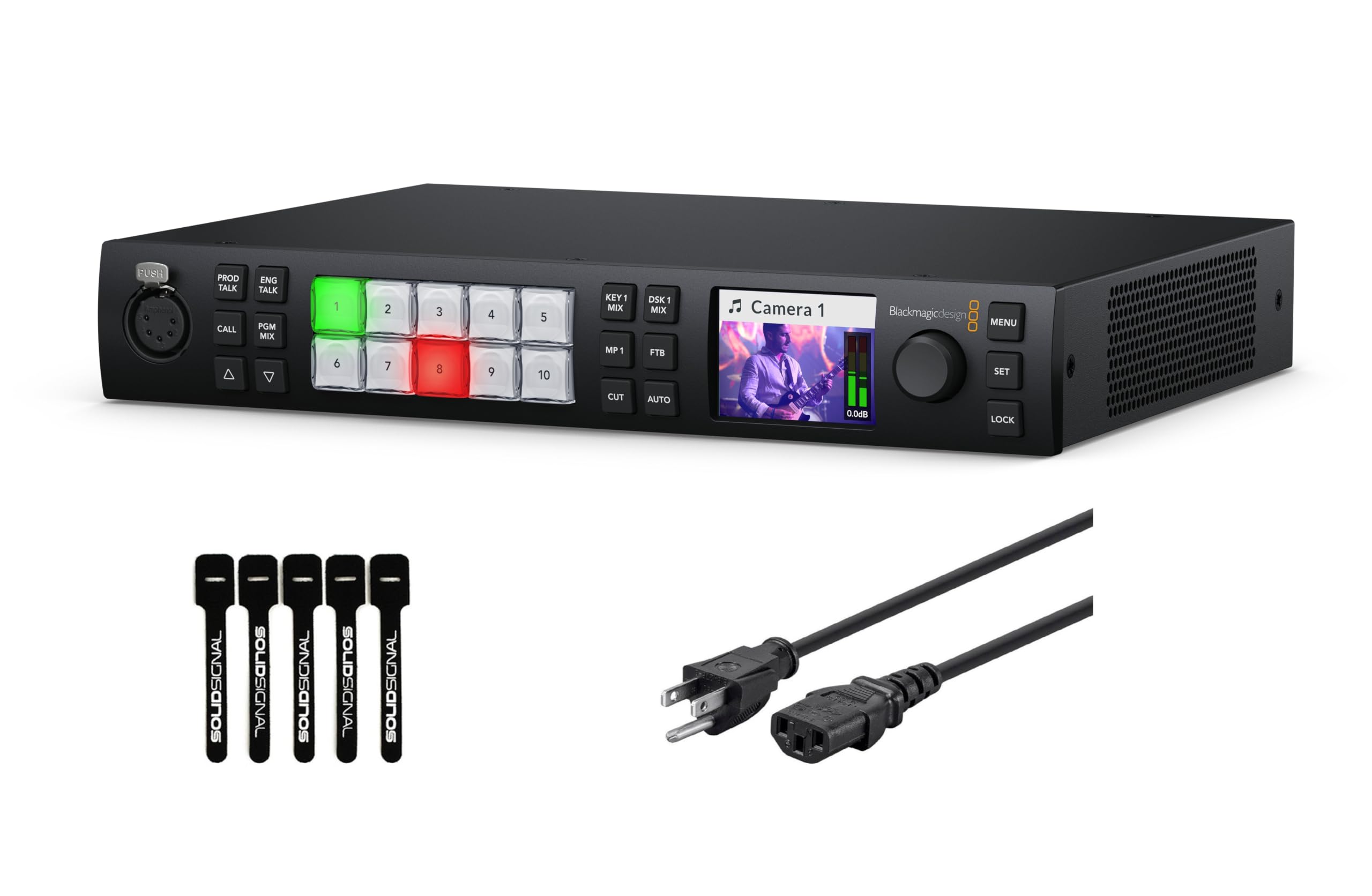
A 10-input 4K switcher built for stages, sports, and anywhere the show cannot drop
This is the top of the stack. Ten standards-converted 12G/6G/3G/HD/SD-SDI inputs (12G SDI being a single cable that carries 4K at high frame rates), a reference SDI input, two balanced 1/4-inch TRS inputs, a 5-pin XLR talkback, and two RJ-45 ports for control and talkback. Outputs run six 12G-SDI, one USB Type-C, and a 16-way multiview SDI feed. That multiview lets your crew watch sixteen sources at once, which is exactly what large live production demands.
Inside sits real live-production muscle: a 28-channel digital audio mixer, DVE for transitions and keyers, media players, talkback, and up to seven layers for building multi-layer compositions. The full front panel with LCD lets you drive the show without a laptop on stage. It is a 16-port unit, standing at 4.1 pounds, and comes bundled with a 6ft power cord and a 5-pack of Solid Signal Cable Ties — a small detail that reads as thoughtful for the installer crowd.
Who it is really for is houses of worship, music festivals, live sports, and concerts where cameras are spread across a whole venue. If your installations are smaller — a handful of TVs off one HDMI source — you are paying for layers and multiview you will never use, and a coax modulator would serve you better. This is the tool for the crew running the show, not the person distributing it to the lobby.
Ideal for: professional live production where 10 inputs, seven layers, and 4K switching all matter.
Overkill for: home distribution and single-source setups — those want a modulator, not a switcher.
The heavyweight pick: stages, sports, and multi-camera events that need a real production switcher.
Wrong tool if: your goal is putting one channel on many coax-fed TVs.
Know the Specs
ATSC vs QAM vs DVB-T
ATSC is the over-the-air digital TV format used in North America, and QAM (J.83B) is the same idea carried over cable. DVB-T is the European equivalent. Your TV’s tuner can’t read all three, so match the modulator’s output to your TV’s scan mode — many units here let you pick more than one standard, which is why multi-standard support matters when you buy across regions.
HDBaseT and CAT Cable Runs
HDBaseT moves HDMI, audio, control, and power over a single Ethernet cable instead of a long HDMI run. Round shielded cable holds up over distance where flat cable often fails at 65 feet and needs 135 feet minimum over a good run. Distance ratings vary by resolution, so check whether a listed reach applies to 4K@120Hz or to 8K@30Hz before you commit to a cable length.
Multiviewer vs Matrix
A multiviewer shows several feeds at once in a grid — quad, nine-screen, or a big-plus-small layout. A matrix routes any input to any output independently, so each room can watch a different source. If you want one channel everywhere, you want a modulator; if you want independent control per screen, you want a matrix.
Output Power and Amplifiers
RF modulators let you adjust output power in dBuV, the signal-strength unit that decides how clean distant TVs see the channel. A value that is too low leaves grain that an inline amplifier often fixes, and a value that is too high can wipe out the channel entirely. Start low, raise slowly, and expect to test at your farthest display.
Common Questions
Will a QAM modulator work with a TV set to Antenna mode?
Do I need a separate cable from the modulator to every TV?
Why do distant TVs look grainy while the closest TV looks fine?
What is the difference between a multiviewer and a plain modulator?
Does HDMI-to-coax distribution reduce picture quality compared with a direct HDMI cable?
Can a modulator combine with my existing antenna or cable TV signal?
How long can I run an HDBaseT extender over Ethernet cable?
Can I mix an HDBaseT transmitter from one brand with a receiver from another?
How many HDMI sources can a multi-viewer switch to one screen?
Is 4K over coax possible or is 1080p the practical limit?
The Bottom Line
For most people building a coax-network setup, the 4k rf modulator multichannel qam atsc dvb-t winner is the Decimator DMON-Quad, because it does the hardest job in the category — showing four camera feeds on one HDMI or SDI output with no laptop and no lag — and it does it in a 1.8-pound aluminum box. If your goal is simply getting one channel onto every TV over existing coax, grab the Thor Broadcast HDMI to Coax Modulator, whose multi-standard DVB-C/T/ATSC/ISDB-T output and front-panel channel control earned the most praise for functionality across its reviews. And for feeding a whole house or an RV while keeping your antenna channels, the MINIMOD 2 Vecoax is the one to reach for — it earns the highest quality score in the mixed-coax group, quality being its single most praised feature. Match the tuner standard to your TVs, use round shielded cable, and set your output power carefully, and any of these will do the wired distribution job cleanly.
How we choose
We do not accept paid placement. Every pick is matched to a real buyer and a real use-case; we do not hands-on test units.
Sources
Specifications: manufacturer listings and product documentation. Review insights: verified customer reviews, as of October 2026. Pricing: not shown on this page (it changes often); check the current price via the retailer link.
As an Amazon Associate, Aappliancez earns from qualifying purchases. This does not affect which products we feature.