Disclosure: Some links in this post are affiliate links. As an Amazon Associate I earn from qualifying purchases, at no extra cost to you. Learn more
Specs are compiled from manufacturer listings and verified buyer reviews and can change over time — please confirm the key details on the product page before buying.
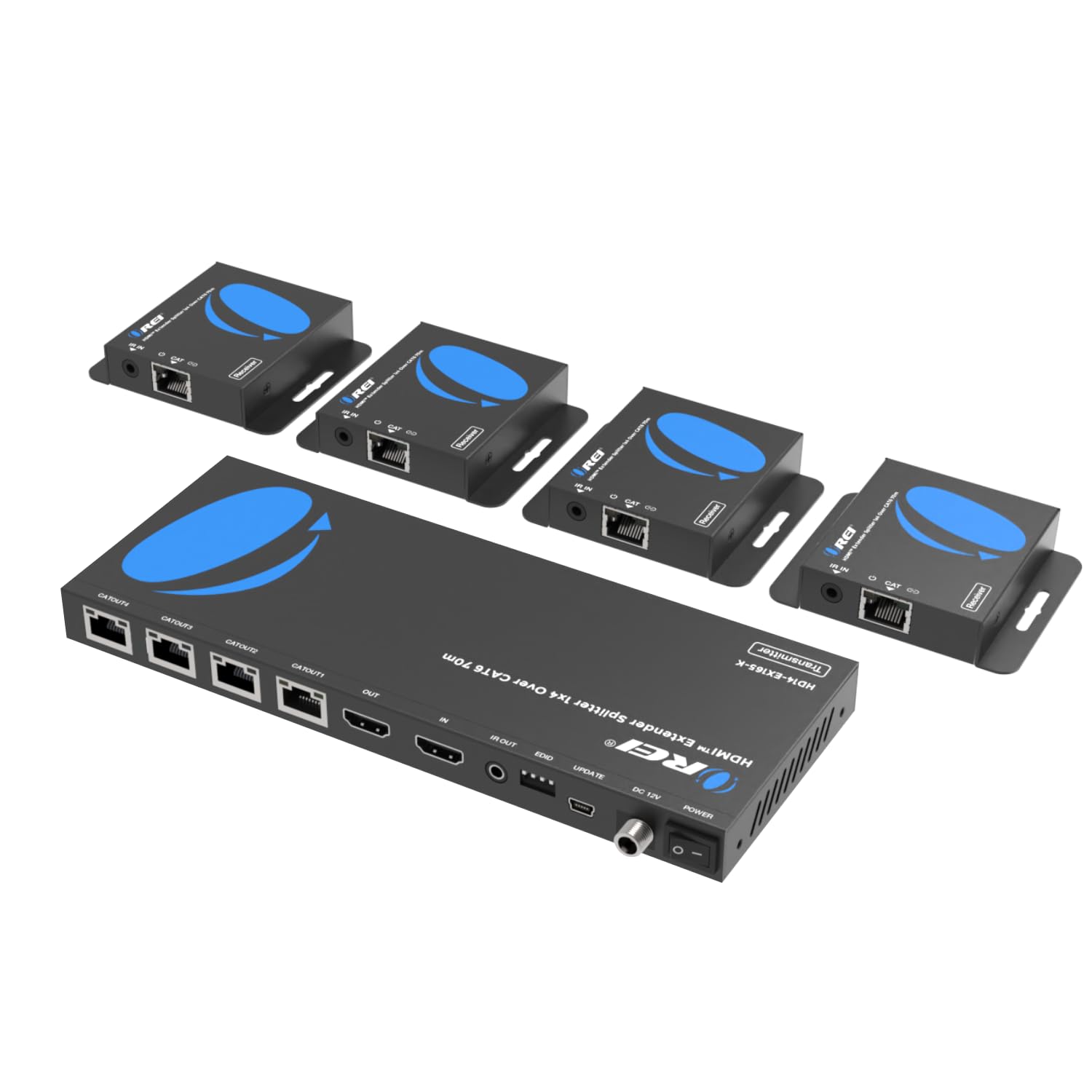
You want one video source on every TV in the house, and you do not want to fish new HDMI cable through the walls. The fix is a modulator that rides the coax you already have. The safest first pick is the OREI HDMI Splitter Extender, which sends one HDMI source to four screens over plain Cat6 network cable (standard Ethernet cable). One honest catch: “4K modulator” is a loose label. Most units here put out a 1080p broadcast channel (1920×1080 pixels) that your smart TV tunes in like a normal digital station, so a movie night looks sharp on a 55-inch screen. Only a few accept a true 4K signal at the input. So the real question is not which box is newest. It is which one matches the cable already in your walls and the source you already own.
This guide is built by comparing the manufacturers’ published specifications and the patterns across verified customer reviews, so you get each pick’s real strengths and trade-offs instead of marketing spin.
Below you will find seven real options sorted by what they actually do, from a four-screen network splitter to a wireless 4K transmitter, so you can match one to your wiring. Every pick here is a genuine 4K RF Modulator for Smart TV Distribution tool in its own lane.
Top Picks

How To Choose The Best 4K RF Modulator for Smart TV Distribution
Before you buy anything, walk to the wall and look at what cable is already there. That one check decides most of your shortlist, because every box here needs a specific kind of wire to travel down.
Know the cable in your walls first
Coax — the round screw-on cable your cable company used — is the jackpot here. A coax modulator (a box that turns an HDMI signal into a TV channel) injects your video onto that same cable, and every TV in the house tunes it in like a normal station. No new wire, no fishing through drywall.
If your walls instead have Cat6 network cable, you want an HDMI-over-Cat6 extender rather than a modulator. If you have neither and cannot run anything, wireless HDMI is the last resort — and it comes with its own signal caveats.
Understand the 4K label before you trust it
A true 4K RF modulator is rare. What most of these units do is accept a 4K or HD source and broadcast it as a 1080p channel your TV receives like over-the-air digital TV. The SatLink ST-7000, for example, is built around a 1080p output. That is not a flaw — it is how digital broadcast channels work, and at normal viewing distance a clean 1080p channel looks perfectly sharp.
Match the output mode to your TV
ATSC is the digital broadcast standard your TV already scans for when it hunts channels. QAM is the cable-style variant. Some units do both, and some buyers found one mode caught the channel when the other did not. Check that the box supports the mode your TV’s tuner prefers.
Check your signal level and splitters
A modulator outputs a measured signal level. Push it too high and it can wipe out neighboring channels; too low and distant TVs go grainy. An adjustable output is worth having, because you can dial it to your house instead of guessing.
Side-by-Side Comparison
| Model | Best For | Distribution Path | Max Output Resolution | Ports | Amazon |
|---|---|---|---|---|---|
| OREI HDMI Splitter Extender 1×4★ Best Overall | Four screens on network cable | Cat6 / Cat6a / Cat7 | 1920×1080@60Hz | 4 | Amazon |
| OREI HDMI Over Coax Extender 330ftBest Over Coax | Reusing coax to a far TV | Coaxial | 4K@60Hz | — | Amazon |
| SatLink ST-7000 | Putting cameras or a DVD on every TV | Coax (RF channel) | 1080p | 1 channel | Amazon |
| Blackmagic Design Mini Converter SDI Distribution 4K | Studio SDI feeds to eight decks | SDI | 6G-SDI | 8 | Amazon |
| Thor Broadcast HDMI to Coax Modulator | Whole-house channel from one source | Coax (RF channel) | 1080p | 5 | Amazon |
| MINIMOD 2 Vecoax | RV and existing coax homes | Coax (RF channel) | 1080p | 2 | Amazon |
| Teradek Ace 750 | No cable at all, set to set | 6GHz wireless | 4Kp30 | — | Amazon |
Detailed Reviews
1. OREI HDMI Splitter Extender 1×4
Our pick — 4.5+★ from 750+ verified ratings; the strongest balance of quality and price.
One source, four screens, and only a single power adapter to plug in.
If your house is wired with network cable instead of coax, this is the pick that needs the least fuss. One HDMI source goes in, and four receivers put it on four separate screens — each receiver draws its power down the same network cable, so you do not need an outlet at every TV. That saves you an outlet hunt at every TV on install day.
Installers appreciate the local loop-out: a fifth HDMI output on the transmitter feeds the screen in the same room as your source. You can also send IR remote commands back down a dedicated channel to the source device, which means the DVD player or streaming box stays hidden in a closet and still answers its own remote. Setup is plug-and-play, with no software to install, and it works with Cat6, Cat6a, and Cat7 cable.
Owners praise the reliability: the box does exactly what the manual says, run after run. The recurring gripe is heat at the transmitter: give it air rather than burying it in a closed cabinet. Build-quality questions come up occasionally too, so treat the unit gently and it will reward you.
What carries the install
- Four receivers run off one power adapter — no outlet hunt at each screen
- Loop-out HDMI port keeps a local monitor live right at the source
- IR pass-back lets you control a hidden source from another room
- Works with Cat6, Cat6a and Cat7 network cable, no adapters for receiver power
Where it asks for care
- Ceiling is 1920×1080@60Hz at the output, so this is not a 4K distribution path
- The transmitter needs airflow — a sealed cabinet can cause picture glitches
- Oxidized or poorly terminated network cable will drop a remote receiver
Reach for this if: your walls already have Cat6 and you want four screens live without new power runs at each TV.
Think twice if: you need a true 4K output channel — the ceiling here tops out at 1920×1080@60Hz.
2. OREI HDMI Over Coax Extender 330ft
The one that turns a dead coax jack into a 4K TV feed above your fireplace.
This is the closest thing on the list to a proper 4K-over-coax run. A sender and a receiver pair up over a single length of coaxial cable (the round screw-on cable your TV service uses), and the signal travels up to 330 feet at 4K@60Hz (3840×2160 pixels, 60 frames per second). That means a sharp picture reaches a screen three rooms away without new wiring. Unlike the broadcast modulators here, which output a 1080p channel every TV tunes in, this one carries a point-to-point 4K@60Hz picture. So it fits when you have one far screen and already-laid coax, not a whole-house channel plan.
Installation is where it earns its keep. Buyers report swapping out an old in-wall HDMI cable for these units and using the coax that was already there. The setup is simple — plug in, and the picture locks without a lot of EDID fiddling — and the two-way IR means your remote still reaches the source. It is also HDCP 2.2 compliant and backward compatible with earlier HDMI and HDCP versions, so streaming boxes and Blu-ray players cooperate.
One thing to check before you order: the coax connectors on this unit are push type, not screw type. If your wall plate ends in a standard threaded coax fitting, you will need an extra adapter, and a few buyers learned that the hard way. Set those DIP switches to match your output setup too — the factory default can leave you looking at only the second monitor.
The coax win: it revives wiring you already paid for, so you skip a fresh cable pull entirely.
Read before you buy: grab the screw-on adapters and confirm your DIP switch positions, or the first power-up can look broken when it is not.
Best for: one distant 4K screen fed from a source across the house, using the coax already in your walls.
Look elsewhere if: you need four independent screens sharing one source — that is the splitter’s job, not this pair’s.
3. SatLink ST-7000 HDMI to RF Digital Modulator

Turns any HDMI source into a broadcast channel your whole house scans in.
The SatLink ST-7000 does the classic modulator job. It takes an HDMI or RCA source (RCA is the older red-white-yellow plug), encodes it into a 1080p digital channel, and injects that channel onto your coax. Any TV in the building then finds it the same way it finds an over-the-air station. Security cameras, a DVD player, a computer feed — anything with an HDMI or RCA output becomes a numbered channel.
Setup runs over an IP interface (a web page you open in a browser), and owners describe it as a breeze. The 1080p picture beats expectations, and a couple of smart touches help tune your house. The output power is adjustable from 70 to 100 dBuV (a signal-strength unit), and the balance tends to sit around 75, where a neighboring channel stays clean. It also accepts a grainy coax run and cleans it up when you add an amplifier.
Here is the honest part. It works, it is easy to set up, and build quality feels solid — but it is not universally compatible. A handful of owners hit garbled video, dropping audio, or a purplish static screen on specific displays, where every other TV in the house was fine. Compatibility is the topic that dominates owner discussion here, and more than one buyer found that the hard way. There is also no overscan handling, so the image edges get clipped slightly.
What it nails: one HDMI source, one channel number, and every TV in the house tunes it in like a normal station — the lowest-friction path from source to screen.
The compatibility caveat: the output is 1080p, and a small number of TV models simply will not talk to the signal, so test your main screen early.
Pick it when: you want a simple 1080p channel feeding multiple TVs and you have HDMI or RCA out of your source.
Pass if: every TV in the house must work identically on day one with no tweaking — this one occasionally asks for a channel re-scan.
4. Blackmagic Design Mini Converter SDI Distribution 4K

Not coax, not a channel — the one for SDI racks and edit suites.
Cross-check the table and you will spot the difference fast: while the SatLink and Thor broadcast to coax, this Blackmagic unit splits a single SDI feed across eight SDI outputs. SDI is the pro-grade cabling standard used on cameras and monitors, not the coax your TV plugs into — so this is a studio and production tool, not a residential distribution device.
It handles SD, HD, and 6G-SDI inputs with automatic detection, and reclocking is built in to keep those eight outputs clean and in sync. Power draw is 4.80 watts. If you are wiring several decks, monitors, or recorders from one source, this is the tidy way to do it.
The honest note here: Blackmagic has a reputation for variable consistency across its line, and that shows up in owner feedback. Most buyers find it a strong addition to a 4K workflow, and it holds up in a 24×7 operation, but some report a hit-or-miss track record. Buy this for a production rack, not to feed your living-room smart TV.
Where it lives: SDI sources, not HDMI — the wrong tool for a coax-based whole-home channel.
If you are building a rack: eight identical synchronized outputs from one 6G-SDI source is the whole appeal, and it delivers.
The choice for: studio and production setups where one SDI camera or switcher feeds multiple monitors or recorders.
Wrong pick if: you want a channel on a smart TV — that path runs over coax, and this unit speaks SDI.
5. Thor Broadcast HDMI to Coax Modulator

The whole-house workhorse — one HDMI source, one channel, every TV watching.
If the SatLink is the cautious version, the Thor Broadcast is the one that trained owners keep coming back to. It integrates HD MPEG2 encoding with Dolby AC3 audio and an internal digital modulator in a single box, and it outputs 720p, 1080i, or 1080p as a DVB-C/T/ATSC or ISDB-T channel. Owners talk about picture quality first, calling it near-direct HDMI — a strong result when the alternative is a fuzzy scan of the source.
Setup earns high marks too. Channel assignment runs off the front panel or via a web interface over Ethernet, and the TV typically auto-discovers the new channel the moment the modulator is running. Owners using it for church services, security cameras, and satellite receivers all report the same clean result across multiple TVs.
Real-world reach holds up: church setups report feeding a 200-foot coax run to 85-inch displays, and shorter runs on thinner RG6 coax work fine too. The trade-off is on the configuration end. A few buyers find the web-based setup wants specific PC network settings, the manual is thin, and the front panel is plain. It runs warm in 24/7 use, so ventilation matters.
Where it shines: broadcast-quality output and an easy channel assignment, which lands it at the top of the ratings on this list.
Plan for it: give the unit airflow, and set aside a few minutes to configure the web interface — the front panel alone will not walk you through it.
Go here when: you want the cleanest picture, the easiest channel setup, and multi-room reliability from one HDMI source.
Second-guess it if: you need front-panel-only control and no network access — the web interface is the smoothest path.
6. MINIMOD 2 Vecoax HDMI to Coax Modulator

Set the channel on its little color screen, rescan your TVs, done.
The MINIMOD 2 keeps setup refreshingly physical. You connect your HDMI source to its input, inject its coax output into your TV distribution wiring, then set the channel number and name on the built-in color display. Rescan your televisions, and they find the new HD 1080p channel — Dolby audio included. It also combines with your existing antenna or cable feed, so your normal channels do not disappear when you add this one.
Owners rave about the 1080p picture quality first, then the ease of use. RV users are the loudest fans: they replace an old modulator, distribute a DirecTV HD signal to three or five TVs over the existing coax, and describe a major picture improvement. Support is helpful when you need it, and each TV does its own quick setup before they all land on the same channel.
Two honest caveats. Blu-ray sources show compression artifacts in this setup, though DVDs look nearly identical to the source — a fair trade if your library is disc-based, and a small letdown if it is high-bitrate streaming. And you will want to inject it at the same point as your over-the-air feed, with the adjustable gain set to balance signals, or a neighboring channel can get crowded out. Install it once, correctly, and it settles into plug-and-play.
Small detail, big payoff: a color display for setting the channel beats squinting at a DIP-switch chart every time.
Where it asks for tuning: gain and injection point matter, and Blu-ray compression can show up on high-bitrate discs.
Ideal for: RVs and homes with existing coax who want one HDMI source on every TV with the least head-scratching setup.
Not the one if: you feed a Blu-ray player or expect full 4K — this stays 1080p, and compression shows on the highest-bitrate sources.
7. Teradek Ace 750 4K Wireless HDMI Transmitter and Receiver Set

No coax, no Cat6 — just a clean 4K picture through the air.
Every other pick on this list needs a wire. The Teradek Ace 750 is the exception: a matched transmitter and receiver pair that beams a 4Kp30 10-bit HDR signal through the air over 6GHz, with built-in antennas and no cable run at all. It even accepts 4K at the input, so it dodges the 1080p ceiling that hobbles the modulator options above. Range stretches to 750 feet, and the connection is designed for near-zero delay — genuinely useful when you are monitoring a live camera, not just feeding a TV.
Setup is quick. The pair arrives pre-paired, and you control it from the Bolt Manager phone app over Bluetooth. It supports 12 frequency options with automatic channel selection, and routes include an AC adapter and a D-Tap cable for on-camera power.
Here is the honest trade-off, and it is the big one: wireless is not a wall-penetrating guarantee. A solid, line-of-sight path keeps the signal clean, but people and objects in the way can block it — a buyer running live production reported non-stop dropouts indoors, while another had flawless results across an open auditorium. The unit also runs hot, and keeping the heat sink in place is not optional. And it runs premium. Buy this when portability and a 4K input genuinely matter, not because you are tired of coax.
What it does that the others cannot: true 4K through the air, 750 feet with no cable run at all.
Where it trips up: wireless only travels reliably with a clear path, and overheating can drag the signal down.
The pick when: you need a 4K signal moving without cables — cameras, portable stints, or setups where running wire is off the table.
skip it if: your walls are coax or Cat6 and your runs pass behind closed doors — a wired unit will beat wireless reliability there.
Know the Specs
Resolution In vs Out
A modulator does not always repeat the resolution it takes in. Several units here accept a 4K or HD source but broadcast it as a 1080p channel — that is how a smart TV can tune it in like a normal station. So read the output column, not the input column. The SatLink ST-7000 outputs 1080p, the OREI splitter tops out at 1920×1080@60Hz, and the Teradek Ace 750 is one of the few that carries 4K through to the screen, though only point-to-point.
Signal Level and Attenuation
Modulators output a set signal strength, measured in dBuV, and a few here let you adjust it. That matters because coax carries a fixed amount of power, and pushing one channel too strong can crowd out the ones next to it. Set the amount correctly and distant TVs stay sharp and grainy feeds clean up.
ATSC vs QAM Output
ATSC is the over-the-air digital broadcast format your TV scans for automatically. QAM is the cable-style equivalent. Some units do both, and some owners find one mode catches the channel when the other does not. Check which mode your TV tuner handles before committing.
Distribution Cable Matters
Each pick uses a specific path: coax for RF modulators, network cable for extenders, SDI for studio gear, or nothing at all for wireless. The cable that is already in your walls is the first thing to match, and existing coax can often be reused with the right adapters instead of running fresh wire.
Common Questions
Will a 4K RF modulator actually give me a 4K channel on my smart TV?
Can I combine a modulator with my existing cable or antenna signal?
Do I need coax, or can I use the network cable already in my walls?
Why does my picture look grainy or my channel disappear on some TVs?
How far can I run the signal before it degrades?
Will a modulator work with a hidden source and a remote control?
Does the modulator support HDCP-protected sources like a streaming stick?
Do these units need ventilation or run hot?
Is a coax modulator better than a wireless HDMI transmitter for a whole-home setup?
Can I set my own channel number and name it?
The Bottom Line
The 4k rf modulator for smart tv distribution that fits most homes is the OREI HDMI Splitter Extender 1×4, because it puts one source on four screens over network cable with a single power adapter and loop-out HDMI for the local display. If you want a genuine 4K signal running down coax, the OREI HDMI Over Coax Extender 330ft carries 4K@60Hz point-to-point and revives the wiring already in your walls. And for the cleanest whole-house channel with the strongest owner track record, the Thor Broadcast HDMI to Coax Modulator is the one to reach for. It is the highest-rated coax modulator here, and the one to trust with the room your whole family watches.
How we choose
We do not accept paid placement. Every pick is matched to a real buyer and a real use-case; we do not hands-on test units.
Sources
Specifications: manufacturer listings and product documentation. Review insights: verified customer reviews, as of October 2026. Pricing: not shown on this page (it changes often); check the current price via the retailer link.
As an Amazon Associate, Aappliancez earns from qualifying purchases. This does not affect which products we feature.