Disclosure: Some links in this post are affiliate links. As an Amazon Associate I earn from qualifying purchases, at no extra cost to you. Learn more
Specs are compiled from manufacturer listings and verified buyer reviews and can change over time — please confirm the key details on the product page before buying.
You want one HDMI source playing on every TV in the house without ripping open walls. A 4K modulator or an HDMI-over-coax extender does that, and the OREI 4×4 HDMI Matrix Switch is the pick most buyers should start with. It takes four HDMI sources and sends them to four displays, so your game console, streaming stick and security feed can all live on one box. Downscaling matters here: a 4K source can drop to 1080p for an older bedroom TV while a newer set still gets the full 4K@60Hz signal. Downscaling means one box feeds a 4K set and a 1080p set at the same time.
This guide is built by comparing the manufacturers’ published specifications and the patterns across verified customer reviews, so you get each pick’s real strengths and trade-offs instead of marketing spin.
Coax is already in most walls, and these boxes turn it into a private HD channel your TVs find during a scan. With a 4k modulator, the output mode and downscaling decide whether your TVs find the channel at all.
Top Picks


How To Choose The Best 4K Modulator
Two different jobs get called the same thing. A modulator builds a brand-new TV channel out of an HDMI signal so every TV in the house can tune to it. An HDMI-over-coax extender takes one HDMI signal and carries it down a coax run to a second room. Decide which job you actually have before you buy anything.
Modulator Or Extender — Pick Your Job First
A modulator is what you want when one source needs to reach many TVs at once. You set a channel number, rescan the TVs, and each set finds it like a local broadcast. An extender is the right tool when a single TV in another room needs the signal and you already have coax between the two points. Buying a modulator when you need an extender — or the reverse — is the most common mistake in this category.
Check The Output Mode Your TVs Can Tune
Modulators push out either an ATSC signal (the same standard over-the-air antennas use) or a QAM signal (what cable systems use). Most North American TVs scan both, but some sets only look at one. If a unit lets you switch between modes, you have a fallback when a screen refuses to find the channel.
Resolution Reality On Coax
Coax distribution is a compressed path, not a straight wire. A box that accepts a 4K@60Hz input may still output a 1080p channel, which is normal for this category. What matters is whether the box downscales cleanly for older screens while passing full resolution where the hardware allows it.
Side-by-Side Comparison
| Model | Best For | Max Resolution | Output Type | Inputs / Ports | Amazon |
|---|---|---|---|---|---|
| OREI 4×4 HDMI Matrix Switch★ Best Overall | Whole-home source switching | 4K@60Hz | HDMI out | 4 in / 4 out (8 ports) | Amazon |
| SiliconDust HDHomeRun Flex QuatroBest for Cord Cutters | Free over-the-air DVR | ATSC 1.0 tuner | Ethernet network | 4 tuners | Amazon |
| OREI HDMI Over Coax Extender 330ft | Long single-TV runs | 4K@60Hz | Coax to HDMI | Sender + receiver | Amazon |
| SatLink ST-7000 | Security camera distribution | 1080p | ATSC or QAM | HDMI + RCA (1 channel) | Amazon |
| Thor Broadcast HDMI to Coax Modulator | Church and venue distribution | 1080p | QAM or ATSC | HDMI in / F-type out | Amazon |
| MINIMOD 2 Vecoax | RV and small multi-TV setups | 1080p | Coax channel | HDMI in / coax out | Amazon |
| Accsoon CineView Master 4K | Wireless film-set monitoring | 4K@60Hz | Wireless HDMI/SDI | HDMI + SDI | Amazon |
Detailed Reviews
1. OREI 4×4 HDMI Matrix Switch
Our pick — 4.0+★ from 600+ verified ratings; the strongest balance of quality and price.
Four sources, four screens, and the one box that keeps a 4K TV and a 1080p TV happy at the same time.
Here is the problem this box solves. You have a cable box, a game console, a streaming stick and a security feed, and four TVs that want different things. A plain splitter forces every screen to show the same picture. This matrix lets each of the four outputs run its own source independently — one TV watches the game while another plays a movie. Independent per-output switching is why it sits at the top of this list.
The spec that does the quiet heavy lifting is downscaling. Feed it a 4K@60Hz signal and it can hand a 1080p version to an older bedroom TV without choking the 4K set in the living room. You get 18Gbps of bandwidth (the pipe size the signal travels through) across the board, plus HDCP 2.2 so protected streaming content actually passes through instead of hitting a black screen. Audio runs up to 7.1-channel with Dolby Digital and DTS-HD Master Audio, which matters if the main room has a real surround setup rather than TV speakers.
The catch is the physical footprint. Eight ports on one chassis means this is a shelf piece, not something you hide behind a wall-mounted TV, and the dual-voltage supply needs a power outlet at the rack. Owners describe setup as quick and call out build and picture quality as the strongest points. One buyer summed up the appeal of a set-once-and-forget device: “Guide shows instantly, records up to 4 shows at once, quality beyond expectations.”
What earns it the top slot
- Four inputs to four outputs, each display free to show its own source
- Downscales 4K content to 1080p for older TVs without touching the newer ones
- Handles 4K@60Hz, HDR, HDMI 2.0a and HDCP 2.2 in one pass
- 7.1-channel audio support including Dolby Digital and DTS-HD Master Audio
- 18Gbps bandwidth keeps playback smooth with minimal latency
The trade-offs worth knowing
- Needs a rack or shelf spot plus an outlet — not a hide-behind-the-TV unit
- Four outputs mean four HDMI cables to route, so plan the run before you mount anything
- International buyers need the included plug adapter for the dual-voltage supply
Reach for this if: you are wiring a main room plus bedrooms and want every screen to choose its own source without a second box.
Look elsewhere if: you only need one HDMI signal carried down a single coax run to one far-away TV — an extender is the simpler, cheaper answer.
2. SiliconDust HDHomeRun Flex Quatro 4 x ATSC Tuners – HDFX-4US
Four tuners in one small box, streaming free over-the-air channels to every phone, tablet and TV on your network.
This one is not a coax-channel builder like the OREI boxes above — it is a network tuner, which means it pulls free broadcast channels off an antenna and pushes them over your home network instead. The number that defines it is four. Four ATSC 1.0 tuners means four different channels can play at once, so a bedroom TV, a kitchen tablet and two phones can all watch something different without fighting over one signal.
Everything here runs over Ethernet through an RJ45 port, so your Wi-Fi congestion never touches the TV signal. It works with Android, FireTV, AppleTV, Roku, Sony, XBox, iPhone, iPad and Win10/11 and Mac. Recording lives on a USB hard drive you supply, with no subscription required — though there is a paid TV guide option if you want advanced auto-record features. Buyers report the guide loads instantly, four simultaneous recordings, and picture quality beyond expectations.
Be realistic about the rough edges. The on-screen interface is the weakest part and several owners call it noticeably less polished than the streaming apps they are used to, and a hard drive has to be formatted before recording works. Setup itself is described as simple, and receiving more stations than a previous DVR is a common note. First-timers who want a plug-and-play streaming box may find the wiring step fussier than expected.
Where it shines: four simultaneous channels across phones, tablets and TVs, all on wired Ethernet with a 2 year warranty behind it.
The honest catch: the interface feels dated next to modern streaming apps, and you need to format a USB drive before the DVR side works.
Who it beats everything else for: cord cutters who want local channels plus a no-subscription DVR and already own a decent antenna.
Who should keep looking: someone with no antenna and no interest in Ethernet wiring — this device assumes both.
3. OREI HDMI Over Coax Extender 330ft

Sends a full 4K picture 330 feet down coax you already have in the wall, with no new cable to pull.
The number that sells this one is 330 feet. That is the distance it carries a 4K@60Hz signal over coaxial cable, which covers the run from an AV shelf to a TV mounted above a fireplace in most homes. It is HDMI 2.0 and HDCP 2.2 compliant, and it steps down to 1080i@60Hz for interlaced displays. If the last owner left unused coax in your walls, this is the shortest path from a source to a far-away screen.
Two-way IR is the feature nobody thinks about until they need it. It lets you point a remote at the TV in the far room and still control the source box sitting in the other room — so you are not walking back to the rack to change the channel. The kit includes the sender, the receiver, two power adapters and two IR kits.
Two practical details trip people up. First, the coax connectors are push type rather than screw type, so you will likely need an adapter to join your existing wall run. Second, the DIP switches (tiny manual switches that set the output mode) ship on a default setting that only sends picture to the second monitor; until you flip them for dual-monitor output, things look broken. Once sorted, owners mention it works right from the start with no HDMI or EDID switcheroo (EDID is the handshake that tells a source what the screen can display), one of them describing sending Apple TV and Blu-ray sources to a 65-inch 4K TV above a fireplace through existing coax jacks. Leave the transceiver vents clear, because the units run warm.
What makes it different: 330 feet of 4K@60Hz over coax, plus two-way IR so the source box stays hidden in another room.
What to plan for: push-type connectors may need an adapter for your wall plates, and the DIP switches must be set correctly or output lands on the wrong display.
Buy this one when: a single TV sits far from the source and you have a dead coax run begging to be used.
Pass it over when: you need many TVs on many channels — that job belongs to a true coax modulator, not an extender.
4. SatLink ST-7000 HDMI to RF Digital Modulator

Turns one HDMI feed into a real TV channel, so a camera or set-top box shows up on every screen in the building.
If the Accsoon further down this list is a wireless film-set tool, the ST-7000 is the opposite: a wired workhorse built to put one source onto every TV through coax. It outputs a single HD ATSC or QAM (J.83B) channel, meaning you pick a channel number, feed in video from an HDMI or RCA source, and the TVs find it on a scan like any local broadcast. One owner runs security cameras through it and says he can now view them on any TV in the house, adding that it works fine at 1080p.
Where it needs care is output strength. The unit has adjustable output from 70-100 dBuV (a power measure for the signal), and the balance for most homes is around 75 — pushing it to 100 can drown out other channels on the same coax. If the signal looks grainy on distant TVs, a line amplifier fixes it. Picture quality is genuinely good here, with owners calling the 1080p image excellent and comparing the way TVs accept the channel to over-the-air digital TV.
Compatibility is the honest caveat and worth knowing before you buy. Some HDMI sources and certain Samsung displays have fought this unit — the symptoms are periodic audio drops and a garbled image that a channel change temporarily clears, and it also has no overscan handling (overscan is when the picture is slightly cropped at the edges), so it can clip the very edges of the picture. On a mixed fleet of six displays, more than one owner found it worked on five and struggled on the sixth. For a security or support feed where a mostly-steady picture is enough, that is a manageable trade. For a critical viewing screen, verify your source first.
The case for it: one clean HD channel over existing coax, easy IP-based setup, and adjustable 70-100 dBuV output to tune signal strength on long runs.
The case against: no overscan handling and spotty behavior with a handful of sources and displays — measure twice if your gear is picky.
Best suited to: households distributing a security feed or a single source to a spread-out set of TVs over coax.
Approach with care if: you need pixel-perfect full-frame output or run a large number of class-leading TV brands.
5. Thor Broadcast HDMI to Coax Modulator
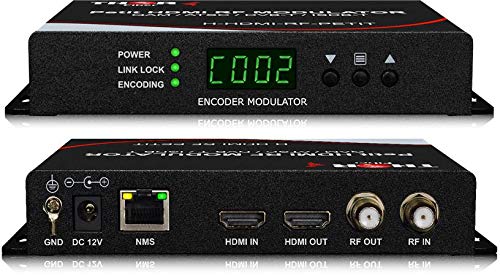
A pro-grade box that puts one HD source on every TV in a building, with 720p, 1080i and 1080p all supported.
It takes any HDMI source — a set-top box, satellite receiver, camera, DVD player or computer — and converts it to any RF channel you choose, outputting DVB-C, DVB-T, ATSC or ISDB-T. Video support spans 720p, 1080i and 1080p, and HD audio travels alongside it through AC3 Dolby Audio in an all-in-one encoder and modulator. A church running four 85-inch TVs off one source, and an installer pushing satellite around a whole house, are exactly the setups this is built for.
Two things win owners over: how simply it drops into an existing coax system, and how solid the picture holds. Customers note distributing a DVD player to multiple TVs on channel 03 with the sets finding it automatically, so the TV remote controls the source without disturbing anyone else. Owners rate functionality and picture quality highest, calling the output broadcast-quality with about a second of delay — fine for TV, not for gaming.
The trade-offs are real but predictable for pro gear. Configuration is done through a web interface that sometimes needs your PC’s network settings adjusted, and the manual is thin on detail. On the value side, owners are split — those replacing a failed commercial unit consider it a steal, while others find the price hard to swallow. It also runs hot around the clock, so give it airflow. A single channel means you cannot run a second independent feed from this one box.
Why installers reach for it: 720p/1080i/1080p input support, QAM or ATSC output on any channel you pick, and rock-solid playback with no drops.
What to budget for: one channel only, a fiddly web setup, a sparse manual, and constant heat that demands ventilation.
An easy yes for: venues, churches and multi-TV buildings that need one source repeated across dozens of screens on existing coax.
Overkill for: a two-TV home where a simpler extender or a budget modulator covers the job.
6. MINIMOD 2 Vecoax HDMI to Coax Modulator

The setup is three steps — connect, inject, set the channel — and every TV on the coax finds it on a rescan.
Small-scale distribution is the balance here. You plug your HDMI source into the Minimod 2, inject its coax output into your existing TV coax cabling, and set the channel number and name right on the unit’s own color display. Then you rescan your TVs and they pick up a Full HD 1080p channel with Dolby audio. It even combines with your antenna or cable signal, so real channels and your injected one sit on the same wire.
RV owners are the ones who really love it, because a coach full of TVs on coax is exactly the problem it solves. Reviewers point out success distributing HDMI to five TVs over coax in an RV, with DVD quality that looks near-identical to the source. The adjustable gain is genuinely useful for balancing levels against an OTA feed. Push a Blu-ray through and you will see some compression artifacts, similar to what cable or satellite delivers — that is the nature of a 1080p coax channel, not a fault.
The two things that need attention are setup quirks and picture ambitions. It needs to sit at the same coax injection point as your OTA feed (over-the-air antenna signal) to keep signal levels balanced, and some owners had to switch it to ATSC mode (the US digital TV standard) because the default cable-TV output was never detected by their TVs. Add roughly 20dB of attenuation (a signal reducer) if your OTA channels go missing after install. One owner testing it for DirecTV distribution over a master antenna system found the picture softer than a straight HDMI run and chose to keep it on secondary TVs only. For a coach or a small home setup, it is more than enough.
The parts that impress
- Three-step install with on-unit channel naming and a color display
- Combines your injected channel with antenna or cable on the same coax
- Adjustable gain helps balance against an OTA feed on one line
- Full HD 1080p with Dolby audio for every TV that rescans
The parts that need patience
- Some TVs only find the channel when you switch to ATSC mode
- You may need roughly 20dB of attenuation to protect OTA channels
- Picture is softer than a direct HDMI feed on secondary TVs
- Outside the US, you will want a plug adapter
Made for: RV and small-home setups distributing HD to a handful of TVs on coax you already have.
Think twice if: you want cable-grade sharpness on every screen — coax compression is the price of this approach.
7. Accsoon CineView Master 4K Wireless Video Transmission
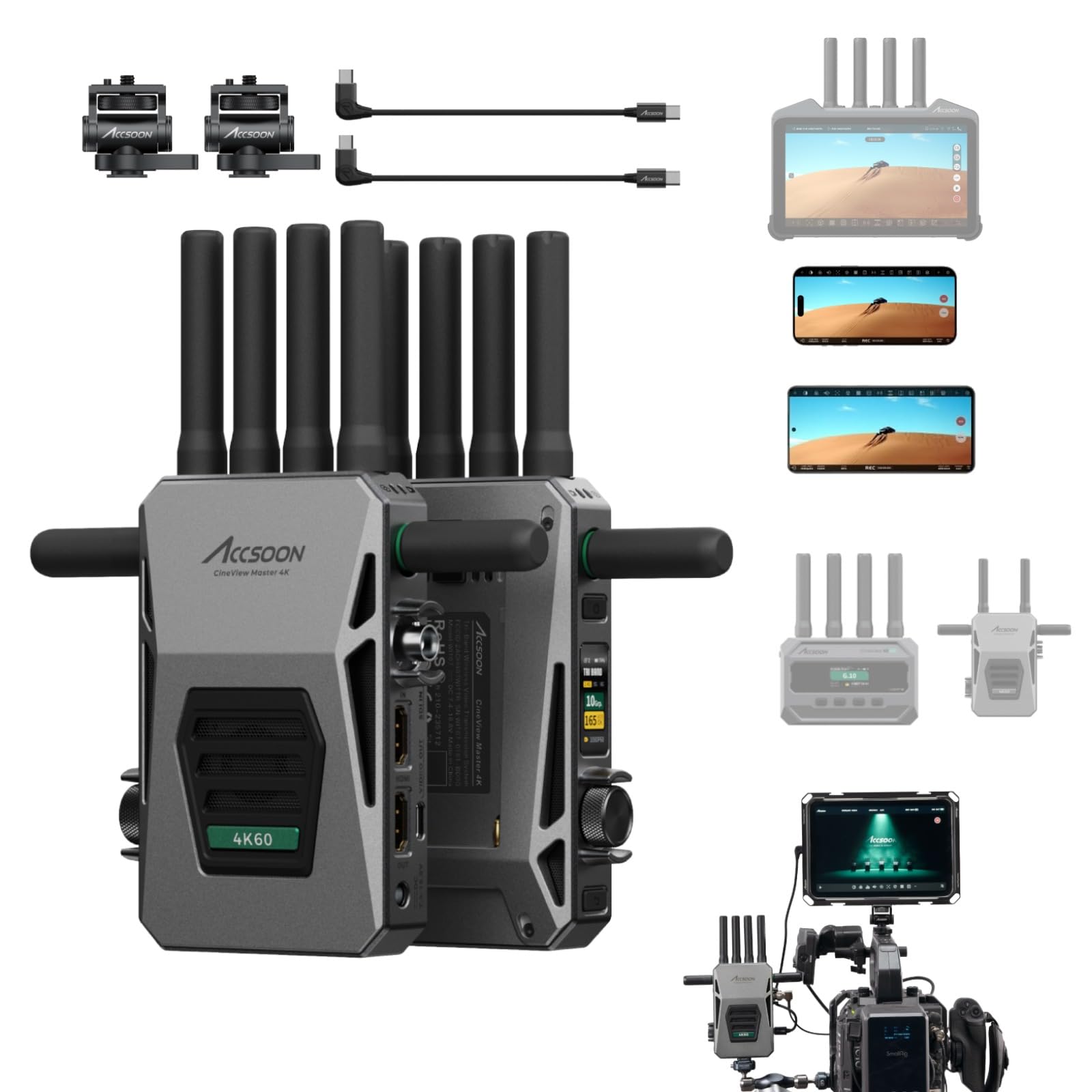
Wireless 4K video at a latency low enough to pull focus by, instead of running coax or HDMI across a set.
Every other product on this list moves video through a wire. This one moves it through the air. The CineView Master 4K sends up to 4K at 3840×2160 24/25/30/50/60 fps over HDMI, with 1080P over SDI or HDMI, and its latency (the delay between what the camera sees and what you see) is under 25ms at 1080P and under 35ms at 4K. That is fast enough for a focus puller watching on a monitor to trust the frame. In open air it reaches 8202 feet, and it runs on tri-band 2.4GHz, 5GHz and 6GHz to keep the link steady.
The flexibility is where it pulls away from a wired box like the OREI Matrix above. One transmitter feeds four devices wirelessly — receivers, iPhones or Android phones — and a USB video out port pushes a zero-latency signal to an iPhone or iPad over a cable. The Accsoon SEE app adds live streaming to YouTube, Facebook, TikTok and Twitch straight from the phone with no capture card, plus recording, focus peaking, waveforms, false color and audio meters. It pairs with Accsoon’s own CineView M7 Pro, M7H Pro, SE 4K and Master 4K Lite, and powers from NP-F970/750/550 batteries, DC input or V-mount.
Be aware of the limits before you commit. Live streaming runs over Wi-Fi only — cellular and 5G home internet are detected and blocked, which owners flag as a frustration for truly portable streaming. The Android app has glitched for some users, with the video feed shrinking to a quarter of the screen on occasion, and one owner reports it degrading further over time. It is also picky about HDMI cables and works with some batteries but not others. On reception it genuinely delivers: shoppers say beating other wireless units across 100 feet with walls in between, and describe it as better than competing brands in reliability.
Where it wins: under-25ms latency at 1080P, 4K@60Hz over HDMI, 8202-foot open-air range, and four-device monitoring from one transmitter.
Where it disappoints: streaming is Wi-Fi only, the Android app is unstable for some, and it wants specific cables and batteries to behave.
Right for you if: you shoot film or video and need a reliable wireless feed to a director’s monitor or a phone on set.
Not for you if: you need to livestream from a phone over cellular — this one is Wi-Fi first.
Know the Specs
ATSC vs QAM Output
These are the two ways a modulator can broadcast to your TVs. ATSC is the standard used by over-the-air antennas, so most modern TVs look for it first. QAM is the standard cable companies use. Many modulators can switch between the two, and that matters in practice: if your TV scans ATSC and finds nothing, flipping the box to QAM mode often reveals the channel. When a unit offers both, you have a fallback for stubborn displays.
Output Level in dBuV
This measures how strong the signal leaving the modulator is. A typical home sits well around 75 dBuV, and pushing it much higher can overload the line and interfere with the actual broadcast channels sharing your coax. If televisions far from the box show a grainy picture, an inline amplifier usually solves it. Treat the output control as a tuning dial, not a “turn it up for better picture” knob.
4K vs 1080p Over Coax
Coax distribution compresses what it carries, so a box that accepts 4K input often outputs a 1080p channel — that is normal, and it looks genuinely good on a TV. Extenders that run point-to-point can carry the full 4K@60Hz signal intact over a single run. If a true 4K picture on a distant screen matters most, an extender is the more direct route; if you need many TVs on one source, 1080p over coax is the practical answer.
HDCP and Your HDMI Sources
HDCP 2.2 is the copy-protection handshake your streaming sticks, set-top boxes and disc players expect before they will send a picture. If a box is not HDCP 2.2 compliant, protected content can hit a black screen or a warning. Check compliance before you commit if your sources include a modern streaming device or a Blu-ray player with protected discs.
Common Questions
Will a 4K modulator work with my older 1080p TV?
Do I need coax cable already in the walls for a 4K modulator to work?
What is the difference between an HDMI modulator and an HDMI extender?
Why can’t my TV find the channel after I install the modulator?
Can I run more than one HDMI source through the same coax system?
Does a 4K modulator support HDR and surround sound?
How do I extend the range of a wireless HDMI transmitter on set?
Can I use an HDMI-over-coax extender instead of running a new HDMI cable?
What is the difference between ATSC and QAM output on a modulator?
Do I need a subscription to record with a 4K modulator or network tuner?
The Bottom Line
Shopping for the 4k modulator really depends on the job in front of you. For most people wiring a home, the OREI 4×4 HDMI Matrix Switch is the one to start with, because four inputs to four outputs with downscaling covers nearly every multi-room setup you can throw at it. If your goal is free local channels plus a no-subscription DVR, among the most reliable picks in the whole category is the SiliconDust HDHomeRun Flex Quatro — a crowd favorite that holds up across a huge base of cord cutters. And when you need professional-grade reliability with rock-solid picture and one source across dozens of screens, the Thor Broadcast HDMI to Coax Modulator is the one to reach for.
Match the box to the job — matrix for many TVs, extender for one long run, modulator for a new channel — and you fix the picture without replacing your TVs.
How we choose
We do not accept paid placement. Every pick is matched to a real buyer and a real use-case; we do not hands-on test units.
Sources
Specifications: manufacturer listings and product documentation. Review insights: verified customer reviews, as of October 2026. Pricing: not shown on this page (it changes often); check the current price via the retailer link.
As an Amazon Associate, Aappliancez earns from qualifying purchases. This does not affect which products we feature.