Disclosure: Some links in this post are affiliate links. As an Amazon Associate I earn from qualifying purchases, at no extra cost to you. Learn more
Specs are compiled from manufacturer listings and verified buyer reviews and can change over time — please confirm the key details on the product page before buying.
Almost nothing sold as a 4K Blu-Ray burner actually writes 4K discs from the start. Most of these drives are DVD and standard Blu-ray burners that can read some high-definition discs, and a couple cannot play 4K at all. Before you spend anything, work out if you need to write 100GB BDXL discs, rip a movie library, or just read the old discs in your drawer. That one answer decides which drive below is right for you.
This guide is built by comparing the manufacturers’ published specifications and the patterns across verified customer reviews, so you get each pick’s real strengths and trade-offs instead of marketing spin.
Some drives here burn triple-layer BDXL media, some refuse 4K entirely, and one is an internal unit that needs the right SATA adapter. This breakdown of the 4k blu-ray burner market shows you which drive matches the discs you actually own.
Top Picks


How To Choose The Best 4K Blu-Ray Burner
The single most common mistake here is trusting the product title. A listing can say “4K Blu-Ray Drive” and still only read standard Blu-ray discs, or burn nothing above DVD. Read the disc-format line in the description before anything else, because that line decides whether the drive is useful to you at all.
Check whether it writes BDXL, not just reads Blu-ray
BDXL is the triple and quad-layer disc format that holds the big capacities — one drive here is built around 100GB triple-layer discs and 128GB quad-layer discs, while others top out at standard single-layer Blu-ray. If your goal is archiving a video project or a photo library, that capacity number is the whole reason to buy. If you only need to read old DVDs, a much simpler drive will do the job.
Match the connector to your machine
Most of these drives ship with both a USB-A and a Type-C cable, so they plug into a modern laptop or an older desktop without an adapter. Two drives here are pickier: one wants a powered hub or a separate power cable, and one is an internal SATA unit that needs a specific slimline adapter before your computer will see it. Know which of those you are buying before you open the box.
Budget for playback software separately
A drive can spin a Blu-ray disc and still show you nothing, because Blu-ray and 4K playback need licensed software that most of these units do not include. Factor a playback app into your plan from the start. Some bundles here include CyberLink software; others explicitly tell you to buy PowerDVD or Leawo yourself.
Side-by-Side Comparison
| Model | Best For | Disc Formats | Connection | Max BD Speed | Amazon |
|---|---|---|---|---|---|
| Produplicator LG BP60NB10★ Best Overall | Archiving to 100GB discs | BDXL, BD-R/RE, DVD, CD, M-Disc | USB | 6x | Amazon |
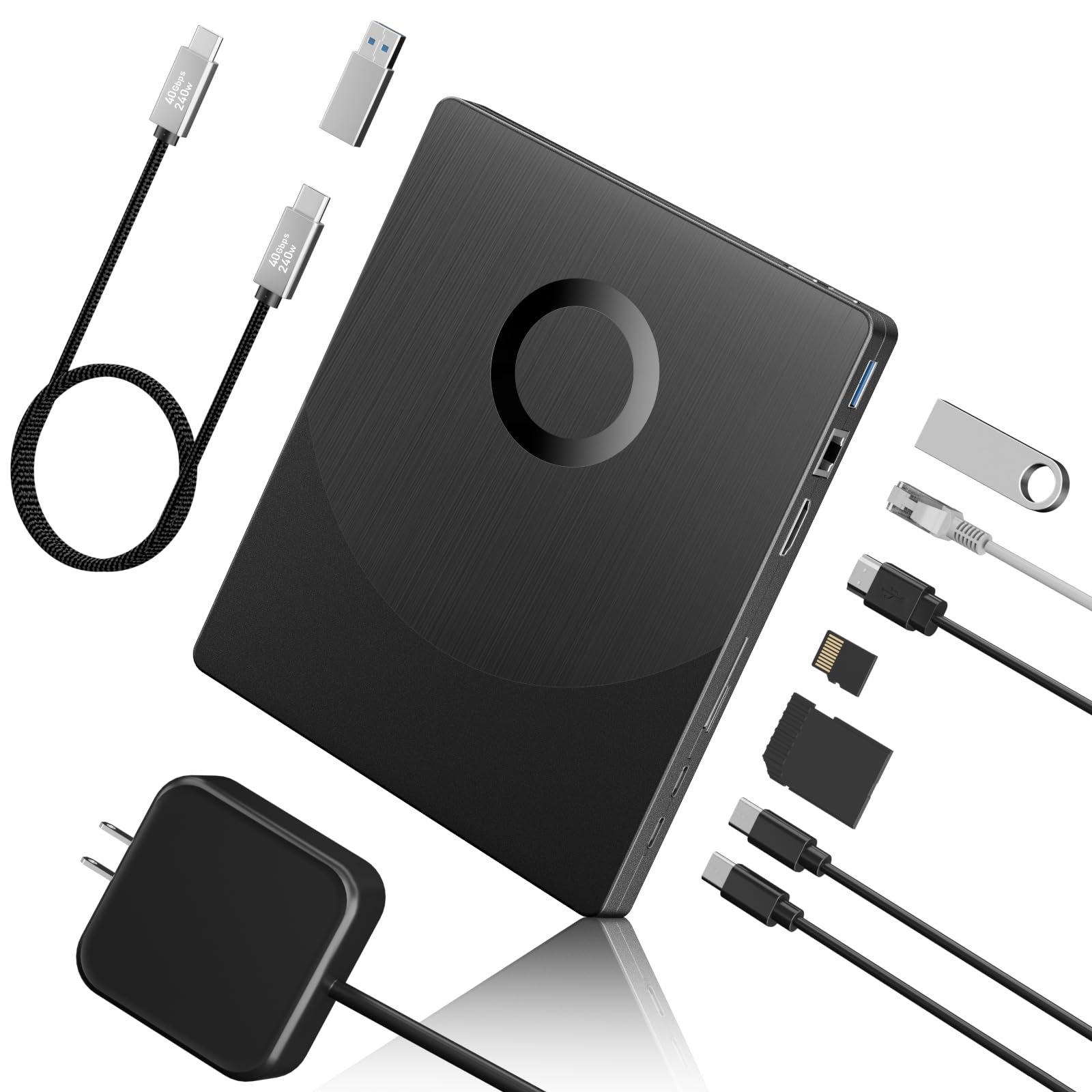
| Wbacon 7 in 1Most Versatile | Port hub plus disc drive | BD/DVD/CD, 3D, SD/TF | USB 3.0 Type-A / Type-C | 6x | Amazon |
| Yaeonku HDMI/LAN DriveWorkstation Pick | Workstation with peripherals | BD/DVD/CD, 100GB BD | USB 3.0 Type-C, HDMI, LAN | 6x | Amazon |
| BUNUD 5 in 1 | Everyday plug-and-play use | Blu-ray, DVD, CD | USB 3.0 Type-C | CD-R 24X / DVD-R 8X | Amazon |
| Dainty External Blu-ray Drive | Light-travel spare | BD (100GB), DVD, CD | USB 3.0 / Type-C | 6x | Amazon |
| JOYIN-BURN BU40N Internal | Laptop drive bay replacement | BDXL 100GB / 128GB, 4K UHD, M-Disc | 9.5mm SATA | 6x | Amazon |
| Mthstec Desktop Drive | Media server builds | BD, DVD, CD | USB 3.0 Type-C, HDD dock | BD read up to 16x | Amazon |
| LG WP50NB40 Bundle | Careful small-batch burning | BD-R DL, M-Disc 50GB, DVD, CD | USB | 6x | Amazon |
| Synteryx External CD/DVD Drive | Reading old CDs and DVDs | CD-R/RW, DVD±R/±RW, DVD-R DL | USB 3.0 / Type-C | DVD 8x / CD 24x | Amazon |
Detailed Reviews
1. Produplicator LG BP60NB10 Blu-ray Burner
Our pick — 4.0+★ from 50+ verified ratings; the strongest balance of quality and price.
The drive that puts 100GB on a single disc and still slides into a laptop bag.
This drive takes the top spot because it records up to 100GB onto a BDXL (triple-layer) disc — the high-capacity Blu-ray format you want for archiving a season of footage or a whole photo library. That same tray also takes BD-R/RE, DVD-R/-RW/+R/+RW, DVD-RAM, CD-R/RW, and M-Disc, so one drive replaces the drawer of equipment you have been hoarding. M-Disc is an archival disc with a hard coat that resists scratches and fingerprints — useful when a disc has to sit in a box for a decade.
Playback noise is handled by Silent Play, which recognises the type of media and adjusts playback speed for quieter running, and Jamless Play skips past damaged sections of a disc so a scratch does not stall your movie. The bundled CyberLink Media Suite and USB cable mean you can start burning without buying extras. What owners describe most is plain reliability: this drive plays Blu-ray and 4K discs without drama, which is exactly why people buy it when a new PC arrives with no optical slot at all.
The honest limit is 4K writing. Owners say 4K UHD ripping is where it stumbles — standard Blu-ray is fine, but if 4K UHD is your whole reason for buying, they suggest looking at other brands. Note that it holds the highest trust score in this lineup at 4.0+ stars, though the BUNUD pick has far more ratings behind it. Expect to spend on licensed Blu-ray software, since the bundled suite handles general disc work rather than every 4K playback job.
Where it earns the crown
- Writes 100GB BDXL triple-layer discs — the big-capacity format most drives on this list ignore
- M-Disc compatibility for long-term archival copies of photos and video
- Silent Play and Jamless Play keep noisy playback and scratched discs from ruining a movie
- Slim portable body with the USB cable and CyberLink software included
Where it stops short
- 4K UHD ripping is the weak spot — standard Blu-ray reads cleanly, 4K does not
- Fewer ratings behind it than the BUNUD pick, though its 4.0+ stars are higher
Reach for this one: you want to write 100GB BDXL and M-Disc archival discs from a laptop with no optical drive.
Think again if: your only goal is ripping 4K UHD movie discs — this is not the drive for that job.
2. Wbacon 7 in 1 External 4K Blu Ray Drive for Laptop
Seven slots in one slab, with two hidden cable grooves so nothing gets lost.
This is the drive to look at if your laptop is short on ports and you also need to move files around. It reads CDs at up to 24x, DVDs at up to 8x, and Blu-ray discs at up to 6x, and it burns standard CDs and DVDs in 8.5GB, 4.7GB and 700MB sizes plus 3D discs. Alongside the tray you get one SD slot, one TF slot, two Type-C ports, one USB 2.0 port and one USB 3.0 port, so the drive doubles as a small dock.
A neat touch is the pair of concealed wire grooves that hold both the USB 3.0 and Type-C cables inside the body. That means the cable does not dangle loose in your bag, and you are not hunting for the right connector mid-transfer. The ABS plastic shell keeps it light enough to carry, and it runs on the USB connection with no separate power brick.
The catch here is the name on the box. This is marketed as a 4K drive, but the 4K UHD features are impractical on most setups — the preparation is demanding and the drive slows down when anything else is connected. A powered USB hub is a near-requirement, because it would not reliably run a webcam off an unpowered one. If you want a working optical drive plus a hub, it delivers; if genuine 4K UHD burning is the goal, this is not the pick.
Why the port count wins: seven ways to connect a card, a flash drive or a hard disk in the same footprint as an ordinary portable burner makes this the travel drive for people juggling files on the move.
The 4K asterisk: treat the “4K” in the title as marketing — the real-world reports say the high-definition mode is a struggle, so buy it for its ports and standard disc work.
Best fit: a laptop user who wants a burner and a card reader glued into one compact slab.
Look elsewhere if: you need reliable 4K UHD playback as your main job.
3. Yaeonku Versatile External Blu Ray Drive with HDMI/LAN
A disc burner, a network port, a second screen and a card reader in one box.
The headline capability is 100G burning — this drive reads and writes triple-layer BD discs — combined with an HDMI output that carries video and audio to a second display and a LAN port for wired network access. Blu-ray discs read at up to 6x, DVDs at up to 8x and CDs at up to 24x. The total port count is eight: one SD slot, one TF slot, two Type-C ports, one USB 3.0 port, HDMI, and a 1000M ethernet port, plus a Type-C power port.
Performance is what wins people over here. The HDMI output effectively hands you a spare monitor connection, and the ethernet port saves you from buying a separate adapter if your laptop has none. It needs its external 65W USB-C power adapter connected, which is the trade-off for all that hardware.
Reliability is the honest caveat. Reports are mixed — for some it runs fine indefinitely, while a few find it stops being recognised after a while. There is also one recurring grumble worth knowing before you burn a treasured disc: this drive is fussy about surface condition, and a fingerprint or the smallest scratch can stop it reading a Blu-ray. If you keep your discs clean and treat it as a workstation accessory rather than a rugged travel drive, it is a clever piece of kit.
Worth it for: desk setups that need a disc drive, a wired network port and an extra display output from a single box.
Watch out: it needs its own 65W power supply, and it will not read a disc that has picked up a smudge.
4. BUNUD External Blu Ray CD DVD Drive, USB 3.0 Type C

The crowd favorite — the drive most people on this list end up buying.
If you want the safest bet in this roundup, this is it. The BUNUD drive is the most-reviewed pick here with 900+ ratings, and performance is the thing it wins on rather than any single flashy spec. It is a 5-in-1 unit: the disc tray handles Blu-ray, DVD and CD reading and writing, and alongside it you get two USB ports plus an SD and TF card slot to solve a port shortage. It plugs in over USB-A or Type-C with no driver install and gets detected straight away.
Burning speeds are clearly stated — CD-R at 24X, DVD-R at 8X, and CD-RW at 16X — so it handles everyday disc jobs at a sensible pace. One thing to be clear about: this drive does not play 4K Ultra HD discs. It reads standard Blu-ray, which is enough for most people, but if you specifically bought a 4K movie to play on your laptop, this will not do it.
The mixed feedback is worth sizing fairly. Compatibility is the big one — it works smoothly on Windows 11 but has been reported failing on Mac OS 14.6.1, so confirm your macOS version before ordering. The tray has a firm reputation for being flimsy-feeling, and a small number of buyers find it not sturdy. But the strong majority get a simple, reliable drive, and the maker backs it for a year.
Why it wins the crowd
- Most-reviewed drive here, with a 4.0+ star rating built on 900+ ratings
- 5-in-1 design adds two USB ports and an SD/TF slot for extra devices
- Plug-and-play on USB-A or Type-C with no driver install
- Year-long quality guarantee from the maker
Points to weigh first
- No 4K Ultra HD disc playback — standard Blu-ray only
- Reported trouble on Mac OS 14.6.1, so check your OS first
- Tray has a light, flimsy feel that needs gentle handling
The safe call: a first-time buyer who wants a working Blu-ray and DVD burner for Windows, backed by the biggest review base on this page.
Hold off if: you run a recent macOS build or need 4K playback.
5. Dainty External Blu ray Drive Player Read/Write
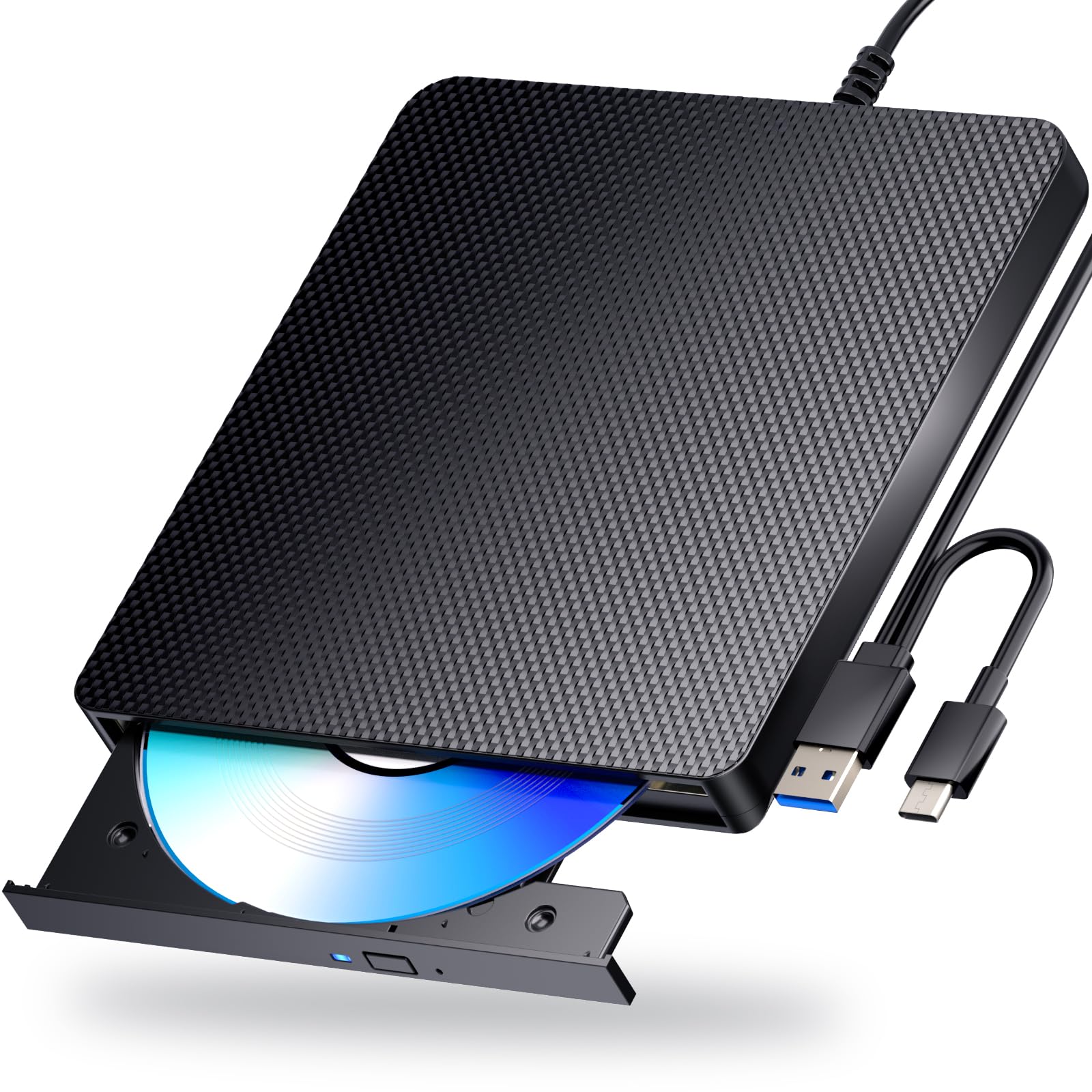
Built with a spare power cable so a long burn never dies halfway through.
Design-wise, this drive has a smart idea: it runs two USB cables into one body, so it can pull extra power to keep reads and writes stable. That extra cable is intended to stop the playback interruption and burning failure that weak power can cause. It reads and writes BD, DVD and CD discs, and the spec sheet lists 100GB BD, 700MB CD, 4.7GB DVD and 8.5GB dual-layer DVD support with 5Gbps USB 3.0 bandwidth.
You need to know what you are getting, though, because reliability here is mixed. Some units work well for a long stretch as both a player and a writer, given the right software. Others fail quickly — reports include drives that stop connecting to any computer after only a few uses and drawers that stop staying shut after roughly two and a half months. Reliability being mixed on an affordable drive is a real risk to weigh.
Two further details matter before you buy. First, it does not play 4K discs at all — this is a standard Blu-ray and DVD drive. Second, Blu-ray playback and writing need software of your own, such as PowerDVD or Leawo, which is not included. It also ships region 2 in some cases rather than US region 1, so a commercial DVD may need its region changed before it plays. If you want a cheap spare drive for occasional rips, it fills that role; as your main workhorse, it carries real risk.
The clever bit: the dual USB power design is genuinely useful for a portable drive, because a stable power feed is exactly what makes a long burn finish cleanly.
The gamble: reliability is the most-discussed topic for this drive and it splits both ways — some units last, some fail within a few months, so buy it as a spare rather than your one and only drive.
Pick this one: as a low-cost second drive for occasional DVD and standard Blu-ray jobs.
Better to pass: if this is the only drive you will own or you need 4K or bundled playback software.
6. 9.5mm Tray-Loading SATA Internal 4K UHD Blu-ray Writer BU40N

A bare internal burner for the person who wants real 4K UHD writing, adapters and all.
For genuine 4K UHD writing, the drive inside this unit is the one to understand. It reads and writes three-layer BDXL discs at 100GB and quad-layer BDXL-R discs at 128GB, and it handles 4K and 3D Blu-ray discs. BD read and write speeds are listed at 6x, and M-Disc support lets it write archival discs rated to outlast standard CD, DVD and BD-R media. Performance is what earns this pick its following — it handles its core job well, and flashability is the second thing that comes up.
Here is the thing that separates it from every external drive here: you must supply the hardware and software yourself. It is an internal 9.5mm tray-loading SATA unit with no retail box, no cables, no instruction manual and no software. To use it in an external enclosure or through an adapter, you need the right SATA-to-USB cable — the hollow 6+7 pin slimline kind — or your computer will not recognise it correctly. Buyers who got that right have ripped 50-plus Blu-rays through MakeMKV in a fortnight.
The 4K story is hit and miss, and that is the honest caveat. Some units arrive with firmware old enough to read 4K discs from the start with no flashing. Others need a firmware flash before 4K works, and one buyer could not read three-layer UHD discs on any firmware at all, even with standard Blu-ray working fine. It is a genuine BU40N drive, but treat 4K capability as something you may have to open up rather than a guarantee.
What serious users gain
- Writes 100GB triple-layer and 128GB quad-layer BDXL discs
- M-Disc support for archival copies rated to outlast standard discs
- Flashing the firmware open up 4K UHD ripping for many owners
- Genuine BU40N drive — well-documented and familiar to ripping communities
What you give up
- No cables, software or manual in the box — you source the SATA adapter yourself
- 4K UHD reading can require a firmware flash, and some units need none at all — it is inconsistent
Made for: tinkerers fitting a 4K-capable burner into a laptop bay or enclosure, who can handle firmware and adapters.
Avoid if: you want a plug-and-play drive straight out of a box.
7. Mthstec Desktop Blu Ray Drive

A desk-bound burner with a hard-drive bay on top and a USB hub on the side.
What makes this one different is the hard drive enclosure built into the top of the body. It takes both 3.5-inch and 2.5-inch SATA drives, so you can drop an old hard disk in and read it over the same connection without buying a separate dock. Around that you get a 2-port USB 3.0 hub running at up to 5Gbps and a fast-charging port. The drive side reads Blu-ray at up to 16x, DVD at up to 16x and CD at up to 40x in the manufacturer’s figures, and it burns 8.5GB, 4.7GB and 700MB CD and DVD discs.
Build quality is the thing buyers keep coming back to. It feels heavy-duty, and people use the phrase “it hasn’t blinked yet” after pushing it hard to build a media server. The SATA dock on the rear top is the feature that owners single out as the reason to choose this over a plain burner. If you shuffle files between drives for a home server, it is a genuinely different machine rather than just a disc tray.
Test the claim on speed before you plan your workflow around it, though. The 16x figure does not hold up in real reports — DVD ripping is slower than advertised, and the 2MB buffer is the likely reason. One unit arrived dead-on-arrival with a tray that auto-ejected, and one buyer found the supplied optical drive too old to take a firmware flash for 4K Blu-ray burning. The Type-C port is also just an adapter on a normal USB connection, so there is no real Type-C speed boost here.
The differentiator: that top-mounted SATA dock turns this from a burner into a media-management hub, and it is what owners call the reason it earns a place on the desk.
The speed reality: the 16x figure is optimistic — expect slower ripping than the number suggests and do not bank on it for 4K burning.
For the home server builder: someone who wants a disc drive, a hard-drive dock and extra USB ports on the same desk.
Not the one: if fast ripping speeds or 4K burning are the whole reason you are shopping.
8. LG 6X WP50NB40 External Portable Blu-ray Burner Bundle
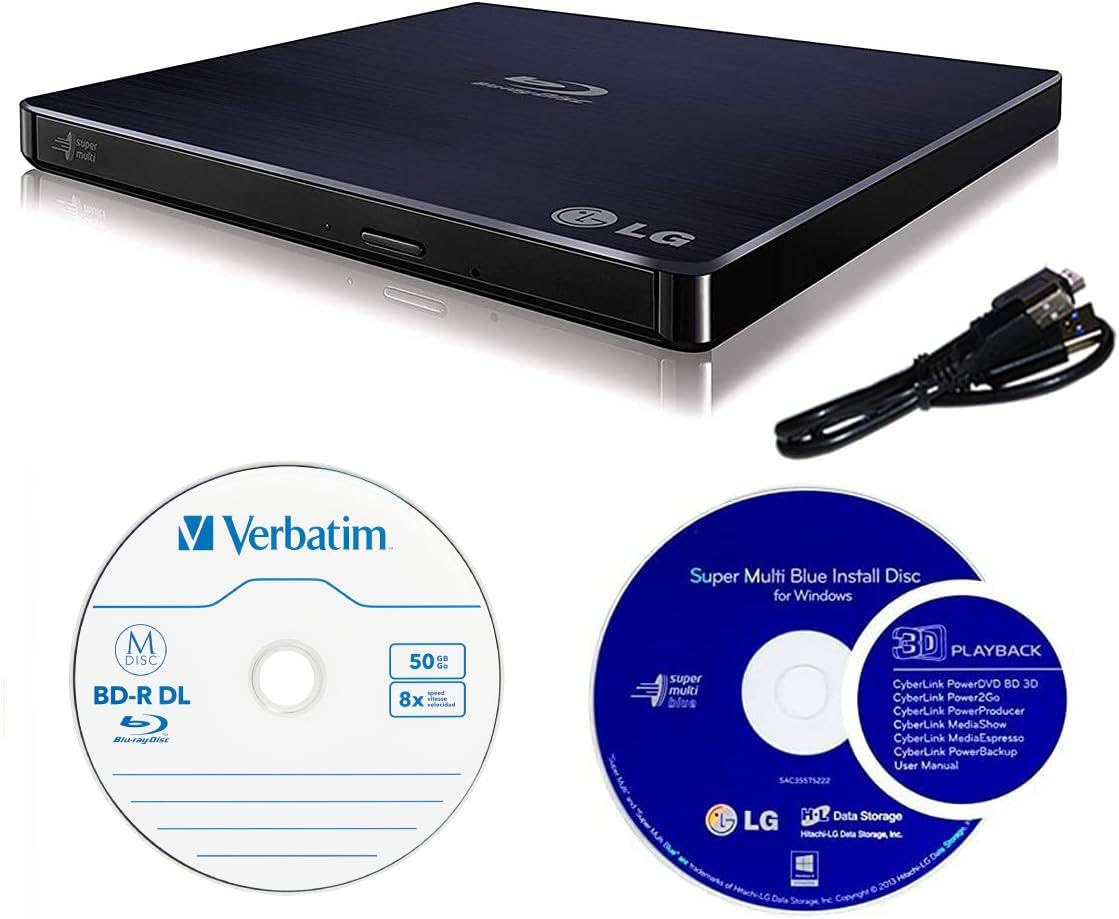
An LG burner plus a 50GB M-Disc, sold together for permanent archive copies.
This bundle is about one job: writing a copy that will still be readable in decades. It ships with LG’s portable burner and a single 50GB Verbatim M-Disc BD-R DL. M-Disc uses a non-volatile, rock-like data layer instead of the reflective dye-based layer found in conventional discs, and LG claims M-Discs written on a supported drive can hold data for up to 1000 years. Whether or not you take that number at face value, the rock-like layer is a real advantage for a family photo archive.
The drive itself burns BD-R at up to 6x, DVD-R/+R at up to 8x and CD-R at up to 24x, with the same read speeds. Dual-layer BD and DVD burning both run at 6x. A 4MB buffer with under-run prevention is embedded, which is exactly the feature that keeps a burn from failing when your machine stutters. It meets the OS requirements of Mac OS X 10.7.5 or higher and Windows XP SP3 or higher, and asks for a Pentium IV at 2.4GHz with 1GB of RAM.
Two honest cautions. First, newer buyers are surprised that it will not decode 4K UHD from the start — that needs a firmware flash with the right binary files, which older buyers have done. Second, one unit died after burning four discs and then produced ten coasters across three brands. Treat it as a careful, slow archive tool rather than a drive for long production runs.
Right choice for: archiving family photos and videos, where the bundled M-Disc and the anti-failure buffer matter more than speed.
Skip it for: volume burning sessions or out-of-the-box 4K support without a firmware flash.
9. Synteryx External CD/DVD Drive for Laptop, USB-A & Type-C
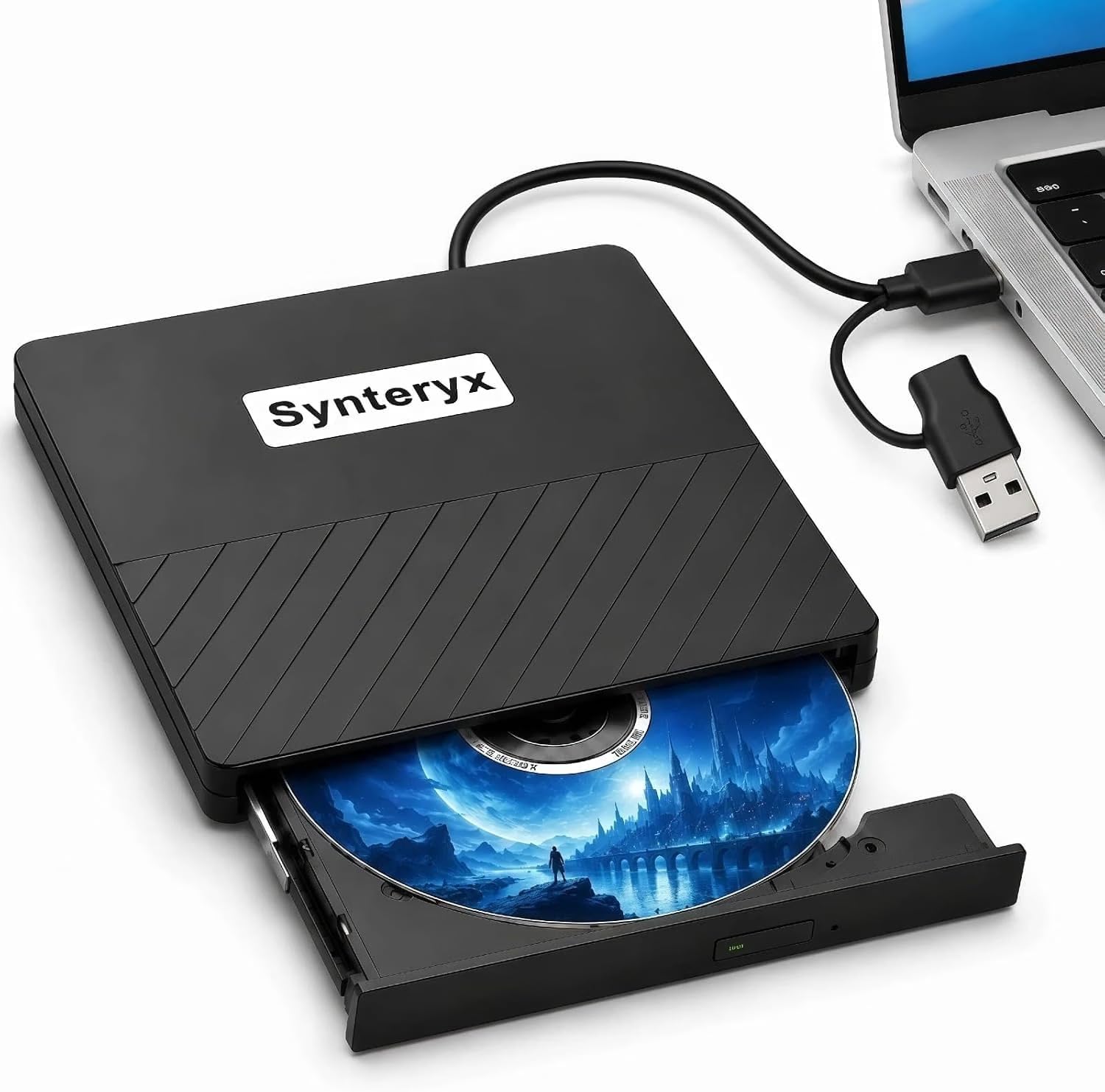
The straightforward answer for reading old CDs and DVDs on a laptop with no slot.
Be clear about what this one is: it reads and writes CDs and DVDs, not Blu-ray. It takes CD-R, CD-RW, DVD-R, DVD+R, DVD-RW, DVD+RW and DVD-R DL, with reads and writes at up to 24x for CD and 8x for DVD. It connects over either USB-A or Type-C with no driver needed and works with Windows 11/10/8.1/7, macOS and Linux. Non-slip pads underneath stop it sliding while a disc spins up.
For a light, everyday job it does exactly what it should. If your new laptop has no CD drive and you have a box of old discs to read, this handles it without fuss, and it is light enough to live in a laptop bag. Data moves over a 5Gbps USB 3.0 connection, and the maker backs it for a year. One thing most buyers notice: the included USB cable is short, so it dangles awkwardly beside a laptop or cannot comfortably reach a desktop tower.
The other thing to know is that macOS and Windows 11 are not equally friendly here — reports say it works well on an older Mac but less smoothly on Windows 11. The tray can also be stiff and will not pop open easily. Neither is a reason to skip the drive if your need is simple; just keep a spare USB extension cable on hand and check your OS. It is the honest little reader, not the burner.
Why it earns a spot
- Handles CD and DVD reading and writing, with dual USB-A and Type-C connectors
- Plug-and-play across Windows, macOS and Linux with no driver install
- Light and compact enough for a laptop bag, with non-slip pads
What holds it back
- No Blu-ray support at all — CDs and DVDs only
- The USB cable is short and awkward to place
- Tray is stiff and does not pop open easily
Choose it for: pulling old files and music off CDs and DVDs when a basic, light reader is all you need.
Keep looking if: you need to burn Blu-ray discs — this drive cannot touch them.
Know the Specs
BDXL capacity and its layers
BDXL is the high-capacity Blu-ray disc format, and the layer count tells you how much a drive can write in one go. A triple-layer BDXL disc stores up to 100GB, and a quad-layer BDXL-R disc up to 128GB. A standard single-layer Blu-ray disc holds far less. If you are archiving a video project, the BDXL figure is the number that matters, because it decides whether a whole project fits on one disc or gets split across several. Confirm the drive actually writes BDXL, not just reads it.
Buffer size and burn reliability
The buffer is a small chunk of memory that feeds data to the laser while the disc spins. One drive here lists a 4MB buffer with under-run prevention, and another lists a 2MB buffer — a bigger buffer gives the drive more slack when your computer stutters, which keeps a slow burn from turning into a coaster. Speed is not the whole story; a steady burn at a moderate speed beats a fast one that fails.
M-Disc: what the coat actually does
M-Disc is a disc with a hard coat that resists scratches and fingerprints, plus a non-volatile data layer instead of the dye-based layer in conventional discs. Drives that support M-Disc let you write an archival copy meant for long-term storage of photos, videos and files. If your backup plan is a shelf of discs you plan to revisit years from now, check M-Disc support before buying.
Connection and power for a portable drive
A USB 3.0 connection moves data at up to 5Gbps, which is plenty for disc burning. Some drives here add both USB-A and Type-C in a single body, so you do not need an adapter. A few need a second cable or a separate 65W power adapter to stay stable, and one is an internal SATA unit that will not be recognised through a plain adapter. Match the power method to your setup before you buy.
Common Questions
Can these drives actually burn 4K UHD Blu-ray discs?
What is the difference between reading and burning a Blu-ray disc?
Do I need to buy Blu-ray software separately?
Will the internal BU40N drive fit my laptop?
Why does a portable drive need two USB cables or a power adapter?
How long does a disc burned with M-Disc last?
What does BDXL mean compared with standard Blu-ray?
Can I use these on a Mac or a tablet?
Why does one drive ship set to the wrong DVD region?
Does a USB 3.0 connection make disc burning faster?
The Bottom Line
For a true 4K Blu-Ray Burner job where the goal is writing large discs, the Produplicator LG BP60NB10 is the one to reach for — it writes 100GB BDXL and M-Disc discs and keeps its playback quiet. If you want a simple, proven everyday drive and the biggest review base on the page, the BUNUD 5-in-1 is the easy pick, provided you do not need 4K. And if you are fitting a drive into a laptop bay or enclosure and can handle adapters, the BU40N internal drive is your 4K UHD starting point. Match the drive to the disc you actually need to write, and this whole list makes sense.
How we choose
We do not accept paid placement. Every pick is matched to a real buyer and a real use-case; we do not hands-on test units.
Sources
Specifications: manufacturer listings and product documentation. Review insights: verified customer reviews, as of October 2026. Pricing: not shown on this page (it changes often); check the current price via the retailer link.
As an Amazon Associate, Aappliancez earns from qualifying purchases. This does not affect which products we feature.