Disclosure: Some links in this post are affiliate links. As an Amazon Associate I earn from qualifying purchases, at no extra cost to you. Learn more
Specs are compiled from manufacturer listings and verified buyer reviews and can change over time — please confirm the key details on the product page before buying.
No desktop machine prints a finished shirt. What this hobby calls “3D clothing” is printed armor, cosplay plates, wearables, and flexible filament pieces. The machine that earns its place lays down smooth layers at speed without you babysitting it. The Bambu Lab P1S is the safest place to start: it arrives assembled, sets up in about 15 minutes, and levels itself before every job.
This guide is built by comparing the manufacturers’ published specifications and the patterns across verified customer reviews, so you get each pick’s real strengths and trade-offs instead of marketing spin.
Below you’ll find how build volume, enclosed chambers, and extruder temperature decide what a printer can actually wear or display, plus which models handle flexible filaments. If you want pieces that fit a body or a costume, this breakdown of the field of 3d clothing printer machines covers the ones worth your money.
Top Picks



How To Choose The Best 3D Clothing Printer
Buying for wearable and costume printing is a different job than buying a general hobby printer. A finished armor plate is usually tall, thin, and curved, and those shapes punish a machine that warps, wobbles, or runs out of bed space. Get these four things right and the rest is slicing skill.
Build volume decides what you can print in one piece
A 260 x 260 x 260mm bed is the common starting point and handles most gauntlets, masks, and small plates. Anything bigger than that — a full chest piece, a long sword blade — either needs a bigger machine or gets split into pieces you glue and sand. The IdeaFormer IR3 V2 takes that further with a conveyor belt and an infinite Z axis, so a long part keeps rolling instead of stopping at a fixed height.
Enclosed versus open frame
An enclosed body traps warm air around the print, which helps tall thin shapes hold their form and keeps drafts from peeling a corner loose mid-job. Open-frame machines like the Bambu Lab A1 print PLA beautifully but give you less control over ambient temperature. If your wearable work leans on ABS or ASA, the enclosure matters more than almost any other spec.
Extruder temperature and flexible filament
TPU, the rubbery filament people use for straps and flexible panels, is the hardest material to feed reliably. A direct-drive extruder with a hot end that reaches 300°C gives you the best odds, and a hardened steel nozzle lets you run abrasive carbon-fiber blends without chewing through the tip. Machines that top out lower will still print PLA and PETG perfectly well — they just close the door on the stretchy stuff.
Speed numbers versus first-layer reliability
You will see 500mm/s and 600mm/s printed in big letters on the box, along with acceleration figures in the tens of thousands. Those numbers only hold on simple shapes at generous layer heights. What actually saves you a ruined costume piece is a machine that probes the bed and sets its own first layer, because a bad first layer on a tall print wastes hours.
Side-by-Side Comparison
| Model | Best For | Build Volume | Max Speed | Weight | Amazon |
|---|---|---|---|---|---|
| Bambu Lab P1S★ Best Overall | Wearables and armor plates | 260 × 260 × 260mm | 500 mm/s | 38.9 lb | Amazon |
| Creality K1CMost Trusted Track Record | Carbon-fiber cosplay armor | 8.66 × 8.66 × 9.84 in | 600mm/s | 27.3 lb | Amazon |
| Anycubic Kobra XBest for Colour Work | Four-color pieces right away | 260 × 260 × 260mm | 600mm/s | 20.9 lb | Amazon |
| Creality K2 Combo | Big helmet-scale prints | 10.24 × 10.24 × 10.24 in | 600mm/s | 39.7 lb | Amazon |
| Bambu Lab A1 Combo | Quiet multicolor display props | — | 10,000 mm/s² accel. | 28.5 lb | Amazon |
| ELEGOO Centauri 2 | First-timers on a budget | 256 × 256 × 256mm | 500 mm/s | 30.1 lb | Amazon |
| FLASHFORGE AD5X | Fast batch production | 220 × 220 × 220mm | 600mm/s | 24.2 lb | Amazon |
| QIDI Max4 Combo | Full-size armor in one go | 390 × 390 × 340mm | 800mm/s | 120 lb | Amazon |
| IdeaFormer IR3 V2 | Endless-length blades and props | 250 × 250 × ∞mm | 400mm/s | 44 lb | Amazon |
| Snapmaker Artisan | Print, laser and carve | 400 × 400 × 400mm | — | 79.8 lb | Amazon |
| Original Prusa CORE One | Set-and-forget reliability | 250 × 220 × 270mm | — | 56.8 lb | Amazon |
Detailed Reviews
1. Bambu Lab P1S 3D Printer
Our pick — 4.5+★ from 400+ verified ratings; the strongest balance of quality and price.
The enclosed workhorse that prints a wearable plate in a single overnight run.
If your goal is a finished costume piece rather than a printer project, this is the machine that gets out of the way. It arrives ready to use and is set up in 15 minutes, and the fully enclosed body holds warmth around tall, thin shapes so a shoulder plate does not peel at the corner overnight. The bed is 260 x 260 x 260mm — big enough for most masks, gauntlets, and forearm guards in a single run.
Speed is 500 mm/s with 20,000 mm/s² acceleration, and the automatic bed leveling probes before each job so you are not chasing a paper shim with a screwdriver. Its supported filament list is unusually wide: PLA, PETG, TPU, PVA, PET ABS and ASA are all listed as ideal, with PA and PC as capable. TPU on that list is the detail that matters here, because stretchy filament is what flexible straps and hinged panels are made of.
Owners describe a machine that buries whatever they owned before — one long-time user with a decade of printing behind them reckoned it beat a much larger workhorse on quality, speed, and reliability. The recurring caveat is the ecosystem: you get the most out of it with the maker’s own filament and software. And one honest note on the numbers: the ELEGOO Centauri 2 carries far more ratings, but the P1S holds the higher score at 4.5+ stars across 400+ owners.
Why it holds the top slot
- Enclosed chamber keeps tall, thin wearable shapes from warping mid-print.
- 260 x 260 x 260mm bed prints most armor and prop pieces in one piece.
- TPU listed as an ideal filament, so flexible straps are on the table.
- Self-leveling before every print removes the most common beginner failure.
- Up to 16 colors with the AMS unit connected, per the manufacturer.
Where it asks something of you
- Heavier than the Kobra X — 38.9 pounds against 20.9 — so plan a permanent bench spot.
- Carbon and glass-fiber reinforced filament are not recommended on this unit.
- Multi-color only works once you add the AMS, which is not in the base box.
- Occasional units show up with cosmetic assembly faults and get returned.
Built for: anyone making wearable plates and props who wants the print to succeed without tuning.
Think twice: if you plan on abrasive carbon-fiber blends, which this machine does not recommend.
2. Creality K1C 3D Printer
Hardened steel tip and a sealed path built for gritty carbon-fiber armor panels.
Carbon-fiber reinforced filament is how people get stiff, light armor plates that feel like real kit, and it eats soft nozzles for breakfast. The K1C is the pick here for that job. It runs a clog-free direct extruder with a steel-tipped copper nozzle fused to a titanium alloy heatbreak, and it prints up to 300℃, which is the headroom abrasive blends need. Speed sits at 600 mm/s with 20,000 mm/s² acceleration, and the build size is 8.66 x 8.66 x 9.84 inches.
What buyers respond to most is simply how much machine you get: the quality story dominates the feedback by a wide margin, with assembly second — most people report it arrives pre-assembled with the tools in the box. A mechanical engineering student running research parts measured dimensional accuracy within 0.5mm on a 100mm cube. It also carries an AI camera that watches for spaghetti failures and foreign objects, so a tall print that goes wrong overnight gets flagged instead of quietly wasting a spool.
Direct contrast worth knowing: it is lighter than the P1S at 27.3 pounds against 38.9, and it does not have that machine’s enclosure, so ABS drafting is less controlled. The instructions draw the sharpest criticism of anything on this printer — the community videos are the real manual. Budget time for belt tension and a frame check on arrival.
The armor argument: a 300℃ hot end paired with a hardened steel tip is the specific combination that makes carbon-fiber plate work possible on a desktop machine.
Set aside an evening: the included paperwork is thin, so plan to learn setup from community guides rather than the box.
Reach for this if: your builds lean on stiff, abrasion-resistant filament and you want a large owner base behind the machine.
Look elsewhere if: you want zero assembly and a sealed chamber from the start.
3. Anycubic Kobra X Multicolor 3D Printer
Four colours built in from the first print, no add-on box to buy separately.
Most multicolor setups make you buy a separate feeder unit. This one ships with the four-color feeder already inside the machine, so a painted-looking prop comes off the bed on day one. It can climb to 19 colors if you add more ACE 2 Pro units, the manufacturer says, and the print area is 260 x 260 x 260mm. Top speed is 600mm/s, and the maker claims a Benchy in 14 minutes.
It is the lightest machine in this group at 20.9 pounds, against the P1S’s 38.9, so you can move it alone. It does take up more desk: 23 x 13 x 22 inches against the P1S’s 15.31 x 18.03 x 15.31. Print quality is what carries it. That is the subject buyers bring up most, and the consensus describes crisp layers even at the top speed setting. Color transitions come out clean without you stopping to swap spools by hand.
The honest catch is the feeder. Reliability, clogging, and bed adhesion are the three areas where sentiment splits, and a small share of buyers hit jams and describe the warranty process as frustrating. Clean, dry filament and the included auto-leveling routine keep most of that at bay — the LeviQ 3.0 system runs a 49-point bed calibration. Note the spools in the photos are display only and filament is bought separately.
What buyers keep coming back to
- Four colors from the start means no extra purchase to start painting parts in filament.
- 260 x 260 x 260mm bed covers masks, bracers, and helmet shells in one pass.
- Spaghetti and foreign-object detection watch the print when you walk away.
- Dual-band 2.4G/5G Wi-Fi plus LAN for remote monitoring from the app.
- TPU among the supported flexible filaments for straps and joint pieces.
The trade-offs to weigh
- Filament is not included — the four spools shown in photos are display only.
- A minority deal with clogging and jams that need clearing.
- Long and wide footprint at 23 x 13 x 22 inches, so measure your bench.
- The ACE 2 Pro expansion units need the matching generation — older ACE Pro does not fit.
Pick it when: multicolor props are the whole point and you want the feeder included rather than sold apart.
Know going in: you supply your own filament from day one.
4. Creality K2 Combo 3D Printer

A 10.24-inch cube that prints a whole helmet shell in one piece.
Helmets are the piece that forces the purchase decision. A 260mm bed makes you slice the shell into four parts, glue them, and sand the seams for a weekend. The K2 Combo gives you 10.24 x 10.24 x 10.24 inches of print area, which the maker pitches directly at printing a helmet or a whole tray of small pieces at once. The frame is die-cast aerospace aluminum alloy, and the whole unit weighs 39.7 pounds.
Under the hood are three step-servo motors — one in the extruder and one on each of the X and Y axes — working to hold extrusion consistency. Speed reaches 600mm/s with 20,000 mm/s³ acceleration. The hot end flows 40mm³/s powered by an 80W heater, the nozzle reaches 300°C with a hardened steel tip, and the CFS feeder takes you to 16 colors. A chamber camera watches for spaghetti and foreign objects and alerts you.
Feedback splits cleanly between people delighted by the print quality and value, and those who find the build flimsier than expected. A printed helmet shell is one of the better arguments for buying here, because one-piece shells save you a full day of seam work. Give it a rigid table — at nearly 40 pounds it will find any wobble in your setup.
The volume dividend: 10.24 inches per side is what lets a single-piece helmet or a large armor plate skip the glue-and-sand stage entirely.
Anchor it properly: a 39.7-pound machine with a fast moving toolhead wants a solid, level surface, not a folding table.
Best for: cosplayers printing full shells and long plates that other beds force you to cut apart.
One caveat: the physical build draws mixed reactions, so inspect the frame and squareness after assembly.
5. Bambu Lab A1 Combo with LED Lamp Kit

Open-frame, four colors from the start, and quiet enough to run beside your desk overnight.
What sets this apart is the bundled LED kit: you print a lamp design, drop in the included light, and end up with an illuminated prop or gift rather than another dust collector. The AMS lite is in the box too, so multi-color printing works from the start — the manufacturer is explicit that the feeder is required for it. Acceleration is 10,000 mm/s², and active flow rate compensation adjusts extrusion on the fly so layers stay even.
Active motor noise canceling is the feature that earns its keep in a small apartment. It keeps the machine quiet enough to run while you work. Full-auto calibration handles Z-offset and bed leveling before each job, and the 1-clip quick swap nozzle makes a worn tip a minute-long change rather than a teardown. At 28.5 pounds it is light enough to move between rooms.
Two things to plan for. There is no enclosure, so ABS and ASA are not where this machine shines — PLA and PETG are its home turf. And a notable set of buyers ran into filament clogs severe enough to sour the whole experience. Clean the nozzle and retighten the nozzle holder on a schedule and you sidestep most of it.
Right for: makers printing display props and lit decor in PLA (a basic, easy-to-print plastic) who want multicolor and quiet operation together.
Not the tool: for ABS or ASA work (tougher plastics that warp without steady heat) that needs a sealed warm chamber.
6. ELEGOO Centauri 2 3D Printer
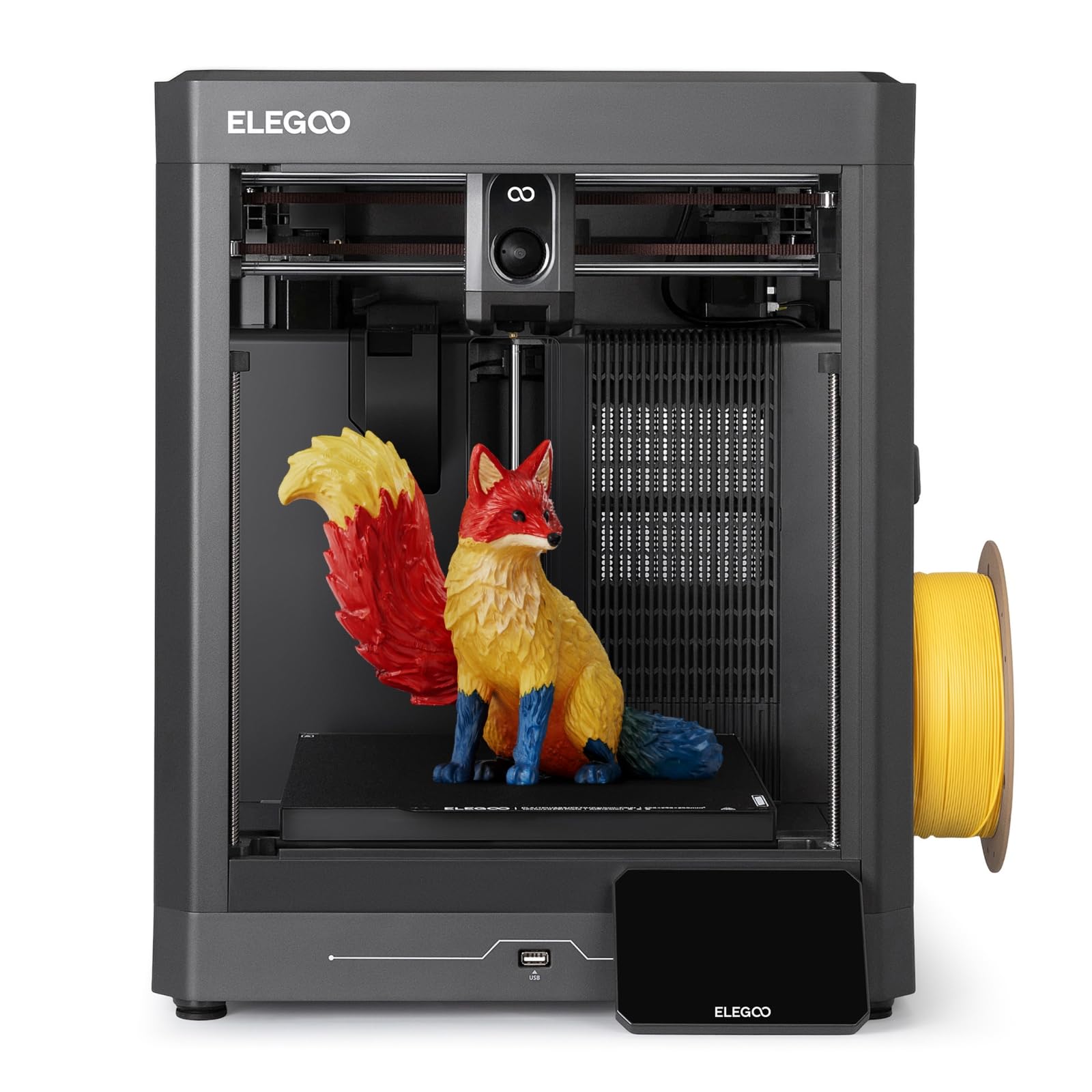
The budget enclosed machine that gets a beginner printing within minutes of unboxing.
If you have never printed a wearable before, this is the least intimidating way in. Setup takes minutes, and the buyer consensus is that it works properly straight from the box — the ease-of-use thread runs deep. The bed is 256 x 256 x 256mm with an enclosed body, which means PLA and PETG pieces come out clean and the door keeps the cavity warm. Speed reaches 500 mm/s with 20,000 mm/s² acceleration on the CoreXY system.
A 5-inch touchscreen runs the show, and smart pre-print checks handle calibration before every job. Maintenance is deliberately simple: a magnetic printhead cover, a semi-automatic belt tensioner, and a nozzle wiper. There is a remote app for monitoring, and a large model library to pull files from when you are starting out.
Now the part nobody should skip. Some units do fail — the steel tubing of the mechanical side is sturdier than the electronics, and one buyer’s first machine quit with a hot end communication error after six days. The replacement worked well for hundreds of hours of PETG and PLA+ printing. Most clogs trace back to a dirty nozzle, so clean it and retighten the nozzle holder on a schedule and you sidestep most of them.
Right for: makers printing display props and lit decor in PLA who want multicolor and quiet operation together.
Not the tool: for ABS or ASA work that needs a sealed warm chamber.
7. FLASHFORGE AD5X Multi-Color 3D Printer

Four colors, four nozzle sizes, and a 20-minute assembly before you are printing.
The flexible part of this machine is the nozzle lineup. It ships with a 0.4mm nozzle fitted and lets you swap to 0.25mm for miniature detail or 0.6mm and 0.8mm to cut print time on big sturdy shapes. That range is a genuine advantage for a cosplay builder flipping between tiny greebles and large flat plates. Speed is 600mm/s with 20,000 mm/s² acceleration, and it prints four colors at once.
It weighs 24.2 pounds, and setup is short — buyers report assembly and calibration in around 20 minutes, with the machine running within about 30 minutes of unboxing. Durability is the soft spot: the sentiment there leans negative, and a small batch of owners hit auto-leveling trouble around the 300-hour mark that needed parts from support. The manufacturer did ship replacements in those cases, and some units have gone on past that mark without trouble.
A 300°C direct-drive extruder, a dual-channel cooling fan, and vibration compensation handle the quality side, and resume-printing picks up after a power cut. The 220 x 220 x 220mm bed is the smallest in this top group, so long blade props will not fit — for those you are looking at the belt machine further down. Only small filament samples are in the box, so stock spools before your first serious print.
Reasons it earns a place
- Four nozzle sizes from 0.25mm to 0.8mm cover both fine detail and fast bulk parts.
- 300°C direct-drive extruder handles a broad filament range.
- 20-minute assembly gets a first print going the same day.
- Resume-after-power-loss picks the job back up instead of scrapping it.
What to budget for
- 220 x 220 x 220mm bed is tight for larger armor sections.
- Long-run durability divides opinion, and some units need service.
- Filament in the box is a small sample, not a usable spool.
- The touchscreen can feel unresponsive in spots.
Take this route: if you swap between fine detail and fast bulky parts and want four nozzles in one box.
Weigh it against: bigger prints — the bed here is the smallest of the mid-range set.
8. IdeaFormer-3D IR3 V2 Conveyor Belt Printer
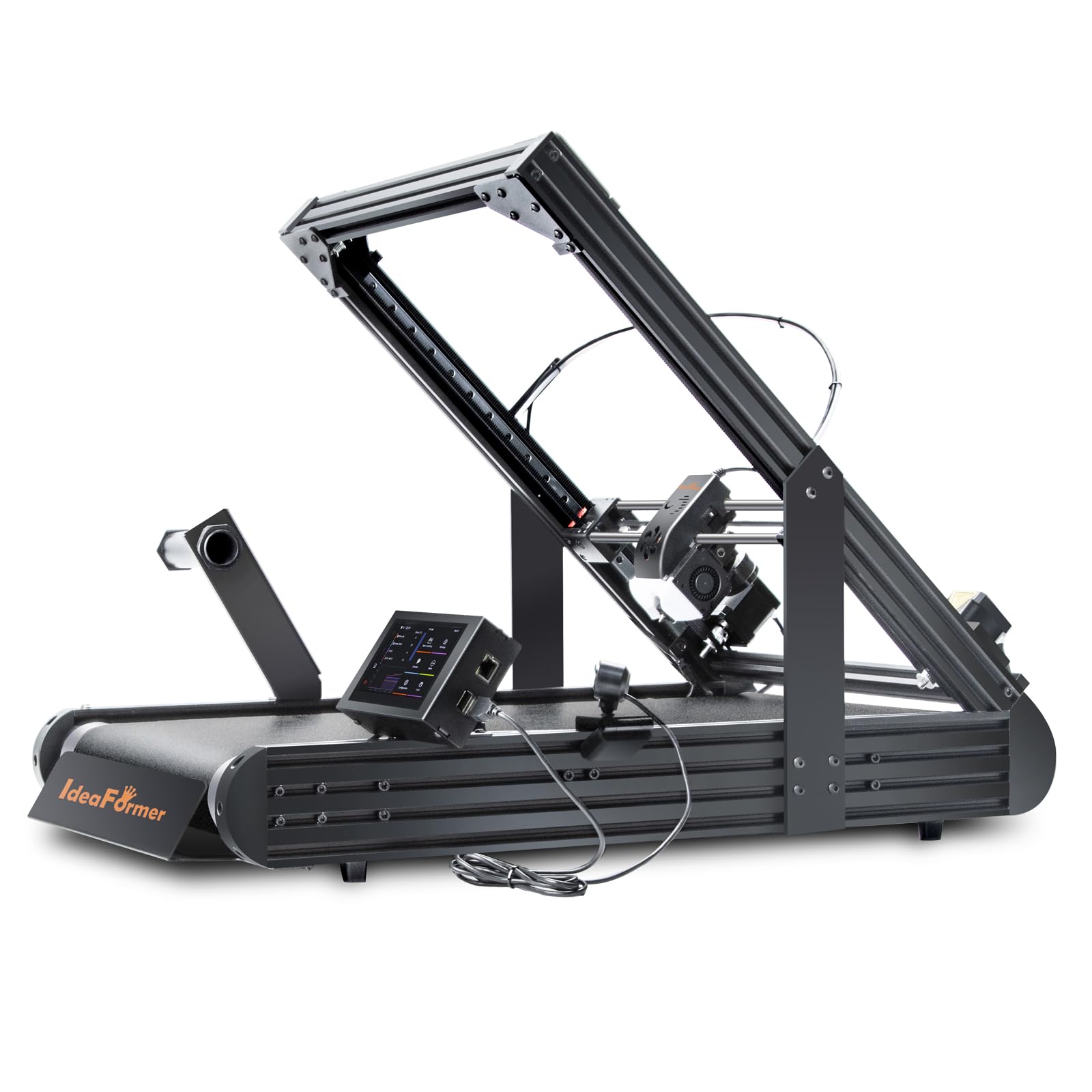
A rolling belt with no height limit, so a sword blade prints as one continuous piece.
Every other machine on this list runs into a ceiling. This one does not — its bed is 250 x 250 x ∞mm, with a rolling PEI-coated conveyor belt that carries the part forward as it prints. That means no height limit and no seams in the middle of a long prop. Bones, blades, staffs, wing spars, and architectural models all print as one continuous object instead of three glued sections.
The print head sits at 45 degrees, which lets tall shapes print hollow and unsupported — a feature the experienced owners rank above everything else on this machine. It runs on Klipper firmware with an integrated roller gearbox, reaching 400mm/s. One-click auto calibration with a Y-offset strain sensor replaces manual knobs and shims. Print quality is the aspect praised most, and the consensus describes parts matching far pricier enclosed machines on single-color work.
Two things to know before you order. First, it is not a beginner’s machine — you must square the gantry at exactly 45 degrees, and downloaded models often fail on overhangs because they were designed for a flat bed. Second, adhesion on the belt degrades over time and needs periodic attention. Treat it as a second or third printer rather than your only one.
The smooth advantage: a 250 × 250 × ∞mm belt (the ∞ means it keeps printing in one endless run) is the only way to print a full-length blade without a joint in the middle that fails under stress.
Specialist, not starter: the 45-degree gantry demands careful squaring, and belt adhesion falls off with use.
Made for: seasoned makers printing long props and small production batches who need length without seams.
Wrong call: as a first printer — the setup demands and belt upkeep punish impatience.
9. QIDI Max4 Combo 3D Printer

A 390 × 390 × 340mm volume that prints a full chest plate in one shot.
The build volume here is 390 × 390 × 340mm, and it exists for people who are tired of cutting a torso into four panels. It prints large industrial parts, complex molds, and custom prototypes in one pass, and the full-surface silicone heated bed spreads heat evenly so the first layer grips and the shape does not warp. Speed reaches 800mm/s with 30,000 mm/s² acceleration, driven by closed-loop motors on the X and Y axes.
The 65℃ active heated chamber is the other reason this sits high on the list. Combined with a 40mm³/s high-flow hot end and a hardened steel nozzle, it opens up ABS-CF, PC, and PPS-CF — the engineering blends that hold their shape in a wearable. A 2mm lead screw with an anti-backlash nut on the Z axis keeps vertical surfaces clean on tall prints. Setup is the aspect buyers praise most, with build quality right behind it.
Know what the 120 pounds means — this is a permanent installation, not something you shift between rooms. Owners also flag that the Polar Cooler is not included with the Max4 series and must be bought separately if you want it. The QIDI BOX expansion takes you to 16 colors, though the sync between that box and the slicer has been inconsistent for some users, with third-party slicer software serving as the workaround.
The chamber payoff: a 65℃ heated cavity paired with a 40mm³/s hot end is what makes carbon-fiber nylon viable for a rigid armor plate.
Plan the space: at 120 pounds it needs its own bench and stays there.
Matches your project: full torso plates and large molds in engineering-grade filament printed as one piece.
Add to the order: the Polar Cooler, which the Max4 series does not include.
10. Snapmaker Artisan 3D Printer

One frame that prints the armor, then swaps to a laser module to engrave the trim.
This machine sells you room to grow. This exact model is the 3D printing version, and the frame lets you add the laser engraving and cutting module or the CNC carving module later — toolhead and platform swaps take about a minute each. The print area is 400 × 400 × 400mm, the largest cube in this group, so a big chest plate fits in one go. It runs a dual-extrusion module (two nozzles feeding one print) with 7:5:1 planetary plus dual extrusion gears for dissolves and two-material parts.
The motion hardware is the interesting part: steel guide rails ground at micron level, paired with a one-piece die-cast base plate. A 7-inch touchscreen gives you live status, both nozzle temperatures, and G-code previews. The manufacturer lists support for 600+ materials across the three functions, with PLA, ABS, PETG, TPU, and Nylon on the printing side. Modules can be swapped without powering the machine down.
Setup is where the complaints land. Some owners finished assembly only with the help of videos, and at least one reported four hours with just a quick start guide in the box. The unit weighs 79.8 pounds and needs a real footprint — one owner says a minimum 4×5 workspace with room for the enclosure and control head. Treat it as a workshop tool rather than a desk appliance.
Why it’s more than a printer
- 400 × 400 × 400mm print area handles full chest plates and large props.
- Dual extrusion for two-material prints and dissolvable supports.
- Toolhead and platform swaps in about a minute between print, laser, and CNC.
- Steel linear rails and a die-cast base give it rigidity at speed.
The honest frictions
- Assembly guidance is thin — expect to lean on video walkthroughs.
- 79.8 pounds plus enclosure means a dedicated workspace.
- Laser and CNC modules are add-ons, not in this version.
- The all-in-one software rewards patience over a quick start.
Choose it if: you want to print a prop and then engrave or carve it on the same rigid frame.
Keep shopping if: you want a printer that assembles in an hour without video help.
11. Original Prusa CORE One

Ships assembled, tested, and with a spool — open the crate and press print.
Some people want to build a machine and tune it. Others want to come home to a finished part. This is firmly the second camp. It arrives assembled and tested, includes a 1kg spool of Prusament PLA, and the manufacturer offers lifetime technical assistance with 24-hour customer service. Print size is 9.8 x 8.6 x 10.6 inches, and the enclosure holds up to 55℃ with active temperature control — enough to run ASA, PC, and Nylon, or PLA and PETG with the door closed per the maker.
The all-steel exoskeleton frame and the linear rails are the durability story, and it is an open ecosystem rather than a locked one — local use works without the cloud, and the software and hardware are open source. Owners rate print quality highest among everything about this machine, and the phrase that keeps surfacing is that it simply works without tinkering. A one-color-capable 250 × 220 × 270mm enclosed workhorse with that attitude is rare.
Being straight with you: the value verdict and the reliability verdict both split. Some experienced printers find a generation behind the fastest consumer machines for the money, and a few hit failed calibrations or shipping-loosened parts that needed support to sort out. It also needs a solid bench — heavy vibration at top speed will throw a light table out of calibration. Multicolor is not part of this configuration.
Reach for this if: you value an assembled, enclosed, open-ecosystem machine over raw speed figures.
skip it if: four-color printing is a requirement — this one is single-color.
Know the Specs
Build Volume (mm)
This is the box of space a print can occupy — width × depth × height in millimeters. For wearable work it is the first thing to check, because a 260mm cube fits most masks and bracers while a chest plate needs something closer to 390mm or a four-way split. The IdeaFormer’s “∞” height works differently: a conveyor belt moves the part forward so length is unlimited even though the width is 250mm.
Hot End Temperature (°C)
The top temperature the nozzle can hold determines which filaments are available to you. 300℃ is the figure that open up engineering blends like carbon-fiber nylon and ABS-CF, and it appears on the K1C, the K2 Combo, and the Kobra X. A 40mm³/s flow rate paired with an 80W heater, as on the K2 Combo, means the nozzle can keep up at speed without starving the layer.
Print Speed (mm/s) and Acceleration (mm/s²)
Speed is how fast the toolhead moves in a straight line; acceleration is how quickly it gets there. Both numbers only hold on simple geometry, and tall thin prints usually run slower for quality. The practical value is in the acceleration figure — 20,000 mm/s² on several machines here means fewer slow-downs at corners on a detailed prop.
Chamber Temperature (°C)
An enclosed printer can hold a warm cavity around the print, and the QIDI Max4 Combo does it actively at 65℃ while the Prusa CORE One reaches 55℃. That warmth is what stops a tall, thin armor panel from curling as it cools. On machines without a heated chamber, drafts and room temperature play a bigger role in whether a plate stays flat.
Common Questions
Can a 3D printer actually make clothingyou can wear?
How big a print do I need for a cosplay chest plate or helmet?
Do I need an enclosed printer for wearable pieces?
Can these printers handle flexible TPU filament?
What does carbon-fiber filament need from a printer?
How long does it take to print an armor piece?
Is a bigger build volume always the better choice?
What does a conveyor belt printer do that a normal one cannot?
Do these printers come assembled?
Which printer is easiest for a complete beginner?
The Bottom Line
For most people making wearable pieces today, the strongest pick is the Bambu Lab P1S. It pairs a fully enclosed body and a 260 x 260 x 260mm bed with 15-minute setup and self-leveling before every job — no tuning, no paper shims, no wasted overnight prints. If a helmet shell in one piece is the whole reason you are buying, the Creality K2 Combo and its 10.24-inch cube solve that problem on day one. For a full torso plate in engineering filament, the QIDI Max4 Combo with its 390 × 390 × 340mm volume and 65℃ heated chamber is the machine that stops you cutting parts in four.
And if you are just testing whether this hobby sticks, start with the ELEGOO Centauri 2 — it gets a first-timer printing in minutes without a big commitment, which is exactly what you want before spending on a workhorse.
How we choose
We do not accept paid placement. Every pick is matched to a real buyer and a real use-case; we do not hands-on test units.
Sources
Specifications: manufacturer listings and product documentation. Review insights: verified customer reviews, as of October 2026. Pricing: not shown on this page (it changes often); check the current price via the retailer link.
As an Amazon Associate, Aappliancez earns from qualifying purchases. This does not affect which products we feature.