Disclosure: Some links in this post are affiliate links. As an Amazon Associate I earn from qualifying purchases, at no extra cost to you. Learn more
Specs are compiled from manufacturer listings and verified buyer reviews and can change over time — please confirm the key details on the product page before buying.
You plug in a 100W USB-C cable, expect a fast top-up, and instead your laptop crawls all night. Most cables sold as “100W” can carry that power, but the difference between good and great depends on three things: whether the connector ends survive daily yanking, whether the E-marker chip (a tiny chip inside the cable that talks to your charger) actually negotiates the full wattage, and whether the cable can bend thousands of times without fraying at the strain relief (the reinforced section where the cable meets the plug). This guide walks through five cables that get those basics right, explains in plain terms what each spec means for your phone or laptop, and points you to the one that fits how you actually charge.
This guide is built by comparing the manufacturers’ published specifications and the patterns across verified customer reviews, so you get each pick’s real strengths and trade-offs instead of marketing spin.
The quick answer: the UGREEN 100W USB C to USB C Cable is the safe default for most people, and its 2-pack covers a desk and a bag without much fuss. Here is how to pick the right 100w usb-c cable for the way you charge every day, without overpaying for features you will never touch.
Top Picks

How To Choose The Best 100W USB-C Cable
You plug a cable into a 100W charger, expect a full-speed top-up, and instead watch your laptop take all night. Nine times out of ten the cable is the bottleneck, not the charger. A 100W USB-C cable has to keep three plates spinning at once: it has to physically pass the power, it has to tell the charger it is safe to send that power, and it has to survive getting folded into a bag, stepped on, and yanked out by the connector every day. Miss any one of those and the whole chain falls apart.
The E-marker chip is the handshake your charger waits for
Inside every certified 100W cable sits a tiny E-marker chip — think of it as the cable’s ID badge. When you plug in, the charger asks “how much can this cable handle?” and the chip answers. If the chip is missing or weak, the charger plays it safe and drops to a slow rate. UGREEN’s version is built to match current to the device and boost charging efficiency, and the cables here that pass that handshake keep a Samsung Galaxy S25 or MacBook running at the rate the charger was rated for.
Length, bend life, and the connector ends that die first
The ends are where 90% of cable failures start. A 6.6-foot cable with 10,000 ninety-degree bends — like UGREEN’s — is engineered around that wear point, using a 250d fiber core (a strong inner layer that protects the copper wires) under the nylon braid so the copper inside does not fatigue. Six feet is the practical balance: long enough to reach from a wall outlet across a desk, short enough to roll into a bag without tangling. Longer runs like 10 feet work, but they add bulk and can drag on the floor.
What “100W” actually gets you at the outlet
100W is a standard ceiling, not a suggestion. It covers a 16-inch MacBook Pro, most modern ultrabooks, iPad Pro, and any phone with PD or PPS fast charging. The cable here that maxes at 100W will happily run a 65W charger, a 45W charger, or a 20W phone brick — everything just steps down to whatever the charger sends. If you have already bought a 140W or 240W charger, you will want a cable that matches it so you do not leave the extra headroom unused.
Side-by-Side Comparison
| Model | Best For | Max Power | Length | Data Rate | Amazon |
|---|---|---|---|---|---|
| UGREEN 100W USB C to USB C★ Best Overall | All-around daily charging | 100W | 6.6 ft | 480 Mbps | Amazon |
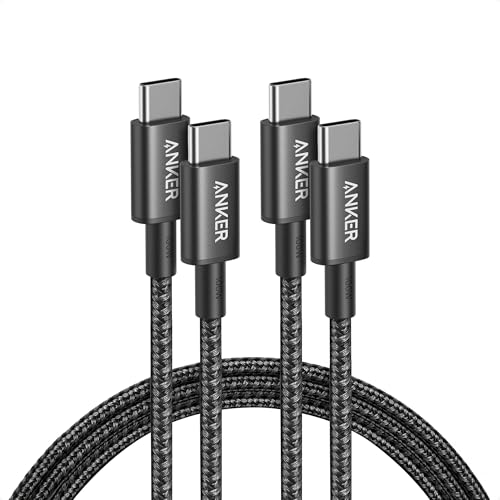
| Anker USB C to USB C (Black)Best Value | House-wide cable rotation | 100W | 6 ft | 0.48 Gbps | Amazon |
| Anker USB C to USB C (Silver) | Color-coded charging setup | 100W | 6 ft | 0.48 Gbps | Amazon |
| VisionSync 240W USB C with LED Display | Power-curious laptop owners | 240W | 6.6 ft | 480 Mbps | Amazon |
| DEWALT Heavy Duty 100W USB C | Jobsite and rough handling | 100W | 6 ft | USB-C data | Amazon |
Detailed Reviews
1. UGREEN 100W USB C to USB C Cable 2-Pack 6.6ft
Our pick — over 4.5★ from 34,000+ verified ratings; the strongest balance of quality and price.
The two-pack that ends the “which charger is missing a cable” hunt for good
If you want one cable that quietly handles everything in your life — a laptop at a desk, a phone in a car, an iPad on the couch — this is the one to grab in the 2-pack and stop shopping. UGREEN’s 100W USB-C to USB-C cable earns the top spot because it does not pick fights with your devices: it supports 100W fast charging over PD3.0 and QC3.0, so a compatible laptop or an iPhone 17 Pro Max can hit half charge in about 20 minutes. It steps down cleanly to 65W, 45W, 30W, and 20W chargers, which means the same cable works whether you are plugged into a travel brick or the daily wall plug.
The build is where the value sits. A 250d fiber core runs under a nylon braid, wrapped at both ends in aluminum housing — engineered to survive over 10,000 ninety-degree bends without fraying or splitting. The E-marker chip inside handles the negotiation, matching current to the device for higher charging efficiency and stability than a plain 60W cable. In plain terms: the charger and the device actually agree on the top speed instead of defaulting to something slow and safe. Buyers running a 45W PPS brick report both cables hitting Super Fast Charging on a Samsung Galaxy S25 Edge at 5A.
What wins people over is the connector housing — heavy, chunky ends with strong strain relief, the part that normally dies first on a cheap cable. The length covers a desk, a nightstand, or the gap between a car console and a windshield-mounted phone. The catch is flexibility: the build is stiff, and a handful of owners find it more rigid than they expected for tight bag pockets. Shorter 3-foot variants also exist for pure desk use, but 6.6 feet is the more forgiving pick if you ever want to charge where the outlet is not right next to you.
What earns it the top spot
- 100W PD3.0 and QC3.0 fast charging, backwards compatible with 65W/45W/30W/20W bricks
- E-marker chip negotiates the full rate instead of defaulting to a slow trickle
- 250d fiber core under nylon braid rated for over 10,000 ninety-degree bends
- 2-pack means a desk cable and a bag cable from a single purchase
- 480Mbps data transfer — a 1GB movie in under a minute
Where it gives and where it does not
- The nylon sheath is stiff — not a cable to wrap tightly around a finger
- Data tops out at 480Mbps, so large video file transfers will feel slow
- Some owners find 3-foot variants too short for couch charging
Reach for this if: you want one cable that covers laptop, phone, and tablet without checking a compatibility list every time.
skip it if: you need a soft, thin, easily coiled cable for a tightly packed camera bag.
2. Anker USB C to USB C Cable 2-Pack 6 ft Black
The cable that survives a cat, a job site, and a toddler in the same week
People who buy Anker cables rarely buy them once — they buy them again for a second room. The 333-series USB-C to USB-C here is rated for up to 100W with a compatible charger, wrapped in a hard-wearing nylon exterior, and spec’d for a 5,000-bend lifespan. That matters if your cable lives in a bag that gets tossed into a trunk or a pocket that splits a seam at month four. The 6-foot length is well-matched to hotel room nightstands and airline tray tables, and each cord ships with a hook-and-loop cable tie.
Two things make this the value pick rather than the all-star. First is the durability formula: 5,000 bends is a real number to hang a decision on, and the pattern in the reviews is that owners keep these cables for years across rooms and travel bags. Second is the data ceiling — 0.48 gigabits per second, which is fine for phone backup, documents, and photos but not for pushing video-heavy projects back and forth. It also does not support video output, so it is purely a charging and data cable; if you were hoping to feed a monitor, look elsewhere. That is a physical limit of the cable, not a quality issue.
The honest catch is charging speed consistency. The cable is rated up to 100W, and plenty of buyers report exactly that. But some note that on specific Samsung models, “not rated for ultra-fast charging 2.0 despite 100W label; max ~18W.” That is about protocol matching — Samsung’s UFCS step (a specific fast-charging handshake) requires specific chip behavior — and it does not affect a MacBook or iPhone hitting standard PD rates. If you want a fast-charge handshake on a specific phone, check the model numbers first. If you want a reliable, well-made 2-pack for regular fast charging and light data, this is the pair to grab.
Sized-up value: Two 6-foot cables, a hook-and-loop tie, and a nylon sheath rated for 5,000 bends, from a brand with 80 million+ devices in use.
The buying question: Can you live with 0.48Gbps data and no video output in exchange for a cable that regularly outlasts its owner’s phone?
Best for: charging across multiple rooms and travel bags, where build quality beats exotic protocols.
Think twice if: you need Samsung’s Super Fast Charging 2.0 rate specifically — the ceiling there can drop near 18W.
3. Anker USB C to USB C Cable 2-Pack 6 ft Silver
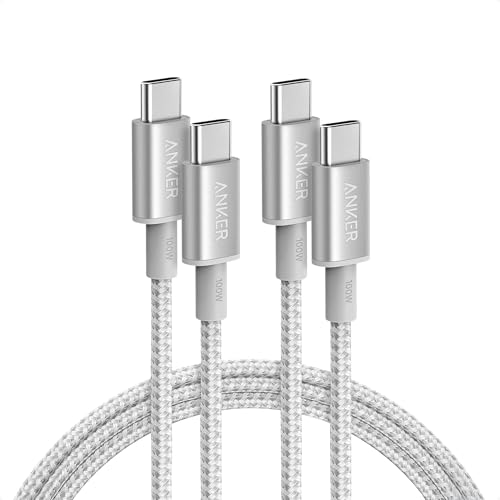
The silver twin — same brains, different look, easier to tell apart in a drawer
If you own more than four USB-C devices, cables eventually become a pile. The silver variant of the Anker 333 USB-C to USB-C cable solves that with the simplest trick in the book: it looks different from its black brother, so you can dedicate one color to one device. Same 100W rating, same 6-foot length, same nylon braid. Same 3.2 ounces per cable that gives the ends a little authority when you plug into a tight laptop port. The kit includes a hook-and-loop tie per cable, which is the small detail that keeps the cords from turning into a knot in your bag.
Compatibility is broad by design: the spec list covers iPad Pro, iPad Air, iPad mini, MacBook Air and Pro, Lenovo Yoga and ThinkPad, HP Spectre, Samsung Galaxy S24 and S23 families, Google Pixel 5 through 8, and even a Nintendo Switch. That means the same two cables cover a home office, a kid’s tablet, and a travel laptop without an adapter swap. Data is still 0.48Gbps (gigabits per second, a measure of data transfer speed) — the same ceiling as the black version — and the cable still does not carry video. It is a charger and data cable only, which is worth knowing before you plug it into a monitor and start troubleshooting.
The one honest limitation that keeps this out of the top spot is the same as the black edition: stiffness. At least one owner lands at 4 stars for it — “Better than I thought it’d be but a bit rigid.” For a cable that folds into a slim laptop sleeve, that rigidity can be a small annoyance. For a cable that stays plugged into a desk lamp or a bedside charger, it never comes up. If you are buying this because the color matches your setup, that is a valid reason — as long as you know you are getting the same reliable guts in a different wrapper.
Where it shines: color identity for multi-cable households, plus 100W PD handling across phones, tablets, and laptops, with a 5,000-bend durability spec behind it.
Pairs well with: a person who has already lost the game of “which cable is which” and wants color to do the sorting.
Pass on it if: you only ever need one cable — the black edition above covers the same job without the color premium.
4. 240W USB C to USB C Cable 6.6ft 2Pack

A cable with a wattage readout, for people who want to see what their charger is really doing
Here is the cable for the person who has ever stared at a charger and wondered whether it was actually delivering the speed it promised. VisionSync’s 240W USB-C to USB-C cable handles up to 240W under the USB PD 3.1 protocol (Power Delivery 3.1, a newer fast-charging standard) — 48V at 5A — and steps down through 180W, 140W, 100W, and 60W so it can replace every USB-C cable in your kit. A small LED display shows the live wattage flowing to your device, so you can check at a glance whether your laptop is sipping at 45W or gulping at 140W. The transparent shell case over a rugged double-braided nylon exterior is rated for 36,000+ bends, which is a durability claim that clearly outpaces the budget cables above.
The E-marker 2.0 chip handles device identification and controls voltage and current to reduce the risk of overcharging, which matters more when the cable can pass 240W. Owners mention it driving a Galaxy S25 Ultra into Super Fast Charging 2.0 over PD and an iPhone 16 to full-speed charge on 65W bricks. The build is thicker at the connector ends because of the LED module, so you may find it does not fit next to another cable on a tightly packed dual-port charger. That is a real physical constraint of the design, not a defect.
Two quirks are worth flagging before you buy. Because the display is only on one side of one end, figuring out which orientation shows the readout takes a moment — owners say it can be fiddly to line up in the dark. And a 10-foot variant exists for campers and couch-side charging, but shorter is usually better for a display cable because you want to see the number without tugging. The 4.5-star rating is on a smaller owner base than the budget 2-packs, so treat the glowing build-quality feedback as real but young. If you love data over your charging, this is the cable that hands it to you.
Why the LED display earns its keep
- Live wattage readout shows exactly what your charger sends in real time
- 240W PD 3.1 ceiling with backwards compatibility down to 60W devices
- Double-braided nylon exterior rated for 36,000+ bends
- E-marker 2.0 chip handles device identification and overcharge protection
The quirks you should size up
- Display only shows on one side of one end, making it awkward to orient quickly
- Thicker connector housing can block the second port on some dual-port chargers
- 240W at the top is mostly future-proofing — 100W covers most laptops today
Perfect for: tinkerers, laptop owners with a 140W brick, and anyone who wants proof a charger is doing what it claims.
Consider the alternative if: you just want a cable that works invisibly — the wattage display is the whole point here.
5. DEWALT 100W USB C Cable 6 ft

Built like a wrench — the cable for a truck, a workshop, or a kid who shreds chargers
Some cables are meant to sit politely on a desk. This one is not. The DEWALT 100W USB-C to USB-C cable is a jobsite tool first: thick braided jacket, Kevlar-reinforcement, and flexible strain relief that holds up to real-world abuse. Weighing 69 grams — noticeably heavier than the Anker and UGREEN cords above — the yellow-and-black cord feels like it belongs in a toolbox, and the reviews back that up. A parent who says their kids go through cables “like crazy” reports this one still going strong after months. Another owner describes it as toddler-proof, which is as close to a real stress test as a USB-C cable gets.
On the numbers, it is a plain 100W cable — which is fine. It handles up to 100W for a MacBook Pro, iPad, iPhone 15 or later, and the DEWALT USB Charging Kit (DCB094K). Plugged into a compatible 100W charger, it delivers full-rate power; used with an Anker 100W brick, customers note it feeding a NOCO jump starter and charging phones with zero hiccups. Data connection quality is solid too — one owner describes flawless connections with an Android device. There is no LED gimmick here, no 240W headroom, and no marketing glitter: the point of this cable is that the jacket absorbs the abuse your phone’s connector should not have to.
The trade-off is expected but worth naming: at a premium price point for a single cable, you are paying for the build rather than the specs. If your phone lives on a bedside table and never leaves, the standard-yellow-and-black aesthetic and the thicker gauge are more than you need — a 2-pack of the UGREEN or Anker cables above covers that lifestyle with less bulk per cord. But if your charging quietly takes place around tools, dirt, trucks, or kids, this cable is the one that will not be the reason something did not charge. It is a tough, straightforward tool for tough, straightforward use.
The case for it: Kevlar-reinforced braid and heavy strain relief on a 6-foot 100W cable, pitched at a durability level the everyday 2-packs do not chase.
The honest read: you pay a single-cable premium for the armor — not for extra wattage, data speed, or features this cable does not claim.
Buy it for: trucks, toolboxes, campsites, and households where cables get destroyed by children.
Not the best fit if: you want a cheap multi-pack to spread across a tidy home — build quality is the whole point of this one.
Know the Specs
Wattage Rating (100W vs 140W vs 240W)
The number printed on a cable is its ceiling, not its speed. A 100W cable will run a 65W charger at 65W, a 45W charger at 45W, and a 240W cable will drop to whatever your device asks for. The Practical rule: buy a cable at or above the wattage of your highest-power charger, and one rung below when you are shopping for a phone-only cord. If your charger is 100W today and you might buy a 140W brick later, a 100W cable will still work — you just will not tap the extra headroom.
The E-Marker Chip and PD 3.0 / PD 3.1
A tiny E-marker chip inside the connector tells your charger how much current the cable can safely pass. Without it, chargers default to a low safe rate — sometimes near 18W even when the cable says 100W. Power Delivery (PD) is the standard protocol that sets the rules, and PPS is the sub-protocol that lets Samsung phones hit their fastest tier. A cable has to support both the wattage and the correct protocol handshake to keep a Samsung Galaxy in Super Fast Charging instead of letting it slip down to a slow rate.
Common Questions
Will a 100W USB-C cable charge a MacBook Pro at full speed?
Why does my 100W cable only charge my Samsung at 18W?
Is 100W enough for a 140W or 240W charger?
Can a 100W USB-C cable transfer video to a monitor?
How many bends should a 100W USB-C cable survive?
Will a 100W USB-C cable also charge smaller 20W devices?
Does a thicker 100W cable mean slower data transfer?
What does the LED wattage display on a USB-C cable actually show?
Can a 100W USB-C cable damage a phone if the wattage is too high?
The Bottom Line
For almost every buyer, the 100w usb-c cable that fits the widest range of daily jobs is the UGREEN 100W USB C to USB C Cable — the E-marker chip actually negotiates the full rate instead of defaulting to a slow trickle, the 250d fiber core survives the bends a cheap cable fails, and the 2-pack means a desk cord and a bag cord in one purchase. If your house is a tangle of devices and you want a value 2-pack that just keeps charging, the Anker USB C to USB C Cable (Black) covers more rooms for less. And for anyone who wants to actually see the wattage going into their laptop, the VisionSync 240W Cable with LED Display gives you PD 3.1 headroom and a live readout. Pick the one that matches the charger you already own and stop thinking about cables for a few years.
How we choose
We do not accept paid placement. Every pick is matched to a real buyer and a real use-case; we do not hands-on test units.
Sources
Specifications: manufacturer listings and product documentation. Review insights: verified customer reviews, as of October 2026. Pricing: not shown on this page (it changes often); check the current price via the retailer link.
As an Amazon Associate, Aappliancez earns from qualifying purchases. This does not affect which products we feature.