Disclosure: Some links in this post are affiliate links. As an Amazon Associate I earn from qualifying purchases, at no extra cost to you. Learn more
Specs are compiled from manufacturer listings and verified buyer reviews and can change over time — please confirm the key details on the product page before buying.
Any phone can become a cinema if you slide it into the right shell — but only if the lenses actually focus on your eyes. Most cheap headsets fail exactly there, leaving you with a blurry double image and a sore nose bridge. This guide ranks six real headsets by the things that decide whether you actually use one: how wide the view is, whether you can adjust focus, and which phone sizes fit.
This guide is built by comparing the manufacturers’ published specifications and the patterns across verified customer reviews, so you get each pick’s real strengths and trade-offs instead of marketing spin.
You will see how field of view and lens adjustment change what you feel inside the headset, and which shells handle a big phone without pinching it. The short answer on the best cell phone vr headset is that lens adjustment and honest phone fit matter far more than app lists.
Top Picks


How To Choose The Best Cell Phone VR Headset
Before you read a single listing, know what you are actually buying. A phone VR headset is a plastic shell with two lenses that split your phone screen into two near-identical pictures. That is the whole machine. There is no processor, no battery, and no built-in software. Everything you see comes from your own phone, so the headset’s only job is to hold the phone steady and bend the light into your eyes cleanly.
Field of view: the number that sells headsets and the one you should check first
Field of view, usually written as FOV, is the spread of the picture measured in degrees. A wider figure means the screen fills more of your vision, so the black edges around the image shrink and the scene feels closer. The VRG Pro lists 120 degrees, while the DESTEK V5 and TECKNET both list 110 degrees. That 10-degree gap is subtle but real: the VRG Pro’s 120 degrees shrinks the black border at the edges of the frame compared with the DESTEK’s 110.
Focus and pupil distance controls separate usable from unwatchable
Pupil distance is the gap between the centres of your eyes. If the headset’s lenses sit at the wrong gap, you get a split or soft image no matter how hard you try. Focal length is how far the lenses sit from the phone screen. Headsets that let you move both, such as the VRG Pro with its knob and the TECKNET with its adjustable gears, are far easier to dial in for your own eyes. Shells that lock these in place often leave you straining.
Match your phone’s screen size to the shell’s opening
Screen size is not vanity spec here — it is a fit dimension. The TECKNET supports 4.7 to 7.2 inch screens, and the CoCerKet claims a 4.7 to 7.2 inch range too. The VR SHINECON is tighter at 4.7 to 6 inch, which is why newer, larger phones can feel squeezed. If your phone is 6.2 inches or bigger, TECKNET tells you the screen frame can be removed for a better fit and cooler running.
Side-by-Side Comparison
| Model | Best For | Field of View | Max Resolution Per Eye | Phone Size Support | Amazon |
|---|---|---|---|---|---|
| DESTEK V5★ Best Overall | Family entertainment bundle | 110 degrees | — | Smartphone | Amazon |
| TECKNET VR HeadsetTop Performer | Wide phone compatibility | 110 degrees | 3840×2160 per eye | 4.7–7.2 inch | Amazon |
| FEEBZ 3D VR Headset for Kids 2.0 | Beginners on Android | — | — | iPhone & Android | Amazon |
| VRG Pro 3D VR Glasses | Widest view on a budget | 120 degrees | 1920×1080 per eye | up to 7 inch | Amazon |
| CoCerKet All-in-One | Built-in stereo headphones | 120 degrees | 1920 pixels (3840 x 1080) | 4.7–7.2 inch | Amazon |
| VR SHINECON VR Headset | Older small phones | 100 degrees | 1440 x 2560 pixels | 4.7–6 inch | Amazon |
Detailed Reviews
1. DESTEK V5 VR Headset
A complete starter box that hands you the shell, a controller and an app list in one go.
The DESTEK V5 is the one to pick when you want an all-in bundle rather than a bare plastic shell. In the box you get the headset itself, a Bluetooth controller and 100+ recommended VR apps, which is more than most rivals hand you. It weighs 4.8 ounces, light enough that a child can wear it without the strap digging in. The listed 110 degree field of view is the same spread TECKNET and the CoCerKet-style wide shells quote, so the picture fills your vision properly.
Where this one stumbles is behind the lenses. It has no focus adjustment, and a headset without that control leaves anyone with imperfect vision fighting a soft image. The bundle also leans on Android — as buyers report of the remote, “Only works for android phones and OLD android phones.” That sentence is worth reading twice before you buy for a newer iPhone.
Think of it as a family gift for a younger child on an Android handset, where the included controller and app suggestions save you a setup hunt. What the bundle can’t do is rescue a blurry lens, so a shell with pupil and focal knobs is the safer route if sharpness is your priority. Still, at 4.8 ounces it is light enough to hand to a child, which is the point of a first VR set.
What lands well
- Controller and 100+ app suggestions come in the box, so no separate shopping trip
- 4.8 ounces keeps it light on a child’s face
- 110 degree field of view matches the mid-tier standard for a filling picture
Where it stops short
- No focus adjustment, so eyes that need correction may never get a clean image
- Controller and app ecosystem lean heavily on Android
Go for it when: you want a single box with a remote and app ideas for a young Android user.
Hold off if: you need adjustable focus or you are buying for a current iPhone.
2. TECKNET VR Headset
The sharpest resolution figure in this lineup, wrapped around the widest phone-fit window.
TECKNET quotes a display maximum of 3840×2160 per eye, and that is the highest resolution claim of any pick here. Compared with the VRG Pro’s 1920×1080 per eye, the TECKNET claims double the pixel count per eye — a 2.0x gap on paper. In plain terms, a sharper, less blocky image, which matters most when you read small on-screen text or watch a detailed 3D movie.
Fit is the other draw. The 4.7 to 7.2 inch range covers small and large phones, and TECKNET notes that phones 6.2 inches or larger can have the screen frame removed for a more secure sit and better heat dissipation. Weight sits at 268 grams, light enough to wear for a full movie without the band pressing. The lenses carry an anti-blue-light coating, and you get adjustable pupil distance and focal length plus support for myopic viewing within 600°.
The catch is consistency. Some units ship with a lens defect — a set that arrives with dark spots across the view cannot be fixed by fiddling with the knobs, so check yours early. And the shell is a basic phone-insert model, so you will want a subscription app for the good VR content. What wins people over is the focus range: the adjustable gears let you dial in a clean image instead of accepting a blurry one.
Best spec on the sheet: 3840×2160 per eye, comfortably above the 1920×1080 per eye on the VRG Pro.
Worth knowing: you tune pupil distance and focal length yourself with the adjustable gears, so take a few minutes to dial it in rather than judging the picture on the first try.
Top of the pile if: you have a larger phone and want the sharpest claimed picture plus real focus controls.
Check first: inspect the lenses on arrival for spotting, since that is a quality-control lottery rather than a design limit.
3. VRG Pro 3D VR Glasses Full Screen Visual Wide-Angle

Widest window into the scene here, and the knobs to actually tune it.
If the size of the picture is what sells you, the VRG Pro quotes a 120 degree field of view against the 110 degrees on the DESTEK V5 and the 100 degrees on the VR SHINECON. Those 120 degrees are the top figure in this lineup, which means less black border and a scene that wraps further around your vision. For a full 3D movie, that difference is real.
The screen frame is detachable and stretched to hold phones up to 7 inches, so a big handset slides in without forcing. Owners praise the wide opening for exactly that reason — as one puts it, it “Takes full advantage of 6″ smartphone screens unlike others with small openings limiting viewing area.” Independent lens adjustment, a pupil-distance knob and object-distance tuning round out the controls, and the removable sponge eye mask is easy to clean.
What you give up is polish. The body is described as light and foldable, but one honest gripe is control: with a button-and-knob setup you will find yourself pulling the phone out to navigate menus more often than you would like. An occasional unit also arrives hard to focus. Still, at the 1920×1080 per eye resolution, video looks clean enough for casual viewing and the wide view does the heavy lifting.
Widest frame, plainest build: 120 degrees of view makes it the most enveloping shell here, while the button controls keep you reaching for the phone.
Made for: anyone who values a big, filling picture over a slick remote.
Skip if: easy in-headset navigation is a deal for you, because the manual controls get fiddly.
4. CoCerKet Smartphone VR Headset
A shell that brings its own stereo sound so you can skip the earbuds.
What separates the CoCerKet from a plain shell is the audio. It builds in stereo headphones with 42mm drivers, a large aperture meant to push clear footsteps and movie sound straight into your ears. For a 3D movie night, that is one less cable and one less pair of buds to hunt down. It also quotes a 120 degree field of view and uses PMMA aspherical lenses, the curved plastic optics meant to keep edges in focus.
Fit is broad on paper — the maker says 4.7 to 7.2 inch phones will sit inside, so a large handset should drop in. Its magnetic front cover opens up for heat dissipation, which matters when a phone runs a heavy video for an hour, and the three-axis adjustable headband is meant to keep it steady. It runs wired off your phone through the included cables, with no Bluetooth controller to pair.
The film inside the lenses is worth flagging — the maker warns you must peel it off before use, so a blurry first impression is usually that film, not a fault. Beyond that, focus has been a rough patch for some, and the manual controls are basic. Treat it as a movie-and-casual-game headset where the built-in sound carries the experience, and check focus on arrival before assuming it is the phone.
What earns its place
- Built-in stereo headphones with 42mm drivers, no separate earbuds needed
- 120 degree field of view puts it level with the widest shells here
- Magnetic front cover helps the phone shed heat during long sessions
Room for improvement
- Focus is not always easy to lock in, so expect some trial and error
- Controls are basic and the removable lens film must be peeled first
Choose this for: the integrated sound — a movie headset that keeps audio inside the shell.
Pass on it when: you need easy sharpness; the focus here rewards patience.
5. FEEBZ 3D VR Headset for Kids 2.0 + Android Remote

A light, starter shell that fits more phone models than most, so long as you run Android.
The FEEBZ 2.0 sells itself as a beginner set with a wide phone window — the maker says it fits more phone models than any other VR model. It runs on both Android and iOS, and the 60 Hz refresh rate is standard for phone VR, smooth enough for video and light games. It ships with a remote control and includes links to 3D VR videos and apps so a first-timer has somewhere to start.
The remote is the catch. Movement through the controller is built for Android, and on iOS the headset falls back to being a plain 3D viewer — a child using it on an iPhone could only look around in “I am Cat” (Feeb2 app, /yr), no environment movement. That is a fit limitation, not a defect: buy it for an Android handset and the remote earns its place.
Build quality is the honest trade-off. Some units feel cheap in hand, which is why this sits in the starter bracket. For a first taste of VR on an Android phone with a young child, the broad phone support and included remote make setup quick. A grown-up with a flagship phone wanting crisp optics should look elsewhere.
Starter footing: the broad phone support and included remote get a beginner moving fast on Android.
The honest catch: on iPhone the remote does little, so the headset is basically a look-around viewer.
Right for: a first VR set for a child on an Android phone.
Wrong for: iPhone households, where the remote’s motion controls fall flat.
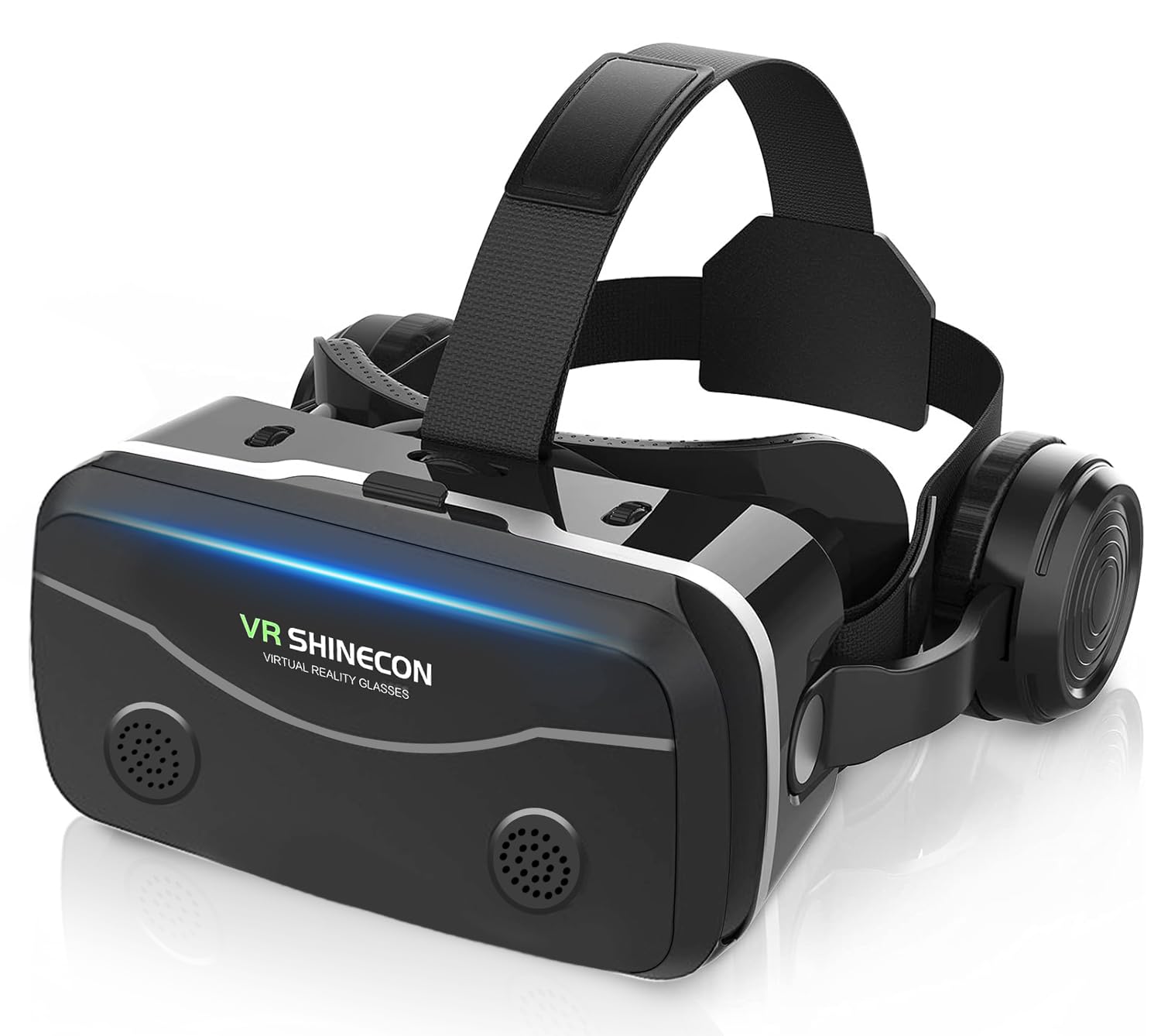
6. VR SHINECON VR Headset

A snug old-school shell tuned for compact handsets, headphones and a remote included.
The VR SHINECON tops out at 4.7 to 6 inch phones and quotes a 100 degree field of view, both of which peg it to smaller, older handsets. That tighter fit is deliberate: build a shell around a small screen and the phone sits closer to the lenses with less room to rattle. It uses Japanese SLR optical PMMA material with a 45mm short focal length, and offers independent pupil-distance and object-distance adjustment, including support for myopic viewing below 0-600 degrees.
Sound is the other selling point. It has adjustable earphones tuned for 3D phase sound, plus a 3.5mm jack if you would rather use your own headphones. The bottom-mounted buttons handle volume, fast forward and quick retreat, and it needs no charging — you plug your phone in and go. At 1440 x 2560 pixels and 100 Hz refresh, it is built for 3D video and casual play rather than heavy gaming.
The warning is compatibility. This shell is sized for 4.7 to 6 inch phones, so a current large handset may not fit cleanly, and the Bluetooth remote can run into trouble on newer iOS versions. Expect to adjust the headphones and dial in eye spacing before it feels right. For anyone with a compact older phone, the snug fit and included audio make it a comfortable pick.
Reasons it works
- Independent pupil and object distance adjustment for sharpness
- Built-in adjustable earphones plus a 3.5mm jack
- No charging needed, so setup stays simple
Limits to weigh
- Only sized for 4.7–6 inch phones, so big handsets may not fit
- Remote can hit compatibility snags on newer iOS
Suits you if: you still carry a compact phone and want built-in sound.
Look elsewhere if: your handset is large or recent, since the fit and remote get awkward.
Know the Specs
Field of View (FOV) in degrees
This is how wide the picture spreads across your vision, measured in degrees. A bigger number means less black border and more of the scene around you, so the VR feels more enveloping. The VRG Pro and CoCerKet list 120 degrees, while the DESTEK V5 and TECKNET list 110 and the VR SHINECON lists 100. For a movie, wider feels more like a cinema; for a phone game where you turn your head a lot, a moderate figure can feel natural.
Pupil distance and focal length
Pupil distance is the gap between your eyes’ centres; focal length is how far the lenses sit from the screen. Headsets that let you move both — the VRG Pro’s knobs, the TECKNET’s gears — let you match the optics to your own face. Shells without these controls leave you stuck at one setting. If the image splits, softens, or makes you squint, one of these two settings is usually out of line, not the unit.
Resolution per eye
Your phone screen is split into two pictures, one for each eye. The headset’s resolution figure describes how much detail each eye gets — TECKNET quotes 3840×2160 per eye, the VRG Pro 1920×1080, and the VR SHINECON 1440 x 2560. Higher figures usually mean sharper text and less visible screen-door dots, though a well-focused lower-resolution shell can beat a poorly adjusted high-resolution one.
Phone fit and heat
Match the shell to your screen size — TECKNET and CoCerKet quote 4.7 to 7.2 inches, while VR SHINECON caps at 6 inches. A phone that barely fits will press against the lenses and run hot. Shells like the CoCerKet and TECKNET offer a way to open up the frame for airflow, which helps keep the image clear during longer sessions.
Common Questions
Will a phone VR headset work with my iPhone?
Why is my VR image blurry even after I put the phone in?
Does a wider field of view make phone VR better?
Do these headsets need charging or a battery?
My phone is 6.5 inches — will it fit these headsets?
Can I wear glasses inside a phone VR headset?
What do I need to download to get 3D content?
Is a phone VR headset good enough for real gaming?
Why do some listings say phone VR apps cost money?
Will my phone overheat inside the headset?
The Bottom Line
For most people, the winner among these cell phone vr headset options is the TECKNET VR Headset, because it pairs the highest resolution claim in the lineup with real focus and pupil-distance controls. If a wide picture is what you are after, reach for the VRG Pro with its 120 degree view. And if you want sound built into the shell, the CoCerKet All-in-One keeps the headphones inside the headset.
Whichever you choose, spend the first evening dialing in focus before you judge the image — most blurred first impressions trace back to a lens film that was never peeled, or a pupil-distance knob set wrong. Five minutes with the focus knobs is what separates a sharp picture from a blurry one.
How we choose
We do not accept paid placement. Every pick is matched to a real buyer and a real use-case; we do not hands-on test units.
Sources
Specifications: manufacturer listings and product documentation. Review insights: verified customer reviews, as of October 2026. Pricing: not shown on this page (it changes often); check the current price via the retailer link.
As an Amazon Associate, Aappliancez earns from qualifying purchases. This does not affect which products we feature.