Disclosure: Some links in this post are affiliate links. As an Amazon Associate I earn from qualifying purchases, at no extra cost to you. Learn more
Specs are compiled from manufacturer listings and verified buyer reviews and can change over time — please confirm the key details on the product page before buying.
If you have ever tried to type a Steam Deck password, a Discord message, or a desktop-mode login on that 7-inch touchscreen, you already know the pain. The on-screen keyboard covers half the display and every third letter lands wrong. A Bluetooth keyboard fixes that instantly, and the right one flips open on your lap, pairs in seconds, and slips back into the case with the Deck. This guide sorts the seven models worth your money by how they actually behave in desktop mode, in your bag, and on a plane tray table.
This guide is built by comparing the manufacturers’ published specifications and the patterns across verified customer reviews, so you get each pick’s real strengths and trade-offs instead of marketing spin.
A Deck keyboard has three jobs: pair fast, type full-size, and disappear into a bag between sessions. Below you will find the foldables, macro pads, and slim travel boards that do all three, sorted by what each one is genuinely best at so you can match one to how you actually play and work. These are the keyboards for steam deck that hold up in real desktop-mode use.
Top Picks

How To Choose A Keyboard For Your Steam Deck
The Deck runs a desktop environment when you leave Gaming Mode, and that is where a keyboard earns its keep. You need one that pairs without a dongle, lays out keys at a size your fingers recognize, and folds or packs small enough to live in the same case as the console. Nail those three and the rest depends on layout and backlight preference.
Bluetooth pairing and multi-device switching
Your Deck connects over Bluetooth, so a keyboard with multi-device memory lets you keep your phone or laptop paired at the same time and hop between them with a keypress. Bluetooth 5.1 is the version to look for on the foldables here. The catch worth knowing: cheaper boards sometimes drop the link during power saving, so check that a model resyncs quickly rather than making you re-pair.
Key size and layout
A full-size layout means the letter keys sit at roughly laptop spacing instead of shrunken to fit a folding shell. That matters most if you touch-type, because your muscle memory expects certain distances. A 0.65-inch keycap is the standard figure quoted on the travel models in this list. If you mostly tap out short commands, a compact board with fewer keys is fine; if you write or chat for hours, full-size spacing saves your accuracy.
Folding, weight, and how it travels
Foldables split into panels on a hinge and close down to palm size, which is what makes them practical next to a Deck. Weight tells you what you will actually carry: something around 9 to 11 ounces disappears into a bag, while a case-and-mouse bundle at 0.83 kg is a desk-to-desk kit rather than a pocket item. Weigh the folded dimensions against your Deck case, not just the look of the hinge.
Backlighting and battery life
You get a backlight for playing in a dark room or typing in bed, and multi-level brightness lets you dim it to save power. Battery figures vary widely across this list, from rechargeable cells that need a top-up every few days to coin batteries rated in years. Decide if you want a rechargeable USB-C cell or a coin battery you swap every few years.
Side-by-Side Comparison
| Model | Best For | Keys | Connection | Weight | Amazon |
|---|---|---|---|---|---|
| ProtoArc XK01 Plus Backlit Foldable★ Best Overall | Full-size typing on the go | 105 | Bluetooth 5.1, 3 devices | — | Amazon |
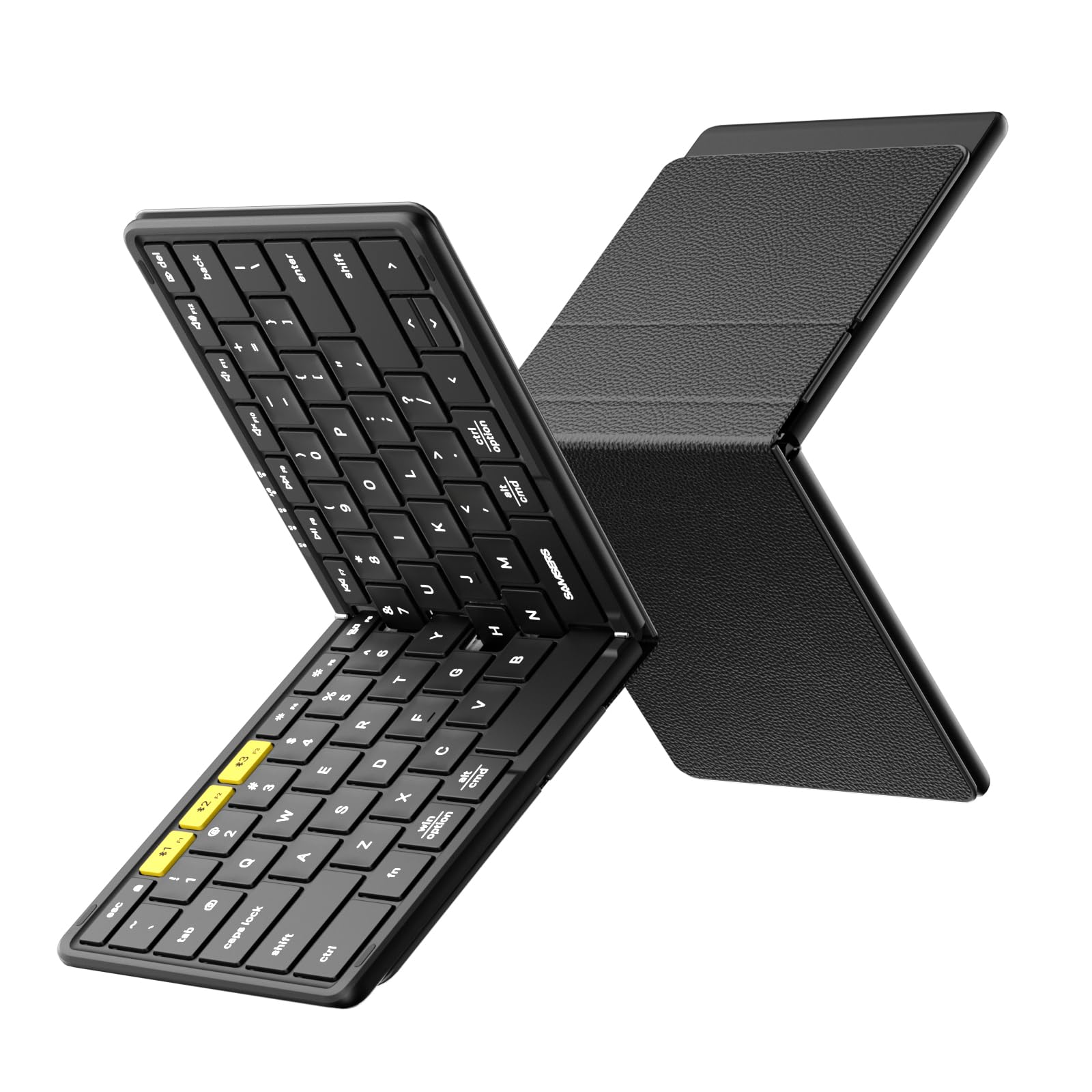
| Samsers Full-Size Foldable Bluetooth KeyboardBudget Champion | Budget travel typing | 78 | Bluetooth, 3 devices | 9.1 ounces | Amazon |
| VSD M18 Stream Controller Deck | Macros and stream shortcuts | 18 | USB-C | 10.56 ounces | Amazon |
| Samsers Backlit Foldable with Touchpad | Cursor control without a mouse | 78 | Bluetooth 5.1, 3 devices | 11 ounces | Amazon |
| Samsers Foldable Keyboard and Mouse | Keyboard plus mouse kit | — | 2.4G receiver + Bluetooth 5.0 | 0.83 kg | Amazon |
| VSD K1 Pro Programmable Macro Keyboard | Mechanical deck with LCD keys | 87 | USB-C | — | Amazon |
| Logitech Keys-to-Go 2 | Slim everyday carry | 78 | Bluetooth, 3 devices | — | Amazon |
Detailed Reviews
1. ProtoArc XK01 Plus Backlit Foldable Keyboard
Our pick — 4.0+★ from 850+ verified ratings; the strongest balance of quality and price.
The full-size number pad that folds into your Deck case and still types like a desk keyboard.
If you want the closest thing to a desktop keyboard that still folds up, this is the one. It packs 105 keys — a full QWERTY layout plus a numeric keypad and a dedicated shortcut row — into a shell that folds down to 8.46 x 4.68 x 0.78 inches. That is a real laptop-style spread, not a cramped portable layout you have to relearn. The crowd favorite here holds 4.0+ stars across 800+ ratings, and the reason shows up in the parts people talk about most.
You get quiet typing first. The scissor-switch keys (low-profile keys with a scissor mechanism underneath that keeps each press even) are quiet enough for a shared room, which is exactly what wins people over here — sound quality is the single most praised trait in the whole review set. Bluetooth 5.1 (a wireless standard that keeps a steady link) holds three devices paired at once, so your Deck, laptop, and phone all sit in memory and you switch with a keypress. A three-level white backlight keeps keys readable in dark rooms, and auto-sleep is rated by the maker at up to 150 days of standby. Pairing is quick in practice; as buyers report, it “Pairs quickly with tablet; ~6 hrs use before preemptive charge.”
Here is the honest trade-off. Reliability is the mixed note in this model’s feedback — while it works well out of the gate, a share of long-term owners mention the left side of the keyboard going quiet after a month of use, so treat it as a travel companion rather than a forever desk board. The layout is also narrower than a true desktop keyboard with no wrist rest, and the stiff metal hinge makes it awkward on your lap. For a Deck in a case, none of that stings much.
What earns it the top spot
- 105 keys with a numeric pad — rare on a folding board, and it beats the Samsers 78-key foldable by a wide margin on button count.
- Three-level backlight keeps keys readable on a dim couch or a night flight.
- Bluetooth 5.1 holds three devices at once with instant switching.
- Auto-sleep standby rated up to 150 days, so it is ready when you grab it.
Where it asks patience
- Some long-term owners see the left half fail after roughly a month — buy it as a travel tool, not a permanent desk keyboard.
- No wrist rest and a narrow footprint make long sessions less comfortable than a desktop board.
- The metal hinge is sturdy but stiff, so it does not balance well on your lap.
Reach for this if: you want full-size typing with a number pad that still folds into a backpack for desktop-mode work on your Deck.
Think twice if: you plan to hammer it daily for years — the mixed long-term reliability reports make a heavier desk board the safer pick.
2. Samsers Full-Size Foldable Bluetooth Keyboard
Featherweight folding board that pairs with your Deck in under a minute and vanishes into a pocket.
It disappears into the same pouch as your Deck at just 9.1 ounces. It unfolds to 11.2 x 4.8 x 0.35 inches — a near-laptop keyboard — then folds to palm size. You get 78 keys on six rows at 0.65-inch spacing, and the smooth metal hinges keep every key the same size instead of shrinking the edge letters. That matters if you touch-type; your fingers land where they expect.
Pairing is genuinely quick. As customers note, it “Pairs with Galaxy Tab 10 in under 30 seconds, works flawlessly.” Once open it holds up to three devices with one-click switching, and the connection holds across a wide open room. The typing feel is the praised part: sound quality is the most-mentioned positive trait in this model’s feedback, and owners describe firm keys with good spring. A 2-hour Type-C charge yields up to 120+ days of standby, so it is ready whenever you unfold it. The PU leather back keeps dust and scratches off.
The quirk to know about is the split spacebar — it looks odd at first but most people adjust inside a day. A couple of owners also wish the bottom had more grip, since it slides on smooth surfaces. And while the folded size is small, the unfolded footprint is a touch bigger than expected for airplane tray tables. None of these sour a keyboard that reads as a solid value against the brand names.
Where it shines: the price-to-performance math on this one is hard to argue with — 0.65-inch standard keys, three-device Bluetooth, and a velvet carry pouch included, all in a 9.1-ounce package.
A small caveat: there is no backlight, so if you game or type with the lights low, the ProtoArc above covers that gap.
Pick this one: for a no-fuss travel keyboard you can leave folded on the couch and grab for quick desktop-mode input.
Look past it: if you need backlit keys or a numeric pad — those live on the ProtoArc instead.
3. VSD M18 Stream Controller
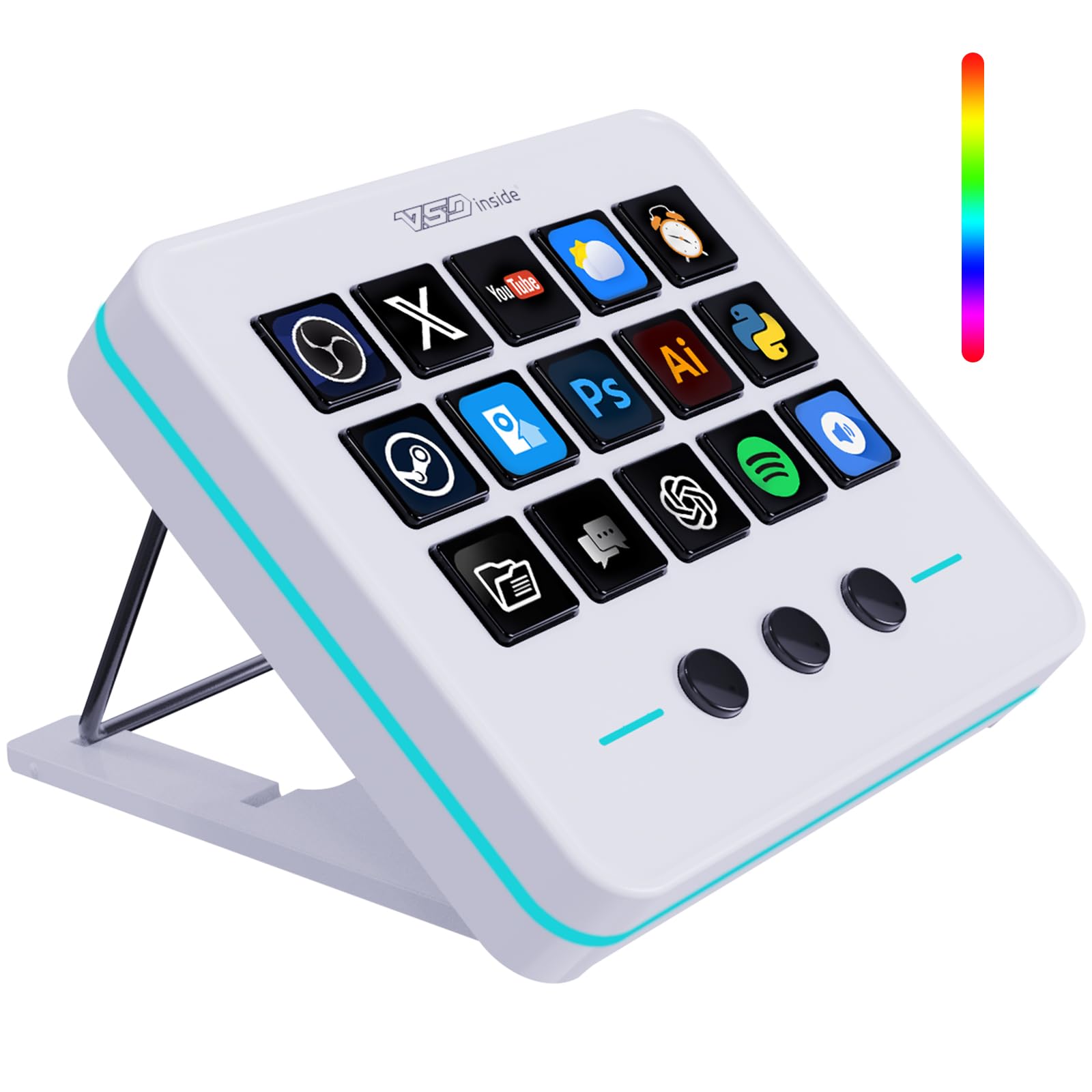
Not a typing board at all — it is the shortcut pad that turns Steam, OBS, and Discord into one-touch buttons.
This is a different tool from the foldables, and it is worth understanding why before you buy. The M18 gives you 18 programmable keys — 15 of them visual LCD keys you can label with your own JPG, PNG, or GIF images — plus 3 physical buttons. You plug in over USB-C and assign each key to a single action or a whole sequence. For a Deck in desktop mode, that means launching Steam, opening Discord, switching OBS scenes, or firing a multi-key game combo with one press instead of a chord.
The construction is where it wins buyers over: quality is the most-praised trait in this model’s feedback, with owners calling out the crisp feel of the buttons and the general build. Compatibility covers Windows 11 and above plus macOS 11.0 and above, and it slots into software like OBS, Streamlabs, Discord, Excel, Word, and Photoshop. There is a surrounding RGB ring for setup ambiance, and a set of plugins like a clock, timer, weather, and calendar that ride along on the display.
The catch is that this is a companion, not a keyboard. It has no letter keys, so you still need the Deck’s own input or a foldable for actual typing. Setup leans on software, and some owners found the Mac download path clunky to get working. If you only need to type, a keyboard is the answer; if you want faster shortcuts while streaming or gaming, this is the efficient add-on.
The case for the shortcut pad
- 18 keys with 15 customizable LCD icons for instant recognition.
- One-touch and multi-step macros for Steam, OBS, and editing workflows.
- USB-C plug-in setup works on Windows and macOS.
What to plan around
- No letter keys — it pairs with a keyboard, not instead of one.
- Getting the Mac software installed can take a couple of tries.
Add it to the kit: if you stream, capture, or play shortcut-heavy games on your Deck and want a labeled button for every action.
Skip the add-on: if you mainly need to type passwords and chats — a foldable keyboard does that job.
4. Samsers Full-Size Backlit Foldable Bluetooth Keyboard with Touchpad

The one that replaces your mouse too — a foldable keyboard with a real trackpad built in.
Desktop mode on the Deck really wants a cursor, and this board solves that without you packing a separate mouse. It combines 78 standard-size keys (0.63-inch) with an upgraded multi-touch trackpad you can scroll and tap on. Unfolded it measures 13.5 x 4.5 x 0.35 inches, and it folds magnetically to palm size. Weighing 11 ounces, it still fits a smaller purse or handbag as owners point out.
The backlight is the other draw: seven colors (green, purple, blue, yellow, white, cyan, red) at four brightness levels, so you can match the room or kill the glow. Bluetooth 5.1 keeps three devices paired, and the 500 mAh battery is rated up to 110 hours without backlight or 300 days of standby after a 2–3 hour charge. Owners describe strong, near-instant pairing with iPads and phones, and the multi-device switching plus the leather backing that stops key ghosting when laid over a laptop are the parts people like most.
Two things keep it from being flawless. The trackpad lacks acceleration, so long drags can take a couple of swipes, and a two-finger scroll sometimes reads as a zoom — lower the pointer speed to fix the feel. The backlight timeout also is not adjustable, which drains more than you might expect over a long session. For the Deck’s pointer-heavy desktop mode, though, an included trackpad still beats carrying a mouse.
Best-in-list for: anyone who wants to navigate desktop mode with a cursor and never think about a separate mouse.
The honest limit: trackpad gestures can be fussy — expect to tune sensitivity and use simple taps and drags rather than relying on two-finger scrolling.
Go here: if a trackpad and a backlight matter more than the lightest possible bag weight.
Look elsewhere: if you want a pointer-free couch board — the Samsers KM08 bundle adds a real mouse instead.
5. Samsers Full-Size Travel Foldable Keyboard and Mouse
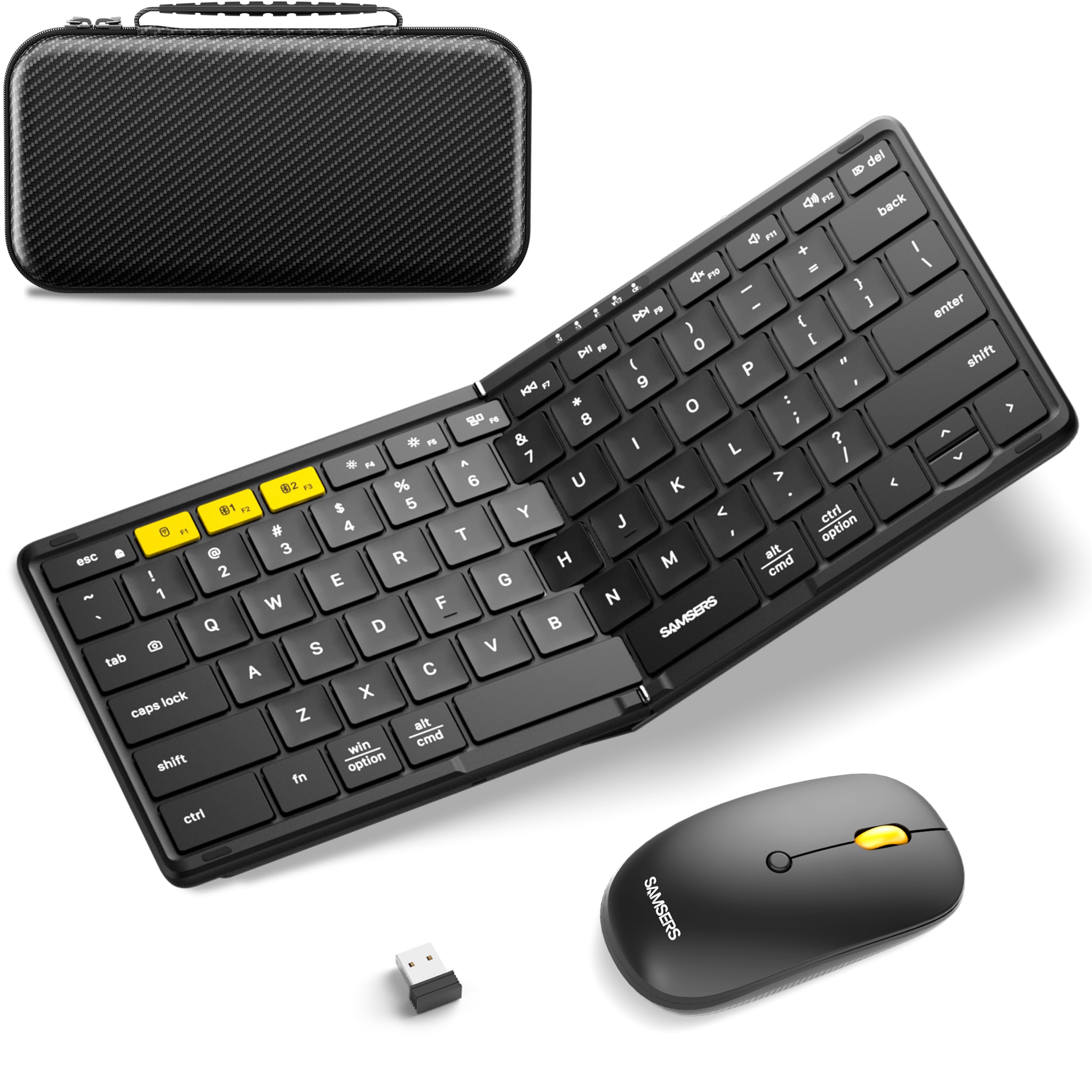
A foldable keyboard, a contoured mouse, and a hard case that holds both — one bag, done.
If you want a complete travel setup rather than pieces, this bundle is the smart buy. It pairs the six-row, 0.65-inch-key foldable (unfolding to 11 x 4.8 inches) with a shaped mouse that fits the curve of your palm. You connect over a tiny 2.4G USB receiver plus two Bluetooth 5.0 channels, so three devices stay in reach and the connection holds across a room within about 33 feet. Everything arrives in a sturdy hard case that also fits the phone holder and cable — the whole kit weighs in at 0.83 kg.
Build quality is what wins people over: quality is the single most-praised trait in this kit’s feedback, and owners describe the keyboard as feeling higher-end than its tier. The mouse is smooth and precise, and the case is called out as genuinely useful. The “sturdy” reputation comes across in the details — owners swap to this after other foldables fail, and battery life runs long between charges. The keyboard folds and feels solid but light, with quiet soft-touch keystrokes.
The one note worth hearing: responsiveness draws mixed feedback, with some owners reporting delays where others find the keys snappy. If you are sensitive to input lag, test it early. The other small gripe is a phone stand that does not work well with thick tablet cases, plus some owners wish the back had more skid grip. Both are minor next to a full keyboard-and-mouse kit that packs into one case.
Why the bundle works
- Keyboard, mouse, and hard case in one — nothing else to buy for desktop mode.
- 2.4G receiver plus two Bluetooth 5.0 channels covers three devices.
- Long battery life between charges and a case that fits all the accessories.
What to watch
- Some reviewers point out input delay; others find it snappy, so test responsiveness early.
- The included phone stand can struggle with bulky tablet cases.
Buy the bundle: if you want a keyboard and mouse together in a single protective case for Deck desktop work.
Stay lean: if you want the lightest possible carry — a keyboard-only foldable slims the bag down.
6. VSD K1 Pro Programmable Macro Keyboard

A full mechanical keyboard with a stream deck built into the top — LCD keys, knobs, and all.
For players who want real mechanical feel plus shortcut controls in one board, the K1 Pro merges the two. It carries 87 mechanical keys (a compact tenkeyless layout that saves desk space) and adds 6 custom LCD keys and 3 knobs across the top. Those knobs and LCD keys map to volume, scenes, and lighting, so you can run Steam, a capture app, or music without leaving the keys. RGB runs to over 16.8 million colors, and the hot-swappable PCB takes 3-pin or 5-pin switches with no soldering — a puller and three spare switches are in the box.
Typing feel is the star here: keyboard quality is the most-praised trait in this model’s feedback, and owners describe a satisfying, thocky sound and smooth, soft-click keys. The 5-layer dampening and gasket mount keep the sound clean instead of hollow, and pre-lubed stabilizers add to the smooth press. Concave keycaps and 3°–6°–13° adjustable stands let you angle it for long sessions, and it works across Windows and macOS over USB-C. Its mechanical switches are rated for 50 million keystrokes.
Two real caveats. This is a desk keyboard — it is wired and does not fold, so it travels poorly with a Deck. And the software side splits opinion: some owners find setup super easy while others wrestle with it, and the whole device needs you to reset after reinstalling or updating the app. The LCD icons and time display also want the app running on a wired connection. Worth it for the mechanical feel; plan for a learning curve.
Sound and feel: if you want the click-clack of a real mechanical board with the shortcut control of a stream deck, this delivers both — hot-swappable, dampened, and bright with RGB.
The trade-off: wired-only and software-dependent, so it lives on your desk rather than in a Deck bag.
This suits: the gamer who docks the Deck at a desk and wants a real mechanical typing feel with shortcut keys up top.
Not for: handheld-on-the-go use where you need folded portability and no laptop-software setup.
7. Logitech Keys-to-Go Bluetooth Keyboard

A slip of a keyboard with a protective cover built right in — the one you forget you packed.
This is the closest thing to a premium daily carry in the lineup. It is a super slim, lightweight Bluetooth board with an integrated cover that protects the keys when it is in your bag, which is why owners call it a top choice for iPad and travel use. It pairs with up to three devices and switches with a tap, and the scissor keys at 78 count give a roomy feel that many compare to a laptop board. The full F-row is customizable through the Logi Options+ app on Windows and Googlebook OS.
It runs on pre-installed coin cell batteries rated for up to 3 years, so there is no USB-C cable to pack. That means no USB-C cable to pack, but you also cannot recharge it — you swap the cell when it dies. Around 10.5- and 11-inch tablets it fits neatly, and the thin profile matches a tablet, so the whole carry is barely thicker than the device itself. Owners describe satisfying, well-balanced typing with good connectivity and the cover as a real plus.
What to weigh: there is no backlight, so it is weak in low light. Battery is the priciest pain point — some owners note a fresh set of coin cells draining faster than hoped, and there is a known quirk where a weak stock battery causes Bluetooth dropouts until you fit a fresh one and update firmware. If you want a rechargeable backlight board, the Samsers touchpad model covers that ground; if you want a fade-into-the-bag board with a cover, this is it.
Why it carries well: the built-in cover and slim profile make it the easiest of the bunch to toss in a purse or sleeve with your tablet.
The catch: no backlight and non-rechargeable coin power — great for daylight typing, weaker for dim-room sessions.
Choose it: for a slim, covered, pair-and-go board that rides along with a tablet or Deck without adding bulk.
Choose differently: if backlit keys and USB-C recharging are must-haves — the Samsers trackpad keyboard has both.
Know the Specs
Bluetooth version and multi-device memory
Bluetooth is the wireless link your Deck uses to talk to the keyboard. A newer version like 5.1 tends to hold a steadier link and pair faster. Multi-device memory (the “3 devices” figure) lets one keyboard stay paired to your Deck, your phone, and a laptop at once, switching with a keypress instead of re-pairing each time. If you juggle screens, this is the single most useful feature to check.
Keycap size and switch type
Keycap size is how wide each key is — 0.65-inch is a laptop-style standard, so full-size boards type closer to what your fingers already know. Switch type is what happens under each key: a scissor switch (the low, even kind) is quiet and flat, while a mechanical switch is taller with a distinct press and sound. For a Deck, scissor keys travel better; for a desk setup, mechanical feels richer.
Backlighting levels
A backlight is a glow behind the keys for dark rooms. Levels like 3 or 7 colors, plus brightness steps, let you dial it up for a night game or down to save power. Backlighting drains battery faster than typing alone, so check whether the timeout is adjustable before you rely on it every session.
Battery and standby figures
Battery figures on these boards range from rechargeable cells that need topping up every few days to coin batteries rated in years. Standby is how long the keyboard holds its charge asleep — a 120+ day or 150 day figure means it is ready when you reach for it. Decide whether you would rather plug in a USB-C cable or forget about charging altogether.
Common Questions
Will a Bluetooth keyboard work with the Steam Deck in desktop mode?
Do I need a keyboard with a trackpad for the Steam Deck?
Is a foldable keyboard comfortable enough for long typing sessions?
How long does a Steam Deck keyboard battery last between charges?
Can I use one keyboard to switch between my Steam Deck and my phone?
What is a macro pad and is it useful with the Deck?
Will a folding keyboard fit in my Steam Deck case?
Do these keyboards work with Windows and macOS as well?
Is a wired or wireless keyboard better for a docked Steam Deck?
The Bottom Line
For most people pairing a keyboard to a Steam Deck, the ProtoArc XK01 Plus is the one to start with — 105 keys including a number pad, three-level backlighting, and Bluetooth 5.1 across three devices, all in a shell that folds to bag size. If you want a pointer without a mouse, grab the Samsers backlit foldable with trackpad. And if your priority is a shortcut-heavy gaming or streaming setup, the VSD M18 stream controller turns Steam and OBS actions into one-touch keys beside your Deck.
How we choose
We do not accept paid placement. Every pick is matched to a real buyer and a real use-case; we do not hands-on test units.
Sources
Specifications: manufacturer listings and product documentation. Review insights: verified customer reviews, as of October 2026. Pricing: not shown on this page (it changes often); check the current price via the retailer link.
As an Amazon Associate, Aappliancez earns from qualifying purchases. This does not affect which products we feature.