Disclosure: Some links in this post are affiliate links. As an Amazon Associate I earn from qualifying purchases, at no extra cost to you. Learn more
Specs are compiled from manufacturer listings and verified buyer reviews and can change over time — please confirm the key details on the product page before buying.
If you want one answer fast: the Logitech Signature Slim K950 is the safest buy for most people, because you get a full-size layout, quiet keys and three-device switching in one board. The rest of this list splits by job — a palm-sized remote-board for your TV, a Mac-only slab with backlighting, a folding full-size deck for travel. The trick is matching key travel, device channels and layout to how you actually type, not to how the board looks in the listing photo.
This guide is built by comparing the manufacturers’ published specifications and the patterns across verified customer reviews, so you get each pick’s real strengths and trade-offs instead of marketing spin.
Compact boards live or die on three things: key travel (how far a key dips when you press it), how many devices they can hop between, and whether the thing stays connected when you wake it up. Below are seven boards sorted by their strongest job — three-device desk work, folding travel, Mac-only backlighting, budget tablet typing and couch control. This is the shortlist that answers the question behind compact bluetooth keyboard shopping.
Top Picks


How To Choose The Best Compact Bluetooth Keyboard
Most buyers assume smaller equals worse typing. That is only true when the manufacturer shrinks the keys without keeping the key travel — the distance a key dips when you press it. A board with 1.3mm of travel and properly spaced keys types better than a wide board with mushy, shallow keys.
Decide your layout before anything else
A 75-key board with no number pad fits a bag and a lap. A 105-key full-size folding board gives you the number pad back but takes up more desk. If you type figures all day, a number pad is not optional — if you mostly type words and switch apps, dropping it buys you portability.
Count your devices, then count the channels
A three-channel keyboard lets you pair a work laptop, a home PC and a tablet, then hop between them with one tap. Two-channel boards force you to re-pair, which gets old fast. If you work across more than two machines, treat three channels as the floor.
Weigh battery style honestly
Rechargeable boards with USB-C mean one cable for everything you own. Coin-cell and AAA boards mean a swap every few months but no charging ritual. Backlighting is the single biggest battery drain on any of these, so decide whether you actually type in the dark before you pay for it.
Side-by-Side Comparison
| Model | Best For | Key Count | Devices | Charging | Amazon |
|---|---|---|---|---|---|
| Logitech Signature Slim K950★ Best Overall | Desk work across three machines | Full-size QWERTY | 3 | Battery | Amazon |
| ProtoArc XK01 PlusBest for Travel | Travel with a number pad | 105 | 3 | USB-C | Amazon |
| Logitech MX Keys Mini | Mac-heavy desks and small trays | 34 | 3 | USB-C | Amazon |
| ProtoArc K90-A | Mac and iPad backlit typing | 78 | 3 | USB-C | Amazon |
| Lenovo Multi-Device Wireless | Tablet and laptop on the move | 75 | 3 | USB-C | Amazon |
| Microsoft Designer Compact | Tight desks and clean setups | 78 | 3 | Battery | Amazon |
| Rii Mini Bluetooth Keyboard | Couch control and TV boxes | 10 learning keys | 2.4G + Bluetooth | USB-C | Amazon |
Detailed Reviews
1. Logitech Signature Slim K950 Wireless Keyboard
Our pick — 4.5+★ from 500+ verified ratings; the strongest balance of quality and price.
A full-width board that quietly handles three machines from one desk.
Here is where a compact board usually makes you pay, and the K950 refuses to: it keeps a full QWERTY layout with a number pad, but types like a laptop deck rather than a clunky desktop slab. It is a membrane keyboard — a layered rubber-sheet mechanism rather than individual mechanical switches — so the press feels soft and the sound stays low. The whole thing runs on a 685 g body, which is heavy enough that it does not skate around a desk when you type hard.
What wins people over is the keybed itself. The typing feel is the most-discussed strength in this product’s data, and it tracks with what the pages describe — a firm press with real density and a dull, low thud rather than a sharp click. As owners put it: “It’s is heavy, sleek, fantastic quality. Super flat, easy on the wrist, pretty quite keys, soft touch.” Pairing is the other draw. Buyers report “Love being able to connect to 3 devices at a time,” and the one-tap switching between computer, tablet and phone is the whole reason this board wins the top slot.
The honest catch sits in the responsiveness and noise columns, which read mixed rather than glowing. Some typists find the shallow, flat pitch takes a day or two to trust, and the quiet claim is relative — it is discreet, not silent. If you want a deep mechanical clack or a backlight, this is the wrong board; there is no backlighting here, and one owner noted it runs on battery rather than a rechargeable cell. For a quiet home-office keyboard across three devices, though, it is the crowd favorite — 4.5+ stars across 500+ ratings — and the money buys you the key feel, not features you will not use.
What earns its keep
- Three-device switching via Bluetooth or Logi Bolt, with one-tap hopping between computer, tablet and phone.
- Firm, dense key press with a quiet thud, so a shared room stays calm.
- Full-size layout with number pad and laptop-style keys, so nothing gets re-learned.
- Runs across Windows, macOS, Chrome OS, Linux, iPadOS, iOS and Android.
Where you will feel the limit
- No backlight, so a dim room makes you hunt for keys.
- Battery-powered instead of USB-C rechargeable.
- The flat key pitch takes adjustment if you are used to deep keys.
Made for: anyone juggling a work laptop, a home machine and a tablet who wants one quiet board to rule them all.
Think again if: you type in low light or insist on USB-C recharging.
2. ProtoArc XK01 Plus Foldable Keyboard
The folding board that unfolds into a proper 105-key desk keyboard.
This is the pick for anyone who has tried a palm-sized travel keyboard and given up on it. The XK01 Plus carries a 105-key full-size QWERTY layout with a numeric keypad and a dedicated shortcut row, so you are not relearning a cramped mini layout. Yet it folds down to 8.46 x 4.68 x 0.78 inches, which slides into a bag alongside a tablet. Unfolded keycaps measure 0.65 in, which is full-size typing rather than a compromise.
For scale, consider the gap against the Microsoft Designer Compact: the ProtoArc packs 105 keys where that board has 78, and the unfolded deck runs 15.19 inches wide versus the Microsoft’s 11.18 inches. That extra width is where the number pad lives. Typing on it feels quiet, thanks to scissor-switch keys — two plastic scissors under each cap that keep the press even — and the white backlight runs at three brightness levels so a dim hotel room does not slow you down. Bluetooth 5.1 holds three devices at once and switches between laptop, tablet and phone.
What the reviews keep returning to is how quietly this board works, and the connection reliability that follows you between machines. The trade-off is durability, and it is worth sizing honestly. The folding hinges and body feel light rather than rigid, and the mixed reliability feedback means the occasional unit loses part of the keybed after a month — treat a folding keyboard as a travel tool rather than a lifetime desk board. Auto-sleep standby reaches up to 150 days, so it is ready whenever you pull it out, and the package includes a PU carry pouch, a phone stand and a USB cable.
Portability math: you get a 105-key number-pad layout in a folded footprint of 8.46 x 4.68 x 0.78 inches, which is the whole pitch of this board.
Go easy on it: the folding build is light by design, so pack it in the pouch and do not toss it loose in a bag.
Pick this when: you want full-size keys and a number pad in a bag without hauling a desktop board.
Pass on it when: you need one rigid keyboard to survive daily abuse on a desk year after year.
3. Logitech MX Keys Mini Wireless Keyboard

Keys that light up the second your hands get close — and feel better than they look.
Spend the most here and you buy the typing experience, not the layout. The MX Keys Mini is a minimalist slab with 34 keys shaped to your fingertips, including dedicated dictation, mic mute and emoji keys. The backlight is the signature piece: it lights the moment your hands approach and adjusts to the room’s lighting on its own. That means no fumbling for a backlight button mid-sentence in a dark office.
What earns the praise here is the sound of the keybed — smooth, tactile, quiet — and the size, which fits small keyboard trays and crowded desks without cramping your hands. It pairs with three devices over Bluetooth Low Energy (the low-power version of Bluetooth that sips battery) and hops between them with one button. Charging is USB-C, and the maker claims up to 10 days on a full charge, or up to 5 months with the backlighting off. A near-flat body and a solid heft keep it planted while you type.
Two real caveats. The first is connectivity, which reads mixed rather than clean: most setups pair instantly, but Windows machines have wanted a firmware update, and some Linux distributions have needed a manual “trusted” marking before they stay connected. The second is longevity. The keycaps and plastic are softer than the price suggests, and a few long-term owners mention arrow keys or individual keys giving out far sooner than the board looks like it should. If key feel matters more to you than a number pad or long-term keycap durability, it is still the board to buy.
The case for it
- Backlight activates on hand approach and self-adjusts to room light.
- Three-device Bluetooth switching with one-button hops.
- Up to 10 days per charge, up to 5 months with backlight off.
- Compact footprint fits narrow keyboard trays.
What you give up
- No number pad, and only 34 physical keys before shortcuts.
- Windows and Linux setups can need a firmware update or manual pairing fix.
- Soft keycaps show wear sooner than expected for the price.
The right call for: typists who care more about how keys feel under the finger than about extra keys on the deck.
Look elsewhere if: you need a number pad or you want a board that survives years of punishing daily use.
4. ProtoArc K90-A Bluetooth Keyboard
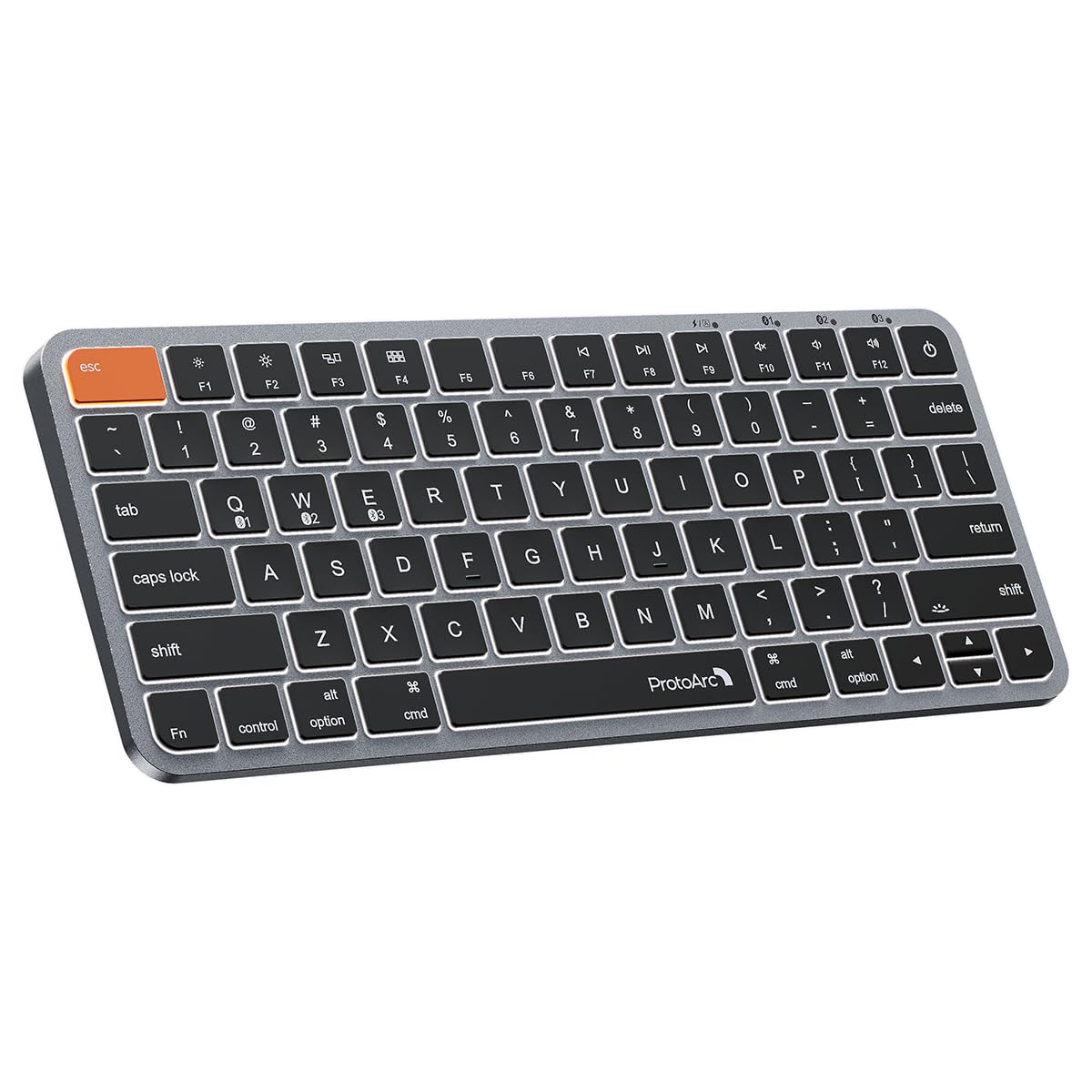
A Mac-layout slab with wider Command keys and three-step backlighting.
The detail that sells this board to Mac users is the Command key. Both of them are noticeably wider than on most rivals, so the copy-paste-and-switch shortcut stops being a thumb-tip accuracy test. It sits right where your thumb naturally rests. Add a metallic plate and low-profile scissor keys, and you get a deck that feels like a MacBook without the laptop attached.
The layout is strictly Mac. It’s a 78-key design with no number pad, built for Mac OS 10.12 or later, iOS and iPadOS 13.0 and above, and it works with MacBook, iMac, Mac mini and iPad. It does not support Windows, Linux, or Windows running on Mac hardware, so if you share the desk with a Windows machine, keep reading. Backlighting runs three soft white levels, and the built-in 1200mAh rechargeable battery goes into sleep mode after 60 minutes of inactivity. Bluetooth holds three devices, and there’s no dongle — the included cable is for charging only.
What wins people over here is the build — the most-praised category in this product’s data — plus the key feel, which Mac users compare directly to a MacBook. The recurring gripe is battery behaviour in Bluetooth mode with the backlight on: it runs down faster than you would like, and one owner reports needing to charge about weekly. Reconnect after auto-off can take up to 10 seconds, slower than Apple or Logitech gear. If your desk is Mac and iPad only and you want three-level backlighting plus a wider Command key, it is still the right call.
Mac-first by design: the K90-A targets Apple hardware only, and the three-level backlight with a 1200mAh battery makes it a realistic iPad companion.
Budget the charging: with the backlight on, expect to plug in more often than a plain board would need.
Choose it if: your whole setup is Mac or iPad and you want backlit keys that feel like the laptop you left behind.
Rule it out if: you own even one Windows or Linux machine you’d want to type on.
5. Lenovo Multi-Device Wireless Bluetooth Keyboard, Iron Grey

Phone-list weight and a 60-hour battery in a deck that still types like a keyboard.
At 180 g, this board is light enough to forget in a bag, and it runs 60 hours of continuous use on a single charge. Those two numbers are the reason it earns a slot. The 75-key layout has 1.3mm of key travel — that is a real dip under your fingertip, not a raised rubber sheet — and 12 customizable shortcut keys, so a tablet or laptop setup gets real function keys. Bluetooth or USB-C handles the connection, and three devices pair to it at once.
For the footprint, the body measures 10.1 x 4.2 x 0.22 inches slim, which is why it fits tablet bags and lap use. It’s rechargeable via USB-C, so the same cable as your phone works. The keys sit close together — one owner notes they are smaller and more tightly packed than a ThinkPad’s, which is the main thing to weigh if you type by feel. The upside is a soft, quiet press that works well for long sessions without hearing yourself clack.
The praise lines up with a strong value read: owners rate quality and value highest, and they note that the board feels good for long typing. The mixed part is connectivity — some units need a Bluetooth toggle to re-pair, and the small keys take a session or two to get used to. If you want a number pad or a wide desktop pitch, this isn’t the board. If you want a light, rechargeable deck for tablet and laptop work with a battery that outlasts a workday, it’s the value pick.
Why owners keep it
- 60 hours of continuous use per charge with a rechargeable USB-C battery.
- Just 180 g, so a bag or lap setup stays comfortable.
- 12 customizable shortcut keys plus 1.3mm key travel.
- Three devices paired at once across iOS, Android and Windows.
Where it asks you to adapt
- Keys are smaller and closer than a ThinkPad’s.
- No number pad in the 75-key layout.
- Some units need a Bluetooth toggle to reconnect.
Stack it up: 180 g and 60 hours per charge make this the travel value pick for tablet and laptop work.
Skip the switch: if you type by muscle memory and need full-size key spacing, this board will fight you.
6. Microsoft Designer Compact Keyboard

A slim 78-key slab built to clear space and stay put.
This is the board you buy when your desk has more screen than surface. It measures 11.18 x 4.36 x 0.38 inches, so a mouse can sit close and comfortable rather than off to the side. A 78-key layout keeps the function row but drops the number pad, with an emoji key for quick symbols and up to three paired devices to switch between. Matte black and low-profile, it disappears into a setup rather than announcing itself.
Against the ProtoArc XK01 Plus, the size gap is the whole story: the Microsoft has 78 keys versus the ProtoArc’s 105, and it runs 11.18 inches wide versus 15.19 inches unfolded. You give up the number pad; you gain a board that fits a narrow tray. The key press has real travel and a distant, soft thud, and the matte caps resist greasy fingerprints, which is rare on black keys.
The mixed notes are worth weighing. Some customers note the soft-touch coating wears on heavy-use keys over time, and the coin-cell batteries (CR cells rather than a rechargeable pack) mean a swap every several months instead of a USB-C cable. Connectivity and responsiveness appear in both the praise and the gripes, so pairing is usually instant but not guaranteed across every machine. For a narrow desk where you want quiet keys, a low profile and no number pad, it’s a genuinely good pick.
What it does best: frees desk space — 11.18 x 4.36 x 0.38 inches and 78 keys — while staying stable and quiet under the finger.
Keep spare cells: it runs on coin-cell batteries, so plan for a swap every few months rather than a plug-in.
Best fit: a compact desk or a shared workspace where a low-profile, quiet board keeps things tidy.
Not for you if: you type numbers all day or want a USB-C rechargeable deck.
7. Rii Mini Bluetooth Keyboard

A two-handed remote with a touchpad, built for the couch rather than the desk.
Do not buy this expecting to write a report on it. The Rii is a handheld keyboard for your TV, streaming box or media PC — a palm-sized 5.9 x 2.3 x 0.4 inch slab with a touchpad, mouse buttons and backlit keys. Ten learning keys let it copy your TV remote’s infrared signals, so you can throw the old remote in a drawer and control power and volume from the same unit. As reviewers point out, the backside IR is “programmable to TV in ~5 min for power/volume.”
Two ways to connect matter here. Bluetooth handles modern devices, while a 2.4G nano USB receiver covers older gear that has no Bluetooth at all — the receiver stores in the box. The touchpad handles pointer work, and a Type-C charging port keeps it topped up. It’s not a full desktop layout: the Home and Return keys need Fn combos, and the trackpad doesn’t do multitouch. Those are real limits, but they don’t matter when the job is searching Netflix or typing a password into a set-top box.
The size is both the appeal and the catch. It’s tiny enough for one hand and a lap, yet it’s a genuinely small typing surface, and touchpad accuracy can be jumpy for precise work. One caveat worth knowing: some owners note the keyboard can lose its USB dongle if you don’t have a spare slot. For typing a Netflix search or a Wi-Fi password into a TV or media PC, its touchpad and backlit keys beat a directional-pad remote by a wide margin.
The real selling point: ten IR learning keys and a touchpad turn your TV remote into a full keyboard-and-mouse in one unit.
Know the trade-off: it’s a couch tool — the tiny keys and jumpy touchpad are not built for desktop work.
Made for: couch control of a TV, streaming box or media PC where typing on a remote is the alternative.
Keep shopping if: you need a full QWERTY desk layout or accurate pointer work.
Know the Specs
Key travel
Key travel is how far a key dips when you press it, measured in millimetres. More travel usually means a more satisfying, feedback-rich press; less travel means a flatter, laptop-like feel. The Lenovo lists 1.3mm of travel; shallower boards can tire fingers faster on long typing sessions, while deeper travel resists accidental presses.
Device channels
Device channels are the number of machines a keyboard can pair with and remember. Three channels let you keep a laptop, tablet and phone paired and hop between them with a tap; two forces a re-pair each swap. Every board on this list except the Rii Mini offers three, while the Rii uses Bluetooth plus a 2.4G dongle.
Backlighting
Backlighting illuminates keys for low-light typing, usually at stepped brightness levels. It’s the single biggest battery drain on any board: the ProtoArc XK01 Plus runs backlighting at three levels, and the Logitech MX Keys Mini stays powered up to 10 days with the light on, or up to 5 months with it off. Backlighting is a want, not a need, unless you regularly type in a dim room or on a night-flight tray table.
Battery type
Rechargeable boards run on USB-C (or Type-C) cables, so one charger covers phone and keyboard; coin-cell and AAA boards run on swappable batteries. Rechargeable is convenient for frequent travellers, while swappable cells suit desk set-and-forget owners who don’t want to think about charging.
Common Questions
Will a compact Bluetooth keyboard work with my iPad or Android tablet?
How long does the battery actually last on these keyboards?
Is a compact keyboard comfortable for all-day typing?
Do I need a number pad?
Can a compact keyboard switch between Windows and Mac?
Does backlighting drain the battery fast?
What is an IR learning key on a mini keyboard?
Can I use a folding keyboard on an airplane tray?
Do these keyboards connect via USB dongle or Bluetooth only?
Is a compact keyboard as good as a full-size one for gaming?
The Bottom Line
For most desk setups, the compact bluetooth keyboard winner is the Logitech Signature Slim K950 — a full-size, quiet board that switches between three devices and holds a 4.5+ rating across 500+ owners. If you plan to travel with full-size keys and a number pad, the ProtoArc XK01 Plus folds into a bag. And for a Mac-only desk with backlit keys, the ProtoArc K90-A is the one to reach for. Match the board to your main job — three-device desk work, travel with a number pad, or Mac-only backlit typing — and it will hold up for years.
How we choose
We do not accept paid placement. Every pick is matched to a real buyer and a real use-case; we do not hands-on test units.
Sources
Specifications: manufacturer listings and product documentation. Review insights: verified customer reviews, as of October 2026. Pricing: not shown on this page (it changes often); check the current price via the retailer link.
As an Amazon Associate, Aappliancez earns from qualifying purchases. This does not affect which products we feature.