Disclosure: Some links in this post are affiliate links. As an Amazon Associate I earn from qualifying purchases, at no extra cost to you. Learn more
Specs are compiled from manufacturer listings and verified buyer reviews and can change over time — please confirm the key details on the product page before buying.
Most Windows 11 printing problems are not your computer’s fault. They come from a printer whose driver never installed cleanly, or a model that drops off Wi-Fi the moment you need a boarding pass. The picks below are the ones that install through Windows 11 without a fight, keep a stable connection, and cost you the least in toner or ink over a year of real use. If you want the short answer, the HP LaserJet Pro 3101sdw is the safest buy for a home office that prints black-and-white documents every day.
This guide is built by comparing the manufacturers’ published specifications and the patterns across verified customer reviews, so you get each pick’s real strengths and trade-offs instead of marketing spin.
You will see which models take a USB cable without complaint, which ones handle double-sided pages automatically, and where the running costs actually land. Every pick here has a Windows 11 setup path that real owners have walked through, and the comparison below sorts them by what they print best.
Top Picks



How To Choose The Best Printers for Windows 11
Windows 11 changed how printers connect. It uses a modern driver system (software that lets Windows talk to your printer) and prefers wireless discovery (finding printers automatically over Wi-Fi). That works well when the printer supports it and causes headaches when it does not. Your first decision is not brand — it is if you want a laser that uses dry toner powder or an inkjet that sprays liquid ink.
Laser or inkjet for a Windows 11 desk
A laser printer uses toner powder and never dries out, so it can sit for weeks and still print the moment you hit Ctrl+P. That makes it the safer pick for documents you print in bursts. An inkjet gives you color and photo output, but the print head can clog if the machine idles, and some models refuse to print black if any color cartridge runs dry.
The connection that decides your setup day
A USB cable is the most reliable path on Windows 11. Plug it in, let Windows pull the driver, and you are printing in minutes. Wi-Fi and Ethernet add convenience across phones and laptops, but wireless is where most setup complaints cluster — the printer drops off the network, or the driver reinstalls itself. If a model offers Ethernet, use it for a desktop that never moves.
Toner and ink cost over a year
The purchase is the cheap part. What matters is the yield printed on the cartridge box — the page count you get before replacing it. A starter toner that yields about 1,000 pages will run dry faster than you expect in a busy home office. Also check whether the printer accepts third-party cartridges, because several models here use chip locks that block them.
Side-by-Side Comparison
| Model | Best For | B&W Speed | Duplex | Connection | Amazon |
|---|---|---|---|---|---|
| HP LaserJet Pro 3101sdw★ Best Overall | Everyday home-office documents | 40 ppm | Automatic | Ethernet, USB, Wi-Fi | Amazon |
| Canon imageCLASS MF3010 VPBest Value | Cheap black-and-white volume | 19 ppm | Automatic | USB | Amazon |
| Epson WorkForce WF-2960Compact Pick | Compact color all-in-one | 14 ppm | Automatic | Ethernet, USB, Wi-Fi | Amazon |
| Epson WorkForce Pro WF-7310 | Wide-format 13″ x 19″ jobs | 25 ppm | Automatic | Ethernet, USB, Wi-Fi | Amazon |
| Canon Megatank G3290 | Low-cost color and photo printing | 11 ppm | Automatic | USB, Wi-Fi | Amazon |
| Brother MFC-L2820DW | Small offices that fax and scan | 34 ppm | Automatic | Ethernet, USB, Wi-Fi | Amazon |
| Xerox B225DNI | Fast mono scanning with a feeder | 36 ppm | Automatic | Ethernet, Wi-Fi | Amazon |
| HP LaserJet Pro 3101fdw | Teams that need fax and security | 35 ppm | Automatic | Ethernet, USB, Bluetooth | Amazon |
| Brother HL-L6210DW | High-volume mono printing | 50 ppm | Automatic | Gigabit Ethernet, USB 2.0, Wi-Fi | Amazon |
Detailed Reviews
1. HP LaserJet Pro 3101sdw
Our pick — 4.5+★ from 600+ verified ratings; the strongest balance of quality and price.
Forty pages a minute and a seven-second first page — the printer that keeps a home office moving.
The HP LaserJet Pro 3101sdw is a black-and-white laser all-in-one that prints up to 40 pages per minute (ppm — how many sheets it pushes through in one minute). Its first page comes out in 7 seconds, which is the number that actually matters when you are printing a single address label and want to walk away. Duplex is automatic, so double-sided documents flip themselves without you refeeding paper. The 250-sheet input tray holds a solid ream-and-a-bit, and the 50-sheet auto document feeder lets you scan or copy a multi-page stack hands-free.
Where this model earns its place is the connection options. You get Ethernet, USB, and Wi-Fi, so a desk that never moves can run a cable and forget about dropped signals. Windows 11 finds it cleanly — owners describe setup as intuitive and easy, including people who deliberately picked the Ethernet cable over Bluetooth pairing. The introductory toner cartridge yields about 1,000 pages, so budget for a replacement sooner than you might expect in a busy household.
The trade-off is the toner chip lock. HP designs this printer to accept only cartridges with HP chips, and periodic firmware updates enforce that. Third-party toner can be blocked outright. The other recurring friction is the HP Smart software, which owners describe as buggy and occasionally flipping the printer to offline — a manual reset fixes it, but it happens. Buyers praise the print quality most: crisp, sharp text that looks office-grade.
Where it pulls ahead
- 40 ppm black-and-white and a 7-second first page keep waiting to a minimum.
- Ethernet, USB, and Wi-Fi together mean one reliable cable option plus wireless flexibility.
- Automatic duplex plus a 50-sheet document feeder handle stacks and double-sided jobs.
- Crisp, sharp text that reads like an office machine, not a budget toy.
What to know before buying
- Toner chip lock blocks third-party cartridges, so you buy HP toner.
- HP Smart software occasionally drops the printer to offline until reset.
- Starter cartridge yields about 1,000 pages — plan a replacement early.
Made for: a home office or small team printing black-and-white documents daily who want speed and a wired option.
Think again if: you rely on cheap third-party toner — the chip lock will fight you.
2. Canon imageCLASS MF3010 VP
Two toner cartridges in the box and almost nothing to configure — the no-nonsense cheap laser.
The Canon imageCLASS MF3010 VP is a wired, monochrome laser all-in-one with a USB cable included. Setup on Windows 11 is close to plug-and-play: connect the cable, install the driver, and you are printing. It runs at 19 pages per minute (ppm — sheets per minute) with an 8-second first page. Compare that with the HP LaserJet Pro 3101sdw above at 40 ppm and 7 seconds, and the Canon is the slower of the two — but for forms, invoices, and single-sided black text it is plenty fast.
The real value is in the box. You get a starter toner at 700 pages and an additional Cartridge 125 toner at 1,600 pages, so you have 2,300 pages of yield before you buy anything. Replacement cartridges are cheap, and there are no color cartridges to waste. Buyers report the bundled second cartridge alone carries real value. Scanning works at up to 600 dpi (dots per inch — the resolution of the scan), and an ID Card Copy function handles small documents like licenses without guessing at the crop.
A few honest limits: this is USB only, with no wireless at all, so it needs a cable to a Windows 11 PC. There is no auto document feeder, so scanning a multi-page document means feeding each sheet. Sleep mode draws approximately 1.2 watt, which is low enough to leave it on all week. Paper capacity tops out at 150 sheets. A few owners mention the open paper tray can expose paper to moisture and cause jams if the printer sits idle — keep a ream handy and it is a non-issue.
Where the value lands: a starter toner plus a second full cartridge in the box, at a price that sits among the lowest here, is the whole argument for this machine. Owners describe it as a capable Windows 11 multifunction laser that installs and runs without fuss.
The honest trade: wired-only, no document feeder, and no duplex in the strict sense — you print one side at a time, which is fine for single-sided office work but not for double-sided reports.
Reach for this one: a single Windows 11 desktop that prints black-and-white forms and wants the cheapest toner path available.
Look elsewhere if: you need wireless printing from a phone or laptop that moves around the house.
3. Epson WorkForce WF-2960
A color all-in-one that fits a small desk, with the ink bills to match.
The Epson WorkForce WF-2960 packs print, scan, copy, and fax into one compact unit, with a 2.4-inch color touchscreen and the Epson Smart Panel app for setup. It runs at 14 pages per minute in black and 7.5 pages per minute in color. For comparison, that is a step behind the Canon MF3010 VP’s 19 ppm black — so if pure document speed is the goal, the Canon is the faster pick. What you gain here is color output and mobile printing from Android and iOS, plus Ethernet and USB alongside Wi-Fi.
It has a 150-sheet paper tray and an auto document feeder, and automatic duplex printing reduces paper use. Epson’s PrecisionCore printhead is designed to be heat-free and permanent, so the head stays in the machine rather than in the cartridge. The 4 Claria 222 cartridges come in the box, one black and three colors.
The honest warning here is ink cost and reliability. Ink consumption is the loudest pain point in the reviews, and the recurring story is a printer that stops cold after a few dozen pages because a cartridge is empty. Some owners mention a firmware update blocking third-party cartridges, and one describes printing halting on page 2 until the black cartridge was refilled. A few customers note a color channel clogging entirely. Owners also flag that there is no USB port on some units, and no WIA scan support — worth checking your Windows 11 scanning workflow before you buy.
The setup story: owners find it quick to pair over Wi-Fi and get phone and laptop printing working without fuss, and the touchscreen makes basic jobs simple.
The catch: this is a printer for occasional color jobs, not a high-volume document machine — ink replacement frequency is the running theme in owner feedback.
Fits best: a home user who needs color printing, scanning, and fax every now and then, and wants a compact footprint with a touchscreen.
Not the pick for: anyone planning to print hundreds of pages a month and expecting low running costs.
4. Epson WorkForce Pro WF-7310
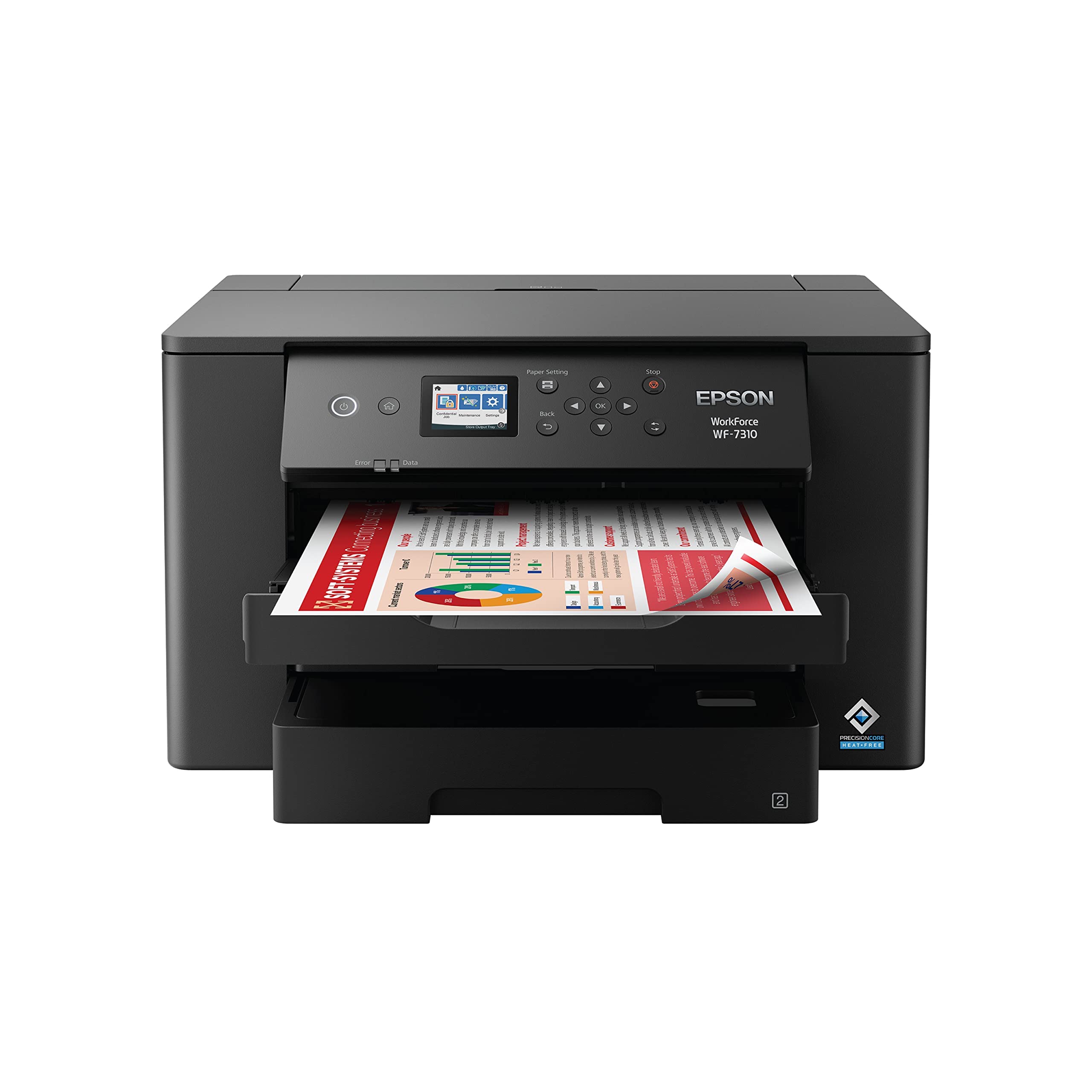
Tabloid-size printing in one unit, with a large footprint to match.
The Epson WorkForce Pro WF-7310 prints up to 13 inches by 19 inches, so tabloid and blueprint-size jobs stay in your office instead of going to a print shop. Print speed runs 25 black and 12 color ISO ppm (pages per minute — Epson’s own ISO measure of throughput) with DURABrite Ultra pigment inks that dry on contact. Paper capacity is 500 sheets across two 250-sheet trays, plus a rear feed for specialty stock. Wi-Fi 5 and Wi-Fi Direct mean you can connect a device without a network, and setup on Windows 11 over Wi-Fi has been reported working with no issues.
This model is a wide-format printer that also handles standard letter pages without complaint. Reviewers point out both trays load 11×17 stock — the tray protrudes when loaded, and Epson provides a cover for it. The 2.4-inch color display and Epson Smart Panel app handle setup and control. There is no scanner or fax on this unit, just printing — which keeps it cheaper for buyers who already have a scanner.
Two things to weigh. Print quality feedback runs both ways: some owners find it excellent, others are disappointed, so buy for the format you need, not for top-tier output. The other snag is cartridge chipping (firmware that blocks third-party ink): Epson’s firmware blocks non-genuine ink, and a few heavy users report expensive low-yield cartridges that show empty at half full. The printer also won’t print if any single color runs out, so a black-and-white job can be blocked by a missing cyan cartridge. Some buyers do report aftermarket cartridges being accepted, but it varies by firmware revision.
What makes it worth a look
- 13″ x 19″ wide-format output in a single unit, no print shop trip needed.
- 500-sheet capacity across two trays plus a rear feed for heavy jobs.
- Wi-Fi Direct prints without a network, useful for guest devices and phones.
- 25 black pages per minute keeps standard pages moving fast.
The compromises
- No scanner or fax — print only.
- Firmware can block non-genuine cartridges, and color-empty blocks all printing.
- Large footprint and protruding tray when loaded with 11×17 stock.
Suited to: a designer, architect, or small office that needs 11×17 or 13×19 output and already has a scanner.
skip it if: all you print is letter-size pages — you are paying for format you will never use.
5. Canon Megatank G3290

Refillable ink tanks that print thousands of pages — the color printer that skips cartridges entirely.
The Canon Megatank G3290 uses refillable ink bottles instead of cartridges, with one set rated for up to 6,000 black-and-white pages or 7,700 color pages. That is a different cost model from every cartridge machine here: you buy ink in bottles and top up the tank, not swap out a sealed unit. Black prints at 11 pages per minute (ppm) and color at 6 ppm, so it is slower than the laser options — 11 ppm against the HP 3101sdw’s 40 ppm — but the running cost is far lower per page.
It is a print/copy/scan unit with a 2.7-inch LCD color touchscreen, automatic two-sided printing, and Wi-Fi plus USB. Setup feedback is generally positive, with owners describing the on-screen guide as straightforward and the ink loading as easy. Pigment black plus dye color inks make glossy photo output look right when you select the matching paper type in both the computer and printer settings — a mismatch causes smearing. A user-replaceable ink maintenance box means you do not ship it to a service center when it fills up.
Print speed and color accuracy draw mixed feedback. The Canon app is thinner than owners expect, with limited contrast, brightness, and alignment controls. A few report borderless full-color prints taking several minutes, and some setup loops on Android that only finished on a PC. Wireless is generally stable, but the feedback varies — count on a USB setup as your fallback.
The big win: refillable bottles and the high page yield make this the low-cost-per-page option for color, and owners broadly find the printer itself easy to set up and use.
Watch for: slower color output, a weaker app ecosystem, and photo workflows that need a bit of trial and error to dial in.
Best fit: a household or small office printing color documents and photos regularly, where low ink cost over time outweighs fast speed.
Choose another if: you need rapid color pages or a polished mobile app controlling every image setting.
6. Brother MFC-L2820DW

Scan, copy, fax, and print at 34 pages a minute — all in a compact footprint.
The Brother MFC-L2820DW is a monochrome laser all-in-one with print, copy, scan, and fax, running at up to 34 pages per minute. Scan speed hits 23.6 images per minute in black and 7.9 in color (ipm — how many pages the feeder can scan per minute). The 50-page auto document feeder handles multi-page copy, scan, and fax jobs without hand-feeding. A 2.7-inch touchscreen drives navigation, and it can print from and scan to Google Drive, Dropbox, Evernote, and OneNote without a computer in the loop.
Connection is the standout. It offers built-in dual-band wireless at 2.4GHz and 5GHz — the latter being the less crowded band, so wireless printing tends to stay alive in busy homes — plus Ethernet and USB for a single desk. The Brother Mobile Connect app handles printing and toner tracking from a phone. Setup is genuinely simple: owners repeatedly note that it just works, every time, with no fuss.
The main caution is toner economics. A few shoppers say the starter cartridge runs out faster than expected, and low-toner warnings can land before deadlines. The machine takes TN830, TN830V, and TN830XL cartridges, and a Brother Refresh subscription trial is included. Owners praise Brother support in particular — warranty replacements have been handled quickly, though one owner noted the software has no way to remove a dead printer without reinstalling the whole driver package.
Where it shines: dual-band Wi-Fi plus Ethernet plus USB gives you three ways to connect, and the document feeder turning printing and scanning into a one-button task wins people over.
One honest caveat: toner refills come more often than the box implies, so factor cartridge cost into the ownership math.
Dependable for: a small office that needs print, scan, copy, and fax together, with wired or dual-band wireless freedom.
Look past it if: you print only a handful of pages a week — the toner economics favor busier desks.
7. Xerox B225DNI

Professional scanning in a home-office box, with a first page out in 6.4 seconds.
The Xerox B225DNI is a black-and-white laser all-in-one with fast duplex scanning for stacks of paper, plus more trays and paper handling than the average home printer. It prints at 36 pages per minute in black and 34 in color (even though output is monochrome), and the first page leaves in 6.4 seconds — the fastest first-page number in this roundup. The pre-installed starter cartridge yields 1,200 pages. Wi-Fi and Ethernet cover connectivity, and it supports Apple AirPrint, Mopria, and Chromebook printing, so a house full of phones and laptops is well served.
The scanner is the reason to pick it. Duplex scanning means both sides of a sheet are captured in one pass, and buyers report feeding different paper sizes through the document feeder with ease. The Xerox Print & Scan Experience handles auto-straighten, auto-crop, and receipt scanning. On Windows 11, install the updated software from Xerox and it’s recognized quickly. Security features protect access and data, which matters when multiple people share the machine.
The honest downside is reliable wireless. The pattern in owner feedback is that wireless connectivity can be flaky across Windows, Linux, and phones, forcing driver reinstalls and reboots. Some report cartridges depleting quickly or going unrecognized even when new. Print quality draws split opinion as well. On a wired Ethernet connection, though, the machine behaves as a fast, high-quality scanner-copier that fits a tight desk.
The scanning edge: duplex scanning plus a document feeder that handles mixed paper sizes makes this the strongest pick for anyone who scans more than they print.
Where it stumbles: wireless reliability and toner life are the two things owners push back on — use Ethernet and it argues far less.
Target buyer: a home office that lives on scanned contracts, receipts, and mixed-size batches, and can run a cable to the router.
Try another route if: you need rock-solid wireless printing from several devices all day long.
8. HP LaserJet Pro 3101fdw

Fax, scanner, and Wolf Pro Security for a small team that shares one machine.
The HP LaserJet Pro 3101fdw is a monochrome laser all-in-one that prints, scans, copies, and faxes at up to 35 pages per minute. It handles up to 7 people, with automatic two-sided printing and an auto document feeder for scan and copy jobs. Connections include Ethernet, USB, and Bluetooth, plus wireless from mobile devices, PCs, and tablets, supporting Microsoft, Mac, AirPrint, Android, and Chromebook. HP Wolf Pro Security with customizable settings protects the printer and documents, which matters when a team shares the network.
Setup is where this model surprises people. Owners mention a full print/copy/scan/fax setup in about five minutes, with on-printer controls clear enough for non-technical users. Performance is the strongest positive theme: it prints fast, the document feeder handles multi-page jobs well, and two-page duplex documents print in a single run. Bluetooth pairing also gets praise for phones.
Two things temper the recommendation. Print quality draws mixed reports — some get clear text, others blurry or faded pages even at top settings after driver and paper changes. And a small number of units stop working after a few weeks, which is a hard failure to plan around. On the scanning side, network scanning needs extra setup, and there is no two-sided scanning from the feeder — you flip pages manually if you need both sides.
Why teams pick it
- Print, scan, copy, and fax in one machine rated for up to 7 people.
- 35 ppm and automatic duplex keep a busy desk moving.
- HP Wolf Pro Security protects shared documents and network access.
- Ethernet, USB, Bluetooth, and wireless cover every device in the room.
Where it asks you to be careful
- No two-sided scanning from the feeder — flip pages manually.
- Network scanning needs extra setup on Windows 11.
- A small share of units report early failure.
Built for: a small shared office that needs fax and document security in one machine and wants every connection option in the box.
Think harder if: two-sided scanning is a daily need or you run a very high mixed workload.
9. Brother HL-L6210DW

Fifty pages a minute with a 520-sheet tray — the heavy-lifter for a busy office.
The Brother HL-L6210DW is a monochrome print-only laser built for volume. It puts out 50 pages per minute, the highest in this roundup. The main tray holds 520 sheets, the multipurpose tray holds 100 more, and optional trays expand it up to 1,660 sheets. Connectivity includes Gigabit Ethernet and dual-band wireless, so shared network printing stays fast. A built-in TN920 toner cartridge yields 3,000 pages, and the TN920UXXL high-yield option is rated for up to 18,000 pages. Triple Layer Security protects the network, devices, and documents.
This is the pick for an office that prints all day. Owners call it fast, quiet, and built with reinforced internals for around 8,000 pages a month. Setup on Windows 11 is straightforward, and one buyer’s note sums up the relief: “I hooked it up and it worked.” Wireless setup to a computer and phone is reported easy. Text and symbols print cleanly; photos may show banding, which is fine for a document machine but not a photo one.
There is no scanner, copier, or fax — it prints only, so it pairs with a separate scanner if you need one. The bigger snag is the firmware: an update can lock the machine behind a password on the back panel that, in some units, does not work, and resetting it requires a Brother account and app registration. A few units also fail early, with durability feedback split between over two years and as little as three months.
The volume case: 50 ppm and a 520-sheet tray mean you refill paper and toner far less often, which is what a print-heavy office actually wants.
One thing to accept: print-only means no scanning or copying, and firmware updates have tripped up a few owners on password resets.
Right for: a high-volume office that needs fast monochrome pages and already owns a scanner for everything else.
Wrong choice if: you need to scan, copy, or fax from the same machine — this one just prints.
Know the Specs
Pages Per Minute (ppm)
Ppm means how many pages the printer pushes through in one minute of continuous printing. It matters most for long jobs — a 40 ppm machine finishes a 200-page report in about five minutes of printing time, while a 14 ppm inkjet takes much longer. For a single boarding pass, first-page-out time matters more, since the machine has to warm up before the first sheet. That number is the wait you actually feel.
Duplex and the Document Feeder
Duplex means the printer flips pages and prints both sides automatically, so you save paper and do not refeed by hand. An auto document feeder (ADF) is the tray on top that pulls a stack of originals through the scanner one at a time — a 50-sheet ADF lets you copy a 50-page stack without touching it. Duplex scanning means it captures both sides of each original in a single pass, a different feature than duplex printing.
Toner Yield and Cartridge Chips
Yield is the page count printed on the toner or ink box — how many sheets you get before the cartridge runs out. A 1,000-page starter cartridge in a busy office can empty within weeks. Cartridge chips are the small circuits that tell the printer a cartridge is genuine. Several printers here use them to block third-party cartridges, so check the ink or toner cost before you buy.
Connection Types
USB is the simplest connection to a single Windows 11 PC and the most reliable. Ethernet uses a cable to your router for a full-speed, always-on network printer. Wi-Fi prints from phones and laptops without cables, but is where most setup complaints come from. Dual-band Wi-Fi (2.4GHz and 5GHz) lets you use the less crowded 5GHz band, and Wi-Fi Direct skips the network entirely so a phone can connect straight to the printer.
Common Questions
Will these printers install automatically on Windows 11 without a CD?
Is a USB connection more reliable than Wi-Fi on Windows 11?
Do these printers actually save money on ink over time?
Can I use third-party ink or toner with these printers?
What is the difference between automatic duplex printing and the document feeder?
Will a laser printer work better than an inkjet for printing black-and-white documents?
Do I need an auto document feeder to copy multi-page stacks?
How often will I replace the toner cartridge?
Can I print from a phone to these printers?
Is there a wide-format printer that prints both wide and letter-size pages?
The Bottom Line
For most people, the winner among these printers for windows 11 is the HP LaserJet Pro 3101sdw — 40 pages per minute, a 7-second first page, automatic duplex, and Ethernet, USB, and Wi-Fi all in the box. It installs cleanly on Windows 11, prints crisp black-and-white, and Its 4.5+ star average across 600+ ratings backs up the reliability record.
If toner cost is your main concern and you print black-and-white documents on a single PC, the Canon imageCLASS MF3010 VP includes two cartridges in the box and keeps the cheapest toner path here. For a family that prints color and photos regularly, the refillable Canon Megatank G3290 turns ink into a top-up job rather than a cartridge swap.
And for a high-volume office print room, the Brother HL-L6210DW at 50 pages per minute and a 520-sheet tray handles the loads the others cannot touch. Whichever one fits your desk, the chip-lock caveat on branded toner is the one thing worth checking before your first refill order.
How we choose
We do not accept paid placement. Every pick is matched to a real buyer and a real use-case; we do not hands-on test units.
Sources
Specifications: manufacturer listings and product documentation. Review insights: verified customer reviews, as of October 2026. Pricing: not shown on this page (it changes often); check the current price via the retailer link.
As an Amazon Associate, Aappliancez earns from qualifying purchases. This does not affect which products we feature.