Disclosure: Some links in this post are affiliate links. As an Amazon Associate I earn from qualifying purchases, at no extra cost to you. Learn more
Specs are compiled from manufacturer listings and verified buyer reviews and can change over time — please confirm the key details on the product page before buying.
If your processor runs hot and your fans sound like a leaf blower, a liquid cooler is the fix — and the seven picks below are the ones worth your money. The short answer: the CORSAIR Nautilus 240 RS ARGB is the safest all-round buy for most people. It cools a flagship CPU quietly and syncs its ARGB fans straight to your motherboard’s +5V header. On a tight budget, the Thermalright Aqua Elite 360 V3 delivers a full 360mm radiator for less than most 240mm loops.
This guide is built by comparing the manufacturers’ published specifications and the patterns across verified customer reviews, so you get each pick’s real strengths and trade-offs instead of marketing spin.
Not every cooler fits every case, and not every pump suits every processor. Below you get real temperature results, noise trade-offs, socket compatibility, and the honest catches owners actually hit. By the end you will know which radiator size fits your case, which socket bracket you need, and how loud each loop runs.
Top Picks


How To Choose The Best PC Cooling System
A liquid cooler, often called an AIO (all-in-one), is a sealed loop that you never refill or build yourself. A pump and cold plate sit on your processor, tubes carry the heat away, and a radiator with fans dumps it out of your case. Your choice depends on four things: radiator size, noise, socket fit, and if you want lighting or a screen.
Match radiator size to your case, not your ego
A 240mm radiator holds two 120mm fans; a 360mm holds three. Bigger radiators spread the heat over more metal, so fans can spin slower for the same result. A 360mm unit like the ARCTIC or PCCOOLER only helps if your case actually has room for a long, thick radiator. Measure first — a thick radiator that barely fits is a build-day headache.
Noise is a pump problem as much as a fan problem
Most people blame fans, but the pump is often the louder part. A pump running at a fixed high speed hums constantly, while a PWM (pulse-width modulation) pump can be slowed by your motherboard. Look at the noise figure in decibels and read what owners say about real-world sound, not just the spec sheet.
Check socket compatibility before anything else
Every cooler here lists its supported sockets. Intel LGA1851 and LGA1700 cover recent Intel chips; AMD AM5 and AM4 cover Ryzen. If your board is not on the list, the cooler does not fit — no adapter changes that. Threadripper owners need a wider cold plate, which is rare in this roundup.
Lighting and screens are personal, not performance
ARGB lighting and LCD pump screens add character to a build, and they add cost. They do not lower your temperatures. Buy for cooling and noise first, then pick the looks you want within that shortlist.
Side-by-Side Comparison
| Model | Best For | Radiator Size | Noise Level | Airflow | Amazon |
|---|---|---|---|---|---|
| CORSAIR Nautilus 240 RS ARGB★ Best Overall | Most builds | 240mm | 36 db | — | Amazon |
| Thermalright Aqua Elite 360 V3Best Value | Budget 360mm | 360mm | 23 db | 66.17 cfm | Amazon |
| ARCTIC Liquid Freezer III Pro 240 A-RGB | High heat loads | 240mm | — | 77 cfm | Amazon |
| ID-COOLING FX360 PRO | Quiet performance | 360mm | 35.2 db | 82.5 cfm | Amazon |
| PCCOOLER DC360 Pro | On-screen monitoring | 360mm | 15 db | 90.56 cfm | Amazon |
| be quiet! Silent Loop 3 360mm | Near-silent builds | 360mm | 38.8 db | — | Amazon |
| LIAN LI Galahad II LCD 360 | Display-focused builds | 360mm | 29 db | 61.3 cfm | Amazon |
Detailed Reviews
1. CORSAIR Nautilus 240 RS ARGB Liquid CPU Cooler
Our pick — over 4.5★ from 2,000+ verified ratings; the strongest balance of quality and price.
The quiet all-rounder that keeps a flagship processor in check without drama
If you want a 240mm loop that installs with two cables and needs no tuning, start here. The Nautilus 240 RS ARGB is a closed liquid loop, which means you bolt the pump onto your processor, mount a radiator with two fans, and plug in two cables. That is the whole job. Owners describe a board-friendly install where the included fans daisy-chain together — meaning they link in a chain so you run one 4-pin PWM fan header and one +5V ARGB header instead of four separate wires. The result is less clutter in a case you will have to look at every day.
What wins people over is thermal control at low fan speeds. The convex cold plate — slightly bowed so it presses evenly against your processor’s metal lid — pairs with pre-applied thermal paste in a set pattern, and the company quotes a whisper-quiet 20 dBA pump. In practice, a home server running a Ryzen 9 9950X at stock speeds holds around 70°C under constant load with the fan locked to half speed, as buyers report. That is a strong result for a 9950X, and the pump stays near-silent at idle.
The catch is not cooling, it is sound once you start gaming. One owner put it plainly: it can get loud and ramps up as soon as a game launches, though it still keeps the processor cool. Another described it as sounding like a jet engine until the fan curve was adjusted. Since the fans are PWM, you can tune that curve in your motherboard BIOS. If you prefer a hands-off build and hate opening settings menus, factor that in. Otherwise this is a flexible, well-rounded cooler that suits a modern mid-tower case with room for a 240mm radiator.
Where it wins
- Two-wire install thanks to daisy-chained ARGB fans — one 4-pin PWM header, one +5V ARGB header
- Convex cold plate plus pre-applied paste speeds up mounting and improves contact
- Pump quoted at a whisper-quiet 20 dBA, with the loop rated for 2100 rpm maximum
- Clean ARGB sync with Corsair lighting for matching your build
The honest trade-off
- Fans can get loud under sustained gaming load until you tune the curve in BIOS
- Only a 240mm radiator — a 360mm spreads heat over more metal for quieter high-load runs
Buy this if: you want a low-hassle 240mm liquid cooler with tidy wiring and flexible fan tuning.
Think twice if: you plan to overclock hard on a 360mm-class budget and want maximum radiator surface from day one.
2. Thermalright Aqua Elite 360 V3 Water Cooling CPU Cooler
A 360mm radiator and three PWM fans for less than most 240mm coolers cost
The Aqua Elite 360 V3 gives you a longer, quieter cooling surface than the CORSAIR Nautilus 240 RS ARGB, thanks to its 360mm radiator, three fans, and 23 db noise rating versus the Corsair’s 240mm size and 36 db rating. That extra surface keeps your temperatures down at an entry-level price. The trade-offs show up in build quality, not in raw thermal performance. Owners judge it the standout bargain in this class, praising how it holds temperatures down while staying affordable.
Real-world results back the spec sheet up. A Ryzen 7 7800X3D build with the pump at 100% and a stock fan curve never pushed past 65°C under maximum load, and an owner even front-mounted it with the hoses on top — a setup most manufacturers warn against — with no issues at all. Gaming temperatures land low-to-mid 40s°C once the fan curves are tuned. The three 120mm fans are PWM (pulse-width modulation, which lets the motherboard control fan speed), so they speed up and slow down with the processor’s temperature automatically, and they push 66.17 CFM (cubic feet per minute, a measure of airflow) at full tilt. That airflow figure sits a little under some rivals, but the full 360mm radiator length makes up for it.
Where this one asks patience is assembly. If you are comfortable with a bit of mechanical fiddling, or you can find an install video for your socket, the effort is worth it. Just budget a little extra time on build day — and note the braided hoses are stiff enough to make placing the block a two-hand job.
Why owners rave
- Full 360mm radiator with three PWM fans at an entry-level price
- Quiet 23 db rating — the lowest fan-noise spec among the three-fan options here
- Fourth-generation pump head rated for 40,000 hours of life at up to 2800 RPM ± 10%
- 66.17 CFM airflow with 5V 3-pin ARGB that syncs to your motherboard
Where it gets fiddly
- Mounting hardware and thin instructions can make the CPU block install tricky
- Stiff braided hoses make routing in tighter cases less forgiving
The smart budget call: pick this if your case fits a 360mm radiator and you want maximum cooling surface for the least outlay.
Look elsewhere if: you want a tool-free, ten-minute install and are not comfortable troubleshooting mounting hardware.
3. ARCTIC Liquid Freezer III Pro 240 A-RGB

A 1665 g, 1.5-inch-thick 240mm loop built for high-wattage flagship chips
The Liquid Freezer III Pro is the heaviest and largest 240mm unit here, so it pulls heat off processors that run hot by design. It weighs 1665 g and measures 10.9″L x 4.7″W x 1.5″H, against the Thermalright’s 100 g weight — the ARCTIC carries real metal, and that thicker radiator is exactly what does the work. It also adds a genuinely unusual feature: an integrated VRM fan (a small fan that cools the voltage converters around the processor socket). Those components feed your CPU power, and cooling them helps stability under sustained heavy use.
Compatibility is where the engineering shows. It ships with a contact frame for Intel LGA1851 and LGA1700 that spreads mounting pressure more evenly across the processor. There is also native offset mounting for both Intel and AMD, which shifts the cold plate toward the processor’s hottest spot for more efficient heat transfer. Airflow comes in at 77 CFM, and the PWM cables for the radiator fans are woven into the hose sheathing, so only one cable reaches your motherboard. Buyers describe moving from an older single-fan tower cooler and dropping temperatures 10°C, with one i7-13700KF system holding 33°C typical, 48°C gaming, and never above 78°C in a benchmark.
Before you order, know the two frictions. The kit does not include a printed instruction manual — you are expected to find the maker’s per-model video guides online, and the included thermal paste has arrived dried up for more than one builder, so buying a fresh tube is a sensible precaution. It is also bulky enough to barely fit a medium case, and a few owners find the fans carry a dull, constant hum. The mixed feedback on install and noise is worth weighing, because neither issue affects the strong cooling numbers.
Beyond the spec sheet: that thick radiator and offset cold plate are the reason this 240mm cooler trades blows with bigger three-fan units on stubborn, high-wattage processors.
Plan ahead: grab a fresh tube of thermal paste and watch the maker’s install video for your exact socket before you start.
Made for: builders running a power-hungry Intel or Ryzen chip who value thermal headroom over a slim, easy fit.
Not the pick for: compact cases, or anyone who wants a printed manual in the box and a smooth first-time install.
4. ID-COOLING FX360 PRO 360mm AIO CPU Cooler

A matte-black 360mm loop rated for 350W TDP with no RGB and no software
The FX360 PRO is the quiet, understated pick. No rainbow light show, no nagging software — just a matte black pump cap with a textured pattern and three 120mm fans on a 360mm radiator. It is rated for 350W TDP, which is a measure of how much processor heat it is engineered to dissipate, so it suits a modern high-core chip with room to spare. The three fans push 82.5 CFM of air and 2.55mmH2O of static pressure, and that pressure number is what pushes air through the dense radiator fins instead of stalling at the surface.
Cooling performance is the thing owners single out, and the numbers are convincing. A 5900X idles at 29°C in a 17°C room, and the same processor sits under 65°C while gaming. A 9800X3D build hovers around 60°C under load and never crosses 80°C even during stress testing. A 9900X rig running a heavy all-core benchmark stayed under 80°C with a fan alert that never triggered. The pump runs at 2900 RPM ± 10%, and the fans daisy-chain so the wiring stays short and tidy. It installs easily on AM4 and handles a wide list of Intel sockets too.
Here is the asterisk: the pump is louder than the fans. Owners note a pump hum that cannot be dialed down, because it connects with a 3-pin connector rather than a PWM 4-pin, which means your motherboard cannot vary its speed. The fans also get loud once you push past 75%. Keep them at half speed and you get the quiet build you wanted. Crank everything up and the sound ramps with it. Fit is friendly, though — it sits in most modern cases without a fight.
The case for it
- 350W TDP rating suits demanding high-core processors
- 82.5 CFM airflow and 2.55mmH2O static pressure push through a full 360mm radiator
- Clean all-black look with daisy-chained fans for simpler cable management
- Tuned fan curves keep gaming temps in the 60°C range on high-end chips
The fine print
- Pump runs on a 3-pin connector, so you cannot slow it in BIOS — expect a steady hum
- Fans get audibly louder above roughly 75% speed
Reach for this if: you want a low-key 360mm cooler that keeps temperatures low for gaming and creative work.
skip it if: you are chasing a near-silent top-speed build and need pitch-black, whisper-level fans and pump.
5. PCCOOLER DC360 Pro 360mm AIO CPU Cooler
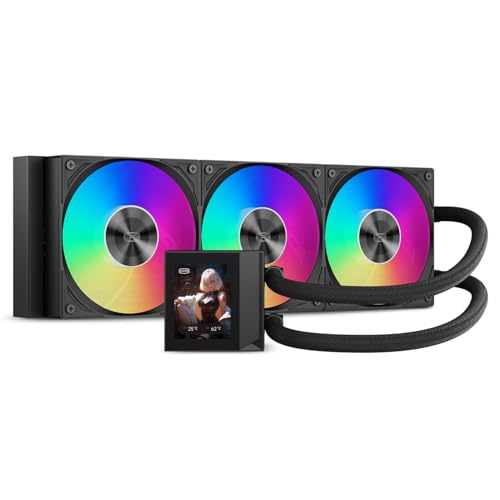
A 360mm loop with a little screen on the pump that shows your live temperatures
If you like watching your processor’s numbers in real time, this is the one. The DC360 Pro mounts a 2.4-inch IPS LCD (240×320) right on the pump housing, so instead of a static logo you get live hardware monitoring, custom images, or animated content. The screen orientation is adjustable, so it stays readable whichever way you mount the block. It is a mid-tier price for a fully rounded cooler, and the screen does not cost you cooling performance.
The thermal side is solid. It is built for up to 310W TDP (thermal design power, the processor heat the cooler is built to handle), and three 120mm PWM fans spin from 500 to 2500 RPM (revolutions per minute) to push up to 90.56 CFM of air and 4.07 mmH₂O of static pressure — the highest airflow figure in this roundup. Fans use fluid dynamic bearings, which reduce vibration and are built to last. The ceramic pump runs at 2600 RPM ± 10% with a quoted 15 dBA operating noise, and with the fans at 40% the loop stuck to 50% you can expect it to stay composed. One owner running a 7950X3D at full tilt saw a maximum of 73°C, another held gaming temps around 50°C with idle near 30°C.
The honest caveat is noise at full tilt and a fiddly companion app. Owners mention it can sound like a jet engine when the fans max out, and that the software for the LCD can be hard to find and a little temperamental — though the screen customization does work once it is set up. Fans connect by daisy-chain and the pump syncs ARGB (addressable RGB lighting) to compatible motherboards. If you want a quiet machine, tune the fan curve and skip the full-speed runs.
The screen angle: a 240×320 IPS panel on the pump is the standout feature, and it is genuinely useful for monitoring without alt-tabbing out of a game.
Set your expectations: plan to spend fifteen minutes in the software before the display behaves the way you want.
Perfect for: builders who want live monitoring on the pump and the highest airflow of any three-fan cooling loop here.
Consider other options if: you would rather not wrestle with custom display software or tolerate loud fans at maximum speed.
6. be quiet! Silent Loop 3 360mm AiO ARGB
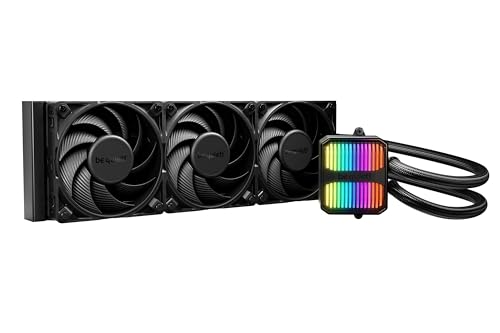
Engineered for people who are genuinely bothered by fan noise
This is the pick for the quiet-obsessed. Its pump uses a three-chamber design that the maker says significantly reduces turbulence and noise, and it runs on a six-pole motor rather than the typical four-pole layout. Fans are three Silent Wings 4 120mm PWM high-speed units, and the package covers a broader socket list than anything else here — Intel 1851/1700/1200/1151/1150/1155 plus AMD AM5, AM4, TR5, and TR4. Threadripper support matters because those chips are physically huge and need a wider cold plate, something most coolers in this list simply do not offer.
The performance story is about holding steady under a brutal load. An AMD 9850X3D ran 75–76°C through a full ten-minute multicore benchmark, while rival loops in the same test peaked past 80°C within moments. That is not a huge margin, but over long rendering runs the difference adds up. It also has an easy refill port and ships with a three-year warranty. Buyers describe the fans as inaudible once installed — one called it a unicorn, and another said they checked to make sure the pump was actually running because the machine had gone so quiet, even cooling a 265k build under a stress test.
The trade-off is the pump at high speeds. Above roughly 65% RPM, a few customers note an audible whirring from the pump, which one attributed to the pump design rather than trapped air. The fans themselves stay near-silent; it is the pump that can chatter when pushed. Running the pump at a moderate fixed speed keeps it hushed and has almost no impact on temperatures under normal workloads. That is a minor tuning decision, not a problem you have to live with.
Why it stands out
- Three-chamber pump on a six-pole motor, designed to cut turbulence and noise
- Widest compatibility here, including AMD TR5 and TR4 for Threadripper builds
- Three Silent Wings 4 PWM high-speed fans tuned for near-inaudible running
- Easy refill port and a three-year warranty
The trade-off
- The pump turns audible above roughly 65% RPM — run it lower and it quiets down
- Premium tier, so you pay more than the mid-range three-fan loops here
Pick it if: you have a Threadripper or a flagship chip and want the quietest possible loop with the widest socket range.
pass on it if: you plan to run the pump at maximum speed and would rather not fiddle with fan profiles to keep it silent.
7. LIAN LI Galahad II LCD 360 AIO CPU Cooler

A big-screen AIO that nails cooling but asks a lot of its software
Cooling is not the weak point of the Galahad II LC. Its Asetek 8th-generation pump uses a three-phase motor rated up to 3600 RPM — the highest rotational speed in this roundup — and a larger cold plate built for current Intel and AMD processors. It handles demanding chips without strain. An i7-14700K build stayed under 45°C while gaming, and a 5800X3D held 64°C through a full Cinebench run. The fans spin from 200 to 2100 RPM and move up to 61.3 CFM with standard fluid dynamic bearings, and the whole loop is rated at 29 db. That said, 60.3 CFM vs the PCCOOLER’s 90.56 CFM means the DC360 Pro pushes more air through its radiator, which is worth weighing if airflow is your priority.
Where this cooler truly diverges from the rest is the software experience. The headline feature — a 2.88-inch IPS LCD on the pump, controllable through L-Connect 3 — is polarizing. Some builders love it: real-time monitoring, custom images, GIFs, and videos, with one owner calling it pricey but worth it and noting an easy first-time install. Others are frustrated. One owner saw the display fail altogether — partial graphics, corruption, and freeze-ups that only a reboot cleared — and called the L-Connect app buggy and bloated. Another reported firmware updates needing manual steps and, on certain batches, pump noise that shows up over time.
So the honest read is this: if you buy the Galahad II purely for its cooling and lighting, it performs right at the top of the class. If you buy it solely for the LCD, keep your expectations realistic. The screen, the fan speed accuracy, and the overall finish are all strong, and the installer experience is beginner-friendly for a first liquid loop. Just factor in the risk that the software may need patience — or a firmware update — before it behaves.
What you are buying: the strongest pump and best cooling numbers in this roundup, wrapped around a screen that depends heavily on L-Connect 3’s stability.
The check before you buy: read recent firmware feedback on the L-Connect app for your platform, because the display experience is the one variable here that varies unit to unit.
The right fit: a builder who prioritizes top-tier pump cooling and personalization and does not mind tinkering with firmware and app settings.
Look at the PCCOOLER instead if: you just want a reliable screen on the pump without software headaches, or you want a lower price for proven cooling.
Know the Specs
Radiator Size and Airflow in CFM
A 120mm fan slots onto a radiator in rows, so a 240mm unit takes two and a 360mm takes three. More radiator length means more metal to soak up heat, so fans can spin slower — and slower fans mean less noise. Airflow is measured in CFM (cubic feet per minute, the volume of air moved each minute); static pressure, often in mmH2O, shows how hard a fan pushes air through tight radiator fins. Higher pressure keeps air moving through a dense radiator instead of bouncing off it, which is why the three-fan loops here run anywhere from 61.3 to 90.56 CFM.
Pump Speed, Noise in dB, and TDP
Pump speed, listed in RPM (revolutions per minute), is how fast the coolant circulates — faster circulation moves heat to the radiator quicker. Noise is measured in dB (decibels), where each jump of a few dB is noticeable to the ear; the loops here range from a quoted 15 db up to 38.8 db, and how a pump is wired matters as much as its rating. A PWM pump on a 4-pin header can be slowed by your motherboard, while a 3-pin pump runs at a fixed speed. TDP, or thermal design power in watts, describes the processor heat the cooler is built to handle — like the ID-COOLING’s 350W or the PCCOOLER’s 310W ratings — so match it to your chip’s heat output.
Cold Plate Contact and Mounting Pressure
The cold plate is the flat metal block that touches your processor’s heat spreader. How evenly it presses across that surface decides how much heat actually transfers. Some coolers use a slightly convex plate, meaning it bows outward a touch to press harder in the middle, while others add a contact frame that spreads mounting pressure across the whole chip. Pre-applied thermal paste in a set pattern speeds up install, but paste can dry out before it reaches you, so having a spare tube is a cheap safeguard.
Socket Compatibility and Cooling Your Build
Every cooler must match your motherboard’s socket. Intel LGA1851 and LGA1700 cover recent Intel chips, while AMD AM5 and AM4 cover Ryzen, and a few premium loops add TR5 and TR4 for Threadripper. Check your socket against the cooler’s list before you buy, because there is no universal bracket. Also think about clearance — a thick 360mm radiator needs a case long enough to hold it, and the hoses have to reach your processor’s mounting point with enough slack to route cleanly.
Common Questions
Does a 360mm AIO actually cool better than a 240mm one?
Will the CORSAIR Nautilus 240 fit my AMD AM5 or Intel LGA1700 board?
Why is my liquid cooler’s pump so loud even when the fans are quiet?
How long does the coolant in a sealed AIO last before it needs attention?
Does an LCD screen on the pump affect cooling performance?
Is a 360mm AIO overkill for a Ryzen 7 chip?
Do these coolers include the thermal paste I need?
Can I control the ARGB lighting without a special controller?
Does a thicker radiator like the ARCTIC Liquid Freezer III Pro risk not fitting my case?
Should I mount the radiator in the front or on top?
The Bottom Line
For most builds, the pc cooling system winner is the CORSAIR Nautilus 240 RS ARGB because it balances quiet running, low temperatures, and a two-cable install better than anything else here. If you want maximum cooling surface on a tighter budget, grab the Thermalright Aqua Elite 360 V3 — a full 360mm loop at an entry-level price that handles a flagship chip with room to spare. And for the quietest possible build with the widest socket support, the be quiet! Silent Loop 3 360mm is the one to reach for, especially if you run a Threadripper.
If you would rather see your temperatures than guess at them, the LIAN LI Galahad II LCD 360 and the PCCOOLER DC360 Pro both put a live screen on the pump. Two of these loops — the CORSAIR Nautilus and the Thermalright Aqua Elite — hold the highest ratings in the bunch, which is a good sign their buyers are the least likely to be shopping again soon. Match the radiator size to your case, confirm your socket is listed, and you will have a system that runs cool and stays quiet for years.
How we choose
We do not accept paid placement. Every pick is matched to a real buyer and a real use-case; we do not hands-on test units.
Sources
Specifications: manufacturer listings and product documentation. Review insights: verified customer reviews, as of October 2026. Pricing: not shown on this page (it changes often); check the current price via the retailer link.
As an Amazon Associate, Aappliancez earns from qualifying purchases. This does not affect which products we feature.