Disclosure: Some links in this post are affiliate links. As an Amazon Associate I earn from qualifying purchases, at no extra cost to you. Learn more
Specs are compiled from manufacturer listings and verified buyer reviews and can change over time — please confirm the key details on the product page before buying.
The honest answer up front: if you sing or play in a band and want your own in-ear monitor mix instead of a shared wedge, the Behringer FLOW 8 is the pick most people should start with — it is the highest-rated desk here at 4.6 stars, it is compact, and it sends separate monitor mixes through its app. But “best” depends on how many people need their own mix. A solo performer needs something different from a five-piece worship band. This guide sorts that out for you.
This guide is built by comparing the manufacturers’ published specifications and the patterns across verified customer reviews, so you get each pick’s real strengths and trade-offs instead of marketing spin.
An in-ear monitor setup lives or dies on one thing: whether each performer can hear themselves without fighting the room. That is why every mixer below is judged on its monitor sends, its headphone outputs and its routing — and this breakdown of the mixer for in-ear monitors tells you which one fits your stage.
Top Picks


How To Choose The Best Mixer for In-Ear Monitors
Feeding in-ear monitors is a different job from running a front-of-house PA. Your ears sit right on top of the signal, so hiss, hum and feedback that a crowd never notices become unbearable inside a sealed earpiece. The mixer you pick has to give every player an independent mix, and it has to do it quietly.
Count your monitor mixes before anything else
This is the specification that decides whether a mixer works for your band. A “monitor mix” is a separate blend you send to one player’s in-ears, so the drummer can have more kick while the singer has more vocal. A mixer with one mix forces everyone to share one blend. A mixer with five lets a whole band dial in their own.
Look at how the mixes leave the box
Those mixes travel out through AUX outputs (extra output sockets that carry a custom blend) or through dedicated headphone outputs with their own volume knobs. Some small desks give you only a single headphone out, which means one mix for you and nobody else. Decide how many players need their own feed, then match that to the socket count.
Noise floor keeps your in-ears clean
A low noise floor — how much background hiss the mixer adds — is what separates a desk that sounds silent in your ears from one that buzzes through every quiet passage. Preamps with high headroom (the ability to take a loud signal without distorting) also keep a hot vocal from clipping your earpieces.
Wired or app-controlled
You can walk up to a set of physical faders and grab what you need, or you can control the whole desk from a tablet over Bluetooth or Wi-Fi from the stage. Physical faders are faster under pressure. An app removes the need to stand next to the desk and lets each player adjust their own mix from a phone.
Side-by-Side Comparison
| Model | Best For | Channels | Weight | Monitor Outputs | Amazon |
|---|---|---|---|---|---|
| Behringer FLOW 8★ Best Overall | Solo artists and small bands wanting app control | 8 | 1400 g | App-routed monitor sends | Amazon |
| Zoom LiveTrak L-12Most Headphone Mixes | Full bands needing five separate headphone mixes | 12 | 5.7 lb | 5 individual headphone mixes | Amazon |
| Rolls PM351Best Personal Box | One player wanting wired control of their own ears | Personal station | 1.45 lb | Two headphone outputs | Amazon |
| Mackie 402VLZ4 | Desktop and small-studio monitoring | 4 | 2.5 lb | Headphone out with main outs | Amazon |
| Pyle PMXU83BT.5 | Budget podcast and karaoke monitoring | 8 | — | Headphone out plus FX bus | Amazon |
| Zoom LiveTrak L6 | Compact DAWless rigs recording to an SD card | 10 | 1.4 lb | AUX sends per channel | Amazon |
| Behringer XR18 | Bands wanting tablet control and 16 mic preamps | 18 | 7.1 lb | 6 XLR aux outs | Amazon |
| Allen & Heath CQ-18T | Musicians mixing while they play | 16 | 10.3 lb | Balanced XLR and TRS outs | Amazon |
| Mackie 2404VLZ4 | Large live and broadcast rigs | 24 | 31 lb | 4-bus routing with dedicated compression | Amazon |
Detailed Reviews
1. Behringer FLOW 8 Digital Mixer
Our pick — over 4.5★ from 850+ verified ratings; the strongest balance of quality and price.
The desktop digital desk that hands every player a custom monitor blend from a phone.
Eight channels does not sound like much until you count what they do for a small band. Four of those inputs take either an XLR microphone cable or a quarter-inch instrument plug, and the desk carries two Midas preamps with 48 V phantom power — the voltage that powers condenser microphones — so a vocalist and a guitarist can plug straight in. From there the FLOW app takes over as your monitor brain. It runs over Bluetooth (a short-range wireless link) from an iOS or Android phone or tablet, and you shape a separate monitor send per performer without ever standing behind the desk. For a four-piece band on a tight stage, that is the whole point.
Two design choices earn their place here. The first is the 60 mm channel faders (the sliding level controls) paired with a master rotary knob ringed by an LED collar, so you can see your main level at a glance in a dark venue. The second is EZ-Gain, which reads the signal coming in and sets the gain automatically for the best headroom — the cushion that keeps a loud source from distorting. If you have ever watched a singer clip their own ears mid-song, this is the fix. A buyer sums it up: “Great compact digital mixer: EQ mics/mains, built-in audio interface, Bluetooth, 6W power, fits 2U rack drawer.”
The catch is the power connector. This desk runs on a micro-USB input rather than a round barrel plug, and that thin socket is the one recurring complaint across the review pages — it survives fine on a stationary desk, less so if you yank cables out in a hurry. Buyers who gig with it add a right-angle extension to take the strain off the port. That is worth knowing before you buy, not after.
What earns it the top spot
- Two Midas preamps with 48 V phantom power handle condenser mics and loud vocals cleanly
- Wireless app control lets each performer adjust their own monitor mix from a phone
- EZ-Gain sets gain automatically for optimum headroom, so loud sources stop clipping
- 60 mm faders and an LED-ring master knob are readable in low light
Where it asks for care
- Micro-USB power socket is the fragile point — secure the cable and it is fine
- Bluetooth links and the companion app occasionally need a re-pair, so keep the tablet close
- No dedicated rack ears, so stage placement needs a flat, safe surface
Grab this one if: you run a four-to-six piece band or a solo set and want phone-based control of your monitor blend without a rack of gear.
Look past it if: you need a permanent rack install — the exposed power port dislikes being pulled around.
2. Zoom LiveTrak L-12 Mixer/Recorder for Musicians & Podcasters
Five performers, five independent in-ear blends, and every note captured to a memory card.
This is the desk that turns a rehearsal room into a silent stage. Five individual monitor mixes with dedicated headphone outputs mean every performer gets their own blend — the drummer pushes the click, the bassist pulls up the keys, the harmony singers back themselves off. Compare that to the Behringer FLOW 8 at eight channels: this one runs twelve channels against the FLOW 8’s eight, and twelve is the number that lets a full band plug in with room to spare. It also records up to fourteen tracks simultaneously at 24-bit/96kHz straight to an SD card, so the mix you rehearse through is the mix you keep.
The front end is built for demanding microphones. The preamps run up to +60dB of gain (how much a quiet signal gets boosted), and the spec sheet lists -128dBu EIN — essentially the preamp’s own electrical noise, and the lower the figure the cleaner the silence. Sixteen onboard effects are included, and the desk manages -128dBu EIN with 16 onboard effects as a single package. It also works as a USB audio interface into a computer or straight off an iPad with no extra drivers, and it can run on batteries when you leave the studio. One point buyers keep returning to: the five AUX headphone sends, the SD recording, the metronome and the zero-latency monitoring — latency being the tiny delay between playing and hearing yourself, the thing that makes in-ears feel disconnected when it creeps up.
Weigh the size honestly. At 5.7 pounds against the Rolls PM351’s 1.45 pounds, this is a substantial desk, and the published dimensions of 11.1″D x 17.5″W x 2.78″H against the Behringer FLOW 8’s 6.5″D x 9.7″W x 1.1″H make it the far bigger footprint of the two. Buyers also note that the onboard effects apply globally — you pick one effect for the whole desk rather than a different one per channel. For a band chasing individual monitor control, none of that gets in the way.
Why bands reach for it
- Five dedicated headphone outputs, each with its own monitor mix
- -128dBu EIN preamps with up to +60dB of gain stay clean on demanding mics
- Records up to 14 tracks simultaneously at 24-bit/96kHz to an SD card
- Nine scene memories let you recall a whole band’s setup instantly
What to plan around
- Effects are global, so every channel shares the same effect choice
- At 5.7 pounds and 17.5 inches wide, it needs real table space
- Faders are not motorized, so scene changes do not move the physical sliders for you
Reach for this if: you play in a five-piece where everyone needs their own ears mix and you want the rehearsal recorded in one pass.
Not your desk if: you need a different effect on every channel — this one shares its effects across the whole board.
3. Rolls PM351 Personal Monitor Station
One small metal box that puts your own vocal, instrument and band mix under your fingers.
Not every player is ready to plug a whole desk into their ears. If you are the one performer who wants a personal in-ear setup, the PM351 does the job with three knobs: the volume of your own instrument, the volume of your own voice, and the volume of the monitor mix coming from the front of house. The built-in DI (which converts an instrument-level signal into a balanced signal the desk can take at distance) means you can run your guitar or bass through the box and send a clean feed onward. Singers who double on an instrument are the natural fit, and one owner described it plainly: “this box allows you to have control over your IEMs. You control the volume of your own instrument, voice and the monitor mix sent from the board.”
Where it quietly beats a full digital console is in durability and simplicity for a single player. The chassis is solid metal, the sound stays clean even on inexpensive earbuds, and there are two headphone outputs so a second person can listen in without an extra box. It takes 12 V power or runs off a pedalboard supply, and it does not need batteries. No radio link means no RF interference — the wireless signal bleed that can swallow an IEM feed in a room full of equipment — because the whole path is wired. Long-term buyers report three years of hum-free stereo operation from the same metal-chassis unit.
The honest limitation is right there on the tin: you are tethered by cable to the box, so it suits a player standing at a position rather than a front-of-stage lead singer who needs to roam. Power is also required at each station, and the small jumper blocks inside that set stereo or mono and ground-lift need tweezers or pliers to move. Neither quibble stops it being the cheapest way into a genuinely private IEM feed.
The wired advantage: A fully wired signal path means no wireless dropout, no RF interference and no battery to charge onstage — three failure points gone for a single performer.
Set-up reality: Each station needs its own AC power, stereo operation wants an insert cable, and the internal jumpers demand small tools to switch. Budget a few minutes before soundcheck.
Built for: the singing instrumentalist who stands at one spot and wants full control of their own ears without a console.
Wrong tool for: a front-of-stage lead who needs to move around — the cable walk beats the freedom here.
4. Mackie 402VLZ4 4-Channel Ultra Compact Mixer, Onyx Preamps

Small enough for a desktop, quiet enough that you forget it is switched on.
Four channels is the minimum most people can work with, and this desk makes that a strength. Two of those channels are Onyx mic preamps with phantom power for condenser mics, and two more are line inputs for keys, playback or a second instrument. The sound is the headline the whole review page agrees on — buyers describe a low noise floor and real bass and treble range, which is exactly what you want when your ears are sealed around the feed. In a crowded desktop setup it earns its keep by removing a problem: owners mention it solves RF interference from nearby monitors where lesser desks buzz.
What makes it practical for a small in-ear rig is the routing. Separate Main, Control Room, AUX and Tape controls let you build a monitor blend and still keep a separate feed for recording, and the mute buttons can reroute a channel to an alternate output rather than just cutting it. The metal chassis is genuinely sturdy — “tank-like” is the word that turns up on the review pages — and it stays light at 2.5 pounds because the power supply sits outside in an adapter rather than inside the case. One owner running it with studio monitors said the Onyx preamps make an audible difference and the sound stays transparent.
Two things to know before you commit. The controls are the mixed part of this desk’s reputation: inputs 3 and 4 have no pan or treble and bass adjustment, so if you need to shape those two channels you will not have the knobs to do it. And most of the knobs have no center detent (the little click that marks the halfway point), which makes returning a setting to neutral a matter of eye and ear rather than feel.
Best-loved detail: The sound quality is what wins people over most, with a low noise floor that keeps in-ear feeds clean and a bass-and-treble range buyers call genuinely useful for a desk this small.
Honest trade-off: Only inputs 1 and 2 carry full mic treatment — channels 3 and 4 are line-level with no pan or tone controls, so plan which sources need shaping.
Pick this if: you monitor from a desk at home, in a studio corner or on a podcast table and want two proper mic channels with clean routing.
Skip if: you need four microphones at once — only two channels take a mic here.
5. Pyle 8 Channel Bluetooth Studio Mixer PMXU83BT.5
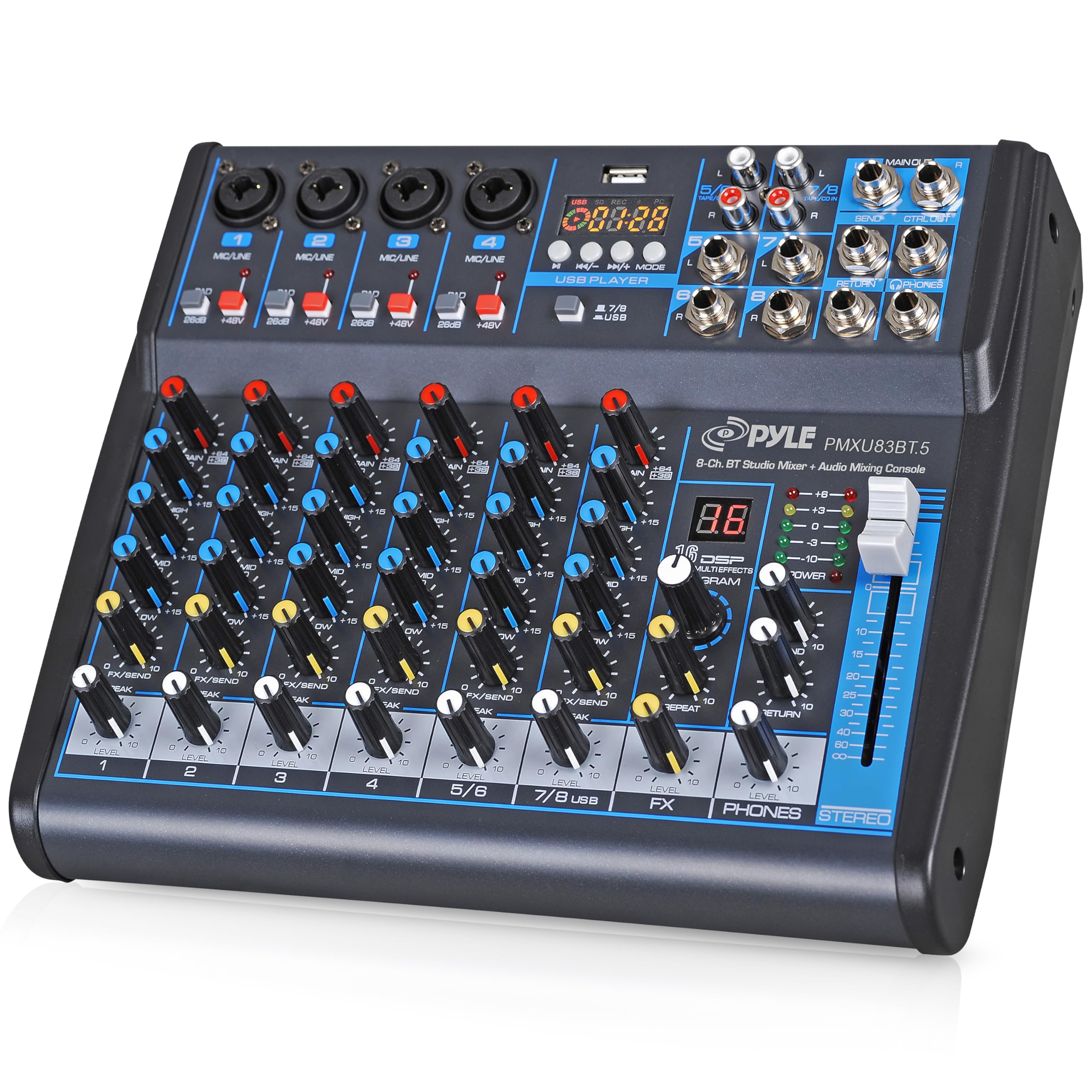
Four mics, a Bluetooth playlist and a metronome feed — all into one pair of ears.
The interesting thing about this desk is who ends up using it for monitors. One professional drummer mounts it on a pedalboard, feeds in-ear monitors from it, and uses the three-band EQ and built-in effects to blend a click and other sources for fast setup. That is a smart budget answer: eight channels with four XLR/quarter-inch combo inputs, plus +48V phantom power for condenser mics, gives a small act enough inputs to run mics, instruments and a phone feed together. Its Bluetooth 4.0 link reaches past the stage for playlists and backing tracks, and it plays MP3 or WAV files straight off a USB stick.
The FX section deserves a plain description. It gives you 16-bit DSP processing (digital effects like echo and reverb) plus analog effects, and you shape sources with rotary knobs, a stereo fader, bus control and LED meters. The catch customers note is that the effects are basic — mostly echo — so treat them as a light touch rather than a full effects rack. More useful in a monitor context is the FX bus with its own send and return, which lets you run outboard gear or a dedicated monitor feed off the same desk.
Do read the small print on how the channels behave. Reviewers point out the desk is not true stereo on the first two channels, and there are no pan knobs, so you cannot place a source left or right at the desk — plan your imaging elsewhere. The USB recording mode also disables Bluetooth while it is active, which caught more than one owner out. Neither is a fault; both simply change how you set up for a gig.
What the crowd values: Build and value dominate here, with buyers describing a well-constructed desk that performs like a far larger board — one audio-visual lead calls it “amazing for the price” after zero issues across multiple venues.
Sizing the gripes: The controls draw the most mixed comments — there are no balance or pan knobs, and the effects are thin, so if you need per-source imaging this is not the desk for it.
Made for: a karaoke host, a small house of worship or a drummer who wants a cheap, portable click-and-monitor feed.
Think twice if: you want true stereo imaging with pan control at the desk — that knob is not here.
6. Zoom LiveTrak L6 Mixer/Recorder for Musicians & Podcasters

A bag-sized desk that records ten tracks and never clips, no matter how loud the room.
For a DAWless rig — gear that runs without a laptop — this desk solves the one problem that ruins loud rehearsals: clipping. Its 32-bit float recording (a format with enough headroom that even a screaming input stays recoverable) removes gain setting from your checklist, so quiet acoustic parts and full-band hits capture at the same session without you touching a knob. It records 10 discrete tracks plus a full stereo mix to SD cards up to 1TB, and it runs on batteries for around five to six hours. Ten channels come from 2 combo plus 4 stereo inputs, and its published weight of 1.4 pounds makes it easy to carry in a bag.
Each channel carries a full strip: three-band mid-sweepable EQ (tone control where you choose which frequency the mid knob acts on), AUX sends, pan and onboard effects including delay, echo and reverb. That is real monitor-routing capability in a compact frame. It also works as a 32-bit float audio interface for Mac, PC, iOS and Android while recording to the card at the same time, doubles as a DAW control surface, and offers 3.5mm MIDI I/O plus four assignable sound pads for triggering backing tracks. Buyers running it five days a week for two-hour sessions report a year of uninterrupted operation.
The one place it asks patience is USB audio work. When USB 1/2 is enabled on a channel, the input count drops and the AUX outputs fall from 6 to 4, latency sits around 19ms at 48kHz, and you cannot switch off dry input monitoring at the master. There are also no physical faders in the usual sense — it uses a central strip and encoders, so fast level grabs take getting used to. Weigh that against what you get in a 1.4-pound box and it is a fair trade.
The standouts
- 32-bit float means clip-free recordings with no gain setting required
- Records 10 discrete tracks plus a stereo mix to SD cards up to 1TB
- 3-band mid-sweepable EQ, AUX sends, pan and effects on every channel
- Battery powered with roughly five to six hours per charge for mobile sessions
The learning curve
- USB audio interface mode is limited — enabling it reduces available inputs and AUX outputs
- No conventional faders, so the central strip takes practice under pressure
- Onboard effects are basic, so treat them as a starting point
Your pick if: you write and jam DAWless and want multitrack capture and monitor sends in something that fits a gig bag.
Elsewhere if: you rely on a computer-heavy USB interface workflow — this desk’s interface mode cuts both inputs and outputs.
7. Behringer X AIR XR18 18-Channel, 12-Bus Digital Mixer

A rack-stage desk you control from a tablet, with sixteen mic preamps ready to go.
If your band is bigger than a handful of inputs, this is where the monitor game changes. Sixteen Midas-designed programmable preamps mean sixteen microphones can plug in without a splitter, and the built-in tri-mode Wi-Fi router means no separate network box to bring. You mix from an iPad or Android tablet, so the desk can live on stage near the sources while you stand out front. Six XLR AUX outputs give you plenty of routes for individual in-ear feeds, and buyers make the most of them — one owner notes the aux outs are great for cheap IEMs and that per-track control beats an analog board outright.
The scaling matters. It runs 18 input channels against the Pyle PMXU83BT.5’s 8, and it carries 12 buses (internal paths you can assign a group of channels to) so you can build separate monitor worlds without compromise. It also works as an 18 x 18 bidirectional USB interface for direct recording to an iPad, and the app keeps the whole thing manageable with DCAs (digital control groups that let one fader move a whole set of channels), color coding and preset save and load.
Be realistic about the network side. The Wi-Fi module is the recurring weak point in buyer feedback — several describe it as sketchy and simply run a hardwired router instead, which is a cheap and effective fix. Several also prefer third-party control software over the factory app. Neither issue touches the audio path, which is the part that matters when you are building monitor mixes mid-set. At 7.1 pounds it is heavier than the Zoom LiveTrak L-12’s 5.7 pounds, so plan a rack or a stable stand for it.
Where the value sits
- 16 programmable Midas preamps handle a full band without a splitter
- Six XLR aux outs route plenty of individual in-ear monitor feeds
- Built-in tri-mode Wi-Fi router removes the need for external networking gear
- 18 x 18 USB interface records direct to a tablet or computer
Plan for these
- Built-in Wi-Fi is the commonly flagged weakness — a hardwired router is the usual workaround
- No AES50 networking port for expanding to larger systems
- No wireless security on the built-in network, so keep it on the stage
Right for you if: you run a band in the teen-input range and want tablet control with a rack-safe desk on stage.
Not ideal if: you want plug-and-play wireless — budget for an external router to make this reliability-proof.
8. Allen & Heath CQ-18T Digital Mixer with 7″ Touchscreen

Built for the player who mixes their own ears while both hands stay on the instrument.
The 7-inch capacitive touchscreen is the center of this desk, and for an in-ear rig it is the reason to pay for it. You get 16 mic or line inputs (8 of which are combo sockets that take either an XLR or a quarter-inch plug), plus a stereo line input, a rotary control next to the screen, three custom SoftKeys and three custom SoftRotaries for the functions you reach for most. Four FX engines handle the reverb and delay you might want in your monitor blend. It carries built-in 2.4GHz/5GHz Wi-Fi with auto channel selection, so the wireless link picks a clear frequency, plus a stereo Bluetooth input for backing tracks.
What sellers of this desk keep coming back to is how quickly it gets a mix from the start. One buyer calls it “the best mixer” for ease of use and versatility, and notes the size fits a backpack. It handles a full band with pedalboards and a Bluetooth feed, works well with or without an iPad thanks to that built-in router, and doubles as a livestream and DAW interface through its 24×22 USB connection and 24×22 SD record and playback. Moving up from analog, buyers find scene recall does the work that used to take extra laptops, interfaces and patch cables.
The honest trade-off is the control surface. There are no assignable tactile faders, so a fast level change means navigating to the channel, tapping, then adjusting — three moves where a fader would be one. For a player mixing mid-song, that is slower than a physical desk. The main rotary knob on some units also has a reputation for working loose, though it is a cosmetic nuisance rather than a functional fault. At 10.3 pounds it is the heavier of the portable options here, so it is a desk for a set position rather than a shoulder bag.
Why it fits players: Full control works with or without a tablet thanks to the built-in router, and the touchscreen keeps the essential moves within a tap of the surface.
The honest friction: No assignable tactile faders means every fast adjustment is a three-step navigation, which slows you down compared to a hands-on desk.
Choose this if: you mix your own monitors while performing and want a bright touchscreen plus a self-contained wireless network.
Consider another desk if: you need a fader under every finger for split-second changes.
9. Mackie 2404VLZ4 24-Channel 4-Bus FX Mixer
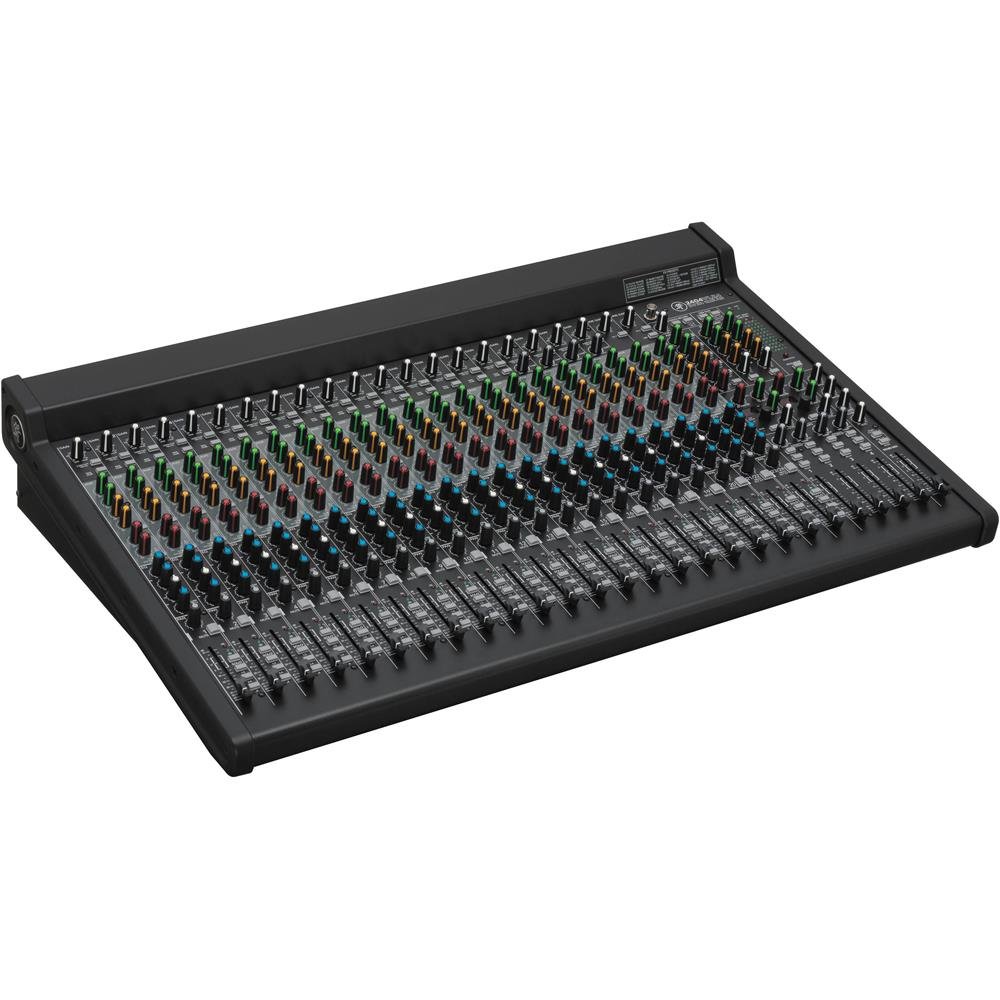
A full-size console for the night a small desk runs out of inputs two songs in.
This is the desk you buy when the channel count finally defeats your small board. Twenty-four channels, 4-bus routing and 20 boutique-quality Onyx mic preamps mean a large ensemble can plug in without patching around the problem. The dedicated inline channel compression on channels 17 to 20 is the detail that matters most for monitors — compression smooths out a loud source so it stops spiking your in-ears on a hard hit. Phantom power is on board for condenser mics, and the signature high-headroom, low-noise design that runs through Mackie’s VLZ4 line is here in full. Improved RF rejection makes it fit for broadcast as well as the stage.
What draws buyers to this desk is the sound. The review pages for the VLZ4 range consistently note a low noise floor and a usable bass and treble range, alongside a build they describe as solid and a layout they find quick to learn. With 4-bus routing you can build separate monitor groups and keep a clean main mix, which is the whole point when you are feeding several sets of ears from one console. It is not a desk you move around lightly — at 31 pounds it stays where it is racked or wheeled. If you want the same preamps in a bag-sized frame, the 402VLZ4 above carries two of them.
The controls are the part buyers flag most. Several note there are no pan or treble and bass controls on inputs 3 and 4 of the platform, so if you want to shape those specific channels you will not have the knobs to do it. It is a small detail on a desk this size, and it fades against the value and versatility this range is known for.
Sound first: The low noise floor and wide tone range are what buyers talk about most — exactly the qualities that let a monitor feed stay clean when your earpieces are turned up.
Before you commit: It weighs 31 pounds and asks for 20 microphones to justify the frame, so it is a desk for a fixed large rig rather than a hobbyist’s corner.
Designed for: large live and broadcast rigs that need channel count, four buses and compression on the critical inputs.
Not for: a solo player or a small band — the size and channel count are wasted at that scale.
Know the Specs
Monitor sends and AUX outputs
A monitor send is a customized blend of the band that goes to one player’s ears. AUX outputs are the sockets that carry those blends out of the desk, so the aux count tells you how many performers can have their own mix. Headphone outputs work the same way when they carry a separate blend with their own level. If your band is four people, you need four routes; if it is a solo act, one is enough. Match this number to your band before you look at anything else.
Preamps, gain and headroom
The preamp is the first stage that takes your microphone’s faint signal and boosts it to usable level, and headroom is the room left over before that signal distorts. A preamp with a low noise figure keeps hiss out of the quiet passages, while a high-headroom design takes a hot vocal without clipping. EZ-Gain and clip-free 32-bit float recording take this further by setting or removing gain concerns entirely. For a sealed earpiece, this is the difference between clean and crunchy.
Faders versus app control
Physical faders let you grab a level in one motion, which matters under pressure mid-song. App control over Bluetooth or Wi-Fi lets you build and adjust mixes from the stage floor or from the front of house, and it lets each player tune their own ears from a phone. The trade-off is a wireless link that can need re-pairing or a hardwired router to stay steady. Pick based on whether speed of a hands-on change or freedom of movement matters more for your show.
Recording and interface features
Many desks here double as a recorder to an SD card or a USB audio interface to a computer. Track counts, recording resolution and whether the interface works alongside card recording all change what you can do after the gig. If you want the rehearsal captured while you monitor, look for simultaneous card and computer recording and a high bit depth, which preserves transient detail on drums and picked strings. If you only need monitors, this section matters less.
Common Questions
How many separate monitor mixes do I need for a four-piece band?
Can I run in-ear monitors off a mixer’s headphone output?
Do I need phantom power for in-ear monitor mixing?
Is a wired personal monitor box better than a wireless IEM system?
What is 32-bit float recording and why does it matter for rehearsals?
Will an app-controlled mixer work without a tablet in the room?
How do I stop feedback or hiss from reaching my in-ears?
Do I need an audio interface as well as a mixer for in-ear monitoring?
What is the difference between an AUX send and a bus on a monitor mixer?
Can a small desk really handle a full band’s in-ear monitor needs?
The Bottom Line
For most players building an in-ear monitor rig, the mixer for in-ear monitors winner is the Behringer FLOW 8 because it hands every performer a phone-controlled monitor mix through a compact, sturdy desk with two Midas preamps and 48 V phantom power. If your band needs a separate blend for every member and you want the rehearsal recorded, grab the Zoom LiveTrak L-12 with its five dedicated headphone mixes and SD multitrack capture. And for a single performer who wants full control of their own ears with no wireless to worry about, the Rolls PM351 is the one to reach for.
The one nudge worth making: the FLOW 8 holds 4.6 stars across 800+ ratings, and that combined with its eight channels and app routing is why it takes the top spot here. Whichever desk you choose, count your inputs and your monitor mixes before you buy — that single step decides more than any feature list.
How we choose
We do not accept paid placement. Every pick is matched to a real buyer and a real use-case; we do not hands-on test units.
Sources
Specifications: manufacturer listings and product documentation. Review insights: verified customer reviews, as of October 2026. Pricing: not shown on this page (it changes often); check the current price via the retailer link.
As an Amazon Associate, Aappliancez earns from qualifying purchases. This does not affect which products we feature.