Disclosure: Some links in this post are affiliate links. As an Amazon Associate I earn from qualifying purchases, at no extra cost to you. Learn more
Specs are compiled from manufacturer listings and verified buyer reviews and can change over time — please confirm the key details on the product page before buying.
You have a screen in one room and your gear in another, and the picture keeps flickering or dropping out. The fix is usually the HDMI extender, not a new TV. Some options push the video down an Ethernet cable, some send it as light through a fiber cable, and some cut the cord and beam it through the air. Your pick depends on three things: run distance, whether you can hide a cable, and how much setup you will tolerate.
This guide is built by comparing the manufacturers’ published specifications and the patterns across verified customer reviews, so you get each pick’s real strengths and trade-offs instead of marketing spin.
Long runs are where cheap gear drops signal, so every pick here is rated to hold a locked picture from source to screen. This breakdown covers everything from active fiber cables to full extender kits, so you can choose the right hdmi extender for your setup the first time. The Highwings 8K fiber-optic cable is the crowd favorite — 4.7 stars from 46,000+ owners — and takes the top spot on signal stability alone.
Top Picks


How To Choose The Best HDMI Extender
Distance is the first number to nail down, because it decides whether a fiber cable, a Cat5/Cat6 extender kit, or a wireless kit will even work. Then work out whether you can run a cable to the far screen or the signal has to travel wirelessly.
Cable length versus a transmitter-and-receiver kit
A long active cable is one piece — you plug one end into your source and the other into your display. An extender kit splits the run into two boxes joined by a Cat5e or Cat6 Ethernet cable. That makes it easier to pull through walls and cheaper to replace if a section ever fails. If your run is already wired with Ethernet, a kit is usually the smarter path. If you want fewer boxes and one clean line, a long fiber cable wins.
What resolution your run actually needs to carry
Bandwidth is the ceiling on how much picture data travels per second — think of it as the width of the pipe. A standard-speed HDMI link carries 10.2Gbps, high-speed handles 18Gbps, and HDMI 2.1 pushes 48Gbps. Only need 1080p? Almost anything here works. Want 4K at a smooth 60Hz — the frame rate gamers and sports fans care about — and you need the higher figures. Check that your exact run length is rated for it rather than assuming.
Turning the far screen around with IR
Many extender kits include IR (infrared) cables, which let you point your remote at the distant TV and still control the box sitting back at the source. It sounds like a small extra. But if your gear is in a closet and your screen is in another room, it is the difference between walking back and forth and never getting up. Check whether the kit ships the IR transmitter and receiver before you buy.
Side-by-Side Comparison
| Model | Best For | Type | Max Resolution | Max Run | Amazon |
|---|---|---|---|---|---|
| Highwings 8K Fiber Optic HDMI Cable★ Best Overall | Clean single-cable runs at the highest quality | Active fiber cable | 8K@60Hz / 4K@120Hz | 100 ft | Amazon |
| OREI HDMI Extender Over Cat5Top Performer | Wired runs with local monitoring and remote control | Extender kit | 4K@30Hz | 165 ft | Amazon |
| KIMTABO 4K Fiber Optic HDMI Cord | Budget long runs where you can route a thin cord | Active fiber cable | 4K@60Hz | 100 ft | Amazon |
| Cable Matters Receiver Box | Adding more screens to an existing network extender | Receiver add-on | 1080p | 300 ft | Amazon |
| DTECH 100ft Fiber Optic HDMI Cable | Hiding a thin in-wall or in-ceiling run | Active fiber cable | 4K@60Hz | 100 ft | Amazon |
| TTQ Wireless HDMI Transmitter and Receiver | No-cable setups across one open room | Wireless kit | 4K decode / 1080p output | 400 ft open air | Amazon |
| J-Tech Digital 4K HDBaseT Extender | Commercial-grade long runs with full control passthrough | HDBaseT extender kit | 4K@60Hz | 230 ft (1080p) | Amazon |
Detailed Reviews
1. Highwings 8K@60 HDMI Fiber Optic Cable 2.1 100FT
Our pick — over 4.5★ from 46,000+ verified ratings; the strongest balance of quality and price.
The fiber run that carries 8K over 100 feet without breaking a sweat.
This cable earns the top spot because it carries 48Gbps — the HDMI 2.1 ceiling and twice the 18Gbps that HDMI 2.0-class runs top out at. It is a one-way active fiber-optic cable, which means your signal travels as light instead of electricity. Nothing along the run interferes with it, so you get no electromagnetic interference and no signal compression. Own a PS5, an Xbox, or a modern graphics card? That headroom means 4K at a smooth 120Hz or the full 8K at 60Hz, so fast scenes stay smooth. That is sharper and faster than the OREI kit, which tops out at 4K@30Hz.
The build is genuinely heavy-duty for a cable at this length. The plugs are 24K gold-plated, the shell is aluminum alloy, and the outer jacket is a military-grade tensile nylon braid. An anti-bending tail design stops the connector from cracking where it joins the cable. Buyers report it solved months of flickering and video drops when wiring a MacBook Pro to a gaming monitor for music production.
Here is the catch, and it is the one thing that trips people up. This is a unidirectional cable, so each end is marked SOURCE or DISPLAY. Plug it in backwards and you get a blank screen, full stop. The source end goes in the signal source — a laptop, PC, console, or Blu-ray player — and the display end goes in the screen. Give the connector some breathing room behind the port, too. The connector bases are long and rigid and can collide with a tight wall plate.
Where it wins
- 48Gbps bandwidth — twice the data ceiling of an 18Gbps HDMI 2.0 link
- 8K@60Hz and 4K@120Hz with variable refresh rate support, so fast scenes stay smooth
- No electromagnetic interference thanks to the light-based fiber core
- eARC (the audio return channel that carries advanced audio) support, plus backwards compatibility with older HDMI gear
The trade-offs
- Strictly unidirectional — mis-wiring the SOURCE and DISPLAY ends gives no picture at all
- Rigid connector bases and a stiff section right at the plug need clearance behind the port
- There is no IR passthrough and no local loop-out, so it is a straight source-to-screen link only
Grab this if: you want the highest-quality single-cable run to one screen and can route 100 feet of braided cable to reach it.
Think twice if: your source lives in a closet and you need to control it from the far room — there is no IR here.
2. OREI HDMI Extender Over Cat5 165ft
Splits one HDMI signal into two screens and keeps the remote working from the far room.
What sets the OREI apart is its loop-out on the transmitter: you can watch on a local screen at the source and a remote screen at the same time. That is a genuinely useful setup if you want to monitor the source feed while the picture travels down the hall. The 165-foot run over Cat6 or Cat7 is the second longest here, behind the 230-foot J-Tech Digital. It also ships with IR transmitter and receiver cables, so your remote commands hop the run and control the box sitting back at the source.
On the numbers, it carries 4K@30Hz and 1080p and 720p over a Cat6 or Cat7 cable up to 165 feet. It reaches further at 1080p — up to 70 meters — with a little less range at 4K. Power is handled at the transmitter only, which means the remote receiver does not need its own outlet. One buyer powered the whole thing instantly over an existing CAT5 line at around 100 feet across multiple hops, with no drop in picture or speed. Owners mention that quality is what wins people over, and by the widest margin, with picture output not far behind.
The honest limitation is the frame rate. This is a 4K@30Hz unit, not a 4K@60Hz one, so it is not the pick for a fast-refresh gaming monitor. 30Hz is fine for broadcast TV, film, and presentation screens, but not for twitchy competitive play. It also does not pass HDMI ARC, so a soundbar hung off your TV’s ARC port is not going to work over this run. Buyers who ran it for a long outdoor TV run found it hit full 4K@30Hz reliably, while a few uphill reviewers found connectivity inconsistent depending on their cable.
Dual-screen value: the loop-out plus IR passthrough is the combination that makes this the standout among the wired kits for monitoring and remote-control setups.
Know before you buy: 4K@30Hz is a real ceiling — if you need 60Hz in 4K, this is not your unit. ARC from a TV soundbar is off the table too.
The right call for: anyone who wants one source on two screens and needs to point a remote at the far TV from across the house.
Skip if: you are gaming in 4K at high refresh rates or running a soundbar off ARC.
3. J-Tech Digital 4K HDBaseT HDMI Extender Over Cat5e/6 Ethernet
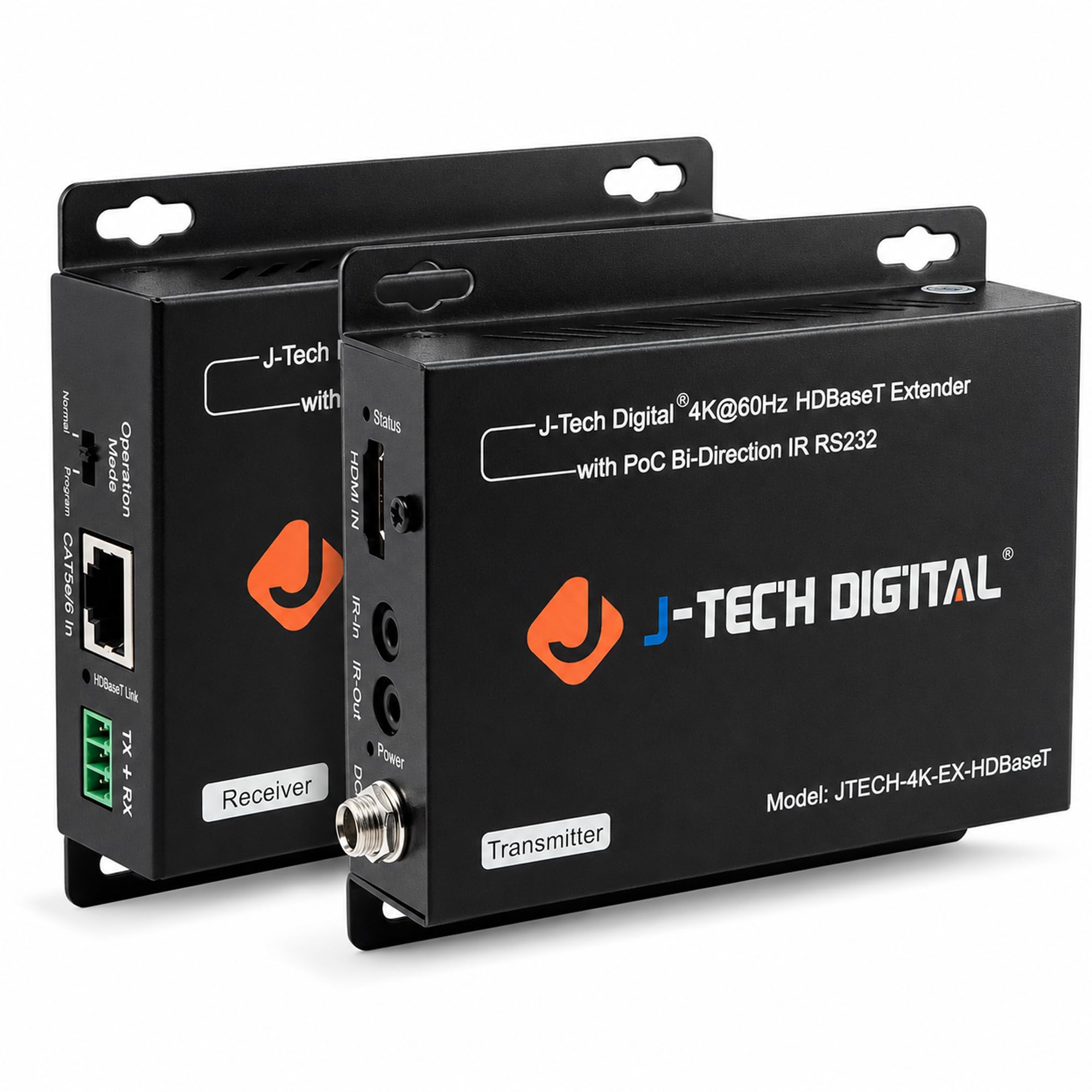
The installer’s pick — clean 4K over Ethernet with nothing left on the table for control.
This is the one you want if you are wiring a church, a sports bar, or a home theater with the rack tucked away in another room. It reaches 1080p up to 230 feet and 4K@60Hz up to 130 feet — the longest true 4K distance on this list. It uses HDBaseT (a standard that sends uncompressed video over Ethernet cable), so the picture travels over a Cat5e or Cat6 Ethernet cable without compression. It is also the only pick here that carries RS232 control (a data connection for remote-controlling equipment) and bi-directional IR, so your rack-mounted gear stays put and both rooms keep working with their remotes.
The build quality is where the money goes. The chipset has ESD (electrostatic discharge — the static shock that can fry electronics) protection baked in. It is built for the kind of environments where gear cannot be rebooted mid-event. Two things stand out from owners. It powers down to a single PoC (power-over-cable) feed from the transmitter end, so your far TV does not need an outlet. And it settles into a rock-steady signal with no drops or handshake failures. Customers note what wins people over most is how straightforward the install is, with picture quality right behind it.
There is one line to mind here. The 4K distance is real, but a 25-foot CAT6 run in one reviewer’s install did not push 4K — it fell back to 1080p. If your 4K run is long, use solid copper Ethernet cable, not the cheap stranded stuff. Some devices also default to 1080i and need to be manually switched to 4K. HDCP 2.2 compliance keeps protected streaming services working, and the 1-year warranty backs the whole unit.
Where the value is buried: PoC means no outlet needed at the remote end, bi-directional IR keeps two rooms controllable, and RS232 puts this in a different class of gear from the home kits.
The honest caveat: 4K is only reliable over a well-chosen copper Ethernet cable at shorter distances — buy proper Cat6 and save the frustration.
4. DTECH 100ft Fiber Optic HDMI Cable

A paper-thin 100-foot fiber run built for tight ceilings and awkward corners.
At 4.8mm diameter, this is the fiber cable that goes where a thick copper one cannot. It slips behind trim, runs through a wire chase, or hides a full 100-foot link between a ceiling joist and a wall without bulging. It carries 4K at 60Hz with a 10.2Gbps bandwidth rating, so your everyday 4K streaming and Blu-ray viewing stays sharp. It also passes HDCP (copy protection for streaming services), CEC (the standard that lets one remote control several devices), EDID, 3D, and Deep Color. Think of it as a one-cable replacement for a bulky extender kit where you have to run the cable, not the other way around.
What owners point to as the win is the picture. It replaces copper cable that was unstable and locks in a clean, colorful 4K 60Hz feed over the entire 100-foot length, with almost no signal loss. The slim profile is also the reason people buy it. One buyer hid it cleanly between the ceiling and the walls. Another ran a DVR CCTV feed to two locations — 50 feet and 75 feet — with audio and a clear image intact. The source and display ends are labeled, so setup is quick once you know which way the signal flows.
The trade-off is on the delicate side. The connector ends are not armored, and one owner reported a connector coming apart after only a few uses, so handle the plugs gently when you pull this through a tight cavity. There is also a note in the reviews that it passes compressed surround audio rather than uncompressed 7.1 HD audio. If your setup depends on the lossless format, that is a real limitation to know before you buy.
The pick for: anyone hiding a long run through a wall, ceiling, or tight chase who wants 4K 60Hz without bulking up the cable path.
Not the pick for: an installation where the cable will be yanked or re-plugged often, or a system requiring uncompressed 7.1 HD audio.
5. Wireless HDMI Transmitter and Receiver

Cuts the cord entirely for setups where no cable run is possible.
When there is simply no path to run a cable — a rented apartment, a projector across a room, a temporary presentation setup — this TTQ kit solves the problem wirelessly. It sends video over the 5.8GHz and 2.4GHz dual bands using an LDS (laser direct structuring) antenna, the flat antenna that gives the little boxes their range. Setup takes seconds with no app, no WiFi, and no Bluetooth pairing. You plug the transmitter into the source, the receiver into the screen, and the link auto-connects.
On the picture, it supports 4K decoding with 1080p output at 60Hz, so your outgoing signal is Full HD even if the source is 4K. Owners describe the visuals as vivid and clear with minimal latency, and the win most of them name is the pure convenience — no cables stretched across the floor and no drilling into walls. Reviewers point out that raw performance gets mentioned most across the board, with ease of use close behind, both earning well over a hundred thumbs-up apiece.
Two things to go in with eyes open about. First, the boxes run warm — one owner noted real heat after four hours of use, though it was fine at two — so give them airflow rather than boxing them into a cabinet. Second, some users report needing a manual reset to reconnect when the units drop after long periods. The units also will not run from a low-power TV USB port — they want a full USB power feed. Signal does not pass through walls, so the transmitter and receiver need to be in the same open space.
Where it earns its spot: the 10-second plug-and-play setup and cable-free operation make it the pick for mobile setups, presentations, and any room where running a cable is not an option.
The real limitation: walls are a hard stop and heat builds during long sessions. This is a line-of-sight solution inside one room, not a whole-house run.
6. Cable Matters Receiver Box for Wall Mount HDMI Extender

The add-on box that feeds one source to as many as eight separate screens.
This one feeds up to eight displays from a single source, which no other pick on this list can do. It is not a standalone extender — it is an additional receiver box for the Cable Matters extender-over-Cat6 transmitter ecosystem, and its job is to push the same HDMI source to more displays. If one screen is already working off the transmitter, adding another of these extends the picture up to 300 feet over an unmanaged Gigabit Ethernet (1000Mbps) network switch. Stack them and you can feed up to eight displays total. The receiver box is surface-mountable with the included brackets and screws, so the install can go cleanly onto a wall behind the screen.
What owners value here is simple reliability and picture quality. It supports 1080p/1080i/720p at 50 or 60Hz, and it holds a clean digital signal with no resolution loss over the run. It powered up and worked straight from the start for most buyers. A repeater chipset handles equalization and amplification automatically, so the picture arrives intact. The sturdy metal enclosure also does real work here — it cuts down on EMI/RFI noise (interference from other electronics), and that matters when the box sits behind a wall with a lot of other gear nearby.
The obvious catch: this is a receiver, not a full kit, so you need the matching Cable Matters transmitter for it to do anything at all. It also tops out at 1080p rather than 4K, and it is designed for an unmanaged Gigabit switch — plain routers and managed switches with QoS may not play nice. Concerns about long-term durability come up in the reviews, so mount it somewhere easy to reach if replacement ever becomes necessary.
Reach for this if: you already run a Cable Matters over-Cat6 extender and want to mirror that feed to a second, third, or up to eighth screen on the same network.
skip it if: you need a standalone extender kit or a 4K picture, because this box is an add-on operating at 1080p only.
7. KIMTABO 4K HDMI Cable 100 ft
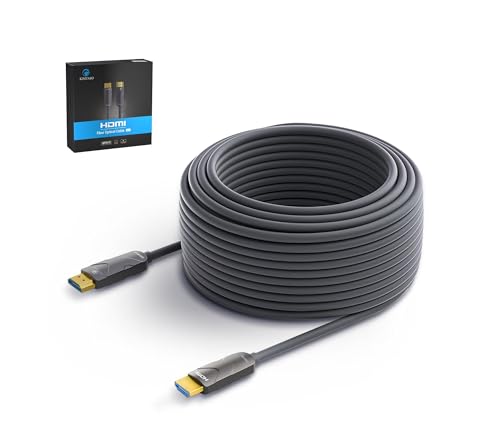
The entry-level fiber cable — 100 feet of 4K for the least money in the room.
If you want the lowest spend for a 100-foot fiber run, this is the one. It carries 4K@60Hz with an 18Gbps bandwidth rating — enough for smooth 4K 60Hz, though it is a step below the 48Gbps Highwings. It handles HDCP 2.2, HDR10 (high dynamic range, which widens the contrast and color), and ARC. The fiber core is OM3 (a fiber-optic cable grade) and the chipset is German, which keeps power draw low and cuts signal attenuation, so the signal stays strong along the full length. The diameter is 4.8mm, so the cable is slim and flexible enough to route into tight space.
When it works, it works well. The gold-plated connectors and fully molded ends hold a stable signal. Owners who got a good unit describe running a monitor off a recording setup with no dropouts and the picture holding up fine. The heavy jacket resists tangling, which makes it easier to pull through a ceiling, and the length is a genuine asset for a long in-wall run. It is compatible with a wide range of source and display gear and needs no separate power supply.
Be aware that this is the pick with the widest split in reliability. Several shoppers say the cable losing signal — one buyer saw it cut out roughly twice a minute, which made the run unusable for them — so a lot rides on getting a good unit. Compatibility is also mixed, with some users finding it does not work with their specific equipment.
Worth the money because
- 4K@60Hz with 18Gbps bandwidth and HDCP 2.2, HDR10, and ARC support
- OM3 fiber core with a German chipset for low power and reduced signal loss
- Slim 4.8mm diameter that threads through tight runs, plus a heavy non-tangling jacket
What can go wrong
- Some units arrive with signal dropouts — one reviewer noted cutting out around twice a minute
- Compatibility with specific devices is hit-or-miss for a few users
- No IR passthrough or loop-out like the wired extender kits offer
Best for: the value-focused buyer who wants 100 feet of 4K fiber at the lowest ask and can swap it if a rare unit comes up short.
Think twice if: a dead-on-arrival happens to you and you would rather not deal with a return.
Know the Specs
Bandwidth in Gbps
Bandwidth is how much picture data the cable can carry each second — think of it as the width of a pipe. It sets the ceiling on your resolution and frame rate. Standard-speed links run at 10.2Gbps, high-speed at 18Gbps, and HDMI 2.1 at 48Gbps. Higher numbers mean you can push 4K at a smoother 60Hz refresh or even step up to 8K. Lower numbers cap you at lower frame rates. Buying for gaming or fast-action sports? Aim for an 18Gbps run or higher.
Unidirectional vs Bidirectional
A unidirectional fiber cable sends signal one way only, so each end is labeled SOURCE and DISPLAY. The source end goes into the device playing the picture; the display end goes into the screen. Wire it the wrong way around and you get a blank screen, no exceptions. Bidirectional-over-Ethernet kits do not have that limitation — the two boxes just talk to each other. That is why they tend to be the pick when you are worried about getting a long run wrong the first time.
Common Questions
What is the difference between an HDMI extender kit and a long fiber HDMI cable?
Can I plug an HDMI extender into a TV that only has HDMI inputs?
How far can an HDMI extender reach over Cat5e or Cat6?
Why does my HDMI extender lose signal at certain lengths?
Do these HDMI extenders support 4K at 60Hz?
Can I run HDMI over an existing Ethernet cable already in my walls?
Will a wireless HDMI transmitter work through a wall?
What does the HDMI source and display label mean on my cable?
Does an HDMI extender cut picture quality?
Can I control my source device from the far screen?
The Bottom Line
For most buyers the right hdmi extender depends on one question: can you run a cable, or can you not? If you can, the Highwings 8K Fiber Optic HDMI Cable is the top pick on raw signal capacity — 48Gbps and 8K@60Hz over a full 100-foot run — and it holds the highest score here, which is why it sits at number one. If you want the signal to travel over ordinary Ethernet with IR and dual-screen support, the OREI HDMI Extender Over Cat5 does the most for the money. And if the far screen lives in a closet across the house, the J-Tech Digital HDBaseT Extender is the one to reach for — PoC power, bi-directional IR, and 4K up to 130 feet. There is a wireless option in the TTQ kit if a cable run truly is impossible, and a slim in-wall fiber cable in the {“@context”: “https://schema.org”, “@graph”: [{“@type”: “ItemList”, “name”: “7 Best HDMI Extender”, “url”: “https://aappliancez.com/best-hdmi-extender/”, “numberOfItems”: 7, “itemListElement”: [{“@type”: “ListItem”, “position”: 1, “name”: “Highwings 8K@60 HDMI Fiber Optic Cable 2.1 100FT Long, Unidirectional”, “url”: “https://aappliancez.com/best-hdmi-extender/#product-1”}, {“@type”: “ListItem”, “position”: 2, “name”: “OREI HDMI Extender Over Cat5 165ft – 4K@30Hz with IR, Loop Out, EDID, PoC”, “url”: “https://aappliancez.com/best-hdmi-extender/#product-2”}, {“@type”: “ListItem”, “position”: 3, “name”: “J-Tech Digital 4K HDBaseT HDMI Extender Over Cat5e/6 Ethernet up to 230ft (1080P) 130ft (4K), Supports HDCP 2.2/1.4, RS232, Bi-Directional IR and PoC”, “url”: “https://aappliancez.com/best-hdmi-extender/#product-3”}, {“@type”: “ListItem”, “position”: 4, “name”: “DTECH 100ft Fiber Optic HDMI Cable with 4K 60Hz 1080p HD Video 3D HDCP CEC High Speed Supported”, “url”: “https://aappliancez.com/best-hdmi-extender/#product-4”}, {“@type”: “ListItem”, “position”: 5, “name”: “Wireless HDMI Transmitter and Receiver, 120M/400FT, 5.8G+2.4G Dual-Band”, “url”: “https://aappliancez.com/best-hdmi-extender/#product-5”}, {“@type”: “ListItem”, “position”: 6, “name”: “Cable Matters Receiver Box for Wall Mount HDMI Extender, up to 300ft”, “url”: “https://aappliancez.com/best-hdmi-extender/#product-6”}, {“@type”: “ListItem”, “position”: 7, “name”: “KIMTABO 4K HDMI Cable 100 ft, Fiber Optic HDMI Cord (HDMI2.0b, 18Gbps, 4K 60Hz, 1080p)”, “url”: “https://aappliancez.com/best-hdmi-extender/#product-7”}]}, {“@type”: “Product”, “position”: 1, “name”: “Highwings 8K@60 HDMI Fiber Optic Cable 2.1 100FT Long, Unidirectional”, “image”: “https://m.media-amazon.com/images/I/7117vAeYINL.jpg”, “brand”: {“@type”: “Brand”, “name”: “Highwings”}, “url”: “https://www.amazon.com/dp/B095W6DVMX/?tag=aappliancez-20”, “offers”: {“@type”: “Offer”, “url”: “https://www.amazon.com/dp/B095W6DVMX/?tag=aappliancez-20”}}, {“@type”: “Product”, “position”: 2, “name”: “OREI HDMI Extender Over Cat5 165ft – 4K@30Hz with IR, Loop Out, EDID, PoC”, “image”: “https://m.media-amazon.com/images/I/61cpU3HTu1L.jpg”, “brand”: {“@type”: “Brand”, “name”: “OREI”}, “url”: “https://www.amazon.com/dp/B084GF6W53/?tag=aappliancez-20”, “offers”: {“@type”: “Offer”, “url”: “https://www.amazon.com/dp/B084GF6W53/?tag=aappliancez-20”}}, {“@type”: “Product”, “position”: 3, “name”: “J-Tech Digital 4K HDBaseT HDMI Extender Over Cat5e/6 Ethernet up to 230ft (1080P) 130ft (4K), Supports HDCP 2.2/1.4, RS232, Bi-Directional IR and PoC”, “image”: “https://m.media-amazon.com/images/I/71eOdZbx48L.jpg”, “brand”: {“@type”: “Brand”, “name”: “J-Tech”}, “url”: “https://www.amazon.com/dp/B01N3PXZLP/?tag=aappliancez-20”, “offers”: {“@type”: “Offer”, “url”: “https://www.amazon.com/dp/B01N3PXZLP/?tag=aappliancez-20”}}, {“@type”: “Product”, “position”: 4, “name”: “DTECH 100ft Fiber Optic HDMI Cable with 4K 60Hz 1080p HD Video 3D HDCP CEC High Speed Supported”, “image”: “https://m.media-amazon.com/images/I/51f+BL098-L.jpg”, “brand”: {“@type”: “Brand”, “name”: “DTECH”}, “url”: “https://www.amazon.com/dp/B07TB7B8XQ/?tag=aappliancez-20”, “offers”: {“@type”: “Offer”, “url”: “https://www.amazon.com/dp/B07TB7B8XQ/?tag=aappliancez-20”}}, {“@type”: “Product”, “position”: 5, “name”: “Wireless HDMI Transmitter and Receiver, 120M/400FT, 5.8G+2.4G Dual-Band”, “image”: “https://s.media-amazon.com/images/I/71sYZ5JELRL.jpg”, “brand”: {“@type”: “Brand”, “name”: “Wireless”}, “url”: “https://www.amazon.com/dp/B0CFGPKVZ1/?tag=aappliancez-20”, “offers”: {“@type”: “Offer”, “url”: “https://www.amazon.com/dp/B0CFGPKVZ1/?tag=aappliancez-20”}}, {“@type”: “Product”, “position”: 6, “name”: “Cable Matters Receiver Box for Wall Mount HDMI Extender, up to 300ft”, “image”: “https://m.media-amazon.com/images/I/71+nUhz0CBL.jpg”, “brand”: {“@type”: “Brand”, “name”: “Cable”}, “url”: “https://www.amazon.com/dp/B00OZV04BK/?tag=aappliancez-20”, “offers”: {“@type”: “Offer”, “url”: “https://www.amazon.com/dp/B00OZV04BK/?tag=aappliancez-20”}}, {“@type”: “Product”, “position”: 7, “name”: “KIMTABO 4K HDMI Cable 100 ft, Fiber Optic HDMI Cord (HDMI2.0b, 18Gbps, 4K 60Hz, 1080p)”, “image”: “https://m.media-amazon.com/images/I/31UtdM3-DxL.jpg”, “brand”: {“@type”: “Brand”, “name”: “KIMTABO”}, “url”: “https://www.amazon.com/dp/B0CJR9R6B8/?tag=aappliancez-20”, “offers”: {“@type”: “Offer”, “url”: “https://www.amazon.com/dp/B0CJR9R6B8/?tag=aappliancez-20”}}, {“@type”: “FAQPage”, “mainEntity”: [{“@type”: “Question”, “name”: “What is the difference between an HDMI extender kit and a long fiber HDMI cable?”, “acceptedAnswer”: {“@type”: “Answer”, “text”: “An extender kit splits the run into two boxes joined by an ordinary Cat5e or Cat6 Ethernet cable, which is usually easier to pull through a wall and cheaper to replace section by section. A long fiber HDMI cable is one piece with no extra boxes, and it carries the signal as light, so it sidesteps electrical interference altogether. Kits tend to add features like IR passthrough and loop-out; a bare fiber cable just carries a clean picture.”}}, {“@type”: “Question”, “name”: “Can I plug an HDMI extender into a TV that only has HDMI inputs?”, “acceptedAnswer”: {“@type”: “Answer”, “text”: “Yes. The receiver end of any kit here presents a standard HDMI connection to whatever screen, projector, or monitor you own. Just match the source end to the player and the display end to the screen. With a unidirectional fiber cable, that end-matching is mandatory, because there is no signal if you swap them.”}}, {“@type”: “Question”, “name”: “How far can an HDMI extender reach over Cat5e or Cat6?”, “acceptedAnswer”: {“@type”: “Answer”, “text”: “It depends on the box and the resolution. A wired kit like the OREI reaches up to 165 feet, while the J-Tech Digital HDBaseT unit goes as far as 230 feet at 1080p but only around 130 feet at 4K@60Hz. The higher the resolution, the shorter the reliable distance — 1080p always travels further than 4K through the same cable.”}}, {“@type”: “Question”, “name”: “Why does my HDMI extender lose signal at certain lengths?”, “acceptedAnswer”: {“@type”: “Answer”, “text”: “Long runs rely on the quality of the Ethernet cable between the boxes. Solid copper Cat6/Cat7 is what carries the signal cleanly across the full distance, and cheap or damaged cable is usually the culprit when a picture drops out or flickers. Framed as a fit-note, this is exactly why the HDBaseT pick recommends copper Ethernet rather than stranded cable for its longest runs.”}}, {“@type”: “Question”, “name”: “Do these HDMI extenders support 4K at 60Hz?”, “acceptedAnswer”: {“@type”: “Answer”, “text”: “Some do and some do not. The Highwings fiber cable carries 8K@60Hz and 4K@120Hz, and the DTECH and KIMTABO fiber cables run 4K@60Hz. The OREI kit tops out at 4K@30Hz by design, and the Cable Matters receiver is a 1080p box. Check the running resolution before you buy if 4K at a smooth 60Hz is your target.”}}, {“@type”: “Question”, “name”: “Can I run HDMI over an existing Ethernet cable already in my walls?”, “acceptedAnswer”: {“@type”: “Answer”, “text”: “Often yes, and this is a big selling point for the wired kits. The OREI powered up over a pre-installed CAT5 line at around 100 feet across multiple hops with no loss in picture or speed, and the J-Tech unit replaced an RGB-over-CAT5 setup using a spare cable. You still want quality copper for the longer 4K runs, but pre-wired Ethernet is a legitimate path.”}}, {“@type”: “Question”, “name”: “Will a wireless HDMI transmitter work through a wall?”, “acceptedAnswer”: {“@type”: “Answer”, “text”: “No — the TTQ wireless kit sends a signal that needs open air between the transmitter and the receiver. Solid walls will cut the link, so the two units want to be in the same room or the same open space. Its 400-foot figure assumes a clear line of sight in open space, not a run through a hallway and a closed door.”}}, {“@type”: “Question”, “name”: “What does the HDMI source and display label mean on my cable?”, “acceptedAnswer”: {“@type”: “Answer”, “text”: “It tells you which end to plug where. The source end goes into the device that plays the picture — a laptop, PC, console, or Blu-ray player. The display end goes into the screen, projector, or monitor. Get it the right way around and you have a picture; get it wrong and no signal comes through.”}}, {“@type”: “Question”, “name”: “Does an HDMI extender cut picture quality?”, “acceptedAnswer”: {“@type”: “Answer”, “text”: “The digital signal itself does not degrade the way analog video did. Fiber cables carry the picture with barely any signal loss over the entire 100-foot length, and the HDBaseT kit sends the video uncompressed. What you actually need to guard against is interference from cheap Ethernet on the wired kits and dropouts from a defective unit, not a gradual fade in quality over the run.”}}, {“@type”: “Question”, “name”: “Can I control my source device from the far screen?”, “acceptedAnswer”: {“@type”: “Answer”, “text”: “Only with a kit that includes IR passthrough. The OREI ships IR transmitter and receiver cables that forward your remote commands to the source, and the J-Tech Digital unit adds bi-directional IR plus RS232 for two-way control. A plain fiber cable has no IR, so if your source sits in another room and you want remote control, pick a kit rather than a bare cable.”}}]}]}