Disclosure: Some links in this post are affiliate links. As an Amazon Associate I earn from qualifying purchases, at no extra cost to you. Learn more
Specs are compiled from manufacturer listings and verified buyer reviews and can change over time — please confirm the key details on the product page before buying.
If your new laptop shipped without a disc slot, you already know the problem: that stack of CDs, old movie DVDs, and family photo discs has nowhere to go. An external CD/DVD drive fixes that in seconds — you plug it into a USB port and your computer treats it like the drive that was never built in. The picks below cover the three things that actually matter: whether your computer recognizes the drive instantly, whether it can both play and burn discs, and whether the cable is long enough to reach comfortably from your desk.
This guide is built by comparing the manufacturers’ published specifications and the patterns across verified customer reviews, so you get each pick’s real strengths and trade-offs instead of marketing spin.
The biggest surprise for most first-time buyers is how much the tray mechanism and cable length shape daily use. A stubby built-in cord can be the difference between a drive that sits flat on your desk and one that dangles off the edge. Cable length and tray design decide how an external CD/DVD drive feels in daily use, so the picks below weigh those over spec-sheet numbers.
Top Picks

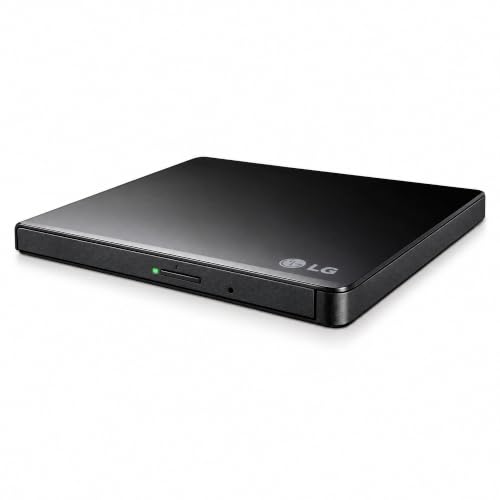
How To Choose The Best External CD/DVD Drive
Before you buy, answer three hardware questions: what your computer’s USB port can feed the drive, which disc formats you actually need to read or write, and if you want the drive to double as a hub or card reader. Match those three to your setup and any drive on this list will work for years.
Match the connection to your port
Most modern laptops use USB-C, so the question is whether the drive’s built-in cable ends in a USB-A plug, a USB-C plug, or both. A USB-A cord on a laptop that only has USB-C ports means you need a small adapter before the drive works at all. Some drives also include a second power cord you plug into a charger or power bank — that extra cable keeps the drive stable on low-power computers, but it does not carry data.
Know which disc formats you need
If you only play movies and install old software, a plain DVD reader covers it. If you burn home videos or music collections to blank discs, look for a writer that handles DVD±R/RW and CD-R/RW. M-DISC support is note — it is a recordable disc format made for long-term storage. Note that none of these drives read Blu-ray or 4K discs.
Decide if you want the built-in extras
Some models pack in a USB hub, an SD card slot, or even an Ethernet port alongside the disc drive. On a laptop with only one open port, that combination saves you from carrying a separate dongle. The trade-off is usually a slightly thicker, heavier body.
Side-by-Side Comparison
| Model | Best For | Interface | Max Write Speed | Built-in Extras | Amazon |
|---|---|---|---|---|---|
| Dell External USB Slim DVD RW Drive DW316★ Best Overall | Simple plug-and-play on Dell laptops | USB | DVD / CD RW | CyberLink Media Suite | Amazon |
| LG GP65NB60 Ultra Slim Portable DVD WriterArchival Burner | Burning M-DISC and everyday DVDs | USB 2.0 (USB 3.0 compatible) | 8x DVD / 24x CD | M-DISC, Silent Play, Jamless Play | Amazon |
| LG Electronics GP60NB50 Ultra Slim DVD+/-RW | Cross-platform use on Windows, Linux, and Mac | USB 3.0 compatible | 24x CD write | M-DISC support | Amazon |
| ROOFULL External CD DVD Drive with USB 3.0 Type-C Hub | One device that adds ports and reads discs | USB 3.0 Type-A & Type-C | 8x DVD / 24x CD | USB hub, SD/Micro-SD slots | Amazon |
| HP External Portable Slim Design CD/DVD RW Drive (F2B56AA) | Budget-friendly disc reading and writing | USB | DVD-RW 6X / CD-RW 24X | USB cable included | Amazon |
| ORIGBELIE External CD DVD Drive with Ethernet Adapter | Adding a disc drive, hub, and network port in one | USB 3.0 Type-A & Type-C | 8x DVD / 24x CD | Ethernet, USB hub, SD/TF slots | Amazon |
| HP USB CD-RW External Optical Drive | Fast CD writing on a name-brand drive | USB | 8x write | USB cable included | Amazon |
Detailed Reviews
1. Dell USB Slim DVD RW Drive DW316
Our pick — 4.5★ from 16,000+ verified ratings; the strongest balance of quality and price.
A 200g disc drive that slips into a bag and reads your collection without a single driver install.
The Dell DW316 makes the shortlist because it does the one job most buyers need — plug it into an Ultrabook or notebook’s USB port and start playing or burning DVDs and CDs. At just 14mm tall and 200g, it disappears into a laptop bag, which is exactly what you want if you copy discs at the office and at home. Dell ships it with the CyberLink Media Suite pre-loaded, so you have burning and playback software sitting inside the box before you even open a browser.
Setup is where this drive earns its reputation. Buyers repeatedly describe it working right from the start with no fiddling — the kind of experience you want when your only goal is loading a CD collection onto a new machine. The drive runs off your laptop’s USB port alone, so there is no power brick to lose and no wall outlet to hunt for. That low-profile, cordless-power design is the whole appeal of the slim external category, and Dell nails it here.
The honest catch is compatibility. The drive’s own feedback shows that some computers simply will not recognize it, so this is the one to pick if you are on a Dell laptop — the place where the connections are known to be reliable. If you are on a different brand or a Chromebook, check first. That single caveat is the real dividing line on an otherwise genuinely capable disc reader and burner.
Where the DW316 shines
- Recognized instantly on a Dell laptop with no driver hunting
- 200g body and 14mm height make it a true travel companion
- Runs entirely off your computer’s USB port, so no separate power cable is required
- CyberLink Media Suite bundled in, so you can burn discs from day one
The trade-off to know about
- Recognition can be unreliable on non-Dell machines and Chromebooks
- Some buyers report durability fading over long-term heavy use
- No built-in extra ports — it reads and writes discs, nothing more
Reach for this if: you want a genuinely grab-and-go drive for a Dell laptop and don’t want to install a single piece of software to burn a disc.
Look elsewhere if: you’re on a non-Dell brand or a Chromebook and want guaranteed recognition without testing first.
2. LG GP65NB60 Portable DVD Writer Drive
The M-DISC burner for anyone who wants a home video to survive longer than the laptop that made it.
If you want burned backups that stick around, the LG GP65NB60 is the drive to reach for. It writes DVDs at up to 8x and CDs at up to 24x, and it carries M-DISC support — a recordable disc format built for long-term storage — so your burned backups are meant to outlast a standard burnable DVD. At 14 millimeters tall and built around a USB 2.0 connection (backwards-compatible with USB 3.0), it slots into the same slim, portable footprint as the rest of this category.
Buyers on the LG pages describe plugging it in and burning for years without drama. On this drive specifically, Owners mention burning hundreds of DVDs over three years with only a couple of failures, both blamed on bad blank discs rather than the drive. That is the kind of reliability story you want from a burner you’re using to protect a photo archive. The all-plastic build feels light, and owners describe it as quiet during use.
Here is what the LG GP65NB60 is not: a universal player. Some customers note the drive refuses to play certain discs until they install separate media software, and the bundled software disc is often described as not worth using — plan on downloading a free player instead. It works with Windows and Linux far more predictably than it does with a Macbook, so if you are on Apple hardware, the next pick is the safer bet. On a Windows or Linux computer, though, this is the archival workhorse on the list.
The archival advantage: M-DISC support is the reason to pick this drive over a plain reader — you can burn a backup disc on a format designed to last rather than a standard DVD-R that may not.
The software catch: the bundled player disc is generally not worth installing. Budget for downloading a free media player like VLC before your first movie night.
Pick it when: you’re on Windows or Linux and want the one drive on this list that writes M-DISC for long-term archiving.
Skip the Mac route: Apple users should look at a drive with a wider macOS track record before committing to this one.
3. LG Electronics GP60NB50 Portable DVD+/-RW External Drive

The LG that owners keep for a decade — a 0.85-inch body that burns 4.3GB in about ten minutes.
If long-term ownership is your priority, the LG GP60NB50 has one of the strongest track records on this list. At 0.85 inches thick it is a genuinely slim disc drive, and it writes CDs at up to 24x while reading and writing the common CD and DVD formats. Owners describe a first drive lasting nine years before it finally stopped reading discs — long service life for a drive used only occasionally. It accepts M-DISC discs too, so archival burning is on the table here as well.
Day-to-day use is refreshingly simple. Owners on modern PCs and Linux describe plug-and-play recognition without any drivers, with quick, quiet CD reading once the disc spins up. A single USB cable powers the whole thing — no external power brick needed, which makes it easy to keep in a laptop bag. On a MacBook it works too, though a USB-A to USB-C adapter may be needed depending on your port layout.
The honest limit on this drive is playback software. Reviewers point out that some older DVDs from the early 2000s will not play straight away through the default player — a free download like VLC is the standard fix. And the bundled Cyberlink PowerDVD 14 is a 30-day trial rather than a permanent player, so plan on the free route. That is a manageable adjustment, not a dealbreaker, and the drive itself holds up season after season.
What earns its keep
- Shoppers say years — even a decade — of continuous use
- Plug-and-play recognition on Windows, Linux, and Mac with no drivers
- M-DISC support for archival burns
- 0.85-inch body slips into the slimmest laptop sleeve
Where the friction lives
- Older DVDs may need a third-party player like VLC before they read
- Bundled PowerDVD software is a 30-day trial, not a permanent licence
- Chrome OS, TVs, and game consoles are not supported
Best for: buyers who want the drive that just keeps working — a long-use history, M-DISC support, and three operating systems covered.
Plan around: downloading a free media player for older disc playback rather than relying on the trial software in the box.
4. ROOFULL External CD DVD Drive
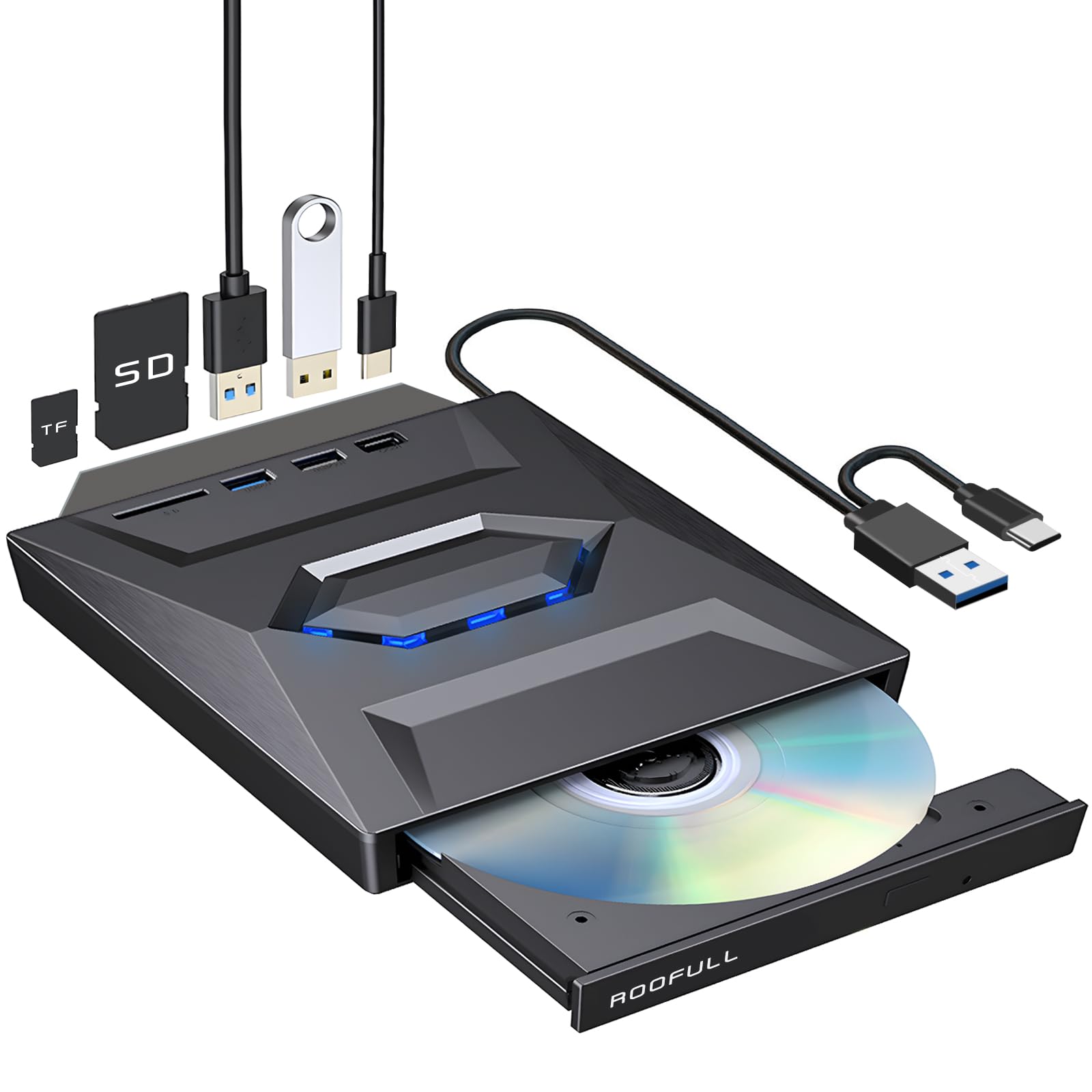
A disc drive that also adds three ports and an SD slot, so one USB connection does the job of a whole desk hub.
The ROOFULL drive solves a problem most external disc drives ignore: modern laptops are starved for ports, not just disc trays. This model combines CD/DVD read, write, and rip functions with a built-in hub that adds one USB 3.0 port, one USB 2.0 port, one Type-C port, and both SD and Micro-SD card slots. That is a 7-in-1 device — a disc drive plus the ports you were about to carry in a separate dongle. Its integrated 2-in-1 cable ends in both USB-A and USB-C connectors, so it plugs into new and old computers without an adapter.
Speed is solid at the technical level too. It handles CD and DVD reading and writing at up to 8x for DVDs and up to 24x for CDs, and it covers all the common formats — CD-ROM, CD-R/RW, DVD-ROM, DVD±R/RW, and dual-layer DVD±R DL. A bundled padded carrying case and a USB power cord for low-power computers round out the package. Buyers repeatedly mention the case as a nice unadvertised extra, and describe the drive reading discs perfectly on Dell laptops.
Two things to know upfront. The hub ports add weight — owners describe the drive as thicker and a touch heavier than a plain reader, and one notes the top surface smudges easily. On Mac, the physical eject button does not work once a disc is loaded; you right-click the desktop icon or press Command + E to eject instead. That is standard for the category but worth flagging if you are switching from an internal drive.
The port math: one USB-C or USB-A connection gives you disc read/write, three extra ports, and dual card slots — that is the entire point of buying this model over a bare reader.
The Mac behavior: owner reports confirm it works on M2 MacBooks with an adapter and power cable, but everyone on Apple hardware should expect the eject button to be inactive.
Choose this one when: your laptop has more discs than ports and you want to fix both shortages with one purchase.
Know before you buy: the hub components make it bulkier than a slim reader, and macOS users should plan on the right-click eject method.
5. HP External Portable CD/DVD RW Drive F2B56AA

A name-brand slim burner that writes DVD-RW at 6X and CD-RW at 24X, sized for a laptop bag.
If you want a big-brand disc drive without paying premium money, the HP slim F2B56AA is the pick. It reads and writes the standard CD and DVD formats, hitting DVD-RW at up to 6X by ZCLV (a write method that keeps speed steady across the disc), DVD+RW at up to 8X, and CD-RW at up to 24X. It also handles unusual formats like DVD-RAM and Super Audio CD — a bonus if you have older specialized discs that a cheap reader would ignore.
The drive’s strongest reported quality is compatibility — owners describe it working with a wide range of Windows versions and Mac OS X without fuss. A buyer ripped a 400-to-500 disc CD collection onto a Mac with this HP drive. Others emphasize how simple the setup is, describing it as genuinely plug-and-play, which is what you want if you are not comfortable with technical adjustments.
The honest caveat is Linux. One owner with an unsuccessful experience on a Linux distribution reports it stopped working outside of Windows, so if your primary machine runs a non-Windows operating system, this is not the drive to rely on. The plastic housing feels light and the tray is shallow — a handful of owners mention discs can be scratched if not seated carefully. Pick this if your daily driver is Windows or macOS and you want a name-brand writer without the premium spend.
Why it earns a spot: a 6X DVD-RW and 24X CD-RW writer from a name brand that owners on both Windows and macOS describe as genuinely plug-and-play, with unusual DVD-RAM support as a bonus.
Suits: Windows or macOS users who want the reassurance of an HP badge and a low-fuss writing drive.
Think twice if: your main computer runs Linux — owner experience there is mixed, and the shallow tray rewards gentle handling.
6. ORIGBELIE External CD DVD Drive

The 9-in-1 drive that adds a wired network port, a USB hub, and card slots to your laptop all at once.
If your laptop lacks both a disc drive and a wired network port, the ORIGBELIE is the Swiss-army option on this list. It combines CD/DVD reading, writing, and ripping with an RJ45 Ethernet port that handles up to 100Mbps, two USB-A ports, a USB-C port, and SD/TF card slots — nine functions from a single plug. The integrated data cable ends in USB-A and USB-C connectors, so it fits newer laptops and older ones without an adapter. USB 3.0 handles up to 5 Gigabits per second, and the drive writes DVDs at up to 8x and CDs at up to 24x.
The design detail that stands out is the RGB LED gradient light on top — the maker describes the look as inspired by Iron Man. Owners describe the effect as adding an eye-catching, futuristic touch to the desk. The RGB light is a love-it-or-leave-it cosmetic feature, but it is note because it is a real distinctive trait and not something most disc drives offer.
Two drawbacks surface in owner experience. The built-in data cable is short, so on some desks the drive has to sit right beside your keyboard rather than further back. And the disc tray is thin — treat it gently, as a little user feedback mentions the drive misreading a CD occasionally on delicate discs. Neither is a reason to skip the drive if you specifically need the Ethernet and hub combination, but the short cord is worth measuring against your desk setup.
What the 9-in-1 delivers
- Reads, writes, and rips CDs and DVDs — all in one device
- Adds a wired Ethernet port plus USB-A, USB-C, and SD/TF slots
- Plugs into USB-A or USB-C without an adapter
- RGB LED accent lights up the desk in a distinctive gradient
Worth measuring first
- Built-in data cable is short — plan for the drive to sit close to your laptop
- Disc tray is thin; hand-load discs gently to avoid misreads
- The drive does not work on cars, TVs, tablets, or game consoles
Built for you if: you need discs, a wired network port, and three extra USB ports from one gadget — this is the do-it-all pick.
Pass if: you only need disc reading and want something ultra-slim without the added bulk of an Ethernet-and-hub body.
7. HP USB CD-RW External Optical Drive

Simple, name-brand CD-RW writing for anyone who just wants to drop in a disc and go.
The second HP on this list leans hard into simplicity. This USB CD-RW drive writes at up to 8x, connects over a single USB cable, and is compatible with Windows 10 and macOS. At 399g it is heavier than the slim LG options, so it is more of a leave-it-on-the-desk drive than a laptop-bag companion. There is no SD slot and no hub — just straightforward disc reading and writing for someone who does not want extra features getting in the way.
Owners describe it as a perfect addition to a laptop that arrived without an optical drive. Setup is described as easy — connect it, download a DVD player app if one isn’t already on the machine, slip the disc in, and it works. Others describe it as working like a charm with no driver hunting. One theme that stands out is value: Owners note the drive costs significantly less here than directly from HP’s own store.
The catch is the total package rather than the drive’s basic function. Owners mention the shipping box can arrive torn on occasion — a delivery-handling issue, not a fault in the drive. And because it is a CD-RW-focused model, if your main goal is movie playback rather than burning data discs, a drive with stronger DVD playback support may serve you better. For straight-ahead CD writing and reading on Windows or Mac, though, this is one of the cleanest options on the list.
The value angle: Buyers report this HP model is dramatically cheaper here than the same drive straight from HP’s store.
The honest limit: the drive focuses on CD-RW writing, so if watching movies is the primary job, a dedicated DVD-playback model will likely feel like the better fit.
The right fit when: you want a no-nonsense, name-brand CD writer for Windows or macOS and don’t need hub ports or card slots.
Look elsewhere if: movie playback or portability is the priority — at 399g this one is best kept on a fixed desk.
Know the Specs
USB 2.0 vs USB 3.0
USB 2.0 is the older, slower connection standard — think of it as a two-lane road. USB 3.0 is the wider, faster version. In practice, the drive only uses its USB connection to move data to and from your computer, which is a small fraction of the total work of reading a disc. That means USB 2.0 drives claim backwards compatibility with 3.0 ports and vice versa. Look for a model whose cable ends in the port you actually have — USB-A, USB-C, or both from the same integrated cable.
Write Speed Ratings (8X, 24X)
The “X” number next to a write speed is a multiple of the original CD-ROM baseline read speed. An 8X DVD write roughly doubles the pace of a 4X burn, and a 24X CD write handles a music disc quickly. For everyday jobs — burning a home video, backing up a photo folder — 8X DVD is plenty. Higher X numbers on the CD side are marketing more than a daily-use upgrade unless you are burning hundreds of audio discs at a time.
M-DISC and Format Support
M-DISC is a recordable disc format built for long-term storage. A drive with M-DISC support can burn to these longer-life discs, which matters if you want your backup to outlive the computer you wrote it on. Standard DVD±R/RW and CD-R/RW formats cover everyday burning. Note that every drive on this list is a CD and DVD reader and writer — none of them read Blu-ray or 4K discs.
The Built-In Cable Length
The short integrated cable on most of these drives is more consequential than the spec sheet suggests. A stubby USB cord means the drive sits right beside your keyboard — it cannot live on a shelf while you work. Some models tuck the cable into a channel underneath when not in use, which keeps your desk tidy. If you want the drive further from your laptop, look for a model that ships with an extension or has a longer built-in cable.
Common Questions
Will an external CD/DVD drive work with my Chromebook?
Can I play a DVD movie by just plugging the drive in?
Do these drives need an external power supply?
Will an external CD/DVD drive work with my MacBook?
How long do external CD/DVD drives last?
Can I burn a Blu-ray disc with one of these drives?
Do I need to install drivers before using the drive?
Can I use one of these drives with a TV or game console?
What is the difference between an 8X and a 24X write speed?
Can I connect these drives to a USB hub instead of directly to my computer?
The Bottom Line
For most people, the external cd/dvd drive winner is the Dell DW316 because it delivers the simplest of all experiences — plug it in, recognize it instantly on a Dell laptop, and start playing or burning discs without ever installing a piece of software. If you want archival M-DISC support and years of reliability, grab the LG GP60NB50. For a single device that adds a disc drive, a wired network port, and extra USB slots without a clutter of dongles, the ORIGBELIE 9-in-1 is the one to reach for. Whichever you pick, confirm your computer’s USB port style before you buy, and download a free media player so your first disc is ready to go the moment it arrives.
How we choose
We do not accept paid placement. Every pick is matched to a real buyer and a real use-case; we do not hands-on test units.
Sources
Specifications: manufacturer listings and product documentation. Review insights: verified customer reviews, as of October 2026. Pricing: not shown on this page (it changes often); check the current price via the retailer link.
As an Amazon Associate, Aappliancez earns from qualifying purchases. This does not affect which products we feature.