Disclosure: Some links in this post are affiliate links. As an Amazon Associate I earn from qualifying purchases, at no extra cost to you. Learn more
Specs are compiled from manufacturer listings and verified buyer reviews and can change over time — please confirm the key details on the product page before buying.
A scan-to-email printer lets you drop a document on the glass, tap a button, and send it straight to an inbox as a digital file — no computer in the middle, no USB cable, no scanning to a folder you then have to find. That is the whole point of this category, and it is exactly where budget printers quietly fall apart. If you want the short answer: the Brother HL-L2480DW is the strongest all-round pick here, because its 2.7-inch touchscreen scans to Google Drive, Dropbox, Evernote and OneNote, and it combines that with 36-page-per-minute black-and-white laser printing and a 250-sheet tray. The picks below split into monochrome laser workhorses for offices and color inkjet models for homes, and that split decides more than any spec sheet headline.
This guide is built by comparing the manufacturers’ published specifications and the patterns across verified customer reviews, so you get each pick’s real strengths and trade-offs instead of marketing spin.
Almost every all-in-one prints, copies and scans, so the scan-to-email feature rarely separates them. What separates them is how you send the file — touchscreen, app, or driver — and whether the scanner can handle a stack of pages without you babysitting it. This guide ranks the strongest scan to email printer options by how you actually send the file — touchscreen, app, or driver.
Top Picks


How To Choose A Scan To Email Printer
Scanning to email is a two-part job: the scanner has to capture the page, and the printer has to hand that file to an email destination. The capture half is hardware, and the sending half is software plus a screen or app. A printer can be brilliant at the first half and useless at the second, which is why two machines with identical scan resolutions can feel completely different to live with.
Does The Machine Scan To Email On Its Own, Or Is An App Required?
Some printers let you walk up, tap “scan to email” or “scan to cloud” on the built-in screen, and pick Google Drive, Dropbox, Evernote or OneNote as the destination. The Brother HL-L2480DW and the Brother MFC-L2820DW both do this through their 2.7-inch touchscreens. Others route everything through a phone or tablet app — Epson’s WF-7840 pushes you toward the Epson Smart Panel or iPrint app. Neither approach is wrong, but the walk-up-tap-and-go method is faster when someone in the office needs a document sent without touching a phone.
Auto Document Feeder: The Feature That Decides Your Scan Speed
Without a feeder you lift the lid and place one page at a time on the flatbed glass — fine for a single signed form, painful for forty pages of leases. An ADF (automatic document feeder) pulls a stack of pages through and captures each one automatically. The Brother MFC-L2820DW takes a 50-page stack and scans at up to 23.6 ipm black and 7.9 ipm color, while the HP LaserJet Pro MFP 3101sdw pairs a 50-sheet feeder with a 250-sheet input tray. If scanning volume is your reason for buying, the feeder’s page capacity and scan speed are the two numbers to hunt for.
Monochrome Laser Or Color Inkjet?
Monochrome laser printers scan and copy in black and white only, never run dry from sitting idle, and produce sharp text fast — the Brother HL-L2480DW reaches 36 pages per minute. Color inkjets scan and print in full color, which matters if you send scanned photos, branding, or charts, but ink systems vary. HP’s Envy Photo 7975 is built around a separate photo tray for borderless prints, while Epson’s EcoTank ET-4950 uses refillable ink bottles the maker says ship with enough ink for up to 6,600 black pages. Match the ink system to your monthly page volume, not to whether you like the idea of tanks or cartridges.
Check The Connection Method Before You Buy
Wireless is convenient until it isn’t, and this category has a reputation for it. Dual-band Wi-Fi (both 2.4GHz and 5GHz) is more stable than single-band, Ethernet is the most reliable of all if you have a router port nearby, and USB is the fallback that always works. The Xerox B315DNI ships with Ethernet and USB 2.0 alongside Wi-Fi, and the HP LaserJet Pro MFP 3101sdw includes Ethernet plus USB. If your scanning workflow has to be bulletproof, buy a machine you can also plug in.
Side-by-Side Comparison
| Model | Best For | Print Speed (B&W ppm) | Duplex | Screen / Control | Amazon |
|---|---|---|---|---|---|
| Brother HL-L2480DW★ Best Overall | Home office scan-to-cloud | 36 pages_per_minute | Automatic | 2.7″ touchscreen | Amazon |
| Canon PIXMA TR7120Budget Champion | Budget color home printing | 14 pages_per_minute | Automatic | 1.42″ monochrome OLED | Amazon |
| HP Envy Photo 7975Best Photo Pick | Family photo and document printing | 15 pages_per_minute | Automatic | Touchscreen | Amazon |
| Brother MFC-L2820DW | Fax plus high-volume scanning | 34 pages_per_minute | Automatic | 2.7″ touchscreen | Amazon |
| HP LaserJet Pro MFP 3101sdw | Small teams, heavy daily output | 40 | Automatic | LED | Amazon |
| Epson WorkForce Pro WF-7840 | Wide-format color scanning | 25 pages_per_minute | Automatic | LCD or LED | Amazon |
| Canon Color imageCLASS MF665Cdw | Color laser for the front desk | 26 pages_per_minute | Automatic | 5″ color touchscreen | Amazon |
| Xerox B315DNI | Fast black-and-white document work | 42 pages_per_minute | Automatic | LCD | Amazon |
| Epson EcoTank ET-4950 | Low-cost color volume | 18 pages_per_minute | Automatic | 2.4″ color display | Amazon |
Detailed Reviews
1. Brother HL-L2480DW Laser Printer
Our pick — 4.5★ from 600+ verified ratings; the strongest balance of quality and price.
The home-office laser that scans a contract straight to Google Drive while you pour your coffee
The thing you will actually use every day is the 2.7-inch touchscreen, and it does the one job this whole category exists for: scan straight to popular cloud apps including Google Drive, Dropbox, Evernote, and OneNote. There is no PC in that chain and no app on your phone. Add a flatbed scan glass for stapled or torn originals you cannot feed, and you have a machine that handles both the easy stack and the awkward one-off page.
The second half is the part that keeps it out of the “annoying electronics” drawer. It prints black and white at up to 36 pages per minute, and it gets the first page out in 8.5 seconds — that is a 2.6x gap over the HP Envy Photo 7975, which takes 22 seconds to the first page. Automatic duplex printing flips each sheet for you, and the 250-sheet paper tray means a busy week of invoices does not turn into a daily paper-refill ritual. The manual feed slot takes envelopes and specialty paper when you need it.
What wins people over is print quality — hundreds of owners single it out, and reliability lands right behind it. Owners describe the move from an inkjet to this mono laser as a relief, with sharp text, quiet running, and a touchscreen that shows cartridge life at a glance. One buyer’s summary of the swap reads exactly like the category thesis: “This machine is fast and so far, no problems. I only need black ink.” The recurring honest gripe is the setup: several owners call the out-of-box process a bit complicated until it clicks, and mixed connectivity reports appear alongside the many owners who had no WiFi trouble at all. Toner refills run on Brother Genuine TN830 or TN830XL, and the Refresh subscription trial is included if you like the supply-on-demand model.
Where This One Wins
- Walk-up scan-to-cloud from a 2.7″ touchscreen — no phone or PC needed in the chain
- 36 ppm black-and-white laser printing with automatic two-sided output
- 8.5-second first page, 2.6x quicker off the mark than the HP Envy Photo 7975
- 250-sheet tray, flatbed glass plus manual feed slot for envelopes
What To Weigh Up
- Monochrome only — no color scanning output
- Setup frustrates some buyers until they work through it
- No auto document feeder, so multi-page stacks go on the glass one at a time
Pick it when: you need a compact black-and-white workhorse that sends scans to the cloud from its own screen and prints fast enough for a busy home office.
Look past it when: you regularly digitize multi-page stacks — the flatbed-only design means one sheet per scan unless you step up to a feeder model.
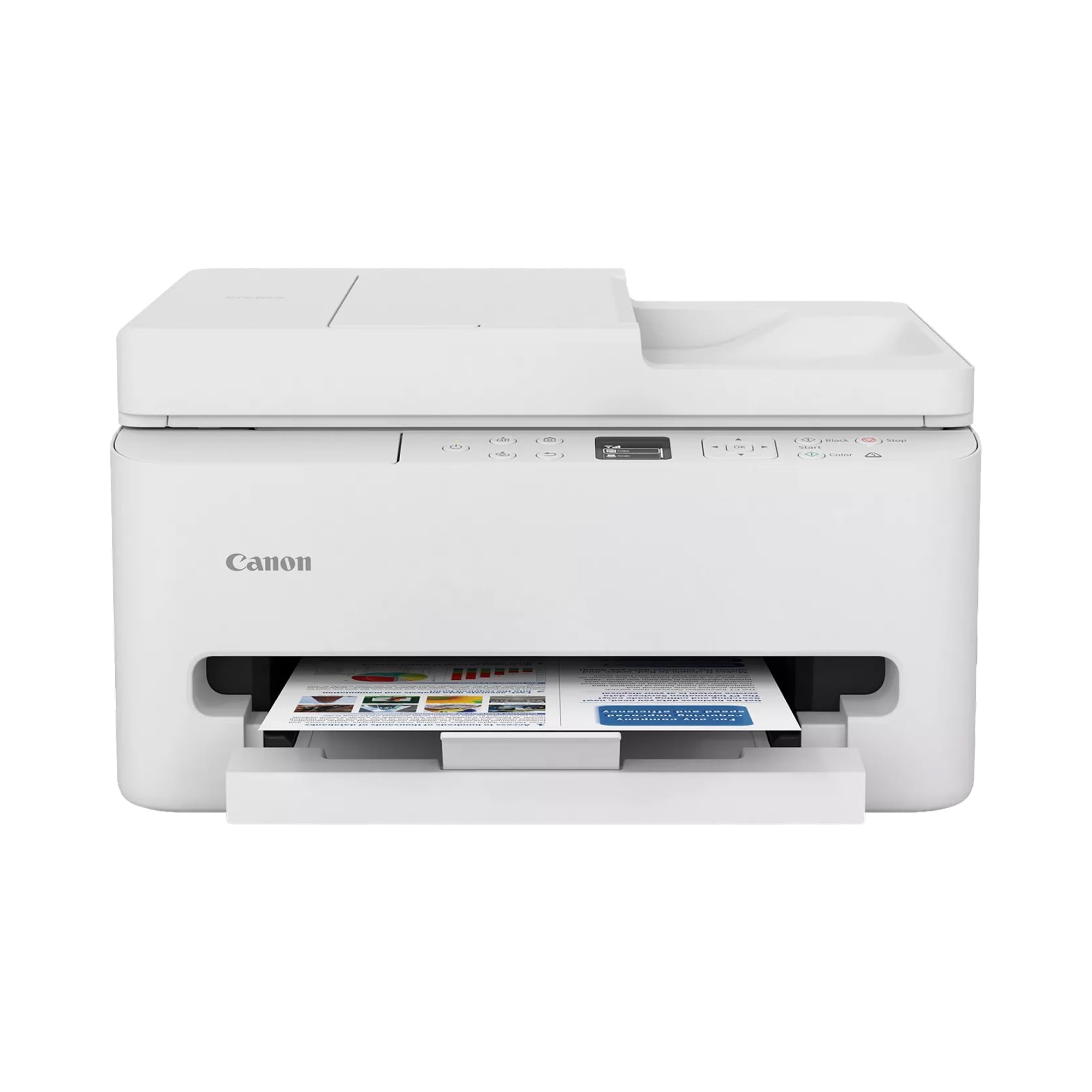
2. Canon PIXMA TR7120 Wireless Color Inkjet Printer
A small white all-in-one that feeds a multi-page stack and scans it without you flipping pages
The Auto Document Feeder is the reason this one earns its place on a scan-to-email list at this tier. It pulls multi-page documents through automatically for scanning and copying, so a ten-page contract becomes one stack on the feeder instead of ten trips to the glass. Duplex printing runs automatically too, which cuts your paper use in half on longer jobs. It prints black and white at up to 14 pages per minute and color at up to 9 pages per minute — the Brother HL-L2480DW runs 36 pages per minute in black, a 2.6x gap if raw speed is your priority.
It works with a two-cartridge hybrid ink system that includes both black and color cartridges in the box, and the 1.42-inch monochrome OLED screen shows ink levels and status at a glance. Dual-band Wi-Fi covers both 2.4GHz and 5GHz networks, and printing from a phone works through the Canon PRINT App, Apple AirPrint, or Mopria Print Service. Media support runs up to 8.5 by 11 inches, with or without borders.
Print quality is the anchor here — it is the aspect the review pages dwell on longest, with speed and ink quality following behind. Owners describe crisp text and vibrant color and photo output, and the setup is repeatedly called straightforward for a home machine. Two honest notes live in this one’s data. First, there is a real software limit: on a Windows 11 ARM laptop, a buyer report describes no Canon drivers and a failure to connect, though an older non-ARM PC on the same network worked fine — check your chip architecture before buying if you use an ARM-based laptop. Second, the color cartridges are combined, so replacing one color refreshes all three.
The everyday case: it does the two things a home scan-to-email machine needs — feed a stack and print in color — without a premium outlay, and the ink that ships in the box lets you start the same day.
Where it will test you: Wi-Fi reliability is a mixed bag here, with some units connecting smoothly and others needing a second or third attempt, so keeping the USB option in reserve is sensible.
Reach for this if: color documents and a feeder matter more to you than raw monochrome speed, and you want a compact white unit that disappears into a home office.
Wait on it if: you work from an ARM-chip Windows laptop — buyer reports describe driver gaps that leave it unable to connect at all.
3. HP Envy Photo 7975 Wireless Color Inkjet Photo Printer
The family all-in-one with a dedicated photo tray and a scanner that doubles for homework stacks
Two trays is the detail that defines this one. There is a separate photo tray for borderless prints alongside the main paper path, so you are not swapping sheets in and out every time you go from a shipping label to a 5×7. The auto document feeder handles multi-page scanning and copying for school packets and signed forms, and auto two-sided printing runs without you thinking about it. Print speeds land at up to 10 pages per minute color and up to 15 pages per minute black.
This is a 24-bit color machine, so scanned and printed images carry deep, true-to-screen color, and it is built for scan, copy and print from one unit. HP’s AI formatting cleans up web pages and emails before printing so you do not burn pages on awkward layouts, and the large color touchscreen handles navigation. Mobile and wireless printing are both on board, which covers the “send it from my phone” case.
Setup ease is the praise point that comes up most — owners describe getting it running without a struggle, and photo output on glossy HP paper earns consistent mention for good resolution. The honest trade-off is pace: at 22 seconds, the first page arrives far more slowly than the Brother HL-L2480DW’s 8.5 seconds, so it is a machine for occasional color jobs rather than a daily document sprint. It is also the physically largest unit in this group at 15.08 inches deep by 18.11 inches wide by 9.17 inches high, so measure your shelf before you commit. Ink runs on HP 64 and 64XL cartridges, and a three-month Instant Ink trial is included.
The trade you are making: you give up document speed and floor space in exchange for a photo tray, borderless output and a scanner that handles a family’s worth of paperwork.
Best matched to: households that print photos as often as they print forms and want the color work done properly.
Think twice if: your workload is mostly plain black-and-white documents — you will pay for color hardware you rarely touch.
4. Brother MFC-L2820DW Laser Printer

Scan speed is the headline, and the 50-page feeder means you never stand there feeding one sheet at a time
Scan speed is measured in ipm — images per minute — and it is the number that decides how fast a stack of invoices becomes a digital file. This model scans at up to 23.6 ipm in black and 7.9 ipm in color through a 50-page auto document feeder, then prints black and white at up to 34 pages per minute. That feeder is the difference between a five-minute job and a half-hour one when the pile is thick. Duplex printing is automatic, and the first page comes out in 8.5 seconds.
It is a true four-function machine: print, copy, scan, and fax, which puts it a step beyond the Brother HL-L2480DW that leaves fax off the list. The 2.7-inch touchscreen scans directly to cloud apps including Google Drive, Dropbox, Evernote, and OneNote, so the email-and-storage workflow works from the panel. You can connect over dual-band 2.4GHz or 5GHz wireless, Ethernet, or USB to a single computer, and the Brother Mobile Connect app handles printing and supply management from a phone.
Printer quality is the standout — the largest share of owner feedback lands there — and setup follows close behind, with buyers calling it the quickest out-of-box experience they have had. Print speed and raw print quality both earn steady praise, and the practical point is that laser toner never dries out while the machine sits idle. The loudest recurring gripe is toner life: the starter cartridge drains fast, and one buyer’s review is bluntly titled around the cost of replacement, noting the low-toner warnings land mid-project. Brother Genuine TN830 or TN830XL cartridges are the recommended replacements, and the Refresh subscription trial is included if you want supplies arriving automatically.
What Buyers Keep Coming Back For
- 50-page ADF with 23.6 ipm black scan speed — fast multi-page digitizing
- Print, copy, scan and fax in one compact footprint
- 8.5-second first page and 34 ppm black-and-white output
- Wireless, Ethernet and USB connection options
The Honest Costs
- Starter toner empties quickly, and replacements are the running expense to plan for
- Black and white only — no color scanning or printing
- Wireless performance splits opinion, so a wired fallback is prudent
Buy it for: a small office that needs a fax line plus fast, feeder-driven scanning without stepping up to a bigger machine.
Keep looking if: your documents arrive in color or your budget cannot absorb frequent toner reorders.
5. HP LaserJet Pro MFP 3101sdw Printer

A seven-second first page and a 40 ppm engine make this the fastest small-team document machine here
Speed is the whole pitch. The first page arrives in 7 seconds and the engine runs at 40 pages per minute in black — that is the quickest combination in this group, and it is aimed squarely at small teams pushing reports and contracts out the door all day. The 250-sheet input tray and 50-sheet auto document feeder keep the workflow moving without constant intervention, and duplex printing runs automatically so you use half the paper on long documents.
For a scan-to-email workflow, the ADF is the piece that matters: it feeds a stack of up to 50 pages through the scanner for copying and digitizing without you standing over it. Network options cover wired Ethernet, USB, plus wireless that actively looks for the best available connection. The control method here is app-based rather than a big touchscreen, and it pairs with a 24-bit black toner output designed for crisp, high-contrast text on professional documents.
Quality and reliability are what the review pages report most, with easy setup close behind. The catch worth knowing before you buy is a deliberate one: this machine only accepts cartridges carrying HP chips or circuitry, and it will block third-party cartridges, with periodic firmware updates enforcing that. Buyers flag short Wi-Fi dropouts that clear with a reset, and HP Smart software has been called buggy in some buyer reports. If you want cheap refills, this is not that machine — but for a team that wants reliability above all, it is a fair trade.
What it is really good at: unglamorous, relentless black-and-white output with fast first pages and a feeder that keeps the scanner clear.
Your pick if: you run a small team and measure success in pages per day, not color accuracy.
Not your pick if: you want to choose your own toner brand or you need a built-in touchscreen instead of an app.
6. Epson WorkForce Pro WF-7840 Printer

Wide-format scanning and printing up to 13 by 19 inches from one desktop machine
If your scanned documents are bigger than a standard sheet — plans, layouts, proofs, oversized forms — this is the machine in this group built for it. It prints and scans wide-format originals at up to 13 by 19 inches, works in color at up to 12 pages per minute and black and white at up to 25 pages per minute, and runs on a 48-bit color depth for richer scans. Duplex printing and copying are automatic.
The print head uses PrecisionCore Heat-Free technology, so it produces pages quickly without the warm-up cycle of a conventional inkjet, and the DURABrite Ultra ink is formulated to dry fast and resist smudging on the page. The 500-sheet paper capacity is built for office volumes rather than occasional home jobs. For sending scans out, Epson Connect Solutions covers Epson Email Print, Remote Print, and the Smart Panel, iPrint and Creative Print apps on iOS and Android, plus Apple AirPrint, Android printing and Mopria Print Service. Wireless runs on 802.11a/b/g/n/ac.
What buyers value most is the wide-format capability, with crisp, clear prints earning consistent mention — and it is a full four-function machine, adding fax to print, copy and scan. The honest note: this sits at a lower overall satisfaction level than the laser picks above, so it is a specialist tool for oversized color work rather than a general-purpose default. If you only print letter-size documents, its best feature is one you would never use.
Why it stands out: almost no other all-in-one in this category touches 13 by 19 inch media, and combined with a 500-sheet capacity that makes it a genuine print-room machine.
Right choice when: oversized color documents are part of your daily work and you need scanning at the same scale.
Wrong choice when: every job you send is standard letter-size, where a laser will serve you faster and more reliably.
7. Canon Color imageCLASS MF665Cdw Printer

Color laser output with a feeder that scans both sides of a page in one pass
The detail that sets this apart from every other machine here is the feeder: a 50-sheet duplex ADF that scans both sides of a page in a single pass. Two passes become one, which halves the time on any double-sided stack of contracts. It prints at up to 26 pages per minute in both color and monochrome, with a first page out in approximately 10.3 seconds, and the paper side handles a 250-sheet standard cassette plus a one-sheet multipurpose tray for envelopes and odd stock.
This is a true four-in-one: print, scan, copy and fax, with automatic two-sided printing built in. The 5-inch color touchscreen runs Canon’s Application Library, a customizable panel that puts the features you actually use up front. Mobile printing works through the Canon PRINT app, Apple AirPrint and Mopria Print Service, and it is Chromebook compatible. Starter toner ships as Canon Genuine Toner 075 in cyan, magenta, yellow and black, and there is a 3-year limited warranty attached, which is longer coverage than most of this group offers.
The praise centers on copy quality, print speed and color reproduction — the color work is excellent for branding and charts. What buyers find uneven is the setup: some describe it as very easy and others call it unfriendly, and Wi-Fi connections split the same way, with a portion of users needing a second attempt. Value is another mixed note, largely because color laser toner is not cheap to refill. None of that undermines what it does when it is running; it just means you should be comfortable with a machine you will occasionally have to talk to.
Standouts
- One-pass duplex scanning — both sides captured in a single run
- 26 ppm in color and monochrome, first page in about 10.3 seconds
- 5″ color touchscreen with customizable Application Library
- 3-year limited warranty and Chromebook compatibility
Friction Points
- Setup is uneven — friendly for some, fiddly for others
- Wireless connections are not universally trouble-free
- Color laser toner refills are the running cost to budget for
Worth it for: a front desk or small business where documents arrive double-sided and in color every single day.
Think again if: you print mostly in black and white, where a monochrome laser will cost considerably less to run.
8. Xerox B315DNI Printer
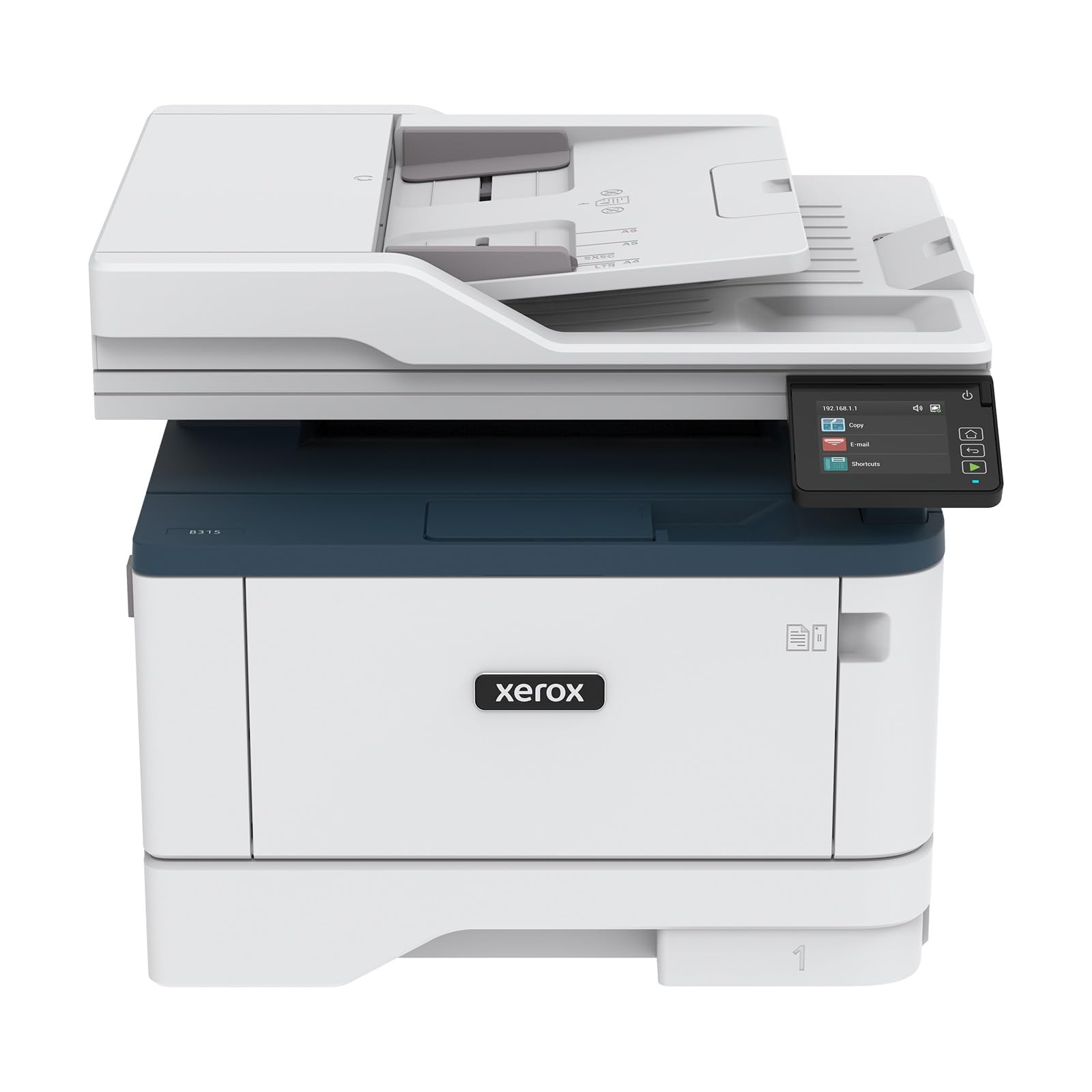
The 42-page-per-minute engine and RADF are built for someone clearing a backlog fast
Raw output speed is the reason to shortlist this one: up to 42 letter-size pages per minute, or 40 on A4, with automatic two-sided printing and a 250-sheet paper capacity. A reversing automatic document feeder handles multi-page scanning, copying and faxing so you are not feeding sheets by hand, and the print resolution is high enough for crisp professional black-and-white documents. Scanning and copying round out a print, copy, scan and fax set.
Connectivity covers Wi-Fi with Apple AirPrint, Mopria Print Service and Chromebook printing, plus Ethernet and USB 2.0 for a wired setup when you want one. There is a security layer aimed at protecting access and sensitive documents in a shared office, and the Xerox Print & Scan Experience software handles tasks like auto straighten, receipt scanning and auto cropping images — useful if you are scanning crumpled receipts into an expense system. The starter cartridge is rated for 2,500 pages, so the first refill is a long way off.
Buyers who are happy describe quick QR-code setup and rock-solid connectivity, crisp black-and-white text, and a compact, high-end look that fits a small space. Where it draws criticism, setup consistency is the theme: some owners find the panel dated and Wi-Fi setup takes a couple of attempts, and one buyer’s review describes the workflow as clunky enough to regret switching brands. It is the sort of complaint you see on every printer at some point, and it does not change what the machine does well. Treat the wired connection as your safety net and it will do its job.
The one-line verdict: if pages per minute is the number you care about most, this is the fastest monochrome all-in-one in the round-up, and the RADF keeps the scanning side moving too.
Suits you if: your day is a stream of black-and-white documents and you want the output done quickly.
Less ideal if: network setup patience runs thin in your office — keep the Ethernet cable handy.
9. Epson EcoTank ET-4950 Printer

Refillable ink bottles instead of cartridges — the running cost story is the whole point here
This is the machine for anyone tired of buying cartridges. Instead of sealed tanks, it uses a cartridge-free system with high-capacity refillable ink bottles, and the maker says the ink in the box will print up to 6,600 pages in black and 5,500 in color. Each replacement bottle set is, according to Epson, equivalent to about 80 cartridges. The refill process uses keyed EcoFit bottles that only fit one opening, so you cannot pour the wrong color into the wrong tank — a genuinely thoughtful detail for anyone who has ever made that mistake.
Print speed runs at 18 pages per minute black and 9 pages per minute color, and there is zero warm-up time. The productivity set includes an auto document feeder for scanning and copying, a 250-sheet paper tray, automatic duplex printing, fax, and a 2.4-inch color display for navigation. It works over Ethernet, USB and wireless, and mobile printing is supported. Epson learned early that scanning matters in this class — the ADF here means a multi-page document does not force you back to the flatbed.
Owners mostly rave about the ink economics: months into ownership, one buyer’s report has them still on the original supply while printing heavily, crediting the running cost against per-page rivals. Print quality holds up for photos and documents, and the printer quality overall is what the review pages praise most. The honest caveats cluster around two things. Setup is slow and heavy — one buyer reports about 45 minutes with a paper jam mid-process — and a small number describe the unit losing communication with all devices after a few months. Routine scanning quality has drawn complaints too. If you want a machine that barely asks for anything after setup, this is the one.
Where the money goes: you pay more up front for the hardware in exchange for refillable tanks that the maker says stretch across thousands of pages before the next top-up.
The one to grab if: you print a lot in color and are done with the cartridge-refill treadmill.
Give it a pass if: you want simple setup and top-tier scanner quality — this one asks for patience on both.
Know the Specs
Scan Speed in ipm: Why It Beats Print Speed for This Category
Ipm stands for images per minute — the number of pages a scanner captures in sixty seconds through the automatic document feeder. It is the figure that decides how fast a stack of invoices or contracts becomes a digital file you can email, which is the whole point of this category. The Brother MFC-L2820DW scans at up to 23.6 ipm in black and 7.9 ipm in color. A machine without a feeder has no meaningful ipm rating at all, because you are the feeder — one page at a time on the glass.
Auto Document Feeder and Duplex Scanning
An ADF (automatic document feeder) pulls a stack of pages through and captures each one without you lifting the lid. The sheet count is the size of stack it can take in one pass — the Brother MFC-L2820DW and the Canon Color imageCLASS MF665Cdw both hold 50 pages. Duplex scanning is the next step up: the feeder captures both sides of a page. The Canon MF665Cdw does it in a single pass, which roughly halves the time on a double-sided stack compared with a feeder that has to pull each page through twice.
How The Scan Actually Reaches Your Inbox
There are three routes, and they are not equally convenient. The fastest is a walk-up touchscreen that scans directly to cloud apps — the Brother HL-L2480DW and Brother MFC-L2820DW both offer this from their 2.7-inch panels. The second is a mobile app like Brother Mobile Connect, Canon PRINT, or Epson Smart Panel, where you scan from the phone and share from there. The third is a computer driver. Whichever route you plan to use, verify the machine supports it before you buy — it is the single most likely source of disappointment.
Monochrome Laser, Color Laser, or Refillable Ink Tank
Monochrome lasers print and scan only in black and white. They are fast, their toner does not dry out while idle, and they suit document-heavy work — the Brother HL-L2480DW runs 36 pages per minute and the Xerox B315DNI reaches 42. Color lasers add color to the same speed and longevity story, which is why the Canon MF665Cdw prints both at 26 pages per minute. Refillable ink tank models like the Epson EcoTank ET-4950 use bottles instead of cartridges, and the maker says the shipped ink covers up to 6,600 black pages — a lower cost per page if you print often enough to use it.
Common Questions
What does scan to email actually mean on a printer?
Do I need an automatic document feeder to scan to email?
Can a monochrome laser printer scan documents in color?
Which is faster for scanning, a laser or an inkjet all-in-one?
What scan speed do I need for a busy home office?
Why does my scan to email printer keep dropping the wireless connection?
How long does the starter ink or toner last on these printers?
Can I scan directly to Dropbox or Google Drive without a computer?
Is a color laser or a refillable ink tank cheaper to run in the long term?
Do I need a phone app to scan to email on these printers?
Can a printer with an ADF scan both sides of a page at once?
The Bottom Line
For most home offices, the winner among the scan to email printer options here is the Brother HL-L2480DW, because it does the two things that matter most together: scan directly to popular cloud apps from its own touchscreen, and print black-and-white pages at up to 36 per minute with a first page in 8.5 seconds. It is the cleanest blend of scanning convenience and daily output speed in the group, and the flatbed glass handles the odd stapled original the feeder models cannot.
If fax is still part of your workflow, the Brother MFC-L2820DW adds it alongside a 50-page feeder and 23.6 ipm black scan speed — it is the more complete small-office machine. And if you want color output without a cartridge treadmill, the Epson EcoTank ET-4950 is the pick, since Epson says its bundled ink covers thousands of pages before you refill.
Buy the scanner around your documents, not the printer around its spec sheet. A 50-page feeder that saves twenty minutes per stack beats an extra page per minute on a machine you fill one sheet at a time — and for daily multi-page scanning, the Brother MFC-L2820DW’s feeder is the feature that earns its keep.
How we choose
We do not accept paid placement. Every pick is matched to a real buyer and a real use-case; we do not hands-on test units.
Sources
Specifications: manufacturer listings and product documentation. Review insights: verified customer reviews, as of October 2026. Pricing: not shown on this page (it changes often); check the current price via the retailer link.
As an Amazon Associate, Aappliancez earns from qualifying purchases. This does not affect which products we feature.