Disclosure: Some links in this post are affiliate links. As an Amazon Associate I earn from qualifying purchases, at no extra cost to you. Learn more
Specs are compiled from manufacturer listings and verified buyer reviews and can change over time — please confirm the key details on the product page before buying.
If you are shopping for multi-head FDM printing, the short answer is simple: the Bambu Lab A1 Combo is the safest first machine, the QIDI Max4 Combo is the one to buy when large, high-temperature parts matter most, and the Raise3D E2 is the pick for true independent dual-extruder work. Everything below sorts the eleven strongest options by what they actually do well, so you can match a machine to your shop instead of guessing.
This guide is built by comparing the manufacturers’ published specifications and the patterns across verified customer reviews, so you get each pick’s real strengths and trade-offs instead of marketing spin.
A four-head or multi-tool printer lets one job carry several colors or materials at once, which changes how you plan both time and filament. This breakdown of the best 4 head 3d printer options covers nozzles, build volume, chamber heat, and leveling so you can pick with confidence.
Top Picks


How To Choose The Best 4 Head 3D Printer
Multi-head printing is not one feature, it is a family of systems that all let a single job use more than one color or material. The trick is knowing which system fits the parts you actually print, because a machine built for speed and one built for engineering plastics overlap far less than the spec sheets suggest.
Multi-extruder versus multi-tool
A multi-extruder machine parks several nozzles on one carriage, so you can duplicate a part or mirror it instead of reloading filament between jobs. Independent dual extruders on the Raise3D E2 let you run both nozzles in synchronized Duplication Mode, or print a model and its inverse at once in Mirror Mode. Multi-tool systems like the Prusa XL 5-Toolhead carry five separate toolheads, so it changes tools rather than squeezing more nozzles onto one gantry. If your workload is two materials at a time, IDEX is enough; if you want five-color models in one run, you need a toolchanger.
Build volume and chamber heat
Build volume decides how big a single piece can be before you split it. A 260 × 260 × 260 mm build plate covers most everyday parts, while a 390 × 390 × 340 mm bed is where large molds and prototypes live. Chamber heating matters just as much when you move past PLA: a 65℃ chamber holds ABS and carbon-fiber nylon steady so tall parts resist warping. The QIDI PLUS4 brings a 400W chamber heating system, while the Prusa CORE One tops out at 55 °C. Choose the chamber to match the filament, not the other way around.
Side-by-Side Comparison
| Model | Best For | Max Speed | Build Volume | Chamber / Heat | Amazon |
|---|---|---|---|---|---|
| MZK Industrial A3 i3200 DTF★ Best Overall | Apparel transfer printing | 5× standard models | 13 × 41 in media | — | Amazon |
| Bambu Lab A1 ComboAlso Great | First multi-color printer | 10,000 mm/s² accel | — | Open frame | Amazon |
| Creality K2 Combo (A)Best Value | Quiet multicolor production | 600 mm/s | 260 × 260 × 260 mm | — | Amazon |
| Creality K2 SE Combo | Compact rapid prototyping | 500 mm/s | 220 × 215 × 245 mm | — | Amazon |
| QIDI PLUS4 | High-temp engineering filaments | CoreXY high speed | 12 × 12 × 11 in | 400W active heating | Amazon |
| QIDI Max4 Combo | Large industrial prints | 800 mm/s | 390 × 390 × 340 mm | 65℃ active | Amazon |
| ANYCUBIC Photon P1 | Dual-material resin work | 25–35 mm/hr | 8.78 × 4.96 × 9.05 in | Heated vat 20–40°C | Amazon |
| ELEGOO Jupiter 2 | Large-format resin builds | — | 302.4 × 161.98 × 300 mm | 30 °C tank heating | Amazon |
| Prusa CORE One | Open, repairable workshop printer | — | 250 × 220 × 270 mm | 55 °C enclosed | Amazon |
| Prusa XL 5-Toolhead | Five-material pro prototyping | CoreXY high speed | 14.17³ in | Segmented heated bed | Amazon |
| Raise3D E2 | True IDEX dual extrusion | — | Up to 13 × 9.4 × 9.4 in | Heated bed 110℃ | Amazon |
Detailed Reviews
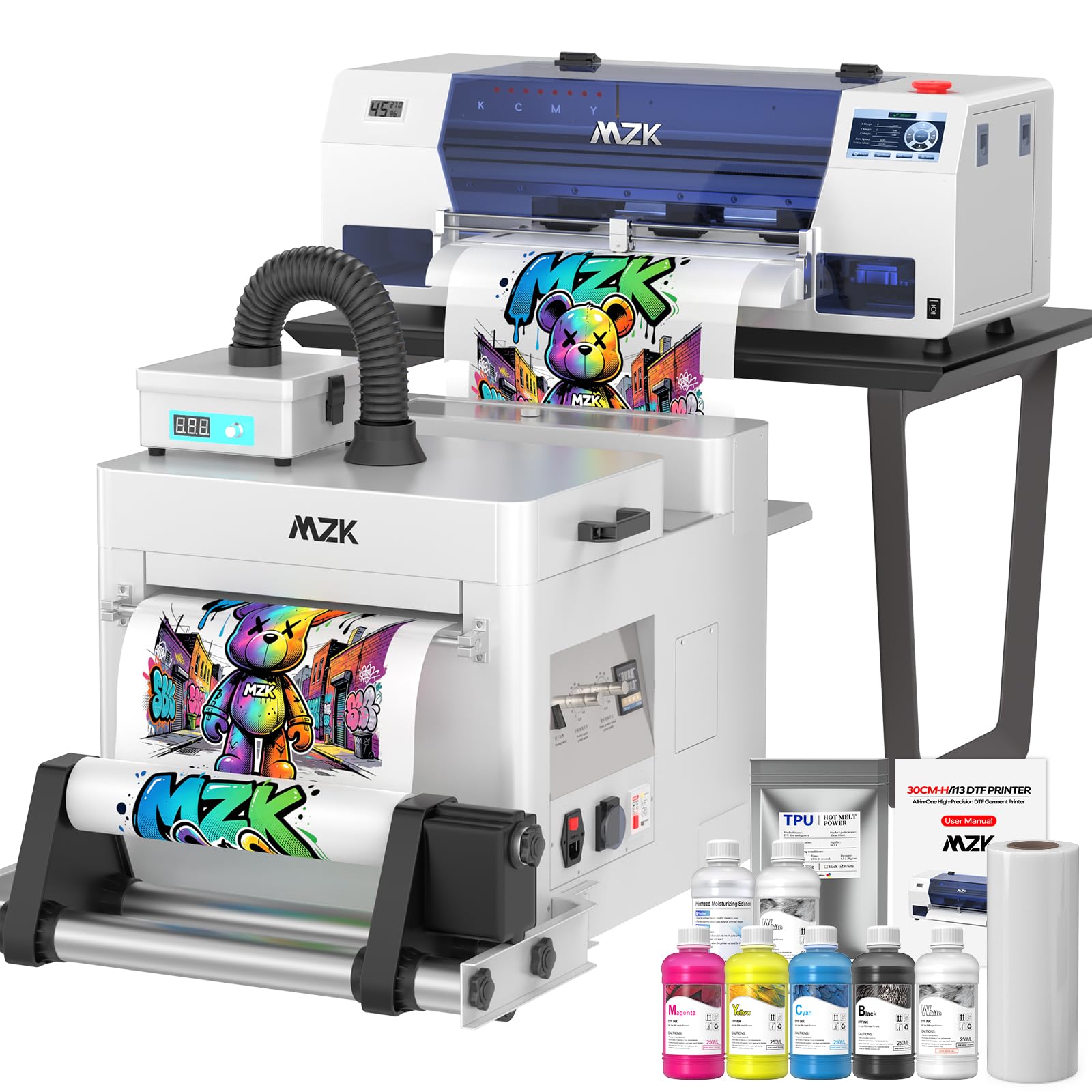
1. MZK Industrial A3 i3200 DTF Printer
Our pick — 4.5+★ from 50+ verified ratings; the strongest balance of quality and price.
A DTF apparel transfer machine that fills the space a plastic printer cannot.
This is not a filament machine — it is an A3 DTF transfer printer built for one job: print a transfer on film, shake on the powder, and press it onto a shirt. The Epson i3200 industrial printhead delivers 5× the speed of standard models — roughly 1 minute for an A4 design and 2.5 minutes for an A3, using 720 × 3600 dpi resolution and G7 certified color calibration for 25% higher detail. Big gain for anyone printing shirt designs on a deadline.
The workflow list is the real sell: a 13 × 41-inch maximum media size, a 5-inch touchscreen for nozzle checks, printhead cleaning, one-click ink filling, and layout adjustments without a laptop in the loop, plus a Honsonsoft motherboard validated for 24/7 printing. Don’t skimp on the Smart Timed Cleaning + Holiday Mode — it auto-runs head cleaning during downtime so a two-week break does not end with a clogged nozzle. Dual ink monitoring warns when a tank is low and flags waste overflow. New buyers report the 2-year ink and powder program (5 bottles of 250ml ink plus 500g powder every 2 months, shipping covered) which is where a lot of the long-term cost sits.
Realistic expectations: this is a production machine with a learning curve. One owner notes the software has a small learning curve, and the head-cleaning cycle is loud — plan a workshop, not a bedroom. Ink auto-fills without syringes, and a support engineer once remotely resolved a white-layer issue in under two hours. For shirt printers, side hustlers, and small apparel shops, this is the DTF workhorse that turns blanks into product.
dtf printing
- i3200 industrial printhead runs 5× standard speed at 720 × 3600 dpi.
- Handles A3 film up to 13 × 41 inches wide for full-front prints.
- Holiday Mode auto-cleans for weeks of downtime without clogs.
- Two-year ink and powder program cuts ongoing consumable cost.
shaker noise
- Loud head-cleaning cycle — best in a workshop, not a spare room.
- Small software and workflow learning curve before the first sellable transfer.
- Consumables ship separately from the printer.
- This is DTF apparel printing, not FDM/plastic-model printing.
shirt business: Shirt printers and apparel side-hustlers wanting sellable DTF transfers in-house.
home use: You want to print plastic models — the MZK is a transfer system, not a filament FDM machine.
2. Bambu Lab A1 Combo + LED Lamp Kit with AMS lite
A four-color AMS lite printer that auto-calibrates Z-offset and bed leveling, so a first-timer can finish a model without tuning.
This is the machine for a buyer stepping up from a single-color bed and wanting color changes without a weekend of tuning. With the AMS lite feeding four spools and 10,000 mm/s² acceleration — the rate at which the toolhead speeds up or slows down — the A1 delivers the speed-and-color combo that used to cost thousands more. Full-auto calibration sets Z-offset and levels the bed for you, and active flow rate compensation adjusts how much plastic is extruded mid-print, so layers stay smooth instead of blotchy.
Where owners land: setup runs near plug-and-play, with one reporting the app arrives stocked with free models and that Orca Slicer compatibility makes slicing painless. The PEI textured plate grip is a recurring favorite — clean it with dish soap and prints hold without glue. The AMS lite takes a chunk of bench space and needs adapters for some spool brands. A dual-band router can trip the Wi-Fi pairing, so set up the machine on a dedicated 2.4GHz band if you have one.
Downsides: multicolor prints run slower than single-color jobs, and the fine mechanical parts loosen and collect dust over hundreds of hours of printing, so plan on periodic cleaning and screw tightening. Beginners frequently praise the 1-Clip quick-swap nozzle and the active motor noise canceling — but this is a hobby machine, not an industrial platform, and treating it like one is the fastest way to frustration.
AMS lite multi-color
- 10,000 mm/s² acceleration keeps color changes quick on detailed models.
- Full-auto calibration handles Z-offset and bed leveling without manual steps.
- 1-Clip quick-swap nozzle makes maintenance a tool-free job.
- AMS lite turns out four-color prints on a starter-class budget.
bed size limits
- Multicolor jobs print noticeably slower than single-color runs.
- AMS lite takes bench space and prefers 1kg reels or adapters.
- Wi-Fi setup prefers a dedicated 2.4GHz band.
- Fine parts need cleaning and tightening over long-term use.
beginners welcome: First-timers and small studios wanting multi-color printing on a machine that works without a modification list.
volume seekers: Anyone who needs a heated chamber for ABS or carbon-fiber nylon — its open frame is designed for PLA and PETG, not engineering plastics.
3. Creality K2 Combo (A) 3D Printer
Up to sixteen filament colors and a 260 mm cube, all on one bench.
Want a color range close to a professional palette but not ready for a toolchanger price? Chain four CFS units and this machine reaches sixteen colors, and it ships 95% pre-assembled so you can print the same afternoon it arrives. The 260 × 260 × 260 mm build volume covers most functional parts, and step-servo motors plus dynamically balanced fans mean it is no louder than someone typing on a laptop PC — a real difference for apartment or shared-office use.
The three step-servo motors (in the extruder and on the X/Y axes) adjust torque in under a millisecond to keep extrusion consistent at 600 mm/s, and the AI camera watches for spaghetti failures and idling in real time. With 2,500+ owners logged, the setup process is the most-praised aspect by far — most buyers report clear multilingual instructions and auto bed leveling that works first try. One caveat: the CFS wants 1kg reels, so 250g spools need adapters, and third-party filament sometimes loads only after playing along with the RFID tag.
Note the Creality OS app and its account flow; a few owners mention the software onboarding takes a few hours longer than the hardware build. Treat the printer as a color-workhorse for PLA, PETG, ABS, and PLA-CF and it will earn its space — this is the most capable multi-color mixer on the tier.
speed focused: Your shop churns out multi-color consumer parts and you want a near-silent, plug-in-and-go machine.
plug and play: You plan to print carbon-fiber nylon or anything needing a heated chamber — the K2 Combo (A) runs an open architecture.
4. Creality K2 SE Combo 3D Printer
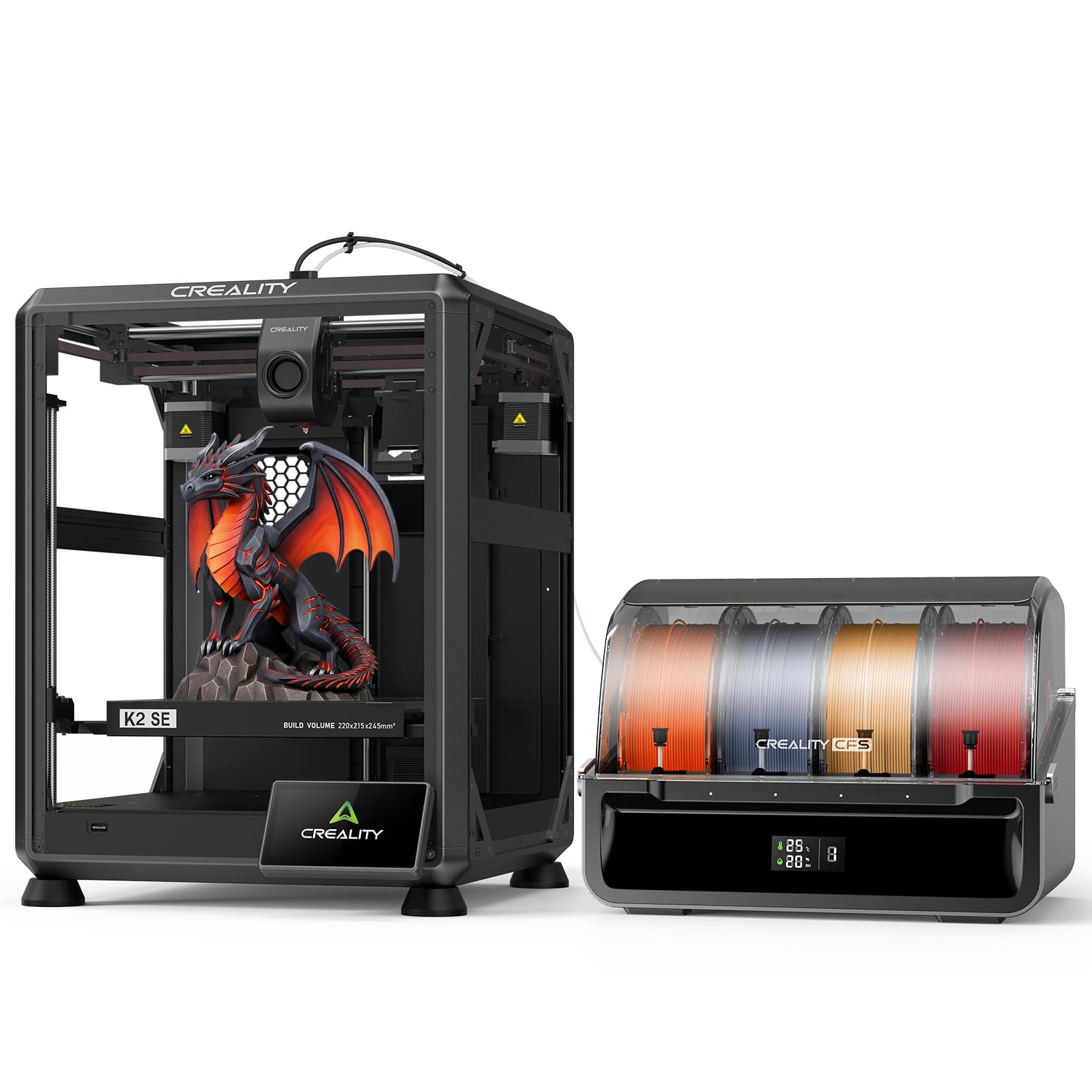
A small-footprint multicolor mixer that fires a Benchy out in under an hour.
For buyers with a tight workbench, the SE tucks a 220 × 215 × 245 mm build volume into a footprint smaller than most competing multicolor units. 500 mm/s top speed with 20,000 mm/s² acceleration gets small parts done fast; one owner reports cookie cutter–scale items release easily once the plate cools. The die-cast aluminum alloy frame with reinforced gussets and crossbeams dampens vibration, and the smart auto leveling probes only the area you will actually print on — faster first layers without running the whole bed. The CFS multicolor module handles auto-switching, color detection, and moisture-proof filament storage.
Compared with the K2 Combo (A) above, the SE is smaller on the build plate but uses the same direct-drive extruder with a quick-swap clog-free nozzle, hardened steel gears, a run-out sensor, and an automatic cutter for clean filament swaps. The upgraded Creality OS handles multi-filament management, LAN multi-printer control and cloud printing — handy if you run more than one unit in a studio.
The honest trade-off: hardware quality earns praise, but the Creality app and cloud sync generate the strongest complaints among owners — connectivity between multiple users and paid-model access frustrate some buyers. Budget a couple of hours to sort the app before your first real client order.
enclosed corexy: The die-cast aluminum alloy frame, hardened steel gears, and Smart Auto Leveling beat typical budget-class machines on stability.
no ams included: 500 mm/s and 20,000 mm/s² turn small batches into afternoon jobs instead of overnight ones.
Where it slows you down: The cloud workflow can be flaky on first install and the print volume will not fit large single-piece projects.
diy upgraders: Small parts, a compact bench, and fast turnaround matter more than a large build plate.
turnkey buyers: You need to print commissions for multiple user accounts on day one — sort the app first.
5. QIDI PLUS4 3D Printer

A 400W heated chamber and 370°C hotend that hold ABS, ASA, and carbon-fiber nylon flat on tall prints.
For engineering-grade filament work, the PLUS4 answers the first question buyers ask: can it hold chamber temperature? Yes — the second-generation chamber heating runs at up to 400W with air circulation and dual-layer insulation, stabilizing the interior so high-temperature plastics resist warping and cracking. The 80W hotend reaches 370°C and handles PPS-CF, PPA-CF/GF, ABS, ASA, PC, PA, and PET — a serious material list for a machine on this tier. Build size of 12 × 12 × 11 in lets you gang multiple models on one plate for efficiency.
Novice-friendly setup is the surprise. Customers note 10–20 minute assembly plus 10–20 minutes of calibration, auto input shaping, bed leveling, filament cutting, and nozzle cleaning before a flawless 22-minute Benchy. The dual-motor Z-axis, a 6mm thickened aluminum hot bed, and 10mm linear shafts and lead screws hold flatness across the plate — important when a single tall part means a long print.
The honest caveats: chamber preheat takes a while to reach set temperature, some owners see automatic bed leveling misfires, and the AMU multi-color box was announced for Q1 2025 but not shipped with the printer. Print PLA and basic PETG and you will love it; print ASA or PPS-CF and you get what you paid for. In short — the PLUS4 is the temperature-first pick on the mid-range tier.
big prints: High-temperature engineering filaments where a heated chamber is non-negotiable.
quiet spaces: If your library is PLA-only, the heated chamber is idle equipment and the 65℃ preheat cycle adds setup time.
6. ANYCUBIC Photon P1 Resin 3D Printer
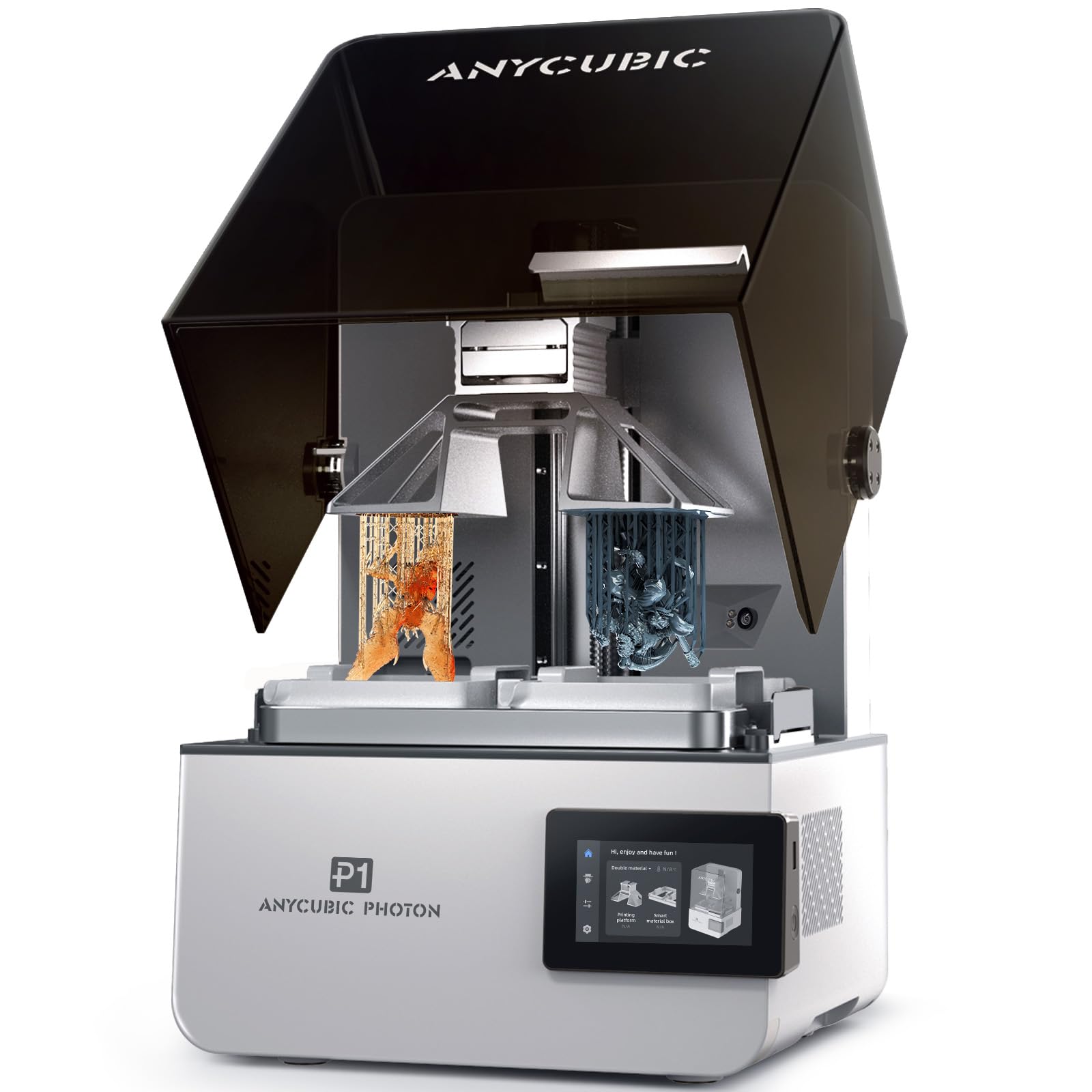
A forked build plate that runs two resins in one job, with a ball-screw Z-axis and milled steel plate.
If you print resin and want dual-material without buying two machines, the Photon P1 uses a forked build plate to run two colors or two resins in one job. The sturdy build — ball screw Z-axis, dual precision guide rails, milled steel plate — is the kind of hardware you find on much costlier resin machines. Wave Release Technology generates micro-airflow during plate lifting to reduce release force by 60%, so small models pull off the film more reliably and cost less resin waste.
Smart Leveling 3.0 comes factory-calibrated and self-checks each print with real-time pressure feedback across four corners — one owner reports the auto-leveling and resin level alert save real time on every print. The AI monitoring system verifies build plate installation and bottom layer separation, tracks resin level, and detects residue in the vat. Ultra-high viscosity resins up to 8,000 cps — a measure of how thick a liquid is — work with pre-configured profiles for Anycubic resins, which is unusual on desktop-class machines.
The honest read: dual-material multicolor has a learning curve, and there is no clean way to tilt the plate for drainage. The setup is not just plug-and-play the first time, and beginners may find the feature rack dense. For a small lab or a serious hobbyist doing two-resin work, the Photon P1 earns its space.
resin detail: The dual-vat forked plate turns a two-material job into one print run with no cleaning between swaps.
post-processing needed: You will want a drain station and a rigid habit for the tilting step — the platform does not angle itself.
miniature makers: You print small dental, jewelry or display models in two resin types on the same plate.
resin avoiders: You are brand-new to resin — start on a single-vat machine and come back to this one with experience.
7. ELEGOO Jupiter 2 16K Resin 3D Printer

A 302.4 × 161.98 × 300 mm resin build volume with 20 × 26 μm XY detail for batch runs in one plate.
Where most desktop resin printers top out at small figures, the Jupiter 2 opens a 302.4 × 161.98 × 300 mm build volume — 2.5× larger than the Saturn 4 — for cosplay parts and batch models in a single run. The 15120 × 6230 resolution with 20 × 26 μm XY detail is what actually puts skin texture and miniature faces into focus, and the fully enclosed light source eliminates light leaks so exposure stays even across the plate.
Auto-fill resin management keeps long jobs topped up, smart tank heating holds a precise 30 °C for consistent flow, and the double-door plus transparent window makes mid-print inspection easy. The laser-engraved plate releases fast, and Quick-Swap Release Film makes tool-free film swaps in seconds — a cost saver once you price the film. One large-format owner reports it prints flawlessly for hours and that the PFA film outlasts cheaper alternatives.
Caveats worth knowing: the machine is very large and ungainly, the lid comes off fully (no hinged flip), and it is not the right first resin printer for a total beginner — FEP suction and plate size reward experience. For a small resin shop that wants big pieces without buying a second printer, the Jupiter 2 does the job.
high detail: Big resin pieces and batch runs, with room for its oversized footprint.
small studios: You are buying your very first resin printer — this one rewards experience with plate size and suction tuning.
8. QIDI Max4 Combo 3D Printer

A 390 × 390 × 340 mm build volume that prints full industrial molds and prototypes without splitting the part.
When the part will not split, the Max4 Combo is the printer that lands it whole — its 390 × 390 × 340 mm build volume is 55% larger than the MAX3 and gives you room for full industrial molds and prototypes in a single job. The 800 mm/s top speed with 30,000 mm/s² acceleration keeps turnaround tight, and closed-loop motors on X/Y axes hold position so fast moves do not drift. Z-axis uses a 2mm lead screw with an anti-backlash nut for smooth vertical travel.
Material support runs deep: a 40mm³/s high-flow hotend and a hardened steel nozzle handle PLA, ABS, and carbon-fiber nylon, and the 65℃ active heated chamber with the Polar Cooler system (sold separately — check before you buy) opens up ABS-CF, PC, and PPS-CF. Built-in AI camera catches spaghetti failures and pauses prints, which saves a full spool on a failed tall print. Expand to 16 colors by adding a QIDI BOX.
The honest caveat: reviewers point out setup as the strongest asset (open the crate, no manual leveling), but the QIDI BOX sync with QIDI Studio can be finicky, so Orca Slicer is a common fallback. It is also a 120-lb machine — plan the bench and help before it arrives. This is a machine for designers and shops that want a large print area without tinkering.
max build size
- 390 × 390 × 340 mm build volume swallows whole industrial prototypes.
- 800 mm/s top speed and 30,000 mm/s² acceleration keep big parts fast.
- 65℃ heated chamber with optional Polar Cooler handles engineering materials.
- AI camera pauses spaghetti failures before they waste material.
slow heating
- QIDI BOX sync with QIDI Studio is unreliable; Orca Slicer is a common workaround.
- Polar Cooler is sold separately, so high-temp setups cost extra.
- 120-pound weight demands a sturdy bench and a helper at unboxing.
- Home-position routine complicates routine cleanup between jobs.
large projects: Designers and shops printing large engineering parts that must not split across jobs.
quick tasks: You print small parts on a tight budget and do not want to babysit the multi-color sync.
9. Original Prusa CORE One 3D Printer

An assembled, tested CoreXY printer with a 55 °C enclosed chamber and an all-steel exoskeleton frame.
Buyers who want to open a box and print — not build a machine — get the CORE One out-of-the-box. It arrives assembled and tested, with a free 1kg spool of Prusament PLA Galaxy Black, 24-hour customer service, and lifetime technical assistance from Prusa Research. Print size runs 250 × 220 × 270 mm inside a 55 °C enclosed chamber — good for PLA, PETG, ASA, PC and Nylon. The all-steel exoskeleton frame and CoreXY design give it rigidity you can feel.
Where owners land: the machine prints fast and accurate without firmware flashing or mods, and linear rails run quiet and smooth. Multiple filament brands work with the stock slicer profiles, and one 12-year printing veteran called it beginner-friendly alongside open-source software and hardware. The trade-offs are the ones you would expect at this tier: no Mk.6 nozzle compatibility without an adapter, an aluminum heat block that slows high-temp work, and no ABS fume filter. Heavy vibration at max speed rewards a sturdy bench; USB, SD, and Wi-Fi printing keep it away from a cloud lock-in.
The CORE One is the machine for a print shop that values open tooling and long service life over the multi-color badge — add an MMU later if you need color. Pick it if you want a repairable workhorse that will not surprise you.
prusa fans: You want an assembled, enclosed, repairable workhorse with open-source software and lifetime support.
budget builders: You need five-color in one job — Prusa’s multicolor system is a separate add-on and not in the base box.
10. Original Prusa XL 5-Toolhead Multi-Material 3D Printer
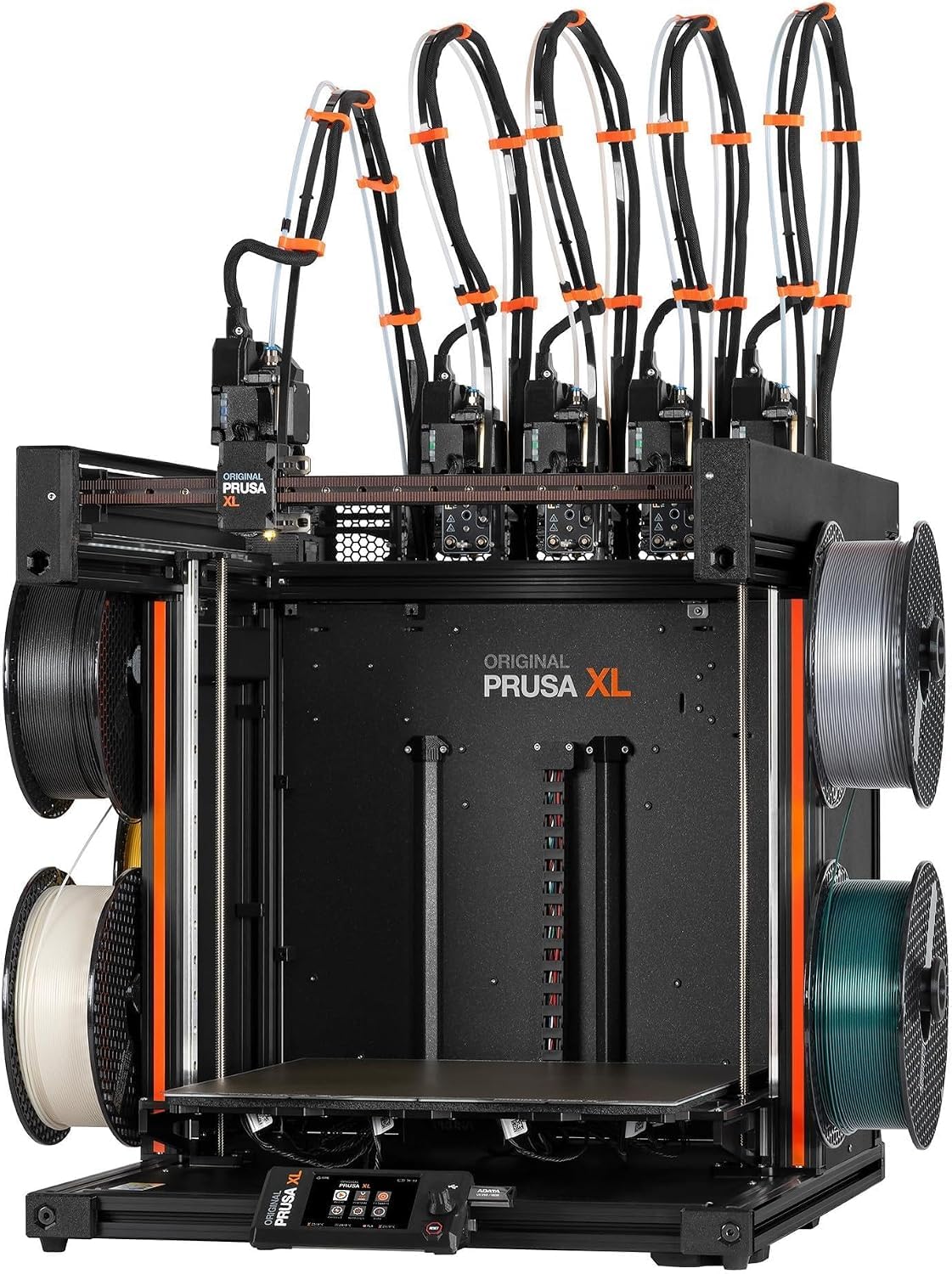
Five separate toolheads that swap mid-print, so one job carries five materials without purging a nozzle.
For full-color models or advanced functional prototypes in one print, the XL carries five separate toolheads and swaps them as the job runs — no reloading, no purging a single nozzle to change color. Build volume reaches 14.17 × 14.17 × 14.17 inches, and the segmented heated bed system heats only the zone your print actually occupies, which improves energy efficiency and reduces warping across a wide first layer. Smart tool management trims waste during frequent tool changes. CoreXY construction keeps speed and precision stable on complex geometries.
The printer ships as a ready-to-print package with one Satin print sheet and a 1kg spool of Prusament PLA, plus lifetime technical assistance and 24-hour service from Prusa Research. It integrates with the broader Prusa software stack and the Printables.com model ecosystem. Real-world note: several fragile parts (LCD, extruder assembly, Wi-Fi antenna, spool holder) ship separately for safe transport and need quick installation on arrival.
Know what you are buying: shoppers say solid multi-material performance and open, unrestricted printing — the XL refuses forced logins and cloud locks. The toolchanger is not a first-printer experience; the base unit ships partially packed and expects an advanced hobbyist or lab operator comfortable with calibration, disassembly, and troubleshooting. For the user who wants five materials in one go and full control, this is the machine that delivers.
multi-toolhead: Five toolheads make full-color and multi-material work possible without purging a single nozzle between colors.
complex setup: Setup is not plug-and-play — some parts ship separately and assembly is quick but hands-on.
multi-material: Advanced makers and labs who need five-material prints and open, unrestricted control.
single extruder: You want a first printer out of a single box — the project is half the value here.
11. Raise3D E2 Desktop 3D Printer

Independent dual extruders that run Duplication Mode for identical parts or Mirror Mode for a model and its inverse.
The E2 is the true independent dual-extruder machine on this list. Run Duplication Mode to sync both extruders on identical parts, or Mirror Mode to print a model and its inverse at the same time. The 7-inch touchscreen with on-screen assistance makes the workflow accessible, and video-assisted offset calibration walks you through geometric alignment instead of expecting you to guess at it. Filament run-out sensors pause the print when material runs dry, and power loss recovery saves progress so a mid-job outage does not throw the part away.
Material coverage is wide: 1.75mm filament in PLA, ABS, HIPS, PC, TPU, TPE, Nylon, PETG, ASA, PP, PVA, glass-fiber, carbon-fiber, metal fill, and wood fill — anything within its 300℃ temperature ceiling. Build volume reaches 13 × 9.4 × 9.4 inches, and the heated bed goes to 110℃ with a flexible build plate for easy release, plus Wi-Fi/ethernet, a live camera for remote monitoring, and HEPA air filtration.
Honest read: the E2 earned a loyal working-shop following, and one owner reported a full two-color test cube after a quick one-hour calibration and praised the polished feel. But its price-to-capability ratio pits it against cheaper Creality, Bambu, and Prusa competitors — the case for the E2 is functional dual-nozzle work and repairable industrial design, not raw speed or a big build plate.
dual printing: You need real IDEX duplication, mirroring, or a wide engineering-filament menu inside a compact footprint.
modern features: Speed and a tall build volume matter more than dual-nozzle versatility — modern CoreXY machines lead there.
Know the Specs
Speed and acceleration
Speed tells you how fast the toolhead travels; acceleration tells you how quickly it gets there. Real-world output depends on both, so a machine with 30,000 mm/s² acceleration can feel faster on detailed parts than one with higher top-end speed but weaker accel. CoreXY designs and step-servo motors are the usual combination for hitting high numbers without losing detail.
Heated chamber and nozzle temperature
The nozzle temperature sets which filament will flow, while the chamber temperature sets whether a tall print will stay flat. A 370°C hotend opens up PPS-CF and PPA-CF; a 65℃ active chamber is needed to hold ABS, PC, and carbon-fiber nylon without warping. If your print library lives in PLA and PETG, an open frame is fine and cheaper to run.
Multi-color tooling and filament management
Multi-color comes in several flavors: AMS-style spool switchers, CFS-style modules, fifth-tool toolchangers, and IDEX dual extruders. The number of colors on one job is a function of how many filament paths are loaded — four spools for most AMS units, up to sixteen when you chain extra modules. Moisture-proof storage and run-out sensors keep those paths reliable.
Leveling, adhesion, and monitoring
Auto leveling, flow calibration, and AI camera monitoring all target the same goal: a reliable first layer and a print that finishes without babysitting. Look for probing that uses only the area you will print on, real-time pressure or flow feedback, and a camera that pauses the print on failure detection. Filament run-out and power-loss recovery are the two features that quietly save the most material.
Common Questions
What actually counts as a “4 head” or multi-head 3D printer?
Do I need a heated chamber to print engineering filaments?
How many colors can these printers print in one job?
Will an IDEX printer print two copies of the same modelat once?
Is a resin printer a better fit than an FDM printer for small detailed parts?
How important is auto leveling on a large multi-head printer?
Can I run these printers without an internet connection?
Will the Bambu Lab A1 Combo work with my existing Wi-Fi router?
How big a print can I make on the QIDI Max4 Combo compared to the Bambu Lab A1 Combo?
Do DTF transfer printers print 3D parts?
How much maintenance does a heated-chamber printer need?
The Bottom Line
For most people shopping the best 4 head 3d printer category, start with the Bambu Lab A1 Combo — it pairs four-color AMS lite printing with automatic calibration and a quick-swap nozzle, all on a machine that works without a modification list. If your work needs large parts in high-temperature plastics, the QIDI Max4 Combo and its 390 × 390 × 340 mm build volume plus 65℃ heated chamber are the picks that will not ask you to split a part in half. And for real independent dual-extruder work, the Raise3D E2 with its Duplication and Mirror modes delivers functionality none of the single-nozzle cloud printers can match. Buy based on the material and size of the parts you actually print, and any of these will earn its bench space.
How we choose
We do not accept paid placement. Every pick is matched to a real buyer and a real use-case; we do not hands-on test units.
Sources
Specifications: manufacturer listings and product documentation. Review insights: verified customer reviews, as of October 2026. Pricing: not shown on this page (it changes often); check the current price via the retailer link.
As an Amazon Associate, Aappliancez earns from qualifying purchases. This does not affect which products we feature.