Disclosure: Some links in this post are affiliate links. As an Amazon Associate I earn from qualifying purchases, at no extra cost to you. Learn more
Specs are compiled from manufacturer listings and verified buyer reviews and can change over time — please confirm the key details on the product page before buying.
If you want to watch a Roku, Fire Stick, game console, or security camera on an older coax TV in another room, an HDMI modulator is the box that makes it happen. It takes a digital HDMI signal and turns it into a TV channel your existing coax wiring can carry. The tricky part is that two very different jobs get lumped under the same name: cheap analog modulators that feed a tube TV, and network encoders that stream HDMI onto your home network. Pick the wrong one and it simply will not do what you pictured.
This guide is built by comparing the manufacturers’ published specifications and the patterns across verified customer reviews, so you get each pick’s real strengths and trade-offs instead of marketing spin.
Some units here push video to a single old TV on channel 3, while others broadcast a full high-definition channel to every screen in the house. A few are network encoders that put your HDMI source on an IP network instead of coax, which matters a lot once you see how each one actually connects. The seven picks below cover that full spread, so you can match the box to your own wiring rather than the other way around with the best Digital HDMI Modulator.
Top Picks

How To Choose The Best Digital HDMI Modulator
The single decision that filters this whole category is what your TV can actually receive. A coax cable carries a signal, but the box on the other end has to understand the format coming down that cable. Get that one match wrong and the picture stays black no matter how many settings you cycle through.
Match the modulator to your TV’s tuner, not the other way around
An analog modulator pushes a standard-definition channel your TV tunes the old way, the same way a VCR did. A digital ATSC or QAM modulator instead broadcasts a real high-definition channel that a modern TV’s built-in tuner scans and locks onto like any broadcast station. If your TV only has coax and no HDMI, check whether it has a digital tuner or an analog one before you order, because a digital box feeding an analog-only tuner will show nothing.
Decide if you need one TV or the whole house
A single-output modulator handles one screen fine. Distributing to several TVs over existing coax is where signal strength starts to matter, and a weak output often needs a distribution amplifier to hold a clean picture across every split. If you want every room fed from one HDMI source, plan for that amplifier from the start rather than discovering the drop-off after install.
Know when an encoder beats a modulator
If your real goal is getting a camera or stream onto phones, computers, or an IPTV system, an HDMI-to-IP encoder is the right tool — it sends the video across your network rather than down a coax line. These units push multiple simultaneous streams and speak streaming protocols, which a coax modulator simply does not do. Choose based on where the video needs to land, not on the label on the box.
Side-by-Side Comparison
| Model | Best For | Output Type | Max Resolution | Inputs | Amazon |
|---|---|---|---|---|---|
| URayCoder HEVC HDMI to IP Encoder★ Best Overall | Streaming HDMI over your network | IP stream (RTSP/RTMP/SRT/HLS) | 1920×1080 at 60fps | HDMI, line-in audio | Amazon |
| AoeSpy HDMI RF Modulator Coax ConverterBudget Champion | Feeding a tube TV on channel 3 | Analog NTSC/PAL RF | Analog (reports note roughly 480p) | HDMI | Amazon |
| AoeSpy HDMI RF Modulator VHF UHF AV Converter | Old TVs with coax but no AV jacks | Analog NTSC/PAL RF | Analog (composite-level) | HDMI, RCA | Amazon |
| URayCoder 4K HEVC HDMI to IP Encoder | 4K streaming and multi-platform push | IP stream (RTSP/RTMP/SRT/HLS) | 4K UHD 3840×2160 at 30fps | HDMI, line-in audio | Amazon |
| SatLink ST-7000 | HD channel over your existing coax | Digital ATSC / QAM (J.83B) | 1080p | HDMI, RCA | Amazon |
| Thor Broadcast HDMI to Coax Modulator | Broadcasting a channel to many TVs | DVB-C/T/ATSC/ISDB-T RF | 720p, 1080i, 1080p | HDMI | Amazon |
| MINIMOD 2 Vecoax | Injecting a channel into home coax | Full HD ATSC/Dolby channel | 1080p | HDMI | Amazon |
Detailed Reviews
1. URayCoder HEVC HDMI to IP Network Video Encoder
Our pick — 4.5+★ from 150+ verified ratings; the strongest balance of quality and price.
The encoder that keeps a clean 1080p stream running around the clock without a restart.
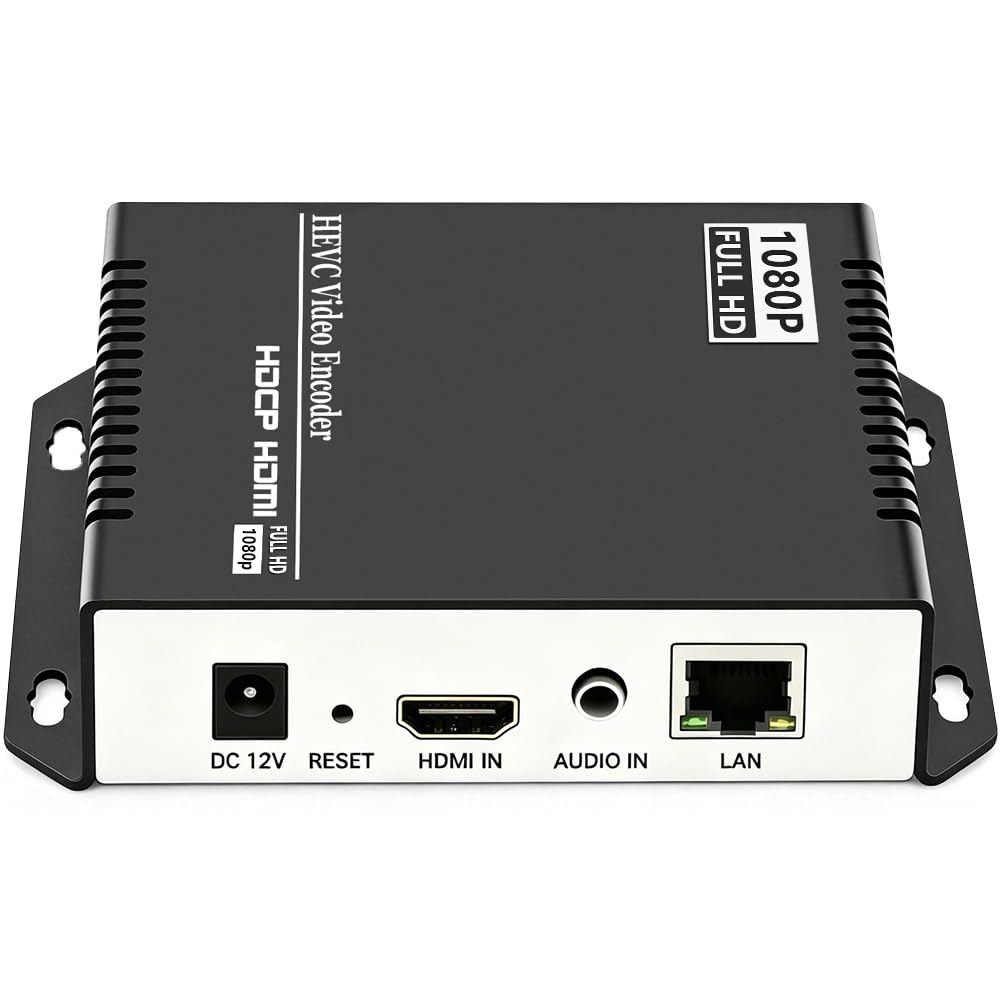
If the thing you actually want is to get a camera, DVR, or game feed onto screens and computers all over your house, this is the pick. It takes one HDMI source in and turns it into a video stream that travels over your network instead of down a coax cable. The crowd favorite in this whole lineup — 4.5+ stars across 150+ owners — and the reputation is built on one thing: it just stays running.
The core spec here is the H.265/H.264 dual encoding chip (two video-compression formats, so older players and newer ones can both understand the stream) that feeds a 1920×1080 picture at up to 60fps. That 60fps matters because fast motion like a live basketball game or a game console stays smooth rather than smearing. It can push four separate streams at once in different protocols (the languages streaming apps speak), so you can run a YouTube broadcast and a private feed to your recorder at the same time without a second box.
You get reliability that runs nonstop. Owners say these units “never have to be restarted or anything, they just keep working.” That means you can set it up in a closet and forget it exists. Setup is easier than most modulators, and the software lets you tune a lot: crop and rotate the picture, add on-screen captions and timestamps.
The catch is networking. from the start it ships on a fixed address, which can confuse people who have never touched a router setting, and pure audio like a Dolby 5.1 signal needs downmixing because the unit handles stereo. A couple of owners also found it can lose its connection to a streaming service after a long bandwidth drop and need a refresh. Neither is unusual for this class of gear, but it is worth knowing before you commit.
What earns its keep
- 1080p at up to 60fps with H.265/H.264 encoding for smooth motion
- Runs four protocol streams at once to multiple platforms
- Built for round-the-clock use without babysitting
- Deep customization: cropping, rotation, captions, timestamps, bitrate
Where it asks a little patience
- Factory default network address can trip up non-technical setups
- Stereo only — Dolby 5.1 needs downmixing
- Can need a manual refresh after a long network dropout
Reach for this if: you want to broadcast one HDMI source across your network and forget about it.
Look elsewhere if: your plan runs through coax cabling rather than Wi-Fi or Ethernet, since this one talks to your network, not your antenna line.
2. HDMI RF Modulator Coax Converter VHF Adapter
The cheapest way to put a Switch, Fire Stick, or DVD player on a basement tube TV’s channel 3.
This is the cheap-and-cheerful route: it takes any HDMI gadget you own and squeezes it into an analog channel your old CRT can tune. Plug a Fire Stick, PS4, or DVD player into one end, run coax to the TV, and it shows up on channel 3. For the money, it is the fastest way to resurrect a set that otherwise has no HDMI port at all.
Be honest about the picture: analog output is well below high definition. Expect around 480p (standard definition), not the crisp image your source puts out. The remote gives you real control: adjust zoom, brightness, contrast, and chroma (color intensity) to fight the softness. One owner ran a Nintendo classic through it and used the menu button to zoom exactly to 4:3 on a tube TV. At that point, the old screen limits the picture, not the box.
Two practical rules come up again and again. First, set the format to NTSC-M (the North American TV standard) or the picture flickers and drops color. Second, power the modulator before plugging in the HDMI source, and be patient with it. This unit only works in the HDMI-to-RF direction, so it cannot take a coax signal and turn it back into HDMI.
The recurring gripe is the remote. It carries all the controls, so if it fails you lose the ability to adjust anything — a fuzzier picture you cannot tune. Remote failure is not the norm, but it is the failure that does show up in the reviews, so treat the remote kindly and keep the box somewhere you can reach by hand as backup.
The value read: for a single retro TV, this delivers the channel-3 experience at an entry-level cost with a control set that punches above it.
The fine print: analog output, NTSC/PAL formats only, and no reverse conversion — check your TV supports NTSC-M, PAL-BG, PAL-I, or PAL-DK before ordering.
Best for: anyone with one old coax TV and a modern HDMI device to feed it.
Think twice if: you want a sharp high-definition picture or the ability to feed several rooms from one box.
3. HDMI RF Modulator VHF UHF AV to Coaxial Converter

One of the few old-TV adapters that takes both an HDMI feed and RCA composite plugs.
What separates this one from the budget pick above is its dual input. HDMI is there for your streaming stick or console, but it also takes RCA composite video and analog stereo audio — the red-white-yellow plugs. That makes it the pick for a closet full of mismatched sources feeding TVs that have coax but no AV jacks at all. It supports NTSC and PAL formats with VHF and UHF coverage up to 136 channels, plus a channel display so you can see what you have selected.
One thing this unit does that few in this class bother with: a separate coax input for a cable box, satellite receiver, or HD tuner, plus a dedicated coax output for your TVs or a splitter. So it can sit alongside your existing TV feed rather than replacing it. A single modulator output can also reach multiple TVs if you split the coax, though headroom runs thin — one long-term owner found it needed a distribution amplifier to drive more than one set cleanly.
The trade-offs here are the ones that keep its rating in the mid-range rather than at the top. Instructions are thin, so setup can mean guessing which button does what, and getting the output matched to your TV’s channel takes some fiddling before it locks in. Audio can also carry static on certain channels that clears once you switch channels. These are setup quirks rather than dealbreakers, but they reward a patient buyer.
Why it stands out: the HDMI-plus-RCA input set is the whole reason to choose this over its simpler sibling, and the extra coax input lets it coexist with your existing feed.
Plan for this: thin documentation and a bit of button-tinkering to match the channel, plus an amplifier if you want more than one TV off the output.
Best for: tinkerers with a mix of HDMI and RCA sources and no AV jacks on the old TV.
Skip if: you want a pure plug-and-play experience with no setup fiddling.
4. HD HEVC 4K HDMI to Video Streaming IPTV Encoder

The same encoder family as the top pick, but built to accept a 4K UHD source instead of stopping at 1080p.
This is the step up from the top pick for anyone whose source runs in 4K. It accepts 4K UHD (3840×2160) input and output, holds 30fps at full 4K, and climbs to 120fps at 2K and lower resolutions. That high frame rate at reduced resolution is why operators reach for it — fast action stays fluid when you dial the resolution down rather than up. It also stacks a longer protocol list, adding WebRTC and TRTC to the RTSP, RTMP, SRT, HLS, and MP4 set the 1080p model already carries.
Two things this shares with the 1080p version: it accepts HDMI embedded audio or line-in through a 3.5mm jack, and it supports secondary development for custom builds. It runs on a standard North American two-pin power plug and comes in an aluminum shell with a matte finish. The guts are the same trusted architecture — one owner has run this family for years and found the video quality excellent even after a firmware patch fixed an early output issue.
The honest limit is that some sources simply do not want to talk to it. Compatibility experiences are mixed in the reviews, so an unusual HDMI device may need a handshake tweak. There is also no dedicated on/off switch — the recommendation to let the internal circuit cool is not there, so it runs whenever powered. That is a minor inconvenience rather than a performance problem unless you want to power-cycle on a schedule.
The draw
- 4K UHD in and out, with 120fps at lower resolutions
- Broadest protocol list of the encoders here, including WebRTC
- Aluminum shell, secondary-development friendly
Keep in mind
- Some HDMI sources cannot negotiate a connection
- No dedicated power switch
- Premium price for a device many people run at 1080p anyway
Choose this if: your source is genuinely 4K and you want room to push multiple formats from one encoder.
Stick with the standard model if: your content lives at 1080p — it costs less and handles that job perfectly.
5. SatLink ST-7000 HDMI to RF Digital Modulator/Encoder

Broadcasts your HDMI source as a true 1080p ATSC or QAM channel over your existing coax.
Analog boxes force you down to a fuzzy channel 3. This unit broadcasts true 1080p as an HD ATSC or QAM (J.83B) channel — the same digital format a modern TV scans for in a normal channel search. That is the key difference: instead of tuning to channel 3 and living with softness, your 4K-capable TV picks it up as a crisp HD channel using the tuner it already has. It takes either HDMI or RCA in and outputs to coax.
You can adjust the output across a wide range, which helps with long coax runs. One homeowner distributing security-camera video saw a grainy picture at first; a signal amplifier and a bump in output level cleared it right up. People who run whole-house camera feeds rate it as one of the better choices in its class. It holds full 1080p output, and one long-time owner has run it for years as a solid, reliable part of a home setup.
Here is the caveat to weigh before you buy: this is a 1080p device, so a 4K source gets delivered at 1080p — which is fine for most TVs but a limit if you need a 4K channel. There is also no overscan handling, so it can trim the extreme edges of the image. And a handful of screens simply do not get along with it, showing periodic audio dropouts that vanish on other displays in the same house. Test it on your main TV first.
The verdict: the balance between budget analog adapters and pro broadcast gear, delivering a genuine HD channel over coax that your TV’s own tuner finds.
Watch for: no overscan handling, a couple of displays that report audio quirks, and the ceiling of 1080p output.
Pick this if: you want real HD across your coax network using the TV tuner you already own.
Not for you if: you need 4K output or a screen that reports pickup problems — test on your primary TV before settling in.
6. Thor Broadcast HDMI to Coax Modulator
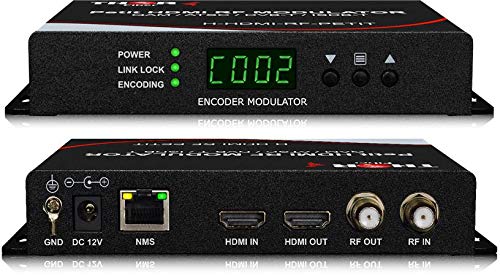
Broadcast-grade gear that puts one HDMI source on every TV as a DVB, ATSC, or ISDB-T digital channel.
This is for someone who needs a dedicated channel without consumer-grade hand-holding. It takes any HDMI source — a set-top box, satellite receiver, camera, DVD player, or computer — and puts it out as a digital RF channel on DVB-C, DVB-T, ATSC, or ISDB-T (regional digital TV standards), so it works across different regions. Inside, it combines MPEG2 encoding (video compression) with AC3 Dolby Audio (surround sound) in one compact box. It handles 720p, 1080i, and 1080p sources and runs from a PC through Thor’s own control software.
For a device that lives in a wiring closet, the build matters as much as the features. This one is a compact, rugged box built for installs that are not fiddled with after setup. You set the channel and parameters, then leave it. The trade-off is upfront effort: setup runs through web-based software, so you may need to adjust your computer’s network settings to reach it. The front panel gives you direct parameter control if you would rather skip the computer, but regular control through a PC is still the primary path.
On picture, the results hold up — this is genuine digital ATSC and QAM output, not a stepped-down analog channel, so the clarity is in a different league from the budget boxes. Value is where opinions split. It costs a real premium, which some owners feel is justified by the build and reliability, and others consider steep for the feature set. That is the honest split: you pay for the control and the industrial design.
Where it earns its price
- Works across DVB-C/T, ATSC, and ISDB-T standards
- Compact, rugged build for permanent installs
- Dolby AC3 audio plus MPEG2 encoding built in
What to expect
- Setup may require adjusting your PC’s network settings
- Costs a premium over consumer modulators
- Control software is PC-first, not a simple plug-and-play
Suits: installers and serious users who want broadcast-grade control and multi-standard output.
Overkill if: you just need one old TV fed on channel 3 — the budget analog boxes handle that for far less.
7. MINIMOD 2 Vecoax HDMI to Coax Modulator

Injects your HDMI source into the coax wiring your home TVs already share, as a named 1080p channel.
The idea here is simple and powerful: plug your HDMI source into the Minimod, inject its coax output into your existing TV distribution cabling, and every TV on that line can find your new channel. It comes up as a full 1080p & Dolby channel with a name you choose, not a bare channel number, which makes it feel like a real broadcast station rather than a workaround. It can also sit alongside your antenna or cable signals, so you keep your normal channels and gain yours.
Getting the most out of it means understanding your coax. In one careful owner’s multi-TV RV setup, the modulator had to be placed right at the coax injection point, and balancing it against over-the-air channels took adjusting gain and slope. That is not a flaw — it is how any channel injection works when it has to share a cable with broadcast signals. Once set, it behaves like plug-and-play, and the mixer of streaming, disc, and live sources all lock in cleanly.
Where this unit stands apart is the picture. Multiple owners who swapped out older modulators describe the improvement as dramatic, with the built-in test video rendering perfectly on first setup. The main caution: like any coax path, quality depends on your wiring. For a couple of owners, the final image looked slightly softer than running HDMI direct, with what they described as light shadows and a slightly unfocused look. That is the honest trade-off of pushing video over older coax rather than a fresh cable.
The story it tells: take one HDMI source, name your channel, and every TV on your existing coax sees it — no new cabling, no extra receivers.
The fine print: sharing the line with OTA or cable signals needs gain and slope tuning, and coax can never quite match a direct HDMI connection for sharpness.
Go here if: you already have home coax wiring and want every TV on it to pick up an HDMI source as a named HD channel.
Consider an upgrade path if: your coax is old and you want the absolutely crispest result possible — direct HDMI or HDMI over category cabling will beat it for sharpness.
Know the Specs
Output standard: NTSC, PAL, ATSC, QAM, or IP
This is the single spec that decides whether a box works with your TV. Analog output feeds an old set the way a VCR did, so it lands on a low channel and looks soft. A digital ATSC or QAM modulator messages a high-definition channel your modern TV tuner scans like a normal broadcast station. An IP encoder skips coax entirely and puts the video on your network so phones and computers can watch it. Match the output to the way your screens already receive signals, because no setting can bridge a mismatch here.
Resolution and frame rate
Resolution sets how sharp the picture gets — 1080p is full high definition, and 4K UHD pushes past it. Frame rate, measured in frames per second (fps, how many still images the box draws each second), decides how smooth fast motion looks. A box that holds 60fps at 1080p keeps live action fluid, while some units trade frame rate for resolution — for example, holding a top resolution at a lower fps but climbing higher at lower resolutions. If you stream fast-moving content, frame rate matters as much as resolution.
Inputs and audio
Most HDMI sources feed straight in, but some modulators also accept RCA composite video and stereo audio, which is the ticket for an older source that has no HDMI out. Audio handling varies too: many encoders take either HDMI embedded audio or line-in, and some deliver Dolby, while others only carry stereo. Know your source’s audio format before you buy, because a surround signal on a stereo-only box will need downmixing.
Power and signal reach
Coax runs get long, and the output level of a modulator has to stay strong across every split. When the picture arrives grainy or a TV cannot tune the channel, the fix is usually more output level or a distribution amplifier rather than a new box. Encoders sidestep this entirely by running over your network, where reach depends on your router and cabling instead of signal strength down a coax line.
Common Questions
Will an HDMI modulator work on a TV that only has a coax input and no HDMI port?
What is the difference between an HDMI coax modulator and an HDMI to IP encoder?
Why does my modulator need a distribution amplifier for multiple TVs?
Can I run a Roku or Fire Stick through a modulator to an old TV?
Is a digital ATSC modulator better than an analog one?
Will a modulator carry audio as well as video?
How many TVs can one modulator feed?
What does the output level on a modulator control?
Will an HDMI modulator reduce my 4K source to 1080p?
Do I need to change my TV settings after connecting a modulator?
The Bottom Line
For most people chasing the digital hdmi modulator label, the call depends on where the video has to land. If it needs to reach screens on your network, the URayCoder 1080p encoder is the pick that delivers four protocol streams at once and simply does not quit — that reputation for round-the-clock reliability is why it holds the top spot.
If instead your TVs are fed by coax and you want a real high-definition channel your tuner finds on its own, grab the SatLink ST-7000 for a crisp 1080p broadcast, or the MINIMOD 2 Vecoax if you want to inject that channel into a whole-home coax network and keep your existing stations. And if you just want to rescue one old tube TV on a tight budget, the budget AoeSpy modulator does the channel-3 job for the least money.
Whichever you choose, buy for the connection your screens actually use, and you will not be troubleshooting a black picture after the box arrives.
How we choose
We do not accept paid placement. Every pick is matched to a real buyer and a real use-case; we do not hands-on test units.
Sources
Specifications: manufacturer listings and product documentation. Review insights: verified customer reviews, as of October 2026. Pricing: not shown on this page (it changes often); check the current price via the retailer link.
As an Amazon Associate, Aappliancez earns from qualifying purchases. This does not affect which products we feature.